ABS CADILLAC DTS 2011 1.G Owners Manual
[x] Cancel search | Manufacturer: CADILLAC, Model Year: 2011, Model line: DTS, Model: CADILLAC DTS 2011 1.GPages: 470, PDF Size: 4.72 MB
Page 5 of 470
Black plate (5,1)Cadillac DTS Owner Manual - 2011
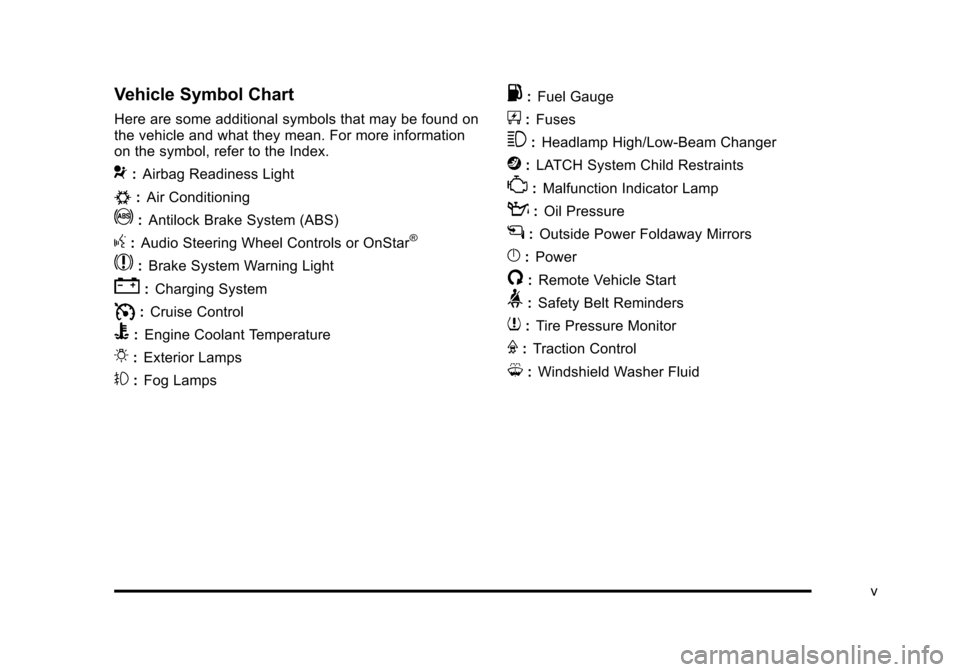
Vehicle Symbol Chart
Here are some additional symbols that may be found on
the vehicle and what they mean. For more information
on the symbol, refer to the Index.
9:Airbag Readiness Light
#:Air Conditioning
!:Antilock Brake System (ABS)
g:Audio Steering Wheel Controls or OnStar®
$: Brake System Warning Light
":Charging System
I:Cruise Control
B: Engine Coolant Temperature
O:Exterior Lamps
#:Fog Lamps
.: Fuel Gauge
+:Fuses
3: Headlamp High/Low-Beam Changer
j:LATCH System Child Restraints
*: Malfunction Indicator Lamp
::Oil Pressure
g:Outside Power Foldaway Mirrors
}:Power
/:Remote Vehicle Start
>:Safety Belt Reminders
7:Tire Pressure Monitor
F:Traction Control
M:Windshield Washer Fluid
v
Page 22 of 470
Black plate (16,1)Cadillac DTS Owner Manual - 2011
4(XM™Satellite Radio Service, MP3/WMA, and RDS
Features): Press this button to display additional text
information related to the current FM-RDS or XM
station, or MP3/WMA song. When information is not
available, No Info displays.
For more information about these and other radio
features, see Audio System(s) on page 4‑86.
Storing a Favorite Station
For vehicles with an XM radio, a maximum of
36 stations can be stored as favorites using the
six softkeys located below the radio station frequency
tabs and by using the radio FAV button. Press FAV to
go through up to six pages of favorites, each having
six favorite stations available per page. Each page
of favorites can contain any combination of AM, FM,
or XM stations.
SeeRadio(s) on page 4‑90.
Setting the Clock
The vehicle has an analog clock as well as the digital
radio clock. At the time of new vehicle delivery, the
digital radio clock display should be disabled. To use
the digital radio clock and the analog clock, see detailed
instructions in Setting the Clock
on page 4‑87for your
specific audio system. The radio clock and analog clock are not synchronized.
Occasionally you might need to set the digital radio
clock using the procedure below to synchronize both
clocks.
Enabling/Disabling the Digital Radio Clock
(Single CD Player)
1. Turn the radio on.
2. Press the
Hbutton until the clock and date setting
menus appear.
3. Press the pushbutton located under the forward arrow tab until the menu for default clock and date
settings appear.
4. Press the pushbutton located under the currently displayed status of either ON or OFF. The ON
display indicates the radio clock display is disabled
and the OFF display indicates the radio clock
display is enabled. Press this pushbutton to toggle
the radio clock display on or off.
1-16
Page 23 of 470
Black plate (17,1)Cadillac DTS Owner Manual - 2011
Setting the Time and Date
(Single CD Player)
1. Turn the radio on.
2. Press
Hand HR, MIN, MM, DD, YYYY (hour,
minute, month, day, and year) displays.
3. Press the pushbutton located below any one of the tabs that you want to change.
4. Increase or decrease the time or date by turning
aclockwise or counterclockwise.
Satellite Radio
XM is a satellite radio service that is based in the
48 contiguous United States and 10 Canadian
provinces. XM satellite radio has a wide variety
of programming and commercial-free music,
coast-to-coast, and in digital-quality sound. A fee is required to receive the XM service.
For more information, refer to:
.www.xmradio.com or call 1-800-929-2100 (U.S.)
.www.xmradio.ca or call 1-877-438-9677 (Canada)
See “XM Satellite Radio Service” underRadio(s)
on
page 4‑90.
Portable Audio Devices
This vehicle may have an auxiliary input, located on the
audio faceplate. External devices such as iPod®, laptop
computers, MP3 players, CD changers, etc. can be
connected to the auxiliary port using a 3.5 mm (1/8 in)
input jack.
See “Using the Auxiliary Input Jack” underRadio(s)
on
page 4‑90.
1-17
Page 164 of 470
Black plate (2,1)Cadillac DTS Owner Manual - 2011
Section 4 Instrument Panel
Antilock Brake System (ABS) Warning Light . . . 4-51
Traction Control System (TCS) WarningLight . . . . . . . . . . . . . . . . . . . . . . . . . . . . . . . . . . . . . . . . . 4-51
StabiliTrak
®Indicator Light . . . . . . . . . . . . . . . . . . . . . 4-52
Lane Departure Warning (LDW) Light . . . . . . . . . . 4-52
Engine Coolant Temperature Warning Light . . . . 4-53
Engine Coolant Temperature Gauge . . . . . . . . . . . 4-53
Tire Pressure Light . . . . . . . . . . . . . . . . . . . . . . . . . . . . 4-54
Malfunction Indicator Lamp . . . . . . . . . . . . . . . . . . . . 4-54
Oil Pressure Light . . . . . . . . . . . . . . . . . . . . . . . . . . . . . 4-57
Security Light . . . . . . . . . . . . . . . . . . . . . . . . . . . . . . . . . . 4-57
Front Fog Lamp Light . . . . . . . . . . . . . . . . . . . . . . . . . . 4-58
Lights On Reminder . . . . . . . . . . . . . . . . . . . . . . . . . . . 4-58
Cruise Control Light . . . . . . . . . . . . . . . . . . . . . . . . . . . 4-58
Highbeam On Light . . . . . . . . . . . . . . . . . . . . . . . . . . . . 4-58
Fuel Gauge . . . . . . . . . . . . . . . . . . . . . . . . . . . . . . . . . . . . 4-59 Driver Information Center (DIC)
. . . . . . . . . . . . . . . . . .4-59
DIC Operation and Displays . . . . . . . . . . . . . . . . . . . 4-60
DIC Warnings and Messages . . . . . . . . . . . . . . . . . . 4-65
DIC Vehicle Customization . . . . . . . . . . . . . . . . . . . . 4-77
Audio System(s) . . . . . . . . . . . . . . . . . . . . . . . . . . . . . . . . . . 4-86
Setting the Clock . . . . . . . . . . . . . . . . . . . . . . . . . . . . . . 4-87
Radio(s) . . . . . . . . . . . . . . . . . . . . . . . . . . . . . . . . . . . . . . . 4-90
Using an MP3 . . . . . . . . . . . . . . . . . . . . . . . . . . . . . . . . 4-100
XM Radio Messages . . . . . . . . . . . . . . . . . . . . . . . . . 4-105
Navigation/Radio System . . . . . . . . . . . . . . . . . . . . . 4-106
Bluetooth
®. . . . . . . . . . . . . . . . . . . . . . . . . . . . . . . . . . . . 4-107
Theft-Deterrent Feature . . . . . . . . . . . . . . . . . . . . . . . 4-114
Audio Steering Wheel Controls . . . . . . . . . . . . . . . 4-114
Radio Reception . . . . . . . . . . . . . . . . . . . . . . . . . . . . . . 4-115
Backglass Antenna . . . . . . . . . . . . . . . . . . . . . . . . . . . 4-116
XM™ Satellite Radio Antenna System . . . . . . . . 4-116
4-2
Page 205 of 470
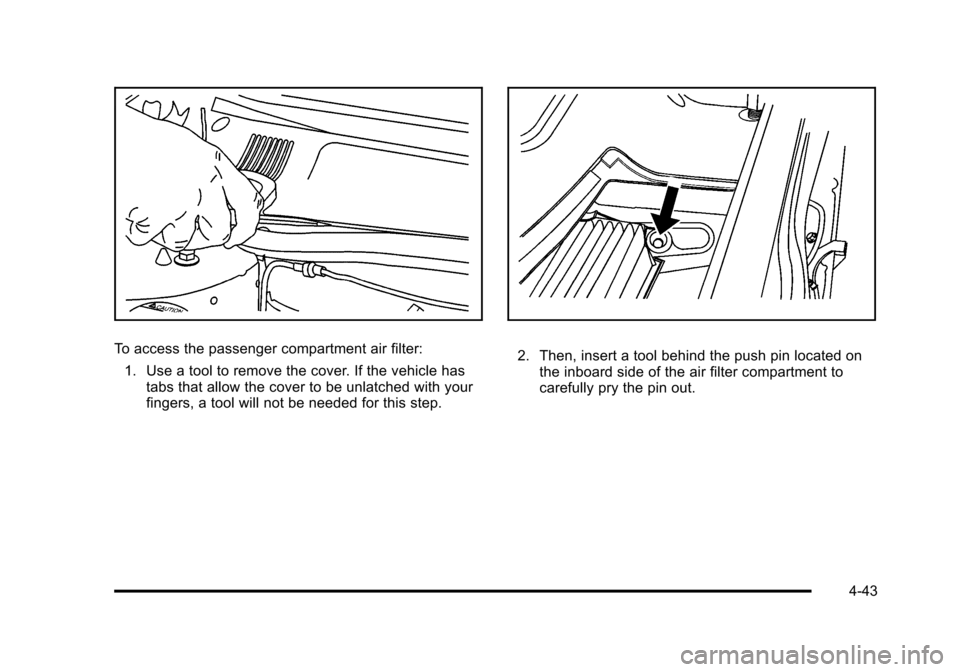
Black plate (43,1)Cadillac DTS Owner Manual - 2011
To access the passenger compartment air filter:1. Use a tool to remove the cover. If the vehicle has tabs that allow the cover to be unlatched with your
fingers, a tool will not be needed for this step.2. Then, insert a tool behind the push pin located onthe inboard side of the air filter compartment to
carefully pry the pin out.
4-43
Page 213 of 470

Black plate (51,1)Cadillac DTS Owner Manual - 2011
Antilock Brake System (ABS)
Warning Light
For vehicles with the
Antilock Brake System
(ABS), this light comes on
briefly when the engine is
started.
If it does not, have the vehicle serviced by your dealer.
If the system is working normally the indicator light then
goes off.
If the ABS light stays on, turn the ignition off. If the light
comes on while driving, stop as soon as it is safely
possible and turn the ignition off. Then start the engine
again to reset the system. If the ABS light stays on,
or comes on again while driving, the vehicle needs
service. If the regular brake system warning light is not
on, the vehicle still has brakes, but not antilock brakes.
If the regular brake system warning light is also on, the
vehicle does not have antilock brakes and there is a
problem with the regular brakes. See Brake System
Warning Light on page 4‑50. For vehicles with a Driver Information Center (DIC), see
DIC Warnings and Messages
on page 4‑65for all
brake related DIC messages.
Traction Control System (TCS)
Warning Light
This warning light comes
on briefly while starting
the engine.
If it does not, have the vehicle serviced by your dealer.
If the system is working normally the indicator light will
then go off.
If it stays on, or comes on while driving, there may be a
problem with the traction control system and the vehicle
needs service. When this warning light is on, the
system will not limit wheel spin.
If the traction control system warning light comes on
and stays on when the system is turned on, the vehicle
needs service. See Traction Control System (TCS)
on
page 5‑6for more information.
4-51
Page 234 of 470

Black plate (72,1)Cadillac DTS Owner Manual - 2011
SERVICE AIR BAG
This message displays when there is a problem with
the airbag system. Have your vehicle serviced by your
dealer immediately. SeeAirbag Readiness Light
on
page 4‑48for more information.
SERVICE A/C SYSTEM
This message displays when the air delivery mode door
or the electronic sensors that control the air conditioning
and heating systems are no longer working. Have the
climate control system serviced by your dealer if you
notice a drop in heating and air conditioning efficiency.
SERVICE BATTERY CHARGING
SYSTEM
This message displays when a problem with the
charging system has been detected. The charging
system light also displays on the instrument panel
cluster. See Charging System Light
on page 4‑49for
more information. Have your vehicle serviced by your
dealer.
SERVICE BRAKE ASSIST
This message displays if there is a problem with the
brake system. The brake system warning light and
the antilock brake system warning light may also be
displayed on the instrument panel cluster. See Brake
System Warning Light
on page 4‑50and Antilock
Brake System (ABS) Warning Lighton page 4‑51for
more information. If this happens, stop as soon as
possible and turn off the vehicle. Restart the vehicle
and check for the message on the DIC display. If the
message is displayed or appears again when you begin
driving, the brake system needs service. See your
dealer as soon as possible. See Brakes
on page 6‑33for more information.
SERVICE BRAKE SYSTEM
This message displays if the ignition is on to inform the
driver that the brake fluid level is low. Have the brake
system serviced by your dealer as soon as possible.
SERVICE LANE DEPARTURE SYSTEM
If your vehicle has the Lane Departure Warning (LDW)
system, this message may display to indicate that the
LDW system is not working properly. If this message
remains on after continued driving, the system needs
service. See your dealer. SeeLane Departure Warning
(LDW)
on page 3‑45for more information.
4-72
Page 250 of 470

Black plate (88,1)Cadillac DTS Owner Manual - 2011
The radio clock and analog clock are not synchronized.
Occasionally you might need to set the digital radio
clock using the procedure below to synchronize both
clocks.
For a Six-Disc CD Player
To turn the radio clock display on or off:1. Turn the radio on.
2. Press the MENU button until
His displayed
3. Press the pushbutton located under
Huntil the
clock and date settings appear.
4. Press the pushbutton located under the forward arrow tab until the menu for default clock and date
settings appear.
5. Press the pushbutton located under the currently displayed status of either ON or OFF. The ON
display indicates the radio clock display is disabled
and the OFF display indicates the radio clock
display is enabled. Press this pushbutton to toggle
the radio clock display on or off.
If the radio clock display is turned on, the screen
displays Radio Clock ON for 10 seconds, then
returns to the original clock display menu. If the radio clock display is turned off, the screen
displays Radio Clock OFF for 10 seconds. The
menus for clock and date settings are removed,
and ON displays as a current status indicating that
the clock display can be turned on, if desired.
Setting the Time and Date
For the Single CD Player
This type of radio has aHbutton for setting the time
and date. To set the time and date:
1. Turn the radio on.
2. Press
Hand HR, MIN, MM, DD, YYYY (hour,
minute, month, day, and year) displays.
3. Press the pushbutton located under any one of the tabs that you want to change. Every time the
pushbutton is pressed again, the time or the date if
selected, increases by one.
.Another way to increase the time or date, is to
press the right SEEK arrow or the
\FWD
button.
.To decrease the time or date, press the left
SEEK arrow or the
sREV button. You can
also turn the
aknob, located on the upper
right side of the radio faceplate, to adjust the
selected setting.
4-88
Page 251 of 470

Black plate (89,1)Cadillac DTS Owner Manual - 2011
For a Six-Disc CD Player
This type of radio has a MENU button for setting the
time and date. To set the time and date:1. Turn the radio on.
2. Press the MENU button until
Hoption is displayed.
3. Press the pushbutton located under
Hand the HR,
MIN, MM, DD, YYYY (hour, minute, month, day,
and year) displays.
4. Press the pushbutton located under any one of the tabs that you want to change. Every time the
pushbutton is pressed again, the time or the date if
selected, increases by one.
.Another way to increase the time or date, is to
press the right SEEK arrow or the
\FWD
button.
.To decrease the time or date, press the left
SEEK arrow or the
sREV button. You can
also turn the
aknob, located on the upper
right side of the radio faceplate, to adjust the
selected setting.
Changing the Time and Date Default
Setting
For the Single CD Player
To change the time and date default setting:
1. Change the time default setting from 12 hour to 24 hour or the date default setting from month/day/
year to day/month/year, by pressing the
Hbutton.
2. Once the clock and date settings display along with the forward arrow tab, press the pushbutton
located under the forward arrow tab until the
time 12H and 24H, and the date MM/DD/YYYY
(month, day, and year) and DD/MM/YYYY (day,
month, and year) displays.
3. Press the pushbutton located under the desired option, then press the
Hbutton again to apply the
selected default, or let the screen time out.
4-89
Page 254 of 470

Black plate (92,1)Cadillac DTS Owner Manual - 2011
Finding a Station
BAND:Press to switch between AM, FM, or XM™. The
selection displays.
a(Tune): Turn to select radio stations.
©SEEK¨:Press the arrows to go to the next or to the
previous station and stay there.
To scan stations, press and hold either arrow for
three seconds until a beep sounds. The radio goes to a
station, plays for a few seconds, then goes to the next
station. Press either arrow again to stop scanning.
The radio only seeks and scans stations with a strong
signal that are in the selected band.
4(Information) (XM™ Satellite Radio Service,
MP3/WMA, and RDS Features): Press this button to
display additional text information related to the current
FM-RDS or XM station, or MP3/WMA song. A choice of
additional information such as: Channel, Song, Artist,
CAT (category) can display. Continue pressing the
information button to highlight the desired label,
or press the pushbutton positioned under any one of
the tabs and the information about that tab displays.
When information is not available, No Info displays.
Storing a Radio Station as a Favorite
Drivers are encouraged to set up their radio station
favorites while the vehicle is in P (Park). Tune to
favorite stations using the presets, favorites button,
and steering wheel controls, if the vehicle has this
feature. See Defensive Driving on page 5‑2.
FAV (Favorites): A maximum of 36 stations can be
programmed as favorites using the six pushbuttons
positioned below the radio station frequency tabs and
by using the radio favorites page button. Press the FAV
button to go through up to six pages of favorites, each
having six favorite stations available per page. Each
page of favorites can contain any combination of AM,
FM, or XM stations. To store a station as a favorite:
1. Tune to the desired radio station.
2. Press the FAV button to display the page where you want the station stored.
3. Press and hold one of the six pushbuttons until a beep sounds. When that pushbutton is pressed
and released, the station that was set, returns.
4. Repeat the steps for each pushbutton radio station you want stored as a favorite.
4-92