change wheel CADILLAC DTS 2011 1.G Owners Manual
[x] Cancel search | Manufacturer: CADILLAC, Model Year: 2011, Model line: DTS, Model: CADILLAC DTS 2011 1.GPages: 470, PDF Size: 4.72 MB
Page 5 of 470
Black plate (5,1)Cadillac DTS Owner Manual - 2011
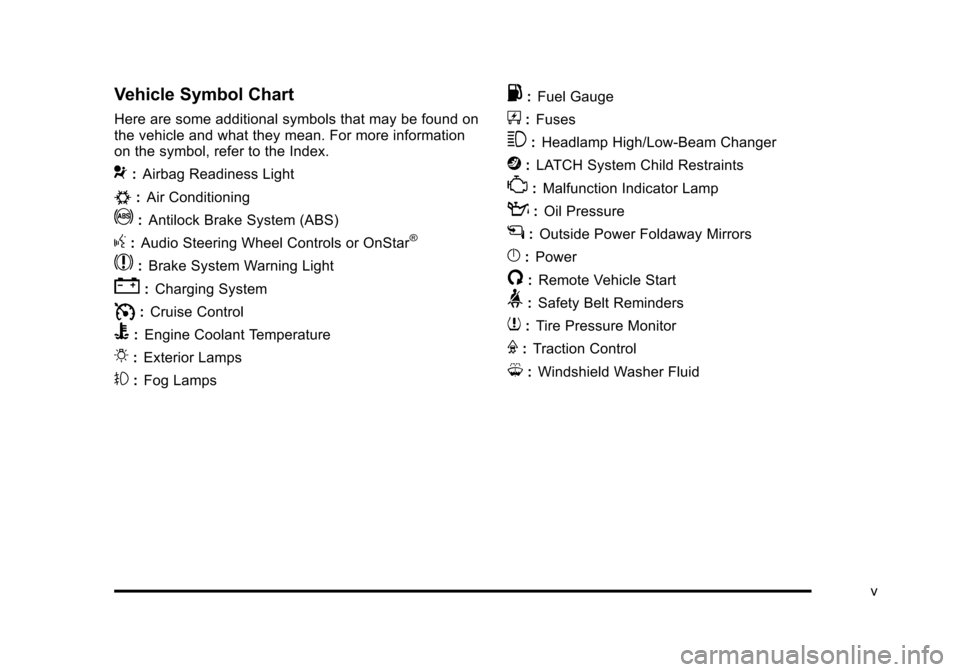
Vehicle Symbol Chart
Here are some additional symbols that may be found on
the vehicle and what they mean. For more information
on the symbol, refer to the Index.
9:Airbag Readiness Light
#:Air Conditioning
!:Antilock Brake System (ABS)
g:Audio Steering Wheel Controls or OnStar®
$: Brake System Warning Light
":Charging System
I:Cruise Control
B: Engine Coolant Temperature
O:Exterior Lamps
#:Fog Lamps
.: Fuel Gauge
+:Fuses
3: Headlamp High/Low-Beam Changer
j:LATCH System Child Restraints
*: Malfunction Indicator Lamp
::Oil Pressure
g:Outside Power Foldaway Mirrors
}:Power
/:Remote Vehicle Start
>:Safety Belt Reminders
7:Tire Pressure Monitor
F:Traction Control
M:Windshield Washer Fluid
v
Page 101 of 470

Black plate (69,1)Cadillac DTS Owner Manual - 2011
Adding Equipment to Your
Airbag-Equipped Vehicle
Q: Is there anything I might add to or change aboutthe vehicle that could keep the airbags from
working properly?
A: Yes. If you add things that change your vehicle's
frame, bumper system, height, front end or side
sheet metal, they may keep the airbag system from
working properly. Changing or moving any parts of
the front seats, safety belts, the airbag sensing and
diagnostic module, steering wheel, instrument panel,
roof-rail airbag modules, ceiling headliner or pillar
garnish trim, overhead console, front sensors, side
impact sensors, or airbag wiring can affect the
operation of the airbag system.
In addition, your vehicle has a passenger sensing
system for the right front passenger's position, which
includes sensors that are part of the passenger's
seat. The passenger sensing system may not
operate properly if the original seat trim is replaced
with non-GM covers, upholstery or trim, or with GM
covers, upholstery or trim designed for a different
vehicle. Any object, such as an aftermarket seat
heater or a comfort enhancing pad or device, installed under or on top of the seat fabric, could
also interfere with the operation of the passenger
sensing system. This could either prevent proper
deployment of the passenger airbag(s) or prevent
the passenger sensing system from properly turning
off the passenger airbag(s). See
Passenger Sensing
System on page 2‑64.
If you have any questions about this, you should
contact Customer Assistance before you modify
your vehicle. The phone numbers and addresses
for Customer Assistance are in Step Two of the
Customer Satisfaction Procedure in this manual.
See Customer Satisfaction Procedure on page 8‑2.
Q: Because I have a disability, I have to get my vehicle modified. How can I find out whether this
will affect my airbag system?
A: If you have questions, call Customer Assistance.
The phone numbers and addresses for Customer
Assistance are in Step Two of the Customer
Satisfaction Procedure in this manual. See
Customer Satisfaction Procedure on page 8‑2.
In addition, your dealer and the service manual have
information about the location of the airbag sensors,
sensing and diagnostic module and airbag wiring.
2-69
Page 163 of 470

Black plate (1,1)Cadillac DTS Owner Manual - 2011
Section 4 Instrument Panel
Instrument Panel Overview. . . . . . . . . . . . . . . . . . . . . . . .4-3
Hazard Warning Flashers . . . . . . . . . . . . . . . . . . . . . . . 4-3
Horn . . . . . . . . . . . . . . . . . . . . . . . . . . . . . . . . . . . . . . . . . . . . 4-3
Tilt Wheel . . . . . . . . . . . . . . . . . . . . . . . . . . . . . . . . . . . . . . . 4-3
Power Tilt Wheel and Telescopic Steering Column . . . . . . . . . . . . . . . . . . . . . . . . . . . . . . . . . . . . . . . 4-4
Heated Steering Wheel . . . . . . . . . . . . . . . . . . . . . . . . . 4-4
Turn Signal/Multifunction Lever . . . . . . . . . . . . . . . . . . 4-5
Turn and Lane-Change Signals . . . . . . . . . . . . . . . . . 4-5
Headlamp High/Low-Beam Changer . . . . . . . . . . . . 4-6
Forward Collision Alert (FCA) System . . . . . . . . . . . 4-6
Flash-to-Pass . . . . . . . . . . . . . . . . . . . . . . . . . . . . . . . . . . 4-10
Windshield Wipers . . . . . . . . . . . . . . . . . . . . . . . . . . . . . 4-10
Windshield Washer . . . . . . . . . . . . . . . . . . . . . . . . . . . . 4-11
Cruise Control . . . . . . . . . . . . . . . . . . . . . . . . . . . . . . . . . 4-12
Adaptive Cruise Control . . . . . . . . . . . . . . . . . . . . . . . 4-14
Exterior Lamps . . . . . . . . . . . . . . . . . . . . . . . . . . . . . . . . 4-25
Wiper Activated Headlamps . . . . . . . . . . . . . . . . . . . 4-28
Headlamps on Reminder . . . . . . . . . . . . . . . . . . . . . . 4-28
Daytime Running Lamps (DRL) . . . . . . . . . . . . . . . . 4-28
Fog Lamps . . . . . . . . . . . . . . . . . . . . . . . . . . . . . . . . . . . . 4-29
Cornering Lamps . . . . . . . . . . . . . . . . . . . . . . . . . . . . . . 4-29
Exterior Lighting Battery Saver . . . . . . . . . . . . . . . . . 4-30
Instrument Panel Brightness . . . . . . . . . . . . . . . . . . . 4-30
Courtesy Lamps . . . . . . . . . . . . . . . . . . . . . . . . . . . . . . . 4-30 Entry Lighting . . . . . . . . . . . . . . . . . . . . . . . . . . . . . . . . . . 4-30
Parade Dimming . . . . . . . . . . . . . . . . . . . . . . . . . . . . . . . 4-31
Reading Lamps . . . . . . . . . . . . . . . . . . . . . . . . . . . . . . . . 4-31
Footwell Lamps . . . . . . . . . . . . . . . . . . . . . . . . . . . . . . . . 4-31
Battery Load Management . . . . . . . . . . . . . . . . . . . . . 4-31
Electric Power Management . . . . . . . . . . . . . . . . . . . 4-32
Inadvertent Power Battery Saver . . . . . . . . . . . . . . . 4-32
Battery Run-Down Protection . . . . . . . . . . . . . . . . . . 4-33
Accessory Power Outlet(s) . . . . . . . . . . . . . . . . . . . . . 4-33
Analog Clock . . . . . . . . . . . . . . . . . . . . . . . . . . . . . . . . . . 4-34
Climate Controls . . . . . . . . . . . . . . . . . . . . . . . . . . . . . . . . . . 4-34
Dual Climate Control System . . . . . . . . . . . . . . . . . . 4-34
Outlet Adjustment . . . . . . . . . . . . . . . . . . . . . . . . . . . . . . 4-40
Rear Climate Control System . . . . . . . . . . . . . . . . . . 4-40
Passenger Compartment Air Filter . . . . . . . . . . . . . 4-42
Warning Lights, Gauges, and Indicators . . . . . . . .4-44
Instrument Panel Cluster . . . . . . . . . . . . . . . . . . . . . . . 4-45
Speedometer and Odometer . . . . . . . . . . . . . . . . . . . 4-46
Tachometer . . . . . . . . . . . . . . . . . . . . . . . . . . . . . . . . . . . . 4-46
Safety Belt Reminders . . . . . . . . . . . . . . . . . . . . . . . . . 4-47
Airbag Readiness Light . . . . . . . . . . . . . . . . . . . . . . . . 4-48
Passenger Airbag Status Indicator . . . . . . . . . . . . . 4-48
Charging System Light . . . . . . . . . . . . . . . . . . . . . . . . 4-49
Brake System Warning Light . . . . . . . . . . . . . . . . . . . 4-50
4-1
Page 174 of 470

Black plate (12,1)Cadillac DTS Owner Manual - 2011
Cruise Control
With cruise control, a speed of approximately 40 km/h
(25 mph) or more can be maintained without keeping
your foot on the accelerator. Cruise control does not
work at speeds below about 40 km/h (25 mph). A cruise
control light appears in the instrument panel cluster
when the cruise control is on.
When the brakes are applied, the cruise control
shuts off.
{WARNING:
Cruise control can be dangerous where you
cannot drive safely at a steady speed. So, do not
use the cruise control on winding roads or in
heavy traffic.
Cruise control can be dangerous on slippery
roads. On such roads, fast changes in tire traction
can cause excessive wheel slip, and you could
lose control. Do not use cruise control on slippery
roads.If your vehicle is in cruise control when the Traction
Control System (TCS) begins to limit wheel spin, the
cruise control automatically turns off. See
Traction
Control System (TCS)
on page 5‑6. When road
conditions let you safely use it again, the cruise control
can be turned back on.
The cruise control buttons
are located on left side of
the steering wheel.
I(On/Off): Press to turn the cruise control system on
or off.
+ RES (Resume/Accelerate): Press briefly to make the
vehicle resume to a previously set speed or press and
hold to accelerate.
4-12
Page 178 of 470

Black plate (16,1)Cadillac DTS Owner Manual - 2011
{WARNING:
.On winding roads, Adaptive Cruise Control
may not detect a vehicle ahead. You could
crash into a vehicle ahead of you. Do not use
Adaptive Cruise Control on winding roads.
.Adaptive Cruise Control may not have time to
slow your vehicle enough to avoid a crash
when you are driving in conditions where
vehicles may suddenly slow or stop ahead of
you, enter your lane, or cross your vehicle's
path. If you are driving in these conditions, do
not use Adaptive Cruise Control. The warning
beep and alert symbol may indicate that you
are driving in conditions where Adaptive
Cruise Control should not be used. See
“Alerting the Driver”in this section.
(Continued)
WARNING: (Continued)
.On slippery roads, fast changes in tire traction
can cause needless wheel spinning, and you
could lose control. Do not use cruise control
on slippery roads.
.When weather limits visibility, such as when in
fog, rain, or snow conditions, Adaptive Cruise
Control performance is limited. There may not
be enough distance to adapt to the changing
traffic conditions. Do not use cruise control
when visibility is low.
4-16
Page 180 of 470

Black plate (18,1)Cadillac DTS Owner Manual - 2011
The on symbol is located on the display at the top of the
instrument panel to the right of the driver. When the on
symbol is lit on the display, it indicates that ACC is
active.
A message on the DIC will also display when ACC is
set. SeeDIC Warnings and Messages on page 4‑65.
Keep in mind speed limits, surrounding traffic speeds,
and weather conditions when adjusting your set speed.
If the vehicle is in ACC when the traction control system
begins to limit wheel spin, the ACC will automatically
disengage. See Traction Control System (TCS)
on
page 5‑6and StabiliTrak®Systemon page 5‑6.
When road conditions allow you to safely use it again,
the ACC can be turned back on.
Increasing Set Speed While Using ACC
If the ACC is already activated,
.Press the +RES button. Hold it there until the
desired set speed is displayed on the Driver
Information Center (DIC), then release the switch.
.To increase the set speed in small amounts, move
the switch briefly to +RES. Each time this is done,
the set speed increases by 1 km/h (1 mph).
Your vehicle will not reach the set speed until the
system determines there is not a vehicle in front of you.
At that point, your vehicle speed will increase to the set
speed.
Decreasing Set Speed While Using ACC
If the ACC is already activated,
.Press the SET– button until the lower speed
desired is reached, then release it.
.To slow down in small amounts, briefly press the
SET– button. Each time this is done, the set speed
decreases by 1 km/h (1 mph) slower.
Resuming a Set Speed
If the ACC is set at a desired speed and then the
brakes are applied, the ACC is disengaged without
erasing the set speed from memory.
Once the vehicle speed is 40 km/h (25 mph) or greater,
press the +RES button. The vehicle returns to the
previously set speed and stays there.
Selecting the Follow Distance (GAP)
When the system detects a slower moving vehicle, it
adjusts your vehicle speed and maintains the follow
distance (gap) you select.
Use the plus and minus buttons on the steering wheel
to adjust the follow distance.
Press the plus button to increase the distance or the
minus button to decrease the distance. The first button
press shows the current follow distance setting on
the DIC. The current follow distance setting will be
maintained until it is changed.
4-18
Page 202 of 470

Black plate (40,1)Cadillac DTS Owner Manual - 2011
In order to prevent false temperature readings at
startup, the displayed temperature will not change until
the following occurs:
.Vehicle speed is above 16 km/h (10 mph) for
5 minutes.
.Vehicle speed is above 51 km/h (32 mph) for 2 and
a half minutes.
The climate control system uses the information from
these sensors to maintain your comfort setting by
adjusting the outlet temperature, fan speed, and the
air delivery mode. The system may also supply cooler
air to the side of the vehicle facing the sun. The
recirculation mode will also be used as needed to
maintain cool outlet temperatures.
Outlet Adjustment
For the front outlets, use the thumbwheel located below
each outlet to change the direction of the airflow. Use
the thumbwheel located next to the outlets to shut the
airflow or to open the outlets and re-direct the air.
For the rear outlets, slide the lever left or right and up or
down to change the direction of the airflow.
Operation Tips
.Clear away any ice, snow or leaves from the air
inlets at the base of the windshield that may block
the flow of air into your vehicle.
.Use of non-GM approved hood deflectors may
adversely affect the performance of the system.
.Keep the path under the front seats clear of
objects to help circulate the air inside of your
vehicle more effectively.
Rear Climate Control System
For vehicles with a rear climate control system, the rear
seat passengers can adjust the direction of the airflow,
fan speed and temperature for the rear seating area.
This system also works with the main climate control
system in the vehicle.
4-40
Page 214 of 470

Black plate (52,1)Cadillac DTS Owner Manual - 2011
StabiliTrak®Indicator Light
For vehicles with the
StabiliTrak®system, this
light comes on briefly
while starting the engine.
If it does not, have the vehicle serviced by your dealer.
If the system is working normally the indicator light then
goes off.
If the light comes on and stays on while driving, there
could be a problem with the StabiliTrak
®system and the
vehicle might need service. When this warning light is
on, the StabiliTrak
®system is off and does not limit
wheel spin.
The light flashes if the system is active and is working
to assist the driver with directional control of the vehicle
in difficult driving conditions.
See StabiliTrak
®Systemon page 5‑6for more
information.
Lane Departure Warning (LDW) Light
For vehicles with the
lane departure warning
system, this light briefly
comes on green while
starting the vehicle.
If it does not, have the vehicle serviced by your dealer.
If the system is working normally the indicator light then
goes off.
This light also comes on green if the system detects a
left or right lane marking. It flashes, changes to amber,
and three beeps sound, if a detected lane marking
is crossed without using a turn signal. For more
information, see the Index in the Navigation Manual.
4-52
Page 218 of 470

Black plate (56,1)Cadillac DTS Owner Manual - 2011
.If the vehicle has been driven through a deep
puddle of water, the vehicle's electrical system
might be wet. The condition is usually corrected
when the electrical system dries out. A few driving
trips should turn the light off.
.Make sure to fuel the vehicle with quality fuel.
Poor fuel quality causes the engine not to run as
efficiently as designed and can cause: stalling
after start-up, stalling when the vehicle is changed
into gear, misfiring, hesitation on acceleration,
or stumbling on acceleration. These conditions
might go away once the engine is warmed up.
If one or more of these conditions occurs, change
the fuel brand used. It will require at least one full
tank of the proper fuel to turn the light off.See Gasoline Octane on page 6‑5.
If none of the above have made the light turn off,
your dealer can check the vehicle. The dealer has the
proper test equipment and diagnostic tools to fix any
mechanical or electrical problems that might have
developed.
Emissions Inspection and Maintenance
Programs
Some state/provincial and local governments may have
programs to inspect the on-vehicle emission control
equipment For the inspection, the emission system
test equipment is connected to the vehicle’s Data Link
Connector (DLC).
The DLC is under the instrument panel to the left
of the steering wheel. See your dealer if assistance is
needed.
The vehicle may not pass inspection if:
.the Malfunction Indicator Lamp is on with the
engine running, or if the light does not come on
when the ignition is turned to ON/RUN while the
engine is off.
4-56
Page 221 of 470

Black plate (59,1)Cadillac DTS Owner Manual - 2011
Fuel Gauge
The fuel gauge shows
approximately how much
fuel is in the tank. It works
only when the engine
is on.
An arrow on the fuel gauge indicates the side of the
vehicle the fuel door is on.
If the fuel supply gets low, the FUEL LEVEL LOW
message appears in the Driver Information Center
and a single chime sounds. See DIC Warnings and
Messages
on page 4‑65for more information.
Here are a few situations that may occur with the fuel
gauge. All of these situations are normal and do not
indicate that anything is wrong with the fuel gauge:
.At the gas station the gas pump shuts off before
the gauge reads full.
.The gauge may change when the vehicle is
turning, stops quickly or accelerates quickly.
.It takes a little more or less fuel to fill the tank than
the gauge indicated. For example, the gauge may
have indicated that the tank was half full, but it
actually took a little more or less than half the
tank's capacity to fill the tank.
Driver Information Center (DIC)
The Driver Information Center (DIC) gives you the
status of many of your vehicle's systems. The DIC is
also used to display warning/status messages. All
messages will appear in the DIC display located at
the bottom of the instrument panel cluster, below the
tachometer and speedometer. The DIC buttons are
located on the instrument panel, to the left of the
steering wheel.
The DIC comes on when the ignition is on. After a short
delay, the DIC will display the information that was last
displayed before the engine was turned off.
The top line of the DIC display shows the vehicle
system information and the warning/status messages.
The bottom line of the DIC display shows the odometer
on the left side. The bottom line of the DIC display also
shows a digital speedometer on the right side.
If a problem is detected, a warning message will appear
on the display. Be sure to take any message that
appears on the display seriously and remember that
clearing the message will only make the message
disappear, not correct the problem.
4-59