tow CADILLAC ELDORADO 1997 10.G Owner's Manual
[x] Cancel search | Manufacturer: CADILLAC, Model Year: 1997, Model line: ELDORADO, Model: CADILLAC ELDORADO 1997 10.GPages: 361, PDF Size: 22.85 MB
Page 159 of 361
Downloaded from www.Manualslib.com manuals search engine With the automatic setting, the air conditioning
compressor automatically cycles when needed to cool
the
air. In cold weather, when the system senses the need
for heat, the airflow will be directed out
the floor
outlets. As the interior temperature approaches a desired
setting, the blower speed will decrease.
To maintain
interior comfort, the aifflow may move to the instrument
panel air outlets and floor outlets (bi-level mode). On
bright sunny days in cold weather,
the airflow may come
out of the air conditioning outlets (AC mode) to
maintain comfort and prevent stuffiness.
If your vehicle is sitting out on a hot day and you have it
set on
AUTO, the air will first flow out the floor air
outlets for a few seconds. That is normal. This is to
expel
hot air from the air outlets. As the air is cooled,
the airflow will move through
the air conditioning
outlets. If you start your vehicle with the
fan setting on
HI,
it will skip the air conditioning purge.
To avoid blowing cold
air in cold weather, the system will
delay
turning on the fan until warm air is available. The
length of delay depends on the outside
air temperature,
engine coolant temperature
or the time since the engine
was last started. As the coolant warms up, the blower fan
speed will gradually increase and air will flow from the
heater outlets, with some airflow to
the windshield to
prevent fogging under most normal conditions.
If you leave your vehicle, the system will remember the
control setting the next time you
start your engine,
except
for recirculation and defrost. Each ignition cycle
cancels recirculation, whereas,
DEFROST will change
to automatic operation when
the ignition is shut off and
then turned
back on.
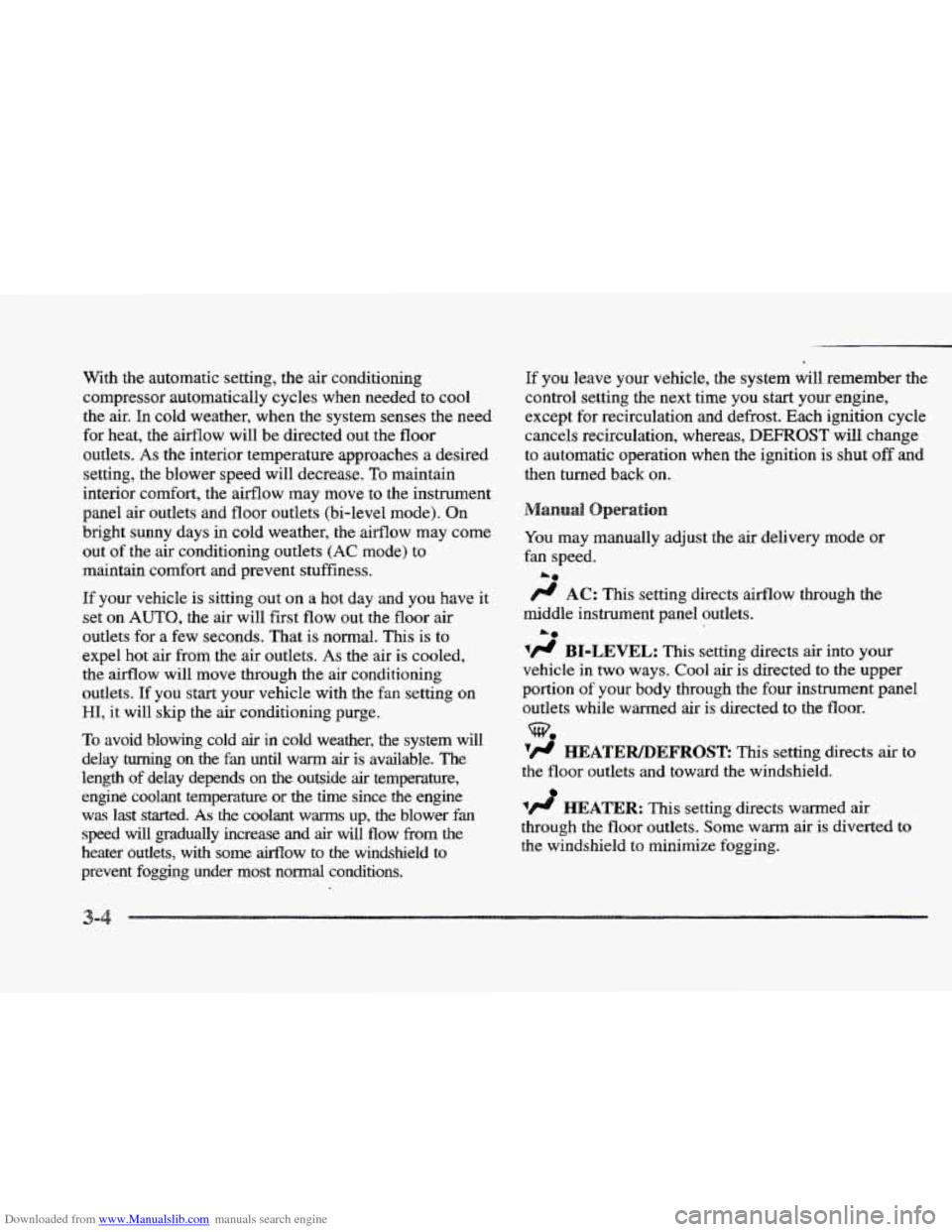
You may manually adjust
the air delivery mode or
fan speed.
/.I AC: This setting directs airflow through the
middle instrument panel outlets.
'/J BI-LEVEL: This setting directs air into your
vehicle in two ways. Cool air is directed to the upper
portion
of your body through the four instrument panel
outlets while warmed
air is directed to the floor.
'fl HEATER/DEFROSE This setting directs air to
the floor outlets and toward the windshield.
1/J HEATER: This setting directs warmed air
through the
floor outlets. Some warm air is diverted to
the windshield to minimize fogging.
L*
Page 173 of 361
Downloaded from www.Manualslib.com manuals search engine 4. Press and hold one of the six numbered buttons until
you hear a chime.
A preset number will appear on
the display. The sound will mute. When it returns,
release the button. Whenever you press that
numbered button, the station
you set will return.
5. Repeat the steps for each pushbutton.
seconds until PRESET
SCAN appears on the display to
listen
to each of your preset stations for a few seconds
(Factory presets which have not been reprogrammed
with your stations will be ignored). The radio
will go to
the first preset station stored on your pushbuttons, stop
for a few seconds, then go on to the next preset station.
Press
SCAN again to stop scanning. If a preset station
has weak reception, the radio
will not stop at the
preset station.
ESET SCAN: Press and hold SCAN for two to three
ASS: Press this knob lightly so it extends. Turn the
knob clockwise to increase and counterclockwise to
decrease
bass.
T : Press this knob lightly so it extends. Turn the
knob clockwise to increase and counterclockwise to
decrease treble.
If a station is weak or noisy, you may
want to decrease the treble. Push
these knobs back into their stored positions when
you're not using them.
SP: The Digital Signal Processing (DSP) feature is
used to produce four audio effects. These include
TALK, DRIVER SEAT, LIVE and AUDITORIUM.
DSP can be used while listening to the radio, the
cassette tape player or the CD player. To activate DSP,
press the DSP button. Press this button again to go
through the
four effects. To turn the DSP feature off,
press OFF.
TALK: This setting is used when listening to
non-musical material such as baseball games, talk
shows
or news. TALK gives the best clarity of
spoken words. The high and low frequencies are
lowered, the mid-range is increased and the audio is
moved more toward the front speakers.
DRIVER SEAE This setting adjusts the audio to
give
the driver the best possible sound qualities. This
has been done by tailoring the sound arrival times
and equalization
for the driver seat. DRIVER SEAT
can be used at
any time for any material. Other
passengers
in the vehicle may not perceive the
same effect.
LIVE: This setting is used to imitate the sound of a
live performance.
Page 186 of 361
Downloaded from www.Manualslib.com manuals search engine , 1 II
L
Here you’ll find information about driving on different kinds of roads and in varying weather conditions. We’ve also
included many other useful tips on driving.
i 4-2
4-3
4-6
4-6
4-10
4- 13
4-13
4- 14
4-
16 I
.
Defensive Driving Drunken Driving
Control
of a Vehicle
Braking
Steering
Off-Road Recovery
Passing
Loss of Control
Driving at Night
,’% ., , ,. ’
4-1 8
4-2 1
4-22
4-23
4-24
4-24
4-26
4-30
4-32
Driving in Rain and on Wet Roads
City Driving
Freeway Driving
Before Leaving
on a Long Trip
Highway Hypnosis
Hill and Mountain
Roads
Winter Driving
Loading
Your Vehicle
Towing
a Trailer
Page 217 of 361
Downloaded from www.Manualslib.com manuals search engine Things’ you put. inside your- vehicle can strike and:
injure people in a sudden stop .or turn, or in
a crash,
Put things in the,trunk of your vehicle. In a ,
trunk, put.them as far forward. as you can.
Try to spread the weight evenly.
inside the
vehicle so that some of them are
above the tops
.of the seats.
Don’t leave an unsecured child restraint in
your vehicle.
0 When you carry something inside the
vehicle, secure
it whenever you can.
0 Never stack heavier things, like suitcases,
.I# ‘-a ...-,- ._ .. * . ..l_.
This feature keeps the rear of your vehicle level as the
load changes. It’s automatic -- you don’t need to
adjust anything.
Towing, a
If you don’t use the correct equipment and drive
properly, you can lose control when
you pull a
trailer. For example,, if the trailer is too heavy, the
brakes may not work well
=- or even at all. You
and your passengers could be seriously injured.
Pull a trailer only if you have followed all the
steps in
this section. Ask your Cadillac dealer for
advice and information about towing a trailer
with your vehicle.
I NOTICE.:
Pulling a trailer improperly can damage your
vehicle and result
in costly repairs not covered by
your warranty.
To pull a trailer correctly, follow
the advice in this part,
and see your Cadillac
dealer
for important information about towing a
trailer with your vehicle.
Page 218 of 361
Downloaded from www.Manualslib.com manuals search engine Your vehicle can tow a trailer if it is equipped with the
proper trailer towing equipment.
To identify what the
vehicle trailering capacity is for your vehicle,
you
should read the information in “Weight of the Trailer”
that appears later in this section. But trailering is
different than just driving your vehicle by itself.
Trailering means changes in handling, durability and
fuel economy. Successful, safe trailering
takes correct
equipment, and
it has to be used properly.
That’s the reason for this part. In
it are many
time-tested, important trailering tips and safety rules.
Many of these are important
for your safety and that of
your passengers.
So please read this section carefully
before you pull
a trailer.
Load-pulling components such
as the engine, transaxle,
wheel assemblies and tires are forced
to work harder
against the drag of the added weight. The engine is
required to operate at relatively higher speeds and under
greater loads, generating extra heat. What’s more, the
trailer adds considerably to wind resistance, increasing
the pulling requirements.
If You Do Decide TQ Pull A Trailer
If you do, here are some important points:
8
9
9
8
There are many different laws, including speed limit
restrictions, having to
do with trailering. Make sure
your rig will be legal, not only where you live but
also where you’ll be driving.
A good source for this
information can be state or provincial police.
Consider using a sway control.
You can ask a hitch
dealer about sway controls.
Don’t tow a trailer at all during the first
1,000 miles
(1 600 km) your new vehicle is driven. Your engine,
axle or other parts could be damaged.
Then, during
the first 500 miles (800 km) that you
tow a trailer, don’t drive over
50 mph (80 kmk) and
don’t make starts at full throttle. This helps your
engine and other
parts of your vehicle wear in at the
heavier loads.
Obey speed limit restrictions when towing
a trailer.
Don’t
drive faster than the maximum posted speed
for trailers (or no more than 55 mph (90 km/h)) to
save wear
on your vehicle’s parts.
Page 219 of 361
Downloaded from www.Manualslib.com manuals search engine Three important considerations have to do with weight:
the weight
of the trailer,
the weight
of the trailer tongue
and the total weight on your vehicle’s tires.
How heavy can a trailer safely
be?
It should never weigh more than 1,000 lbs. (450 kg)
total, including the load. But even that can be too heavy.
It depends on
how you plan to use your rig. For
example, speed, altitude, road grades, outside
temperature and
how much your vehicle is used to pull a
trailer are all important. And, it can also depend on any
special equipment that you have on your vehicle.
You can ask your dealer for our trailering information or
advice, or you can write us at:
Cadillac Customer Assistance Center
Cadillac Motor Car Division
30009 Van Dyke
P.O. Box 9025
Warren, MI 48090-9025
In Canada, write to:
General Motors of Canada Limited
Customer Communication Centre
1908 Colonel Sam Drive
Oshawa, Ontario
LlH 8P7
e
The tongue load (A) of any trailer is an important
weight to measure because it affects the total capacity
weight
of your vehicle. The capacity weight includes the
curb weight
of the vehicle, any cargo you may carry in
it, and the people who will be riding in the vehicle. And
if you will tow a trailer, you must subtract the tongue
load
from your vehicle’s capacity weight because your
vehicle will
be carrying that weight, too. See “Loading
Your Vehicle” in the Index for more information about
your vehicle’s maximum load capacity.
Page 221 of 361
Downloaded from www.Manualslib.com manuals search engine You should always attach chains between your vehicle
and your trailer. Cross the safety chains under the tongue
of the trailer
so that the tongue will not drop to the road
if it becomes separated from the
hitch. Instructions
about safety chains may be provided by the hitch
manufacturer or by
the trailer manufacturer. Follow the
manufacturer’s recommendation
for attaching safety
chains and do
not attach them to the bumper. Always
leave just enough slack
so you can turn with your rig.
And, never allow safety chains to drag
on the ground.
Because you have anti-lock brakes, don’t
try to tap into
your vehicle’s hydraulic brake system.
If you do, both
brake systems won’t work well, or at all.
Be
sure to read and follow the instructions for the trailer
brakes
so you’ll be able to install, adjust and maintain
them properly.
Towing a trailer requires a certain amount
of experience.
Before setting out for
the open road, you’ll want to get
to know your
rig. Acquaint yourself with the feel of
handling and braking with the added weight of the trailer. And always
keep
in mind that the vehicle you are
driving is now a good deal longer and not nearly as
responsive
as your vehicle is by itself.
Before you start, check the trailer hitch and platform
(and attachments), safety chains, electrical connector,
lamps, tires and mirror adjustment.
If the trailer has
electric brakes, start your vehicle and trailer moving
and
then apply the trailer brake controller by hand to be sure
the brakes are working. This lets you check your
electrical connection at the same time.
During your trip, check occasionally to be sure that
the
load is secure, and that the lamps and any trailer brakes
are still working.
Stay at least twice as far behind the vehicle ahead as you
would when driving your vehicle without a trailer. This
can help you avoid situations that require heavy braking
and sudden turns.
You’ll need more passing distance
up ahead when
you’re towing
a trailer. And, because you’re a good deal
longer, you’ll need to
go much farther beyond the
passed vehicle before you can return to your lane.
Page 222 of 361
Downloaded from www.Manualslib.com manuals search engine Hold the bottom of the steering wheel with one hand.
Then, to move the trailer to the left, just move that hand
to the left. TQ move the trailer to the right, move your
hand
to the right. Always back up slowly and, if
possible,
have someone guide you. When
you tow a trailer, your vehicle may need
a
different turn signal flasher andor extra wiring. Check
with your Cadillac dealer. The green
arrows on your
instrument panel will flash whenever you signal a turn
or lane change. Properly hooked up, the trailer lamps
will also flash, telling other drivers you’re about to turn,
change lanes or stop.
When towing
a trailer, the green arrows on your
instrument
panel will flash for turns even if the bulbs on
the trailer are burned out. Thus, you may think drivers
Making very sharp turns while trailerring could
cause
the trailer to come in contact with the
vehicle.
Your vehicle could be damaged. Avoid
behind you are seeing your signal wheithey are mot. It’s
important to check occasionally to be sure the trailer
bulbs are still working.
-
making very sharp turns while traillering.
Reduce speed and shift to a lower gear before you start
When you’re turning with a trailer, make wider turns down a long or steep downgrade. If you don’t shift
than normal. Do this so your trailer won’t strike soft down, you might have to use your brakes so much that
shoulders, curbs, road
signs, trees or other objects. they would get hot and no longer work well.
Avoid jerky
or sudden maneuvers. Signal well
in advance. speed to around
45 mph (70 kdh) or less to reduce the
On
a long
uphill grade, shift down and reduce your
possibility
of engine and transaxle overheating.
Page 226 of 361
Downloaded from www.Manualslib.com manuals search engine c
Here you’ll find what to do about some problems that can occur on the road.
5-2
5 -4
5-4
5-9
5-16
Hazard Warning Flashers
Other
Warning Devices
Jump Starting
Towing Your
Vehicle
Engine Overheating
’ 5-26
5-26
5-36
5-37
If a Tire Goes Flat
Changing
a Flat Tire
Compact Spare
Tire
If You’re Stuck: In Sand, Mud,
Ice or Snow
Page 234 of 361
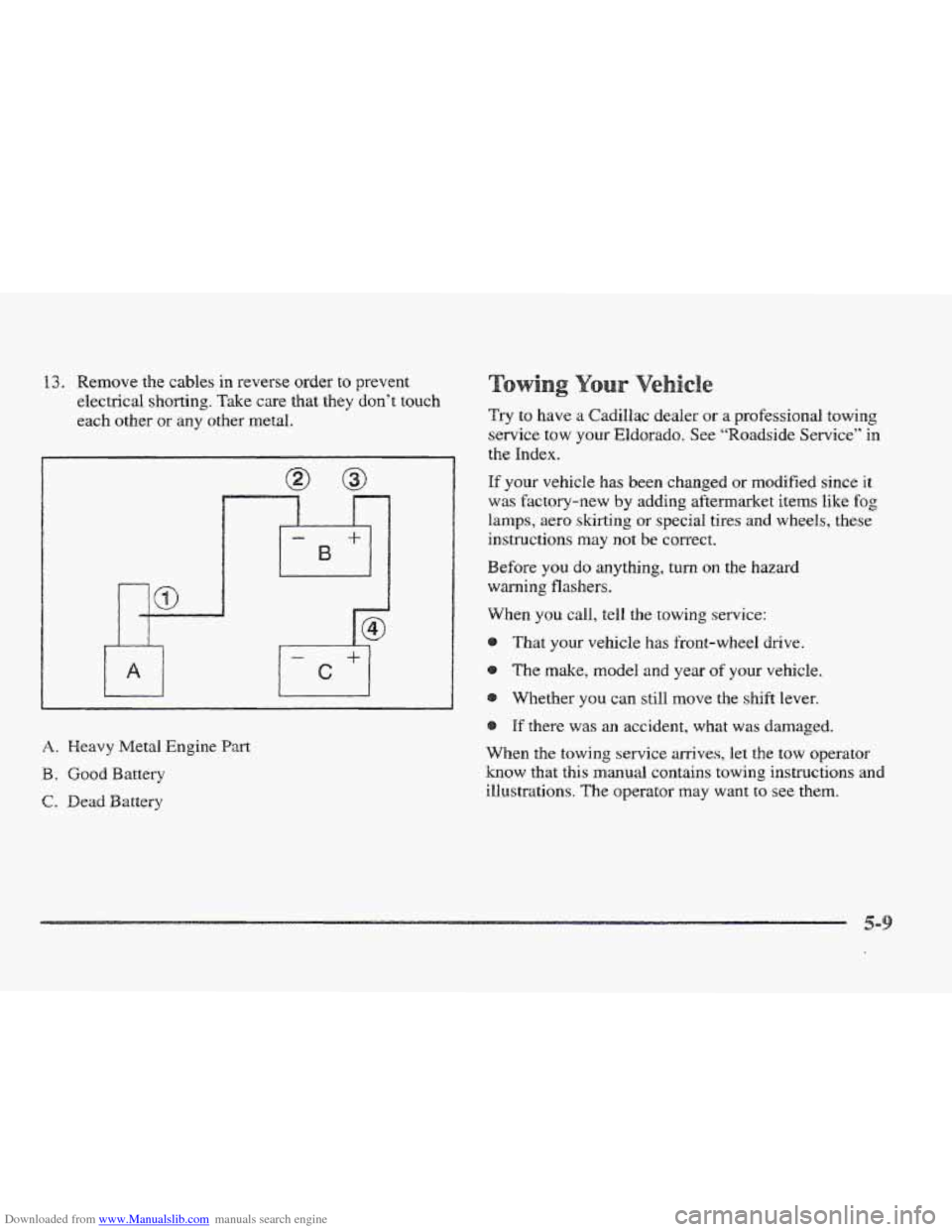
Downloaded from www.Manualslib.com manuals search engine 13. Remove the cables in reverse order to prevent
electrical
shorting. Take care that they don’t touch
each other or any other metal.
A. Heavy Metal Engine Part
B. Good Battery
C. Dead Battery
Try to have a Cadillac dealer or a professional towing
service tow
your Eldorado. See “Roadside Service” in
the Index.
If your vehicle has been changed or modified since it
was Factory-new by adding aftermarket items like fog
lamps, aero skirting or special tires and wheels, these
instructions
may not be correct.
Before
you do anything, turn on the hazard
warning flashers.
When you call, tell the towing service:
That
your vehicle has front-wheel drive.
The make, model and year of your vehicle.
Whethef you can still move the shift lever.
If there was an accident, what was damaged.
When the towhg service arrives, let the tow operator
know that this manual contains towing instructions and
illustrations. The operator may
want to see them.