start stop button CADILLAC ELDORADO 1998 10.G Owners Manual
[x] Cancel search | Manufacturer: CADILLAC, Model Year: 1998, Model line: ELDORADO, Model: CADILLAC ELDORADO 1998 10.GPages: 380, PDF Size: 21.39 MB
Page 92 of 380
Downloaded from www.Manualslib.com manuals search engine 1 A CAUTION:
’ It is dangerous to get out of your vehicle if the
shift lever is not fully in PARK (P) with the
parking brake firmly set. Your vehicle can roll.
Don’t leave your vehicle when the engine is
running unless you have to.
If you have left the
engine running, the vehicle can move suddenly.
You or others could be injured.
To be sure your
vehicle won’t move, even when you’re on
fairly
level ground, always set your parking brake and
move the shift lever to PARK
(P).
See “Shifting Into PARK (P)” in the Index. If
you’re pulling a trailer, see “Towing a nailer”
in the Index.
Ensure the shift lever is fully in PARK (P) before
starting the engine. Your vehicle has a Brake-Transaxle
Shift Interlock (BTSI). You have to fully
apply your
regular brakes
before you can shift from PARK (P)
when the ignition key is in RUN. If you cannot shift out
of PARK (P), ease pressure on the shift lever -- push the
shift lever all the way into
PARK (P) and release the
shift lever button
on the floor shift console models as
you maintain brake application. Then move the shift
lever into
the gear you wish. (Press the shift lever button
before moving the shift lever
on floor shift console
models.)
See “Shifting Out of PARK (P)” in this section.
REVERSE (R): Use this gear to back up.
NOTICE:
Shifting to REVERSE (R) while your vehicle is
moving forward could damage your transaxle.
Shift to REVERSE
(R) only after your vehicle
has stopped.
Also use this gear to rock your vehicle back and forth to
get out of snow, ice or sand without damaging your
transaxle. See “If You’re Stuck in Sand,
Mud, Ice or
Snow” in the lndex for additional information.
2-22
Page 123 of 380
Downloaded from www.Manualslib.com manuals search engine This device complies with RSS-210 of Industry Canada.
Operation is subject to the following two conditions:
(1 j this device may not cause interference, and (2) this
device must accept any interference, including
interference that may cause undesired operation
of
the device.
Changes and modifications to this system by other
than an authorized service facility could void
authorization
to use this equipment.
Programming the Transmitter
Do not use the universal transmitter with any garage
door opener that does not have the “stop and reverse”
safety feature. This includes any garage door opener
model manufactured before April
1, 1982.
Be sure that people and objects are clear of the garage
door you are programming.
Your vehicle’s engine should be turned
off while
programming the transmitter. Follow these steps
to
program up to three channels:
1. If you have previously programmed a transmitter
channel, proceed to Step
2. Otherwise, hold down the
two outside buttons on
the universal transmitter
until the amber light begins to flash rapidly
(approximately
20 seconds). Then release the
buttons. This procedure initializes the memory and
erases any previous settings for all three channels.
2. Decide which one of the three channels you want
to program.
3. Hold the end of the hand-held transmitter against the
front surface of the universal transmitter
so that you
can still see the amber light.
4. Using both hands, press the hand-held transmitter
button and the desired button on the universal
transmitter. Continue
to press both buttons through
Step
5.
light on the universal transmitter flash slowly and
then rapidly. The rapid flashing, which could take up
to
90 seconds, indicates that the universal transmitter
has been programmed. Release both buttons once the
light starts
to flash rapidly.
5. Hold down both buttons until you see the amber
2-53
Page 141 of 380
Downloaded from www.Manualslib.com manuals search engine To operate, press the INFO button to display TIMER.
Each
of the fields for the hours, minutes and seconds are
two numeric digits.
Once TIMER OFF
0O:OO:OO is displayed, press the
INFO RESET button to start the timing feature. Press
the INFO RESET button again to stop it. If
you will be
starting and stopping your vehicle
-- during a trip for
instance
-- the TIMER feature will automatically start
timing where it left off when
you last stopped. To reset
it, press and hold the INFO RESET button until the
display reads TIMER
0O:OO:OO. Press the INFO button
to exit from the TIMER function.
OIL LIFE LEFT (Reset): Press the INFO button to
display the OIL LIFE LEFT, then press and hold the
INFO RESET button until 100% OIL LIFE LEFT is
displayed. (This only needs
to be reset after you have
had the oil changed.)
ENGLISHAWETRIC (Reset): Press the INFO button to
display ENGLISWMETRIC RESET, then press the
INFO RESET button to select. The display will change
from English (miles) to metric (kilometers).
INFO: Pressing this button repeatedly will display the
RANGE, MPG AVG,
MPG INST, GAL FUEL USED,
MPH, AVG MPH, TIMER, BATTERY VOLTS,
COOLANT TEMP, OIL LIFE LEFT and
ENGLISWMETRIC RESET.
FUEL DOOR: Press this button to open the fuel
door. (This feature will work
only when the shift lever
is in PARK
(P) regardless of whether or not the vehicle
is running.)
TRUNK: Press this button to open the trunk. (This
feature will work only when the shift lever
is in
PARK (P) regardless of whether or not the vehicle
is running.)
DIC Messages
These messages will appear if there is a problem sensed
in one
of your vehicle’s systems. Vehicles that are first
sold
in Canada will have a number after each message.
This number helps
to identify the message which is only
displayed in English.
APPLY BRAKE TO SHIFT - 46: This message will
appear if your vehicle is in PARK
(P) for about 15
seconds and the brake is not pressed. To remove this
message from the Driver Information Center (DIC)
display, hold the
OFF and the blue (cooler) buttons on
the digital cluster control panel for about five seconds.
On the analog climate control panel, press the
OFF
button (next to the MODE button) and the down arrow
on
the PASS TEMP button for about five seconds. Hold
the same two buttons
to display the message again.
2-7 1
Page 145 of 380
Downloaded from www.Manualslib.com manuals search engine ICE POSSIBLE - 13: This message appears when
the outside air temperature is cold enough
to create icy
road conditions.
LOW REFRIG A/C OFF - 12: This message means
that the air conditioning system detects a refrigerant
level that is low enough
to cause damage to the air
conditioning compressor.
To avoid damage, the air
conditioning compressor automatically turns
off and the
electronic climate control system will automatically
switch from AUTO to
ECON and remain there.
Have the air conditioning system serviced if this
message appears.
MONITORED SYSTEMS OK - 1: This message only
appears in the “recall” mode by pressing the RESET
button. It lets you know that no other messages are
stored or currently active.
OIL PRESSURE LOW STOP ENGINE - 35: If this
message appears while the engine is running, stop the
engine and do not operate it until the cause of low oil
pressure
is corrected. Severe damage to the engine can
result.
A multiple chime will also sound when this
message is displayed.
OPTIONS NOT SET - 99: This message will display
if a fault has occurred in your vehicle’s memory. Have
your vehicle serviced
by your dealership.
PROGRAM PASS KEY - 31: This warning message
displays when the PASS-Key I1 pellet information has
not been programmed into your vehicle. See your
dealership for service.
PHONE NOT PRESENT - 126: This message will
appear when the steering wheel controls for the optional
phone system are activated but the phone is not plugged
into
the vehicle. Make sure your phone is plugged in. If
your phone appears
to be connected, see your dealership
for service.
REMOVE KEY - 70: This message will appear
when the Personalized Automotive Security System
(PASS-Key
11) is unable to read the pellet on the
ignition key
or an improper key pellet has been
inserted. This message usually appears following the
display of STARTING DISABLED
REMOVE KEY.
The instrument panel cluster will then run a timer and
change the messages
to WAIT 3 MINUTES, WAIT 2
MINUTES, WAIT 1 MINUTE and then START CAR.
When the REMOVE
KEY message is displayed, remove
the ignition key. Check the ignition key for damage. If it
is damaged, it may need to be replaced. If
you see no
damage, clean the pellet contacts with a soft cloth or
napkin before inserting the key back into the ignition.
Have your vehicle serviced
if the message still appears.
2-75
Page 169 of 380
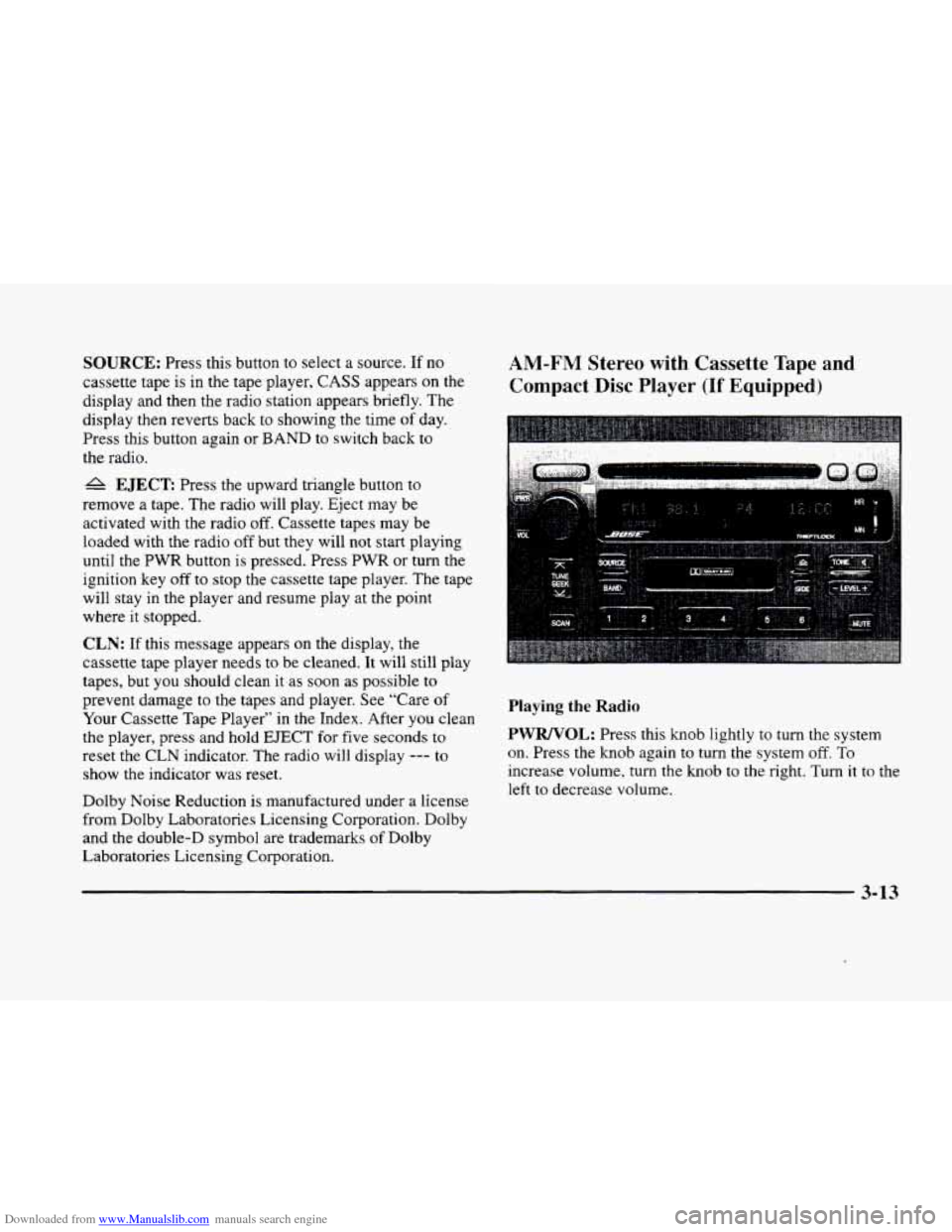
Downloaded from www.Manualslib.com manuals search engine SOURCE: Press this button to select a source. If no
cassette tape is
in the tape player, CASS appears on the
display and then the radio station appears briefly. The
display then reverts back
to showing the time of day.
Press this button again or
BAND to switch back to
the radio.
A EJECT Press the upward triangle button to
remove a tape. The radio will play. Eject may be
activated with
the radio off. Cassette tapes may be
loaded with the radio off but they will not start playing
until the PWR button is pressed. Press
PWR or turn the
ignition key
off to stop the cassette tape player. The tape
will stay in the player and resume play at the point
where it stopped.
CLN: If this message appears on the display, the
cassette tape player needs to be cleaned. It will still play
tapes, but you should clean it as soon as possible to
prevent damage
to the tapes and player. See “Care of
Your Cassette Tape Player” in the Index. After you clean
the player, press and hold
EJECT for five seconds to
reset the CLN indicator. The radio will display
--- to
show the indicator was reset.
Dolby Noise Reduction is manufactured under a license
from Dolby Laboratories Licensing Corporation. Dolby
and the double-D symbol are trademarks of Dolby
Laboratories Licensing Corporation.
AM-FM Stereo with Cassette Tape and
Compact
Disc Player (If Equipped)
Playing the Radio
PWRNOL:
Press this knob lightly to turn the system
on. Press
the knob again to turn the system off. To
increase volume,
turn the knob to the right. Turn it to the
left to decrease volume.
3-13
Page 173 of 380
Downloaded from www.Manualslib.com manuals search engine Playing a Compact Disc
Insert a disc partway into the slot, label side up. The
player will pull
it in. If the ignition and the radio are on
and the underlined compact disc symbol appears on the
display, the disc will begin playing. Compact discs may
be loaded with the radio
off but they will not start
playing until the radio is
on. If you want to insert a disc
when the ignition
is off, first press EJECT.
The integral CD player can play the smaller 8 cm
compact discs. Full-size compact discs and the smaller
compact discs are loaded
in the same manner.
If you’re driving on a very rough road or if it’s very hot,
the disc may not play.
If the disc comes out, it could
be that:
The disc is upside down.
0 It is dirty, scratched or wet.
The air is very humid. (If so, wait about an hour and
try again.)
If any error occurs repeatedly or if an error can’t
be
corrected, please contact your dealer.
RW Press and hold the left arrow to reverse the
compact disc. Release
it to return to playing speed.
FF: Press and hold the right arrow to fast forward to
another part
of the compact disc. Release it to return to
playing speed.
TUNE-SEEK: When this button is pressed, it has two
positions.
This button works the same. whether it is
pressed to the first or second position. Press this button
to seek to the next or previous selection on the
compact disc.
SCAN: Press this button to listen to selections for a few
seconds. The compact disc will go to a selection, stop
for a few seconds, then
go on to the next selection. Press
this button again to stop scanning.
RDM: Press this button to hear the tracks in random,
rather than sequential, order. Press
RDM again to turn
off random play.
A EJECT Press the upward triangle button to
remove a compact disc.
The radio will play. Eject
be activated with the radio off and/or the vehicle
ignition off.
-
3-17
Page 182 of 380
Downloaded from www.Manualslib.com manuals search engine Playing a Compact Disc
Insert a disc partway into the slot, label side up. The
player will pull it in. If the ignition and the radio are on
and the underlined compact disc symbol appears on the
display, the disc will begin playing. Compact discs may
be loaded with the radio off but they will
not start
playing until the radio
is on. If you want to insert a disc
when the ignition is off, first press
EJECT.
The integral CD player can play the smaller 8 cm
compact discs. Full-size compact discs and the smaller
compact discs are loaded in the same manner.
If you’re driving on a very rough road or if it’s very hot,
the disc
may not play. If the disc comes out, it could
be that:
The disc is upside down.
It is dirty, scratched or wet.
The air is very humid. (If so, wait about an hour and
try again.)
If any error occurs repeatedly
or if an error can’t be
corrected, please contact your dealer.
RW: Press and hold the left arrow to reverse the
compact disc. Release it
to return to playing speed,
FF: Press and hold the right arrow to fast forward to
another part
of the compact disc. Release it to return to
playing speed.
TUNE-SEEK: When this button is pressed, it has two
positions. This button works
the same, whether it is
pressed
to the first or second position. Press this
button
to seek to the next or previous selection on the
compact disc.
SCAN: Press this button to listen to selections for a few
seconds. The compact disc will
go to a selection, stop
for a few seconds, then
go on to the next selection. Press
this button again
to stop scanning.
RDM: Press this button to hear the tracks in random,
rather than sequential, order. Press RDM again
to turn
off random play.
A EJECT: Press the upward triangle button to
remove a compact disc. The radio will play. Eject may
be activated with the radio
off and/or the vehicle
ignition
off.
3-26