trunk CADILLAC ELR 2014 User Guide
[x] Cancel search | Manufacturer: CADILLAC, Model Year: 2014, Model line: ELR, Model: CADILLAC ELR 2014Pages: 408, PDF Size: 4.47 MB
Page 40 of 408

Black plate (6,1)Cadillac ELR Owner Manual (GMNA-Localizing-U.S./Canada-6081525) -
2014 - Second Edition - 1/22/14
2-6 Keys, Doors, and Windows
1. Remove the key from thetransmitter and insert the vehicle
key into the key cylinder above
the license plate.
2. Open the trunk.
3. Turn the key counterclockwise five times within 10 seconds.
The DIC message displays
REMOTE LEARN PENDING
PLEASE WAIT.
4. Return the key base back into the RKE transmitter. 5. Wait for 10 minutes until the DIC
displays PRESS ENGINE
START BUTTON LEARN, then
press the POWER
Obutton.
The DIC reads REMOTE
LEARN PENDING,
PLEASE WAIT.
6. Repeat Step 5 two additional times. After the third time all
previously known transmitters
will no longer work with the
vehicle. Remaining transmitters
can be relearned during the next
steps. The DIC display should
now show READY FOR
REMOTE #1.
7. First remove the rubber liner toaccess the pocket. Place the
new transmitter on the indent in
the center console storage bin.
8. Press the POWER
Obutton.
When the transmitter is learned,
the DIC display will show that it
is ready to program the new
transmitter.
9. Remove the transmitter from the transmitter pocket and press
Q
orKon the transmitter.
10. To program additional transmitters, repeat Steps 7–9.
Page 46 of 408
Black plate (12,1)Cadillac ELR Owner Manual (GMNA-Localizing-U.S./Canada-6081525) -
2014 - Second Edition - 1/22/14
2-12 Keys, Doors, and Windows
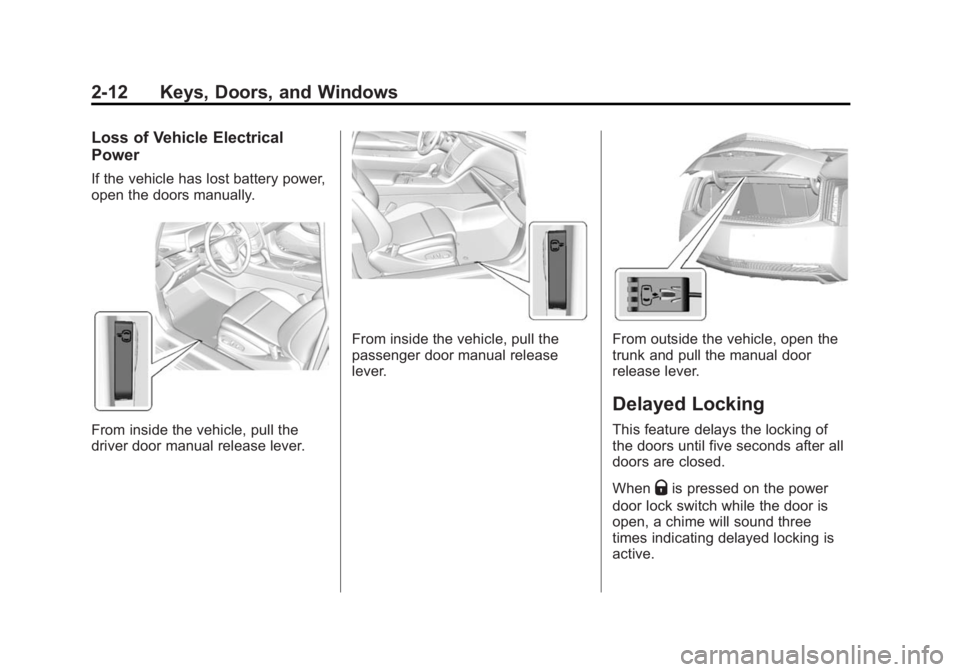
Loss of Vehicle Electrical
Power
If the vehicle has lost battery power,
open the doors manually.
From inside the vehicle, pull the
driver door manual release lever.
From inside the vehicle, pull the
passenger door manual release
lever.From outside the vehicle, open the
trunk and pull the manual door
release lever.
Delayed Locking
This feature delays the locking of
the doors until five seconds after all
doors are closed.
When
Qis pressed on the power
door lock switch while the door is
open, a chime will sound three
times indicating delayed locking is
active.
Page 47 of 408

Black plate (13,1)Cadillac ELR Owner Manual (GMNA-Localizing-U.S./Canada-6081525) -
2014 - Second Edition - 1/22/14
Keys, Doors, and Windows 2-13
The doors will lock automatically
five seconds after all doors are
closed. If a door is reopened before
that time, the five-second timer will
reset when all doors are closed
again.
Press
Qon the door lock switch or
press
Qon the RKE transmitter to
lock the doors immediately.
This feature can also be
programmed. See Vehicle
Personalization on page 5-51.
Automatic Door Locks
The doors will lock automatically
when all doors are closed, the
ignition is on, and the shift lever is
moved out of P (Park).
To unlock the doors:
.PressKon a door.
.Shift the vehicle into P (Park). Automatic door unlocking can be
programmed through the Driver
Information Center (DIC). See
Vehicle Personalization on
page 5-51.
Lockout Protection
If the vehicle is in ACC/
ACCESSORY or ON/RUN/START
and the power door lock switch is
pressed with the driver door open,
all the doors will lock and only the
driver door will unlock.
Lockout Protection can be manually
overridden with the driver door open
by pressing and holding
Qon the
power door lock switch.
If Unlocked Door Anti-Lockout is
turned on and the vehicle is off, the
driver door is open, and locking is
requested, all the doors will lock and
only the driver door will unlock. The
Unlocked Door Anti-Lockout feature
can be turned on or off using the
vehicle personalization menus. See
Vehicle Personalization on
page 5-51.
Doors
Trunk
{Warning
Exhaust gases can enter the
vehicle if it is driven with the
liftgate or trunk/hatch open,
or with any objects that pass
through the seal between the
body and the trunk/hatch or
liftgate. Engine exhaust contains
carbon monoxide (CO) which
cannot be seen or smelled. It can
cause unconsciousness and even
death.
If the vehicle must be driven with
the liftgate or trunk/hatch open:
.Close all of the windows.
.Fully open the air outlets on
or under the instrument
panel.
(Continued)
Page 48 of 408

Black plate (14,1)Cadillac ELR Owner Manual (GMNA-Localizing-U.S./Canada-6081525) -
2014 - Second Edition - 1/22/14
2-14 Keys, Doors, and Windows
Warning (Continued)
.Adjust the climate control
system to a setting that
brings in only outside air and
set the fan speed to the
highest setting. See“Climate
Control Systems” in the
Index.
.If the vehicle is equipped with
a power liftgate, disable the
power liftgate function.
See Engine Exhaust on
page 9-27.
Trunk Release
To open the trunk the shift lever
must be in P (Park).
.Press|on the driver door.
.Press and holdion the
Remote Keyless Entry (RKE)
transmitter.
.Press the touch pad on the rear
of the trunk above the license
plate when all doors are
unlocked. The trunk can be opened while the
vehicle is locked by pressing the
touch pad above the license plate
while the RKE transmitter is within
1 m (3 ft) of the rear of the vehicle.
See
“Keyless Access” inRemote
Keyless Entry (RKE) System
Operation on page 2-2.
Close the trunk by pulling on the
handle. Do not use the handle as a
tie-down.
Emergency Trunk Release
Handle
Page 49 of 408

Black plate (15,1)Cadillac ELR Owner Manual (GMNA-Localizing-U.S./Canada-6081525) -
2014 - Second Edition - 1/22/14
Keys, Doors, and Windows 2-15
{Caution
Do not use the emergency trunk
release handle as a tie-down or
anchor point when securing items
in the trunk as it could damage
the handle.
There is a glow-in-the-dark
emergency trunk release handle on
the trunk lid. This handle will glow
following exposure to light. Pull the
release handle to open the trunk
from the inside.
Vehicle Security
This vehicle has theft-deterrent
features; however, they do not make
the vehicle impossible to steal.
Vehicle Alarm System
This vehicle has an anti-theft alarm
system.
Arming the Alarm System
1. Close the trunk and the hood. Turn off the vehicle.
2. Lock the vehicle in one of three ways:
.Use the RKE transmitter.
.Use the Keyless Access
system.
.With a door open, pressQ
on the interior of the door.
3. After 30 seconds the alarm system will arm. Pressing
Qon
the RKE transmitter a second time will bypass the 30-second
delay and immediately arm the
alarm system.
If the driver door is opened without
first unlocking with the RKE
transmitter, the horn will chirp and
the lights will flash to indicate
pre-alarm. If the vehicle is not
started, or the door is not unlocked
by pressing
Kon the RKE
transmitter during the 10-second
pre-alarm, the alarm will be
activated.
If the charge cord theft alert is
enabled, the alarm will also be
activated when there is an attempt
to remove the charge cord, or if a
passenger door, the trunk, or the
hood is opened without first
disarming the system. When the
alarm is activated, the turn signals
flash and the horn sounds for about
30 seconds. The alarm system will
then re-arm to monitor for the next
unauthorized event.
Page 151 of 408

Black plate (43,1)Cadillac ELR Owner Manual (GMNA-Localizing-U.S./Canada-6081525) -
2014 - Second Edition - 1/22/14
Instruments and Controls 5-43
gas pedal. When this occurs, ACC
will not brake. SeeAdaptive Cruise
Control on page 9-39.
SERVICE ADAPTIVE CRUISE
CONTROL
If this message displays, take the
vehicle to your dealer to repair the
system. Adaptive Cruise Control
(ACC), Forward Collision Alert
(FCA), and/or the Active Emergency
Braking System may not work. Do
not use these systems until the
vehicle has been repaired.
SHIFT TO PARK BEFORE
EXITING
This message may display if
Adaptive Cruise Control (ACC) is
engaged holding the vehicle at a
stop, and the driver attempts to exit
the vehicle. Put the vehicle in
P (Park) before exiting.
Door Ajar Messages
DOOR OPEN
A door open symbol will be
displayed on the DIC showing which
door is open. If the vehicle has been
shifted out of P (Park), a DOOR
OPEN message will also be
displayed. The DOOR OPEN
message may also be displayed if
the vehicle starts to move. Close the
door completely.
HOOD OPEN
This message will display along with
a hood open symbol when the hood
is open. Close the hood completely.
TRUNK OPEN
This message will display along with
a symbol when the trunk is open.
Close the trunk completely.
Drive Mode Messages
HOLD MODE NOT AVAILABLE
This message displays when in
Hold Mode and the mode becomes
unavailable. See “Hold Mode”under
Driver Selected Operating Modes on
page 9-22.
MOUNTAIN MODE NOT
AVAILABLE
This message displays when in
Mountain Mode and the mode
becomes unavailable. See
“Mountain Mode” underDriver
Selected Operating Modes on
page 9-22.
SPORT MODE NOT
AVAILABLE
This message displays when in
Sport Mode and the mode becomes
unavailable. See “Sport Mode”
under Driver Selected Operating
Modes on page 9-22.
Page 160 of 408
Black plate (52,1)Cadillac ELR Owner Manual (GMNA-Localizing-U.S./Canada-6081525) -
2014 - Second Edition - 1/22/14
5-52 Instruments and Controls
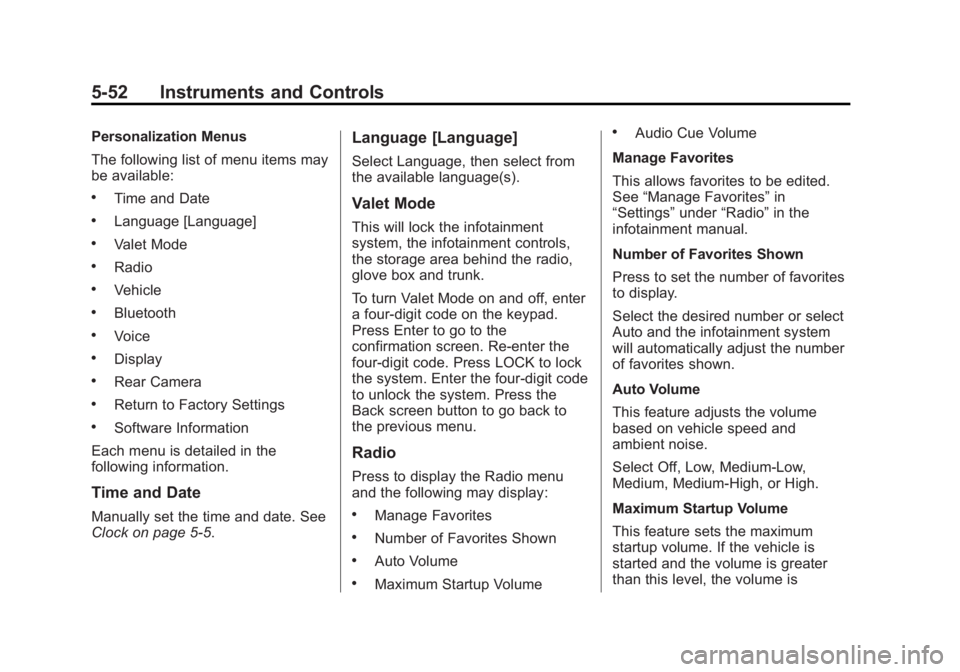
Personalization Menus
The following list of menu items may
be available:
.Time and Date
.Language [Language]
.Valet Mode
.Radio
.Vehicle
.Bluetooth
.Voice
.Display
.Rear Camera
.Return to Factory Settings
.Software Information
Each menu is detailed in the
following information.
Time and Date
Manually set the time and date. See
Clock on page 5-5.
Language [Language]
Select Language, then select from
the available language(s).
Valet Mode
This will lock the infotainment
system, the infotainment controls,
the storage area behind the radio,
glove box and trunk.
To turn Valet Mode on and off, enter
a four-digit code on the keypad.
Press Enter to go to the
confirmation screen. Re-enter the
four-digit code. Press LOCK to lock
the system. Enter the four-digit code
to unlock the system. Press the
Back screen button to go back to
the previous menu.
Radio
Press to display the Radio menu
and the following may display:
.Manage Favorites
.Number of Favorites Shown
.Auto Volume
.Maximum Startup Volume
.Audio Cue Volume
Manage Favorites
This allows favorites to be edited.
See “Manage Favorites” in
“Settings” under“Radio” in the
infotainment manual.
Number of Favorites Shown
Press to set the number of favorites
to display.
Select the desired number or select
Auto and the infotainment system
will automatically adjust the number
of favorites shown.
Auto Volume
This feature adjusts the volume
based on vehicle speed and
ambient noise.
Select Off, Low, Medium-Low,
Medium, Medium-High, or High.
Maximum Startup Volume
This feature sets the maximum
startup volume. If the vehicle is
started and the volume is greater
than this level, the volume is
Page 246 of 408

Black plate (58,1)Cadillac ELR Owner Manual (GMNA-Localizing-U.S./Canada-6081525) -
2014 - Second Edition - 1/22/14
9-58 Driving and Operating
Charging
Plug-In Charging
This section explains the process
for charging the vehicle's high
voltage battery. Do not allow the
vehicle to remain in temperature
extremes for long periods without
being driven or plugged in. It is
recommended that the vehicle be
plugged in when temperatures are
below 0°C (32°F) and above 32°C
(90°F) to maximize high voltage
battery life.
When using a 120-volt AC electrical
outlet, it will take approximately
12.5 hours to charge the vehicle
with the 12 amp AC current setting
or 18 hours using the default 8 amp
AC current setting. When using a
240-volt charging station, it will take
approximately five hours to charge
the vehicle. Charge times will vary
with outside temperature. There are
three ways to program how thevehicle is charged. See
Programmable Charging on
page 5-29.
The charging system may run fans
and pumps that result in sounds
from the vehicle while it is turned
off. Additional unexpected clicking
sounds may be caused by the
electrical devices used while
charging.
While the charge cord is plugged
into the vehicle, the vehicle cannot
be driven.
Charging
Start Charge
1. Make sure the vehicle is parked
and turned off.
2. Push the rearward edge of the charge port door in and release
to open the door.
In cold weather conditions, ice
may form around the charge port
door. Remove ice from the area
before attempting to open or
close the charge port door.
3. Open the rear trunk, lift the leftload support floor cover, and
remove the charge cord. Pull up
on the charge cord handle to
release. The vehicle plug is
stored as shown.
4. Plug the charge cord into the electrical outlet. See Electrical
Requirements for Battery
Charging on page 9-66. Verify
the charge cord status. See the
charge cord user guide. See
Charge Cord on page 9-64.
Select the appropriate charge
level using the Select Charge
Level Preference screen on the
Page 252 of 408

Black plate (64,1)Cadillac ELR Owner Manual (GMNA-Localizing-U.S./Canada-6081525) -
2014 - Second Edition - 1/22/14
9-64 Driving and Operating
Outside Rearview Mirror
(OSRVM) Charging Status
Indicator
The outside rear view mirrors are
equipped with green LEDs used to
indicate high voltage battery system
charging status. The OSRVM CSI
indicates the following:
.Solid green - Battery is charging
and is less than half complete.
.Fast flashing - Battery is
charging. Battery is more than
half complete.
.Slow flashing - Battery is
charging. Battery is nearly
complete.
.Off - Not charging.
Charge Cord
SeeRadio Frequency Statement on
page 13-15.
A portable charge cord used to
charge the vehicle high voltage
battery is stored under the load
support floor covering in the trunk.
Important Information About
Portable Electric Vehicle Charging
.Charging an electric vehicle can
stress a building’ s electrical
system more than a typical
household appliance.
.Before you plug in to any
electrical outlet, have a qualified
electrician inspect and verify the
electrical system (electrical
outlet, wiring, junctions, and
protection devices) for
heavy-duty service at a 12 amp
continuous load.
.Electrical outlets may wear out
with normal usage or be
damaged over time, making
them unsuitable for electric
vehicle charging.
.Check the electrical outlet/plug
while charging and discontinue
use if the electrical outlet/plug is
hot, then have the electrical
outlet serviced by a qualified
electrician.
.When outdoors, plug into an
electrical outlet that is
weather-proof while in use.
.Mount the charging cord to
reduce strain on the electrical
outlet/plug.
{Warning
Improper use of portable electric
vehicle charge cords may cause
a fire, electrical shock, or burns,
and may result in damage to
property, serious injury, or death.
(Continued)
Page 258 of 408

Black plate (70,1)Cadillac ELR Owner Manual (GMNA-Localizing-U.S./Canada-6081525) -
2014 - Second Edition - 1/22/14
9-70 Driving and Operating
Do not top off or overfill the tank and
wait a few seconds before removing
the nozzle. Clean fuel from painted
surfaces as soon as possible. See
Exterior Care on page 10-80.
{Warning
If a fire starts while you are
refueling, do not remove the
nozzle. Shut off the flow of fuel by
shutting off the pump or by
notifying the station attendant.
Leave the area immediately.
{Caution
If a new fuel cap is needed, be
sure to get the right type of cap
from your dealer. The wrong type
of fuel cap might not fit properly,
might cause the malfunction
indicator lamp to light, and could
damage the fuel tank and(Continued)
Caution (Continued)
emissions system. See
Malfunction Indicator Lamp on
page 5-17.
Filling a Portable Fuel
Container
{Warning
Filling a portable fuel container
while it is in the vehicle can cause
fuel vapors that can ignite either
by static electricity or other
means. You or others could be
badly burned and the vehicle
could be damaged. Always:
.Use approved fuel
containers.
.Remove the container from
the vehicle, trunk, or pickup
bed before filling.(Continued)
Warning (Continued)
.Place the container on the
ground.
.Place the nozzle inside the fill
opening of the container
before dispensing fuel, and
keep it in contact with the fill
opening until filling is
complete.
.Fill the container no more
than 95% full to allow for
expansion.
.Do not smoke, light matches,
or use lighters while
pumping fuel.
.Avoid using cell phones or
other electronic devices.