battery CADILLAC ELR 2014 Owner's Guide
[x] Cancel search | Manufacturer: CADILLAC, Model Year: 2014, Model line: ELR, Model: CADILLAC ELR 2014Pages: 408, PDF Size: 4.47 MB
Page 120 of 408

Black plate (12,1)Cadillac ELR Owner Manual (GMNA-Localizing-U.S./Canada-6081525) -
2014 - Second Edition - 1/22/14
5-12 Instruments and Controls
item is highlighted. A checkmark will
be displayed next to the
selected item.
Info Pages:Press SEL while Info
Pages is highlighted to select the
items to be displayed in the DIC info
displays. See Driver Information
Center (DIC) on page 5-38.
Speed Warning: The Speed
Warning display allows the driver to
set a speed that they do not want to
exceed. To set the Speed Warning,
press SEL when Speed Warning is
displayed. Press
yorzto adjust
the value. Press SEL to set the
speed. Once the speed is set, this
feature can be turned off by
pressing SEL while viewing this
page. If the selected speed limit is
exceeded, a pop-up warning is
displayed with a chime.
Tutorial: Press SEL while Tutorial
is highlighted to view the tutorials
that explain some of the features of
the instrument cluster. The tutorials
are only available when the vehicle
is in P (Park). Open Source Software:
Press
SEL while Open Source Software is
highlighted to display open source
software information.
Speedometer
The speedometer shows the
vehicle's speed in either kilometers
per hour (km/h) or miles per
hour (mph).
Odometer
The odometer shows how far the
vehicle has been driven, in either
kilometers or miles.
This vehicle has a tamper-resistant
odometer. If the vehicle needs a
new cluster installed, the new
odometer is set to the mileage of
the old odometer. If this is not
possible, it is set at zero and a label
is put on the driver door to show the
old mileage reading.
Trip Odometer
The trip odometer can show how far
the vehicle has been driven since
the trip odometer was last reset.
The trip odometer is accessed and
reset through the Driver Information
Center (DIC). See Driver
Information Center (DIC) on
page 5-38.
Battery Gauge (High
Voltage)
Page 121 of 408

Black plate (13,1)Cadillac ELR Owner Manual (GMNA-Localizing-U.S./Canada-6081525) -
2014 - Second Edition - 1/22/14
Instruments and Controls 5-13
This gauge shows the high voltage
battery charge level.
The arrow next to the battery
symbol points to the side of the
vehicle the charge port is on.
SeeElectric Mode on page 9-21.
Fuel Gauge
When the ignition is on, the fuel
gauge indicates about how much
fuel is left in the tank. There is an arrow near the fuel
gauge pointing to the side of the
vehicle the fuel door is on.
When the indicator nears empty, the
low fuel light comes on. There still is
a little fuel left, but the vehicle
should be refueled soon.
Here are four things that some
owners ask about. None of these
show a problem with the fuel gauge:
.At the service station, the fuel
pump shuts off before the gauge
reads full.
.It takes a little more or less fuel
to fill up than the gauge
indicated. For example, the
gauge may have indicated the
tank was half full, but it actually
took a little more or less than
half the tank's capacity to fill
the tank.
.The gauge takes a few seconds
to stabilize after the ignition is
turned on, and goes back to
empty when the ignition is
turned off.
Driver Efficiency Gauge
This gauge appears on the left side
of the display in the Classic
Enhanced configuration.
This gauge is a guide to driving in
an efficient manner by keeping the
marker green and in the center of
the gauge.
See
Driving for Better Energy
Efficiency on page 9-2.
Page 122 of 408

Black plate (14,1)Cadillac ELR Owner Manual (GMNA-Localizing-U.S./Canada-6081525) -
2014 - Second Edition - 1/22/14
5-14 Instruments and Controls
accel:If the leaf turns yellow and
travels above the center of the
gauge, acceleration is too
aggressive to optimize efficiency.
brake: If the leaf turns yellow and
travels below the center of the
gauge, braking is too aggressive to
optimize efficiency.
In the Modern display
configurations, the light ring in the
center of the display acts as an
efficiency gauge. It is green when
driving efficiently and turns yellow
when acceleration or braking is too
aggressive.Power Indicator Gauge
Battery Power
Total Power The power gauge is on the right
side of the display in the Classic
Enhanced configuration and on both
right and left sides in the Modern
Enhanced configuration.
The power gauge shows the power
coming from the engine and/or
battery. When the power indicator is
green, battery power is being
regenerated. When the indicator is
yellow, the vehicle is using power.
Safety Belt Reminders
Driver Safety Belt Reminder
Light
There is a driver safety belt
reminder light on the instrument
cluster.
Page 125 of 408

Black plate (17,1)Cadillac ELR Owner Manual (GMNA-Localizing-U.S./Canada-6081525) -
2014 - Second Edition - 1/22/14
Instruments and Controls 5-17
as a system check. Then, after
several more seconds, the status
indicator will light either ON or OFF,
or the on or off symbol, to let you
know the status of the front
outboard passenger frontal airbag
and knee airbag.
If the word ON or the on symbol is
lit on the passenger airbag status
indicator, it means that the front
outboard passenger frontal airbag
and knee airbag are allowed to
inflate.
If the word OFF or the off symbol is
lit on the airbag status indicator, it
means that the passenger sensing
system has turned off the front
outboard passenger frontal airbag
and knee airbag.
If, after several seconds, both status
indicator lights remain on, or if there
are no lights at all, there may be a
problem with the lights or the
passenger sensing system. See
your dealer for service.{Warning
If the airbag readiness light ever
comes on and stays on, it means
that something may be wrong
with the airbag system. To help
avoid injury to yourself or others,
have the vehicle serviced right
away. SeeAirbag Readiness
Light on page 5-16 for more
information, including important
safety information.
Charging System Light
(12-Volt Battery)
The charging system light comes on
briefly when the vehicle is in ON/
RUN, as a check to show the light is
working. If the light stays on, or comes on
while driving, there could be a
problem with the electrical charging
system. Have it checked by your
dealer. Driving while this light is on
could drain the 12‐volt battery.
If a short distance must be driven
with the light on, be sure to turn off
all accessories, such as the radio.
Malfunction
Indicator Lamp
A computer system called OBD II
(On-Board Diagnostics-Second
Generation) monitors operation of
the vehicle. It ensures that
emissions are at acceptable levels
for the life of the vehicle, helping to
maintain a clean environment. The
malfunction indicator lamp comes
on when the vehicle is placed in
Service Only Mode, as a check to
show it is working. If it does not,
have the vehicle serviced by your
dealer. See
Power Button on
page 9-16 for more information.
Page 128 of 408

Black plate (20,1)Cadillac ELR Owner Manual (GMNA-Localizing-U.S./Canada-6081525) -
2014 - Second Edition - 1/22/14
5-20 Instruments and Controls
.The OBD II (On-Board
Diagnostics) system determines
that critical emission control
systems have not been
completely diagnosed by the
system. If this were to occur, the
vehicle would be considered not
ready for inspection. This can
happen if the 12-volt battery has
recently been replaced or
run down.
The diagnostic system is
designed to evaluate critical
emission control systems during
normal driving. This can take
several days of driving. If this
has been done and the vehicle
still does not pass the inspection
for lack of OBD II system
readiness, your dealer can
prepare the vehicle for
inspection.Brake System Warning
Light
The vehicle brake system consists
of two hydraulic circuits. If one
circuit is not working, the remaining
circuit can still work to stop the
vehicle. For normal braking
performance, both circuits need to
be working.
If the warning light comes on, there
is a brake problem. Have the brake
system inspected right away.
MetricEnglish
This light comes on briefly when the
vehicle is turned on. If it does not
come on then, have it fixed so it will
be ready to warn if there is a
problem.
If the light comes on and stays on,
there is a base brake problem.
{Warning
The brake system might not be
working properly if the brake
system warning light is on.
Driving with the brake system
warning light on can lead to a
crash. If the light is still on after
the vehicle has been pulled off
the road and carefully stopped,
have the vehicle towed for
service.
Electric Parking Brake
Light
MetricEnglish
This light comes on when the
parking brake is applied. If the light
continues flashing after the parking
Page 135 of 408

Black plate (27,1)Cadillac ELR Owner Manual (GMNA-Localizing-U.S./Canada-6081525) -
2014 - Second Edition - 1/22/14
Instruments and Controls 5-27
Information Displays
Center Stack Display
The center stack screen displays
Charging, Power Flow, and Energy
Information. See the information that
follows.
Climate Control, Infotainment, and
Vehicle Personalization information
also displays in this screen. For
more information on these
systems, see:
.Dual Automatic Climate Control
System on page 8-1.
.The infotainment manual.
.Vehicle Personalization on
page 5-51.
The center stack controls only need
a light touch to operate and work
best with bare hands. The controls
will work with most gloves although
they may take longer to respond.
Use the finger pad rather than the finger tip to minimize response time.
If the controls are not responding,
remove the gloves.
To view the Power Flow, Charging,
and Energy Information, press the
[button on the infotainment
display.
Power Flows
To view the Power Flow screens,
press the
[button on the
infotainment display and then press
the Power Flow button at the bottom
of the touch screen. The Power
Flow screens indicate the current
system operating condition. The
screens show the energy flow
between the engine, electric drive
unit, and high voltage battery. These
components will be highlighted
when they are active.
Battery Power - Battery is active
with energy flowing to the wheels.
Battery Power - Vehicle is stationary
in electric mode and no power is
flowing to the wheels.
Page 136 of 408

Black plate (28,1)Cadillac ELR Owner Manual (GMNA-Localizing-U.S./Canada-6081525) -
2014 - Second Edition - 1/22/14
5-28 Instruments and Controls
Engine Power - Engine is active
with energy flowing to the wheels.
Engine Power - Vehicle is stationary
in extended range mode and no
power is flowing to the wheels.
Engine and Battery Power - Both
the engine and battery are active
with energy flowing to the wheels.
Engine and Regen Power Recovery
- Engine is active. Power from the
wheels returns to the battery during
regenerative braking or coasting.
Regen Power Recovery - Power
from the wheels returns to the
battery during regenerative braking
or coasting.
Power Off - No power is flowing to
the wheels.
Page 138 of 408

Black plate (30,1)Cadillac ELR Owner Manual (GMNA-Localizing-U.S./Canada-6081525) -
2014 - Second Edition - 1/22/14
5-30 Instruments and Controls
internal clock for programmable
charging, not the clock in the center
stack.
Charge Mode Status
Immediately:The vehicle starts
charging as soon as it is connected
to an electrical outlet. See Plug-In
Charging on page 9-58.
Delayed Departure Time: The
vehicle estimates the charging start
time considering the programmed
departure time for the current day of
the week. Charging begins at the
start time and is complete by the
departure time only if sufficient time
is allowed after the charge cord is
plugged in.
Delayed Rate and Departure
Time: The vehicle estimates the
charging start time based on the
utility rate schedule, utility rate
preference, and the programmed
departure time for the current day of
the week. The vehicle will charge
during the least expensive rate
periods to achieve a full battery charge by the departure time.
Electrical rate information from the
utility company for the charging
location is required for this mode.
Also, if the selected electric rate
settings result in a very long charge
completion time, the vehicle will
start charging immediately upon
plug-in. For example, if the electric
rate table is set up with all
“Peak”
rates and the rate preference is to
charge during “Off-Peak”rates only,
then the vehicle will start charging
immediately upon plug-in.
Charge Level Selection
The Charge Level Preference
setting allows the customer to select
their vehicle’s charge level so it
matches the capability of their
charging location. If the vehicle
consistently stops charging after
plugging in, or if a circuit breaker
continues to trip, reducing to a lower
Charge Level Preference may
resolve the issue.
Page 140 of 408
Black plate (32,1)Cadillac ELR Owner Manual (GMNA-Localizing-U.S./Canada-6081525) -
2014 - Second Edition - 1/22/14
5-32 Instruments and Controls
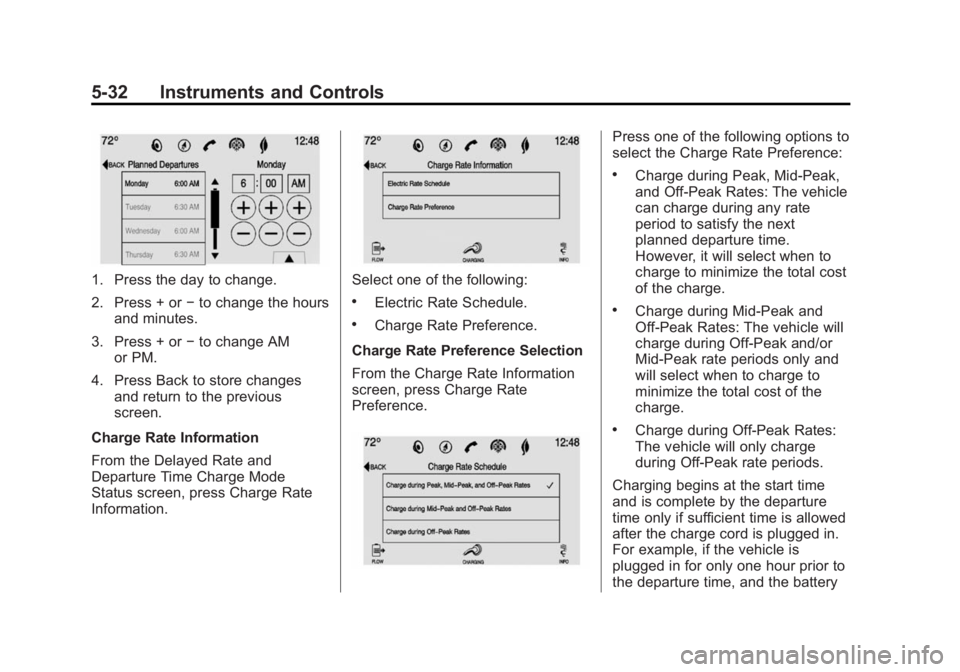
1. Press the day to change.
2. Press + or−to change the hours
and minutes.
3. Press + or −to change AM
or PM.
4. Press Back to store changes and return to the previous
screen.
Charge Rate Information
From the Delayed Rate and
Departure Time Charge Mode
Status screen, press Charge Rate
Information.Select one of the following:
.Electric Rate Schedule.
.Charge Rate Preference.
Charge Rate Preference Selection
From the Charge Rate Information
screen, press Charge Rate
Preference.
Press one of the following options to
select the Charge Rate Preference:
.Charge during Peak, Mid-Peak,
and Off-Peak Rates: The vehicle
can charge during any rate
period to satisfy the next
planned departure time.
However, it will select when to
charge to minimize the total cost
of the charge.
.Charge during Mid-Peak and
Off-Peak Rates: The vehicle will
charge during Off-Peak and/or
Mid-Peak rate periods only and
will select when to charge to
minimize the total cost of the
charge.
.Charge during Off-Peak Rates:
The vehicle will only charge
during Off-Peak rate periods.
Charging begins at the start time
and is complete by the departure
time only if sufficient time is allowed
after the charge cord is plugged in.
For example, if the vehicle is
plugged in for only one hour prior to
the departure time, and the battery
Page 145 of 408

Black plate (37,1)Cadillac ELR Owner Manual (GMNA-Localizing-U.S./Canada-6081525) -
2014 - Second Edition - 1/22/14
Instruments and Controls 5-37
The Charging Override/Interruption
pop-up will appear if any of the
following conditions occur:
.The charging settings have been
modified via OnStar through the
website or the Mobile App. For
example, the Departure Time
Tables, the Rate Tables, or the
Charge Mode were updated
using the customer website
(available in select regions).
.There was an unintended loss of
AC power during the plug-in
charge event. For example,
there was a power outage or the
charge cord was unplugged from
the wall.
.The charge process was
interrupted by the utility
company via OnStar as
authorized by the vehicle owner
(available in select regions).
See Utility Interruption of Charging
on page 9-65.
Programmable Charging
Disabled
When the Programmable Charging
system is disabled, the Default
Charge Mode Status screen and the
pop-up will display “- -:- -”for the
Charge Complete Time. The
Programmable Charging system will
be disabled if the Charge Complete
Time cannot be confidently
estimated. If the Programmable
Charging system is consistently
disabled, see your dealer for details.
Energy Information
To view the Energy Usage and
Energy Efficiency, press the
[
button on the infotainment display
and then press the INFO button at
the bottom of the touch screen.
Energy Usage
The Energy Usage screen displays
information for the total of all drive
cycles since the last time the high
voltage battery was fully charged.
This includes distance traveled in
Electric Mode, distance traveled in
Extended Range Mode, total
distance traveled, electric energy
used from the battery, total fuel
used, and average fuel economy.