trunk CADILLAC ELR 2015 User Guide
[x] Cancel search | Manufacturer: CADILLAC, Model Year: 2015, Model line: ELR, Model: CADILLAC ELR 2015Pages: 407, PDF Size: 41.85 MB
Page 47 of 407
Black plate (12,1)Cadillac ELR Owner Manual (GMNA-Localizing-U.S./Canada-7695154) -
2015 - CRC - 4/25/14
2-12 Keys, Doors, and Windows
Loss of Vehicle Electrical
Power
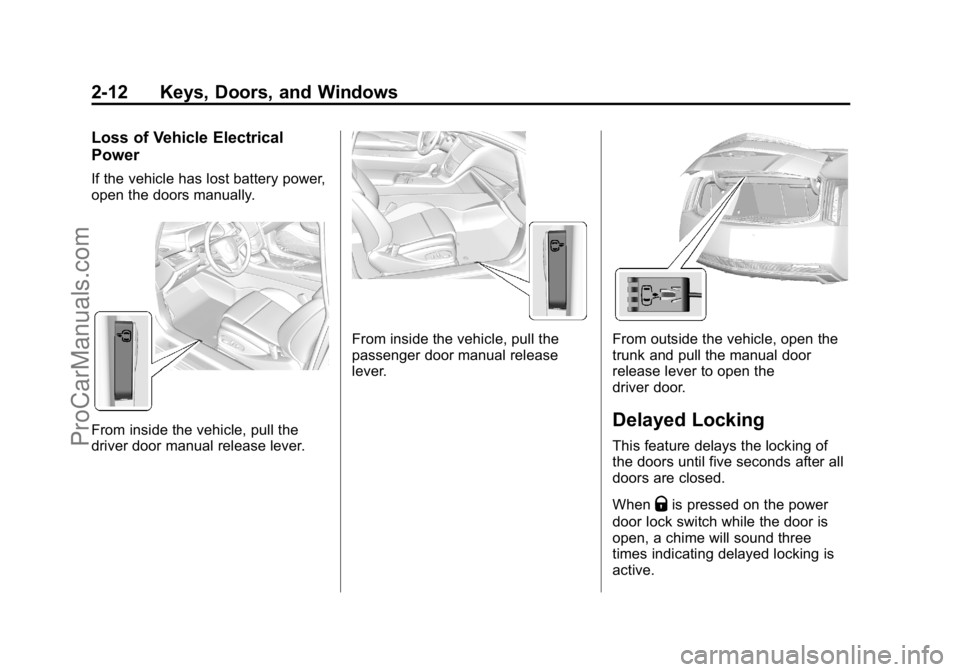
If the vehicle has lost battery power,
open the doors manually.
From inside the vehicle, pull the
driver door manual release lever.
From inside the vehicle, pull the
passenger door manual release
lever.From outside the vehicle, open the
trunk and pull the manual door
release lever to open the
driver door.
Delayed Locking
This feature delays the locking of
the doors until five seconds after all
doors are closed.
When
Qis pressed on the power
door lock switch while the door is
open, a chime will sound three
times indicating delayed locking is
active.
ProCarManuals.com
Page 48 of 407
Black plate (13,1)Cadillac ELR Owner Manual (GMNA-Localizing-U.S./Canada-7695154) -
2015 - CRC - 4/25/14
Keys, Doors, and Windows 2-13
The doors will lock automatically
five seconds after all doors are
closed. If a door is reopened before
that time, the five-second timer will
reset when all doors are closed
again.
Press
Qon the door lock switch or
press
Qon the RKE transmitter to
lock the doors immediately.
This feature can also be
programmed. See Vehicle
Personalization on page 5-52.
Automatic Door Locks
The doors will lock automatically
when all doors are closed, the
ignition is on, and the shift lever is
moved out of P (Park).
To unlock the doors:
.PressKon a door.
.Shift the vehicle into P (Park). Automatic door unlocking can be
programmed through the Driver
Information Center (DIC). See
Vehicle Personalization on
page 5-52.
Lockout Protection
If the vehicle is in ACC/
ACCESSORY or ON/RUN/START
and the power door lock switch is
pressed with the driver door open,
all the doors will lock and only the
driver door will unlock.
Lockout Protection can be manually
overridden with the driver door open
by pressing and holding
Qon the
power door lock switch.
If Unlocked Door Anti-Lockout is
turned on and the vehicle is off, the
driver door is open, and locking is
requested, all the doors will lock and
only the driver door will unlock. The
Unlocked Door Anti-Lockout feature
can be turned on or off using the
vehicle personalization menus. See
Vehicle Personalization on
page 5-52.
Doors
Trunk
{Warning
Exhaust gases can enter the
vehicle if it is driven with the
liftgate or trunk/hatch open,
or with any objects that pass
through the seal between the
body and the trunk/hatch or
liftgate. Engine exhaust contains
carbon monoxide (CO) which
cannot be seen or smelled. It can
cause unconsciousness and even
death.
If the vehicle must be driven with
the liftgate or trunk/hatch open:
.Close all of the windows.
.Fully open the air outlets on
or under the instrument
panel.
(Continued)
ProCarManuals.com
Page 49 of 407
Black plate (14,1)Cadillac ELR Owner Manual (GMNA-Localizing-U.S./Canada-7695154) -
2015 - CRC - 4/25/14
2-14 Keys, Doors, and Windows
Warning (Continued)
.Adjust the climate control
system to a setting that
brings in only outside air and
set the fan speed to the
highest setting. See“Climate
Control Systems” in the
Index.
.If the vehicle is equipped with
a power liftgate, disable the
power liftgate function.
See Engine Exhaust on
page 9-27.
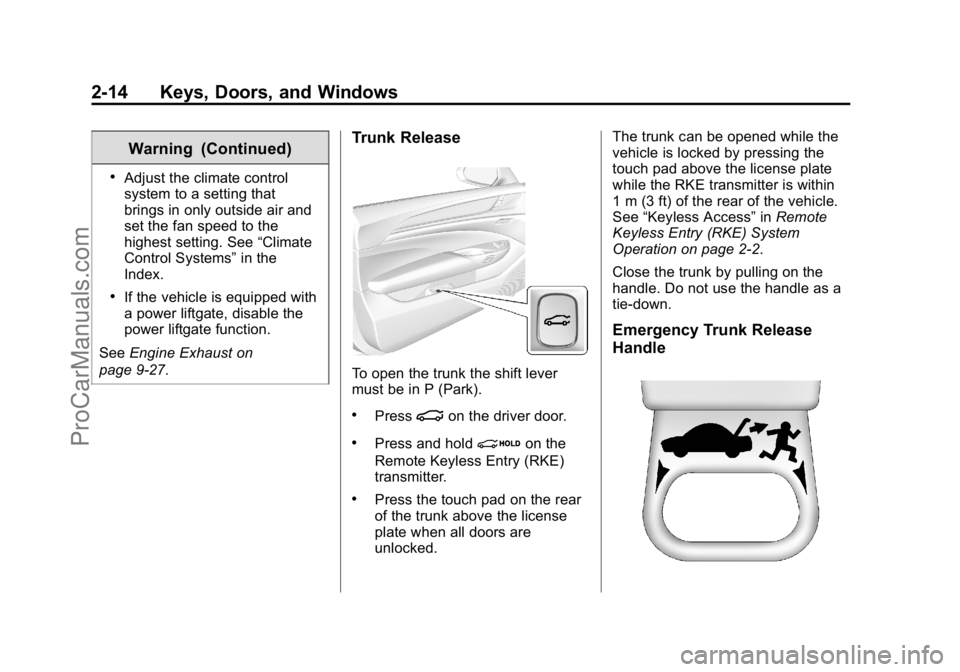
Trunk Release
To open the trunk the shift lever
must be in P (Park).
.Press|on the driver door.
.Press and holdion the
Remote Keyless Entry (RKE)
transmitter.
.Press the touch pad on the rear
of the trunk above the license
plate when all doors are
unlocked. The trunk can be opened while the
vehicle is locked by pressing the
touch pad above the license plate
while the RKE transmitter is within
1 m (3 ft) of the rear of the vehicle.
See
“Keyless Access” inRemote
Keyless Entry (RKE) System
Operation on page 2-2.
Close the trunk by pulling on the
handle. Do not use the handle as a
tie-down.
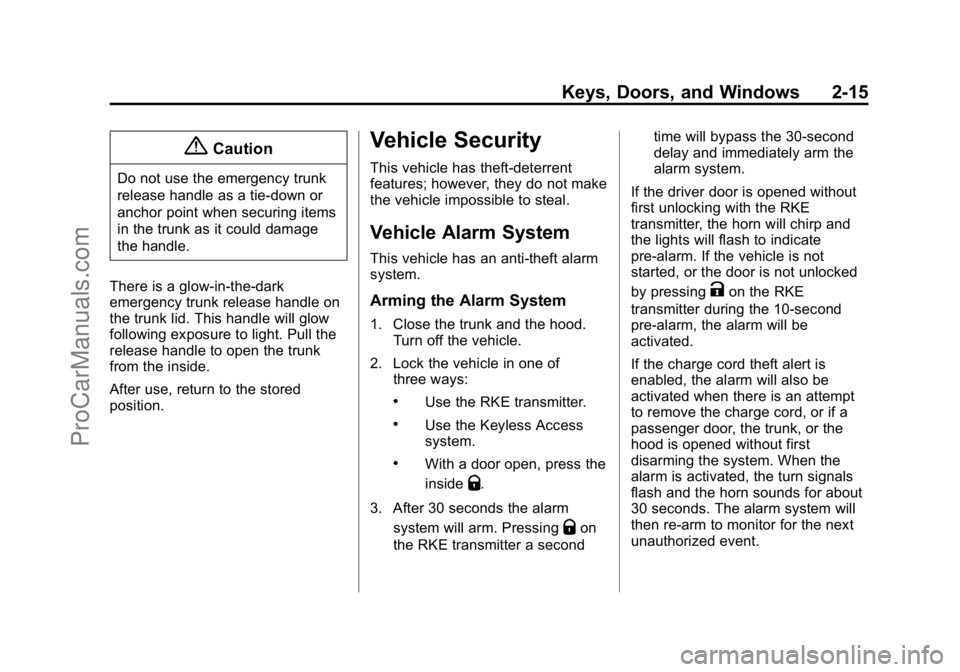
Emergency Trunk Release
Handle
ProCarManuals.com
Page 50 of 407
Black plate (15,1)Cadillac ELR Owner Manual (GMNA-Localizing-U.S./Canada-7695154) -
2015 - CRC - 4/25/14
Keys, Doors, and Windows 2-15
{Caution
Do not use the emergency trunk
release handle as a tie-down or
anchor point when securing items
in the trunk as it could damage
the handle.
There is a glow-in-the-dark
emergency trunk release handle on
the trunk lid. This handle will glow
following exposure to light. Pull the
release handle to open the trunk
from the inside.
After use, return to the stored
position.
Vehicle Security
This vehicle has theft-deterrent
features; however, they do not make
the vehicle impossible to steal.
Vehicle Alarm System
This vehicle has an anti-theft alarm
system.
Arming the Alarm System
1. Close the trunk and the hood. Turn off the vehicle.
2. Lock the vehicle in one of three ways:
.Use the RKE transmitter.
.Use the Keyless Access
system.
.With a door open, press the
inside
Q.
3. After 30 seconds the alarm system will arm. Pressing
Qon
the RKE transmitter a second time will bypass the 30-second
delay and immediately arm the
alarm system.
If the driver door is opened without
first unlocking with the RKE
transmitter, the horn will chirp and
the lights will flash to indicate
pre-alarm. If the vehicle is not
started, or the door is not unlocked
by pressing
Kon the RKE
transmitter during the 10-second
pre-alarm, the alarm will be
activated.
If the charge cord theft alert is
enabled, the alarm will also be
activated when there is an attempt
to remove the charge cord, or if a
passenger door, the trunk, or the
hood is opened without first
disarming the system. When the
alarm is activated, the turn signals
flash and the horn sounds for about
30 seconds. The alarm system will
then re-arm to monitor for the next
unauthorized event.
ProCarManuals.com
Page 152 of 407
Black plate (43,1)Cadillac ELR Owner Manual (GMNA-Localizing-U.S./Canada-7695154) -
2015 - CRC - 4/25/14
Instruments and Controls 5-43
FRONT RADAR BLOCKED,
CLEAN FRONT VEHICLE
This message can occur under the
following conditions:
.The radar is not clean. Keep the
radar sensors free of mud, dirt,
snow, ice, and slush. Clean the
entire front and/or rear of the
vehicle. For cleaning
instructions, seeExterior Care
on page 10-79.
.Heavy rain or snow is interfering
with the radar object detection or
camera performance.
CRUISE SET TO XXX
This message displays when the
cruise control speed is set. See
Cruise Control on page 9-37.
NO CRUISE BRAKING GAS
PEDAL APPLIED
This message displays when
Adaptive Cruise Control (ACC) is
active and the driver is pressing the gas pedal. When this occurs, ACC
will not brake. See
Adaptive Cruise
Control on page 9-39.
SERVICE ADAPTIVE CRUISE
CONTROL
If this message displays, take the
vehicle to your dealer to repair the
system. Adaptive Cruise Control
(ACC), Forward Collision Alert
(FCA), and/or the Active Emergency
Braking System may not work. Do
not use these systems until the
vehicle has been repaired.
SHIFT TO PARK BEFORE
EXITING
This message may display if
Adaptive Cruise Control (ACC) is
engaged holding the vehicle at a
stop, and the driver attempts to exit
the vehicle. Put the vehicle in
P (Park) before exiting.
Door Ajar Messages
DOOR OPEN
A door open symbol will be
displayed on the DIC showing which
door is open. If the vehicle has been
shifted out of P (Park), a DOOR
OPEN message will also be
displayed. The DOOR OPEN
message may also be displayed if
the vehicle starts to move. Close the
door completely.
HOOD OPEN
This message will display along with
a hood open symbol when the hood
is open. Close the hood completely.
TRUNK OPEN
This message will display along with
a symbol when the trunk is open.
Close the trunk completely.
ProCarManuals.com
Page 161 of 407
Black plate (52,1)Cadillac ELR Owner Manual (GMNA-Localizing-U.S./Canada-7695154) -
2015 - CRC - 4/25/14
5-52 Instruments and Controls
Vehicle
Personalization
Use the audio system controls to
access the personalization menus
for customizing vehicle features.
The following are all possible
personalization features. Depending
on the vehicle, some may not be
available.
Infotainment System Audio
System Controls
To access the personalization
menus:
1. Press SETTINGS on the HomePage on the infotainment system
display.
2. Press the desired feature to display a list of available
options.
3. Press to select the desired option setting.
4. Press the
[Back screen button
to return to the previous menu. Personalization Menus
The following list of menu items may
be available:
.Time and Date
.Language (Language)
.Valet Mode
.Radio
.Vehicle
.Bluetooth
.Voice
.Display
.Rear Camera
.Return to Factory Settings
.Software Information
Each menu is detailed in the
following information.
Time and Date
Manually set the time and date. See
Clock on page 5-5.
Language (Language)
Select Language, then select from
the available language(s).
Valet Mode
This will lock the infotainment
system, infotainment controls,
storage area behind the radio, glove
box, and trunk.
To turn Valet Mode on and off, enter
a four-digit code on the keypad.
Press Enter to go to the
confirmation screen. Re-enter the
four-digit code. Press LOCK to lock
the system. Enter the four-digit code
to unlock the system. Press the
Back screen button to go back to
the previous menu.
Radio
Press to display the Radio menu
and the following may display:
.Manage Favorites
.Number of Favorites Shown
.Auto Volume
ProCarManuals.com
Page 248 of 407

Black plate (59,1)Cadillac ELR Owner Manual (GMNA-Localizing-U.S./Canada-7695154) -
2015 - CRC - 4/25/14
Driving and Operating 9-59
In cold weather conditions, ice
may form around the charge port
door. Remove ice from the area
before attempting to open or
close the charge port door.
3. Open the rear trunk, lift the leftload support floor cover, and
remove the charge cord. Pull up
on the charge cord handle to
release. The vehicle plug is
stored as shown. 4. Plug the charge cord into the
electrical outlet. See Electrical
Requirements for Battery
Charging on page 9-66. Verify
the charge cord status. See the
charge cord user guide. See
Charge Cord on page 9-64.
Select the appropriate charge
level using the Select Charge
Level Preference screen on the
center stack. See “Charge Level
Selection” underProgrammable
Charging on page 5-29.
5. Plug in the vehicle plug of the charge cord into the charge port
on the vehicle. Verify that the
charging status indicator
illuminates on top of the
instrument panel and a horn
chirp occurs. See Charging
Status Feedback on page 9-60.
Charge Cord Theft Alert
This vehicle has a Charge Cord
Theft Alert. To enable this feature,
see "Charge Cord Theft Alert" in
Vehicle Personalization on
page 5-52. The system can be
armed and disarmed using the door
lock function on the RKE
transmitter.
End Charge
1. If armed, unlock the vehicle with the RKE transmitter to disarm
the charge cord theft alert.
ProCarManuals.com
Page 253 of 407

Black plate (64,1)Cadillac ELR Owner Manual (GMNA-Localizing-U.S./Canada-7695154) -
2015 - CRC - 4/25/14
9-64 Driving and Operating
Outside Rearview Mirror
(OSRVM) Charging Status
Indicator
The outside rearview mirrors are
equipped with green indicator lights
used to indicate high voltage battery
system charging status. The
OSRVM CSI indicates the following:
.Solid green - Battery is charging
and is less than half complete.
.Fast flashing - Battery is
charging. Battery is more than
half complete.
.Slow flashing - Battery is
charging. Battery is nearly
complete.
.Off - Not charging.
Charge Cord
SeeRadio Frequency Statement on
page 13-12.
A portable charge cord used to
charge the vehicle high voltage
battery is stored under the load
support floor covering in the trunk.
Important Information About
Portable Electric Vehicle Charging
.Charging an electric vehicle can
stress a building’ s electrical
system more than a typical
household appliance.
.Before you plug in to any
electrical outlet, have a qualified
electrician inspect and verify the
electrical system (electrical
outlet, wiring, junctions, and
protection devices) for
heavy-duty service at a 12 amp
continuous load.
.Electrical outlets may wear out
with normal usage or be
damaged over time, making
them unsuitable for electric
vehicle charging.
.Check the electrical outlet/plug
while charging and discontinue
use if the electrical outlet/plug is
hot, then have the electrical
outlet serviced by a qualified
electrician.
.When outdoors, plug into an
electrical outlet that is
weather-proof while in use.
.Mount the charging cord to
reduce strain on the electrical
outlet/plug.
ProCarManuals.com
Page 259 of 407
Black plate (70,1)Cadillac ELR Owner Manual (GMNA-Localizing-U.S./Canada-7695154) -
2015 - CRC - 4/25/14
9-70 Driving and Operating
Do not top off or overfill the tank and
wait a few seconds before removing
the nozzle. Clean fuel from painted
surfaces as soon as possible. See
Exterior Care on page 10-79.
{Warning
If a fire starts while you are
refueling, do not remove the
nozzle. Shut off the flow of fuel by
shutting off the pump or by
notifying the station attendant.
Leave the area immediately.
{Caution
If a new fuel cap is needed, be
sure to get the right type of cap
from your dealer. The wrong type
of fuel cap may not fit properly,
may cause the malfunction
indicator lamp to light, and could
damage the fuel tank and(Continued)
Caution (Continued)
emissions system. See
Malfunction Indicator Lamp on
page 5-17.
Filling a Portable Fuel
Container
{Warning
Filling a portable fuel container
while it is in the vehicle can cause
fuel vapors that can ignite either
by static electricity or other
means. You or others could be
badly burned and the vehicle
could be damaged. Always:
.Use approved fuel
containers.
.Remove the container from
the vehicle, trunk, or pickup
bed before filling.(Continued)
Warning (Continued)
.Place the container on the
ground.
.Place the nozzle inside the fill
opening of the container
before dispensing fuel, and
keep it in contact with the fill
opening until filling is
complete.
.Fill the container no more
than 95% full to allow for
expansion.
.Do not smoke, light matches,
or use lighters while
pumping fuel.
.Avoid using cell phones or
other electronic devices.
ProCarManuals.com
Page 285 of 407
Black plate (24,1)Cadillac ELR Owner Manual (GMNA-Localizing-U.S./Canada-7695154) -
2015 - CRC - 4/25/14
10-24 Vehicle Care
12-Volt Battery
The 12-volt battery is in the trunk,
under the center compartment
cover. Refer to the replacement
number shown on the original
battery label when a new 12-volt
battery is needed. The vehicle has
an Absorbed Glass Mat (AGM)
12-volt battery. Installation of a
standard 12-volt battery will result in
reduced 12-volt battery life.
When using a 12-volt battery
charger on the 12-volt AGM battery,
some chargers have an AGM
battery setting on the charger.
If available, use the AGM setting on
the charger, to limit charge voltage
to 14.8 volts. Follow the charger
manufacturer's instructions.{Warning
Battery posts, terminals, and
related accessories contain lead
and lead compounds, chemicals
known to the State of California to
cause cancer and reproductive
harm. Wash hands after handling.
Vehicle Storage
{Warning
12‐volt batteries have acid that
can burn you and gas that can
explode. You can be badly hurt if
you are not careful. SeeJump
Starting on page 10-69 for tips on
working around a battery without
getting hurt. Up to four weeks
.Plug in the high voltage battery
charge cord if temperatures will
exceed 35°C (95°F) and keep
the 12-volt battery cables
connected.
Four weeks to 12 months
.Discharge the high voltage
battery until two or three bars
remain on the battery range
indicator (Battery symbol) on the
instrument cluster.
.Do not plug in the high voltage
battery charge cord.
.Remove the black negative (−)
cable from the 12-volt battery
and attach a trickle charger to
the battery terminals or keep the
12-volt battery cables connected
and trickle charge from the
underhood remote positive (+)
and negative (−) terminals. See
Jump Starting on page 10-69 for
the location of these terminals.
ProCarManuals.com