mirror CADILLAC ELR 2015 Owner's Manual
[x] Cancel search | Manufacturer: CADILLAC, Model Year: 2015, Model line: ELR, Model: CADILLAC ELR 2015Pages: 407, PDF Size: 41.85 MB
Page 244 of 407

Black plate (55,1)Cadillac ELR Owner Manual (GMNA-Localizing-U.S./Canada-7695154) -
2015 - CRC - 4/25/14
Driving and Operating 9-55
Side Blind Zone
Alert (SBZA)
If equipped, the Side Blind Zone
Alert system is a lane-changing aid
that assists drivers with avoiding
crashes that occur with vehicles in
the side blind zone (or spot) areas.
The SBZA warning display will light
up in the corresponding outside side
mirror and will flash if the turn signal
is on.
{Warning
SBZA does not alert the driver to
vehicles rapidly approaching
outside of the side blind zones,
pedestrians, bicyclists,
or animals. It may not provide
alerts when changing lanes under
all driving conditions. Failure to
use proper care when changing
lanes may result in injury, death,
or vehicle damage. Before
making a lane change, always(Continued)
Warning (Continued)
check mirrors, glance over your
shoulder, and use the turn
signals.
SBZA Detection Zones
The SBZA sensor covers a zone of
approximately one lane over from
both sides of the vehicle, or 3.5 m
(11 ft). The height of the zone is
approximately between 0.5 m (1.5 ft)
and 2 m (6 ft) off the ground. This zone starts at approximately the
middle of the vehicle and goes back
5 m (16 ft).
How the System Works
The SBZA symbol lights up in the
side mirrors when the system
detects a vehicle in the next lane
over that is in the side blind zone.
This indicates it may be unsafe to
change lanes. Before making a lane
change, check the SBZA display,
check mirrors, glance over your
shoulder, and use the turn signals.
Left Side Mirror
DisplayRight Side Mirror Display
When the vehicle is started, both
outside mirror SBZA displays will
briefly come on to indicate the
system is operating. When the
vehicle is moving forward, the
ProCarManuals.com
Page 245 of 407

Black plate (56,1)Cadillac ELR Owner Manual (GMNA-Localizing-U.S./Canada-7695154) -
2015 - CRC - 4/25/14
9-56 Driving and Operating
left- or right-side mirror display will
light up if a vehicle is detected in
that blind zone. If the turn signal is
activated in the same direction of a
detected vehicle, this display will
flash as an extra warning not to
change lanes.
SBZA can be disabled through
vehicle personalization. See
“Collision/Detection Systems”under
Vehicle Personalization on
page 5-52. If SBZA is disabled by
the driver, the SBZA mirror displays
will not light up.
When the System Does Not
Seem to Work Properly
SBZA may alert to objects attached
to the vehicle, such as a bicycle,
or object extending out to either side
of the vehicle. This is normal system
operation; the vehicle does not need
service. SBZA may not always alert the
driver to vehicles in the side blind
zone, especially in wet conditions.
The system does not need to be
serviced. The system may light up
due to guardrails, signs, trees,
shrubs, and other non-moving
objects. This is normal system
operation; the vehicle does not need
service.
SBZA may not operate when the
SBZA sensors in the left or right
corners of the rear bumper are
covered with mud, dirt, snow, ice,
or slush, or in heavy rainstorms. For
cleaning instructions, see "Washing
the Vehicle" under
Exterior Care on
page 10-79. If the DIC still displays
the system unavailable message
after cleaning both sides of the
vehicle toward the rear corners of
the vehicle, see your dealer.
If the SBZA displays do not light up
when vehicles are in the blind zone
and the system is clean, the system
may need service. Take the vehicle
to your dealer. When SBZA is disabled for any
reason other than the driver turning
it off, the Side Blind Zone Alert On
option will not be available on the
personalization menu.
Radio Frequency Information
See
Radio Frequency Statement on
page 13-12.
Lane Departure
Warning (LDW)
LDW may help avoid crashes due to
unintentional lane departures. It may
provide an alert if the vehicle is
crossing a lane marker without
using a turn signal in that direction.
LDW uses a camera sensor to
detect the lane markings at speeds
of 56 km/h (35 mph) or greater.
ProCarManuals.com
Page 246 of 407

Black plate (57,1)Cadillac ELR Owner Manual (GMNA-Localizing-U.S./Canada-7695154) -
2015 - CRC - 4/25/14
Driving and Operating 9-57
{Warning
The LDW system does not steer
the vehicle. The LDW system
may not:
.Provide enough time to avoid
a crash.
.Detect lane markings under
poor weather or visibility
conditions. This can occur if
the windshield or headlamps
are blocked by dirt, snow,
or ice; if they are not in
proper condition; or if the sun
shines directly into the
camera.
.Detect road edges.
.Detect lanes on winding or
hilly roads.
If LDW only detects lane
markings on one side of the road,
it will only warn you when
departing the lane on the side
where it has detected a lane (Continued)
Warning (Continued)
marking. Always keep your
attention on the road and
maintain proper vehicle position
within the lane, or vehicle
damage, injury, or death could
occur. Always keep the
windshield, headlamps, and
camera sensors clean and in
good repair. Do not use LDW in
bad weather conditions.
How the System Works
The LDW camera sensor is on the
windshield ahead of the rearview
mirror.
To turn LDW on and off, press
@on
the center stack. The control
indicator will light when LDW is on.
When LDW is on,@is green if
LDW is available to warn of a lane
departure. If the vehicle crosses a
detected lane marking without using
the turn signal in that direction,
@
changes to amber and flashes.
Additionally, there will be three
beeps, or the driver seat will pulse
three times, on the right or left,
depending on the lane departure
direction.
ProCarManuals.com
Page 249 of 407

Black plate (60,1)Cadillac ELR Owner Manual (GMNA-Localizing-U.S./Canada-7695154) -
2015 - CRC - 4/25/14
9-60 Driving and Operating
2. Disconnect the vehicle plug ofthe charge cord from the vehicle.
3. Close the charge port door by pressing firmly on the rearward
edge of the door surface.
4. Unplug the charge cord from the electrical outlet.
5. Place the charge cord into the storage compartment.
Delayed Charging
Override
To temporarily override a delayed
charge event, unplug the charge
cord from the charge port and then
plug it back in within five seconds.
A single horn chirp will sound and
charging will begin immediately.
To cancel a temporary override,
unplug the charge cord, wait for
10 seconds, and then plug the
charge cord back in. A double horn
chirp will sound and charging will be
delayed.
See Programmable Charging on
page 5-29 for advanced charge
scheduling options.
Charging Status
Feedback
The vehicle has two ways of
monitoring the charging status of
the high voltage battery. The
Instrument Panel Charging Status
Indicator (CSI) is at the center of the
instrument panel near the
windshield. The LEDs in the Outside
Rearview Mirrors (OSRVM) are also
used to monitor charging status.
Some local laws restricting the use
of colored lights on public roads
may apply to the outside rearview
mirrors charging status feedback. To
turn the OSRVM charge indicator
off, see “Charge Status Feedback”
in Vehicle Personalization on
page 5-52.
ProCarManuals.com
Page 253 of 407

Black plate (64,1)Cadillac ELR Owner Manual (GMNA-Localizing-U.S./Canada-7695154) -
2015 - CRC - 4/25/14
9-64 Driving and Operating
Outside Rearview Mirror
(OSRVM) Charging Status
Indicator
The outside rearview mirrors are
equipped with green indicator lights
used to indicate high voltage battery
system charging status. The
OSRVM CSI indicates the following:
.Solid green - Battery is charging
and is less than half complete.
.Fast flashing - Battery is
charging. Battery is more than
half complete.
.Slow flashing - Battery is
charging. Battery is nearly
complete.
.Off - Not charging.
Charge Cord
SeeRadio Frequency Statement on
page 13-12.
A portable charge cord used to
charge the vehicle high voltage
battery is stored under the load
support floor covering in the trunk.
Important Information About
Portable Electric Vehicle Charging
.Charging an electric vehicle can
stress a building’ s electrical
system more than a typical
household appliance.
.Before you plug in to any
electrical outlet, have a qualified
electrician inspect and verify the
electrical system (electrical
outlet, wiring, junctions, and
protection devices) for
heavy-duty service at a 12 amp
continuous load.
.Electrical outlets may wear out
with normal usage or be
damaged over time, making
them unsuitable for electric
vehicle charging.
.Check the electrical outlet/plug
while charging and discontinue
use if the electrical outlet/plug is
hot, then have the electrical
outlet serviced by a qualified
electrician.
.When outdoors, plug into an
electrical outlet that is
weather-proof while in use.
.Mount the charging cord to
reduce strain on the electrical
outlet/plug.
ProCarManuals.com
Page 292 of 407

Black plate (31,1)Cadillac ELR Owner Manual (GMNA-Localizing-U.S./Canada-7695154) -
2015 - CRC - 4/25/14
Vehicle Care 10-31
Mini
Fuses Amps Usage
4 15A Ignition Coils/ Injectors
5 10A Column Lock
6a –Empty
6b –Empty
7 –Empty
8 –Empty
9 7.5A Heated Mirrors
10 5A Air Conditioning Control Module
11 7.5A Traction Power Inverter Module –
Battery
12 –Not Used
13 10A Cabin Heater Pump and Valve
14 –Not Used Mini
Fuses Amps Usage
15 15A Traction Power Inverter Module
and Transmission
Control Module –
Battery
17 5A Engine Control Module–Battery
22 10A Left High-Beam Headlamp
24 –Empty
25 –Empty
26 –Not Used
31 5A Adaptive Cruise Control/Auto
Headlamp
32 5A Vehicle Integration
Control Module
33 10A Run/Crank for Heated Steering
Wheel Mini
Fuses Amps Usage
34 10A Vehicle Integration
Control Module –
Battery
35 –Not Used
36 10A Power Electronics Coolant Pump
37 5A Cabin Heater Control Module
38 10A Rechargeable Energy Storage
System (High
Voltage Battery)
Coolant Pump
39 10A Rechargeable Energy Storage
System (High
Voltage Battery)
Control Module
40 10A Front Windshield Washer
ProCarManuals.com
Page 293 of 407
Black plate (32,1)Cadillac ELR Owner Manual (GMNA-Localizing-U.S./Canada-7695154) -
2015 - CRC - 4/25/14
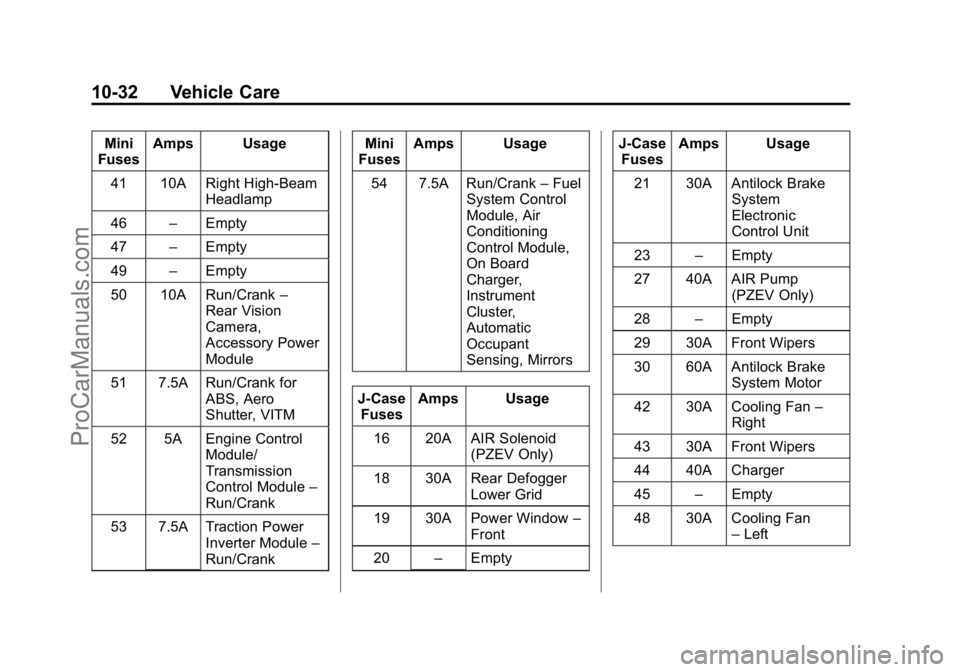
10-32 Vehicle Care
Mini
Fuses Amps Usage
41 10A Right High-Beam Headlamp
46 –Empty
47 –Empty
49 –Empty
50 10A Run/Crank –
Rear Vision
Camera,
Accessory Power
Module
51 7.5A Run/Crank for ABS, Aero
Shutter, VITM
52 5A Engine Control Module/
Transmission
Control Module –
Run/Crank
53 7.5A Traction Power Inverter Module –
Run/Crank Mini
Fuses Amps Usage
54 7.5A Run/Crank –Fuel
System Control
Module, Air
Conditioning
Control Module,
On Board
Charger,
Instrument
Cluster,
Automatic
Occupant
Sensing, Mirrors
J-Case Fuses Amps Usage
16 20A AIR Solenoid (PZEV Only)
18 30A Rear Defogger Lower Grid
19 30A Power Window –
Front
20 –Empty J-Case
Fuses Amps Usage
21 30A Antilock Brake System
Electronic
Control Unit
23 –Empty
27 40A AIR Pump (PZEV Only)
28 –Empty
29 30A Front Wipers
30 60A Antilock Brake System Motor
42 30A Cooling Fan –
Right
43 30A Front Wipers
44 40A Charger
45 –Empty
48 30A Cooling Fan –Left
ProCarManuals.com
Page 294 of 407

Black plate (33,1)Cadillac ELR Owner Manual (GMNA-Localizing-U.S./Canada-7695154) -
2015 - CRC - 4/25/14
Vehicle Care 10-33
Mini Relays Usage3 Powertrain
4 Heated Mirrors
7 Empty
9 AIR Pump (PZEV Only)
11 Empty
12 Empty
13 Empty
14 Run/Crank
Micro
Relays Usage
1 Empty
2 AIR Solenoid (PZEV Only)
6 Empty
8 Empty
10 Empty Ultra Micro
Relays Usage
5 Empty
Instrument Panel Fuse
Block (Left Side)
The left instrument panel fuse block
is on the left side end of the
instrument panel, behind the end cap. To access the fuses, insert a
plastic tool between the end panel
and the instrument panel, and
carefully release the end cap
retaining clips. When all clips are
released, remove the panel.
To reinstall the door, insert the
forward edge hook feature, and
press around the edges of the end
cap to reengage all of the clips.
ProCarManuals.com
Page 301 of 407

Black plate (40,1)Cadillac ELR Owner Manual (GMNA-Localizing-U.S./Canada-7695154) -
2015 - CRC - 4/25/14
10-40 Vehicle Care
Fuses Amps UsageF1 –Empty
F2 15A Radio
F3 10A Pedestrian Protection
F4 10A CDC
F5 10A Memory Seat Module
F6 –Empty Fuses Amps Usage
F7 10A Mirror/ Window/Seat
Switch
F8 20A Passive Entry/Passive
Start 2
F9 15A Heated Seat 2
F10 –Empty
F11 –Empty Fuses Amps Usage
F12 30A Driver Power Seat
F13 30A Passenger Power Seat
F14 –Empty
F15 –Empty
F16 –Empty
F17 –Empty
F18 –Empty
Relays Usage R1 Empty
R2 Empty
R3 Empty
R4 Empty
Diodes Usage DIODE Empty
ProCarManuals.com
Page 398 of 407

Black plate (3,1)Cadillac ELR Owner Manual (GMNA-Localizing-U.S./Canada-7695154) -
2015 - CRC - 4/25/14
INDEX i-3
Convex Mirrors . . . . . . . . . . . . . . . . 2-17
CoolantEngine . . . . . . . . . . . . . . . . . . . . . . 10-16
Engine TemperatureWarning Light . . . . . . . . . . . . . . . 5-23
Cooling System . . . . . . . . 10-14–10-16 Engine Messages . . . . . . . . . . . . 5-44
Courtesy Lamps . . . . . . . . . . . . . . . . 6-6
Courtesy Transportation Program . . . . . . . . . . . . . . . . . . . . . . 13-8
Cruise Control . . . . . . . . . . . . . . . . . 9-37
Light . . . . . . . . . . . . . . . . . . . . . . . . . . 5-26
Messages . . . . . . . . . . . . . . . . . . . . 5-42
Cruise Control, Active . . . . . . . . . 9-39
Cupholders . . . . . . . . . . . . . . . . . . . . . 4-2
Customer Assistance . . . . . . . . . . 13-4 Offices . . . . . . . . . . . . . . . . . . . . . . . . 13-3
Text Telephone (TTY)Users . . . . . . . . . . . . . . . . . . . . . . . 13-4
Customer Information Service Publications
Ordering Information . . . . . . .13-11
Customer Satisfaction Procedure . . . . . . . . . . . . . . . . . . . . 13-1D
Damage Repair, Collision . . . . . . 13-9
Danger, Warnings, andCautions . . . . . . . . . . . . . . . . . . . . . . . . iv
Data Recorders, Event . . . . . . . 13-14
Daytime Running Lamps (DRL) . . . . . . . . . . . . . . . . . . 6-4
Defensive Driving . . . . . . . . . . . . . . . 9-5
Delayed Charging Override . . . . 9-60
Delayed Locking . . . . . . . . . . . . . . . 2-12
Display Center Stack . . . . . . . . . . . . . . . . . 5-27
Distracted Driving . . . . . . . . . . . . . . . 9-4
Dome Lamps . . . . . . . . . . . . . . . . . . . 6-6
Door Ajar Light . . . . . . . . . . . . . . . . . . . . . 5-27
Ajar Messages . . . . . . . . . . . . . . . 5-43
Delayed Locking . . . . . . . . . . . . . . 2-12
Locks . . . . . . . . . . . . . . . . . . . . . . . . . 2-10
Power Locks . . . . . . . . . . . . . . . . . . 2-11
Drive Belt Routing, Engine . . . . . 12-4
Drive Mode Messages . . . . . . . . . 5-44
Drive Unit Electric . . . . . . . . . . . . . . . . . . . . . . . 9-28 Driver Assistance Systems . . . . 9-47
Driver Efficiency Gauge . . . . . . . 5-13
Driver Information
Center (DIC) . . . . . . . . . . . . . . . . . 5-38
Driver Mode Control . . . . . . . . . . . 9-35
Driver Selected Operating Modes . . . . . . . . . . . . . . . . . . . . . . . 9-22
Driving Assistance Systems . . . . . . . . . . 9-50
Defensive . . . . . . . . . . . . . . . . . . . . . . 9-5
Drunk . . . . . . . . . . . . . . . . . . . . . . . . . . 9-5
Hill and Mountain Roads . . . . . . . 9-9
If the Vehicle is Stuck . . . . . . . . . 9-12
Loss of Control . . . . . . . . . . . . . . . . 9-8
Off-Road Recovery . . . . . . . . . . . . 9-7
Vehicle Load Limits . . . . . . . . . . . 9-12
Wet Roads . . . . . . . . . . . . . . . . . . . . 9-8
Winter . . . . . . . . . . . . . . . . . . . . . . . . 9-10
Driving for Better Energy Efficiency . . . . . . . 1-26, 9-2
Driving Mode
Competitive . . . . . . . . . . . . . . . . . . . 9-36
Dual Automatic Climate Control System . . . . . . . . . . . . . . . . 8-1
ProCarManuals.com