parking brake CADILLAC ELR 2015 Owner's Manual
[x] Cancel search | Manufacturer: CADILLAC, Model Year: 2015, Model line: ELR, Model: CADILLAC ELR 2015Pages: 407, PDF Size: 41.85 MB
Page 233 of 407

Black plate (44,1)Cadillac ELR Owner Manual (GMNA-Localizing-U.S./Canada-7695154) -
2015 - CRC - 4/25/14
9-44 Driving and Operating
Warning (Continued)
vehicle it has never detected
moving. This can occur in
stop-and-go traffic or when a
vehicle suddenly appears due to
a vehicle ahead changing lanes.
Your vehicle may not stop and
could cause a crash. Use caution
when using ACC. Your complete
attention is always required while
driving and you should be ready
to take action and apply the
brakes.
ACC Automatically Disengages
ACC may automatically disengage
and the driver will need to manually
apply the brakes to slow the
vehicle when:
.The sensors are blocked.
.The Traction Control System
(TCS) or electronic stability
control system has activated or
been disabled.
.No traffic or other objects are
being detected.
.There is a fault in the system.
.Regen on Demand is engaged.
A message indicating that the cruise
is disengaging will appear on the
DIC and the ACC active symbol will
not be displayed when ACC is no
longer active.
Notification to Resume ACC
ACC will maintain a follow gap
behind a detected vehicle and slow
your vehicle to a stop behind that
vehicle.
If the stopped vehicle ahead has
driven away and ACC has not been
resumed, the vehicle ahead symbol
will flash as a reminder to check
traffic ahead before proceeding. In
addition, the left and right sides of
the Safety Alert Seat will pulse three
times, or three beeps will sound.
See “Alert Type” and“Go Notifier”
under Collision/Detection systems in
Vehicle Personalization on
page 5-52. When the vehicle ahead drives
away, press +RES or the
accelerator pedal to resume ACC.
If stopped for more than
two minutes or if the driver door is
opened and the safety belt is
unbuckled, the ACC automatically
applies the electric parking brake to
hold the vehicle. The electric
parking brake status light will turn
on. See
Electric Parking Brake on
page 9-30. To resume ACC and
release the electric parking brake,
press the accelerator pedal.
A DIC warning message may
display indicating to shift to P (Park)
before exiting the vehicle. See
Vehicle Messages on page 5-41.
{Warning
If ACC has stopped the vehicle,
and if ACC is disengaged, turned
off, or canceled, the vehicle will
no longer be held at a stop. The
vehicle can move. When ACC is
(Continued)
ProCarManuals.com
Page 236 of 407

Black plate (47,1)Cadillac ELR Owner Manual (GMNA-Localizing-U.S./Canada-7695154) -
2015 - CRC - 4/25/14
Driving and Operating 9-47
.PressJ.
.Press a Regen on Demand
paddle.
Erasing Speed Memory
The cruise control set speed is
erased from memory if
Jis
pressed or if the ignition is
turned off.
Cleaning the Sensing System
The radar sensor on the front of the
vehicle can become blocked by
snow, ice, dirt, or mud. These areas
need to be cleaned for ACC to
operate properly.
For cleaning instructions, see
“Washing the Vehicle” under
Exterior Care on page 10-79.
System operation may also be
limited under snow, heavy rain,
or road spray conditions.
Driver Assistance
Systems
This vehicle may have features that
work together to help avoid crashes
or reduce crash damage while
driving, backing, and parking. Read
this entire section before using
these systems.
{Warning
Do not rely on the Driver
Assistance Systems. These
systems do not replace the need
for paying attention and driving
safely. You may not hear or feel
alerts or warnings provided by
these systems. Failure to use
proper care when driving may
result in injury, death, or vehicle
damage. See Defensive Driving
on page 9-5.
(Continued)
Warning (Continued)
Under many conditions, these
systems will not:
.Detect children, pedestrians,
bicyclists, or animals.
.Detect vehicles or objects
outside the area monitored by
the system.
.Work at all driving speeds.
.Warn you or provide you with
enough time to avoid a crash.
.Work under poor visibility or
bad weather conditions.
.Work if the detection sensor
is not cleaned or is covered
by ice, snow, mud, or dirt.
Complete attention is always
required while driving, and you
should be ready to take action
and apply the brakes and/or steer
the vehicle to avoid crashes.
ProCarManuals.com
Page 265 of 407
Black plate (4,1)Cadillac ELR Owner Manual (GMNA-Localizing-U.S./Canada-7695154) -
2015 - CRC - 4/25/14
10-4 Vehicle Care
Lifting the Vehicle with a
Service Jack
{Warning
Lifting a vehicle can cause an
injury. The vehicle can slip off the
jack and roll over you or other
people. You and they could be
badly injured. Find a level place
to lift your vehicle. To help
prevent the vehicle from moving:1. Set the parking brake firmly.
2. Put the shift lever in P (Park).
3. Turn off the vehicle.
To be even more certain the
vehicle will not move, put blocks
in front of and behind the wheels.
{Warning
Getting under a vehicle when it is
lifted on a jack is dangerous.
If the vehicle slips off the jack,
you could be badly injured or
killed. Never get under a vehicle
when it is supported only by
a jack.
{Warning
Raising the vehicle with the jack
improperly positioned can
damage the vehicle or the vehicle
may fall and cause injury to you
or others.
When using a jack to lift the vehicle,
follow the instructions that came
with the jack and be sure to use the
correct lifting points to avoid
damaging the vehicle.
{Caution
Lifting the vehicle improperly can
cause damage and result in
costly repairs not covered by the
warranty. To lift the vehicle
properly, use this procedure. For
additional information, see your
dealer and the service manual.
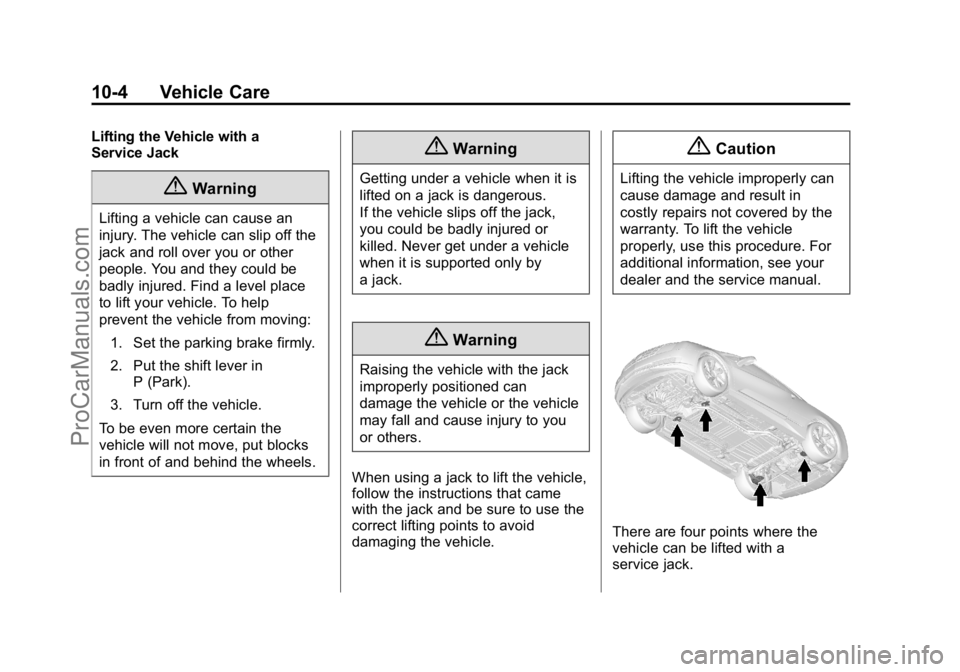
There are four points where the
vehicle can be lifted with a
service jack.
ProCarManuals.com
Page 286 of 407

Black plate (25,1)Cadillac ELR Owner Manual (GMNA-Localizing-U.S./Canada-7695154) -
2015 - CRC - 4/25/14
Vehicle Care 10-25
{Caution
The vehicle is equipped with an
AGM/VRLA 12-volt battery, which
can be damaged by using the
incorrect type of trickle charger.
An AGM/VRLA-compatible
charger must be used, with the
appropriate setting selected.
Follow the trickle charger
manufacturer instructions.
After the battery cable is
reconnected, it is possible that the
vehicle may not operate in Electric
Mode. If this happens, the high
voltage battery may need to be
charged.
Electric Drive Unit Shift
Lock Control Function
Check
{Warning
When you are doing this
inspection, the vehicle could
move suddenly. If the vehicle
moves, you or others could be
injured.
1. Before starting this check, be sure there is enough room
around the vehicle. It should be
parked on a level surface.
2. Firmly apply the parking brake. See Electric Parking Brake on
page 9-30.
Be ready to apply the regular
brake immediately if the vehicle
begins to move.
3. With the vehicle off and the brake not applied, press and
hold the POWER
Obutton for more than five seconds to place
the vehicle in Service Only
Mode. See
Power Button on
page 9-16. Without applying the
regular brake, try to move the
shift lever out of P (Park) with
normal effort. If the shift lever
moves out of P (Park), contact
your dealer for service.
Park Brake and P (Park)
Mechanism Check
{Warning
When you are doing this check,
the vehicle could begin to move.
You or others could be injured
and property could be damaged.
Make sure there is room in front
of the vehicle in case it begins to
roll. Be ready to apply the regular
brake at once should the vehicle
begin to move.
ProCarManuals.com
Page 287 of 407
Black plate (26,1)Cadillac ELR Owner Manual (GMNA-Localizing-U.S./Canada-7695154) -
2015 - CRC - 4/25/14
10-26 Vehicle Care
Park on a fairly steep hill, with the
vehicle facing downhill. Keeping
your foot on the regular brake, set
the electric parking brake.
.To check the electric parking
brake's holding ability: With the
propulsion system active and the
electric drive unit in N (Neutral),
slowly remove foot pressure
from the regular brake pedal. Do
this until the vehicle is held by
the electric parking brake only.
.To check the P (Park)
mechanism's holding ability:
With the propulsion system
active, shift to P (Park). Then
release the electric parking
brake followed by the regular
brake.
Contact your dealer if service is
required.
Wiper Blade Replacement
Windshield wiper blades should be
inspected for wear and cracking.
See the Maintenance Schedule on
page 11-2.
Replacement blades come in
different types and are removed in
different ways. For proper type and
length, see Maintenance
Replacement Parts on page 11-13.
{Caution
Allowing the wiper arm to touch
the windshield when no wiper
blade is installed could damage
the windshield. Any damage that
occurs would not be covered by
your warranty. Do not allow the
wiper arm to touch the windshield. To replace the windshield wiper
blade:
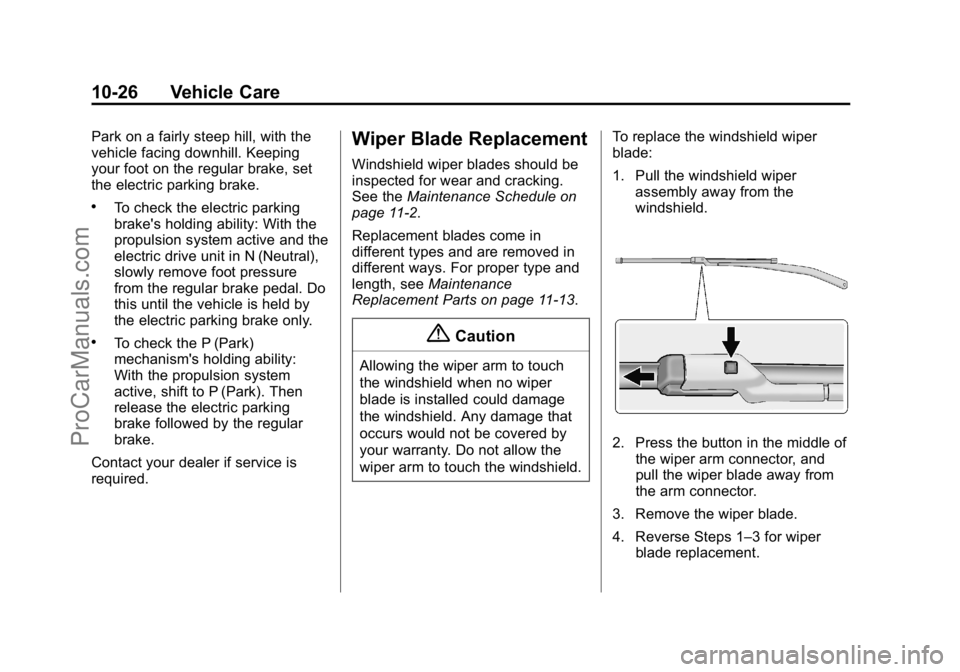
1. Pull the windshield wiper
assembly away from the
windshield.
2. Press the button in the middle ofthe wiper arm connector, and
pull the wiper blade away from
the arm connector.
3. Remove the wiper blade.
4. Reverse Steps 1–3 for wiper blade replacement.
ProCarManuals.com
Page 300 of 407

Black plate (39,1)Cadillac ELR Owner Manual (GMNA-Localizing-U.S./Canada-7695154) -
2015 - CRC - 4/25/14
Vehicle Care 10-39
Fuses Amps UsageF5 2A Regulated Voltage
Control,
Current
Sensor
F6 10A Fuel (Diurnal Valve and
Evap. Leak
Check
Module)
F7 15A Accessory Power
Module
Cooling Fan
F8 30A Amplifier
F9 –Empty
F10 5A Regulated Voltage
Control/Front
and Rear
Parking
Assist, Side
Blind Zone Fuses Amps Usage
F11 15A Horn
F12 –Empty
F13 30A Electric Parking
Brake
F14 30A Rear Defog (Upper Grid)
F15 –Empty
F16 10A Trunk Release
F17 –Empty
F18 –Empty Relays Usage
R1 Rear Defog (Upper Grid)
R2 Trunk Release
R3 Empty
R4 Empty
R5 Empty
R6 Empty
R7/R8 Horn
Diodes Usage DIODE Empty
ProCarManuals.com
Page 313 of 407

Black plate (52,1)Cadillac ELR Owner Manual (GMNA-Localizing-U.S./Canada-7695154) -
2015 - CRC - 4/25/14
10-52 Vehicle Care
should also be performed after
replacing a spare tire with a road
tire containing the TPMS sensor.
The malfunction light and the DIC
message should go off at the next
ignition cycle. The sensors are
matched to the tire/wheel positions,
using a TPMS relearn tool, in the
following order: driver side front tire,
passenger side front tire, passenger
side rear tire, and driver side rear.
See your dealer for service or to
purchase a relearn tool. A TPMS
relearn tool can also be purchased.
See Tire Pressure Monitor
Sensor Activation Tool at
www.gmtoolsandequipment.com or
call 1-800-GM TOOLS
(1-800-468-6657).
There are two minutes to match the
first tire/wheel position, and
five minutes overall to match all four
tire/wheel positions. If it takes
longer, the matching process stops
and must be restarted.The TPMS sensor matching
process is:
1. Set the parking brake.
2. Place the vehicle power mode in
ON/RUN. See Power Button on
page 9-16.
3. Make sure the Tire Pressure info display option is turned on. The
info displays on the DIC can be
turned on and off through the
Settings menu. See Driver
Information Center (DIC) on
page 5-38.
4. Use the five-way DIC control on the right side of the steering
wheel to scroll to the Tire
Pressure screen under the DIC
info page. See Driver
Information Center (DIC) on
page 5-38.
5. Press and hold the SEL button in the center of the five-way DIC
control. The horn sounds twice to signal
the receiver is in relearn mode
and the TIRE LEARNING
ACTIVE message displays on
the DIC screen.
6. Start with the driver side front tire.
7. Place the relearn tool against the tire sidewall, near the valve
stem. Then press the button to
activate the TPMS sensor.
A horn chirp confirms that the
sensor identification code has
been matched to this tire and
wheel position.
8. Proceed to the passenger side front tire, and repeat Step 7.
9. Proceed to the passenger side rear tire, and repeat Step 7.
ProCarManuals.com
Page 316 of 407

Black plate (55,1)Cadillac ELR Owner Manual (GMNA-Localizing-U.S./Canada-7695154) -
2015 - CRC - 4/25/14
Vehicle Care 10-55
Treadwear indicators are one way to
tell when it is time for new tires.
Treadwear indicators appear when
the tires have only 1.6 mm (1/16 in)
or less of tread remaining. SeeTire
Inspection on page 10-53 andTire
Rotation on page 10-53.
The rubber in tires ages over time.
This also applies to the spare tire,
if the vehicle has one, even if it is
never used. Multiple factors
including temperatures, loading
conditions, and inflation pressure
maintenance affect how fast aging
takes place. GM recommends that
tires, including the spare if
equipped, be replaced after six
years, regardless of tread wear. The
tire manufacture date is the last four
digits of the DOT Tire Identification
Number (TIN) which is molded into
one side of the tire sidewall. The
first two digits represent the week
(01–52) and the last two digits, the
year. For example, the third week of
the year 2010 would have a
four-digit DOT date of 0310.Vehicle Storage
Tires age when stored normally
mounted on a parked vehicle. Park
a vehicle that will be stored for at
least a month in a cool, dry, clean
area away from direct sunlight to
slow aging. This area should be free
of grease, gasoline, or other
substances that can deteriorate
rubber.
Parking for an extended period can
cause flat spots on the tires that
may result in vibrations while
driving. When storing a vehicle for
at least a month, remove the tires or
raise the vehicle to reduce the
weight from the tires.
Buying New Tires
GM has developed and matched
specific tires for the vehicle. The
original equipment tires installed
were designed to meet General
Motors Tire Performance Criteria
Specification (TPC Spec)
system rating. When replacement tires are needed,
GM strongly recommends
buying tires with the same TPC
Spec rating.
GM's exclusive TPC Spec
system considers over a dozen
critical specifications that impact
the overall performance of the
vehicle, including brake system
performance, ride and handling,
traction control, and tire
pressure monitoring
performance. GM's TPC Spec
number is molded onto the tire's
sidewall near the tire size. If the
tires have an all-season tread
design, the TPC spec number
will be followed by MS, for mud
and snow. See
Tire Sidewall
Labeling on page 10-43.
GM recommends replacing worn
tires in complete sets of four.
Uniform tread depth on all tires
will help to maintain the
performance of the vehicle.
ProCarManuals.com
Page 322 of 407
Black plate (61,1)Cadillac ELR Owner Manual (GMNA-Localizing-U.S./Canada-7695154) -
2015 - CRC - 4/25/14
Vehicle Care 10-61
If a Tire Goes Flat
This vehicle has a tire sealant and
compressor kit. SeeTire Sealant
and Compressor Kit on page 10-62.
There is no spare tire, no tire
changing equipment, and no place
to store a tire.
To properly lift this vehicle, see
Lifting the Vehicle on page 10-3.
It is unusual for a tire to blowout
while driving, especially if the tires
are maintained properly. See Tires
on page 10-41. If air goes out of a
tire, it is much more likely to leak
out slowly. But if there ever is a
blowout, here are a few tips about
what to expect and what to do:
If a front tire fails, the flat tire will
create a drag that pulls the vehicle
toward that side. Take your foot off
the accelerator pedal and grip the
steering wheel firmly. Steer to
maintain lane position, and then
gently brake to a stop, well off the
road, if possible. A rear blowout, particularly on a
curve, acts much like a skid and
may require the same correction as
used in a skid. Stop pressing the
accelerator pedal and steer to
straighten the vehicle. It may be
very bumpy and noisy. Gently brake
to a stop, well off the road,
if possible.
{Warning
Driving on a flat tire will cause
permanent damage to the tire.
Re-inflating a tire after it has been
driven on while severely
underinflated or flat may cause a
blowout and a serious crash.
Never attempt to re-inflate a tire
that has been driven on while
severely underinflated or flat.
Have your dealer or an authorized
tire service center repair or
replace the flat tire as soon as
possible.
If a tire goes flat, avoid further tire
and wheel damage by driving slowly
to a level place and stopping, well
off the road, if possible.
1. Turn on the hazard warning
flashers. See Hazard Warning
Flashers on page 6-5.
2. Set the parking brake firmly.
3. Put the shift lever in P (Park). See Shifting Into Park on
page 9-19.
4. Turn off the engine.
5. Inspect the flat tire.
If the tire has been separated from
the wheel, has damaged sidewalls,
or has a puncture larger than
6 mm (0.25 in), the tire is too
severely damaged for the tire
sealant and compressor kit to be
effective. See Roadside Service on
page 13-5.
If the tire has a puncture less than
6 mm (0.25 in) in the tread area of
the tire, see Tire Sealant and
Compressor Kit on page 10-62.
ProCarManuals.com
Page 332 of 407

Black plate (71,1)Cadillac ELR Owner Manual (GMNA-Localizing-U.S./Canada-7695154) -
2015 - CRC - 4/25/14
Vehicle Care 10-71
{Caution
If the other vehicle does not have
a 12-volt system with a negative
ground, both vehicles can be
damaged. Only use a vehicle that
has a 12-volt system with a
negative ground for jump starting.
2. Park both vehicles close enough so that the jumper cables can
reach both vehicles' positive (+)
and negative (−) terminals. The
vehicles must not touch each
other. It could cause an
unwanted ground connection
that could damage both vehicles'
electrical systems.
Put both vehicles in P (Park) for
an automatic transmission or
electric drive unit. For a manual
transmission, place the vehicle
in Neutral and set the parking
brake.
{Caution
If any accessories are left on or
plugged in during the jump
starting procedure, they could be
damaged. The repairs would not
be covered by the vehicle
warranty. Whenever possible, turn
off or unplug all accessories on
either vehicle when jump starting.
3. Turn off the ignition on the other vehicle. Turn off the radio, all
lamps, and accessories that are
not needed in both vehicles.
Unplug accessories from the
cigarette lighter or the accessory
power outlets. This avoids
sparks and helps save both
batteries and accessories.
4. Locate the positive (+) and negative (−) terminals on the
other vehicle.
5. Locate the positive (+) and negative (−) battery terminals on
the ELR. The access cover is under the load floor access
cover in the rear cargo area.
Open the access covers for the
positive (+) terminal (1) and the
negative (−) terminal (2).
6. Check that the jumper cables do not have loose or missing
insulation or a shock could result
and the vehicles could be
damaged.
Before connecting the jumper
cables, here are some basic
things to know. Positive (+)
jumper cable goes to positive (+)
battery terminal or a remote
positive (+) terminal if available.
Negative (−) jumper cable goes
to negative (−) battery terminal
or a remote negative (−) terminal
if available. Do not connect
positive (+) to negative (−) or
there will be a short that may
damage the battery and other
parts of the vehicle.
ProCarManuals.com