instrument cluster CADILLAC ELR 2016 Owner's Manual
[x] Cancel search | Manufacturer: CADILLAC, Model Year: 2016, Model line: ELR, Model: CADILLAC ELR 2016Pages: 368, PDF Size: 6.92 MB
Page 135 of 368
Cadillac ELR Owner Manual (GMNA-Localizing-U.S/Canada-9087644) -
2016 - crc - 9/17/15
134 Instruments and Controls
speed can be reset by pressing and
holding SEL while this display is
active.
Timer :This display can be used as
a timer. To start the timer, press SEL
while this display is active. The
display will show the amount of time
that has passed since the timer was
last reset. To stop the timer, press
SEL briefly while this display is
active and the timer is running. To
reset the timer to zero, press and
hold SEL while this display is active.
Speed Limit : Shows the current
speed limit. The information for this
page comes from a roadway
database.
Follow Distance Indicator : When
Adaptive Cruise Control (ACC) is
not engaged, the current follow time
to the vehicle ahead is displayed as
a time value on this page. When
ACC has been engaged, the display
switches to the gap setting page.
This page shows the current gap
setting along with the vehicle ahead
telltale. Coolant Temperature :
Shows the
engine coolant temperature in either
degrees Celsius (°C) or degrees
Fahrenheit (°F).
Blank Page : The Blank Page
display allows for no information to
be displayed in the cluster info
display areas.Vehicle Messages
Messages displayed on the DIC
indicate the status of the vehicle or
some action that may be needed to
correct a condition. Multiple
messages may display one after the
other.
The messages that do not require
immediate action can be
acknowledged and cleared by
pressing SEL. The messages that
require immediate action cannot be
cleared until that action is
performed. All messages should be
taken seriously and clearing the
messages does not correct the
problem.
The following are some of the
vehicle messages that may be
displayed depending on the vehicle
content.
ProCarManuals.com
Page 145 of 368

Cadillac ELR Owner Manual (GMNA-Localizing-U.S/Canada-9087644) -
2016 - crc - 9/17/15
144 Instruments and Controls
If a tire pressure message appears
on the DIC, stop as soon as
possible. Inflate the tires by adding
air until the tire pressure is equal to
the values shown on the Tire and
Loading Information label. SeeTires
0 272, Vehicle Load Limits 0179,
and Tire Pressure 0278.
More than one tire pressure
message can appear at a time. The
DIC also shows the tire pressure
values. See Driver Information
Center (DIC) 0132.
Vehicle Reminder
Messages
ICE POSSIBLE DRIVE
WITH CARE
This message displays when ice
conditions are possible.
Vehicle Speed Messages
SELECTED SPEED LIMIT
EXCEEDED
This message is displayed when the
vehicle speed is greater than the set
speed. See "Speed Warning" under
Instrument Cluster 0104.
Washer Fluid Messages
WASHER FLUID LOW ADD
FLUID
This message may display when the
washer fluid level is low. Fill the
windshield washer reservoir as soon
as possible. See Engine
Compartment Overview 0242 for
the location of the windshield
washer reservoir. Also, see Washer
Fluid 0253.
Window Messages
OPEN, THEN CLOSE DRIVER/
PASSENGER WINDOW
This message is displayed when the
window needs to be reprogrammed.
If the vehicle's battery has been
recharged or disconnected, you will
need to program each front window
for the express-up feature to work.
See Power Windows 047.
ProCarManuals.com
Page 157 of 368
Cadillac ELR Owner Manual (GMNA-Localizing-U.S/Canada-9087644) -
2016 - crc - 9/17/15
156 Lighting
Lighting
Exterior Lighting
Exterior Lamp Controls . . . . . . . 156
Exterior Lamps OffReminder . . . . . . . . . . . . . . . . . . . 158
Headlamp High/Low-Beam Changer . . . . . . . . . . . . . . . . . . . . 158
Flash-to-Pass . . . . . . . . . . . . . . . . 158
Daytime Running Lamps (DRL) . . . . . . . . . . . . . . . 158
Automatic Headlamp System . . . . . . . . . . . . . . . . . . . . . . 158
Hazard Warning Flashers . . . . . 159
Turn and Lane-Change Signals . . . . . . . . . . . . . . . . . . . . . . 159
Interior Lighting
Instrument Panel IlluminationControl . . . . . . . . . . . . . . . . . . . . . . 160
Courtesy Lamps . . . . . . . . . . . . . . 160
Dome Lamps . . . . . . . . . . . . . . . . . 160
Reading Lamps . . . . . . . . . . . . . . 161
Lighting Features
Entry Lighting . . . . . . . . . . . . . . . . 161
Exit Lighting . . . . . . . . . . . . . . . . . . 161
Battery Power Protection . . . . . 162
Exterior Lighting Battery Saver . . . . . . . . . . . . . . . . . . . . . . . 162
Exterior Lighting
Exterior Lamp Controls
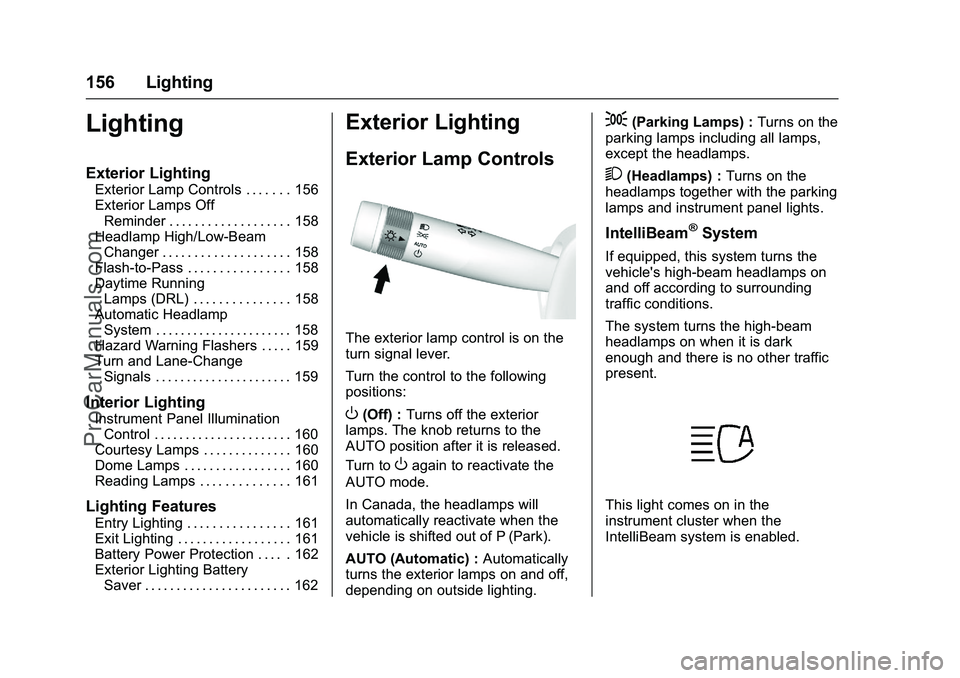
The exterior lamp control is on the
turn signal lever.
Turn the control to the following
positions:
O(Off) : Turns off the exterior
lamps. The knob returns to the
AUTO position after it is released.
Turn to
Oagain to reactivate the
AUTO mode.
In Canada, the headlamps will
automatically reactivate when the
vehicle is shifted out of P (Park).
AUTO (Automatic) : Automatically
turns the exterior lamps on and off,
depending on outside lighting.
;(Parking Lamps) : Turns on the
parking lamps including all lamps,
except the headlamps.
2(Headlamps) : Turns on the
headlamps together with the parking
lamps and instrument panel lights.
IntelliBeam®System
If equipped, this system turns the
vehicle's high-beam headlamps on
and off according to surrounding
traffic conditions.
The system turns the high-beam
headlamps on when it is dark
enough and there is no other traffic
present.
This light comes on in the
instrument cluster when the
IntelliBeam system is enabled.
ProCarManuals.com
Page 158 of 368
Cadillac ELR Owner Manual (GMNA-Localizing-U.S/Canada-9087644) -
2016 - crc - 9/17/15
Lighting 157
Turning On and Enabling
IntelliBeam
To enable the IntelliBeam system,
with the turn signal lever in the
neutral position, turn the exterior
lamp control to AUTO. The blue
high-beam on light appears on the
instrument cluster when the high
beams are on.
Driving with IntelliBeam
The system only activates the high
beams when driving over 40 km/h
(25 mph).
There is a sensor near the top
center of the windshield that
automatically controls the system.
Keep this area of the windshield
clear of debris to allow for best
system performance.
The high-beam headlamps remain
on, under the automatic control,
until one of the following situations
occurs:
.The system detects an
approaching vehicle's
headlamps. .
The system detects a preceding
vehicle's taillamps.
. The outside light is bright
enough that high-beam
headlamps are not required.
. The vehicle's speed drops below
20 km/h (12 mph).
. The IntelliBeam system can be
disabled by the High/Low-Beam
Changer or the Flash-to-Pass
feature. If this happens, the
High/Low-Beam Changer must
be activated two times within
five seconds to reactivate the
IntelliBeam system. The
instrument cluster light will come
on to indicate the IntelliBeam is
reactivated. See Headlamp
High/Low-Beam Changer 0158
and Flash-to-Pass 0158.
The high beams may not turn off
automatically if the system cannot
detect another vehicle's lamps
because of any of the following:
. The other vehicle's lamps are
missing, damaged, obstructed
from view, or otherwise
undetected. .
The other vehicle's lamps are
covered with dirt, snow, and/or
road spray.
. The other vehicle's lamps cannot
be detected due to dense
exhaust, smoke, fog, snow, road
spray, mist, or other airborne
obstructions.
. The vehicle's windshield is dirty,
cracked, or obstructed by
something that blocks the view
of the light sensor.
. The vehicle is loaded such that
the front end points upward,
causing the light sensor to aim
high and not detect headlamps
and taillamps.
. The vehicle is being driven on
winding or hilly roads.
The automatic high-beam
headlamps may need to be disabled
if any of the above conditions exist.
ProCarManuals.com
Page 159 of 368
Cadillac ELR Owner Manual (GMNA-Localizing-U.S/Canada-9087644) -
2016 - crc - 9/17/15
158 Lighting
Exterior Lamps Off
Reminder
A warning chime will sound if the
exterior lamp control is left on in
either the headlamp or parking lamp
position and the driver door is
opened with the ignition off.
Headlamp High/
Low-Beam Changer
2 3
(Headlamp High/Low-Beam
Changer) : Push the turn signal
lever away from you and release, to
turn the high beams on. To return to
low beams, push the lever again or
pull it toward you and release.
This indicator light turns on in the
instrument cluster when the
high-beam headlamps are on.
Flash-to-Pass
To flash the high beams, pull the
turn signal lever toward you, and
release.
Daytime Running
Lamps (DRL)
DRL can make it easier for others to
see the front of your vehicle during
the day. Fully functional DRL are
required on all vehicles first sold in
Canada.
The DRL will come on when all of
the following conditions are met:
. The ignition is on.
. The exterior lamp control is
in AUTO.
. The light sensor determines it is
daytime.
. The parking brake is released or
the vehicle is not in P (Park).
When the DRL are on, the taillamps,
instrument panel lights, and other
lamps will not be on.
The DRL turn off when the ignition
is off.
Automatic Headlamp
System
When the exterior lamp control is
set to AUTO and it is dark enough
outside, the headlamps come on
automatically.
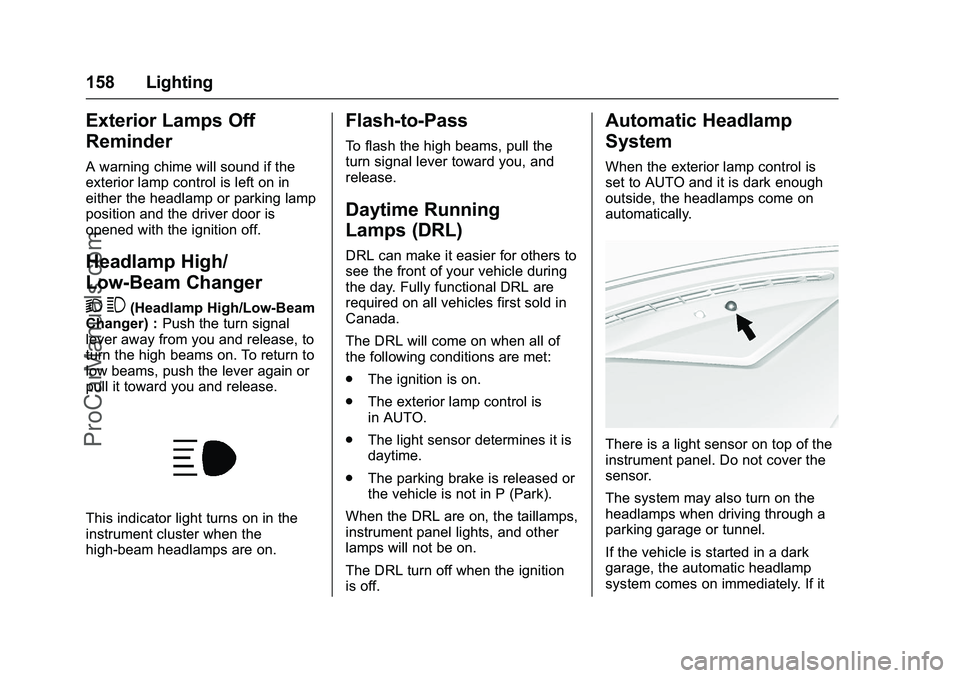
There is a light sensor on top of the
instrument panel. Do not cover the
sensor.
The system may also turn on the
headlamps when driving through a
parking garage or tunnel.
If the vehicle is started in a dark
garage, the automatic headlamp
system comes on immediately. If it
ProCarManuals.com
Page 160 of 368

Cadillac ELR Owner Manual (GMNA-Localizing-U.S/Canada-9087644) -
2016 - crc - 9/17/15
Lighting 159
is light outside when the vehicle
leaves the garage, there is a slight
delay before the automatic
headlamp system changes to the
DRL. During that delay, the
instrument cluster may not be as
bright as usual. Make sure the
instrument panel brightness control
is in the full bright position. See
Instrument Panel Illumination
Control0160.
When it is bright enough outside,
the headlamps will turn off or may
change to Daytime Running
Lamps (DRL).
The automatic headlamp system
turns off when the exterior lamp
control is turned to
Oor the ignition
is off.
For vehicles sold in Canada, this
control only works when the electric
drive unit is in P (Park).
Lights On with Wipers
If the windshield wipers are
activated in daylight with the vehicle
on, and the exterior lamp control is
in AUTO, the headlamps, parking
lamps, and other exterior lamps come on. The transition time for the
lamps coming on varies based on
wiper speed. When the wipers are
not operating, these lamps turn off.
Move the exterior lamp control to
O
or;to disable this feature.
Hazard Warning Flashers
|(Hazard Warning Flashers) :
Press this button to make the front
and rear turn signal lamps flash on
and off. Press again to turn the
flashers off.
The hazard warning flashers turn on
automatically if the airbags deploy.
Turn and Lane-Change
Signals
Move the lever all the way up or
down to signal a turn.
An arrow on the instrument cluster
flashes in the direction of the turn or
lane change.
Raise or lower the lever until the
arrow starts to flash to signal a lane
change. Hold it there until the lane
change is completed. If the lever is
briefly pressed and released, the
turn signal flashes three times.
The turn and lane-change signal
can be turned off manually by
moving the lever back to its original
position.
ProCarManuals.com
Page 167 of 368

Cadillac ELR Owner Manual (GMNA-Localizing-U.S/Canada-9087644) -
2016 - crc - 9/17/15
166 Climate Controls
When in MIN mode, the AUTO
indicator light will be off. When
AUTO is selected in MIN mode, the
mode will change to either ECO
or MAX.
When in MIN mode, the air
conditioning system may turn on
automatically if the high voltage
battery is being cooled. The climate
control system could blow cold air.
This is normal. To prevent cold air
from blowing into the interior, turn off
the fan control and select the vent
mode and manual recirculation
mode, and close the air vents.
When in MIN mode, if Auto Defog is
enabled, the air conditioning and
electric heat may turn on when high
humidity conditions exist. See
“Climate and Air Quality”under
Vehicle Personalization 0145 for
more information on the Auto Defog
selection. The air conditioning may
also run if
0is selected.
ECO (Economy Mode) : The air
conditioning and electric heat are
controlled to balance comfort with
fuel economy. As long as
0is not
selected, the vehicle electric range or fuel economy will decrease less
than in MAX mode, but will result in
moderate comfort.
MAX (Comfort Mode) :
The air
conditioning and electric heat are
controlled to reach the best comfort
level based on the temperature
setting selected. In this mode,
vehicle electric range or fuel
economy will decrease depending
on the amount of energy required to
reach the best comfort levels.
Climate Power Gauge
When the climate mode is changed,
the Climate Power gauge displays
the impact that user setting changes
have on energy consumption. The
higher the reading, the more energy
is being used.
Automatic Operation
The system automatically controls
the fan speed, air delivery, air
conditioning, and recirculation in
order to heat or cool the vehicle to
the desired temperature.
When the indicator light is on or
AUTO is displayed on the touch
screen, the system is in full automatic operation. If the air
delivery mode or fan setting is
manually adjusted, the auto
indicator turns off and the display
will show the selected settings. Auto
operation can be turned off
individually for climate settings.
For automatic operation:
1. Press AUTO.
2. Set the temperature. Allow the system time to stabilize. Then
adjust the temperature as
needed for best comfort.
To improve fuel efficiency and to
cool the vehicle faster, recirculation
may be automatically selected in
warm weather. The recirculation
light will not come on. Press
@to
select recirculation; press it again to
select outside air.
English units can be changed to
metric units through the instrument
cluster. See “Settings”under
Instrument Cluster 0104.
OFF (Fan) : Press to turn the fan on
or off. The temperature control and
air delivery mode can still be
adjusted.
ProCarManuals.com
Page 184 of 368

Cadillac ELR Owner Manual (GMNA-Localizing-U.S/Canada-9087644) -
2016 - crc - 9/17/15
Driving and Operating 183
ON/RUN power mode. When the
vehicle is turned off, the POWER
O
button light will turn off.
The Remote Keyless Entry (RKE)
transmitter must be in the vehicle for
the system to operate. If the vehicle
will not start, place the RKE
transmitter in the transmitter slot.
SeeRemote Keyless Entry (RKE)
System Operation 031.
ON/RUN : This position is for
starting and driving. With the vehicle
off, and the brake pedal applied,
pressing the POWER
Obutton once
will place the vehicle in ON/RUN.
When the READY light is on in the
instrument cluster, the vehicle is
ready to be driven. This could take
up to 15 seconds at extremely cold
temperatures. See Vehicle Ready
Light 0120. The engine will only
start if needed. If the vehicle did not
start, the instrument cluster will
display a screen with inactive fuel
and battery gauges. See Starting
and Stopping the Vehicle 0184. Service Only Mode
This power mode is available for
service and diagnostics, and to
verify the proper operation of the
malfunction indicator lamp as may
be required for emission inspection
purposes. With the vehicle off, and
the brake pedal not applied,
pressing and holding the POWER
O
button for more than five seconds
will place the vehicle in Service
Only Mode. The instruments and
audio systems will operate as they
do in ON/RUN, but the vehicle will
not be able to be driven. The
propulsion system will not start in
Service Only Mode. Press the
button again to turn the vehicle off.
Caution
Service Only Mode will discharge
the 12-volt battery. Do not use
Service Only Mode for an
extended period, or the vehicle
may not start.
STOPPING THE VEHICLE/OFF :
To turn the vehicle off, press the
POWER
Obutton with the vehicle
in P (Park). Retained Accessory
Power (RAP) will remain active until
the driver door is opened. See
Retained Accessory Power (RAP)
0 185. When turning off the vehicle,
if the vehicle is not in P (Park), the
vehicle will go to ACC/
ACCESSORY and display the
message SHIFT TO PARK in the
Driver Information Center (DIC).
See Electric Drive Unit
Messages 0137.
If the vehicle must be shut off in an
emergency:
1. Brake using a firm and steady pressure. Do not pump the
brakes repeatedly. This may
deplete power assist, requiring
increased brake pedal force.
2. Shift the vehicle to N (Neutral). This can be done while the
vehicle is moving. After shifting
to N (Neutral), firmly apply the
brakes and steer the vehicle to
a safe location.
ProCarManuals.com
Page 185 of 368

Cadillac ELR Owner Manual (GMNA-Localizing-U.S/Canada-9087644) -
2016 - crc - 9/17/15
184 Driving and Operating
3. Come to a complete stop, shiftto P (Park), and turn the vehicle
off by pressing the POWER
O
button.
4. Set the parking brake. See Electric Parking Brake 0195.
{Warning
Turning off the vehicle while
moving may disable the airbags.
While driving, only shut the
propulsion system off in an
emergency.
If the vehicle cannot be pulled over,
and must be shut off while driving,
press and hold the POWER
O
button for longer than two seconds,
or press twice in five seconds.
Starting and Stopping the
Vehicle
The engine may start, if required,
when the propulsion system is on.
Caution
Do not try to shift to P (Park) if the
vehicle is moving or the electric
drive unit could be damaged.
Shift to P (Park) only when the
vehicle is stopped.
Caution
If you add electrical parts or
accessories, you could change
the way the vehicle operates. Any
resulting damage would not be
covered by the vehicle warranty.
See Add-On Electrical
Equipment 0234.
Starting Procedure
1. Move the shift lever to P (Park)
or N (Neutral). The propulsion
system will not start in any
other position.
2. The Remote Keyless Entry (RKE) transmitter must be in
the vehicle. 3. Press the brake pedal and
press and release the POWER
Obutton.
If the RKE transmitter is not in the
vehicle or something is interfering
with the transmitter, a message
displays in the Driver Information
Center (DIC). See Key and Lock
Messages 0139.
If the vehicle will not start due to a
low RKE transmitter battery, the
vehicle can still be driven. See
“Starting the Vehicle with a Low
Transmitter Battery” inRemote
Keyless Entry (RKE) System
Operation 031.
Welcome, powering up, and
powering down audio messages are
heard as well as displayed on the
instrument cluster. This happens
when opening the driver door upon
entry, and when pressing the
POWER
Obutton.
The instrument cluster displays an
active fuel or battery gauge, along
with an audio startup cue, when the
vehicle is ready to be driven. This
could take up to 15 seconds at
extremely cold temperatures. The
ProCarManuals.com
Page 186 of 368

Cadillac ELR Owner Manual (GMNA-Localizing-U.S/Canada-9087644) -
2016 - crc - 9/17/15
Driving and Operating 185
engine will only start if needed.
If the vehicle did not start, the
instrument cluster will display a
screen with inactive fuel and battery
gauges. SeeStarting and Stopping
the Vehicle 0184.
Restarting Procedure
If the vehicle must be restarted
while it is still moving, move the shift
lever to N (Neutral) and press the
POWER
Obutton twice without
pressing the brake pedal. The
propulsion system will not restart in
any other position.
Computers determine when the
engine needs to run. The engine
may start, if required, when the
propulsion system is on. Some
vehicle conditions that force the
engine to run:
. There are cold ambient
temperatures.
. The hood is open or not
completely latched.
. The high voltage battery has a
low charge. .
The engine needs to run for
maintenance.
See Maintenance Modes 0190.
A chime will sound if the driver door
is opened while the vehicle is in ON/
RUN. Always press the POWER
O
button to turn the vehicle off before
exiting.
Stopping Procedure
For information on how to turn the
vehicle off, see Power Button0182.
Retained Accessory
Power (RAP)
The following features will operate
for up to 10 minutes or until the
driver door is opened:
.
Audio System
. Accessory Power Outlets
Power windows will operate for up
to 10 minutes or until any door is
opened.
Shifting Into Park
1. Hold the brake pedal down and set the parking brake. See
Electric Parking Brake 0195.
2. Move the shift lever into P (Park) by pushing the lever
all the way toward the front of
the vehicle.
3. Turn the vehicle off.
Leaving the Vehicle with the
Propulsion System On
{Warning
It can be dangerous to leave the
vehicle with the propulsion
system running. It could overheat
and catch fire.
It is dangerous to get out of the
vehicle if the shift lever is not fully
in P (Park) with the parking brake
firmly set. The vehicle can roll.
Do not leave the vehicle when the
propulsion system is running.
If you have left the propulsion (Continued)
ProCarManuals.com