lock CADILLAC ESCALADE 2006 2.G Owners Manual
[x] Cancel search | Manufacturer: CADILLAC, Model Year: 2006, Model line: ESCALADE, Model: CADILLAC ESCALADE 2006 2.GPages: 484, PDF Size: 2.84 MB
Page 373 of 484
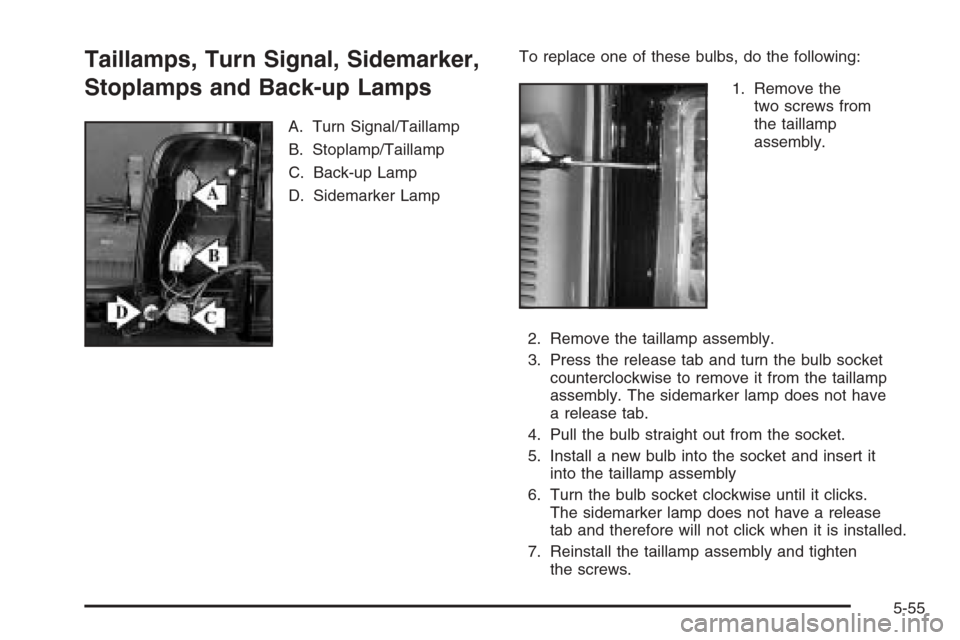
Taillamps, Turn Signal, Sidemarker,
Stoplamps and Back-up Lamps
A. Turn Signal/Taillamp
B. Stoplamp/Taillamp
C. Back-up Lamp
D. Sidemarker LampTo replace one of these bulbs, do the following:
1. Remove the
two screws from
the taillamp
assembly.
2. Remove the taillamp assembly.
3. Press the release tab and turn the bulb socket
counterclockwise to remove it from the taillamp
assembly. The sidemarker lamp does not have
a release tab.
4. Pull the bulb straight out from the socket.
5. Install a new bulb into the socket and insert it
into the taillamp assembly
6. Turn the bulb socket clockwise until it clicks.
The sidemarker lamp does not have a release
tab and therefore will not click when it is installed.
7. Reinstall the taillamp assembly and tighten
the screws.
5-55
Page 383 of 484
A Tire and Loading Information label is attached to
the vehicle’s center pillar (B-pillar), below the driver’s
door lock post (striker). This label lists your vehicle’s
original equipment tires and their recommended cold
tire ination pressures. The recommended cold tire
ination pressure, shown on the label, is the minimum
amount of air pressure needed to support your vehicle’s
maximum load carrying capacity.
For additional information regarding how much weight
your vehicle can carry, and an example of the tire
and loading information label, seeLoading Your Vehicle
on page 4-47.
When to Check
Check your tires once a month or more. Do not forget
to check the spare tire. For additional information
regarding the spare tire, seeSpare Tire on page 5-97.
How to Check
Use a good quality pocket-type gage to check tire
pressure. You cannot tell if your tires are properly inated
simply by looking at them. Radial tires may look properly
inated even when they are underinated. Check the
tire’s ination pressure when the tires are cold. Cold
means your vehicle has been sitting for at least
three hours or driven no more than 1 mile (1.6 km).
Remove the valve cap from the tire valve stem. Press
the tire gage rmly onto the valve to get a pressure
measurement. If the cold tire ination pressure matches
the recommended pressure on the Tire and Loading
Information label, no further adjustment is necessary.
If the ination pressure is low, add air until you reach the
recommended amount.
If you overll the tire, release air by pushing on the
metal stem in the center of the tire valve. Recheck the
tire pressure with the tire gage.
Be sure to put the valve caps back on the valve stems.
They help prevent leaks by keeping out dirt and
moisture.
5-65
Page 387 of 484
5. Remove the valve cap from the valve cap stem.
Activate the TPMS sensor by increasing or
decreasing the tire’s air pressure for 10 seconds,
then stop and listen for a single horn chirp.
The single horn chirp should sound within
15 seconds, conrming that the sensor identication
code has been matched to this tire and wheel
position. If you do not hear the conrming single
horn chirp, you will need to start over with Step 1.
To let air-pressure out of a tire you can use the
pointed end of the valve cap, a pencil-style
air pressure gage or a key.
6. Proceed to the passenger’s side front tire, and
repeat the procedure in Step 5.
7. Proceed to the passenger’s side rear tire, and
repeat the procedure in Step 5.
8. Proceed to the driver’s side rear tire, and repeat the
procedure in Step 5.
9. After hearing the conrming horn chirp for the
left rear tire, check to see if the TPMS warning
light is still ashing. If it is, turn the ignition switch
to LOCK to exit the sensor matching process.
If the TPMS warning light is not ashing, the
ve minute time limit has passed and you will need
to start the process over beginning with Step 1.10. Set all four tires to the recommended air pressure
level as indicated on the Tire and Loading
Information label.
11. Put the valve caps back on the valve stems
The spare tire does not have a TPMS sensor. If you
replace one of the road tires with the spare, the CHECK
TIRE PRESSURE message will be displayed on the
DIC screen. This message should go off once you
re-install the road tire containing the TPMS sensor.
The SERVICE TIRE MONITOR message is displayed
when the TPMS is malfunctioning. One or more missing
or inoperable TPMS sensors will cause the service
tire monitor message to be displayed. See your dealer
for service.
Federal Communications Commission
(FCC) and Industry and Science Canada
The Tire Pressure Monitor System (TPMS) operates
on a radio frequency and complies with Part 15 of
the FCC Rules. Operation is subject to the following
two conditions:
1. This device may not cause harmful interference.
2. This device must accept any interference received,
including interference that may cause undesired
operation.
5-69
Page 391 of 484
{CAUTION:
If you use bias-ply tires on your vehicle, the
wheel rim anges could develop cracks after
many miles of driving. A tire and/or wheel
could fail suddenly, causing a crash. Use only
radial-ply tires with the wheels on your vehicle.
If you must replace your vehicle’s tires with those that
do not have a TPC Spec number, make sure they
are the same size, load range, speed rating, and
construction type (radial and bias-belted tires) as your
vehicle’s original tires.
Vehicles that have a tire pressure monitoring system
may give an inaccurate low-pressure warning if non-TPC
spec rated tires are installed on your vehicle. Non-TPC
Spec rated tires may give a low-pressure warning
that is higher or lower than the proper warning level
you would get with TPC Spec rated tires. SeeTire
Pressure Monitor System on page 5-66.
Your vehicle’s original equipment tires are listed on
the Tire and Loading Information Label. This label
is attached to the vehicle’s center pillar (B-pillar). See
Loading Your Vehicle on page 4-47, for more information
about the Tire and Loading Information Label and its
location on your vehicle.
Different Size Tires and Wheels
If you add wheels or tires that are a different size than
your original equipment wheels and tires, this may
affect the way your vehicle performs, including its
braking, ride and handling characteristics, stability, and
resistance to rollover. Additionally, if your vehicle
has electronic systems such as, anti-lock brakes,
traction control, and electronic stability control, the
performance of these systems can be affected.
{CAUTION:
If you add different sized wheels, your
vehicle may not provide an acceptable level
of performance and safety if tires not
recommended for those wheels are selected.
You may increase the chance that you will
crash and suffer serious injury. Only use
GM specic wheel and tire systems developed
for your vehicle, and have them properly
installed by a GM certied technician.
SeeBuying New Tires on page 5-72andAccessories
and Modications on page 5-3for additional information.
5-73
Page 397 of 484
{CAUTION:
Changing a tire can be dangerous. The vehicle
can slip off the jack and roll over or fall on you
or other people. You and they could be badly
injured or even killed. Find a level place to
change your tire. To help prevent the vehicle
from moving:
1. Set the parking brake rmly.
2. Put the shift lever in PARK (P).
3. Turn off the engine and do not restart
while the vehicle is raised.
4. Do not allow passengers to remain in
the vehicle.
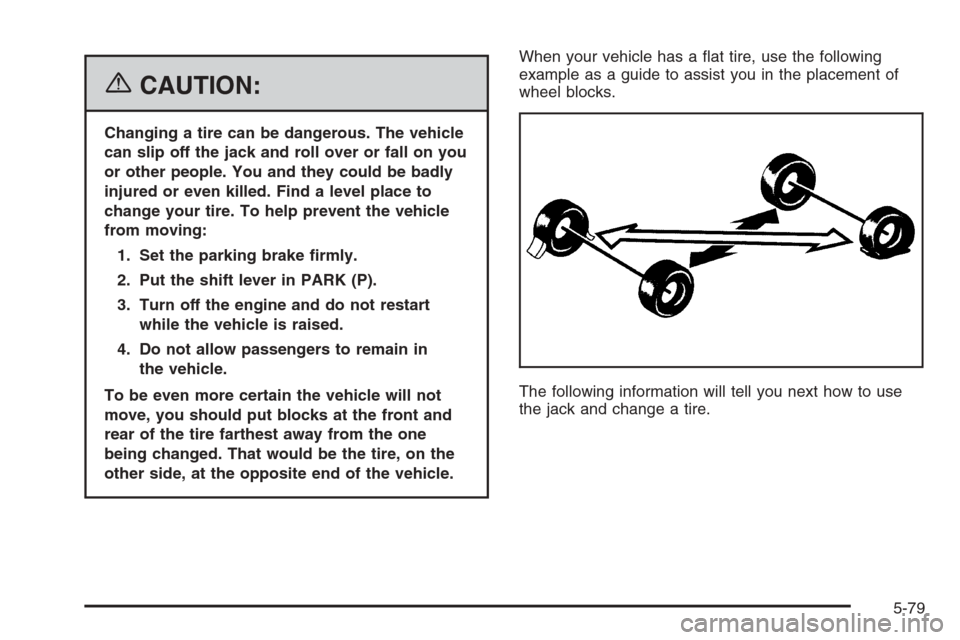
To be even more certain the vehicle will not
move, you should put blocks at the front and
rear of the tire farthest away from the one
being changed. That would be the tire, on the
other side, at the opposite end of the vehicle.When your vehicle has a at tire, use the following
example as a guide to assist you in the placement of
wheel blocks.
The following information will tell you next how to use
the jack and change a tire.
5-79
Page 398 of 484
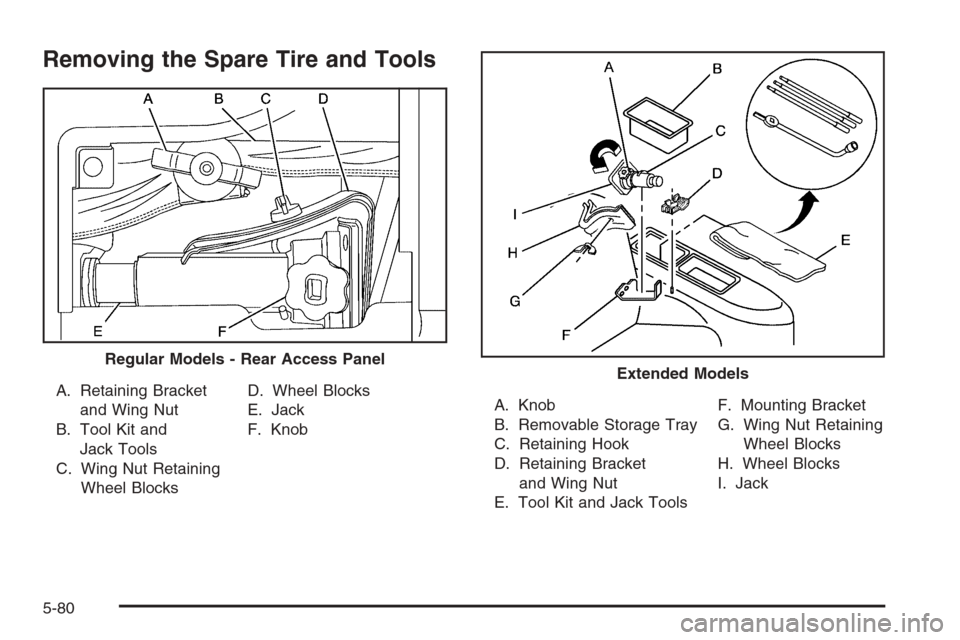
Removing the Spare Tire and Tools
A. Retaining Bracket
and Wing Nut
B. Tool Kit and
Jack Tools
C. Wing Nut Retaining
Wheel BlocksD. Wheel Blocks
E. Jack
F. KnobA. Knob
B. Removable Storage Tray
C. Retaining Hook
D. Retaining Bracket
and Wing Nut
E. Tool Kit and Jack ToolsF. Mounting Bracket
G. Wing Nut Retaining
Wheel Blocks
H. Wheel Blocks
I. Jack Regular Models - Rear Access PanelExtended Models
5-80
Page 399 of 484
On the regular models, the equipment is located on the
driver’s side of the vehicle, behind the left trim panel
in the rear of the vehicle. Unlatch the release lever
to open the trim panel door. Skip the rst step and follow
the last three.
On the extended models, the equipment you will need is
under the storage tray on the driver’s side of the
vehicle, in the trim panel.
1. Remove the tray to access the tools.
2. Remove the wing nut used to retain the tool kit by
turning it counterclockwise.
3. Turn the knob on the jack counterclockwise to
release the jack from its holder and to lower the
jack head.
4. Remove the wheel blocks and the wheel block
retainer by turning the wing nut counterclockwise.
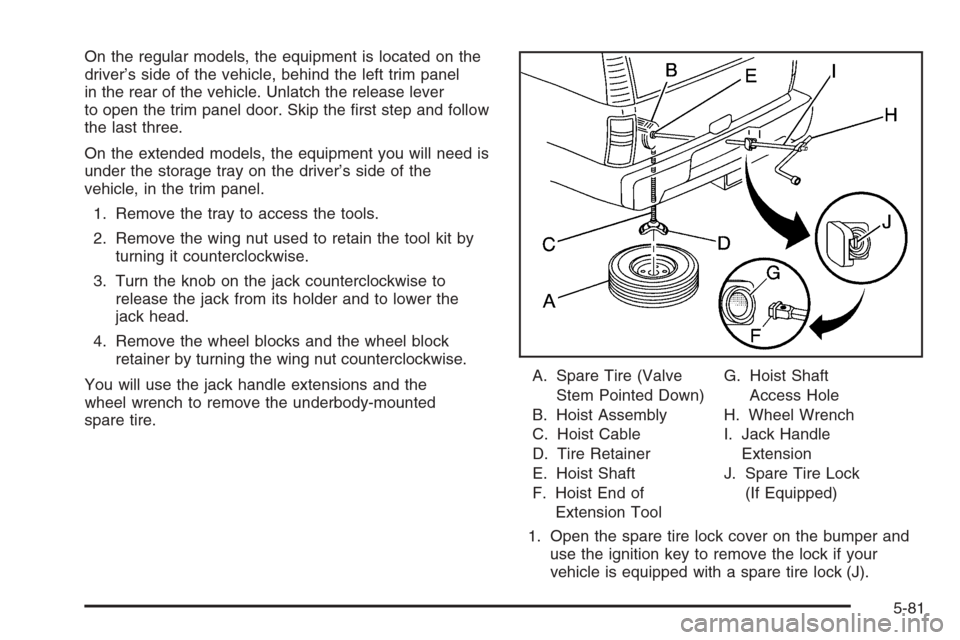
You will use the jack handle extensions and the
wheel wrench to remove the underbody-mounted
spare tire.A. Spare Tire (Valve
Stem Pointed Down)
B. Hoist Assembly
C. Hoist Cable
D. Tire Retainer
E. Hoist Shaft
F. Hoist End of
Extension ToolG. Hoist Shaft
Access Hole
H. Wheel Wrench
I. Jack Handle
Extension
J. Spare Tire Lock
(If Equipped)
1. Open the spare tire lock cover on the bumper and
use the ignition key to remove the lock if your
vehicle is equipped with a spare tire lock (J).
5-81
Page 400 of 484
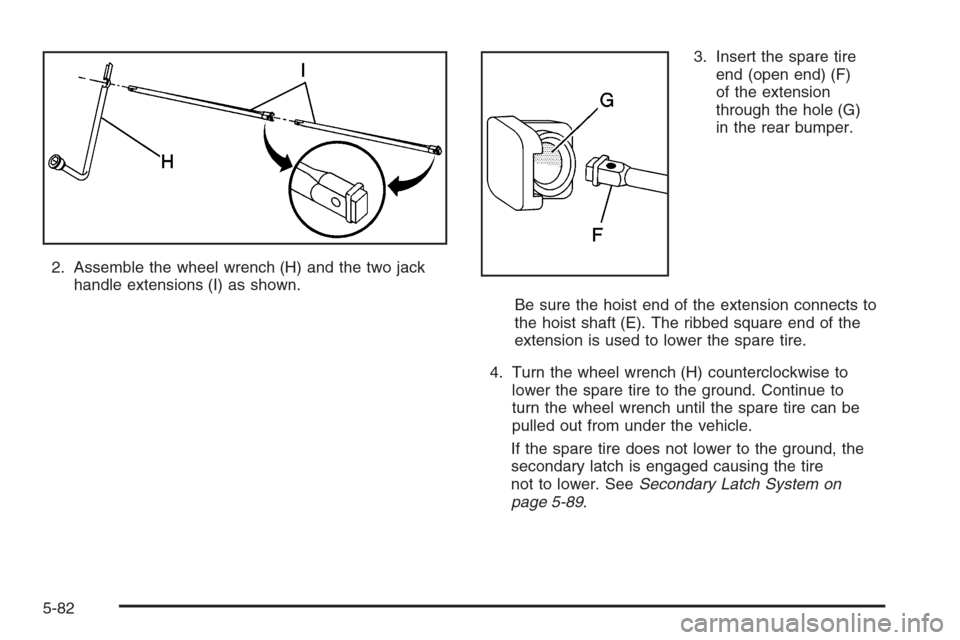
2. Assemble the wheel wrench (H) and the two jack
handle extensions (I) as shown.3. Insert the spare tire
end (open end) (F)
of the extension
through the hole (G)
in the rear bumper.
Be sure the hoist end of the extension connects to
the hoist shaft (E). The ribbed square end of the
extension is used to lower the spare tire.
4. Turn the wheel wrench (H) counterclockwise to
lower the spare tire to the ground. Continue to
turn the wheel wrench until the spare tire can be
pulled out from under the vehicle.
If the spare tire does not lower to the ground, the
secondary latch is engaged causing the tire
not to lower. SeeSecondary Latch System on
page 5-89.
5-82
Page 401 of 484
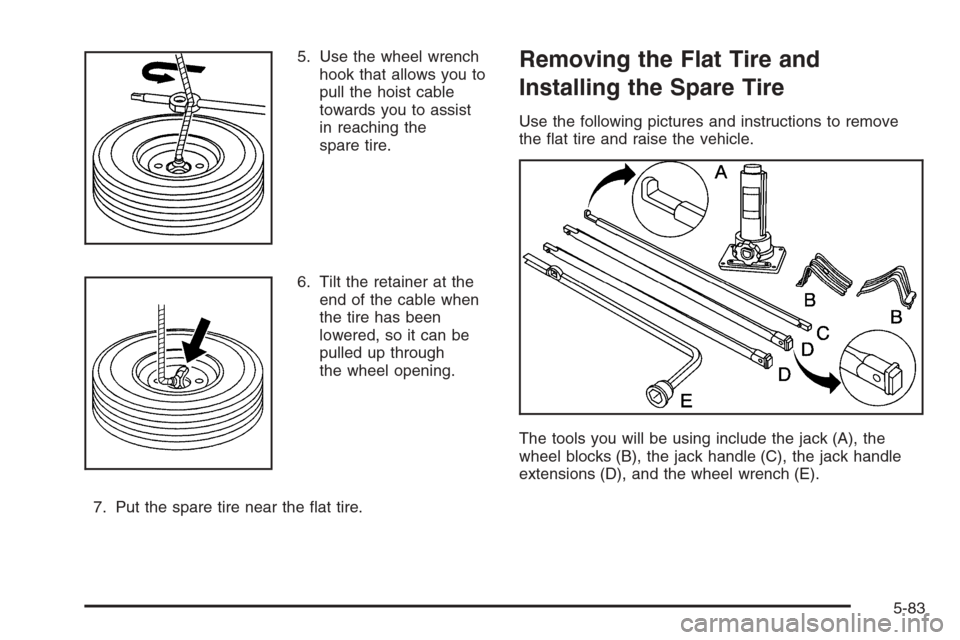
5. Use the wheel wrench
hook that allows you to
pull the hoist cable
towards you to assist
in reaching the
spare tire.
6. Tilt the retainer at the
end of the cable when
the tire has been
lowered, so it can be
pulled up through
the wheel opening.
7. Put the spare tire near the at tire.Removing the Flat Tire and
Installing the Spare Tire
Use the following pictures and instructions to remove
the at tire and raise the vehicle.
The tools you will be using include the jack (A), the
wheel blocks (B), the jack handle (C), the jack handle
extensions (D), and the wheel wrench (E).
5-83
Page 402 of 484
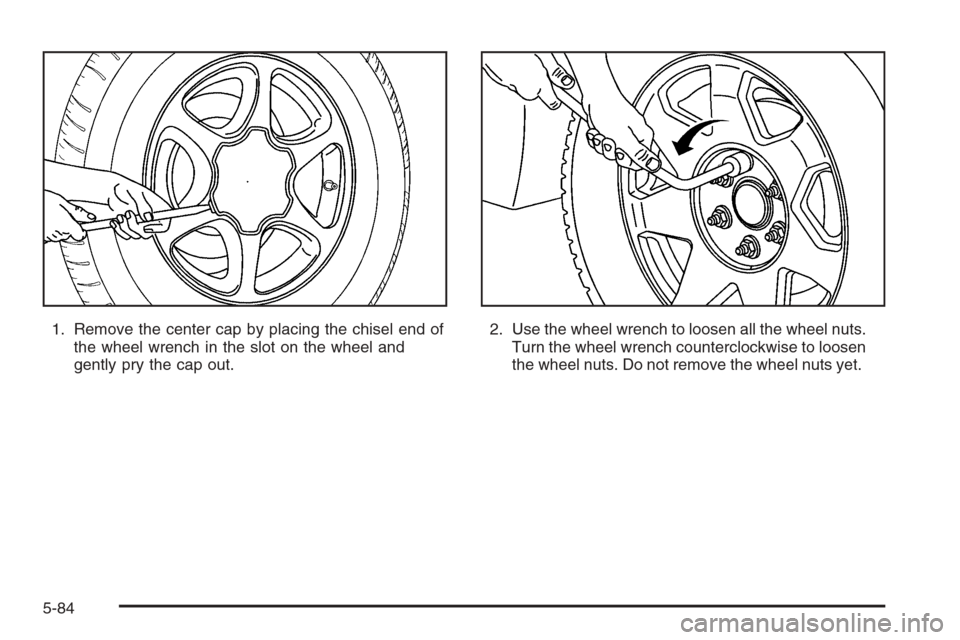
1. Remove the center cap by placing the chisel end of
the wheel wrench in the slot on the wheel and
gently pry the cap out.2. Use the wheel wrench to loosen all the wheel nuts.
Turn the wheel wrench counterclockwise to loosen
the wheel nuts. Do not remove the wheel nuts yet.
5-84