remote control CADILLAC ESCALADE 2007 3.G User Guide
[x] Cancel search | Manufacturer: CADILLAC, Model Year: 2007, Model line: ESCALADE, Model: CADILLAC ESCALADE 2007 3.GPages: 574, PDF Size: 2.89 MB
Page 172 of 574
7. Press and hold the button you would like to
use to control the garage door until the
garage door moves. The indicator light above
the selected button should slowly blink.
You may need to hold the button from ve to
55 seconds.
8. Immediately release the button when the
garage door moves. The indicator light will
blink rapidly until programming is complete.
9. Press and release the button again. The
garage door should move, conrming that
programming is successful and complete.
To program another device such as an additional
garage door opener, a security device, or
home lighting, repeat Steps 1 through 8, choosing
a different function button in Step 7 than what
you used for the garage door opener.Programming Universal Home
Remote — Rolling Code
Rolling code garage door openers are used for
garage doors produced after 1996 and are
code protected. Rolling code means the coded
signal is changed every time your remote control
garage door opener is used.
Programming a rolling code garage door opener
involves time-sensitive actions, so read the
entire procedure before you begin. If you do not
follow these actions, the device will time out
and you will have to repeat the procedure.
Follow these steps to program up to
three channels:
1. Make sure that your key is in the
ACCESSORY position and the engine is off
while programming the transmitter.
2. Press the two outside buttons at the same
time for one to two seconds, and immediately
release them.
172
Page 173 of 574
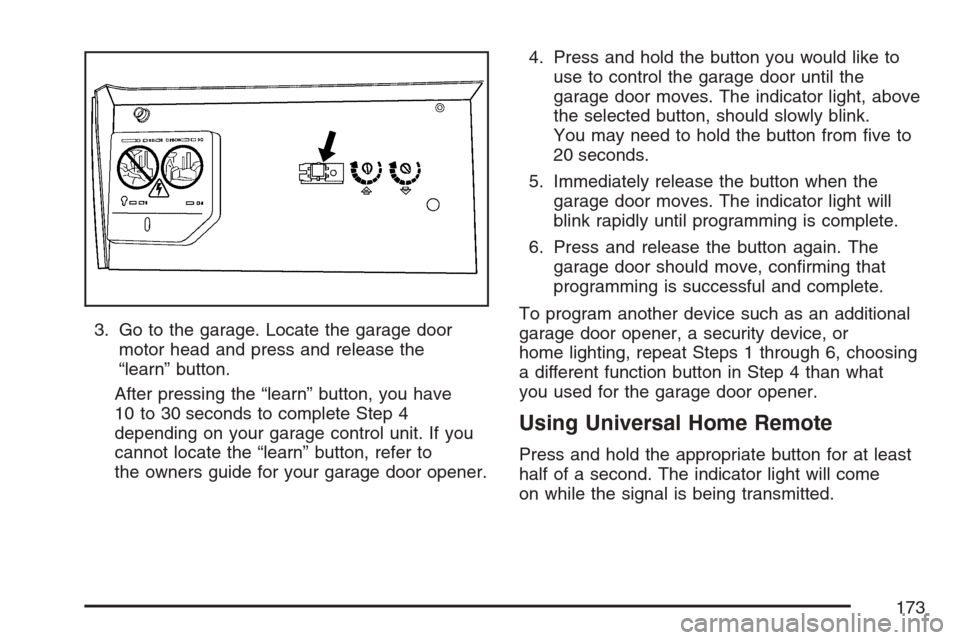
3. Go to the garage. Locate the garage door
motor head and press and release the
“learn” button.
After pressing the “learn” button, you have
10 to 30 seconds to complete Step 4
depending on your garage control unit. If you
cannot locate the “learn” button, refer to
the owners guide for your garage door opener.4. Press and hold the button you would like to
use to control the garage door until the
garage door moves. The indicator light, above
the selected button, should slowly blink.
You may need to hold the button from ve to
20 seconds.
5. Immediately release the button when the
garage door moves. The indicator light will
blink rapidly until programming is complete.
6. Press and release the button again. The
garage door should move, conrming that
programming is successful and complete.
To program another device such as an additional
garage door opener, a security device, or
home lighting, repeat Steps 1 through 6, choosing
a different function button in Step 4 than what
you used for the garage door opener.
Using Universal Home Remote
Press and hold the appropriate button for at least
half of a second. The indicator light will come
on while the signal is being transmitted.
173
Page 294 of 574
Using the DVD Player
Insert a disc partway into the slot, label side up.
The player will pull it in. If the ignition and the radio
are on, the CD or DVD will begin playing. A
DVD may be loaded with the radio off, but it will
not start playing until the radio is on, and sourced
to DVD. The DVD player can be controlled by
the buttons on the radio, the rear seat audio
system, and the remote control, if your vehicle has
this feature. See theRear Seat Entertainment
System on page 303for more information. A DVD
icon will display whenever a disc is loaded. The
DVD player can also be run for passengers in
the rear seat with the radio off. The rear seat
passenger can power on the video screen and
use the remote control to navigate the disc.
SeeRear Seat Entertainment System on page 303
for more information.
Z(Eject):Press this button to eject the DVD or
CD. Eject may be activated with the ignition or
radio off. If the disc is not removed after a
short time, the disc will be pulled back into the
DVD player for storage.The DVD player is only compatible with DVDs of
the appropriate region code. The region code
is printed on the jacket of most DVDs.
DVD video, DVD audio, DVD-R/RW, and
DVD + R/RW are fully supported by this DVD
player. In addition, standard audio CDs, CD-R,
CD-RW, video CD, SACD, MP3, and WMA
formatted discs are fully supported. If a disc is
inserted that is not supported, an error message
will display and the disc will be ejected.
When a DVD is inserted, the DVD functions will
appear on the display above the pushbuttons,
in place of the preset stations. These functions
vary based on the type of disc that is inserted.
Loading the disc can take some time as the DVD
player reads the disc and determines the type.
DVD Messages
If the disc comes out, it could be for one of the
following reasons:
It is very hot. When the temperature returns to
normal, the disc should play.
You are driving on a very rough road.
When the road becomes smoother, the disc
should play.
294
Page 297 of 574
F3 (Reverse):Press and hold this pushbutton, if
the DVD player is playing, to enter fast reverse
mode. Holding the pushbutton will play in reverse
at four times the normal speed. After holding it
for more than four seconds it will play in reverse at
32 times the normal speed. Release the
pushbutton to return to normal play mode.
F4 (Forward):Press and hold this pushbutton, if
the DVD player is playing, to enter fast forward
mode. Holding the pushbutton will play at
four times the normal speed. After holding it for
more than four seconds it will play in reverse
at 32 times the normal speed. Release the
pushbutton to return to normal play mode.
F5 MODE:Press this pushbutton to select from
NORMAL, and RPT TRCK.
Normal:Sets the system for normal play of
the DVD.
RPT TRCK (Repeat Track):Repeats the
track over again. RPT TRCK will appear on the
display. Press the MODE pushbutton again
to turn off repeat play and advance to the
next mode.F6 DISP (Display):Press this pushbutton to
display the time of the track. Press this pushbutton
again to display DVD PLAY MODE.
©or¨(Seek):Press the left single arrow
button to go to the start of the current track. Press
it again to go to the previous track, or press the
right single arrow button to go to the next
track. Press and hold these buttons to change
tracks at a rate of one per second.
TUNE/SEL knob:Turn to the left one notch to go
to the start of the current track. Turn it again to
go to the previous track, or turn to the right
one notch to go to the next track.
If your vehicle has rear seat entertainment,
you can view the menu and playlist from your
DVD audio disc on the video screen. Turn on
the video screen with the power button on
the remote control to view and navigate the menu
and playlists. SeeRear Seat Entertainment
System on page 303for more information.
297
Page 299 of 574
If your vehicle has rear seat entertainment, you
can view the track details from your CD on
the video screen. Turn on the video screen with
the power button on the remote control to view and
navigate the tracks. SeeRear Seat Entertainment
System on page 303for more information.
Playing an MP3 Formatted Disc
See “Using an MP3 CD” earlier in this section for
additional information.
F3 (Reverse):Press and hold this pushbutton to
enter fast reverse mode. Holding the pushbutton
will play in reverse at four times the normal speed.
After holding it for more than four seconds it will
play in reverse at 32 times the normal speed.
Release the pushbutton to return to normal
play mode.
A quick press of this pushbutton will go to the
beginning of the previous folder.
F4 (Forward):Press and hold this pushbutton to
enter fast forward mode. Holding the pushbutton
will play at four times the normal speed. After
holding it for more than four seconds it will play
at 32 times the normal speed. Release the
pushbutton to return to normal play mode.A quick press of this pushbutton will advance to
the next folder.
F5 MODE:Press this pushbutton to select from
NORMAL, RPT TRCK, and RDM TRCK.
Normal:Sets the system for normal play of
the DVD.
RPT TRCK (Repeat Track):Repeats the
track over again. RPT TRCK will appear on the
display. Press the MODE pushbutton again
to turn off repeat play and advance to the
next mode.
RDM TRCK (Random Track):Plays the
tracks on the current DVD in random,
rather than sequential order. RDM TRCK will
appear on the display. Press the MODE
pushbutton again to turn off random play and
advance to the next mode.
F6 DISP (Display):Press this pushbutton to
display the time of the track. Press this pushbutton
again to display CD PLAY MODE.
299
Page 300 of 574
©or¨(Seek):Press the left single arrow
button to go to the start of the current track. Press
it again to go to the previous track, or press
the right single arrow button to go to the next track.
Press and hold these buttons to change tracks
at a rate of one per second.
TUNE/SEL knob:Turn to the left one notch to go
to the start of the current track. Turn it again to
go to the previous track, or turn to the right
one notch to go to the next track.
©¨(Scan):Press this double arrow button to
listen to each track for 10 seconds. The CD will go
to a track, play for 10 seconds, and then go on
to the next track. Press this button again to
stop scanning.
If your vehicle is equipped with rear seat
entertainment, you can view the menu and playlist
from your CD on the video screen. Turn on the
video screen with the power button on the remote
control to view and navigate the menu and
playlists. SeeRear Seat Entertainment System on
page 303for more information.
Using the AUX Display (If Equipped)
If your vehicle has rear seat entertainment, you
will see an AUX screen as you press through the
SRCE key. When AUX is selected in the front,
the audio from the device plugged into the auxiliary
jacks in the rear will be played over the vehicle
speakers. You have the ability to select between
AUX and DVD video on the video screen while
listening to AUX audio. SeeRear Seat
Entertainment System on page 303for more
information on the auxiliary jacks.
SRCE (Source):Press this pushbutton to select
the AUX display.
F2 (DVD):Press this pushbutton to select DVD
video on the video screen in the rear, with
AUX audio on the vehicle speakers.
F5 (AUX):Press this pushbutton to select AUX
video on the video screen in the rear, with
AUX audio on the vehicle speakers.
300
Page 303 of 574
Radio Display Message Condition Action Required
No Info No Text/Informational
message availableNo text or informational messages are available at this time
on this channel. The system is working properly.
XM Lock Theft lock active The XM™ receiver in your vehicle may have previously been
in another vehicle. For security purposes, XM™ receivers
cannot be swapped between vehicles. If this message is
received after having your vehicle serviced, check with your
GM dealer.
Radio ID Radio ID label (channel 0) If tuned to channel 0, this message will alternate with the
XM™ Radio 8 digit radio ID label. This label is needed to
activate the service.
Unknown Radio ID not known
(should only occur with
hardware failure)If this message is received when tuned to channel 0, there
may be a receiver fault. Consult with your dealer.
Check XM Hardware failure If this message does not clear within a short period of time,
the receiver may have a fault. Consult with your dealer.
Navigation/Radio System
Your vehicle may have a navigation radio system.
The navigation system has built-in features
intended to minimize driver distraction. Technology
alone, no matter how advanced, can never
replace your own judgment. See the Navigation
System manual for some tips to help you
reduce distractions while driving.
Rear Seat Entertainment System
Your vehicle may have a DVD Rear Seat
Entertainment (RSE) system. The RSE system
works with the vehicle’s audio system. The
DVD player is part of the front radio. The RSE
system includes a radio with a DVD player, a video
display screen, audio/video jacks, two wireless
headphones, and a remote control. SeeRadio with
CD and DVD on page 273for more information
on the vehicle’s audio/DVD system.
303
Page 307 of 574
The A/V jacks are color coded to match typical
home entertainment system equipment. The yellow
jack is for the video input. The white jack is for
the left audio input. The red jack is for the
right audio input.
Power for auxiliary devices is not supplied by the
radio system.
To use the auxiliary inputs of the RSE system,
connect an external auxiliary device to the
color-coded A/V jacks and turn both the auxiliary
device and the video screen power on. If the
video screen is in the DVD player mode, pressing
the AUX button on the remote control will
switch the video screen from the DVD player
mode to the auxiliary device. The radio will play
the audio of the connected auxiliary device
by sourcing to auxiliary. SeeRadio with CD and
DVD on page 273for more information.How to Change the RSE Video Screen
Settings
The screen display mode (normal, full, and zoom),
screen brightness, and setup menu language
can be changed from the on screen setup menu.
To change any feature, perform the following:
1. Press the display menu button on the remote
control.
2. Use the remote control menu navigation
arrows and the enter button to use the
setup menu.
3. Press the display menu button again to
remove the setup menu from the screen.
Audio Output
Audio from the DVD player or auxiliary inputs may
be heard through the following possible sources:
Wireless Headphones
Vehicle Speakers
Vehicle wired headphone jacks on the rear
seat audio system, if your vehicle has this
feature.
307
Page 308 of 574
The RSE system will always transmit the audio
signal to the wireless headphones, if there is audio
available. See “Headphones” earlier in this
section for more information.
The DVD player is capable of outputting audio to
the wired headphone jacks on the RSA system,
if your vehicle has this feature. The DVD
player may be selected as an audio source on the
RSA system. SeeRear Seat Audio (RSA) on
page 314for more information.
When a device is connected to the radio’s auxiliary
input jack, if your vehicle has this feature, or A/V
jacks, the rear seat passengers will be able to hear
audio from the auxiliary device through the wireless
or wired headphones. The front seat passengers
will be able to listen to playback from this device
through the vehicle speakers by selecting AUX as
the source on the radio.Video Screen
The video screen is located in the RSE overhead
console.
To use the video screen, do the following:
1. Push the release button located on the RSE
overhead console.
2. Rotate the screen to the desired position.
When the video screen is not in use, push it up
into its locked position.
If a DVD is playing and the screen is raised to its
locked position, the screen will remain on, this
is normal, and the DVD will continue to play
through the previous audio source. Use the remote
control power button or eject the disc to turn off
the screen.
The RSE overhead console contains the IR
transmitters for the wireless headphones and the
IR receivers for the remote control. They are
located at the rear of the console.
Notice:Avoid directly touching the video
screen, as damage may occur. See “Cleaning
the Video Screen” later in this section for
more information.
308
Page 309 of 574
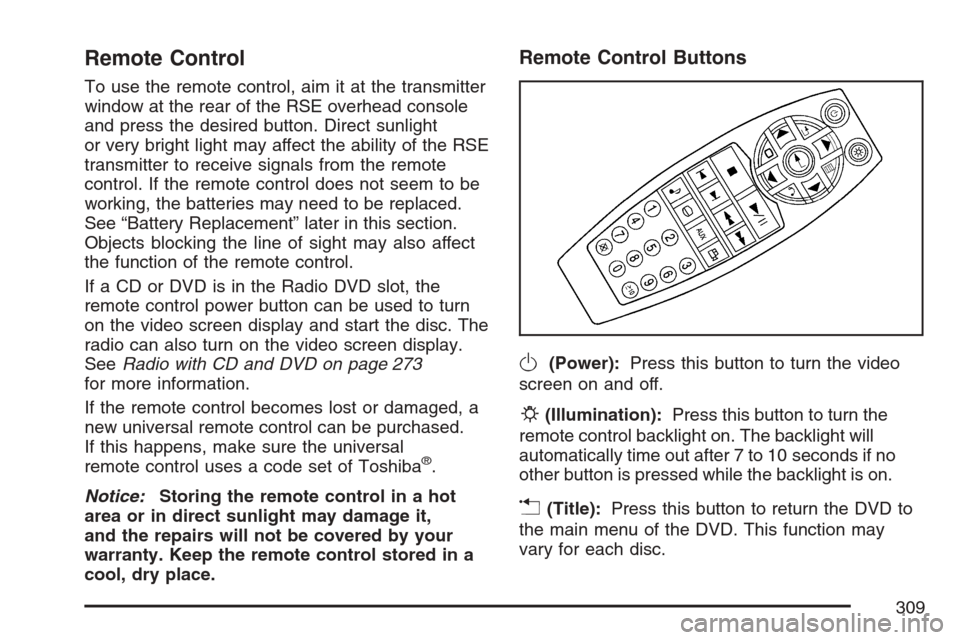
Remote Control
To use the remote control, aim it at the transmitter
window at the rear of the RSE overhead console
and press the desired button. Direct sunlight
or very bright light may affect the ability of the RSE
transmitter to receive signals from the remote
control. If the remote control does not seem to be
working, the batteries may need to be replaced.
See “Battery Replacement” later in this section.
Objects blocking the line of sight may also affect
the function of the remote control.
If a CD or DVD is in the Radio DVD slot, the
remote control power button can be used to turn
on the video screen display and start the disc. The
radio can also turn on the video screen display.
SeeRadio with CD and DVD on page 273
for more information.
If the remote control becomes lost or damaged, a
new universal remote control can be purchased.
If this happens, make sure the universal
remote control uses a code set of Toshiba
®.
Notice:Storing the remote control in a hot
area or in direct sunlight may damage it,
and the repairs will not be covered by your
warranty. Keep the remote control stored in a
cool, dry place.
Remote Control Buttons
O(Power):Press this button to turn the video
screen on and off.
P(Illumination):Press this button to turn the
remote control backlight on. The backlight will
automatically time out after 7 to 10 seconds if no
other button is pressed while the backlight is on.
v(Title):Press this button to return the DVD to
the main menu of the DVD. This function may
vary for each disc.
309