remote control CADILLAC ESCALADE 2008 3.G User Guide
[x] Cancel search | Manufacturer: CADILLAC, Model Year: 2008, Model line: ESCALADE, Model: CADILLAC ESCALADE 2008 3.GPages: 490, PDF Size: 2.65 MB
Page 150 of 490
Universal Home Remote
System
The Universal Home Remote System provides a way to
replace up to three hand-held Radio-Frequency (RF)
transmitters used to activate devices such as garage
door openers, security systems, and home lighting.
This device complies with Part 15 of the FCC Rules.
Operation is subject to the following two conditions:
1. This device may not cause harmful interference.
2. This device must accept any interference received,
including interference that may cause undesired
operation.
This device complies with RSS-210 of Industry Canada.
Operation is subject to the following two conditions:
1. This device may not cause interference.
2. This device must accept any interference received,
including interference that may cause undesired
operation of the device.
Changes or modications to this system by other than
an authorized service facility could void authorization to
use this equipment.
Universal Home Remote System
Operation (With Three Round LED)
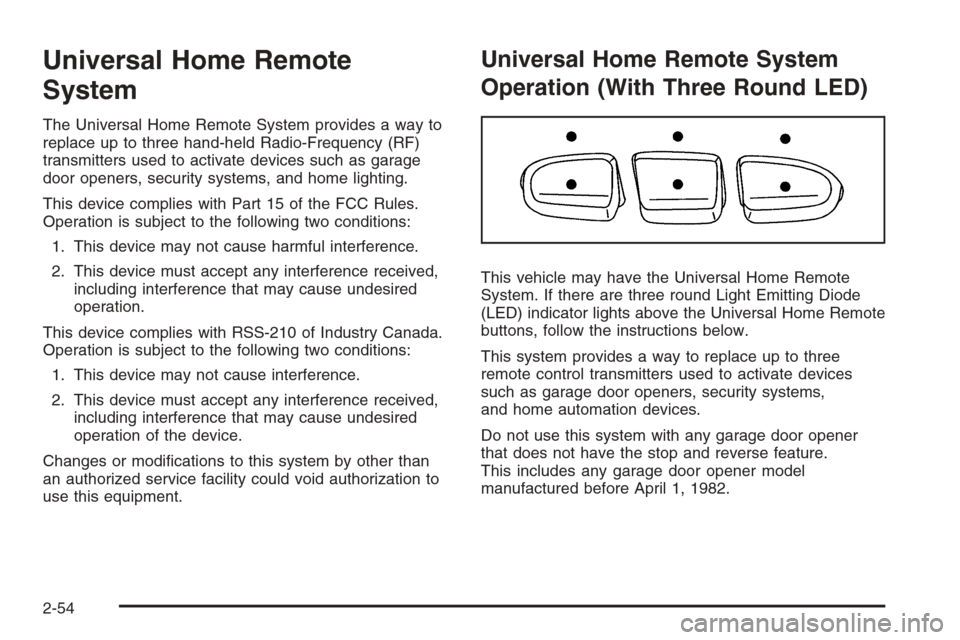
This vehicle may have the Universal Home Remote
System. If there are three round Light Emitting Diode
(LED) indicator lights above the Universal Home Remote
buttons, follow the instructions below.
This system provides a way to replace up to three
remote control transmitters used to activate devices
such as garage door openers, security systems,
and home automation devices.
Do not use this system with any garage door opener
that does not have the stop and reverse feature.
This includes any garage door opener model
manufactured before April 1, 1982.
2-54
Page 151 of 490
Read the instructions completely before attempting to
program the transmitter. Because of the steps involved,
it may be helpful to have another person assist with
programming the transmitter.
Be sure to keep the original remote control transmitter
for use in other vehicles, as well as, for future
programming. Only the original remote control
transmitter is needed for Fixed Code programming.
The programmed buttons should be erased when the
vehicle is sold or the lease ends. See “Erasing Universal
Home Remote Buttons” later in this section.
Park the vehicle outside of the garage when
programming a garage door. Be sure that people
and objects are clear of the garage door or gate that
is being programmed.Programming Universal Home
Remote — Rolling Code
For questions or help programming the Universal
Home Remote System, call 1-866-572-2728 or go to
www.learcar2u.com.
Most garage door openers sold after 1996 are
Rolling Code units.
Programming a garage door opener involves
time-sensitive actions, so read the entire procedure
before starting. Otherwise, the device will time out and
the procedure will have to be repeated.
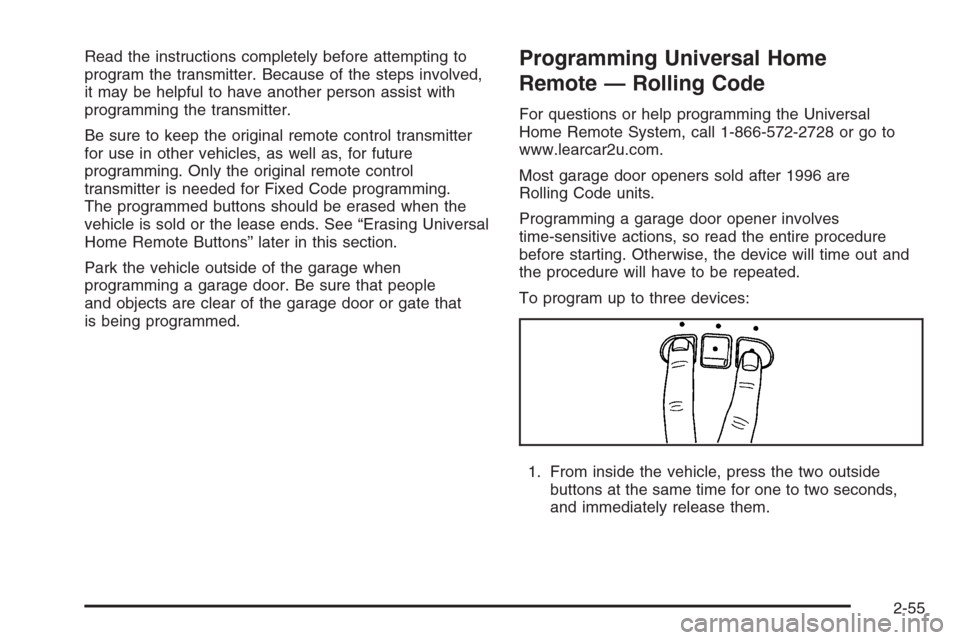
To program up to three devices:
1. From inside the vehicle, press the two outside
buttons at the same time for one to two seconds,
and immediately release them.
2-55
Page 152 of 490
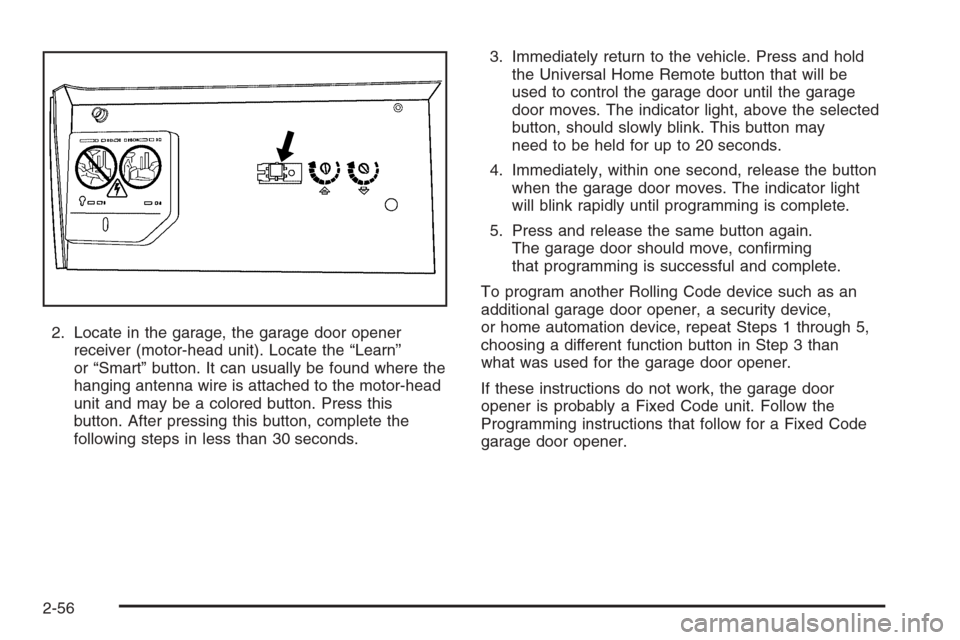
2. Locate in the garage, the garage door opener
receiver (motor-head unit). Locate the “Learn”
or “Smart” button. It can usually be found where the
hanging antenna wire is attached to the motor-head
unit and may be a colored button. Press this
button. After pressing this button, complete the
following steps in less than 30 seconds.3. Immediately return to the vehicle. Press and hold
the Universal Home Remote button that will be
used to control the garage door until the garage
door moves. The indicator light, above the selected
button, should slowly blink. This button may
need to be held for up to 20 seconds.
4. Immediately, within one second, release the button
when the garage door moves. The indicator light
will blink rapidly until programming is complete.
5. Press and release the same button again.
The garage door should move, conrming
that programming is successful and complete.
To program another Rolling Code device such as an
additional garage door opener, a security device,
or home automation device, repeat Steps 1 through 5,
choosing a different function button in Step 3 than
what was used for the garage door opener.
If these instructions do not work, the garage door
opener is probably a Fixed Code unit. Follow the
Programming instructions that follow for a Fixed Code
garage door opener.
2-56
Page 156 of 490
5. After entering all of the switch positions, again,
rmly press and release all three buttons at the
same time. The indicator lights will turn on.
6. Press and hold the button that will be used to
control the garage door until the garage door
moves. The indicator light above the selected button
should slowly blink. This button may need to be
held for up to 55 seconds.
7. Immediately release the button when the garage
door moves. The indicator light will blink rapidly
until programming is complete.
8. Press and release the same button again.
The garage door should move, conrming
that programming is successful and complete.
To program another Fixed Code device such as an
additional garage door opener, a security device,
or home automation device, repeat Steps 1-8, choosing
a different button in Step 6 than what was used for
the garage door opener.
Using Universal Home Remote
Press and hold the appropriate button for at least
half of a second. The indicator light will come on while
the signal is being transmitted.
Reprogramming Universal Home
Remote Buttons
Any of the three buttons can be reprogrammed by
repeating the instructions.
Erasing Universal Home Remote
Buttons
The programmed buttons should be erased when the
vehicle is sold or the lease ends.
To erase either Rolling Code or Fixed Code on the
Universal Home Remote device:
1. Press and hold the two outside buttons at the
same time for approximately 20 seconds, until the
indicator lights, located directly above the buttons,
begin to blink rapidly.
2. Once the indicator lights begin to blink, release both
buttons. The codes from all buttons will be erased.
For help or information on the Universal Home Remote
System, call the customer assistance phone number
underCustomer Assistance Offices on page 7-5.
2-60
Page 244 of 490
Using the DVD Player
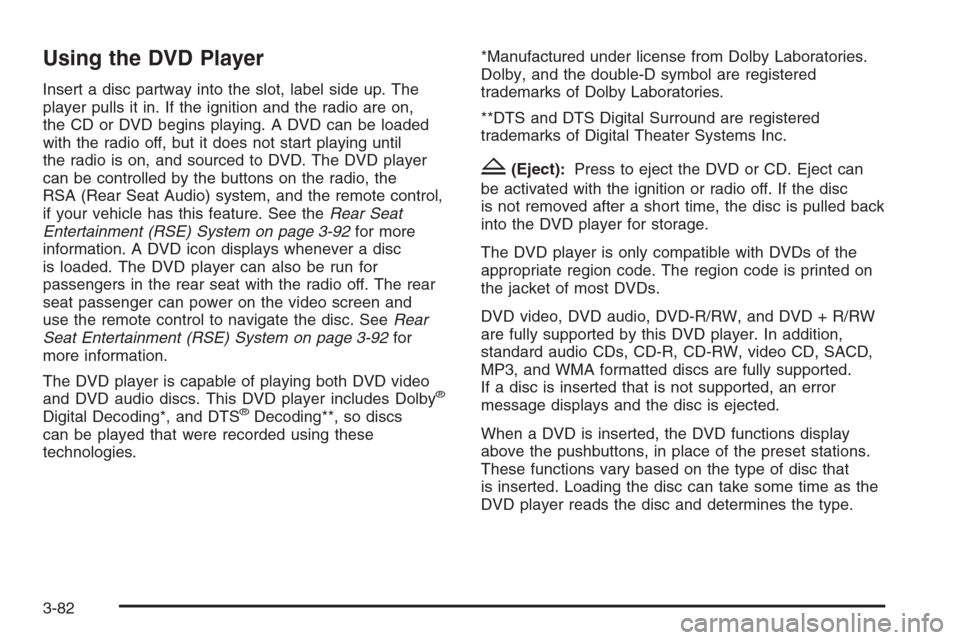
Insert a disc partway into the slot, label side up. The
player pulls it in. If the ignition and the radio are on,
the CD or DVD begins playing. A DVD can be loaded
with the radio off, but it does not start playing until
the radio is on, and sourced to DVD. The DVD player
can be controlled by the buttons on the radio, the
RSA (Rear Seat Audio) system, and the remote control,
if your vehicle has this feature. See theRear Seat
Entertainment (RSE) System on page 3-92for more
information. A DVD icon displays whenever a disc
is loaded. The DVD player can also be run for
passengers in the rear seat with the radio off. The rear
seat passenger can power on the video screen and
use the remote control to navigate the disc. SeeRear
Seat Entertainment (RSE) System on page 3-92for
more information.
The DVD player is capable of playing both DVD video
and DVD audio discs. This DVD player includes Dolby
®
Digital Decoding*, and DTS®Decoding**, so discs
can be played that were recorded using these
technologies.*Manufactured under license from Dolby Laboratories.
Dolby, and the double-D symbol are registered
trademarks of Dolby Laboratories.
**DTS and DTS Digital Surround are registered
trademarks of Digital Theater Systems Inc.
Z(Eject):Press to eject the DVD or CD. Eject can
be activated with the ignition or radio off. If the disc
is not removed after a short time, the disc is pulled back
into the DVD player for storage.
The DVD player is only compatible with DVDs of the
appropriate region code. The region code is printed on
the jacket of most DVDs.
DVD video, DVD audio, DVD-R/RW, and DVD + R/RW
are fully supported by this DVD player. In addition,
standard audio CDs, CD-R, CD-RW, video CD, SACD,
MP3, and WMA formatted discs are fully supported.
If a disc is inserted that is not supported, an error
message displays and the disc is ejected.
When a DVD is inserted, the DVD functions display
above the pushbuttons, in place of the preset stations.
These functions vary based on the type of disc that
is inserted. Loading the disc can take some time as the
DVD player reads the disc and determines the type.
3-82
Page 247 of 490
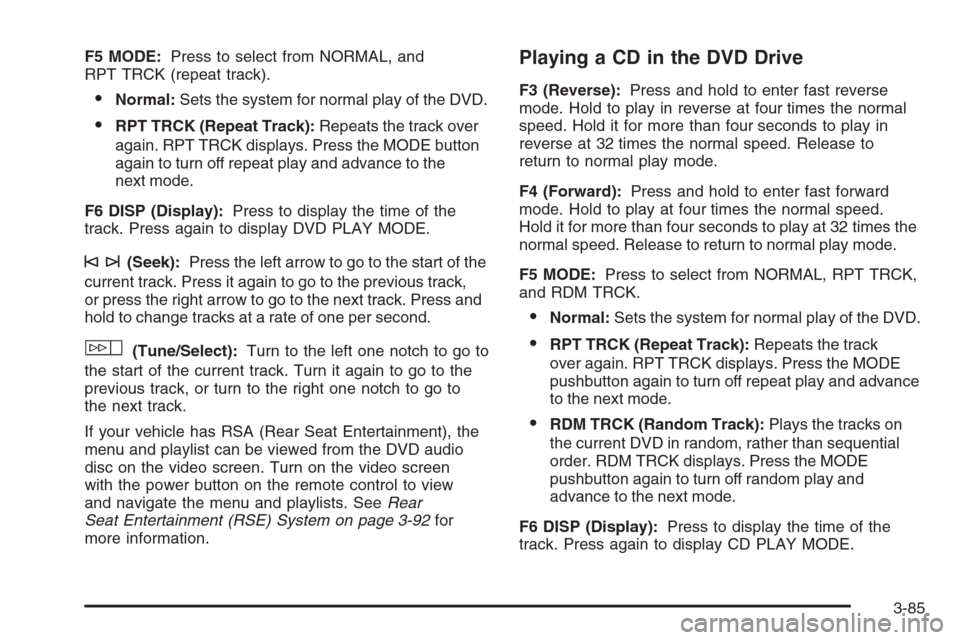
F5 MODE:Press to select from NORMAL, and
RPT TRCK (repeat track).
Normal:Sets the system for normal play of the DVD.
RPT TRCK (Repeat Track):Repeats the track over
again. RPT TRCK displays. Press the MODE button
again to turn off repeat play and advance to the
next mode.
F6 DISP (Display):Press to display the time of the
track. Press again to display DVD PLAY MODE.
©¨(Seek):Press the left arrow to go to the start of the
current track. Press it again to go to the previous track,
or press the right arrow to go to the next track. Press and
hold to change tracks at a rate of one per second.
w(Tune/Select):Turn to the left one notch to go to
the start of the current track. Turn it again to go to the
previous track, or turn to the right one notch to go to
the next track.
If your vehicle has RSA (Rear Seat Entertainment), the
menu and playlist can be viewed from the DVD audio
disc on the video screen. Turn on the video screen
with the power button on the remote control to view
and navigate the menu and playlists. SeeRear
Seat Entertainment (RSE) System on page 3-92for
more information.
Playing a CD in the DVD Drive
F3 (Reverse):Press and hold to enter fast reverse
mode. Hold to play in reverse at four times the normal
speed. Hold it for more than four seconds to play in
reverse at 32 times the normal speed. Release to
return to normal play mode.
F4 (Forward):Press and hold to enter fast forward
mode. Hold to play at four times the normal speed.
Hold it for more than four seconds to play at 32 times the
normal speed. Release to return to normal play mode.
F5 MODE:Press to select from NORMAL, RPT TRCK,
and RDM TRCK.
Normal:Sets the system for normal play of the DVD.
RPT TRCK (Repeat Track):Repeats the track
over again. RPT TRCK displays. Press the MODE
pushbutton again to turn off repeat play and advance
to the next mode.
RDM TRCK (Random Track):Plays the tracks on
the current DVD in random, rather than sequential
order. RDM TRCK displays. Press the MODE
pushbutton again to turn off random play and
advance to the next mode.
F6 DISP (Display):Press to display the time of the
track. Press again to display CD PLAY MODE.
3-85
Page 248 of 490
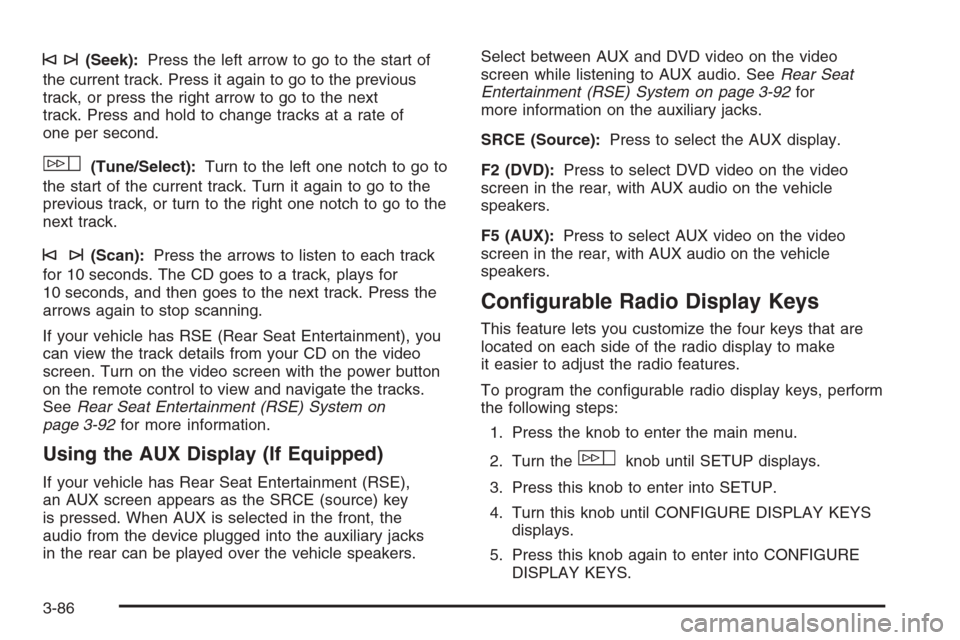
©¨(Seek):Press the left arrow to go to the start of
the current track. Press it again to go to the previous
track, or press the right arrow to go to the next
track. Press and hold to change tracks at a rate of
one per second.
w(Tune/Select):Turn to the left one notch to go to
the start of the current track. Turn it again to go to the
previous track, or turn to the right one notch to go to the
next track.
©¨(Scan):Press the arrows to listen to each track
for 10 seconds. The CD goes to a track, plays for
10 seconds, and then goes to the next track. Press the
arrows again to stop scanning.
If your vehicle has RSE (Rear Seat Entertainment), you
can view the track details from your CD on the video
screen. Turn on the video screen with the power button
on the remote control to view and navigate the tracks.
SeeRear Seat Entertainment (RSE) System on
page 3-92for more information.
Using the AUX Display (If Equipped)
If your vehicle has Rear Seat Entertainment (RSE),
an AUX screen appears as the SRCE (source) key
is pressed. When AUX is selected in the front, the
audio from the device plugged into the auxiliary jacks
in the rear can be played over the vehicle speakers.Select between AUX and DVD video on the video
screen while listening to AUX audio. SeeRear Seat
Entertainment (RSE) System on page 3-92for
more information on the auxiliary jacks.
SRCE (Source):Press to select the AUX display.
F2 (DVD):Press to select DVD video on the video
screen in the rear, with AUX audio on the vehicle
speakers.
F5 (AUX):Press to select AUX video on the video
screen in the rear, with AUX audio on the vehicle
speakers.
Congurable Radio Display Keys
This feature lets you customize the four keys that are
located on each side of the radio display to make
it easier to adjust the radio features.
To program the congurable radio display keys, perform
the following steps:
1. Press the knob to enter the main menu.
2. Turn the
wknob until SETUP displays.
3. Press this knob to enter into SETUP.
4. Turn this knob until CONFIGURE DISPLAY KEYS
displays.
5. Press this knob again to enter into CONFIGURE
DISPLAY KEYS.
3-86
Page 252 of 490
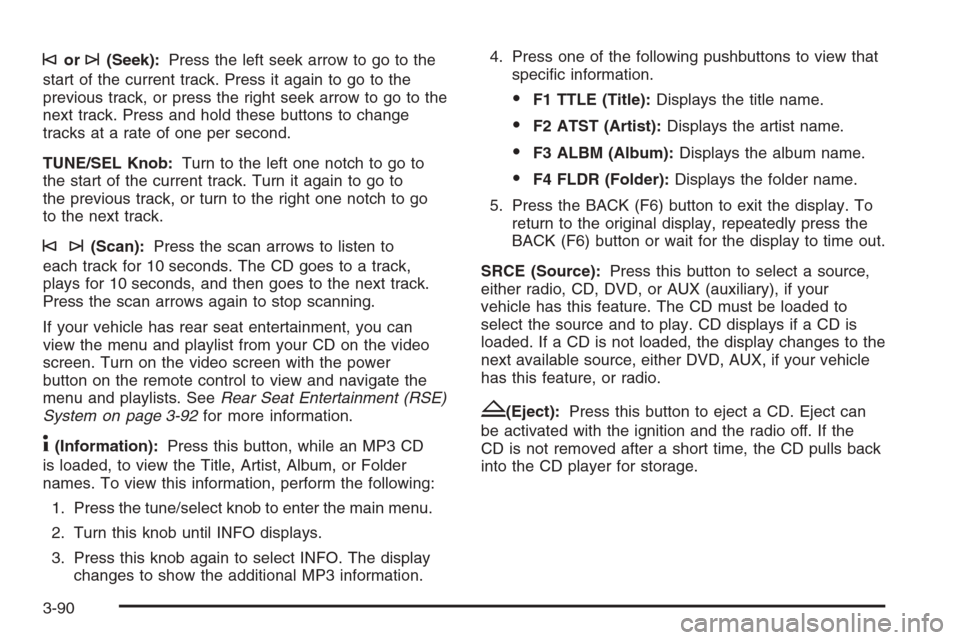
©or¨(Seek):Press the left seek arrow to go to the
start of the current track. Press it again to go to the
previous track, or press the right seek arrow to go to the
next track. Press and hold these buttons to change
tracks at a rate of one per second.
TUNE/SEL Knob:Turn to the left one notch to go to
the start of the current track. Turn it again to go to
the previous track, or turn to the right one notch to go
to the next track.
©¨(Scan):Press the scan arrows to listen to
each track for 10 seconds. The CD goes to a track,
plays for 10 seconds, and then goes to the next track.
Press the scan arrows again to stop scanning.
If your vehicle has rear seat entertainment, you can
view the menu and playlist from your CD on the video
screen. Turn on the video screen with the power
button on the remote control to view and navigate the
menu and playlists. SeeRear Seat Entertainment (RSE)
System on page 3-92for more information.
4(Information):Press this button, while an MP3 CD
is loaded, to view the Title, Artist, Album, or Folder
names. To view this information, perform the following:
1. Press the tune/select knob to enter the main menu.
2. Turn this knob until INFO displays.
3. Press this knob again to select INFO. The display
changes to show the additional MP3 information.4. Press one of the following pushbuttons to view that
specic information.
F1 TTLE (Title):Displays the title name.
F2 ATST (Artist):Displays the artist name.
F3 ALBM (Album):Displays the album name.
F4 FLDR (Folder):Displays the folder name.
5. Press the BACK (F6) button to exit the display. To
return to the original display, repeatedly press the
BACK (F6) button or wait for the display to time out.
SRCE (Source):Press this button to select a source,
either radio, CD, DVD, or AUX (auxiliary), if your
vehicle has this feature. The CD must be loaded to
select the source and to play. CD displays if a CD is
loaded. If a CD is not loaded, the display changes to the
next available source, either DVD, AUX, if your vehicle
has this feature, or radio.
Z(Eject):Press this button to eject a CD. Eject can
be activated with the ignition and the radio off. If the
CD is not removed after a short time, the CD pulls back
into the CD player for storage.
3-90
Page 254 of 490
Navigation/Radio System
Your vehicle may have a navigation radio system.
The navigation system has built-in features intended
to minimize driver distraction. Technology alone,
no matter how advanced, can never replace your own
judgment. See the Navigation System manual for
some tips to help you reduce distractions while driving.
Rear Seat Entertainment (RSE)
System
Your vehicle may have a DVD Rear Seat Entertainment
(RSE) system. The RSE system works with the
vehicle’s audio system. The DVD player is part of the
front radio. The RSE system includes a radio with
a DVD player, a video display screen, and if your
vehicle has a third row seat, it could have a second
video display screen, audio/video jacks, two wireless
headphones, and a remote control. SeeRadio(s)
on page 3-70for more information on the vehicle’s
audio/DVD system.
Driver Control of the Audio System
The driver has basic control of the whole audio system.
Press and hold the
O(power) knob for more than
two seconds to turn off the radio, RSE (rear seat
entertainment), and the RSA (rear seat audio).
SeeRadio(s) on page 3-70for more information.
If your vehicle has the navigation system, see the
Navigation System manual for more information.
Before You Drive
The RSE is designed for rear seat passengers only.
The driver cannot safely view the video screen
while driving and should not try to do so.
In severe or extreme weather conditions the RSE
system might not work until the temperature is within
the operating range. The operating range for the
RSE system is above−4°F (−20°C) or below
140°F (60°C). If the temperature of your vehicle is
outside of this range, heat or cool the vehicle until
the temperature is within the operating range of the
RSE system.
3-92
Page 257 of 490
To use the auxiliary inputs of the RSE system, connect
an external auxiliary device to the color-coded A/V jacks
and turn both the auxiliary device and the video screen
power on. If the video screen is in the DVD player mode,
pressing the AUX (auxiliary) button on the remote control
switches the video screen from the DVD player mode
to the auxiliary device. The radio plays the audio of the
connected auxiliary device by sourcing to auxiliary.
SeeRadio(s) on page 3-70for more information.
For optimal sound quality, increase the portable audio
device’s volume to the loudest level. Higher levels
of volume decreases audio distortion.
It is always best to power your portable audio device
through its own battery while playing.
How to Change the RSE Video Screen
Settings
The screen display mode (normal, full, and zoom),
screen brightness, and setup menu language can be
changed from the on screen setup menu. To change
any feature, perform the following:
1. Press the
z(display menu) button on the remote
control.
2. Use the remote control
Q,R,q,rnavigation
arrows and the
rbutton to use the setup menu.
3. Press the
zmenu button again to remove
the setup menu from the screen.
Audio Output
Audio from the DVD player or auxiliary inputs can be
heard through the following possible sources:
Wireless Headphones
Vehicle Speakers
Vehicle wired headphone jacks on the rear seat
audio system, if your vehicle has this feature.
The RSE system always transmits the audio signal to
the wireless headphones, if there is audio available.
See “Headphones” earlier in this section for more
information.
The DVD player is capable of outputting audio to the
wired headphone jacks on the RSA system, if your
vehicle has this feature. The DVD player can be
selected as an audio source on the RSA system.
SeeRear Seat Audio (RSA) on page 3-102for more
information.
When a device is connected to the radio’s auxiliary
input jack, if your vehicle has this feature, or A/V jacks,
the rear seat passengers are be able to hear audio
from the auxiliary device through the wireless or wired
headphones. The front seat passengers are able to
listen to playback from this device through the vehicle
speakers by selecting AUX as the source on the radio.
3-95