remote control CADILLAC ESCALADE 2008 3.G Owner's Manual
[x] Cancel search | Manufacturer: CADILLAC, Model Year: 2008, Model line: ESCALADE, Model: CADILLAC ESCALADE 2008 3.GPages: 490, PDF Size: 2.65 MB
Page 258 of 490
Video Screen
The video screen is located in the overhead console.
To use the video screen, do the following:
1. Push the release button located on the overhead
console.
2. Move the screen to the desired position.
When the video screen is not in use, push it up into its
locked position.
If a DVD is playing and the screen is raised to its locked
position, the screen remains on, this is normal, and
the DVD continues to play through the previous audio
source. Use the remote control power button or eject
the disc to turn off the screen.
The overhead console contains the IR transmitters
for the wireless headphones and the IR receivers for
the remote control. They are located at the rear of
the console.
Notice:Avoid directly touching the video screen,
as damage may occur. See “Cleaning the Video
Screen” later in this section for more information.
Remote Control
To use the remote control, aim it at the transmitter
window at the rear of the overhead console and press
the desired button. Direct sunlight or very bright light can
affect the ability of the RSE transmitter to receive
signals from the remote control. If the remote control
does not seem to be working, the batteries may need to
be replaced. See “Battery Replacement” later in this
section. Objects blocking the line of sight can also affect
the function of the remote control.
If a CD or DVD is in the Radio DVD slot, the remote
control power button can be used to turn on the video
screen display and start the disc. The radio can also
turn on the video screen display. SeeRadio(s) on
page 3-70for more information.
Notice:Storing the remote control in a hot area or
in direct sunlight can damage it, and the repairs
will not be covered by your warranty. Storage
in extreme cold can weaken the batteries. Keep the
remote control stored in a cool, dry place.
If the remote control becomes lost or damaged, a new
universal remote control can be purchased. If this
happens, make sure the universal remote control uses
a code set of Toshiba
®.
3-96
Page 259 of 490
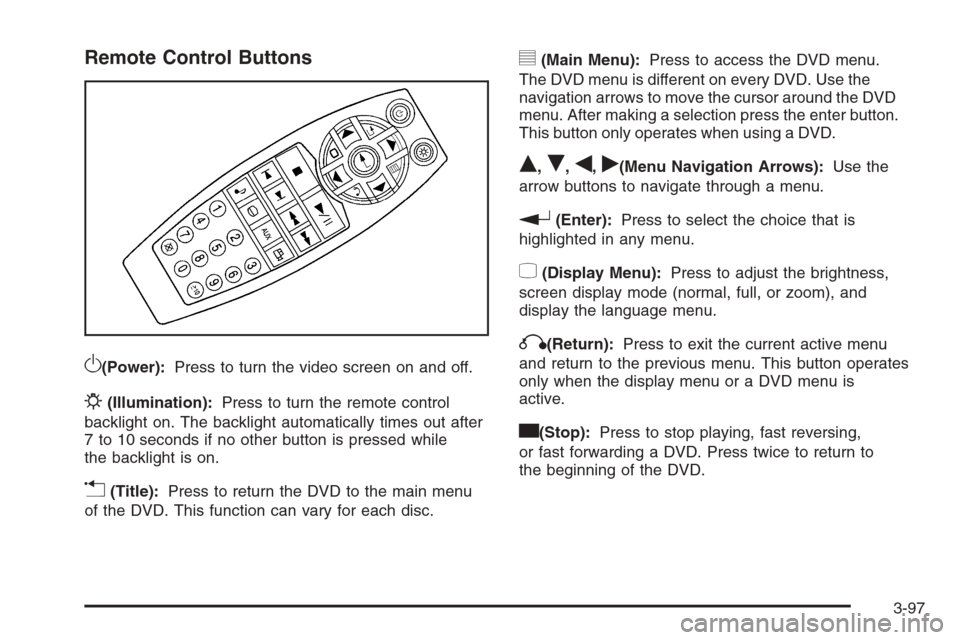
Remote Control Buttons
O(Power):Press to turn the video screen on and off.
P(Illumination):Press to turn the remote control
backlight on. The backlight automatically times out after
7 to 10 seconds if no other button is pressed while
the backlight is on.
v(Title):Press to return the DVD to the main menu
of the DVD. This function can vary for each disc.
y(Main Menu):Press to access the DVD menu.
The DVD menu is different on every DVD. Use the
navigation arrows to move the cursor around the DVD
menu. After making a selection press the enter button.
This button only operates when using a DVD.
Q,R,q,r(Menu Navigation Arrows):Use the
arrow buttons to navigate through a menu.
r(Enter):Press to select the choice that is
highlighted in any menu.
z(Display Menu):Press to adjust the brightness,
screen display mode (normal, full, or zoom), and
display the language menu.
q(Return):Press to exit the current active menu
and return to the previous menu. This button operates
only when the display menu or a DVD menu is
active.
c(Stop):Press to stop playing, fast reversing,
or fast forwarding a DVD. Press twice to return to
the beginning of the DVD.
3-97
Page 261 of 490
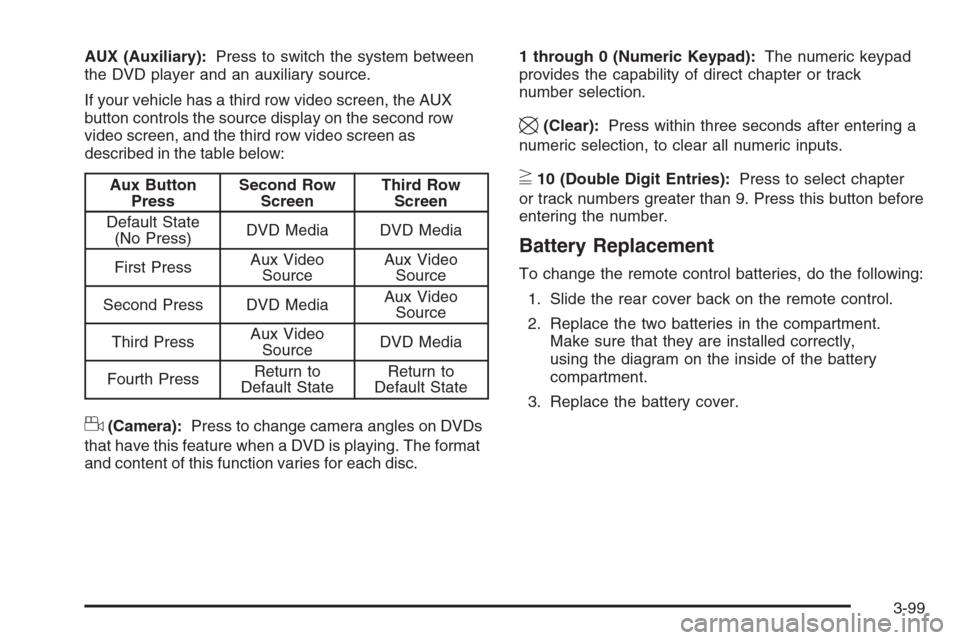
AUX (Auxiliary):Press to switch the system between
the DVD player and an auxiliary source.
If your vehicle has a third row video screen, the AUX
button controls the source display on the second row
video screen, and the third row video screen as
described in the table below:
Aux Button
PressSecond Row
ScreenThird Row
Screen
Default State
(No Press)DVD Media DVD Media
First PressAux Video
SourceAux Video
Source
Second Press DVD MediaAux Video
Source
Third PressAux Video
SourceDVD Media
Fourth PressReturn to
Default StateReturn to
Default State
d(Camera):Press to change camera angles on DVDs
that have this feature when a DVD is playing. The format
and content of this function varies for each disc.1 through 0 (Numeric Keypad):The numeric keypad
provides the capability of direct chapter or track
number selection.
\(Clear):Press within three seconds after entering a
numeric selection, to clear all numeric inputs.
}10 (Double Digit Entries):Press to select chapter
or track numbers greater than 9. Press this button before
entering the number.
Battery Replacement
To change the remote control batteries, do the following:
1. Slide the rear cover back on the remote control.
2. Replace the two batteries in the compartment.
Make sure that they are installed correctly,
using the diagram on the inside of the battery
compartment.
3. Replace the battery cover.
3-99
Page 262 of 490
If the remote control is to be stored for a long period of
time, remove the batteries and keep them in a cool,
dry place.
Problem Recommended Action
No power. The ignition might not be
turned ON/RUN or in
ACC/ACCESSORY.
The picture does not ll the
screen. There are black
borders on the top and
bottom or on both sides
or it looks stretched out.Check the display mode
settings in the setup menu
by pressing the display
menu button on the remote
control.
In auxiliary mode, the
picture moves or scrolls.Check the auxiliary input
connections at both
devices.
The remote control
does not work.Check to make sure
there is no obstruction
between the remote
control and the
transmitter window.
Check the batteries to
make sure they are not
dead or installed
incorrectly.
Problem Recommended Action
After stopping the player,
I push Play but
sometimes the DVD
starts where I left off
and sometimes at the
beginning.If the stop button was
pressed one time, the
DVD player resumes
playing where the DVD
was stopped. If the stop
button was pressed two
times the DVD player
begins to play from the
beginning of the DVD.
The auxiliary source is
running but there is no
picture or sound.Check that the RSE video
screen is in the auxiliary
source mode.
Check the auxiliary
input connections at
both devices.
Sometimes the wireless
headphone audio cuts
out or buzzes.Check for obstructions,
low batteries, reception
range, and interference
from cellular telephone
towers or by using your
cellular telephone in
the vehicle.
Check that the
headphones are on
correctly using the L (left)
and R (right) on the
headphones.
3-100
Page 324 of 490
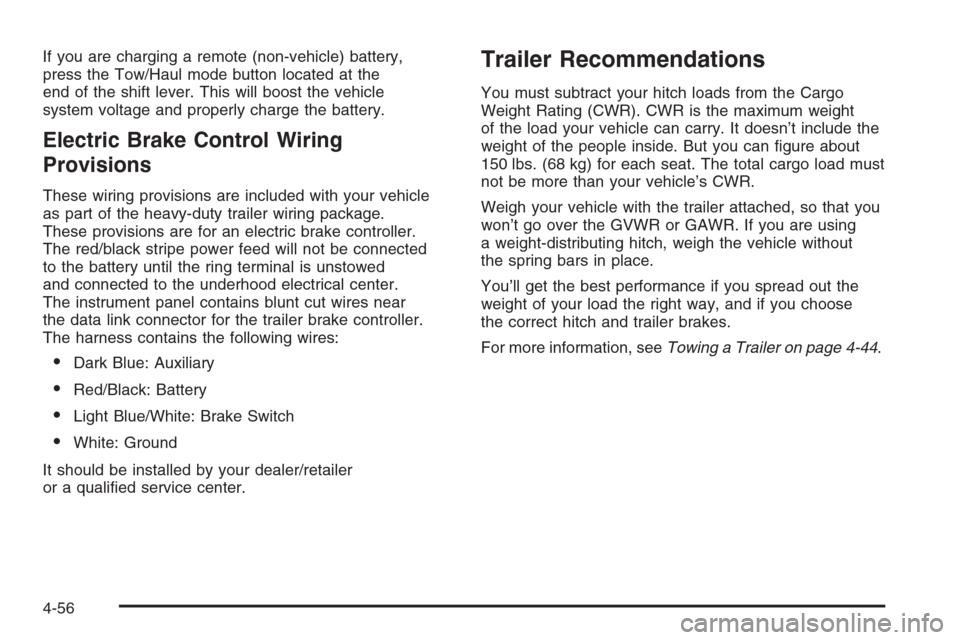
If you are charging a remote (non-vehicle) battery,
press the Tow/Haul mode button located at the
end of the shift lever. This will boost the vehicle
system voltage and properly charge the battery.
Electric Brake Control Wiring
Provisions
These wiring provisions are included with your vehicle
as part of the heavy-duty trailer wiring package.
These provisions are for an electric brake controller.
The red/black stripe power feed will not be connected
to the battery until the ring terminal is unstowed
and connected to the underhood electrical center.
The instrument panel contains blunt cut wires near
the data link connector for the trailer brake controller.
The harness contains the following wires:
Dark Blue: Auxiliary
Red/Black: Battery
Light Blue/White: Brake Switch
White: Ground
It should be installed by your dealer/retailer
or a qualied service center.
Trailer Recommendations
You must subtract your hitch loads from the Cargo
Weight Rating (CWR). CWR is the maximum weight
of the load your vehicle can carry. It doesn’t include the
weight of the people inside. But you can gure about
150 lbs. (68 kg) for each seat. The total cargo load must
not be more than your vehicle’s CWR.
Weigh your vehicle with the trailer attached, so that you
won’t go over the GVWR or GAWR. If you are using
a weight-distributing hitch, weigh the vehicle without
the spring bars in place.
You’ll get the best performance if you spread out the
weight of your load the right way, and if you choose
the correct hitch and trailer brakes.
For more information, seeTowing a Trailer on page 4-44.
4-56
Page 485 of 490
O
Odometer......................................................3-35
Odometer, Trip...............................................3-35
Off-Road Driving.............................................4-12
Off-Road Recovery..........................................4-11
Oil
Engine.......................................................5-14
Pressure Light.............................................3-45
Oil, Engine Oil Life System..............................5-16
Older Children, Restraints................................1-49
Online Owner Center........................................ 7-4
OnStar, Privacy..............................................7-18
OnStar
®System, see OnStar®Manual...............2-51
Operation, Universal Home Remote System........2-54
Other Warning Devices...................................... 3-6
Outlet Adjustment............................................3-31
Outlets
Accessory Power.........................................3-24
Outside
Power Foldaway Mirrors...............................2-45
Overheated Engine Protection
Operating Mode..........................................5-28
Owner Checks and Services.............................6-10
Owners, Canadian............................................... ii
P
Paint, Damage..............................................5-103
Park
Shifting Into................................................2-36
Shifting Out of............................................2-37
Park Aid........................................................2-48
Park Brake....................................................2-35
Parking
Assist........................................................2-48
Over Things That Burn.................................2-38
Passenger Airbag Status Indicator.....................3-37
Passenger Sensing System..............................1-83
Passing.........................................................4-11
PASS-KEY
®III+ Electronic Immobilizer...............2-22
PASS-Key®III+ Electronic Immobilizer
Operation...................................................2-23
Perchlorate Materials Requirements,
California..................................................... 5-4
Power
Door Locks.................................................2-10
Electrical System.......................................5-106
Liftgate......................................................2-14
Lumbar Controls........................................... 1-3
Reclining Seatbacks...................................... 1-7
Retained Accessory (RAP)............................2-26
9
Page 486 of 490
Power (cont.)
Running Boards..........................................2-17
Seat ............................................................ 1-2
Steering Fluid.............................................5-33
Windows....................................................2-19
Privacy..........................................................7-16
Event Data Recorders..................................7-17
Navigation System.......................................7-18
OnStar .......................................................7-18
Radio Frequency Identication.......................7-18
Programmable Automatic Door Locks.................2-11
R
Radio Frequency Identication (RFID),
Privacy......................................................7-18
Radio(s)........................................................3-70
Radios
Navigation/Radio System,
see Navigation Manual..............................3-92
Rear Seat Audio........................................3-102
Reception.................................................3-105
Setting the Clock.........................................3-69
Theft-Deterrent..........................................3-104
Rainsense™ II Wipers.....................................3-10
Reading Lamps..............................................3-23
Rear Air Conditioning and Heating System
and Electronic Climate Controls.....................3-31Rear Axle......................................................5-44
Rear Door Security Locks................................2-11
Rear Heated Seats.........................................1-10
Rear Seat Armrest..........................................2-63
Rear Seat Audio (RSA)..................................3-102
Rear Seat Entertainment System.......................3-92
Rear Side Window Antenna............................3-106
Rear Storage Area..........................................2-63
Rear Windshield Washer/Wiper.........................3-12
Rearview Mirror, Automatic Dimming with
OnStar
®, Compass and Temperature Display.....2-42
Reclining Seatbacks, Power............................... 1-7
Recommended Fluids and Lubricants.................6-13
Recovery Hooks.............................................4-34
Recreational Vehicle Towing.............................4-41
Remote Keyless Entry (RKE) System.................. 2-4
Remote Keyless Entry (RKE) System,
Operation..................................................... 2-5
Remote Vehicle Start........................................ 2-7
Removing the Flat Tire and Installing the
Spare Tire..................................................5-83
Removing the Spare Tire and Tools...................5-78
Replacement Bulbs.........................................5-51
Replacement Parts, Maintenance......................6-15
Reporting Safety Defects
Canadian Government..................................7-15
General Motors...........................................7-15
United States Government............................7-14
10
Page 488 of 490
Service, Scheduling Appointments....................... 7-9
Servicing Your Airbag-Equipped Vehicle..............1-88
Setting the Clock............................................3-69
Sheet Metal Damage.....................................5-103
Shifting Into Park............................................2-36
Shifting Out of Park........................................2-37
Signals, Turn and Lane-Change.......................... 3-8
Spare Tire.....................................................5-95
Installing....................................................5-83
Removing...................................................5-78
Storing.......................................................5-91
Specications, Capacities...............................5-113
Speedometer..................................................3-35
Split Bench Seat (60/40)..................................1-10
StabiliTrak
®Indicator Light...............................3-41
Stabilitrak®System........................................... 4-6
Start Vehicle, Remote....................................... 2-7
Starting the Engine.........................................2-26
Steering.......................................................... 4-9
Steering Wheel Controls, Audio.......................3-104
Steering Wheel, Heated..................................... 3-7
Steering Wheel, Tilt Wheel................................. 3-6
Storage
Garment Hooks...........................................2-62
Storage Areas
Center Console Storage Area........................2-62
Convenience Net.........................................2-63
Cupholders.................................................2-61Storage Areas (cont.)
Glove Box..................................................2-61
Luggage Carrier..........................................2-62
Rear Seat Armrest.......................................2-63
Rear Storage Area.......................................2-63
Stuck in Sand, Mud, Ice, or Snow.....................4-33
Sun Visors.....................................................2-20
Sunroof.........................................................2-65
T
Tachometer....................................................3-35
Theft-Deterrent, Radio....................................3-104
Theft-Deterrent Systems...................................2-20
Content Theft-Deterrent................................2-20
PASS-Key
®III+ Electronic Immobilizer............2-22
PASS-Key®III+ Electronic Immobilizer
Operation................................................2-23
Third Row Seat..............................................1-23
Tilt Wheel........................................................ 3-6
Time, Setting..................................................3-69
Tire
Pressure Light.............................................3-42
Tires.............................................................5-54
Aluminum or Chrome-Plated Wheels,
Cleaning...............................................5-102
Buying New Tires........................................5-70
Chains.......................................................5-75
12
Page 489 of 490
Tires (cont.)
Changing a Flat Tire....................................5-77
Cleaning...................................................5-103
Different Size..............................................5-71
High-Speed Operation..................................5-61
If a Tire Goes Flat.......................................5-76
Ination - Tire Pressure................................5-60
Inspection and Rotation................................5-67
Installing the Spare Tire................................5-83
Pressure Monitor Operation...........................5-63
Pressure Monitor System..............................5-62
Removing the Flat Tire.................................5-83
Removing the Spare Tire and Tools...............5-78
Secondary Latch System..............................5-88
Spare Tire..................................................5-95
Storing a Flat or Spare Tire and Tools............5-91
Tire Sidewall Labeling..................................5-55
Tire Terminology and Denitions....................5-57
Uniform Tire Quality Grading.........................5-72
Wheel Alignment and Tire Balance.................5-73
Wheel Replacement.....................................5-74
When It Is Time for New Tires......................5-69
Tow/Haul Mode ...............................................2-34
Tow/Haul Mode Light.......................................3-47
Towing
Recreational Vehicle.....................................4-41
Towing a Trailer..........................................4-44
Your Vehicle...............................................4-41Traction
Locking Differential........................................ 4-5
Road Sensing Suspension.............................. 4-6
Stabilitrak
®System........................................ 4-6
Trailer
Recommendations.......................................4-56
Transmission
Fluid, Automatic...........................................5-20
Transmission Operation, Automatic....................2-30
Trip Odometer................................................3-35
Turn and Lane-Change Signals.......................... 3-8
Turn Signal/Multifunction Lever........................... 3-8
U
Ultrasonic Rear Parking Assist (URPA)...............2-48
Uniform Tire Quality Grading............................5-72
Universal Home Remote System.......................2-54
Operation...................................................2-54
Using this Manual............................................... iii
V
Vehicle
Control........................................................ 4-3
Damage Warnings........................................... iv
Loading......................................................4-35
Symbols......................................................... iv
13