display CADILLAC ESCALADE 2008 3.G Service Manual
[x] Cancel search | Manufacturer: CADILLAC, Model Year: 2008, Model line: ESCALADE, Model: CADILLAC ESCALADE 2008 3.GPages: 490, PDF Size: 2.65 MB
Page 226 of 490
APPROACH LIGHTING
This feature allows you to select whether or not to
have the exterior lights turn on briey during low light
periods after unlocking the vehicle using the Remote
Keyless Entry (RKE) transmitter.
Press the customization button until APPROACH
LIGHTING appears on the DIC display. Press the
set/reset button once to access the settings for
this feature. Then press the customization button to
scroll through the following settings:
OFF:The exterior lights will not turn on when you
unlock the vehicle with the RKE transmitter.
ON (default):If it is dark enough outside, the exterior
lights will turn on briey when you unlock the vehicle
with the RKE transmitter.
The lights will remain on for 20 seconds or until the
lock button on the RKE transmitter is pressed, or
the vehicle is no longer off. SeeRemote Keyless
Entry (RKE) System Operation on page 2-5for more
information.
NO CHANGE:No change will be made to this feature.
The current setting will remain.
To select a setting, press the set/reset button while
the desired setting is displayed on the DIC.
AUTO HIGH BEAMS
If your vehicle has this feature, it allows you to select to
have the Intellibeam®system turned off or on. See
Exterior Lamps on page 3-16for more information.
Press the customization button until AUTO HIGH
BEAMS appears on the DIC display. Press the set/reset
button once to access the settings for this feature.
Then press the customization button to scroll through
the following settings:
OFF (default):The Intellibeam
®system will be
turned off.
ON:The Intellibeam
®system will be turned on.
NO CHANGE:No change will be made to this feature.
The current setting will remain.
To select a setting, press the set/reset button while the
desired setting is displayed on the DIC.
3-64
Page 227 of 490
CHIME VOLUME
This feature allows you to select the volume level of
the chime.
Press the customization button until CHIME VOLUME
appears on the DIC display. Press the set/reset
button once to access the settings for this feature.
Then press the customization button to scroll through
the following settings:
NORMAL:The chime volume will be set to a normal
level.
LOUD:The chime volume will be set to a loud level.
NO CHANGE:No change will be made to this feature.
The current setting will remain.
There is no default for chime volume. The volume will
stay at the last known setting.
To select a setting, press the set/reset button while the
desired setting is displayed on the DIC.
PARK TILT MIRRORS
This feature allows you to select whether or not the
outside mirror(s) will automatically tilt down when
the vehicle is shifted into REVERSE (R). SeeOutside
Power Foldaway Mirrors on page 2-45for more
information.Press the customization button until PARK TILT
MIRRORS appears on the DIC display. Press the
set/reset button once to access the settings for
this feature. Then press the customization button to
scroll through the following settings:
OFF (default):Neither outside mirror will be tilted down
when the vehicle is shifted into REVERSE (R).
DRIVER MIRROR:The driver’s outside mirror will be
tilted down when the vehicle is shifted into
REVERSE (R).
PASSENGER MIRROR:The passenger’s outside
mirror will be tilted down when the vehicle is shifted into
REVERSE (R).
BOTH MIRRORS:The driver’s and passenger’s outside
mirrors will be tilted down when the vehicle is shifted
into REVERSE (R).
NO CHANGE:No change will be made to this feature.
The current setting will remain.
To select a setting, press the set/reset button while the
desired setting is displayed on the DIC.
3-65
Page 228 of 490
EASY EXIT SEAT
This feature allows you to select your preference for the
automatic easy exit seat feature. SeeMemory Seat,
Mirrors, and Pedals on page 1-6for more information.
Press the customization button until EASY EXIT
SEAT appears on the DIC display. Press the set/reset
button once to access the settings for this feature.
Then press the customization button to scroll through
the following settings:
OFF (default):No automatic seat exit recall will occur.
ON:The driver’s seat will move back when the key
is removed from the ignition.
The automatic easy exit seat movement will only occur
one time after the key is removed from the ignition.
If the automatic movement has already occurred, and
you put the key back in the ignition and remove it again,
the seat will stay in the original exit position, unless
a memory recall took place prior to removing the
key again.
NO CHANGE:No change will be made to this feature.
The current setting will remain.
To select a setting, press the set/reset button while
the desired setting is displayed on the DIC.
MEMORY SEAT RECALL
This feature allows you to select your preference for
the remote memory seat recall feature. SeeMemory
Seat, Mirrors, and Pedals on page 1-6for more
information.
Press the customization button until MEMORY SEAT
RECALL appears on the DIC display. Press the set/reset
button once to access the settings for this feature.
Then press the customization button to scroll through
the following settings:
OFF (default):No remote memory seat recall will occur.
ON:The driver’s seat, and on some vehicles, the outside
mirrors will automatically move to the stored driving
position when the unlock button on the Remote Keyless
Entry (RKE) transmitter is pressed. On some vehicles
with the adjustable throttle and brake pedal feature,
the pedals will also automatically move. See “Relearn
Remote Key” underDIC Operation and Displays on
page 3-48for more information on matching transmitters
to driver ID numbers.
NO CHANGE:No change will be made to this feature.
The current setting will remain.
To select a setting, press the set/reset button while the
desired setting is displayed on the DIC.
3-66
Page 229 of 490
REMOTE START
If your vehicle has this feature, it allows you to turn the
remote start off or on. The remote start feature allows
you to start the engine from outside of the vehicle using
the Remote Keyless Entry (RKE) transmitter. See
Remote Vehicle Start on page 2-7for more information.
Press the customization button until REMOTE START
appears on the DIC display. Press the set/reset
button once to access the settings for this feature.
Then press the customization button to scroll through
the following settings:
OFF:The remote start feature will be disabled.
ON (default):The remote start feature will be enabled.
NO CHANGE:No change will be made to this
feature. The current setting will remain.
To select a setting, press the set/reset button while the
desired setting is displayed on the DIC.
DISPLAY DIGITAL SPEED
This feature allows you to enable or disable the digital
speedometer on the DIC.Press the customization button until DISPLAY DIGITAL
SPEED appears on the DIC display. Press the set/reset
button once to access the settings for this feature.
Then press the customization button to scroll through
the following settings:
OFF:The digital speedometer will be disabled.
ON (default):The digital speedometer will be enabled.
NO CHANGE:No change will be made to this
feature. The current setting will remain.
To select a setting, press the set/reset button while the
desired setting is displayed on the DIC.
FACTORY SETTINGS
This feature allows you to set all of the customization
features back to their factory default settings.
Press the customization button until FACTORY
SETTINGS appears on the DIC display. Press the
set/reset button once to access the settings for
this feature. Then press the customization button to
scroll through the following settings:
RESTORE ALL (default):The customization features
will be set to their factory default settings.
DO NOT RESTORE:The customization features will
not be set to their factory default settings.
To select a setting, press the set/reset button while the
desired setting is displayed on the DIC.
3-67
Page 230 of 490
EXIT FEATURE SETTINGS
This feature allows you to exit the feature settings menu.
Press the customization button until PRESS
VTO EXIT
FEATURE SETTINGS appears in the DIC display.
Press the set/reset button once to exit the menu.
If you do not exit, pressing the customization button
again will return you to the beginning of the feature
settings menu.
Exiting the Feature Settings Menu
The feature settings menu will be exited when any of
the following occurs:
The vehicle is no longer in ON/RUN.
The trip/fuel or vehicle information DIC buttons
are pressed.
The end of the feature settings menu is reached
and exited.
A 40 second time period has elapsed with no
selection made.
Audio System(s)
Determine which radio your vehicle has and then read the
pages following to familiarize yourself with its features.
{CAUTION:
This system provides you with far greater
access to audio stations and song listings.
Giving extended attention to entertainment
tasks while driving can cause a crash and you
or others can be injured or killed. Always keep
your eyes on the road and your mind on the
drive — avoid engaging in extended searching
while driving.
Keeping your mind on the drive is important for
safe driving. SeeDefensive Driving on page 4-2.
Here are some ways in which you can help avoid
distraction while driving.
While your vehicle is parked:
Familiarize yourself with all of its controls.
Familiarize yourself with its operation.
3-68
Page 231 of 490
Set up your audio system by presetting your
favorite radio stations, setting the tone, and
adjusting the speakers. Then, when driving
conditions permit, you can tune to your favorite
radio stations using the presets and steering
wheel controls if the vehicle has them.
Notice:Before adding any sound equipment to
your vehicle, such as an audio system, CD player, CB
radio, mobile telephone, or two-way radio, make sure
that it can be added by checking with your dealer/
retailer. Also, check federal rules covering mobile
radio and telephone units. If sound equipment can be
added, it is very important to do it properly. Added
sound equipment may interfere with the operation
of your vehicle’s engine, radio, or other systems,
and even damage them. Your vehicle’s systems
may interfere with the operation of sound equipment
that has been added.
Notice:The chime signals related to safety belts,
parking brake, and other functions of your vehicle
operate through the radio/entertainment system.
If that equipment is replaced or additional equipment
is added to your vehicle, the chimes may not work.
Make sure that replacement or additional equipment
is compatible with your vehicle before installing it.
SeeAccessories and Modifications on page 5-3.Your vehicle may have a feature called Retained
Accessory Power (RAP). With RAP, the audio system
can be played even after the ignition is turned off.
SeeRetained Accessory Power (RAP) on page 2-26
for more information.
Setting the Clock
1. Press thew(tune/select) knob (the passenger
side knob) to enter the main menu.
2. Turn the same knob until SET CLOCK displays.
3. Press this knob to select SET CLOCK.
4. Turn this knob to adjust the time.
5. Press the same knob to update the time.
VEHICLE TIME UPDATED displays.
If the CLOCK/RADIO DISP (display) is programmed into
one of the congurable keys, pressing the key switches
the display back to the clock set function. The time
and date always appears on the radio display.
See “Congurable Radio Display Keys” later in this
section for more information on conguring the keys.
3-69
Page 232 of 490
Setting the Date
1. Press thewknob (the passenger side knob)
to enter the main menu.
2. Turn the same knob until SET DATE displays.
3. Press this knob to select SET DATE.
4. Turn this knob to adjust the date.
5. Press the same knob to update the time.
VEHICLE DATE UPDATED displays.
If the DATE is programmed into one of the congurable
keys, pressing the key switches the display back to
the date set function. The time and date always appears
on the radio display. See “Congurable Radio Display
Keys” later in this section for more information on
conguring the keys.
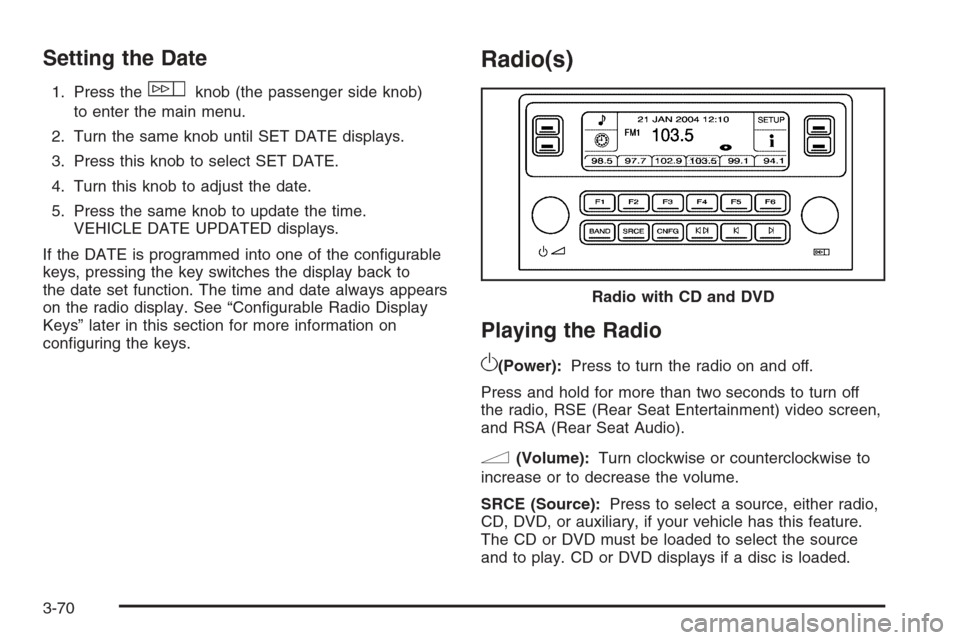
Radio(s)
Playing the Radio
O
(Power):Press to turn the radio on and off.
Press and hold for more than two seconds to turn off
the radio, RSE (Rear Seat Entertainment) video screen,
and RSA (Rear Seat Audio).
n(Volume):Turn clockwise or counterclockwise to
increase or to decrease the volume.
SRCE (Source):Press to select a source, either radio,
CD, DVD, or auxiliary, if your vehicle has this feature.
The CD or DVD must be loaded to select the source
and to play. CD or DVD displays if a disc is loaded.Radio with CD and DVD
3-70
Page 233 of 490
If a CD or DVD is not loaded, the display changes to
the auxiliary source, if your vehicle has this feature,
or continues to play the radio.
Vehicle Noise Compensation (VNC):Your vehicle has
a Bose
®audio system. It includes Bose AudioPilot®noise
compensation technology. When turned on, AudioPilot®
continuously adjusts the audio system equalization, to
compensate for background noise, so that the audio
always sounds the same at the set volume level.
This feature is most effective at lower radio volume
settings where background noise can affect how well the
music is being heard through the audio system. At higher
volume settings, where the music is much louder than the
background noise, there might be little or no adjustments
by AudioPilot
®.
Turn the AudioPilot
®on by pressing thew(tune/
select) knob to enter the main menu. Then turn this knob
until VNC:AUDIOPILOT displays. Press this knob to
turn AudioPilot
®on and off. An X appears in the box while
it is on.
To turn AudioPilot
®off, press thewknob to enter
the main menu, turn this knob until VNC:AUDIOPILOT
appears, and press this knob. The X in the box disappears
when it is turned off. For additional information on
AudioPilot
®, visit www.bose.com/audiopilot.
Finding a Station
BAND:Press to select AM, FM1, FM2, or XM1 or
XM2 (if equipped).
w(Tune/Select):Turn to select radio stations.
©¨(Seek):Press the left arrow to go to the previous
station and stay there. Press the right arrow to go to
the next station and stay there. The sound mutes while
seeking.
The radio only seeks stations with a strong signal that
are in the selected band.
©¨(Scan):Press the arrows to enter scan mode.
SCAN displays. Press the arrows to scan to the
next station. The radio goes to a station, plays for
ve seconds, and then goes on to the next station.
Press the arrows again to stop scanning.
To scan preset stations, press and hold the arrows
for more than two seconds until a beep sounds
and PSCAN displays. The radio goes to the rst preset
station, plays for ve seconds, and then goes to the
next preset station. Press the arrows again to stop
scanning presets.
The radio only scans stations with a strong signal that
are in the selected band.
3-71
Page 234 of 490
ALOCAL/DISTANT Selection:With this feature the
radio can be set to search for local stations or stations
that are further away, for a larger selection. To set
this feature to LOCAL or DISTANT, perform the
following steps:
1. Press the
w(tune/select) knob to enter the
main menu.
2. Turn this knob until SEEK LOCAL or SEEK
DISTANT displays.
3. Press this knob again to select either LOCAL
or DISTANT.
4. Press the BACK (F6) button to exit the display.
To return to the original display, repeatedly press
the BACK (F6) button or wait for the display to
time out.
To search for stations, press the seek arrows.
If the system is set to LOCAL, SEEK displays and
the radio seeks to stations only with strong signals.
If the system is set to DISTANT, D-SEEK displays
and the radio seeks to stations with weak and
strong signals.
Setting Preset Stations
Up to 30 stations (six AM, six FM1, six FM2, and
six XM1 and six XM2 (if equipped)), can be programmed
on the six numbered pushbuttons, by performing the
following steps:
1. Turn the radio on.
2. Press BAND to select AM, FM1, FM2, or XM1 or
XM2 (if equipped).
3. Tune in the desired station.
4. Press and hold one of the six numbered
pushbuttons for two seconds until a beep sounds.
The set preset station number displays above
the pushbutton that is set. When that numbered
pushbutton is pressed for less than two seconds,
the station that was set, returns.
5. Repeat the steps for each pushbutton.
To set the preset stations with an equalization
setting, DSP (Digital Signal Processing) setting,
or a PTY (program type) setting, see each of these
features later in this section. Once one of these
additional settings is selected, the preset station
remembers each setting and it remains active, until
the setting is turned off for that preset station.
3-72
Page 235 of 490
AUTOSTORE PRESETS:To set the preset stations
automatically, perform the following steps:
1. Turn the radio on.
2. Press BAND to select AM, FM1, or FM2.
3. Press the
w(tune/select) knob to enter the
main menu.
4. Turn this knob until AUTOSTORE PRESETS
displays.
5. Press this knob again to select. AUTOSTORE
displays. The radio automatically searches the
band and selects and stores the six radio stations
with the strongest signal. The stations are stored
by signal strength, not sequential order. The
set preset station number displays above the
pushbutton that is set.
6. Press the BACK (F6) button to exit the display.
To return to the original display, repeatedly press
the BACK (F6) button or wait for the display to
time out.
When battery power is removed and later applied,
the radio presets do not have to be reset.
This function does not work with XM™.PRESETS HOME/AWAY:This feature enables the
radio to store two different kinds of station presets.
HOME can be used for local stations and AWAY can be
for stations available outside of the local broadcast
area. To set preset stations for home and away perform
the following steps:
1. Press the
wknob to enter the main menu.
2. Turn this knob until PRESETS HOME/AWAY
displays.
3. Press this knob again to select. HOME or
AWAY displays.
4. Press the BACK (F6) button to exit the display.
To return to the original display, repeatedly press
the BACK (F6) button or wait for the display to
time out.
Follow the manual or automatic steps previously listed
for setting the preset pushbuttons for both home
and away.
This function does not work with XM™.
3-73