lock CADILLAC ESCALADE 2008 3.G Manual PDF
[x] Cancel search | Manufacturer: CADILLAC, Model Year: 2008, Model line: ESCALADE, Model: CADILLAC ESCALADE 2008 3.GPages: 490, PDF Size: 2.65 MB
Page 223 of 490
AUTO DOOR LOCK
This feature allows you to select when the vehicle’s
doors will automatically lock. SeeProgrammable
Automatic Door Locks on page 2-11for more
information.
Press the customization button until AUTO DOOR
LOCK appears on the DIC display. Press the set/reset
button once to access the settings for this feature.
Then press the customization button to scroll through
the following settings:
SHIFT OUT OF PARK (default):The doors will
automatically lock when the vehicle is shifted out of
PARK (P).
AT VEHICLE SPEED:The doors will automatically lock
when the vehicle speed is above 8 mph (13 km/h) for
three seconds.
NO CHANGE:No change will be made to this feature.
The current setting will remain.
To select a setting, press the set/reset button while the
desired setting is displayed on the DIC.
AUTO DOOR UNLOCK
This feature allows you to select whether or not to
turn off the automatic door unlocking feature. It also
allows you to select which doors and when the doors will
automatically unlock. SeeProgrammable Automatic
Door Locks on page 2-11for more information.
Press the customization button until AUTO DOOR
UNLOCK appears on the DIC display. Press the
set/reset button once to access the settings for this
feature. Then press the customization button to scroll
through the following settings:
OFF:None of the doors will automatically unlock.
DRIVER AT KEY OUT:Only the driver’s door will
unlock when the key is taken out of the ignition.
DRIVER IN PARK:Only the driver’s door will unlock
when the vehicle is shifted into PARK (P).
ALL AT KEY OUT:All of the doors will unlock when
the key is taken out of the ignition.
ALL IN PARK (default):All of the doors will unlock
when the vehicle is shifted into PARK (P).
NO CHANGE:No change will be made to this feature.
The current setting will remain.
To select a setting, press the set/reset button while the
desired setting is displayed on the DIC.
3-61
Page 224 of 490
REMOTE DOOR LOCK
This feature allows you to select the type of feedback
you will receive when locking the vehicle with the
Remote Keyless Entry (RKE) transmitter. You will not
receive feedback when locking the vehicle with the RKE
transmitter if the doors are open. SeeRemote Keyless
Entry (RKE) System Operation on page 2-5for more
information.
Press the customization button until REMOTE DOOR
LOCK appears on the DIC display. Press the set/reset
button once to access the settings for this feature.
Then press the customization button to scroll through
the following settings:
OFF:There will be no feedback when you press the
lock button on the RKE transmitter.
LIGHTS ONLY:The exterior lamps will ash when you
press the lock button on the RKE transmitter.
HORN ONLY:The horn will sound on the second press
of the lock button on the RKE transmitter.
HORN & LIGHTS (default):The exterior lamps will ash
when you press the lock button on the RKE transmitter,
and the horn will sound when the lock button is pressed
again within ve seconds of the previous command.
NO CHANGE:No change will be made to this feature.
The current setting will remain.
To select a setting, press the set/reset button while the
desired setting is displayed on the DIC.
REMOTE DOOR UNLOCK
This feature allows you to select the type of feedback
you will receive when unlocking the vehicle with
the Remote Keyless Entry (RKE) transmitter. You will
not receive feedback when unlocking the vehicle
with the RKE transmitter if the doors are open. See
Remote Keyless Entry (RKE) System Operation
on page 2-5for more information.
Press the customization button until REMOTE DOOR
UNLOCK appears on the DIC display. Press the
set/reset button once to access the settings for this
feature. Then press the customization button to scroll
through the following settings:
LIGHTS OFF:The exterior lamps will not ash when
you press the unlock button on the RKE transmitter.
LIGHTS ON (default):The exterior lamps will
ash when you press the unlock button on the RKE
transmitter.
NO CHANGE:No change will be made to this feature.
The current setting will remain.
To select a setting, press the set/reset button while the
desired setting is displayed on the DIC.
3-62
Page 225 of 490
DELAY DOOR LOCK
This feature allows you to select whether or not the
locking of the vehicle’s doors and liftgate will be delayed.
When locking the doors and liftgate with the power
door lock switch and a door or the liftgate is open,
this feature will delay locking the doors and liftgate until
ve seconds after the last door is closed. You will
hear three chimes to signal that the delayed locking
feature is in use. The key must be out of the ignition for
this feature to work. You can temporarily override
delayed locking by pressing the power door lock switch
twice or the lock button on the RKE transmitter twice.
SeeDelayed Locking on page 2-11for more information.
Press the customization button until DELAY DOOR
LOCK appears on the DIC display. Press the set/reset
button once to access the settings for this feature.
Then press the customization button to scroll through
the following settings:
OFF:There will be no delayed locking of the
vehicle’s doors.
ON (default):The doors will not lock until ve seconds
after the last door or the liftgate is closed.
NO CHANGE:No change will be made to this feature.
The current setting will remain.
To select a setting, press the set/reset button while the
desired setting is displayed on the DIC.
EXIT LIGHTING
This feature allows you to select the amount of time you
want the exterior lamps to remain on when it is dark
enough outside. This happens after the key is turned
from ON/RUN to LOCK/OFF.
Press the customization button until EXIT LIGHTING
appears on the DIC display. Press the set/reset button
once to access the settings for this feature. Then
press the customization button to scroll through the
following settings:
OFF:The exterior lamps will not turn on.
30 SECONDS (default):The exterior lamps will stay
on for 30 seconds.
1 MINUTE:The exterior lamps will stay on for
one minute.
2 MINUTES:The exterior lamps will stay on for
two minutes.
NO CHANGE:No change will be made to this feature.
The current setting will remain.
To select a setting, press the set/reset button while
the desired setting is displayed on the DIC.
3-63
Page 226 of 490
APPROACH LIGHTING
This feature allows you to select whether or not to
have the exterior lights turn on briey during low light
periods after unlocking the vehicle using the Remote
Keyless Entry (RKE) transmitter.
Press the customization button until APPROACH
LIGHTING appears on the DIC display. Press the
set/reset button once to access the settings for
this feature. Then press the customization button to
scroll through the following settings:
OFF:The exterior lights will not turn on when you
unlock the vehicle with the RKE transmitter.
ON (default):If it is dark enough outside, the exterior
lights will turn on briey when you unlock the vehicle
with the RKE transmitter.
The lights will remain on for 20 seconds or until the
lock button on the RKE transmitter is pressed, or
the vehicle is no longer off. SeeRemote Keyless
Entry (RKE) System Operation on page 2-5for more
information.
NO CHANGE:No change will be made to this feature.
The current setting will remain.
To select a setting, press the set/reset button while
the desired setting is displayed on the DIC.
AUTO HIGH BEAMS
If your vehicle has this feature, it allows you to select to
have the Intellibeam®system turned off or on. See
Exterior Lamps on page 3-16for more information.
Press the customization button until AUTO HIGH
BEAMS appears on the DIC display. Press the set/reset
button once to access the settings for this feature.
Then press the customization button to scroll through
the following settings:
OFF (default):The Intellibeam
®system will be
turned off.
ON:The Intellibeam
®system will be turned on.
NO CHANGE:No change will be made to this feature.
The current setting will remain.
To select a setting, press the set/reset button while the
desired setting is displayed on the DIC.
3-64
Page 228 of 490
EASY EXIT SEAT
This feature allows you to select your preference for the
automatic easy exit seat feature. SeeMemory Seat,
Mirrors, and Pedals on page 1-6for more information.
Press the customization button until EASY EXIT
SEAT appears on the DIC display. Press the set/reset
button once to access the settings for this feature.
Then press the customization button to scroll through
the following settings:
OFF (default):No automatic seat exit recall will occur.
ON:The driver’s seat will move back when the key
is removed from the ignition.
The automatic easy exit seat movement will only occur
one time after the key is removed from the ignition.
If the automatic movement has already occurred, and
you put the key back in the ignition and remove it again,
the seat will stay in the original exit position, unless
a memory recall took place prior to removing the
key again.
NO CHANGE:No change will be made to this feature.
The current setting will remain.
To select a setting, press the set/reset button while
the desired setting is displayed on the DIC.
MEMORY SEAT RECALL
This feature allows you to select your preference for
the remote memory seat recall feature. SeeMemory
Seat, Mirrors, and Pedals on page 1-6for more
information.
Press the customization button until MEMORY SEAT
RECALL appears on the DIC display. Press the set/reset
button once to access the settings for this feature.
Then press the customization button to scroll through
the following settings:
OFF (default):No remote memory seat recall will occur.
ON:The driver’s seat, and on some vehicles, the outside
mirrors will automatically move to the stored driving
position when the unlock button on the Remote Keyless
Entry (RKE) transmitter is pressed. On some vehicles
with the adjustable throttle and brake pedal feature,
the pedals will also automatically move. See “Relearn
Remote Key” underDIC Operation and Displays on
page 3-48for more information on matching transmitters
to driver ID numbers.
NO CHANGE:No change will be made to this feature.
The current setting will remain.
To select a setting, press the set/reset button while the
desired setting is displayed on the DIC.
3-66
Page 231 of 490
Set up your audio system by presetting your
favorite radio stations, setting the tone, and
adjusting the speakers. Then, when driving
conditions permit, you can tune to your favorite
radio stations using the presets and steering
wheel controls if the vehicle has them.
Notice:Before adding any sound equipment to
your vehicle, such as an audio system, CD player, CB
radio, mobile telephone, or two-way radio, make sure
that it can be added by checking with your dealer/
retailer. Also, check federal rules covering mobile
radio and telephone units. If sound equipment can be
added, it is very important to do it properly. Added
sound equipment may interfere with the operation
of your vehicle’s engine, radio, or other systems,
and even damage them. Your vehicle’s systems
may interfere with the operation of sound equipment
that has been added.
Notice:The chime signals related to safety belts,
parking brake, and other functions of your vehicle
operate through the radio/entertainment system.
If that equipment is replaced or additional equipment
is added to your vehicle, the chimes may not work.
Make sure that replacement or additional equipment
is compatible with your vehicle before installing it.
SeeAccessories and Modifications on page 5-3.Your vehicle may have a feature called Retained
Accessory Power (RAP). With RAP, the audio system
can be played even after the ignition is turned off.
SeeRetained Accessory Power (RAP) on page 2-26
for more information.
Setting the Clock
1. Press thew(tune/select) knob (the passenger
side knob) to enter the main menu.
2. Turn the same knob until SET CLOCK displays.
3. Press this knob to select SET CLOCK.
4. Turn this knob to adjust the time.
5. Press the same knob to update the time.
VEHICLE TIME UPDATED displays.
If the CLOCK/RADIO DISP (display) is programmed into
one of the congurable keys, pressing the key switches
the display back to the clock set function. The time
and date always appears on the radio display.
See “Congurable Radio Display Keys” later in this
section for more information on conguring the keys.
3-69
Page 232 of 490
Setting the Date
1. Press thewknob (the passenger side knob)
to enter the main menu.
2. Turn the same knob until SET DATE displays.
3. Press this knob to select SET DATE.
4. Turn this knob to adjust the date.
5. Press the same knob to update the time.
VEHICLE DATE UPDATED displays.
If the DATE is programmed into one of the congurable
keys, pressing the key switches the display back to
the date set function. The time and date always appears
on the radio display. See “Congurable Radio Display
Keys” later in this section for more information on
conguring the keys.
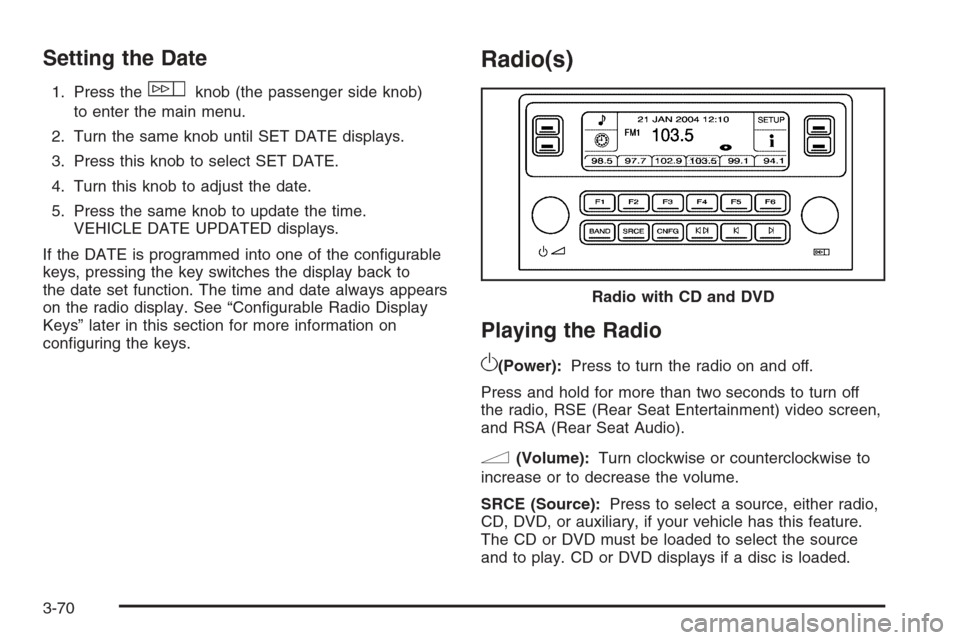
Radio(s)
Playing the Radio
O
(Power):Press to turn the radio on and off.
Press and hold for more than two seconds to turn off
the radio, RSE (Rear Seat Entertainment) video screen,
and RSA (Rear Seat Audio).
n(Volume):Turn clockwise or counterclockwise to
increase or to decrease the volume.
SRCE (Source):Press to select a source, either radio,
CD, DVD, or auxiliary, if your vehicle has this feature.
The CD or DVD must be loaded to select the source
and to play. CD or DVD displays if a disc is loaded.Radio with CD and DVD
3-70
Page 240 of 490
Activating Program Type (PTY)
Stations (RDS and XM™)
PTY lets you search for stations with specic types of
music. The selectable PTYs are POP, EASY, TALK,
CNTRY (Country), CLASS (Classical), and JAZZ.
To activate program types, perform the following steps:
1. Press the
wknob to enter the main menu.
2. Turn this knob until PROGRAM TYPE MODE
displays.
3. Press this knob again to select ON or OFF.
An X appears in the box when ON is selected.
4. Press the BACK (F6) button to exit the display. To
return to the original display, repeatedly press the
BACK (F6) button or wait for the display to time out.
Once program type is activated the PTYs displays
above the pushbuttons, in place of the preset stations
(if programmed). Press the pushbutton for the
desired PTY. The radio might not go to all of the
stations with that music type when pressing the
pushbutton, as not all stations support PTYs.AF (Alternate Frequency):Alternate frequency allows
the radio to switch to a stronger station with the
same program type.
To turn AF on or off, perform the following steps:
1. Press the
wknob to enter the main menu.
2. Turn this knob until ALTERNATE FREQ. displays.
3. Press this knob again to select AF OFF, AF ON,
or AF REG (regular). When AF is selected an
X appears in that box.
4. Press the BACK (F6) button to exit the display. To
return to the original display, repeatedly press the
BACK (F6) button or wait for the display to time out.
This function does not work with XM™.
Radio Message
THEFTLOCK:This message displays when the
THEFTLOCK®system has activated. Take the vehicle
to the dealer/retailer for service.
Radio Messages for XM™ Only
SeeXM Radio Messages on page 3-91later in this
section for further detail.
3-78
Page 253 of 490
XM Radio Messages
XL (Explicit Language Channels):These channels,
or any others, can be blocked at a customer’s request,
by calling 1-800-852-XMXM (9696).
Updating:The encryption code in the receiver is being
updated, and no action is required. This process
should take no longer than 30 seconds.
No Signl:The system is functioning correctly, but
the vehicle is in a location that is blocking the XM™
signal. When the vehicle is moved into an open area,
the signal should return.
Loading:The audio system is acquiring and processing
audio and text data. No action is needed. This message
should disappear shortly.
Off Air:This channel is not currently in service.
Tune in to another channel.
CH Unavl:This previously assigned channel is no
longer assigned. Tune to another station. If this station
was one of the presets, choose another station for
that preset button.No Info:No artist, song title, category, or text
information is available at this time on this channel.
The system is working properly.
No Info:No text or informational messages are
available at this time on this channel. The system is
working properly.
NotFound:There are no channels available for the
selected category. The system is working properly.
XM Lock:The XM™ receiver in your vehicle may
have previously been in another vehicle. For security
purposes, XM™ receivers cannot be swapped between
vehicles. If this message is received after having
your vehicle serviced, check with your dealer/retailer.
Radio ID:If tuned to channel 0, this message alternates
with the XM™ Radio 8 digit radio ID label. This label
is needed to activate the service.
Unknown:If this message is received when tuned to
channel 0, there could be a receiver fault. Consult
with your dealer/retailer.
Check XM:If this message does not clear within
a short period of time, the receiver could have a fault.
Consult with your dealer/retailer.
3-91
Page 258 of 490
Video Screen
The video screen is located in the overhead console.
To use the video screen, do the following:
1. Push the release button located on the overhead
console.
2. Move the screen to the desired position.
When the video screen is not in use, push it up into its
locked position.
If a DVD is playing and the screen is raised to its locked
position, the screen remains on, this is normal, and
the DVD continues to play through the previous audio
source. Use the remote control power button or eject
the disc to turn off the screen.
The overhead console contains the IR transmitters
for the wireless headphones and the IR receivers for
the remote control. They are located at the rear of
the console.
Notice:Avoid directly touching the video screen,
as damage may occur. See “Cleaning the Video
Screen” later in this section for more information.
Remote Control
To use the remote control, aim it at the transmitter
window at the rear of the overhead console and press
the desired button. Direct sunlight or very bright light can
affect the ability of the RSE transmitter to receive
signals from the remote control. If the remote control
does not seem to be working, the batteries may need to
be replaced. See “Battery Replacement” later in this
section. Objects blocking the line of sight can also affect
the function of the remote control.
If a CD or DVD is in the Radio DVD slot, the remote
control power button can be used to turn on the video
screen display and start the disc. The radio can also
turn on the video screen display. SeeRadio(s) on
page 3-70for more information.
Notice:Storing the remote control in a hot area or
in direct sunlight can damage it, and the repairs
will not be covered by your warranty. Storage
in extreme cold can weaken the batteries. Keep the
remote control stored in a cool, dry place.
If the remote control becomes lost or damaged, a new
universal remote control can be purchased. If this
happens, make sure the universal remote control uses
a code set of Toshiba
®.
3-96