light CADILLAC ESCALADE 2009 3.G Owners Manual
[x] Cancel search | Manufacturer: CADILLAC, Model Year: 2009, Model line: ESCALADE, Model: CADILLAC ESCALADE 2009 3.GPages: 586, PDF Size: 4.47 MB
Page 296 of 586
U(Space):Select to enter a space between
characters or the words of a name.
Backspace:Select if an incorrect character has
been entered.
To make name entries easier, the system only highlights
the characters that can follow the last one entered.
For example, if a Z is entered, a T may not be available
for selection.
If a name does not display after entry, it may need to
be entered differently or the map DVD disc may
not contain that information. SeeDatabase Coverage
Explanations on page 4-59for more information.
Maps
This section includes basic information that you need to
know about the map database.
The maps are stored on a DVD. The United States,
Canada, and Puerto Rico are contained on one disc.
Detailed Areas
Road network attributes are contained in the map
database for detailed areas. Attributes include
information such as street names, street address, turn
restrictions, etc. A detailed area includes all major
highways, service roads, and residential roads. The
detailed areas include points of interest (POI) such as:
restaurants, airports, banks, hospitals, police stations,
gas stations, tourist attractions, historical monuments,
etc. The map database may not include data for newly
constructed areas or map database corrections that are
completed after the production of the disc. The navigation
system provides full route guidance in the detailed
map areas.
Limited Guidance Areas
Any area that is not classied as detailed, is a limited
guidance area. Limited guidance streets are displayed
on the map but route guidance may not be given
on these streets. Some POI categories, such as the city
center POI category, and some street addresses are
included in the limited guidance areas.
The navigation system informs through voice prompts
when you are traveling into a limited guidance area
where route guidance is not available. The street maps
and the directional arrow displayed on the navigation
system can then be used to determine the remaining
route to your destination.
4-14
Page 297 of 586
Installing the DVD Map Disc
Your dealer/retailer may have installed the map DVD. If
the map DVD was not installed, do the following to load it:
1. Turn the ignition on.
2. Press
Oto turn the navigation system on.
3. Load the map DVD partway into the slot located
just below the screen. The system pulls it in.
4. If the Caution screen appears, touch the
OK screen button to agree.
DVD Map Disc Messages
If Disc Read Error appears on the display and/or the
map disc comes out, it could be for one of the following
reasons:
If the map disc was installed into the CD slot.
See “Installing the DVD Map Disc” previously.
It is very hot, when the temperature returns to
normal, the map disc should play.
You are driving on a very rough road. When the road
becomes smoother, the map disc should play.
The map disc is dirty, scratched, wet,
or upside down.
If any error occurs repeatedly or if an error cannot be
corrected, contact your dealer/retailer.
Ejecting the DVD Map Disc
Z
(DVD Map Disc Eject):Press to eject the
DVD map disc. This button is located next to the
upper disc slot.
Handling the DVD Map Disc
When handling the DVD map disc, be careful
of the following:
Handle the disc very carefully to avoid
contamination or aws. Signals may not read out
properly if the disc gets contaminated or awed.
If the disc gets soiled, use a soft cloth to gently wipe
it out from the center of the disc to the outside.
Do not use photographic record cleaner, solvents,
or other cleaners.
Do not use the disc to rest on while writing or
drawing using any writing utensil or attach a
seal to any of the sides or the disc.
Do not keep the disc in direct sunlight, high
temperatures, or humidity.
After using the disc, place it back into the
original case.
4-15
Page 305 of 586
3–D Lane Guidance
Some major metropolitan areas may include a 3–D lane
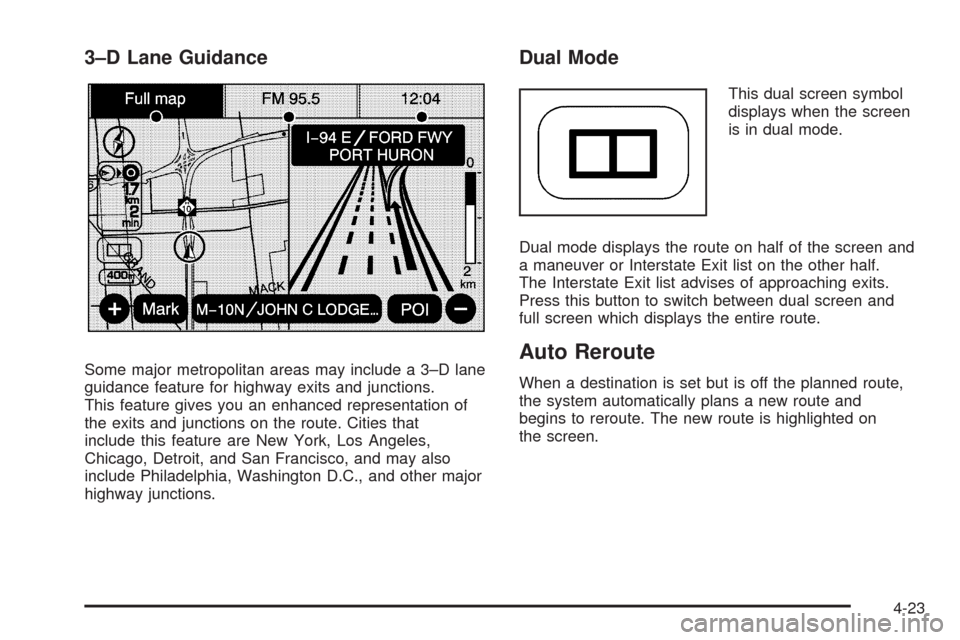
guidance feature for highway exits and junctions.
This feature gives you an enhanced representation of
the exits and junctions on the route. Cities that
include this feature are New York, Los Angeles,
Chicago, Detroit, and San Francisco, and may also
include Philadelphia, Washington D.C., and other major
highway junctions.
Dual Mode
This dual screen symbol
displays when the screen
is in dual mode.
Dual mode displays the route on half of the screen and
a maneuver or Interstate Exit list on the other half.
The Interstate Exit list advises of approaching exits.
Press this button to switch between dual screen and
full screen which displays the entire route.
Auto Reroute
When a destination is set but is off the planned route,
the system automatically plans a new route and
begins to reroute. The new route is highlighted on
the screen.
4-23
Page 307 of 586
4. Once a state or province has been selected the
City name category is automatically selected
for entry.
Enter the City Name or touch the Last 5 Cities
screen button.
The Last 5 Cities screen displays a list of the last ve
city names that had been entered. Select a city from
the list and it appears in the City name area.
If using the alpha keyboard, nish entering the city
name. If ve or less names are available, a list
displays. If more than ve are available, the
List screen button displays a number. This number
represents the number of available cities. Select
this button to view the list and select a city.
5. Once a city has been selected the Street name
category is automatically selected for entry.
Start entering the street name. If ve or less names
are available, a list displays. If more than ve are
available, the List screen button displays a number.
This number represents the number of available
streets. Select this button to view the list.6. Once a street has been selected, press the
House # screen button to enter the house number.
The system displays the house number range
that is available for the street.
7. Select the Go screen button. The map screen,
with the destination marked displays.
8. Select the route preference (Fastest, Shortest,
or Other). The system calculates and highlights
the route.
9. Select the Start Guidance screen button.
The route is now ready to be started.
See “Getting Started on Your Route” later in this
section for more information.
To enter a destination by entering the street name rst:
1. Press the DEST hard key.
2. Select the
2screen button.
3. Select the state/province screen button, if needed,
to change the current state or province. A list of all
of the available states and provinces appear.
Select the state or province.
4-25
Page 308 of 586
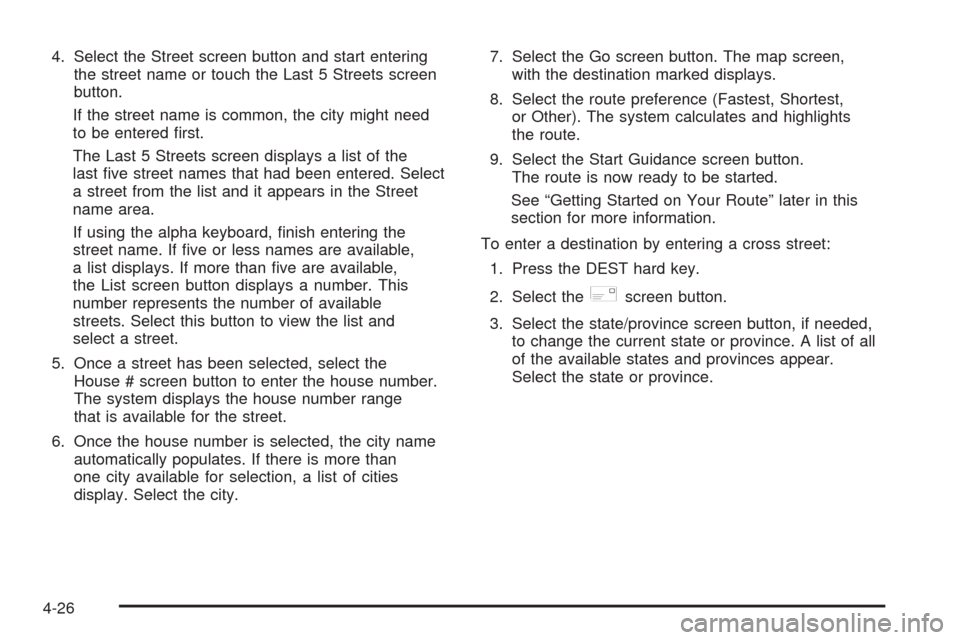
4. Select the Street screen button and start entering
the street name or touch the Last 5 Streets screen
button.
If the street name is common, the city might need
to be entered rst.
The Last 5 Streets screen displays a list of the
last ve street names that had been entered. Select
a street from the list and it appears in the Street
name area.
If using the alpha keyboard, nish entering the
street name. If ve or less names are available,
a list displays. If more than ve are available,
the List screen button displays a number. This
number represents the number of available
streets. Select this button to view the list and
select a street.
5. Once a street has been selected, select the
House # screen button to enter the house number.
The system displays the house number range
that is available for the street.
6. Once the house number is selected, the city name
automatically populates. If there is more than
one city available for selection, a list of cities
display. Select the city.7. Select the Go screen button. The map screen,
with the destination marked displays.
8. Select the route preference (Fastest, Shortest,
or Other). The system calculates and highlights
the route.
9. Select the Start Guidance screen button.
The route is now ready to be started.
See “Getting Started on Your Route” later in this
section for more information.
To enter a destination by entering a cross street:
1. Press the DEST hard key.
2. Select the
2screen button.
3. Select the state/province screen button, if needed,
to change the current state or province. A list of all
of the available states and provinces appear.
Select the state or province.
4-26
Page 309 of 586
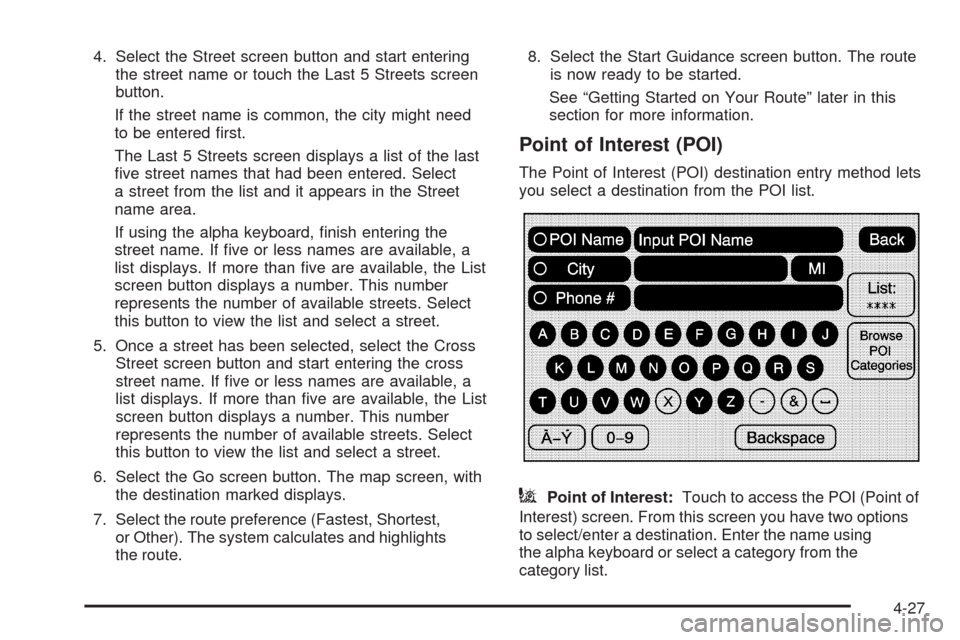
4. Select the Street screen button and start entering
the street name or touch the Last 5 Streets screen
button.
If the street name is common, the city might need
to be entered rst.
The Last 5 Streets screen displays a list of the last
ve street names that had been entered. Select
a street from the list and it appears in the Street
name area.
If using the alpha keyboard, nish entering the
street name. If ve or less names are available, a
list displays. If more than ve are available, the List
screen button displays a number. This number
represents the number of available streets. Select
this button to view the list and select a street.
5. Once a street has been selected, select the Cross
Street screen button and start entering the cross
street name. If ve or less names are available, a
list displays. If more than ve are available, the List
screen button displays a number. This number
represents the number of available streets. Select
this button to view the list and select a street.
6. Select the Go screen button. The map screen, with
the destination marked displays.
7. Select the route preference (Fastest, Shortest,
or Other). The system calculates and highlights
the route.8. Select the Start Guidance screen button. The route
is now ready to be started.
See “Getting Started on Your Route” later in this
section for more information.
Point of Interest (POI)
The Point of Interest (POI) destination entry method lets
you select a destination from the POI list.
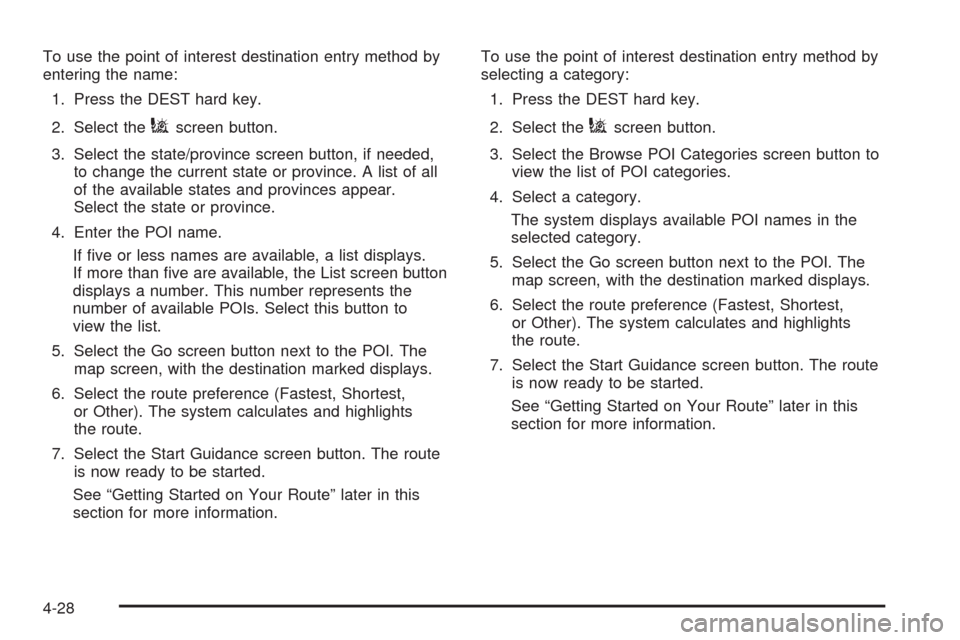
iPoint of Interest:Touch to access the POI (Point of
Interest) screen. From this screen you have two options
to select/enter a destination. Enter the name using
the alpha keyboard or select a category from the
category list.
4-27
Page 310 of 586
To use the point of interest destination entry method by
entering the name:
1. Press the DEST hard key.
2. Select the
iscreen button.
3. Select the state/province screen button, if needed,
to change the current state or province. A list of all
of the available states and provinces appear.
Select the state or province.
4. Enter the POI name.
If ve or less names are available, a list displays.
If more than ve are available, the List screen button
displays a number. This number represents the
number of available POIs. Select this button to
view the list.
5. Select the Go screen button next to the POI. The
map screen, with the destination marked displays.
6. Select the route preference (Fastest, Shortest,
or Other). The system calculates and highlights
the route.
7. Select the Start Guidance screen button. The route
is now ready to be started.
See “Getting Started on Your Route” later in this
section for more information.To use the point of interest destination entry method by
selecting a category:
1. Press the DEST hard key.
2. Select theiscreen button.
3. Select the Browse POI Categories screen button to
view the list of POI categories.
4. Select a category.
The system displays available POI names in the
selected category.
5. Select the Go screen button next to the POI. The
map screen, with the destination marked displays.
6. Select the route preference (Fastest, Shortest,
or Other). The system calculates and highlights
the route.
7. Select the Start Guidance screen button. The route
is now ready to be started.
See “Getting Started on Your Route” later in this
section for more information.
4-28
Page 311 of 586
Address Book
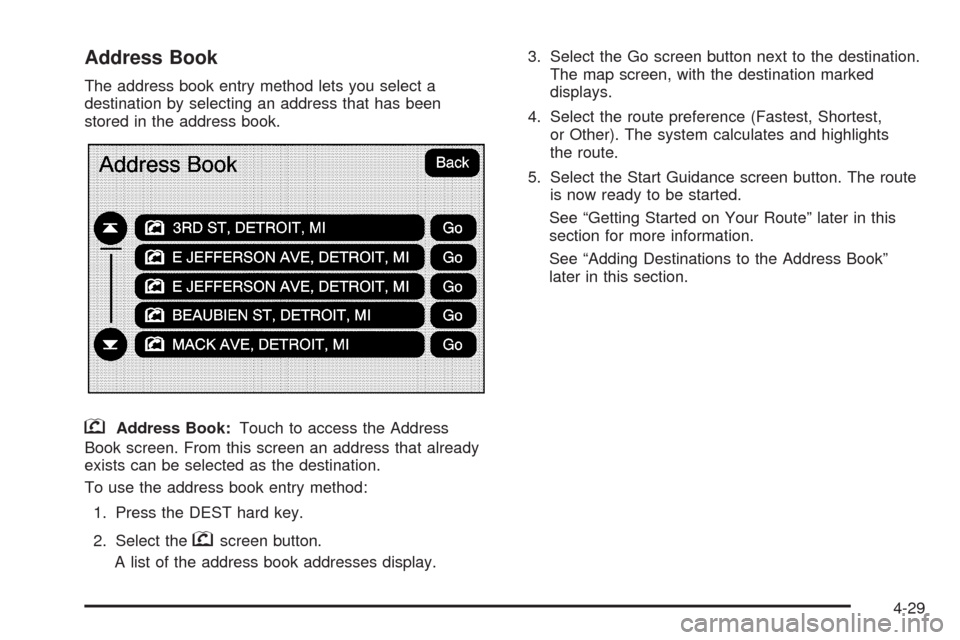
The address book entry method lets you select a
destination by selecting an address that has been
stored in the address book.
gAddress Book:Touch to access the Address
Book screen. From this screen an address that already
exists can be selected as the destination.
To use the address book entry method:
1. Press the DEST hard key.
2. Select the
gscreen button.
A list of the address book addresses display.3. Select the Go screen button next to the destination.
The map screen, with the destination marked
displays.
4. Select the route preference (Fastest, Shortest,
or Other). The system calculates and highlights
the route.
5. Select the Start Guidance screen button. The route
is now ready to be started.
See “Getting Started on Your Route” later in this
section for more information.
See “Adding Destinations to the Address Book”
later in this section.
4-29
Page 312 of 586
Previous Destination
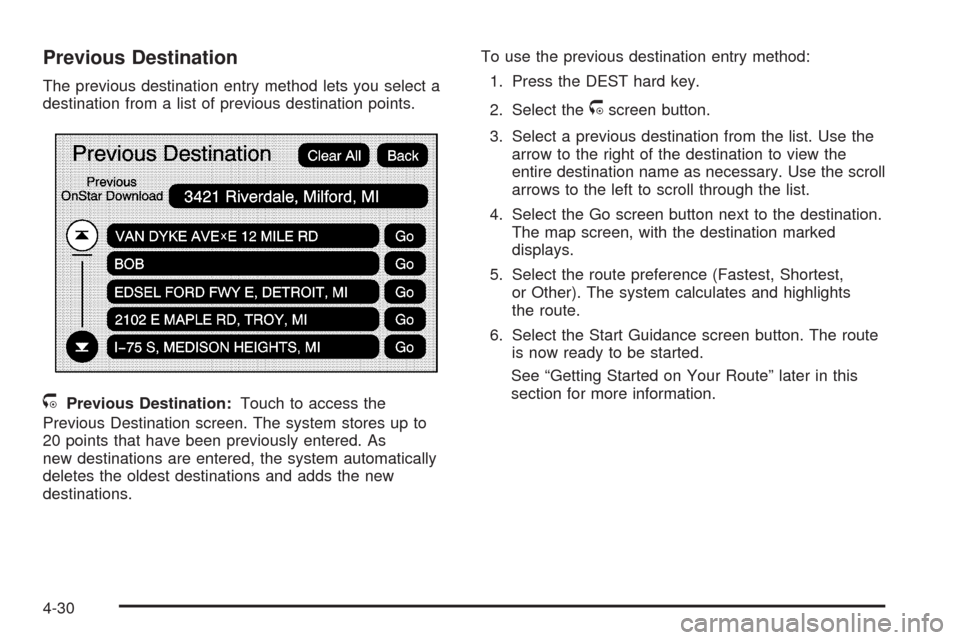
The previous destination entry method lets you select a
destination from a list of previous destination points.
/Previous Destination:Touch to access the
Previous Destination screen. The system stores up to
20 points that have been previously entered. As
new destinations are entered, the system automatically
deletes the oldest destinations and adds the new
destinations.To use the previous destination entry method:
1. Press the DEST hard key.
2. Select the
/screen button.
3. Select a previous destination from the list. Use the
arrow to the right of the destination to view the
entire destination name as necessary. Use the scroll
arrows to the left to scroll through the list.
4. Select the Go screen button next to the destination.
The map screen, with the destination marked
displays.
5. Select the route preference (Fastest, Shortest,
or Other). The system calculates and highlights
the route.
6. Select the Start Guidance screen button. The route
is now ready to be started.
See “Getting Started on Your Route” later in this
section for more information.
4-30
Page 313 of 586
From Map
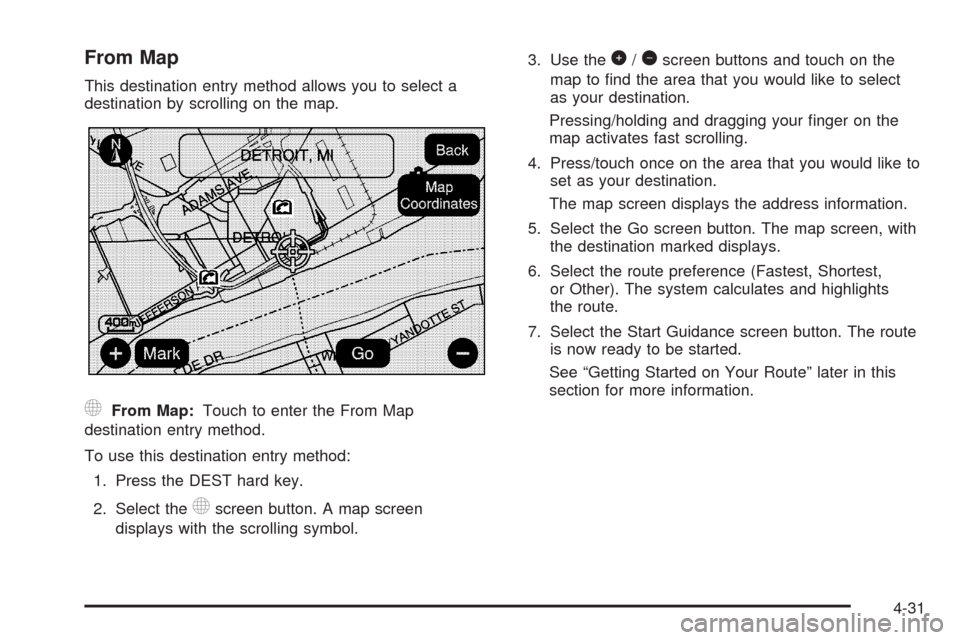
This destination entry method allows you to select a
destination by scrolling on the map.
)From Map:Touch to enter the From Map
destination entry method.
To use this destination entry method:
1. Press the DEST hard key.
2. Select the
)screen button. A map screen
displays with the scrolling symbol.3. Use the
0/1screen buttons and touch on the
map to nd the area that you would like to select
as your destination.
Pressing/holding and dragging your nger on the
map activates fast scrolling.
4. Press/touch once on the area that you would like to
set as your destination.
The map screen displays the address information.
5. Select the Go screen button. The map screen, with
the destination marked displays.
6. Select the route preference (Fastest, Shortest,
or Other). The system calculates and highlights
the route.
7. Select the Start Guidance screen button. The route
is now ready to be started.
See “Getting Started on Your Route” later in this
section for more information.
4-31