belt CADILLAC ESCALADE 2009 3.G Manual PDF
[x] Cancel search | Manufacturer: CADILLAC, Model Year: 2009, Model line: ESCALADE, Model: CADILLAC ESCALADE 2009 3.GPages: 586, PDF Size: 4.47 MB
Page 263 of 586
The DVD player can be controlled by using the buttons
located below the video display screen or by using
the buttons on the system’s remote control. See
“Remote Control” later for more information.
The following discs are compatible with the DVD player:
DVD-Video: A DVD that has video.
CD-DA: A CD that has music or sound content only.
CD-Video: A CD that has a movie.
CD-R/RW: A disc that has audio les such as CD-R
with downloaded MP3 les, MPEG, or JPEG les.
The DVD player and discs are coded by global region.
The DVD players are set to Region 1. Discs with
other region codes will not work in the players.
If an error message displays on the video screen, see
“DVD Messages” later in this section.
While the vehicle is moving, passengers should not
unfasten their safety belts to make adjustments to the
video screen control buttons. See “Safety Belts”
under, Seats and Restraint Systems in the vehicle’s
owner manual. Use the remote control for any necessary
adjustments. See “Remote Control” later in this
supplement.
POWER
O:Press to turn the power on or off. Each
video screen can be powered on or off independently.EJECT
X:Press to eject a disc from the DVD slot.
If a disc is ejected from the player, but not removed,
it will automatically reload into the player. Another way to
reload a disc that has been ejected, but not removed
from the DVD player, is to press the eject button or the
play button.
PLAY
r:Press this button located below the video
display screen to start playback of a disc. On DVDs and
video CDs with playback control (PBC), menu screens
can display automatically. It might be necessary to press
the play button again to begin play.
There is a play position memory feature for DVD and
video CD only. If the DVD player is turned off and then
turned back on, the DVD player resumes playback
where the disc stopped. The play position memory is
erased if the disc is removed.
STOP
c:Press once to stop playing a DVD.
There is a pre-stop feature for DVD and video CD only.
This feature resumes playback of the disc where it
was stopped. Press the stop button once during disc
playback and
cdisplays on the DVD startup screen.
This icon disappears after a few seconds. Press the stop
button a second time, or eject the disc, to cancel the
pre-stop feature and to clear the disc position memory.
3-97
Page 341 of 586
Ordering Map DVDs
The map DVD in your vehicle is the most up-to-date
information available when your vehicle was produced.
The map DVD is updated periodically, provided that
the map information has changed.
If you have any questions about the operation of the
navigation system or the update process, contact the
GM Nav Disc Center toll-free phone number,
1-877-NAV-DISC (1-877-628-3472) or go to the center’s
website, gmnavdisc.com. If you need any updates or a
replacement disc, because the current disc is lost,
damaged, or needs to be updated, call the GM Nav Disc
Center or order a new disc online. To order a disc, have
your Vehicle Identication Number (VIN) available. This
helps the center make sure you receive the correct and
most up-to-date DVD map disc for your vehicle. See
“Vehicle Identication Number (VIN)” in the Index of your
vehicle’s owner manual for more information.
After receiving the updated disc, replace the old disc in
the navigation system. See “Installing the DVD Map
Disc” and “Ejecting the DVD Map Disc” underMaps on
page 4-14. Dispose of the old disc to avoid confusion
about which disc is the most current.
Database Coverage Explanations
Coverage area depends upon the map detail available.
Some areas have greater map detail than others. The
navigation system works only as well as the information
provided on the map disc. SeeOrdering Map DVDs on
page 4-59on how to obtain updated map information.
Navigation Audio System
Notice:Before adding any sound equipment to the
vehicle, such as an audio system, CD player, CB
radio, mobile telephone, or two-way radio, make sure
that it can be added by checking with your dealer/
retailer. Also, check federal rules covering mobile
radio and telephone units. If sound equipment can be
added, it is very important to do it properly. Added
sound equipment can interfere with the operation of
the vehicle’s engine, radio, or other systems, and
even damage them. The vehicle’s systems can
interfere with the operation of sound equipment that
has been added.
Notice:The chime signals related to safety belts,
parking brake, and other functions of the vehicle
operate through the navigation system. If that
equipment is replaced or additional equipment is
added to the vehicle, the chimes may not work. Make
sure that replacement or additional equipment is
compatible with the vehicle before installing it. See
“Accessories and Modications” in the Index of the
vehicle’s owner manual.
4-59
Page 370 of 586
Your Driving, the Road, and
the Vehicle
Driving for Better Fuel Economy
Driving habits can affect fuel mileage. Here are some
driving tips to get the best fuel economy possible.
Avoid fast starts and accelerate smoothly.
Brake gradually and avoid abrupt stops.
Avoid idling the engine for long periods of time.
When road and weather conditions are appropriate,
use cruise control, if equipped.
Always follow posted speed limits or drive more
slowly when conditions require.
Keep vehicle tires properly inated.
Combine several trips into a single trip.
Replace the vehicle’s tires with the same
TPC Spec number molded into the tire’s
sidewall near the size.
Follow recommended scheduled maintenance.
Defensive Driving
Defensive driving means “always expect the
unexpected.” The rst step in driving defensively is to
wear your safety belt — SeeSafety Belts: They Are for
Everyone on page 1-28.
{CAUTION:
Assume that other road users (pedestrians,
bicyclists, and other drivers) are going to be
careless and make mistakes. Anticipate what
they might do and be ready. In addition:
Allow enough following distance between
you and the driver in front of you.
Focus on the task of driving.
Driver distraction can cause collisions resulting in
injury or possible death. These simple defensive
driving techniques could save your life.
5-2
Page 379 of 586
An emergency like this requires close attention and a
quick decision. If holding the steering wheel at the
recommended 9 and 3 o’clock positions, it can be turned
a full 180 degrees very quickly without removing
either hand. But you have to act fast, steer quickly, and
just as quickly straighten the wheel once you have
avoided the object.
The fact that such emergency situations are always
possible is a good reason to practice defensive driving
at all times and wear safety belts properly.
Off-Road Recovery
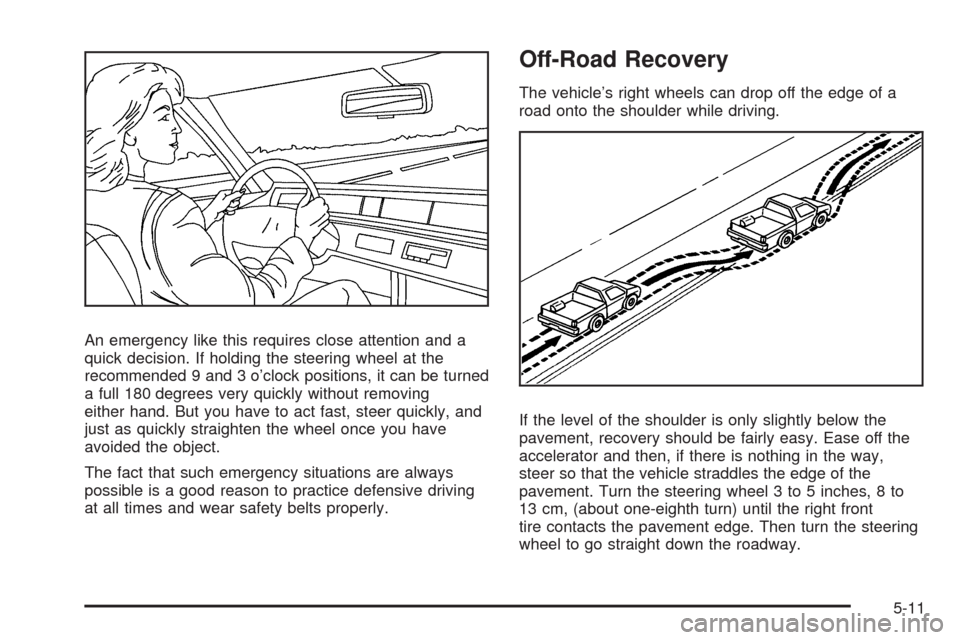
The vehicle’s right wheels can drop off the edge of a
road onto the shoulder while driving.
If the level of the shoulder is only slightly below the
pavement, recovery should be fairly easy. Ease off the
accelerator and then, if there is nothing in the way,
steer so that the vehicle straddles the edge of the
pavement. Turn the steering wheel 3 to 5 inches, 8 to
13 cm, (about one-eighth turn) until the right front
tire contacts the pavement edge. Then turn the steering
wheel to go straight down the roadway.
5-11
Page 381 of 586
While driving on a surface with reduced traction, try your
best to avoid sudden steering, acceleration, or braking,
including reducing vehicle speed by shifting to a lower
gear. Any sudden changes could cause the tires to slide.
You may not realize the surface is slippery until the
vehicle is skidding. Learn to recognize warning
clues — such as enough water, ice, or packed snow
on the road to make a mirrored surface — and slow
down when you have any doubt.
Remember: Any Antilock Brake System (ABS) helps
avoid only the braking skid.
Off-Road Driving
Vehicles with all-wheel drive can be used for off-road
driving. Vehicles without all-wheel drive and vehicles
with 22-inch tire/wheel assemblies should not be driven
off-road except on a level, solid surface.
Many of the vehicle design features that help make the
vehicle more responsive on paved roads during poor
weather conditions also help make it better suited
for off-road use than conventional passenger vehicles.
The vehicle does not have features usually thought to be
necessary for extended or severe off-road use such
as special underbody shielding and transfer case
low gear range.The airbag system is designed to work properly under
a wide range of conditions, including off-road usage.
Always wear your safety belt and observe safe driving
speeds, especially on rough terrain.
Drinking and driving can be very dangerous on any road
and this is certainly true for off-road driving. At the
very time you need special alertness and driving skills,
your reexes, perceptions, and judgment can be
affected by even a small amount of alcohol. You could
have a serious — or even fatal — accident if you
drink and drive or ride with a driver who has been
drinking.
Off-roading can be great fun but has some denite
hazards. The greatest of these is the terrain itself. When
off-road driving, traffic lanes are not marked, curves
are not banked, and there are no road signs. Surfaces
can be slippery, rough, uphill, or downhill.
Avoid sharp turns and abrupt maneuvers. Failure to
operate the vehicle correctly off-road could result in loss
of vehicle control or vehicle rollover.
Off-roading involves some new skills. That is why it is
very important that you read these driving tips and
suggestions to help make off-road driving safer
and more enjoyable.
5-13
Page 384 of 586
Always carry a litter bag and make sure all refuse is
removed from any campsite before leaving.
Take extreme care with open res (where
permitted), camp stoves, and lanterns.
Never park your vehicle over dry grass or other
combustible materials that could catch re from
the heat of the vehicle’s exhaust system.
Traveling to Remote Areas
It makes sense to plan your trip, especially when going
to a remote area. Know the terrain and plan your
route. Get accurate maps of trails and terrain. Check to
see if there are any blocked or closed roads.
It is also a good idea to travel with at least one other
vehicle in case something happens to one of them.
For vehicles with a winch, be sure to read the winch
instructions. In a remote area, a winch can be handy if
you get stuck but you will want to know how to use
it properly.
Getting Familiar with Off-Road Driving
It is a good idea to practice in an area that is safe and
close to home before you go into the wilderness.
Off-roading requires some new and different skills.Tune your senses to different kinds of signals. Your eyes
need to constantly sweep the terrain for unexpected
obstacles. Your ears need to listen for unusual tire or
engine sounds. Use your arms, hands, feet, and body to
respond to vibrations and vehicle bounce.
Controlling the vehicle is the key to successful off-road
driving. One of the best ways to control the vehicle
is to control the speed. At higher speeds:
You approach things faster and have less time
to react.
There is less time to scan the terrain for obstacles.
The vehicle has more bounce when driving over
obstacles.
More braking distance is needed, especially on an
unpaved surface.
{CAUTION:
When you are driving off-road, bouncing and quick
changes in direction can easily throw you out of
position. This could cause you to lose control and
crash. So, whether you are driving on or off the
road, you and your passengers should wear
safety belts.
5-16
Page 422 of 586
Maintenance When Trailer Towing
The vehicle needs service more often when pulling a
trailer. See this manual’s Maintenance Schedule
or Index for more information. Things that are especially
important in trailer operation are automatic transmission
uid, engine oil, axle lubricant, belts, cooling system
and brake system. It is a good idea to inspect
these before and during the trip.
Check periodically to see that all hitch nuts and bolts
are tight.
Trailer Wiring Harness
Heavy-Duty Trailer Wiring Package
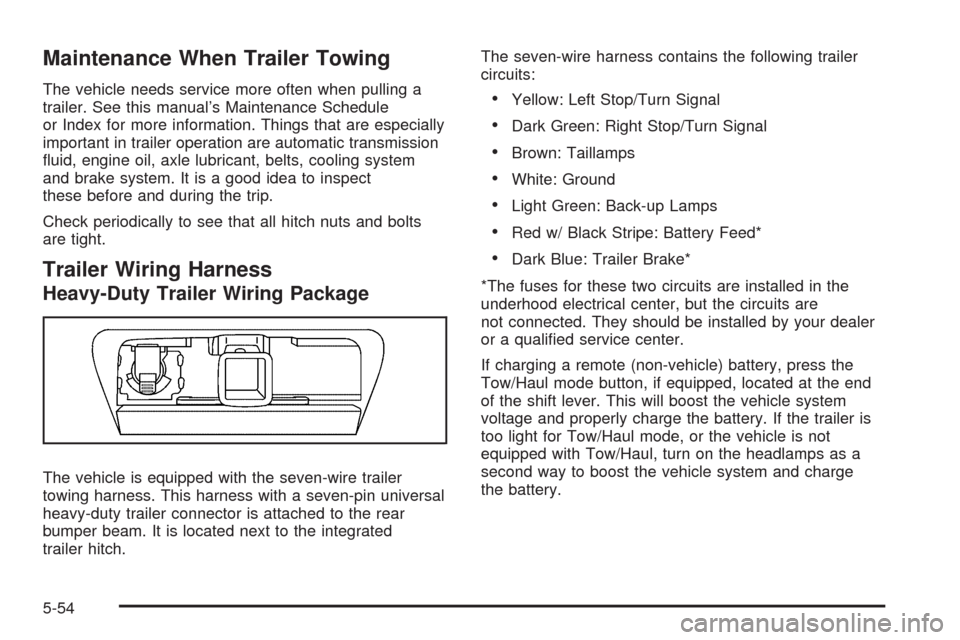
The vehicle is equipped with the seven-wire trailer
towing harness. This harness with a seven-pin universal
heavy-duty trailer connector is attached to the rear
bumper beam. It is located next to the integrated
trailer hitch.The seven-wire harness contains the following trailer
circuits:
Yellow: Left Stop/Turn Signal
Dark Green: Right Stop/Turn Signal
Brown: Taillamps
White: Ground
Light Green: Back-up Lamps
Red w/ Black Stripe: Battery Feed*
Dark Blue: Trailer Brake*
*The fuses for these two circuits are installed in the
underhood electrical center, but the circuits are
not connected. They should be installed by your dealer
or a qualied service center.
If charging a remote (non-vehicle) battery, press the
Tow/Haul mode button, if equipped, located at the end
of the shift lever. This will boost the vehicle system
voltage and properly charge the battery. If the trailer is
too light for Tow/Haul mode, or the vehicle is not
equipped with Tow/Haul, turn on the headlamps as a
second way to boost the vehicle system and charge
the battery.
5-54
Page 426 of 586
Tire Pressure Monitor Operation.....................6-65
Tire Inspection and Rotation...........................6-68
When It Is Time for New Tires.......................6-69
Buying New Tires.........................................6-70
Different Size Tires and Wheels......................6-72
Uniform Tire Quality Grading..........................6-72
Wheel Alignment and Tire Balance..................6-74
Wheel Replacement......................................6-74
Tire Chains..................................................6-75
If a Tire Goes Flat........................................6-76
Changing a Flat Tire.....................................6-76
Removing the Spare Tire and Tools................6-78
Removing the Flat Tire and Installing
the Spare Tire..........................................6-82
Secondary Latch System...............................6-86
Storing a Flat or Spare Tire
and Tools.................................................6-89
Spare Tire...................................................6-93
Appearance Care............................................6-94
Interior Cleaning...........................................6-94
Fabric/Carpet...............................................6-95
Leather.......................................................6-96
Instrument Panel, Vinyl, and Other
Plastic Surfaces........................................6-96
Wood Panels...............................................6-97
Speaker Covers............................................6-97Care of Safety Belts......................................6-97
Weatherstrips...............................................6-97
Washing Your Vehicle...................................6-98
Cleaning Exterior Lamps/Lenses.....................6-98
Finish Care..................................................6-98
Windshield, Backglass, and Wiper Blades.........6-99
Aluminum or Chrome-Plated Wheels
and Trim................................................6-100
Tires.........................................................6-101
Sheet Metal Damage...................................6-101
Finish Damage
...........................................6-101
Underbody Maintenance...............................6-101
Chemical Paint Spotting...............................6-101
Vehicle Identication.....................................6-102
Vehicle Identication Number (VIN)................6-102
Service Parts Identication Label...................6-102
Electrical System..........................................6-102
Add-On Electrical Equipment.........................6-102
Windshield Wiper Fuses...............................6-103
Power Windows and Other Power Options......6-103
Fuses and Circuit Breakers..........................6-103
Instrument Panel Fuse Block........................6-103
Center Instrument Panel Fuse Block..............6-105
Underhood Fuse Block................................6-106
Capacities and Specications........................6-110
Section 6 Service and Appearance Care
6-2
Page 428 of 586
California Proposition 65 Warning
Most motor vehicles, including this one, contain and/or
emit chemicals known to the State of California to
cause cancer and birth defects or other reproductive
harm. Engine exhaust, many parts and systems
(including some inside the vehicle), many uids, and
some component wear by-products contain and/or emit
these chemicals.
California Perchlorate Materials
Requirements
Certain types of automotive applications, such as airbag
initiators, seat belt pretensioners, and lithium batteries
contained in remote keyless transmitters, may contain
perchlorate materials. Special handling may be
necessary. For additional information, see
www.dtsc.ca.gov/hazardouswaste/perchlorate.
Doing Your Own Service Work
If this vehicle is a Two-mode Hybrid, see the
Two-mode Hybrid manual for more information.
{CAUTION:
You can be injured and the vehicle could be
damaged if you try to do service work on a vehicle
without knowing enough about it.
Be sure you have sufficient knowledge,
experience, the proper replacement parts,
and tools before attempting any vehicle
maintenance task.
Be sure to use the proper nuts, bolts, and
other fasteners. English and metric fasteners
can be easily confused. If the wrong fasteners
are used, parts can later break or fall off. You
could be hurt.
If doing some of your own service work, use the proper
service manual. It tells you much more about how to
service the vehicle than this manual can. To order
the proper service manual, seeService Publications
Ordering Information on page 8-15.
6-4
Page 482 of 586
(G) Maximum Cold Ination Load Limit:Maximum load that can be carried and the
maximum pressure needed to support that load.
For information on recommended tire pressure
seeInflation - Tire Pressure on page 6-61and
Loading the Vehicle on page 5-32.
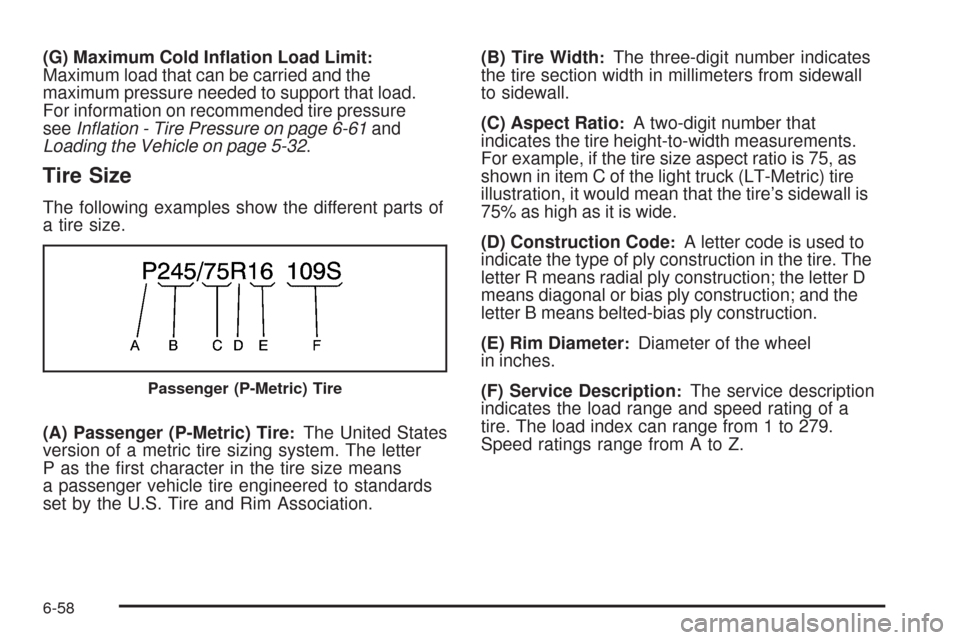
Tire Size
The following examples show the different parts of
a tire size.
(A) Passenger (P-Metric) Tire
:The United States
version of a metric tire sizing system. The letter
P as the rst character in the tire size means
a passenger vehicle tire engineered to standards
set by the U.S. Tire and Rim Association.(B) Tire Width
:The three-digit number indicates
the tire section width in millimeters from sidewall
to sidewall.
(C) Aspect Ratio
:A two-digit number that
indicates the tire height-to-width measurements.
For example, if the tire size aspect ratio is 75, as
shown in item C of the light truck (LT-Metric) tire
illustration, it would mean that the tire’s sidewall is
75% as high as it is wide.
(D) Construction Code
:A letter code is used to
indicate the type of ply construction in the tire. The
letter R means radial ply construction; the letter D
means diagonal or bias ply construction; and the
letter B means belted-bias ply construction.
(E) Rim Diameter
:Diameter of the wheel
in inches.
(F) Service Description
:The service description
indicates the load range and speed rating of a
tire. The load index can range from 1 to 279.
Speed ratings range from A to Z.Passenger (P-Metric) Tire
6-58