ECO mode CADILLAC ESCALADE 2010 3.G User Guide
[x] Cancel search | Manufacturer: CADILLAC, Model Year: 2010, Model line: ESCALADE, Model: CADILLAC ESCALADE 2010 3.GPages: 616, PDF Size: 39.41 MB
Page 158 of 616
N (Neutral) :In this position, the engine does notconnect with the wheels. To restart when you arealready moving, use N (Neutral) only. Also, useN (Neutral) when the vehicle is being towed.
{WARNING:
Shifting into a drive gear while the engine is
running at high speed is dangerous. Unless your
foot is firmly on the brake pedal, the vehicle could
move very rapidly. You could lose control and hit
people or objects. Do not shift into a drive gear
while the engine is running at high speed.
Notice:Shifting out of P (Park) or N (Neutral) withthe engine running at high speed may damage thetransmission. The repairs would not be covered bythe vehicle warranty. Be sure the engine is notrunning at high speed when shifting the vehicle.
D (Drive) :This position is for normal driving. It providesthe best fuel economy. If you need more power forpassing, and you are:
.Going less than about 35 mph (55 km/h), push theaccelerator pedal about halfway down.
.Going about 35 mph (55 km/h) or more, push theaccelerator all the way down.
By doing this, the vehicle shifts down to the next gearand has more power.
D (Drive) can be used when towing a trailer, carrying aheavy load, driving on steep hills, or for off-road driving.You may want to shift the transmission to a lower gearselection if the transmission shifts too often.
Downshifting the transmission in slippery roadconditions could result in skidding, see Skidding underLoss of Control on page 6!12.
M (Manual Mode) :This position lets drivers selectthe range of gears appropriate for current drivingconditions. See Driver Shift Control (DSC) later inthis section.
Notice:Spinning the tires or holding the vehicle inone place on a hill using only the accelerator pedalmay damage the transmission. The repair will not becovered by the vehicle warranty. If you are stuck, donot spin the tires. When stopping on a hill, use thebrakes to hold the vehicle in place.
The vehicle has a shift stabilization feature thatadjusts the transmission shifting to the currentdriving conditions in order to reduce rapid upshiftsand downshifts. This shift stabilization feature isdesigned to determine, before making an upshift, ifthe engine will be able to maintain vehicle speed by
3-34
Page 160 of 616
The DIC display will show the message MANUALSHIFT on the first line and the current gear will bedisplayed on the second line. SeeDriver InformationCenter (DIC)on page 4!41andDIC Operation andDisplayson page 4!41for more information. Thenumber displayed in the DIC is the highest gear thatcan be used. However, the vehicle can automaticallyshift to lower gears as it adjusts to driving conditions.This means that all gears below that number areavailable. When 5 (Fifth) is selected, 1 (First) through5 (Fifth) gears are automatically shifted by the vehicle,but 6 (Sixth) cannot be used until the plus/minus buttonlocated on the steering column lever is used to changeto the gear.
Grade Braking is not available when the Driver ShiftControl is active. SeeTow/Haul Modeon page 3!36formore information.
While using the DSC, cruise control and the tow/haulmode can be used.
Tow/Haul Mode
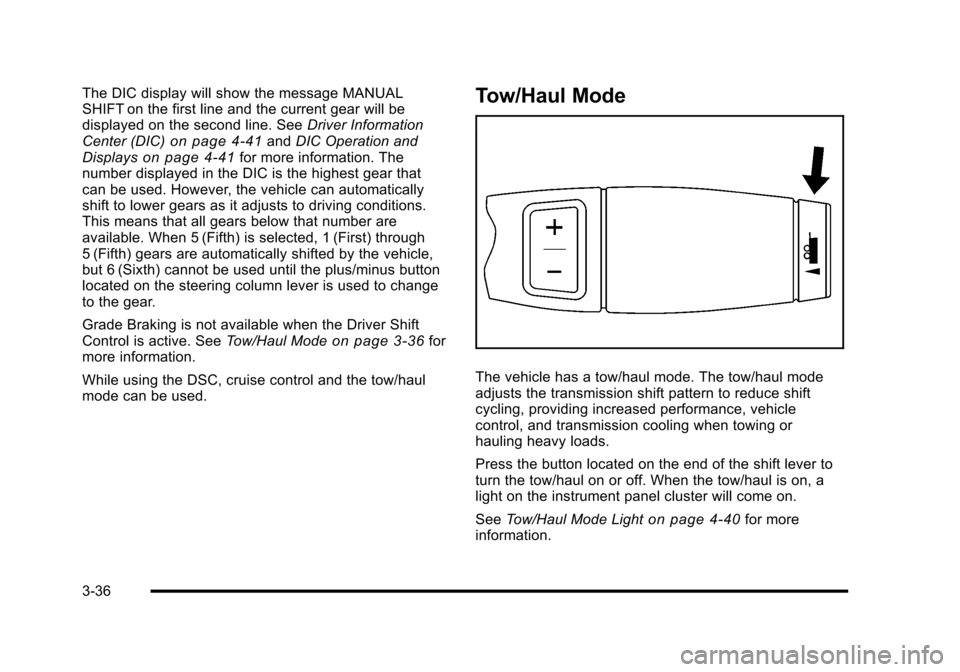
The vehicle has a tow/haul mode. The tow/haul modeadjusts the transmission shift pattern to reduce shiftcycling, providing increased performance, vehiclecontrol, and transmission cooling when towing orhauling heavy loads.
Press the button located on the end of the shift lever toturn the tow/haul on or off. When the tow/haul is on, alight on the instrument panel cluster will come on.
SeeTow/Haul Mode Lighton page 4!40for moreinformation.
3-36
Page 180 of 616

Do not use this system with any garage door openerthat does not have the stop and reverse feature. Thisincludes any garage door opener model manufacturedbefore April 1, 1982.
Read the instructions completely before attempting toprogram the transmitter. Because of the steps involved,it may be helpful to have another person assist withprogramming the transmitter.
Be sure to keep the original remote control transmitterfor use in other vehicles, as well as, for futureprogramming. Only the original remote controltransmitter is needed for Fixed Code programming.The programmed buttons should be erased when thevehicle is sold or the lease ends. See“ErasingUniversal Home Remote Buttons”later in this section.
Park the vehicle outside of the garage whenprogramming a garage door. Be sure that people andobjects are clear of the garage door or gate that isbeing programmed.
Programming Universal Home
Remote—Rolling Code
For questions or help programming the Universal HomeRemote System, call 1-866-572-2728 or go tolearcar2u.com.
Most garage door openers sold after 1996 areRolling Code units.
Programming a garage door opener involvestime-sensitive actions, so read the entire procedurebefore starting. Otherwise, the device will time out andthe procedure will have to be repeated.
To program up to three devices:
1. From inside the vehicle, press the two outsidebuttons at the same time for one to two seconds,and immediately release them.
3-56
Page 184 of 616
Example of Eight Dip Switches with Three Positions
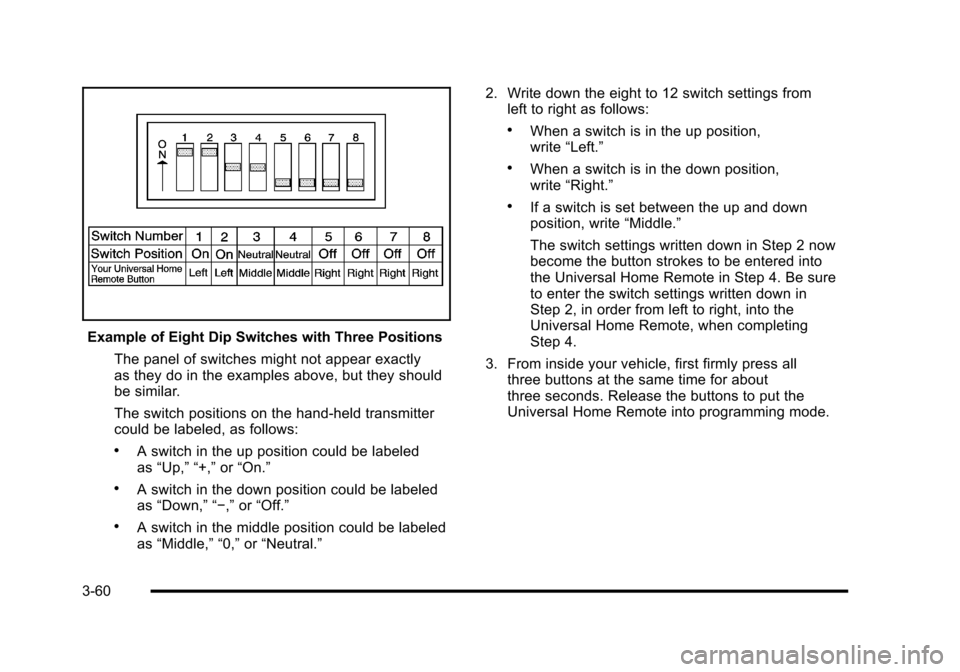
The panel of switches might not appear exactlyas they do in the examples above, but they shouldbe similar.
The switch positions on the hand-held transmittercould be labeled, as follows:
.A switch in the up position could be labeledas“Up,”“+,”or“On.”
.A switch in the down position could be labeledas“Down,”“!,”or“Off.”
.A switch in the middle position could be labeledas“Middle,”“0,”or“Neutral.”
2. Write down the eight to 12 switch settings fromleft to right as follows:
.When a switch is in the up position,write“Left.”
.When a switch is in the down position,write“Right.”
.If a switch is set between the up and downposition, write“Middle.”
The switch settings written down in Step 2 nowbecome the button strokes to be entered intothe Universal Home Remote in Step 4. Be sureto enter the switch settings written down inStep 2, in order from left to right, into theUniversal Home Remote, when completingStep 4.
3. From inside your vehicle, first firmly press allthree buttons at the same time for aboutthree seconds. Release the buttons to put theUniversal Home Remote into programming mode.
3-60
Page 187 of 616
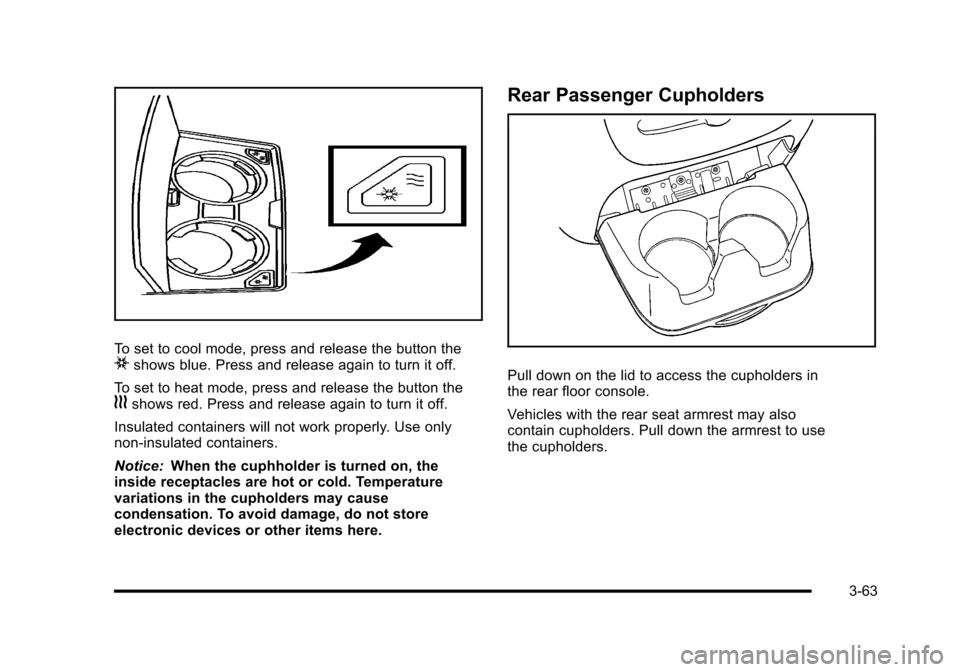
To set to cool mode, press and release the button theishows blue. Press and release again to turn it off.
To set to heat mode, press and release the button thehshows red. Press and release again to turn it off.
Insulated containers will not work properly. Use onlynon-insulated containers.
Notice:When the cuphholder is turned on, theinside receptacles are hot or cold. Temperaturevariations in the cupholders may causecondensation. To avoid damage, do not storeelectronic devices or other items here.
Rear Passenger Cupholders
Pull down on the lid to access the cupholders inthe rear floor console.
Vehicles with the rear seat armrest may alsocontain cupholders. Pull down the armrest to usethe cupholders.
3-63
Page 197 of 616
Turn and Lane-Change Signals
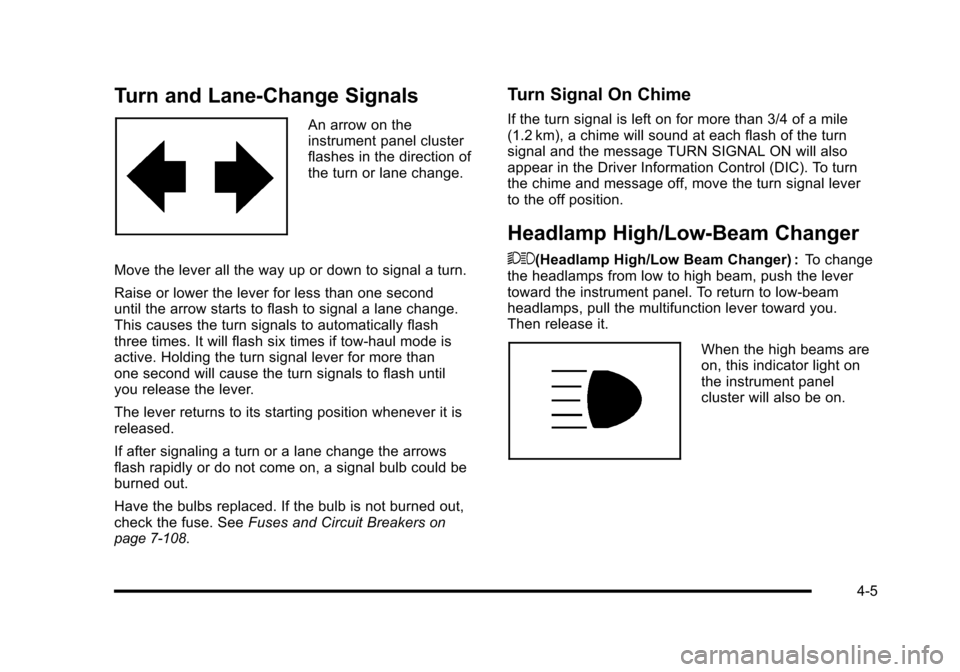
An arrow on theinstrument panel clusterflashes in the direction ofthe turn or lane change.
Move the lever all the way up or down to signal a turn.
Raise or lower the lever for less than one seconduntil the arrow starts to flash to signal a lane change.This causes the turn signals to automatically flashthree times. It will flash six times if tow-haul mode isactive. Holding the turn signal lever for more thanone second will cause the turn signals to flash untilyou release the lever.
The lever returns to its starting position whenever it isreleased.
If after signaling a turn or a lane change the arrowsflash rapidly or do not come on, a signal bulb could beburned out.
Have the bulbs replaced. If the bulb is not burned out,check the fuse. SeeFuses and Circuit Breakersonpage 7!108.
Turn Signal On Chime
If the turn signal is left on for more than 3/4 of a mile(1.2 km), a chime will sound at each flash of the turnsignal and the message TURN SIGNAL ON will alsoappear in the Driver Information Control (DIC). To turnthe chime and message off, move the turn signal leverto the off position.
Headlamp High/Low-Beam Changer
53(Headlamp High/Low Beam Changer) :To changethe headlamps from low to high beam, push the levertoward the instrument panel. To return to low-beamheadlamps, pull the multifunction lever toward you.Then release it.
When the high beams areon, this indicator light onthe instrument panelcluster will also be on.
4-5
Page 200 of 616
The rear window wiper/washer will not operate if theliftgate or liftglass is open or ajar. If the liftgate orliftglass is opened while the rear wiper is on, the wiperwill return to the parked position and stop.
Cruise Control
{WARNING:
Cruise control can be dangerous where you
cannot drive safely at a steady speed. So, do not
use the cruise control on winding roads or in
heavy traffic.
Cruise control can be dangerous on slippery
roads. On such roads, fast changes in tire traction
can cause excessive wheel slip, and you could
lose control. Do not use cruise control on slippery
roads.
With cruise control, a speed of about 40 km/h (25 mph)or more can be maintained without keeping your foot onthe accelerator. Cruise control does not work at speedsbelow about 40 km/h (25 mph).
When the brakes are applied, cruise control isturned off.
For vehicles with an Allison®or Hydra!Matic 6!speedautomatic transmission, see“Grade Braking and CruiseGrade Braking (Allison Transmission) underTow/HaulModeon page 3!36for an explanation of how cruisecontrol interacts with the Range Selection Mode, tow/haul and grade braking systems.
If the vehicle has StabiliTrak®, and the system beginsto limit wheel spin, cruise control will automaticallydisengage. SeeStabiliTrak®Systemo n p a g e 6!6.When road conditions allow the cruise control to besafely used again, it can be turned back on.
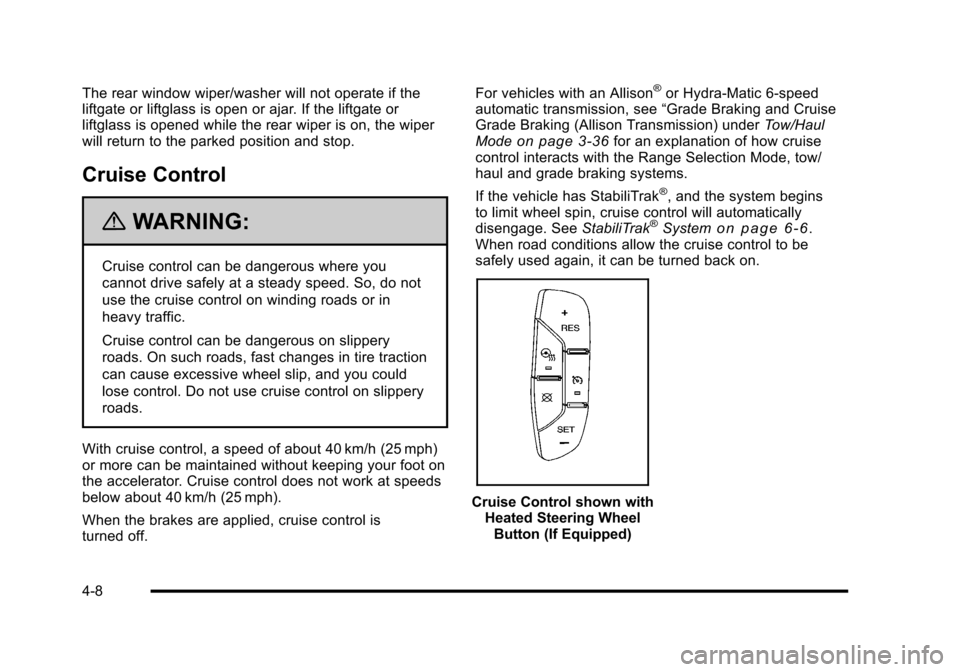
Cruise Control shown withHeated Steering WheelButton (If Equipped)
4-8
Page 213 of 616
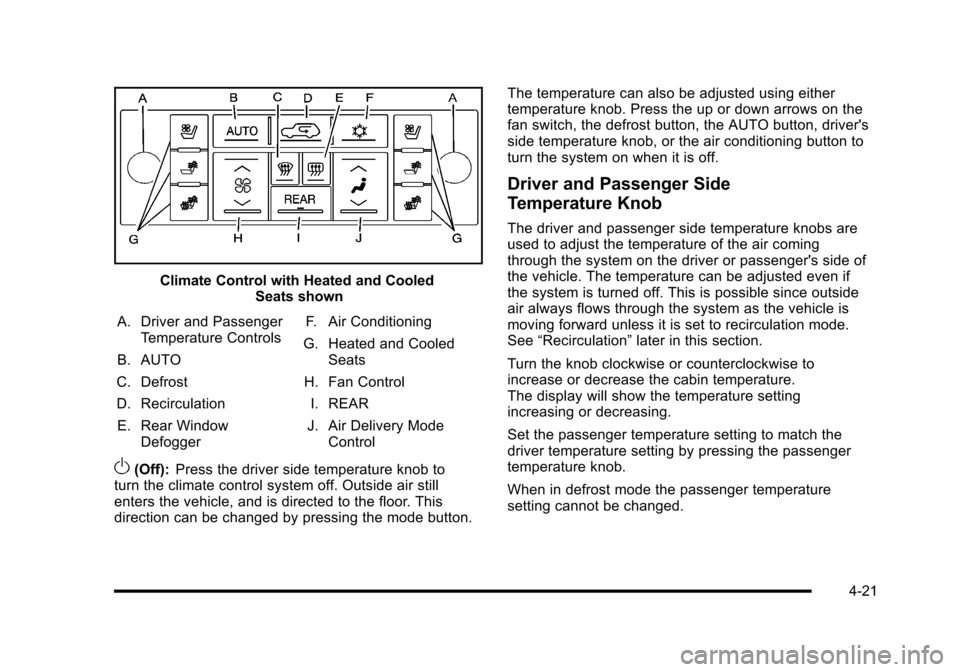
Climate Control with Heated and CooledSeats shown
A. Driver and PassengerTemperature Controls
B. AUTO
C. Defrost
D. Recirculation
E. Rear WindowDefogger
F. Air Conditioning
G. Heated and CooledSeats
H. Fan Control
I. REAR
J. Air Delivery ModeControl
O(Off):Press the driver side temperature knob toturn the climate control system off. Outside air stillenters the vehicle, and is directed to the floor. Thisdirection can be changed by pressing the mode button.
The temperature can also be adjusted using eithertemperature knob. Press the up or down arrows on thefan switch, the defrost button, the AUTO button, driver'sside temperature knob, or the air conditioning button toturn the system on when it is off.
Driver and Passenger Side
Temperature Knob
The driver and passenger side temperature knobs areused to adjust the temperature of the air comingthrough the system on the driver or passenger's side ofthe vehicle. The temperature can be adjusted even ifthe system is turned off. This is possible since outsideair always flows through the system as the vehicle ismoving forward unless it is set to recirculation mode.See“Recirculation”later in this section.
Turn the knob clockwise or counterclockwise toincrease or decrease the cabin temperature.The display will show the temperature settingincreasing or decreasing.
Set the passenger temperature setting to match thedriver temperature setting by pressing the passengertemperature knob.
When in defrost mode the passenger temperaturesetting cannot be changed.
4-21
Page 214 of 616
Automatic Operation
AUTO (Automatic) :When automatic operation isactive the system will control the inside temperature, theair delivery, and the fan speed.
Use the steps below to place the entire system inautomatic mode:
1. Press the AUTO button.
When AUTO is selected, the display will change toshow the current temperature(s) and AUTO comeon the display. The current delivery mode and fanspeed will also be displayed for approximatelyfive seconds.
When AUTO is selected, the air conditioningoperation and air inlet will be automaticallycontrolled. The air conditioning compressor willrun when the outside temperature is over about4°C (40°F). The air inlet will normally be set tooutside air. If it is hot outside, the air inlet mayautomatically switch to recirculate inside air tohelp quickly cool down the vehicle. The lighton the button comes on in recirculation.
2. Set the driver's and passenger's temperature.
To find your comfort setting, start with a 23°C(74°F) temperature setting and allow about20 minutes for the system to regulate. Use thedriver or passenger temperature buttons to adjustthe temperature setting as necessary. If atemperature setting of 15°C (60°F) is chosen, thesystem remains at the maximum cooling setting.If a temperature setting of 32°C (90°F) is chosen,the system remains at the maximum heat setting.Choosing either maximum setting will not causethe vehicle to heat or cool any faster.
Be careful not to cover the sensor located on the top ofthe instrument panel near the windshield. This sensorregulates air temperature based on sun load and alsoturns on the headlamps.
To avoid blowing cold air in cold weather, the systemwill delay turning on the fan until warm air is available.The length of delay depends on the engine coolanttemperature. Pressing the fan switch will override thisdelay and change the fan to a selected speed.
4-22
Page 215 of 616
Manual Operation
y9z(Fan Control):Press the up or down arrowsto increase or decrease the fan speed
Pressing this button when the system is off will turn thesystem on.
Pressing either arrow while using automatic operationwill place the fan in manual operation. The fan settingwill display and the AUTO light will turn off. The airdelivery will remain in automatic operation.
N(Air Delivery Mode Control):Press to change thedirection of the airflow in the vehicle. Repeatedly pressthe button until the desired mode appears on thedisplay.
When the system is turned off, the display goes blankafter displaying the current status of the system.
H(Vent):Air is directed to the instrument paneloutlets.
)(Bi-Level):Air is divided between the instrumentpanel and floor outlets. Some air is directed towards thewindshield and side window outlets. Cooler air isdirected to the upper vents and warmer air to thefloor vents.
6(Floor):Air is directed to the floor outlets, with someto the windshield, side window outlets, and second rowfloor outlets. In this mode, the system automaticallyselects outside air.
-(Defog):This mode clears the windows of fog ormoisture. Air is directed to the windshield, floor outlets,and side window vents. In this mode, the system turnsoff recirculation and runs the air conditioningcompressor unless the outside temperature is close tofreezing. The recirculation mode cannot be selectedwhile in the defog mode.
0(Defrost):This mode removes fog or frost from thewindshield more quickly. Air is directed to thewindshield and side window vents, with some directedto the floor vents. In this mode, the systemautomatically forces outside air into the vehicle andruns the air conditioning compressor unless the outsidetemperature is close to freezing. The recirculation modecannot be selected while in the defrost mode.
The passenger temperature control cannot be activatedwhile in defrost mode. If the passenger control knob ispressed, the passenger temperature flashes three timesand will not work. If the passenger control knob isadjusted, the driver temperature indicator changes.The passenger temperature will not be displayed.
If vent, bi-level, or floor mode is selected again, theclimate control system displays the previoustemperature settings.
Do not drive the vehicle until all the windows are clear.
4-23