ad blue CADILLAC ESCALADE 2010 3.G User Guide
[x] Cancel search | Manufacturer: CADILLAC, Model Year: 2010, Model line: ESCALADE, Model: CADILLAC ESCALADE 2010 3.GPages: 616, PDF Size: 39.41 MB
Page 266 of 616

3. Say the name tag of the person to call.
.If the system clearly recognizes the name tag itresponds with“OK, calling,
.If the system is unsure it recognizes the rightname tag, it confirms the name tag followed bya tone. If the name tag is correct, say“Yes”.The system responds with“OK, calling,
Once connected, the person called will be heardthrough the audio speakers.
Using the Re!dial Command
1. Press and holdbgfor two seconds. The system
responds with“Ready”followed by a tone.
2. After the tone, say“Re!dial”. The system respondswith“Re!dial using
Once connected, the person called will be heardthrough the audio speakers.
Receiving a Call
When an incoming call is received, the audio systemmutes and a ring tone is heard in the vehicle.
.Pressbgand begin speaking to answer the call.
.Presscxto ignore a call.
Call Waiting
Call waiting must be supported on the Bluetooth phoneand enabled by the wireless service carrier to work.
.Pressbgto answer an incoming call when
another call is active. The original call is placedon hold.
.Pressbgagain to return to the original call.
.To ignore the incoming call, continue with theoriginal call with no action.
.Presscxto disconnect the current call and
switch to the call on hold.
4-74
Page 267 of 616

Three!Way Calling
Three!Way Calling must be supported on the Bluetoothphone and enabled by the wireless service carrierto work.
1. While on a call pressbg. The system responds
with“Ready”followed by a tone.
2. Say“Three!way call”. The system responds with“Three!way call, please say dial or call”.
3. Use the dial or call command to dial the number ofthe third party to be called.
4. Once the call is connected, pressbgto link all
the callers together.
Ending a Call
Presscxto end a call.
Muting a Call
During a call, all sounds from inside the vehicle can bemuted so that the person on the other end of the callcannot hear them.
To Mute a call
1. Pressbg. The system responds with“Ready”
followed by a tone.
2. Say“Mute Call”. The system responds with“Callmuted”.
To Cancel Mute
1. Pressbg. The system responds with“Ready”
followed by a tone.
2. After the tone, say“Mute Call”. The systemresponds with“Resuming call”.
Transferring a Call
Audio can be transferred between the in!vehicleBluetooth system and the cell phone.
To Transfer Audio to the Cell Phone
During a call with the audio in the vehicle:
1. Pressbg. The system responds with“Ready”
followed by a tone.
2. Say“Transfer Call.”The system responds with“Transferring call”and the audio will switch fromthe vehicle to the cell phone.
4-75
Page 268 of 616
To Transfer Audio to the In-Vehicle
Bluetooth System
The cellular phone must be paired and connected withthe Bluetooth system before a call can be transferred.The connection process can take up to two minutesafter the key is turned to the ON/RUN or ACC/ACCESSORY position.
During a call with the audio on the cell phone,
pressbgfor more than two seconds. The audio
switches from the cell phone to the vehicle.
Voice Pass-Thru
Voice Pass!Thru allows access to the voice recognitioncommands on the cell phone. See the cell phonemanufacturers user guide to see if the cell phonesupports this feature. This feature can be used toverbally access contacts stored in the cell phone.
1. Press and holdbgfor two seconds. The system
responds with“Ready”followed by a tone.
2. Say“Bluetooth”. The system responds with“Bluetooth ready”followed by a tone.
3. Say“Voice”. The system responds with“OK,accessing
.The cell phone's normal prompt messages willgo through its cycle according to the phone'soperating instructions.
Dual Tone Multi-Frequency (DTMF)
Tones
The in!vehicle Bluetooth system can send numbers andnumbers stored as name tags during a call. This is usedwhen calling a menu driven phone system. Accountnumbers can be programmed into the phonebook forretrieval during menu driven calls.
Sending a Number During a Call
1. Pressbg. The system responds with“Ready”
followed by a tone.
2. Say“Dial”. The system responds with“Say anumber to send tones”followed by a tone.
3. Say the number to send.
.If the system clearly recognizes the number itresponds with“OK, Sending Number”and thedial tones are sent and the call continues.
.If the system is not sure it recognized thenumber properly, it responds“Dial Number,Please say yes or no?”followed by a tone.If the number is correct, say“Yes”. The systemresponds with“OK, Sending Number”and thedial tones are sent and the call continues.
4-76
Page 269 of 616

Sending a Stored Name Tag During a Call
1. Pressbg. The system responds with“Ready”
followed by a tone.
2. Say“Send name tag.”The system responds with“Say a name tag to send tones”followed by a tone.
3. Say the name tag to send.
.If the system clearly recognizes the name tag itresponds with“OK, Sending
.If the system is not sure it recognized the nametag properly, it responds“Dial
Clearing the System
Unless information is deleted out of the in!vehicleBluetooth system, it will be retained indefinitely. Thisincludes all saved name tags in the phonebook andphone pairing information. For information on how todelete this information, see the above sections onDeleting a Paired Phone and Deleting Name Tags.
Other Information
The Bluetooth®word mark and logos are owned by theBluetooth®SIG, Inc. and any use of such marks byGeneral Motors is under license. Other trademarks andtrade names are those of their respective owners.
SeeRadio Frequency Statementon page 9!20for FCCinformation.
Rear Seat Entertainment (RSE)
System (Overhead)
The vehicle may have an Overhead DVD Rear SeatEntertainment (RSE) system. The RSE system workswith the vehicle's audio system. The DVD player is partof the front radio. The RSE system includes a radio witha DVD player, a video display screen, and if the vehiclehas a third row seat, it could have a second videodisplay screen, audio/video jacks, two wirelessheadphones, and a remote control. SeeNavigationAudio Systemon page 5!60for more information onthe vehicle's audio/DVD system.
4-77
Page 298 of 616
Radio
To select preset or favorite radio stations:
Press and releaseworxto go to the next or previous
radio station stored as a preset or favorite.
CD/DVD
To select tracks/chapters on a CD/DVD:
Press and releaseworxto go to the next or previous
track/chapter.
bg(Mute/Push to Talk):Press to silence the vehiclespeakers only. Press again to turn the sound on.
For vehicles with Bluetooth or OnStar®systems, pressand hold for longer than two seconds to interact withthose systems. SeeBluetooth®on page 4!67and theOnStar Owner's Guide for more information.
c(End):Press to reject an incoming call, or end acurrent call.
SRCE (Source/Voice Recognition) :Press to switchbetween the radio, CD, DVD, and rear auxiliary,if equipped.
Press and hold this button for longer than one secondto initiate voice recognition. SeeVoice Recognitiononpage 5!86for more information.
¨(Seek):Press to go to the next radio station while inAM, FM, or XM™.
To scan available radio stations:
1. Press and hold¨until a beep is heard, to place
the radio into SCAN mode, a station will play forfive seconds before moving to the next station.
2. To stop the SCAN function, press¨again.
While listening to a CD press and release¨to select
the next disc.
+e!e(Volume):Press to increase or to decrease
the volume.
Navigating an iPod or USB Device
Audio steering wheel controls can be used to navigatean iPod or USB device while on the main audio screenor the music navigator screen.
Main Audio Screen
Press and releaseworxto select the next or
previous track.
Press and holdworxto select the next or previous
category/folder, if available.
Press and release¨to enter the music
navigator menu.
4-106
Page 303 of 616

A. FULL MAP Touch Screen Button. See“NAV”under“Hard Keys”underUsing the Navigation Systemon page 5!12for more information.
B. No GPS Symbol. SeeSymbolson page 5!17formore information.
C. North Up/Heading Up Symbol. SeeSymbolsonpage 5!17for more information.
D. Map Scale. See“Map Scales”underMapsonpage 5!14for more information.
E.0(Zoom In) Touch Screen Button. See“Map
Scales”underMapson page 5!14for moreinformation.
F. Mark Touch Screen Button. See“AddingDestinations to the Address Book”underDestinationon page 5!24for more information.
G.Z(DVD Map Disc Eject) Key. SeeMapson
page 5!14for more information.
H. Map DVD Slot. See“Installing the Map DVD”underMapson page 5!14for information on how toinstall and eject a map DVD.
I.M(Load) Key. SeeCD Playeron page 5!68or
DVD Playeron page 5!75for more information.
J.Z(CD/DVD Video/Audio Eject) Key. SeeCD
Playeron page 5!68orDVD Playeron page 5!75for more information.
K. CD/DVD Video/Audio Slot. SeeCD Playeronpage 5!68orDVD Playeron page 5!75formore information.
L.O/n(Power/Volume) Knob. SeeNavigation
Audio Systemon page 5!60for more information.
M.M(Disc Up/Down) Key. See“Hard Keys”under
Using the Navigation Systemon page 5!12formore information.
N. AUDIO Key. SeeNavigation Audio Systemonpage 5!60for more information.
O. FAV (Favorite) Key. See“Storing Radio StationPresets”underNavigation Audio Systemonpage 5!60for more information.
P.5(Phone) Key. See the OnStar®owner guide and
Bluetooth®on page 4!67for more information.
Q.e(Sound) Key. See“Sound Menu”under
Navigation Audio Systemon page 5!60formore information.
R. Source (AM, FM, XM, CD, etc.) Touch ScreenButton. SeeNavigation Audio Systemonpage 5!60for more information.
S. Clock Touch Screen Button. See“Setting theClock”underConfigure Menuon page 5!42formore information.
5-3
Page 313 of 616
5(Phone):Press to access calling through OnStar®.See the OnStar®owner guide andBluetooth®onpage 4!67for more information.
e(Sound):Press to access the Sound screen toadjust bass, midrange, treble, and Digital SignalProcessing (DSP). See“Sound Menu”underNavigationAudio Systemon page 5!60for more information.
DEST (Destination) :Press to access the DestinationEntry screen to plan a destination. SeeDestinationonpage 5!24for more information.
CONFIG (Configure Menu) :Press to adjust featuresfor sound, radio, navigation, and the display. SeeConfigure Menuon page 5!42for more information.
NAV (Navigation) :Press to view your vehicle's currentposition on the map screen. Each press of this keycycles through Full Map and the tab that displays thecurrent audio source (AM, FM, CD, etc.). Full Mapdisplays the screen in full map view. Selecting the audiotab splits the screen between the map screen and thecurrent audio source screen menu. See“Audio”underNavigation Audio Systemon page 5!60for moreinformation.
RPT (Navigation Repeat) :Press to repeat the lastvoice guidance prompt.
y © ¨ z(Seek):Press the seek arrows to seekand scan radio stations, to seek tracks on a CD, and toseek chapters on a DVD. SeeNavigation Audio Systemon page 5!60,CD Playeron page 5!68, orDVDPlayeron page 5!75for more information.
Touch-Sensitive Screen Buttons
Touch-sensitive screen buttons are located on thescreen. When a screen button has been selected, abeep sounds. Screen buttons are highlighted when afeature is available.
Alpha-Numeric Keyboard
Letters of the alphabet, symbols, punctuation, andnumbers, when available, displays on the navigationscreen as an alpha or numeric keyboard. The alphakeyboard displays when the system requires entry of acity or street name.
All characters are touch-sensitive screen buttons.Touch a character to select it.
A-Y (Accent Alphabet) :Select to enter letters withaccent symbols. This button may toggle to A-Z.
A-Z (Alphabet) :Select to enter letters from thealphabet. This button may toggle to A-Y.
0-9 (Numbers) :Select to enter numbers.
5-13
Page 321 of 616
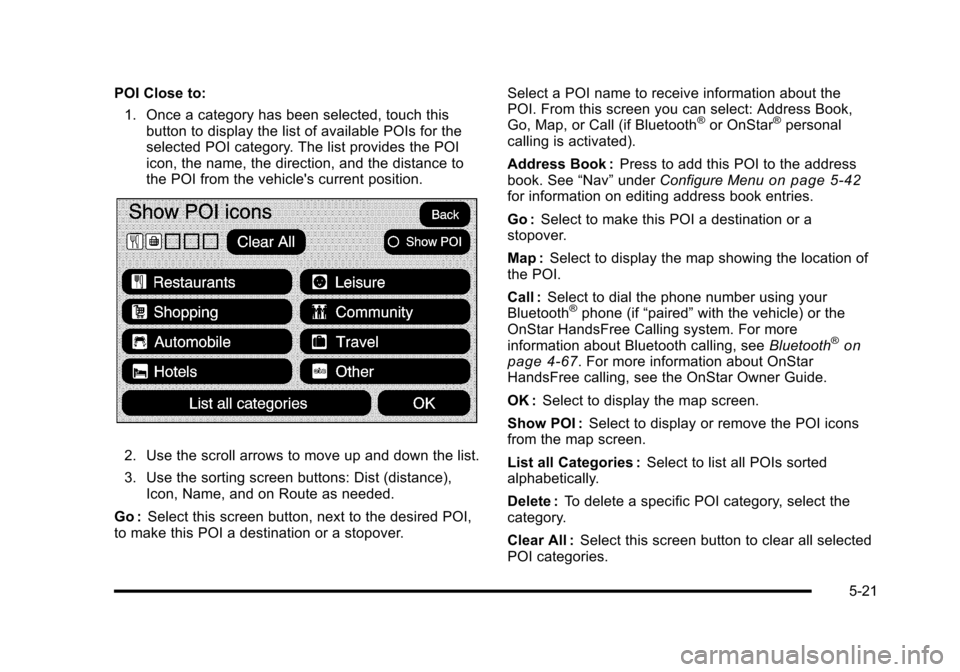
POI Close to:
1. Once a category has been selected, touch thisbutton to display the list of available POIs for theselected POI category. The list provides the POIicon, the name, the direction, and the distance tothe POI from the vehicle's current position.
2. Use the scroll arrows to move up and down the list.
3. Use the sorting screen buttons: Dist (distance),Icon, Name, and on Route as needed.
Go :Select this screen button, next to the desired POI,to make this POI a destination or a stopover.
Select a POI name to receive information about thePOI. From this screen you can select: Address Book,Go, Map, or Call (if Bluetooth®or OnStar®personalcalling is activated).
Address Book :Press to add this POI to the addressbook. See“Nav”underConfigure Menuon page 5!42for information on editing address book entries.
Go :Select to make this POI a destination or astopover.
Map :Select to display the map showing the location ofthe POI.
Call :Select to dial the phone number using yourBluetooth®phone (if“paired”with the vehicle) or theOnStar HandsFree Calling system. For moreinformation about Bluetooth calling, seeBluetooth®onpage 4!67. For more information about OnStarHandsFree calling, see the OnStar Owner Guide.
OK :Select to display the map screen.
Show POI :Select to display or remove the POI iconsfrom the map screen.
List all Categories :Select to list all POIs sortedalphabetically.
Delete :To delete a specific POI category, select thecategory.
Clear All :Select this screen button to clear all selectedPOI categories.
5-21
Page 334 of 616
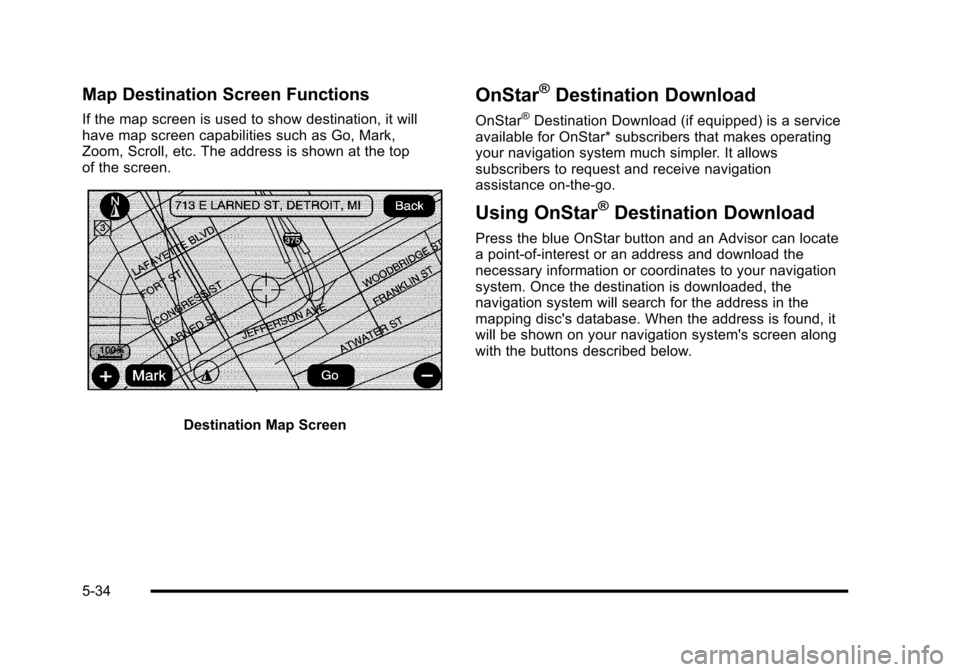
Map Destination Screen Functions
If the map screen is used to show destination, it willhave map screen capabilities such as Go, Mark,Zoom, Scroll, etc. The address is shown at the topof the screen.
Destination Map Screen
OnStar®Destination Download
OnStar®Destination Download (if equipped) is a serviceavailable for OnStar* subscribers that makes operatingyour navigation system much simpler. It allowssubscribers to request and receive navigationassistance on-the-go.
Using OnStar®Destination Download
Press the blue OnStar button and an Advisor can locatea point-of-interest or an address and download thenecessary information or coordinates to your navigationsystem. Once the destination is downloaded, thenavigation system will search for the address in themapping disc's database. When the address is found, itwill be shown on your navigation system's screen alongwith the buttons described below.
5-34
Page 335 of 616
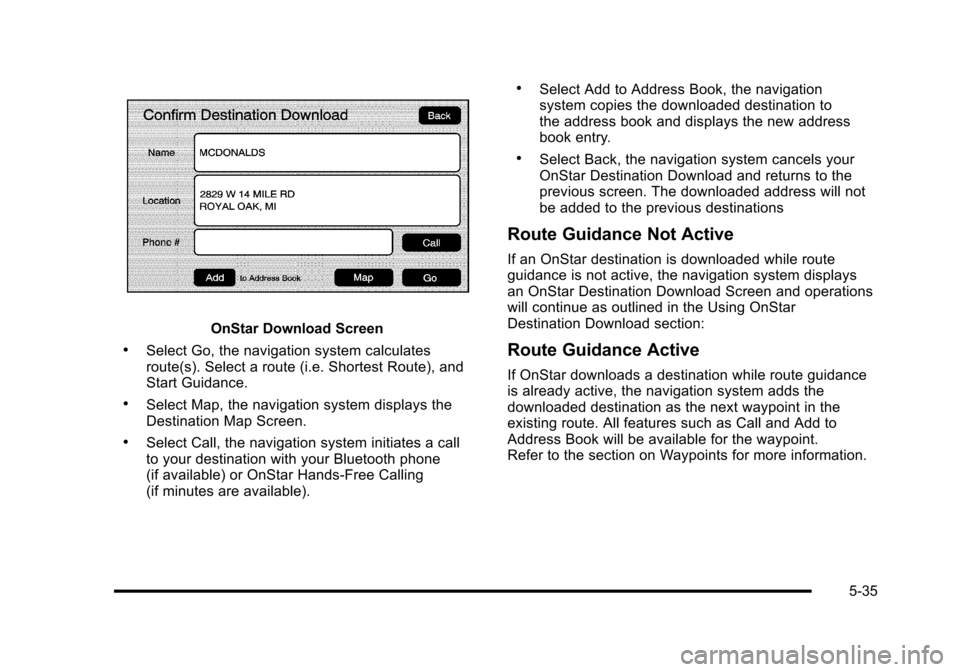
OnStar Download Screen
.Select Go, the navigation system calculatesroute(s). Select a route (i.e. Shortest Route), andStart Guidance.
.Select Map, the navigation system displays theDestination Map Screen.
.Select Call, the navigation system initiates a callto your destination with your Bluetooth phone(if available) or OnStar Hands-Free Calling(if minutes are available).
.Select Add to Address Book, the navigationsystem copies the downloaded destination tothe address book and displays the new addressbook entry.
.Select Back, the navigation system cancels yourOnStar Destination Download and returns to theprevious screen. The downloaded address will notbe added to the previous destinations
Route Guidance Not Active
If an OnStar destination is downloaded while routeguidance is not active, the navigation system displaysan OnStar Destination Download Screen and operationswill continue as outlined in the Using OnStarDestination Download section:
Route Guidance Active
If OnStar downloads a destination while route guidanceis already active, the navigation system adds thedownloaded destination as the next waypoint in theexisting route. All features such as Call and Add toAddress Book will be available for the waypoint.Refer to the section on Waypoints for more information.
5-35