automatic transmission CADILLAC ESCALADE 2010 3.G User Guide
[x] Cancel search | Manufacturer: CADILLAC, Model Year: 2010, Model line: ESCALADE, Model: CADILLAC ESCALADE 2010 3.GPages: 616, PDF Size: 39.41 MB
Page 159 of 616
analyzing things such as vehicle speed, throttle positionand vehicle load. If the shift stabilization featuredetermines that a current vehicle speed cannot bemaintained, the transmission does not upshift andinstead holds the current gear. In some cases, this mayappear to be a delayed shift, however the transmissionis operating normally.
The vehicle's transmission uses adaptive shift controlsthat compares key shift parameters to pre-programmedideal shifts stored in the transmissions computer. Thetransmission constantly makes adjustments to improvevehicle performance according to how the vehicle isbeing used, such as with a heavy load or whentemperature changes. During this adaptive shift controlsprocess, shifting may feel different as the transmissiondetermines the best settings.
When temperatures are very cold, the Hydra-Matic®
6L80 automatic transmission's gear shifting may bedelayed providing more stable shifts until the enginewarms up. Shifts may be more noticeable with a coldtransmission. This difference in shifting is normal.
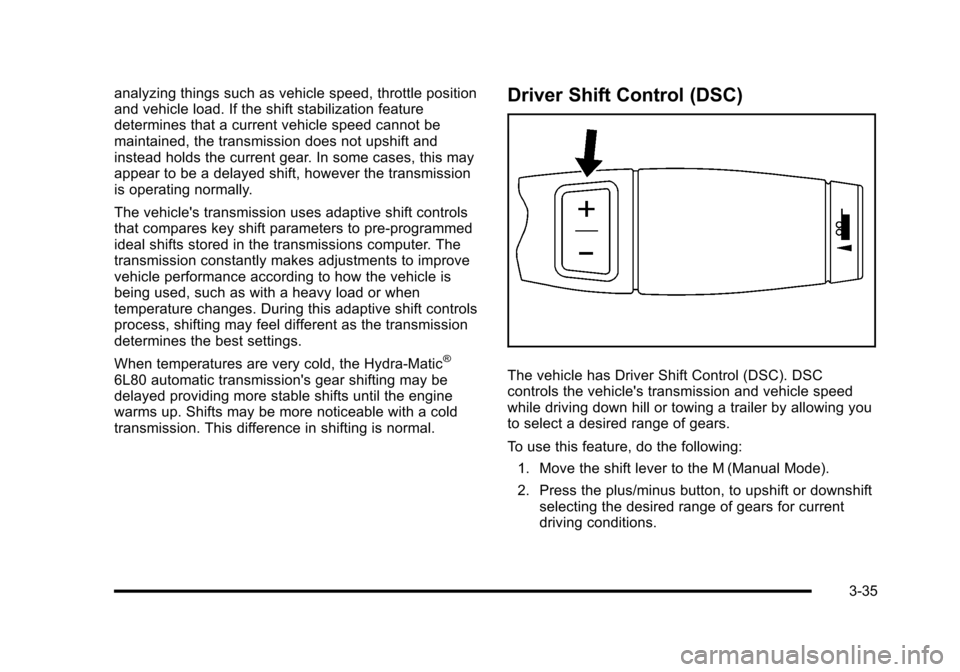
Driver Shift Control (DSC)
The vehicle has Driver Shift Control (DSC). DSCcontrols the vehicle's transmission and vehicle speedwhile driving down hill or towing a trailer by allowing youto select a desired range of gears.
To use this feature, do the following:
1. Move the shift lever to the M (Manual Mode).
2. Press the plus/minus button, to upshift or downshiftselecting the desired range of gears for currentdriving conditions.
3-35
Page 160 of 616
The DIC display will show the message MANUALSHIFT on the first line and the current gear will bedisplayed on the second line. SeeDriver InformationCenter (DIC)on page 4!41andDIC Operation andDisplayson page 4!41for more information. Thenumber displayed in the DIC is the highest gear thatcan be used. However, the vehicle can automaticallyshift to lower gears as it adjusts to driving conditions.This means that all gears below that number areavailable. When 5 (Fifth) is selected, 1 (First) through5 (Fifth) gears are automatically shifted by the vehicle,but 6 (Sixth) cannot be used until the plus/minus buttonlocated on the steering column lever is used to changeto the gear.
Grade Braking is not available when the Driver ShiftControl is active. SeeTow/Haul Modeon page 3!36formore information.
While using the DSC, cruise control and the tow/haulmode can be used.
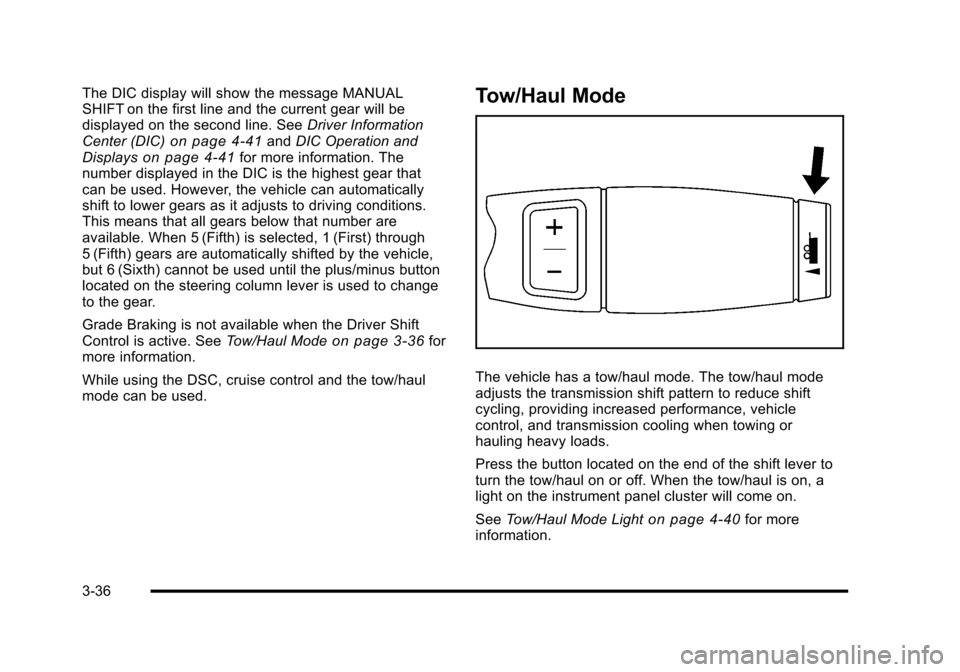
Tow/Haul Mode
The vehicle has a tow/haul mode. The tow/haul modeadjusts the transmission shift pattern to reduce shiftcycling, providing increased performance, vehiclecontrol, and transmission cooling when towing orhauling heavy loads.
Press the button located on the end of the shift lever toturn the tow/haul on or off. When the tow/haul is on, alight on the instrument panel cluster will come on.
SeeTow/Haul Mode Lighton page 4!40for moreinformation.
3-36
Page 161 of 616
Also see“Tow Haul Mode”underTowing a Traileronpage 6!42for more information.
The tow/haul mode works with the Autoride®feature,if the vehicle has this, to enhance the ride whentrailering or with a loaded vehicle. SeeAutoride®onpage 6!42.
Grade Braking
The Grade Braking shift modes can be activated bypressing the button on the end of the shift control lever.While in Range Selection Mode , Grade Braking isdeactivated allowing the driver to select a desired rangeof gears.
Grade Braking is only active while the Tow/Haul Modeis selected and you are not in the Range SelectionMode. See“Tow/Haul Mode listed previously andAutomatic Transmission Operationon page 3!32formore information on the Range Selection Mode. GradeBraking assists in maintaining desired vehicle speedswhen driving on downhill grades by automaticallyimplementing a shift schedule that utilizes the engineand transmission to slow the vehicle. This reduces wearon the braking system and increases control of thevehicle. Grade Braking monitors vehicle speed,acceleration, engine torque and brake pedal usage.
Using this information, it detects when the vehicle is ona downhill grade and the driver desires to slow thevehicle by pressing the brake.
Also seeTowing a Traileron page 6!42for moreinformation.
Cruise Grade Braking
Cruise Grade Braking assists when driving on adownhill grade. It maintains vehicle speed byautomatically implementing a shift schedule that usesthe engine and the transmission to slow the vehicle.Cruise Grade Braking operates while Cruise Control isengaged in Tow/Haul mode to assist in maintainingvehicle speed under loaded vehicle conditions.It utilizes vehicle acceleration and deviation fromdesired speed to determine the correct gear for theoperating condition. If vehicle speed is above thedesired speed the transmission will downshift to slowthe vehicle. If vehicle speed is near or below desiredspeed the trans will upshift, allowing vehicle speedto increase.
While in the Range Select Mode (RSM) mode, cruisegrade braking is not available.
SeeAutomatic Transmission Operation on page 3!32.
3-37
Page 166 of 616
Running the Vehicle While Parked
It is better not to park with the engine running. But if youever have to, here are some things to know.
{WARNING:
Idling a vehicle in an enclosed area with poor
ventilation is dangerous. Engine exhaust may
enter the vehicle. Engine exhaust contains
Carbon Monoxide (CO) which cannot be seen or
smelled. It can cause unconsciousness and even
death. Never run the engine in an enclosed area
that has no fresh air ventilation. For more
information, seeEngine Exhaust on page 3!41.
{WARNING:
It can be dangerous to get out of the vehicle if the
automatic transmission shift lever is not fully in
P (Park) with the parking brake firmly set. The
vehicle can roll. Do not leave the vehicle when the
engine is running unless you have to. If you have
left the engine running, the vehicle can move
suddenly. You or others could be injured. To be
sure the vehicle will not move, even when you are
on fairly level ground, always set the parking
brake and move the shift lever to P (Park).
Follow the proper steps to be sure the vehicle will notmove. SeeShifting Into Park on page 3!39.
If parking on a hill and pulling a trailer, seeTowing aTrailer on page 6!42.
3-42
Page 200 of 616
The rear window wiper/washer will not operate if theliftgate or liftglass is open or ajar. If the liftgate orliftglass is opened while the rear wiper is on, the wiperwill return to the parked position and stop.
Cruise Control
{WARNING:
Cruise control can be dangerous where you
cannot drive safely at a steady speed. So, do not
use the cruise control on winding roads or in
heavy traffic.
Cruise control can be dangerous on slippery
roads. On such roads, fast changes in tire traction
can cause excessive wheel slip, and you could
lose control. Do not use cruise control on slippery
roads.
With cruise control, a speed of about 40 km/h (25 mph)or more can be maintained without keeping your foot onthe accelerator. Cruise control does not work at speedsbelow about 40 km/h (25 mph).
When the brakes are applied, cruise control isturned off.
For vehicles with an Allison®or Hydra!Matic 6!speedautomatic transmission, see“Grade Braking and CruiseGrade Braking (Allison Transmission) underTow/HaulModeon page 3!36for an explanation of how cruisecontrol interacts with the Range Selection Mode, tow/haul and grade braking systems.
If the vehicle has StabiliTrak®, and the system beginsto limit wheel spin, cruise control will automaticallydisengage. SeeStabiliTrak®Systemo n p a g e 6!6.When road conditions allow the cruise control to besafely used again, it can be turned back on.
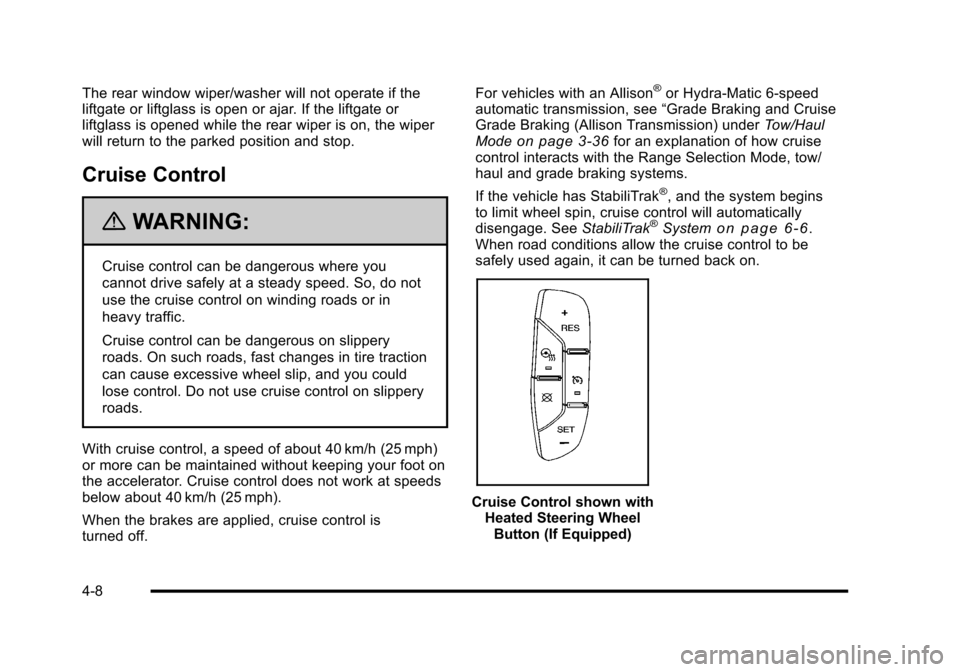
Cruise Control shown withHeated Steering WheelButton (If Equipped)
4-8
Page 207 of 616
Headlamps on Reminder
If a door is open, a reminder chime sounds when theheadlamps or parking lamps are manually turned onand the key is out of the ignition. To turn off the chime,turn the headlamp switch to off or AUTO and then backon, or close and re-open the door. In the AUTO mode,the headlamps turn off once the ignition is in LOCK/OFFor remains on until the headlamp delay ends (if enabledin the DIC). See“Exit Lighting”underDIC VehicleCustomization on page 4!57.
Daytime Running Lamps (DRL)
Daytime Running Lamps (DRL) can make it easier forothers to see the front of your vehicle during the day.Fully functional daytime running lamps are required onall vehicles first sold in Canada.
The DRL system comes on when the followingconditions are met:
.The ignition is on.
.The exterior lamps control is in AUTO.
.The engine is running.
.The light sensor determines it is daytime.
When the DRL system is on, only the DRL lamps areon. The taillamps, sidemarker, instrument panel lights,and other lamps will not be on.
When it begins to get dark, the automatic headlampsystem switches from DRL to the headlamps.
To turn off the DRL lamps, turn the exterior lampscontrol to the OFF position and then release. Forvehicles first sold in Canada, the transmission must bein the P (Park) position, before the DRL lamps can beturned off.
Automatic Headlamp System
When it is dark enough outside, the automaticheadlamp system turns on the headlamps at the normalbrightness, along with the taillamps, sidemarker, parkinglamps, and the instrument panel lights. The radio lightswill also be dim.
To turn off the automatic headlamp system, turn theexterior lamps switch to the off position and thenrelease it. For vehicles first sold in Canada, thetransmission must be in the P (Park) position, beforethe automatic headlamp system can be turned off.
The vehicle has a light sensor located on the top of theinstrument panel in the defroster grille that regulateswhen the automatic headlamps turn on. Do not coverthe sensor or the headlamps will come on whenever theignition is on.
The system may also turn on the headlamps whendriving through a parking garage, heavy overcastweather, or a tunnel. This is normal.
4-15
Page 236 of 616
Transmission Temperature
Press the trip/fuel button until TRANS TEMP displays.This display shows the temperature of the automatictransmission fluid in either degrees Fahrenheit (°F) ordegrees Celsius (°C).
Instantaneous Economy
If your vehicle has this display, press the trip/fuel buttonuntil INST ECON displays. This display shows thecurrent fuel economy at a particular moment and willchange frequently as driving conditions change. Thisdisplay shows the instantaneous fuel economy in milesper gallon (mpg) or liters per 100 kilometers (L/100 km).Unlike average economy, this screen cannot be reset.
The display may also show if the vehicle is currentlyin V4, V6 or V8 mode.
Average Vehicle Speed
Press the trip/fuel button until AVERAGE SPEEDdisplays. This display shows the average speed inmiles per hour (MPH) or kilometers per hour (km/h).
Blank Display
This display shows no information.
Vehicle Information Menu Items
T(Vehicle Information):Press this button to scrollthrough the following menu items:
Oil Life
Press the vehicle information button until OIL LIFEREMAINING displays. This display shows an estimateof the oil's remaining useful life. If you see 99% OILLIFE REMAINING on the display, that means 99% ofthe current oil life remains. The engine oil life systemwill alert you to change the oil on a schedule consistentwith your driving conditions.
When the remaining oil life is low, the CHANGEENGINE OIL SOON message will appear on thedisplay. See“CHANGE ENGINE OIL SOON”underDICWarnings and Messageson page 4!48. You shouldchange the oil as soon as you can. SeeEngine Oilonpage 7!17. In addition to the engine oil life systemmonitoring the oil life, additional maintenance isrecommended in the Maintenance Schedule in thismanual. SeeScheduled Maintenanceo n p a g e 8!3formore information.
4-44
Page 249 of 616
TRANSMISSION HOT IDLE ENGINE
Notice:If you drive your vehicle while thetransmission fluid is overheating and thetransmission temperature warning is displayed onthe instrument panel cluster and/or DIC, you candamage the transmission. This could lead to costlyrepairs that would not be covered by your warranty.Do not drive your vehicle with overheatedtransmission fluid or while the transmissiontemperature warning is displayed.
This message displays along with four chimes if thetransmission fluid in the vehicle gets hot. Driving withthe transmission fluid temperature high can causedamage to the vehicle. Stop the vehicle and let it idle toallow the transmission to cool. This message clears andthe chime stops when the fluid temperature reaches asafe level.
TURN SIGNAL ON
This message displays and a chime sounds if a turnsignal is left on for 3/4 of a mile (1.2 km). Move the turnsignal/multifunction lever to the off position.
WASHER FLUID LOW ADD FLUID
This message displays when the windshield washerfluid is low. Fill the windshield washer fluid reservoir assoon as possible. SeeEngine Compartment Overviewon page 7!16for the location of the windshield washerfluid reservoir. Also, seeWindshield Washer Fluidonpage 7!39for more information.
DIC Vehicle Customization
Your vehicle may have customization capabilities thatallow you to program certain features to one preferredsetting. Customization features can only beprogrammed to one setting on the vehicle and cannotbe programmed to a preferred setting for two differentdrivers.
All of the customization options may not be available onyour vehicle. Only the options available will bedisplayed on the DIC.
The default settings for the customization features wereset when your vehicle left the factory, but may havebeen changed from their default state since then.
The customization preferences are automaticallyrecalled.
To change customization preferences, use the followingprocedure.
4-57
Page 398 of 616
It is recommended to leave the system on for normaldriving conditions, but it may be necessary to turn thesystem off if the vehicle is stuck in sand, mud, ice orsnow, and you want to“rock”the vehicle to attempt tofree it. It may also be necessary to turn off the systemwhen driving in extreme off-road conditions where highwheel spin is required. SeeIf Your Vehicle is Stuck inSand, Mud, Ice, or Snow on page 6!30.
Traction Control Operation
The traction control system is part of the StabiliTraksystem. Traction control limits wheel spin by reducingengine power to the wheels (engine speedmanagement) and by applying brakes to each individualwheel (brake-traction control) as necessary.
The traction control system is enabled automaticallywhen the vehicle is started. It will activate and theStabiliTrak light will flash if it senses that any of thewheels are spinning or beginning to lose tractionwhile driving. If traction control is turned off, only thebrake-traction control portion of traction control willwork. The engine speed management will be disabled.In this mode, engine power is not reduced automaticallyand the driven wheels can spin more freely. This cancause the brake-traction control to activate constantly.
Notice:If the wheel(s) of one axle is allowed to spinexcessively while the StabiliTrak, ABS and brakewarning lights and any relevant DIC messages aredisplayed, the transfer case could be damaged.The repairs would not be covered by the vehiclewarranty. Reduce engine power and do not spin thewheel(s) excessively while these lights andmessages are displayed.
The traction control system may activate on dry orrough roads or under conditions such as heavyacceleration while turning or abrupt upshifts/downshiftsof the transmission. When this happens, a reduction inacceleration may be noticed, or a noise or vibration maybe heard. This is normal.
If cruise control is being used when the systemactivates, the StabiliTrak light will flash and cruisecontrol will automatically disengage. Cruise control maybe reengaged when road conditions allow. SeeCruiseControl on page 4!8.
StabiliTrak may also turn off automatically if itdetermines that a problem exists with the system.If the problem does not clear itself after restarting thevehicle, see your dealer/retailer for service.
6-8
Page 431 of 616
Two-wheel-drive vehicles should not be towed withthe rear wheels on the ground. Two-wheel-drivetransmissions have no provisions for internal lubricationwhile being towed.
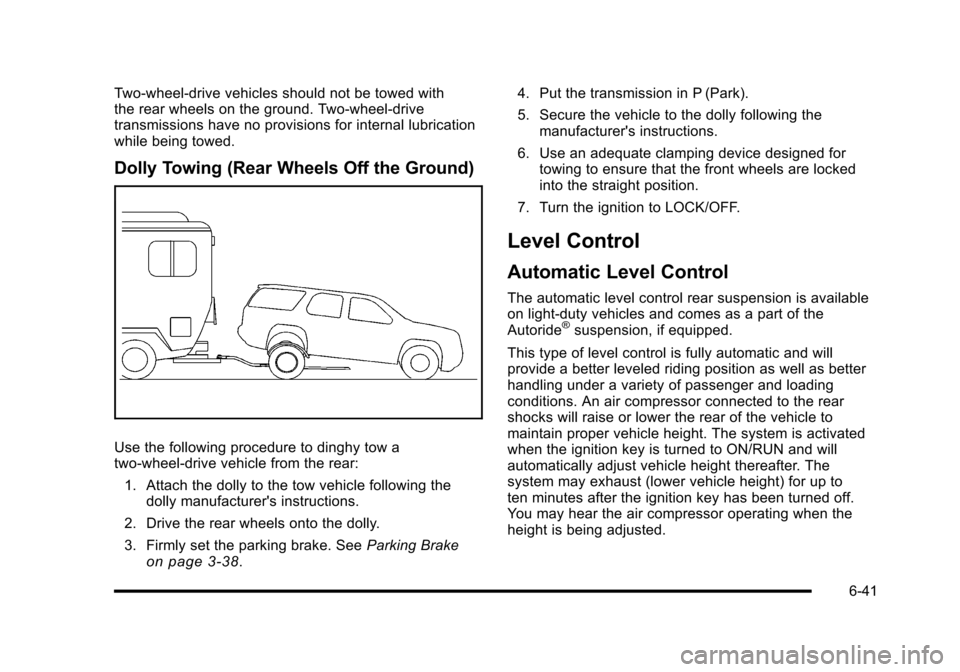
Dolly Towing (Rear Wheels Off the Ground)
Use the following procedure to dinghy tow atwo-wheel-drive vehicle from the rear:
1. Attach the dolly to the tow vehicle following thedolly manufacturer's instructions.
2. Drive the rear wheels onto the dolly.
3. Firmly set the parking brake. SeeParking Brakeon page 3!38.
4. Put the transmission in P (Park).
5. Secure the vehicle to the dolly following themanufacturer's instructions.
6. Use an adequate clamping device designed fortowing to ensure that the front wheels are lockedinto the straight position.
7. Turn the ignition to LOCK/OFF.
Level Control
Automatic Level Control
The automatic level control rear suspension is availableon light!duty vehicles and comes as a part of theAutoride®suspension, if equipped.
This type of level control is fully automatic and willprovide a better leveled riding position as well as betterhandling under a variety of passenger and loadingconditions. An air compressor connected to the rearshocks will raise or lower the rear of the vehicle tomaintain proper vehicle height. The system is activatedwhen the ignition key is turned to ON/RUN and willautomatically adjust vehicle height thereafter. Thesystem may exhaust (lower vehicle height) for up toten minutes after the ignition key has been turned off.You may hear the air compressor operating when theheight is being adjusted.
6-41