battery CADILLAC ESCALADE 2010 3.G Owner's Guide
[x] Cancel search | Manufacturer: CADILLAC, Model Year: 2010, Model line: ESCALADE, Model: CADILLAC ESCALADE 2010 3.GPages: 616, PDF Size: 39.41 MB
Page 282 of 616
Vehicle Speakers
Audio from the DVD player or an auxiliary device canbe heard through the vehicle speakers or the wireless/wired headphones, while the radio is tuned to one of thesix frequencies selected on the Sound Around portionof the system’s remote control. See“Remote Control”later in this supplement.
Only one audio source can be heard through thevehicle’s speakers at a time. The audio source beingused is specified by the A/V (audio/video) sourceselected on the driver side head restraint video displayscreen.
To turn the RSE system audio output to the vehicle’sspeakers, press Sound Around ON, on the system’sremote control. The audio from the RSE system can beheard through the wireless/wired headphones and thevehicle’s speakers at the same time. The volume on theradio can vary when switching between the radio, CD,DVD, MP3, or an auxiliary device.
Wireless Headphones
The two wireless headphones included with theHeadrest DVD RSE system will only work with theHeadrest DVD RSE system and are marked for channel3 and 4. The wireless headphones must be used withina line of sight of the transmitter that is located above thevideo display screen.
3!4 Channel Selector :This is located on the rightearpiece. Either Channel 3 or 4 can be selected withthe channel selector. The driver side monitor isdesignated as Channel 3, and the passenger side asChannel 4. Set the channel selector switch according tothe video display screen being viewed. The message,“To listen to this monitor tune your headphones toChannel 3 (or 4)”displays for five seconds thendisappears when the video display screen is turned on.
OFF/ON (Power) :Turn the power switch located onthe earpiece to turn the wireless headphones on or off.Each headphone has a light to indicate ON. If the lightdoes not come on, the batteries may need to bereplaced. See“Battery Replacement”under Rear SeatEntertainment System in the vehicle’s owner manual.
The headphones shut off automatically if the RSEsystem is turned off or if the headphones are out ofrange of the transmitter for more than three minutes.
VOL0(Volume):Use to adjust the volume on the
headphones.
Notice:Do not store the headphones in heat ordirect sunlight. This could damage the headphonesand repairs will not be covered by the warranty.Storage in extreme cold can weaken the batteries.Keep the headphones stored in a cool, dry place.
4-90
Page 283 of 616
Remote Control
To use the remote control, aim at the remote sensorlocated on top center of the video display screen andpress the desired button.
Objects blocking the line-of-sight can affect the functionof the remote control. Direct or very bright light canaffect the ability of the transmitter to receive signalsfrom the remote control. If the remote control does notseem to be working, the batteries might need to bereplaced. See“Battery Replacement”following thissection.
The remote control provided with the Headrest DVDRSE system, is not a universal remote control and willnot control other equipment.
Notice:Storing the remote control in a hot area orin direct sunlight can damage it, and the repairs willnot be covered by the warranty. Storage in extremecold can weaken the batteries. Keep the remotecontrol stored in a cool, dry place.
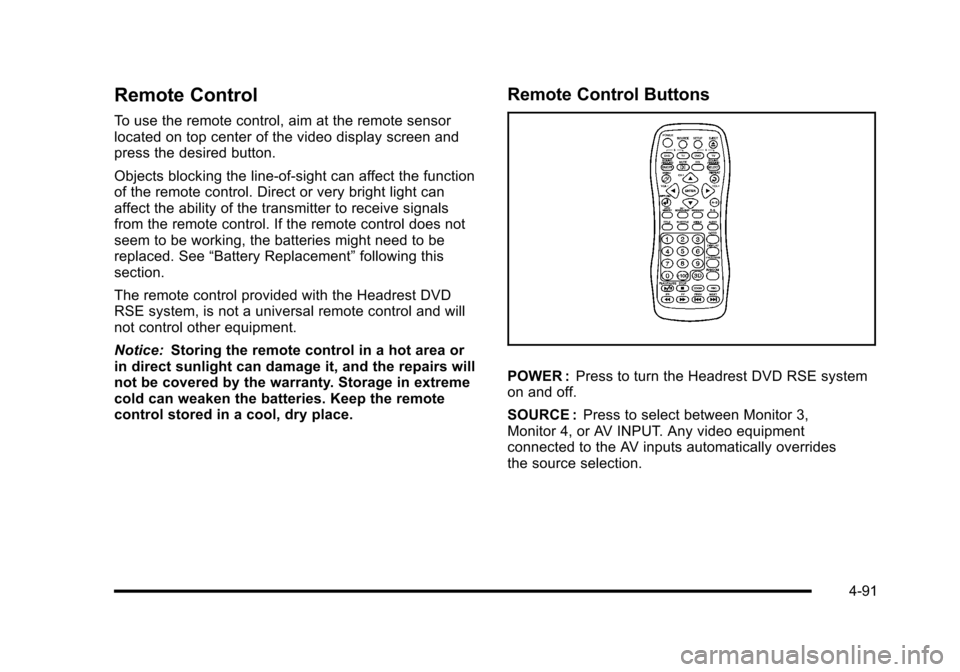
Remote Control Buttons
POWER :Press to turn the Headrest DVD RSE systemon and off.
SOURCE :Press to select between Monitor 3,Monitor 4, or AV INPUT. Any video equipmentconnected to the AV inputs automatically overridesthe source selection.
4-91
Page 286 of 616
STOPc:Press to stop playback of a disc.
.To resume disc playback, press PLAY.
.To start playback from the beginning of the disc,press STOP, STOP, then PLAY .
ZOOM :Press to either enlarge the viewed imageby 2X, 3X, and 4X, or reduce the image by 1/2X,1/3X, and 1/4X.
PBC (Playback Control) :Press to turn video CDplayback control on or off.
FRr(Fast Reverse):Press to fast reverse the disc.
Press multiple times to choose between 2X, 4X, 8X,16X, and 32X speeds.
FF[(Fast Forward):Press to fast forward the disc.
Press multiple times to choose between 2X, 4X, 8X,16X, and 32X speeds.
PREVg(Previous):Press to play the previous
chapter or track. To return to previous chapters or tracksone at a time, press and release multiple times until thedesired chapter or track is reached.
NEXTl:Press to play the next chapter or track. To
go to the next chapter or track one at a time, press andrelease multiple times until the desired chapter or trackis reached.
Battery Replacement
To change batteries in the remote control:
1. Turn the remote control face down.
2. Press down on the ridged area of the battery coverand slide it off.
3. Install two AAA batteries into the batterycompartment.
4. Slide the cover back on until it clicks.
If the remote control is to be stored for a long period oftime, remove the batteries and keep it in a cool, dryplace.
4-94
Page 300 of 616
Cellular Phone Usage
Cellular phone usage may cause interference with thevehicle's radio. This interference may occur whenmaking or receiving phone calls, charging the phone'sbattery, or simply having the phone on. Thisinterference causes an increased level of static whilelistening to the radio. If static is received while listeningto the radio, unplug the cellular phone and turn it off.
Rear Side Window Antenna
The AM-FM antenna is located in the passenger rearside windows. Make sure the inside surfaces of the rearside windows are not scratched and that the lines onthe glass are not damaged. If the inside surfaces aredamaged, they could interfere with radio reception.
If a cellular telephone antenna needs to be attached tothe glass, make sure that the grid lines for the AM-FMantenna are not damaged. There is enough spacebetween the grid lines to attach a cellular telephoneantenna without interfering with radio reception.
Notice:Using a razor blade or sharp object to clearthe inside of the rear side windows may affect radioreception or damage the rear side window antenna.Repairs would not be covered by the warranty. Donot clear the inside of the rear side windows withsharp objects.
Notice:Do not apply aftermarket glass tinting withmetallic film. The metallic film in some tintingmaterials will interfere with or distort the incomingradio reception. Any damage caused to the antennadue to metallic tinting materials will not be coveredby the warranty.
XM™Satellite Radio Antenna
System
The XM Satellite Radio antenna is located on the roof ofthe vehicle. Keep the antenna clear of obstructions forclear radio reception.
If the vehicle has a sunroof, the performance of theXM system may be affected if the sunroof is open.
4-108
Page 358 of 616
.Vehicle is traveling at high speed.
.Vehicle changes directions more than once,or when the vehicle is turning on a turn table in aparking lot.
.Vehicle is entering and/or exiting a parking lot ora garage.
.GPS signal is not received.
.Roof carrier is installed on the vehicle.
.Vehicle is being driven with tire chains.
.Tires are replaced.
.Tire pressure for the tires is incorrect.
.Tires are worn.
.First time the map DVD is inserted.
.Battery is disconnected for several days.
.Vehicle is driving in heavy traffic where driving is atlow speeds, and the vehicle is stopped and startedrepeatedly.
See your dealer/retailer if other problems occur.
Problems with Route Guidance
Inappropriate route guidance may occur under one ormore of the following conditions:
.You have not turned onto the road indicated.
.Route guidance may not be available when usingautomatic rerouting for the next right or left turn.
.The route may not be changed when usingautomatic rerouting.
.There is no route guidance when turning at anintersection.
.Plural names of places may be announcedoccasionally.
.It may take a long time to operate automaticrerouting during high-speed driving.
.Automatic rerouting may display a route returningto the set stopover if you are heading for adestination without passing through a set stopover.
.The route prohibits the entry of a vehicle due to aregulation by time or season or any otherregulation which may be given.
5-58
Page 381 of 616
.You are driving on a very rough road. When theroad becomes smoother, the DVD should play.
.The DVD is dirty, scratched, wet, or upside down.
.The air is very humid. If so, wait about an hour andtry again.
.There may have been a problem while burningthe DVD.
.The label may be caught in the DVD player.
If the DVD is not playing correctly, for any other reason,try a known good DVD.
If any error occurs repeatedly or if an error cannot becorrected, contact your dealer/retailer.
Connecting a USB Storage Device
or iPod®
The USB Port, located in the center console, can beused to control an iPod®or a USB storage device.
To avoid connection problems, extension cords arenot recommended. Use only the cable that came withthe device.
To connect a USB storage device, connect the device tothe USB port located in the center console.
To connect an iPod®, connect one end of the USB cablethat came with the iPod to the iPod’s dock connectorand connect the other end to the USB port. If thevehicle is on and the USB connection works,“OK todisconnect”and a GM logo may appear on the iPod andiPod appears on the radio's display. The iPod musicappears on the radio’s display and begins playing.
The iPod charges while it is connected to thevehicle if the vehicle is in the ACC/ACCESSORY orON/RUN position. When the vehicle is turned off, theiPod automatically powers off and will not charge ordraw power from the vehicle's battery.
USB Supported File and Folder Structure
The guidelines that must be met while using USBsupported files and folders are:
.Up to 700 folders.
.Up to 8 folders in depth.
.Up to 65,535 files.
.Folder and file names up to 64 bytes.
.Files with an .mp3 or .wma file extension.
.AAC files stored on an iPod.
.FAT16
.FAT32
5-81
Page 419 of 616

{WARNING:
Snow can trap engine exhaust under the vehicle.
This may cause exhaust gases to get inside.
Engine exhaust contains carbon monoxide (CO)
which cannot be seen or smelled. It can cause
unconsciousness and even death.
If the vehicle is stuck in the snow:
.Clear away snow from around the base of
your vehicle, especially any that is blocking
the exhaust pipe.
.Check again from time to time to be sure
snow does not collect there.
.Open a window about 5 cm (two inches) on
the side of the vehicle that is away from the
wind to bring in fresh air.
.Fully open the air outlets on or under the
instrument panel.
.Adjust the Climate Control system to a setting
that circulates the air inside the vehicle and
set the fan speed to the highest setting.
See Climate Control System in the Index.
(Continued)
WARNING: (Continued)
For more information about carbon monoxide, see
Engine Exhaust on page 3!41.
Snow can trap exhaust gases under your vehicle.
This can cause deadly CO (carbon monoxide) gas
to get inside. CO could overcome you and kill you.
You cannot see it or smell it, so you might not
know it is in your vehicle. Clear away snow from
around the base of your vehicle, especially any
that is blocking the exhaust.
Run the engine for short periods only as needed tokeep warm, but be careful.
To save fuel, run the engine for only short periods asneeded to warm the vehicle and then shut the engineoff and close the window most of the way to save heat.Repeat this until help arrives but only when you feelreally uncomfortable from the cold. Moving about tokeep warm also helps.
If it takes some time for help to arrive, now and thenwhen you run the engine, push the accelerator pedalslightly so the engine runs faster than the idle speed.This keeps the battery charged to restart the vehicleand to signal for help with the headlamps. Do this aslittle as possible to save fuel.
6-29
Page 444 of 616
Trailer Wiring Harness
Heavy-Duty Trailer Wiring Harness Package
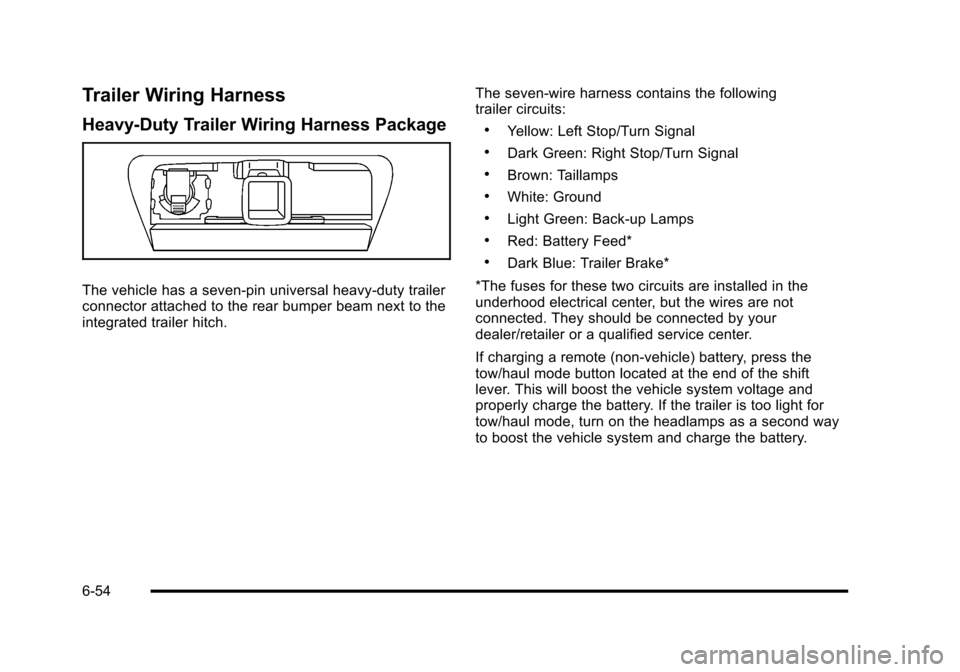
The vehicle has a seven-pin universal heavy-duty trailerconnector attached to the rear bumper beam next to theintegrated trailer hitch.
The seven-wire harness contains the followingtrailer circuits:
.Yellow: Left Stop/Turn Signal
.Dark Green: Right Stop/Turn Signal
.Brown: Taillamps
.White: Ground
.Light Green: Back-up Lamps
.Red: Battery Feed*
.Dark Blue: Trailer Brake*
*The fuses for these two circuits are installed in theunderhood electrical center, but the wires are notconnected. They should be connected by yourdealer/retailer or a qualified service center.
If charging a remote (non-vehicle) battery, press thetow/haul mode button located at the end of the shiftlever. This will boost the vehicle system voltage andproperly charge the battery. If the trailer is too light fortow/haul mode, turn on the headlamps as a second wayto boost the vehicle system and charge the battery.
6-54
Page 445 of 616
Electric Brake Control Wiring
Provisions
These wiring provisions are included with the vehicle aspart of the trailer wiring package. These provisions arefor an electric brake controller. The instrument panelcontains blunt cut wires near the data link connector forthe trailer brake controller. The harness contains thefollowing wires:
.Dark Blue: Brake Signal to Trailer Connector
.Red/Black: Battery
.Light Blue/White: Brake Switch
.White: Ground
It should be installed by your dealer/retailer or aqualified service center.
Trailer Recommendations
Subtract the hitch loads from the Cargo Weight Rating(CWR). CWR is the maximum weight of the load thevehicle can carry. It does not include the weight of thepeople inside, but you can figure about 150 lbs. (68 kg)for each passenger. The total cargo load must not bemore than the vehicles CWR.
Weigh the vehicle with the trailer attached, so theGVWR or GAWR are not exceeded. If using aweight-distributing hitch, weigh the vehicle without thespring bars in place.
The best performance is obtained by correctlyspreading out the weight of the load and choosing thecorrect hitch and trailer brakes.
For more information seeTowing a Traileronpage 6!42.
6-55
Page 447 of 616
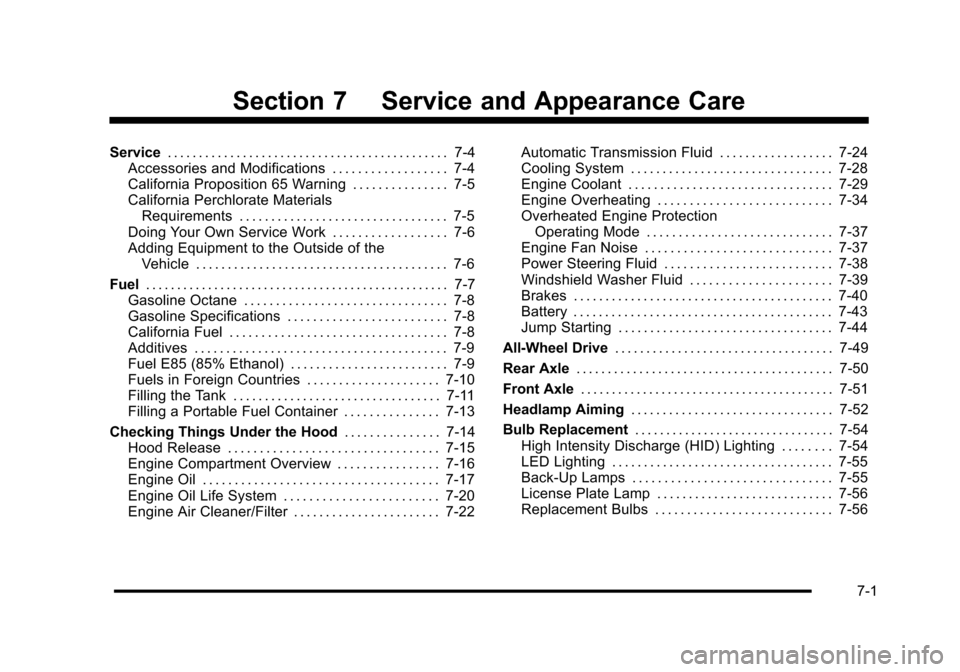
Section 7 Service and Appearance Care
Service. . . . . . . . . . . . . . . . . . . . . . . . . . . . . . . . . . . . . . . . . . . . . 7-4Accessories and Modifications . . . . . . . . . . . . . . . . . . 7-4California Proposition 65 Warning . . . . . . . . . . . . . . . 7-5California Perchlorate MaterialsRequirements . . . . . . . . . . . . . . . . . . . . . . . . . . . . . . . . . 7-5Doing Your Own Service Work . . . . . . . . . . . . . . . . . . 7-6Adding Equipment to the Outside of theVehicle . . . . . . . . . . . . . . . . . . . . . . . . . . . . . . . . . . . . . . . . 7-6
Fuel. . . . . . . . . . . . . . . . . . . . . . . . . . . . . . . . . . . . . . . . . . . . . . . . . 7-7Gasoline Octane . . . . . . . . . . . . . . . . . . . . . . . . . . . . . . . . 7-8Gasoline Specifications . . . . . . . . . . . . . . . . . . . . . . . . . 7-8California Fuel . . . . . . . . . . . . . . . . . . . . . . . . . . . . . . . . . . 7-8Additives . . . . . . . . . . . . . . . . . . . . . . . . . . . . . . . . . . . . . . . . 7-9Fuel E85 (85% Ethanol) . . . . . . . . . . . . . . . . . . . . . . . . . 7-9Fuels in Foreign Countries . . . . . . . . . . . . . . . . . . . . . 7-10Filling the Tank . . . . . . . . . . . . . . . . . . . . . . . . . . . . . . . . . 7-11Filling a Portable Fuel Container . . . . . . . . . . . . . . . 7-13
Checking Things Under the Hood. . . . . . . . . . . . . . . 7-14Hood Release . . . . . . . . . . . . . . . . . . . . . . . . . . . . . . . . . 7-15Engine Compartment Overview . . . . . . . . . . . . . . . . 7-16Engine Oil . . . . . . . . . . . . . . . . . . . . . . . . . . . . . . . . . . . . . 7-17Engine Oil Life System . . . . . . . . . . . . . . . . . . . . . . . . 7-20Engine Air Cleaner/Filter . . . . . . . . . . . . . . . . . . . . . . . 7-22
Automatic Transmission Fluid . . . . . . . . . . . . . . . . . . 7-24Cooling System . . . . . . . . . . . . . . . . . . . . . . . . . . . . . . . . 7-28Engine Coolant . . . . . . . . . . . . . . . . . . . . . . . . . . . . . . . . 7-29Engine Overheating . . . . . . . . . . . . . . . . . . . . . . . . . . . 7-34Overheated Engine ProtectionOperating Mode . . . . . . . . . . . . . . . . . . . . . . . . . . . . . 7-37Engine Fan Noise . . . . . . . . . . . . . . . . . . . . . . . . . . . . . 7-37Power Steering Fluid . . . . . . . . . . . . . . . . . . . . . . . . . . 7-38Windshield Washer Fluid . . . . . . . . . . . . . . . . . . . . . . 7-39Brakes . . . . . . . . . . . . . . . . . . . . . . . . . . . . . . . . . . . . . . . . . 7-40Battery . . . . . . . . . . . . . . . . . . . . . . . . . . . . . . . . . . . . . . . . . 7-43Jump Starting . . . . . . . . . . . . . . . . . . . . . . . . . . . . . . . . . . 7-44
All-Wheel Drive. . . . . . . . . . . . . . . . . . . . . . . . . . . . . . . . . . . 7-49
Rear Axle. . . . . . . . . . . . . . . . . . . . . . . . . . . . . . . . . . . . . . . . . 7-50
Front Axle. . . . . . . . . . . . . . . . . . . . . . . . . . . . . . . . . . . . . . . . . 7-51
Headlamp Aiming. . . . . . . . . . . . . . . . . . . . . . . . . . . . . . . . 7-52
Bulb Replacement. . . . . . . . . . . . . . . . . . . . . . . . . . . . . . . . 7-54High Intensity Discharge (HID) Lighting . . . . . . . . 7-54LED Lighting . . . . . . . . . . . . . . . . . . . . . . . . . . . . . . . . . . . 7-55Back-Up Lamps . . . . . . . . . . . . . . . . . . . . . . . . . . . . . . . 7-55License Plate Lamp . . . . . . . . . . . . . . . . . . . . . . . . . . . . 7-56Replacement Bulbs . . . . . . . . . . . . . . . . . . . . . . . . . . . . 7-56
7-1