instrument panel CADILLAC ESCALADE 2010 3.G Service Manual
[x] Cancel search | Manufacturer: CADILLAC, Model Year: 2010, Model line: ESCALADE, Model: CADILLAC ESCALADE 2010 3.GPages: 616, PDF Size: 39.41 MB
Page 248 of 616
TIGHTEN GAS CAP
This message may display along with the check enginelight on the instrument panel cluster if the vehicle's fuelcap is not tightened properly. SeeMalfunction IndicatorLampon page 4!36. Reinstall the fuel cap fully. SeeFilling the Tankon page 7!11. The diagnostic systemcan determine if the fuel cap has been left off orimproperly installed. A loose or missing fuel cap allowsfuel to evaporate into the atmosphere. A few drivingtrips with the cap properly installed should turn this lightand message off.
TIRE LEARNING ACTIVE
On vehicles with the Tire Pressure Monitor System(TPMS), this message displays when the TPMS isre-learning the tire positions on your vehicle. The tirepositions must be re-learned after rotating the tires orafter replacing a tire or sensor. SeeTire Inspection andRotationon page 7!71,Tire Pressure Monitor Systemon page 7!67, andInflation - Tire Pressureonpage 7!65for more information.
TIRE LOW ADD AIR TO TIRE
On vehicles with the Tire Pressure Monitor System(TPMS), this message displays when the pressure inone or more of the vehicle's tires is low. This messagealso displays LEFT FRONT, RIGHT FRONT, LEFTREAR, or RIGHT REAR to indicate which tire needs tobe checked. The low tire pressure warning light will alsocome on. SeeTire Pressure Lighton page 4!35. Youcan receive more than one tire pressure message at atime. To read the other messages that may have beensent at the same time, press the set/reset button. If atire pressure message appears on the DIC, stop assoon as you can. Have the tire pressures checked andset to those shown on the Tire Loading Informationlabel. SeeTireson page 7!58,Loading the Vehicleonpage 6!32, andInflation - Tire Pressureon page 7!65.The DIC also shows the tire pressure values. SeeDICOperation and Displays on page 4!41.
TRACTION CONTROL OFF
If your vehicle has StabiliTrak, this message displayswhen the Traction Control System (TCS) is turned off.Adjust your driving accordingly. SeeStabiliTrak®
Systemo n p a g e 6!6for more information.
4-56
Page 249 of 616
TRANSMISSION HOT IDLE ENGINE
Notice:If you drive your vehicle while thetransmission fluid is overheating and thetransmission temperature warning is displayed onthe instrument panel cluster and/or DIC, you candamage the transmission. This could lead to costlyrepairs that would not be covered by your warranty.Do not drive your vehicle with overheatedtransmission fluid or while the transmissiontemperature warning is displayed.
This message displays along with four chimes if thetransmission fluid in the vehicle gets hot. Driving withthe transmission fluid temperature high can causedamage to the vehicle. Stop the vehicle and let it idle toallow the transmission to cool. This message clears andthe chime stops when the fluid temperature reaches asafe level.
TURN SIGNAL ON
This message displays and a chime sounds if a turnsignal is left on for 3/4 of a mile (1.2 km). Move the turnsignal/multifunction lever to the off position.
WASHER FLUID LOW ADD FLUID
This message displays when the windshield washerfluid is low. Fill the windshield washer fluid reservoir assoon as possible. SeeEngine Compartment Overviewon page 7!16for the location of the windshield washerfluid reservoir. Also, seeWindshield Washer Fluidonpage 7!39for more information.
DIC Vehicle Customization
Your vehicle may have customization capabilities thatallow you to program certain features to one preferredsetting. Customization features can only beprogrammed to one setting on the vehicle and cannotbe programmed to a preferred setting for two differentdrivers.
All of the customization options may not be available onyour vehicle. Only the options available will bedisplayed on the DIC.
The default settings for the customization features wereset when your vehicle left the factory, but may havebeen changed from their default state since then.
The customization preferences are automaticallyrecalled.
To change customization preferences, use the followingprocedure.
4-57
Page 397 of 616

If the system fails to turn on or activate, the StabiliTraklight along with one of the following messages will bedisplayed on the Driver Information Center (DIC):TRACTION CONTROL OFF, SERVICE TRACTIONCONTROL, STABILITRAK OFF, SERVICESTABILITRAK. If these DIC messages appear, makesure the StabiliTrak system has not been turned offusing the StabiliTrak on/off button. Then turn thesteering wheel clockwise from the nine o'clock positionto the three o'clock position. If this clears themessage(s), the vehicle does not need servicing.If this does not clear the message(s), then turn thevehicle off, wait 15 seconds, and then turn it back onagain to reset the system. If any of these messagesstill appear on the Driver Information Center (DIC), thevehicle should be taken in for service. For moreinformation on the DIC messages, seeDriverInformation Center (DIC) on page 4!41.
The StabiliTrak light willflash on the instrumentpanel cluster when thesystem is both onand activated.
The system may be heard or felt while it is working; thisis normal.
The traction controldisable button is locatedon the instrument panelbelow the climatecontrols.
The traction control part of StabiliTrak can be turnedoff by pressing and releasing the StabiliTrak button ifboth systems (traction control and StabiliTrak) werepreviously on. To disable both traction control andStabiliTrak, press and hold the button for five seconds.
Traction control and StabiliTrak can be turned on bypressing and releasing the StabiliTrak button if notautomatically shut off for any other reason.
When the TCS or StabiliTrak system is turned off,the StabiliTrak light and the appropriate TCS off orStabiliTrak off message will be displayed on the DIC towarn the driver. The vehicle will still have brake-tractioncontrol when traction control is off, but will not be ableto use the engine speed management system. See“Traction Control Operation”next for more information.
When the traction control system has been turned off,system noises may still be heard as a result of thebrake-traction control coming on.
6-7
Page 419 of 616

{WARNING:
Snow can trap engine exhaust under the vehicle.
This may cause exhaust gases to get inside.
Engine exhaust contains carbon monoxide (CO)
which cannot be seen or smelled. It can cause
unconsciousness and even death.
If the vehicle is stuck in the snow:
.Clear away snow from around the base of
your vehicle, especially any that is blocking
the exhaust pipe.
.Check again from time to time to be sure
snow does not collect there.
.Open a window about 5 cm (two inches) on
the side of the vehicle that is away from the
wind to bring in fresh air.
.Fully open the air outlets on or under the
instrument panel.
.Adjust the Climate Control system to a setting
that circulates the air inside the vehicle and
set the fan speed to the highest setting.
See Climate Control System in the Index.
(Continued)
WARNING: (Continued)
For more information about carbon monoxide, see
Engine Exhaust on page 3!41.
Snow can trap exhaust gases under your vehicle.
This can cause deadly CO (carbon monoxide) gas
to get inside. CO could overcome you and kill you.
You cannot see it or smell it, so you might not
know it is in your vehicle. Clear away snow from
around the base of your vehicle, especially any
that is blocking the exhaust.
Run the engine for short periods only as needed tokeep warm, but be careful.
To save fuel, run the engine for only short periods asneeded to warm the vehicle and then shut the engineoff and close the window most of the way to save heat.Repeat this until help arrives but only when you feelreally uncomfortable from the cold. Moving about tokeep warm also helps.
If it takes some time for help to arrive, now and thenwhen you run the engine, push the accelerator pedalslightly so the engine runs faster than the idle speed.This keeps the battery charged to restart the vehicleand to signal for help with the headlamps. Do this aslittle as possible to save fuel.
6-29
Page 439 of 616
Tow/Haul Mode
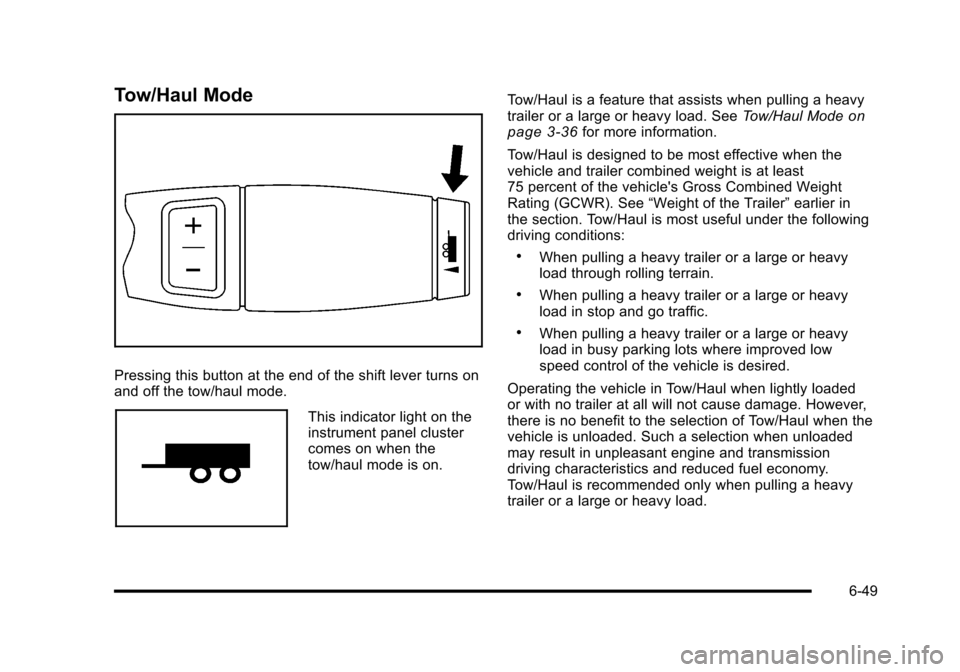
Pressing this button at the end of the shift lever turns onand off the tow/haul mode.
This indicator light on theinstrument panel clustercomes on when thetow/haul mode is on.
Tow/Haul is a feature that assists when pulling a heavytrailer or a large or heavy load. SeeTow/Haul Modeonpage 3!36for more information.
Tow/Haul is designed to be most effective when thevehicle and trailer combined weight is at least75 percent of the vehicle's Gross Combined WeightRating (GCWR). See“Weight of the Trailer”earlier inthe section. Tow/Haul is most useful under the followingdriving conditions:
.When pulling a heavy trailer or a large or heavyload through rolling terrain.
.When pulling a heavy trailer or a large or heavyload in stop and go traffic.
.When pulling a heavy trailer or a large or heavyload in busy parking lots where improved lowspeed control of the vehicle is desired.
Operating the vehicle in Tow/Haul when lightly loadedor with no trailer at all will not cause damage. However,there is no benefit to the selection of Tow/Haul when thevehicle is unloaded. Such a selection when unloadedmay result in unpleasant engine and transmissiondriving characteristics and reduced fuel economy.Tow/Haul is recommended only when pulling a heavytrailer or a large or heavy load.
6-49
Page 440 of 616

Trailer Brakes
A loaded trailer that weighs more than 2,000 lbs(900 kg) needs to have its own brake system that isadequate for the weight of the trailer. Be sure to readand follow the instructions for the trailer brakes so theyare installed, adjusted and maintained properly.
Since the vehicle is equipped with StabiliTrak®, thetrailer brakes cannot tap into the vehicle's hydraulicsystem.
Driving with a Trailer
{WARNING:
When towing a trailer, exhaust gases may collect
at the rear of the vehicle and enter if the liftgate,
trunk/hatch, or rear-most window is open.
Engine exhaust contains carbon monoxide (CO)
which cannot be seen or smelled. It can cause
unconsciousness and even death.
To maximize safety when towing a trailer:
.Have the exhaust system inspected for
leaks and make necessary repairs before
starting a trip.
(Continued)
WARNING: (Continued)
.Never drive with the liftgate, trunk/hatch,
or rear-most window open.
.Fully open the air outlets on or under the
instrument panel.
.Adjust the Climate Control system to a setting
that brings in only outside air and set the fan
speed to the highest setting. See Climate
Control System in the Index.
For more information about carbon monoxide, see
Engine Exhaust on page 3!41.
Towing a trailer requires a certain amount ofexperience. The combination you are driving is longerand not as responsive as the vehicle itself. Getacquainted with the handling and braking of the rigbefore setting out for the open road.
Before starting, check all trailer hitch parts andattachments, safety chains, electrical connectors,lamps, tires and mirrors. If the trailer has electricbrakes, start the combination moving and then applythe trailer brake controller by hand to be sure thebrakes work.
6-50
Page 441 of 616
During the trip, check occasionally to be sure that theload is secure and the lamps and any trailer brakesstill work.
Following Distance
Stay at least twice as far behind the vehicle ahead asyou would when driving the vehicle without a trailer.This can help to avoid heavy braking and sudden turns.
Passing
More passing distance is needed when towing a trailer.The combination will not accelerate as quickly and islonger so it is necessary to go much farther beyond thepassed vehicle before returning to the lane.
Backing Up
Hold the bottom of the steering wheel with one hand.Then, to move the trailer to the left, move that hand tothe left. To move the trailer to the right, move your handto the right. Always back up slowly and, if possible,have someone guide you.
Making Turns
Notice:Making very sharp turns while traileringcould cause the trailer to come in contact with thevehicle. The vehicle could be damaged. Avoidmaking very sharp turns while trailering.
When turning with a trailer, make wider turns thannormal. Do this so the trailer will not strike softshoulders, curbs, road signs, trees or other objects.Avoid jerky or sudden maneuvers. Signal wellin advance.
If the trailer turn signal bulbs burn out, the arrowson the instrument panel will still flash for turns. It isimportant to check occasionally to be sure the trailerbulbs are still working.
6-51
Page 445 of 616
Electric Brake Control Wiring
Provisions
These wiring provisions are included with the vehicle aspart of the trailer wiring package. These provisions arefor an electric brake controller. The instrument panelcontains blunt cut wires near the data link connector forthe trailer brake controller. The harness contains thefollowing wires:
.Dark Blue: Brake Signal to Trailer Connector
.Red/Black: Battery
.Light Blue/White: Brake Switch
.White: Ground
It should be installed by your dealer/retailer or aqualified service center.
Trailer Recommendations
Subtract the hitch loads from the Cargo Weight Rating(CWR). CWR is the maximum weight of the load thevehicle can carry. It does not include the weight of thepeople inside, but you can figure about 150 lbs. (68 kg)for each passenger. The total cargo load must not bemore than the vehicles CWR.
Weigh the vehicle with the trailer attached, so theGVWR or GAWR are not exceeded. If using aweight-distributing hitch, weigh the vehicle without thespring bars in place.
The best performance is obtained by correctlyspreading out the weight of the load and choosing thecorrect hitch and trailer brakes.
For more information seeTowing a Traileronpage 6!42.
6-55
Page 448 of 616
Section 7 Service and Appearance Care
Windshield Wiper Blade Replacement. . . . . . . . . . . 7-57
Tires. . . . . . . . . . . . . . . . . . . . . . . . . . . . . . . . . . . . . . . . . . . . . . . 7-58Tire Sidewall Labeling . . . . . . . . . . . . . . . . . . . . . . . . . 7-60Tire Terminology and Definitions . . . . . . . . . . . . . . . 7-62Inflation - Tire Pressure . . . . . . . . . . . . . . . . . . . . . . . . 7-65High-Speed Operation . . . . . . . . . . . . . . . . . . . . . . . . . 7-66Tire Pressure Monitor System . . . . . . . . . . . . . . . . . 7-67Tire Pressure Monitor Operation . . . . . . . . . . . . . . . 7-68Tire Inspection and Rotation . . . . . . . . . . . . . . . . . . . 7-71When It Is Time for New Tires . . . . . . . . . . . . . . . . . 7-73Buying New Tires . . . . . . . . . . . . . . . . . . . . . . . . . . . . . . 7-73Different Size Tires and Wheels . . . . . . . . . . . . . . . 7-75Uniform Tire Quality Grading . . . . . . . . . . . . . . . . . . . 7-76Wheel Alignment and Tire Balance . . . . . . . . . . . . 7-77Wheel Replacement . . . . . . . . . . . . . . . . . . . . . . . . . . . 7-77Tire Chains . . . . . . . . . . . . . . . . . . . . . . . . . . . . . . . . . . . . 7-78If a Tire Goes Flat . . . . . . . . . . . . . . . . . . . . . . . . . . . . . 7-79Changing a Flat Tire . . . . . . . . . . . . . . . . . . . . . . . . . . . 7-80Removing the Spare Tire and Tools . . . . . . . . . . . . 7-81Removing the Flat Tire and Installing theSpare Tire . . . . . . . . . . . . . . . . . . . . . . . . . . . . . . . . . . . 7-86Secondary Latch System . . . . . . . . . . . . . . . . . . . . . . 7-91Storing a Flat or Spare Tire and Tools . . . . . . . . . 7-94Spare Tire . . . . . . . . . . . . . . . . . . . . . . . . . . . . . . . . . . . . . 7-98
Appearance Care. . . . . . . . . . . . . . . . . . . . . . . . . . . . . . . . . 7-98Interior Cleaning . . . . . . . . . . . . . . . . . . . . . . . . . . . . . . 7-98Fabric/Carpet . . . . . . . . . . . . . . . . . . . . . . . . . . . . . . . . . . 7-99Leather . . . . . . . . . . . . . . . . . . . . . . . . . . . . . . . . . . . . . . . 7-100Instrument Panel, Vinyl, and Other PlasticSurfaces . . . . . . . . . . . . . . . . . . . . . . . . . . . . . . . . . . . 7-101Wood Panels . . . . . . . . . . . . . . . . . . . . . . . . . . . . . . . . . 7-101Speaker Covers . . . . . . . . . . . . . . . . . . . . . . . . . . . . . . 7-101Care of Safety Belts . . . . . . . . . . . . . . . . . . . . . . . . . . 7-102Weatherstrips . . . . . . . . . . . . . . . . . . . . . . . . . . . . . . . . 7-102Washing Your Vehicle . . . . . . . . . . . . . . . . . . . . . . . . 7-102Cleaning Exterior Lamps/Lenses . . . . . . . . . . . . . 7-103Finish Care . . . . . . . . . . . . . . . . . . . . . . . . . . . . . . . . . . . 7-103Windshield, Backglass, and Wiper Blades . . . . 7-104Aluminum or Chrome-Plated Wheelsand Trim . . . . . . . . . . . . . . . . . . . . . . . . . . . . . . . . . . . 7-104Tires . . . . . . . . . . . . . . . . . . . . . . . . . . . . . . . . . . . . . . . . . . 7-105Sheet Metal Damage . . . . . . . . . . . . . . . . . . . . . . . . . 7-105Finish Damage . . . . . . . . . . . . . . . . . . . . . . . . . . . . . . . 7-106Underbody Maintenance . . . . . . . . . . . . . . . . . . . . . 7-106Chemical Paint Spotting . . . . . . . . . . . . . . . . . . . . . . 7-106
Vehicle Identification. . . . . . . . . . . . . . . . . . . . . . . . . . . . 7-107Vehicle Identification Number (VIN) . . . . . . . . . . . 7-107Service Parts Identification Label . . . . . . . . . . . . . 7-107
7-2
Page 449 of 616
Section 7 Service and Appearance Care
Electrical System. . . . . . . . . . . . . . . . . . . . . . . . . . . . . . . . 7-108Add-On Electrical Equipment . . . . . . . . . . . . . . . . . 7-108Windshield Wiper Fuses . . . . . . . . . . . . . . . . . . . . . . 7-108Power Windows and Other Power Options . . . 7-108Fuses and Circuit Breakers . . . . . . . . . . . . . . . . . . . 7-108
Instrument Panel Fuse Block . . . . . . . . . . . . . . . . . 7-109Center Instrument Panel Fuse Block . . . . . . . . . . 7-110Underhood Fuse Block . . . . . . . . . . . . . . . . . . . . . . . 7-111
Capacities and Specifications. . . . . . . . . . . . . . . . . . 7-115
7-3