phone CADILLAC ESCALADE 2010 3.G Service Manual
[x] Cancel search | Manufacturer: CADILLAC, Model Year: 2010, Model line: ESCALADE, Model: CADILLAC ESCALADE 2010 3.GPages: 616, PDF Size: 39.41 MB
Page 385 of 616
Do not add any label to a CD or DVD, it could getcaught in the player. If a CD or DVD is recorded on apersonal computer and a description label is needed,try labeling the top of the recorded CD or DVD with asoft marker.
Auxiliary Devices
The vehicle may have a rear entertainmentsystem (RSE) with a second and third row screen.The RSE has audio adapters to allow you to connectauxiliary devices. The audio can be heard through thespeakers or through the wireless or wired headphones.See“Audio/Video Jacks”under,Rear SeatEntertainment (RSE) System (Overhead)on page 4!77orRear Seat Entertainment (RSE) System (HeadrestDVD)on page 4!86for more information.
Drivers are encouraged to set up any auxiliary devicewhile the vehicle is in P (Park). SeeDefensive Drivingo n p a g e 6!2for more information on driver distraction.
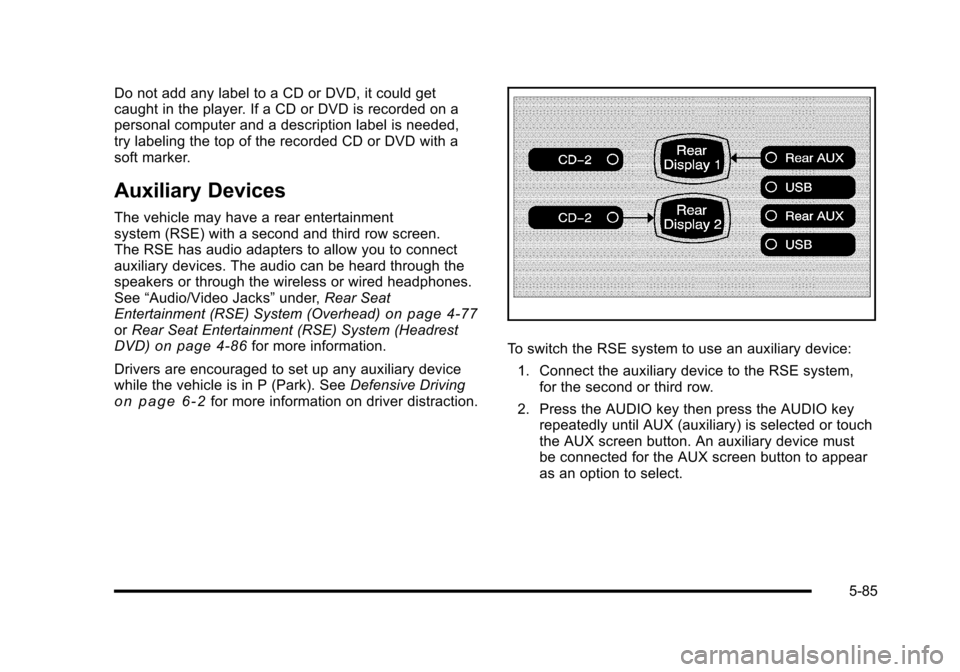
To switch the RSE system to use an auxiliary device:
1. Connect the auxiliary device to the RSE system,for the second or third row.
2. Press the AUDIO key then press the AUDIO keyrepeatedly until AUX (auxiliary) is selected or touchthe AUX screen button. An auxiliary device mustbe connected for the AUX screen button to appearas an option to select.
5-85
Page 457 of 616
Filling the Tank
{WARNING:
Fuel vapor burns violently and a fuel fire can
cause bad injuries. To help avoid injuries to you
and others, read and follow all the instructions on
the fuel pump island. Turn off the engine when
refueling. Do not smoke near fuel or when
refueling the vehicle. Do not use cellular phones.
Keep sparks, flames, and smoking materials away
from fuel. Do not leave the fuel pump unattended
when refueling the vehicle. This is against the law
in some places. Do not re-enter the vehicle while
pumping fuel. Keep children away from the fuel
pump; never let children pump fuel.
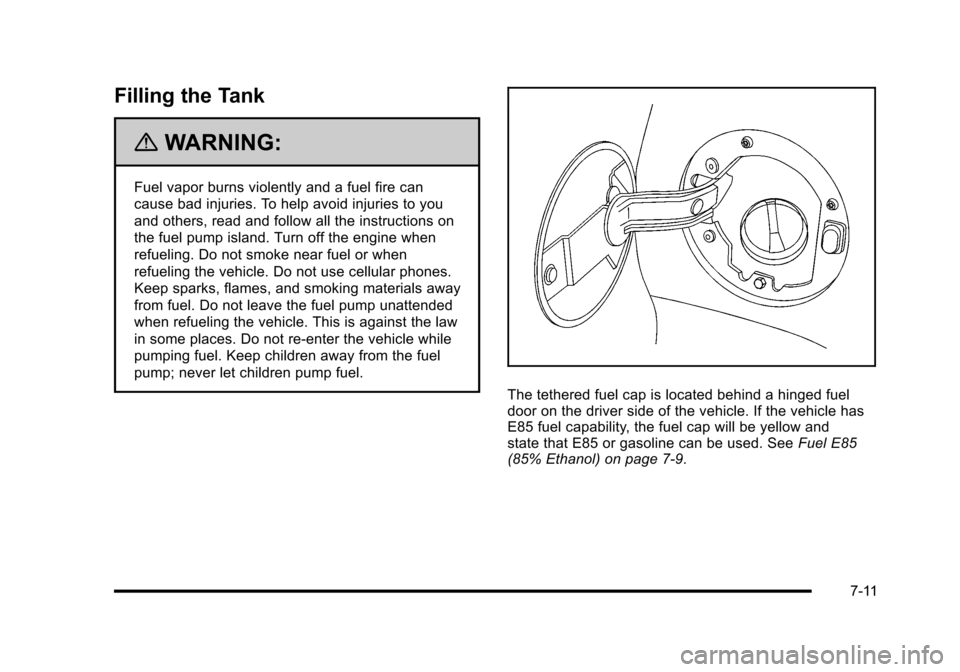
The tethered fuel cap is located behind a hinged fueldoor on the driver side of the vehicle. If the vehicle hasE85 fuel capability, the fuel cap will be yellow andstate that E85 or gasoline can be used. SeeFuel E85(85% Ethanol) on page 7!9.
7-11
Page 459 of 616
If the vehicle has a Driver Information Center (DIC), theTIGHTEN GAS CAP message displays if the fuel cap isnot properly installed.
{WARNING:
If a fire starts while you are refueling, do not
remove the nozzle. Shut off the flow of fuel by
shutting off the pump or by notifying the station
attendant. Leave the area immediately.
Notice:If you need a new fuel cap, be sure to getthe right type. Your dealer/retailer can get one foryou. If you get the wrong type, it may not fitproperly. This may cause the malfunction indicatorlamp to light and may damage the fuel tank andemissions system. SeeMalfunction Indicator Lampon page 4!36.
Filling a Portable Fuel Container
{WARNING:
Never fill a portable fuel container while it is in
the vehicle. Static electricity discharge from the
container can ignite the fuel vapor. You can be
badly burned and the vehicle damaged if this
occurs. To help avoid injury to you and others:
.Dispense fuel only into approved containers.
.Do not fill a container while it is inside a
vehicle, in a vehicle's trunk, pickup bed,
or on any surface other than the ground.
.Bring the fill nozzle in contact with the inside
of the fill opening before operating the nozzle.
Contact should be maintained until the filling
is complete.
.Do not smoke while pumping fuel.
.Do not use a cellular phone while
pumping fuel.
7-13
Page 579 of 616

Section 9 Customer Assistance Information
Customer Assistance and Information. . . . . . . . . . . 9-2Customer Satisfaction Procedure . . . . . . . . . . . . . . . 9-2Online Owner Center . . . . . . . . . . . . . . . . . . . . . . . . . . . . 9-5Customer Assistance forText Telephone (TTY) Users . . . . . . . . . . . . . . . . . . 9-6Customer Assistance Offices . . . . . . . . . . . . . . . . . . . 9-6GM Mobility Reimbursement Program . . . . . . . . . . . 9-7Roadside Service . . . . . . . . . . . . . . . . . . . . . . . . . . . . . . . 9-8Scheduling Service Appointments . . . . . . . . . . . . . 9-11Courtesy Transportation Program . . . . . . . . . . . . . . 9-11Collision Damage Repair . . . . . . . . . . . . . . . . . . . . . . 9-13
Reporting Safety Defects. . . . . . . . . . . . . . . . . . . . . . . . 9-16Reporting Safety Defects to theUnited States Government . . . . . . . . . . . . . . . . . . 9-16Reporting Safety Defects to theCanadian Government . . . . . . . . . . . . . . . . . . . . . . . 9-16Reporting Safety Defects to General Motors . . . 9-17Service Publications Ordering Information . . . . . 9-17
Vehicle Data Recording and Privacy. . . . . . . . . . . . . 9-18Event Data Recorders . . . . . . . . . . . . . . . . . . . . . . . . . 9-19OnStar®. . . . . . . . . . . . . . . . . . . . . . . . . . . . . . . . . . . . . . . 9-20Navigation System . . . . . . . . . . . . . . . . . . . . . . . . . . . . . 9-20Radio Frequency Identification (RFID) . . . . . . . . . 9-20Radio Frequency Statement . . . . . . . . . . . . . . . . . . . 9-20
9-1
Page 581 of 616
STEP THREE (U.S. Owners) :Both General Motorsand your dealer are committed to making sure you arecompletely satisfied with your new vehicle. However,if you continue to remain unsatisfied after following theprocedure outlined in Steps One and Two, you can filewith the Better Business Bureau (BBB) Auto LineProgram to enforce your rights.
The BBB Auto Line Program is an out of court programadministered by the Council of Better Business Bureausto settle automotive disputes regarding vehicle repairsor the interpretation of the New Vehicle LimitedWarranty. Although you may be required to resort tothis informal dispute resolution program prior to filing acourt action, use of the program is free of charge andyour case will generally be heard within 40 days. If youdo not agree with the decision given in your case, youmay reject it and proceed with any other venue for reliefavailable to you.
You may contact the BBB Auto Line Program using thetoll-free telephone number or write them at the followingaddress:
BBB Auto Line ProgramCouncil of Better Business Bureaus, Inc.4200 Wilson BoulevardSuite 800Arlington, VA 22203-1838
Telephone: 1-800-955-5100dr.bbb.org/goauto
This program is available in all 50 states and the Districtof Columbia. Eligibility is limited by vehicle age, mileageand other factors. General Motors reserves the right tochange eligibility limitations and/or discontinue itsparticipation in this program.
9-3
Page 583 of 616
Online Owner Center
Online Owner Center (U.S.)—
www.gmownercenter.com/cadillac
Information and services customized for your specificvehicle—all in one convenient place.
.Digital owner manual, warranty information,and more
.Online service and maintenance records
.Find Cadillac dealers for service nationwide
.Exclusive privileges and offers
.Recall notices for your specific vehicle
.OnStar®and GM Cardmember ServicesEarnings summaries
Other Helpful Links:
Cadillac!www.cadillac.com
Cadillac Merchandise—www.cadillaccollection.com
Help Center—www.cadillac.com/helpcenter
.FAQ
.Contact Us
My GM Canada (Canada)—www.gm.ca
My GM Canada is a password-protected section ofwww.gm.ca where you can save information onGM vehicles, get personalized offers, and use handytools and forms with greater ease.
Here are a few of the valuable tools and services youwill have access to:
.My Showroom: Find and save information onvehicles and current offers in your area.
.My Dealers/Retailers: Save details such asaddress and phone number for each of yourpreferred GM dealers/retailers.
.My Driveway: Access quick links to parts andservice estimates, check trade-in values,or schedule a service appointment by adding thevehicles you own to your driveway profile.
.My Preferences: Manage your profile and usetools and forms with greater ease.
To sign up, visit the My GM Canada sectionwithin www.gm.ca.
9-5
Page 584 of 616
Customer Assistance for Text
Telephone (TTY) Users
To assist customers who are deaf, hard of hearing,or speech-impaired and who use Text Telephones(TTYs), Cadillac has TTY equipment availableat its Customer Assistance Center. Any TTY usercan communicate with Cadillac by dialing:1-800-833-CMCC (2622). (TTY users in Canadacan dial 1-800-263-3830.)
Customer Assistance Offices
Cadillac encourages customers to call the toll-freenumber for assistance. However, if a customer wishesto write or e-mail Cadillac, the letter should beaddressed to:
United States—Customer Assistance
Cadillac Customer Assistance CenterCadillac Motor Car DivisionP.O. Box 33169Detroit, MI 48232-5169www.Cadillac.com
1-800-458-80061-800-833-2622 (For Text Telephonedevices (TTYs))Roadside Assistance: 1-800-882-1112
From Puerto Rico:
1-800-496-9992 (English)1-800-496-9993 (Spanish)
From U.S. Virgin Islands:
1-800-496-9994
Canada—Customer Assistance
General Motors of Canada LimitedCanadian Cadillac Customer CommunicationCentre, CA1-163-0051908 Colonel Sam DriveOshawa, Ontario L1H 8P7www.gmcanada.com
1-888-446-20001-800-263-3830 (For Text Telephonedevices (TTYs))Roadside Assistance: 1-800-882-1112
Overseas—Customer Assistance
Please contact the local General Motors Business Unit.
9-6
Page 585 of 616
Mexico, Central America and
Caribbean Islands/Countries
(Except Puerto Rico and U.S. Virgin
Islands)—Customer Assistance
General Motors de Mexico, S. de R.L. de C.V.Customer Assistance CenterPaseo de la Reforma # 2740Col. Lomas de BezaresC.P. 11910, Mexico, D.F.
01-800-508-0000Long Distance: 011-52-53 29 0 800
GM Mobility Reimbursement
Program
This program, available to qualified applicants, canreimburse you up to $1,000 of the cost of eligibleaftermarket adaptive equipment required foryour vehicle, such as hand controls or awheelchair/scooter lift.
The offer is available for a very limited period of timefrom the date of vehicle purchase/lease. For moredetails, or to determine your vehicle's eligibility, visitgmmobility.com or call the GM Mobility AssistanceCenter at 1-800-323-9935. Text telephone (TTY) users,call 1-800-833-9935.
General Motors of Canada also has a Mobility Program.Call 1-800-GM-DRIVE (463-7483) for details. TTY userscall 1-800-263-3830.
9-7
Page 586 of 616
Roadside Service
In the United States or Canada, call1-800-882-1112.
Text Telephone (TTY), U.S. only, call1-888-889-2438.
Service is available 24 hours a day, 365 days a year.
Calling for Assistance
When calling Roadside Assistance, have the followinginformation ready:
.Your name, home address, and home telephonenumber
.Telephone number of your location
.Location of the vehicle
.Model, year, color, and license plate numberof the vehicle
.Odometer reading, Vehicle IdentificationNumber (VIN), and delivery date of the vehicle
.Description of the problem
Coverage
Services are provided up to 5 years/100,000 miles(160 000 km), whichever comes first.
In the U.S., anyone driving the vehicle is covered. InCanada, a person driving the vehicle without permissionfrom the owner is not covered.
Roadside Assistance is not a part of the New VehicleLimited Warranty. Cadillac and General Motors ofCanada Limited reserve the right to make any changesor discontinue the Roadside Assistance program at anytime without notification.
Cadillac and General Motors of Canada Limited reservethe right to limit services or payment to an owner ordriver if they decide the claims are made too often,or the same type of claim is made many times.
9-8
Page 593 of 616
Gather the following information:
.Driver's name, address, phone number
.Driver's license number
.Owner's name, address, phone number
.Vehicle license plate
.Vehicle make, model and model year
.Vehicle Identification Number (VIN)
.Insurance company and policy number
.General description of the damage to theother vehicle
Choose a reputable repair facility that uses qualityreplacement parts. See“Collision Parts”earlier inthis section.
If the airbag has inflated, seeWhat Will You See Afteran Airbag Inflates? on page 2!82.
Managing the Vehicle Damage
Repair Process
In the event that your vehicle requires damage repairs,GM recommends that you take an active role in itsrepair. If you have a pre-determined repair facility ofchoice, take your vehicle there, or have it towed there.Specify to the facility that any required replacementcollision parts be original equipment parts, eithernew Genuine GM parts or recycled original GM parts.Remember, recycled parts will not be covered by yourGM vehicle warranty.
Insurance pays the bill for the repair, but you mustlive with the repair. Depending on your policy limits,your insurance company may initially value therepair using aftermarket parts. Discuss this with yourrepair professional, and insist on Genuine GM parts.Remember if your vehicle is leased you may beobligated to have the vehicle repaired with GenuineGM parts, even if your insurance coverage does notpay the full cost.
If another party's insurance company is paying forthe repairs, you are not obligated to accept a repairvaluation based on that insurance company's collisionpolicy repair limits, as you have no contractual limitswith that company. In such cases, you can have controlof the repair and parts choices as long as cost stayswithin reasonable limits.
9-15