warning CADILLAC ESCALADE 2010 3.G Manual PDF
[x] Cancel search | Manufacturer: CADILLAC, Model Year: 2010, Model line: ESCALADE, Model: CADILLAC ESCALADE 2010 3.GPages: 616, PDF Size: 39.41 MB
Page 170 of 616

Object Detection Systems
Ultrasonic Rear Parking
Assist (URPA)
For vehicles with the Ultrasonic Rear ParkingAssist (URPA) system, it operates at speeds lessthan 8 km/h (5 mph), and assists the driver with parkingand avoiding objects while in R (Reverse). The sensorson the rear bumper are used to detect the distance toan object up to 2.5 m (8 ft) behind the vehicle, and atleast 25.4 cm (10 in) off the ground.
{WARNING:
The Ultrasonic Rear Parking Assist (URPA)
system does not replace driver vision.
It cannot detect:
.Objects that are below the bumper,
underneath the vehicle, or if they are too close
or far from the vehicle
.Children, pedestrians, bicyclists, or pets.
(Continued)
WARNING: (Continued)
If you do not use proper care before and while
backing; vehicle damage, injury, or death could
occur. Even with URPA, always check behind the
vehicle before backing up. While backing, be sure
to look for objects and check the vehicle's mirrors.
How the System Works
URPA comes on automatically when the shift lever ismoved into R (Reverse). A single tone sounds toindicate the system is working.
URPA operates only at speeds less than5 mph (8 km/h).
An obstacle is indicated by audible beeps. The intervalbetween the beeps becomes shorter as the vehicle getscloser to the obstacle. When the distance is less than30 cm (12 in) the beeps are continuous.
To be detected, objects must be at least 25.4 cm (10 in)off the ground and below liftgate level. Objects mustalso be within 2.5 m (8 ft) from the rear bumper. Thisdistance may be less during warmer or humid weather.
3-46
Page 171 of 616

The system can bedisabled by pressing therear park aid disablebutton located next tothe radio.
The indicator light will come on and PARK ASSIST OFFdisplays on the Driver Information Center (DIC) toindicate that URPA is off, seeDIC Warnings andMessages on page 4!48.
When the System Does Not Seem to
Work Properly
If the URPA system will not activate due to a temporarycondition, the messages PARK ASSIST OFF or PARKASSIST BLOCKED SEE OWNERS MANUAL will bedisplayed on the DIC.
SERVICE PARK ASSIST :If this message occurs, takethe vehicle to your dealer/retailer to repair the system.
PARK ASSIST OFF :This message occurs if the driverdisables the system.
PARKING ASSIST BLOCKED SEE OWNERSMANUAL :This message can occur under thefollowing conditions:
.The ultrasonic sensors are not clean. Keep thevehicle's rear bumper free of mud, dirt, snow, iceand slush. For cleaning instructions, seeWashingYour Vehicle on page 7!102.
.The park assist sensors are covered by frost orice. Frost or ice can form around and behind thesensors and may not always be seen; this canoccur after washing the vehicle in cold weather.The message may not clear until the frost or icehas melted.
.A trailer was attached to the vehicle, or a bicycle oran object was hanging out of the liftgate during thelast drive cycle. Once the attached object isremoved, URPA will return to normal operation.
.A tow bar is attached to the vehicle.
.The vehicle's bumper is damaged. Take the vehicleto your dealer/retailer to repair the system.
.Other conditions may affect system performance,such as vibrations from a jackhammer or thecompression of air brakes on a very large truck.
If the system is still disabled, after driving forward atleast 40 km/h (25 mph), take the vehicle to yourdealer/retailer.
3-47
Page 172 of 616
Side Blind Zone Alert (SBZA)
The vehicle may have a Side Blind Zone Alert (SBZA)system. Read this entire section before using thesystem.
{WARNING:
SBZA is only a lane changing aid and does not
replace driver vision. SBZA does not detect:
.Vehicles outside the side blind zones which
may be rapidly approaching.
.Pedestrians, bicyclists, or animals.
Failure to use proper care when changing lanes
may result in damage to the vehicle, injury,
or death. Always check the outside and rearview
mirrors, glance over your shoulder, and use the
turn signal before changing lanes.
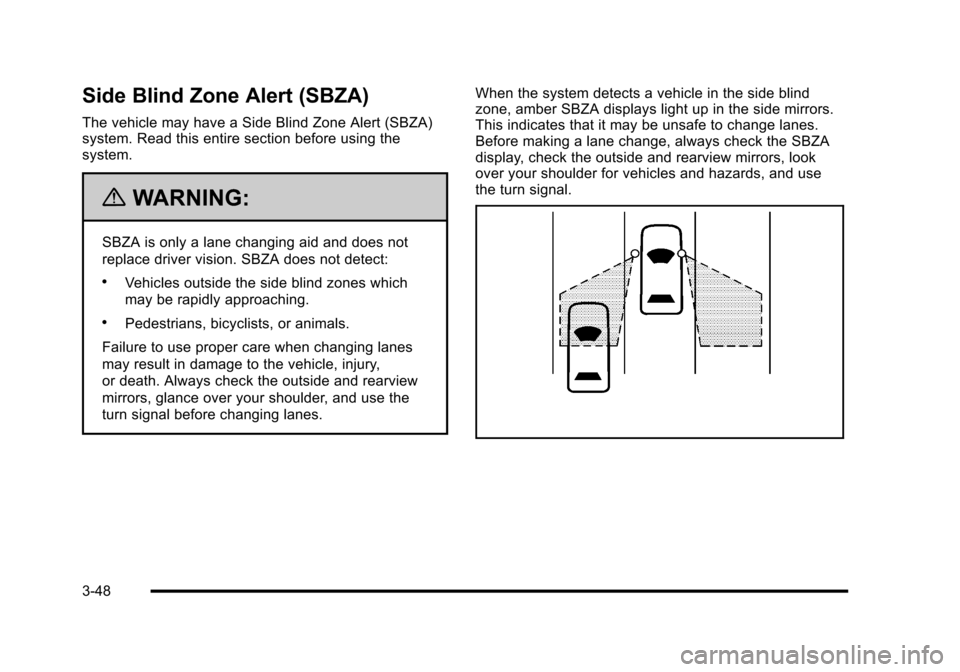
When the system detects a vehicle in the side blindzone, amber SBZA displays light up in the side mirrors.This indicates that it may be unsafe to change lanes.Before making a lane change, always check the SBZAdisplay, check the outside and rearview mirrors, lookover your shoulder for vehicles and hazards, and usethe turn signal.
3-48
Page 173 of 616
SBZA Detection Zones
The SBZA sensor covers a zone of approximatelyone lane over from both sides of the vehicle,3.5 m (11 ft). This zone starts at each side mirror andgoes back approximately 16 ft. (5.0 m). The height ofthe zone is approximately between 0.5 m (1.5 ft) and2.0 m (6 ft) off the ground.
Use caution while changing lanes when towing a trailer,as the SBZA detection zones do not change when atrailer is towed.
How the System Works
Left Side Mirror DisplayRight Side Mirror Display
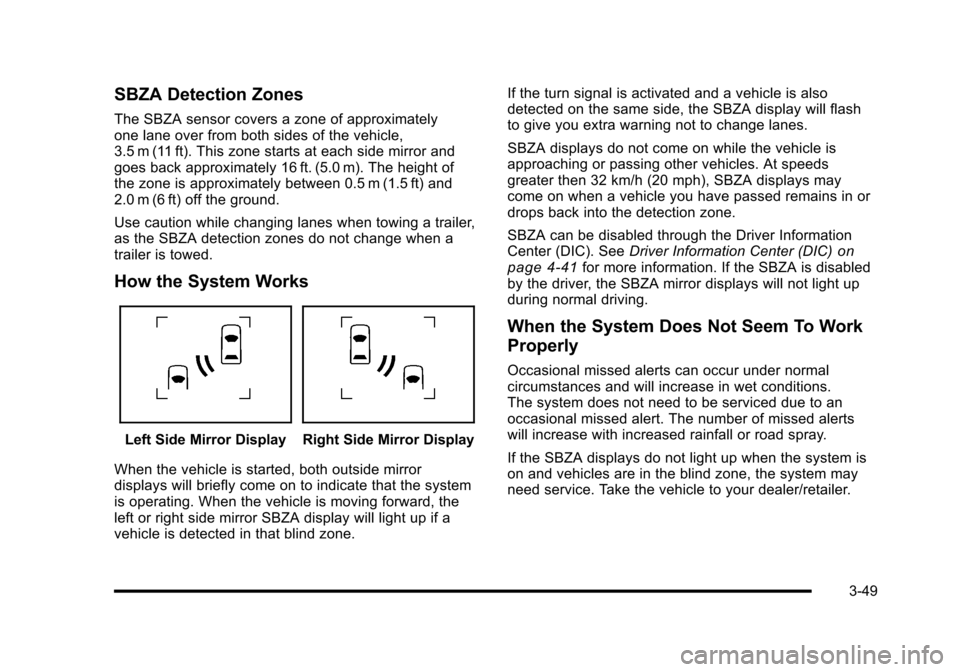
When the vehicle is started, both outside mirrordisplays will briefly come on to indicate that the systemis operating. When the vehicle is moving forward, theleft or right side mirror SBZA display will light up if avehicle is detected in that blind zone.
If the turn signal is activated and a vehicle is alsodetected on the same side, the SBZA display will flashto give you extra warning not to change lanes.
SBZA displays do not come on while the vehicle isapproaching or passing other vehicles. At speedsgreater then 32 km/h (20 mph), SBZA displays maycome on when a vehicle you have passed remains in ordrops back into the detection zone.
SBZA can be disabled through the Driver InformationCenter (DIC). SeeDriver Information Center (DIC)onpage 4!41for more information. If the SBZA is disabledby the driver, the SBZA mirror displays will not light upduring normal driving.
When the System Does Not Seem To Work
Properly
Occasional missed alerts can occur under normalcircumstances and will increase in wet conditions.The system does not need to be serviced due to anoccasional missed alert. The number of missed alertswill increase with increased rainfall or road spray.
If the SBZA displays do not light up when the system ison and vehicles are in the blind zone, the system mayneed service. Take the vehicle to your dealer/retailer.
3-49
Page 177 of 616
Rear Vision Camera Error Messages
Service Rear Vision Camera System :This messagecan display when the system is not receivinginformation it requires from other vehicle systems.
Rear Vision Camera System Unavailable :Displayswhen the system is not receiving information it requiresfrom other vehicle systems.
If any other problem occurs or if a problem persists, seeyour dealer/retailer.
{WARNING:
The Rear Vision Camera (RVC) system does not
replace driver vision. RVC does not:
.Detect objects that are outside the camera's
field of view, below the bumper, or underneath
the vehicle.
.Detect children, pedestrians, bicyclists,
or pets.
(Continued)
WARNING: (Continued)
Do not back the vehicle by only looking at the
RVC screen, or use the screen during longer,
higher speed backing maneuvers or where there
could be cross-traffic. Your judged distances using
the screen will differ from actual distances.
So if you do not use proper care before backing
up, you could hit a vehicle, child, pedestrian,
bicyclist, or pet, resulting in vehicle damage,
injury, or death. Even though the vehicle has the
RVC system, always check carefully before
backing up by checking behind and around
the vehicle.
3-53
Page 188 of 616
Center Console Storage
A console compartment is located between thebucket seats.
The console has both an upper and lower storage binaccessed by lifting up on the latches located at the frontof the console lid.
The console may have an accessory power outletinside. SeeAccessory Power Outlet(s) on page 4!19.
The rear of the console also has a cupholder thatswings down for the rear seat passengers to use.
Assist Handles
Assist handles located above the rear passenger doorscan be used when getting out of the vehicle. Pull thehandles downward to use them.
Garment Hooks
There are garment hooks located on the assist handles.
Roof Rack System
{WARNING:
If something is carried on top of the vehicle that is
longer or wider than the roof rack—like paneling,
plywood, or a mattress—the wind can catch it
while the vehicle is being driven. The item being
carried could be violently torn off, and this could
cause a collision, and damage the vehicle. Never
carry something longer or wider than the roof rack
on top of the vehicle unless using a GM Certified
accessory carrier.
For vehicles with a roof rack, the rack can be used toload items. For roof racks that do not have crossrailsincluded, GM Certified crossrails can be purchased asan accessory. See your dealer/retailer for additionalinformation.
For vehicles with crossrails, they can be movedback and forth to help secure cargo. To adjust them,turn the knob located at each end of the crossrailcounterclockwise until the crossrail can move freely.To secure the crossrail, turn the knob located at eachend of the crossrail clockwise until tightened. Tie theload to the siderails or siderail supports.
3-64
Page 193 of 616
Section 4 Instrument Panel
Instrument Panel Overview. . . . . . . . . . . . . . . . . . . . . . . . 4-3Hazard Warning Flashers . . . . . . . . . . . . . . . . . . . . . . . 4-3Horn . . . . . . . . . . . . . . . . . . . . . . . . . . . . . . . . . . . . . . . . . . . . 4-3Tilt Wheel . . . . . . . . . . . . . . . . . . . . . . . . . . . . . . . . . . . . . . . 4-3Heated Steering Wheel . . . . . . . . . . . . . . . . . . . . . . . . . 4-4Turn Signal/Multifunction Lever . . . . . . . . . . . . . . . . . . 4-4Turn and Lane-Change Signals . . . . . . . . . . . . . . . . . 4-5Headlamp High/Low-Beam Changer . . . . . . . . . . . . 4-5Flash-to-Pass . . . . . . . . . . . . . . . . . . . . . . . . . . . . . . . . . . . 4-6Windshield Wipers . . . . . . . . . . . . . . . . . . . . . . . . . . . . . . 4-6Windshield Washer . . . . . . . . . . . . . . . . . . . . . . . . . . . . . 4-7Rear Window Wiper/Washer . . . . . . . . . . . . . . . . . . . . 4-7Cruise Control . . . . . . . . . . . . . . . . . . . . . . . . . . . . . . . . . . 4-8Exterior Lamps . . . . . . . . . . . . . . . . . . . . . . . . . . . . . . . . . 4-11Headlamps on Reminder . . . . . . . . . . . . . . . . . . . . . . 4-15Daytime Running Lamps (DRL) . . . . . . . . . . . . . . . . 4-15Automatic Headlamp System . . . . . . . . . . . . . . . . . . 4-15Fog Lamps . . . . . . . . . . . . . . . . . . . . . . . . . . . . . . . . . . . . 4-16Instrument Panel Brightness . . . . . . . . . . . . . . . . . . . 4-16Dome Lamps . . . . . . . . . . . . . . . . . . . . . . . . . . . . . . . . . . 4-17Dome Lamp Override . . . . . . . . . . . . . . . . . . . . . . . . . . 4-17Entry Lighting . . . . . . . . . . . . . . . . . . . . . . . . . . . . . . . . . . 4-17Exit Lighting . . . . . . . . . . . . . . . . . . . . . . . . . . . . . . . . . . . 4-17
Reading Lamps . . . . . . . . . . . . . . . . . . . . . . . . . . . . . . . . 4-17Electric Power Management . . . . . . . . . . . . . . . . . . . 4-18Battery Run-Down Protection . . . . . . . . . . . . . . . . . . 4-18Accessory Power Outlet(s) . . . . . . . . . . . . . . . . . . . . . 4-19Ashtray(s) and Cigarette Lighter . . . . . . . . . . . . . . . 4-20Analog Clock . . . . . . . . . . . . . . . . . . . . . . . . . . . . . . . . . . 4-20
Climate Controls. . . . . . . . . . . . . . . . . . . . . . . . . . . . . . . . . . 4-20Dual Automatic Climate Control System . . . . . . . 4-20Outlet Adjustment . . . . . . . . . . . . . . . . . . . . . . . . . . . . . . 4-25Rear Air Conditioning and Heating System andElectronic Climate Controls . . . . . . . . . . . . . . . . . . 4-26
Warning Lights, Gages, and Indicators. . . . . . . . . . 4-27Instrument Panel Cluster . . . . . . . . . . . . . . . . . . . . . . . 4-28Speedometer and Odometer . . . . . . . . . . . . . . . . . . . 4-29Trip Odometer . . . . . . . . . . . . . . . . . . . . . . . . . . . . . . . . . 4-29Tachometer . . . . . . . . . . . . . . . . . . . . . . . . . . . . . . . . . . . . 4-29Safety Belt Reminders . . . . . . . . . . . . . . . . . . . . . . . . . 4-29Airbag Readiness Light . . . . . . . . . . . . . . . . . . . . . . . . 4-30Passenger Airbag Status Indicator . . . . . . . . . . . . . 4-31Charging System Light . . . . . . . . . . . . . . . . . . . . . . . . 4-32Brake System Warning Light . . . . . . . . . . . . . . . . . . . 4-33Antilock Brake System (ABS) Warning Light . . . 4-34
4-1
Page 194 of 616
Section 4 Instrument Panel
StabiliTrak®Indicator Light . . . . . . . . . . . . . . . . . . . . . 4-34Engine Coolant Temperature Gage . . . . . . . . . . . . 4-35Tire Pressure Light . . . . . . . . . . . . . . . . . . . . . . . . . . . . 4-35Malfunction Indicator Lamp . . . . . . . . . . . . . . . . . . . . 4-36Oil Pressure Light . . . . . . . . . . . . . . . . . . . . . . . . . . . . . 4-38Security Light . . . . . . . . . . . . . . . . . . . . . . . . . . . . . . . . . . 4-39Fog Lamp Light . . . . . . . . . . . . . . . . . . . . . . . . . . . . . . . . 4-39Lights On Reminder . . . . . . . . . . . . . . . . . . . . . . . . . . . 4-39Cruise Control Light . . . . . . . . . . . . . . . . . . . . . . . . . . . 4-39Highbeam On Light . . . . . . . . . . . . . . . . . . . . . . . . . . . . 4-40Tow/Haul Mode Light . . . . . . . . . . . . . . . . . . . . . . . . . . 4-40Fuel Gage . . . . . . . . . . . . . . . . . . . . . . . . . . . . . . . . . . . . . 4-40
Driver Information Center (DIC). . . . . . . . . . . . . . . . . . 4-41DIC Operation and Displays . . . . . . . . . . . . . . . . . . . 4-41DIC Compass . . . . . . . . . . . . . . . . . . . . . . . . . . . . . . . . . . 4-47DIC Warnings and Messages . . . . . . . . . . . . . . . . . . 4-48DIC Vehicle Customization . . . . . . . . . . . . . . . . . . . . 4-57
Audio System(s). . . . . . . . . . . . . . . . . . . . . . . . . . . . . . . . . . 4-67Bluetooth®. . . . . . . . . . . . . . . . . . . . . . . . . . . . . . . . . . . . . 4-67Rear Seat Entertainment (RSE) System(Overhead) . . . . . . . . . . . . . . . . . . . . . . . . . . . . . . . . . . 4-77Rear Seat Entertainment (RSE) System(Headrest DVD) . . . . . . . . . . . . . . . . . . . . . . . . . . . . . 4-86Rear Seat Audio (RSA) . . . . . . . . . . . . . . . . . . . . . . . 4-103Theft-Deterrent Feature . . . . . . . . . . . . . . . . . . . . . . 4-105Audio Steering Wheel Controls . . . . . . . . . . . . . . . 4-105Radio Reception . . . . . . . . . . . . . . . . . . . . . . . . . . . . . . 4-107Rear Side Window Antenna . . . . . . . . . . . . . . . . . . 4-108XM™Satellite Radio Antenna System . . . . . . . . 4-108
4-2
Page 195 of 616
Instrument Panel Overview
Hazard Warning Flashers
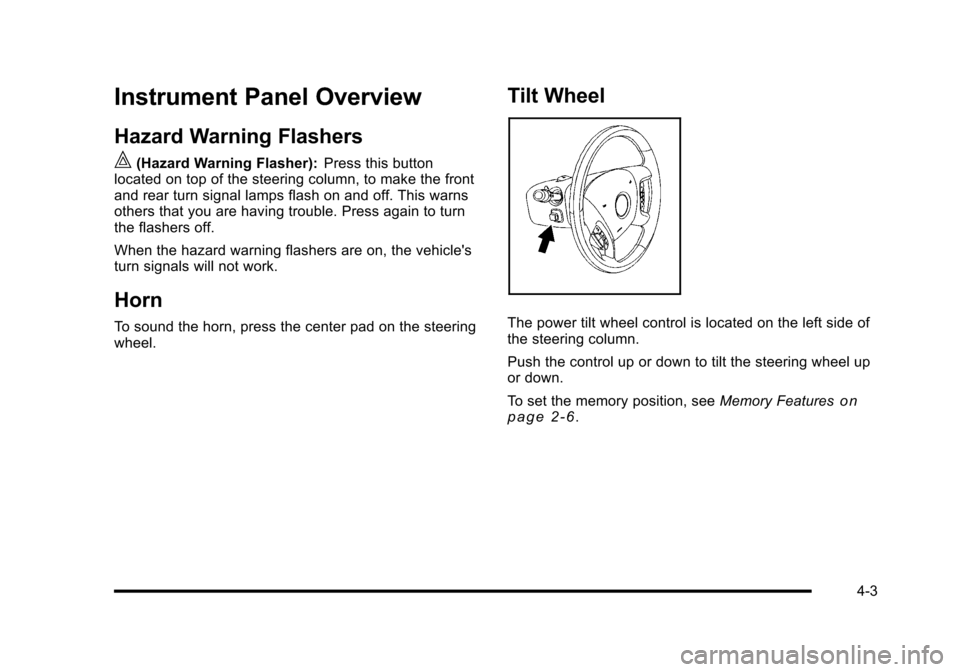
|(Hazard Warning Flasher):Press this buttonlocated on top of the steering column, to make the frontand rear turn signal lamps flash on and off. This warnsothers that you are having trouble. Press again to turnthe flashers off.
When the hazard warning flashers are on, the vehicle'sturn signals will not work.
Horn
To sound the horn, press the center pad on the steeringwheel.
Tilt Wheel
The power tilt wheel control is located on the left side ofthe steering column.
Push the control up or down to tilt the steering wheel upor down.
To set the memory position, seeMemory Featuresonp a g e 2!6.
4-3
Page 199 of 616
Clear ice and snow from the wiper blades before usingthem. If frozen to the windshield, carefully loosen orthaw them. Damaged wiper blades should be replaced.SeeWindshield Wiper Blade Replacementonpage 7!57.
Heavy snow or ice can overload the wiper motor.A circuit breaker will stop the motor until it cools down.
Windshield Washer
{WARNING:
In freezing weather, do not use your washer until
the windshield is warmed. Otherwise the washer
fluid can form ice on the windshield, blocking your
vision.
L(Washer Fluid):Push the paddle marked with thewindshield washer symbol at the top of the multifunctionlever, to spray washer fluid on the windshield. Thewipers clear the window and then either stop or returnto the preset speed.
Rear Window Wiper/Washer
{WARNING:
In freezing weather, do not use your washer until
the windshield is warmed. Otherwise the washer
fluid can form ice on the windshield, blocking your
vision.
The rear wiper control is located on the turn signal/multifunction lever.
To turn the rear wiper on, slide the lever to a wiperposition.
9(Off) :Turns the wiper off.
5(Rear Wiper Delay):Turns on the rear wiper delay.
Z(Rear Wiper):Turns on the rear wiper.
=(Rear Wiper Wash):To turn on the rear wiper wash,push the button on the end of the turn signal/multifunction lever to spray washer fluid on the rearwindow. The wipers will clear the rear window andeither stop or return to your preset speed. For morewasher cycles, press and hold the button.
4-7