warning CADILLAC ESCALADE 2010 3.G Owners Manual
[x] Cancel search | Manufacturer: CADILLAC, Model Year: 2010, Model line: ESCALADE, Model: CADILLAC ESCALADE 2010 3.GPages: 616, PDF Size: 39.41 MB
Page 248 of 616
TIGHTEN GAS CAP
This message may display along with the check enginelight on the instrument panel cluster if the vehicle's fuelcap is not tightened properly. SeeMalfunction IndicatorLampon page 4!36. Reinstall the fuel cap fully. SeeFilling the Tankon page 7!11. The diagnostic systemcan determine if the fuel cap has been left off orimproperly installed. A loose or missing fuel cap allowsfuel to evaporate into the atmosphere. A few drivingtrips with the cap properly installed should turn this lightand message off.
TIRE LEARNING ACTIVE
On vehicles with the Tire Pressure Monitor System(TPMS), this message displays when the TPMS isre-learning the tire positions on your vehicle. The tirepositions must be re-learned after rotating the tires orafter replacing a tire or sensor. SeeTire Inspection andRotationon page 7!71,Tire Pressure Monitor Systemon page 7!67, andInflation - Tire Pressureonpage 7!65for more information.
TIRE LOW ADD AIR TO TIRE
On vehicles with the Tire Pressure Monitor System(TPMS), this message displays when the pressure inone or more of the vehicle's tires is low. This messagealso displays LEFT FRONT, RIGHT FRONT, LEFTREAR, or RIGHT REAR to indicate which tire needs tobe checked. The low tire pressure warning light will alsocome on. SeeTire Pressure Lighton page 4!35. Youcan receive more than one tire pressure message at atime. To read the other messages that may have beensent at the same time, press the set/reset button. If atire pressure message appears on the DIC, stop assoon as you can. Have the tire pressures checked andset to those shown on the Tire Loading Informationlabel. SeeTireson page 7!58,Loading the Vehicleonpage 6!32, andInflation - Tire Pressureon page 7!65.The DIC also shows the tire pressure values. SeeDICOperation and Displays on page 4!41.
TRACTION CONTROL OFF
If your vehicle has StabiliTrak, this message displayswhen the Traction Control System (TCS) is turned off.Adjust your driving accordingly. SeeStabiliTrak®
Systemo n p a g e 6!6for more information.
4-56
Page 249 of 616
TRANSMISSION HOT IDLE ENGINE
Notice:If you drive your vehicle while thetransmission fluid is overheating and thetransmission temperature warning is displayed onthe instrument panel cluster and/or DIC, you candamage the transmission. This could lead to costlyrepairs that would not be covered by your warranty.Do not drive your vehicle with overheatedtransmission fluid or while the transmissiontemperature warning is displayed.
This message displays along with four chimes if thetransmission fluid in the vehicle gets hot. Driving withthe transmission fluid temperature high can causedamage to the vehicle. Stop the vehicle and let it idle toallow the transmission to cool. This message clears andthe chime stops when the fluid temperature reaches asafe level.
TURN SIGNAL ON
This message displays and a chime sounds if a turnsignal is left on for 3/4 of a mile (1.2 km). Move the turnsignal/multifunction lever to the off position.
WASHER FLUID LOW ADD FLUID
This message displays when the windshield washerfluid is low. Fill the windshield washer fluid reservoir assoon as possible. SeeEngine Compartment Overviewon page 7!16for the location of the windshield washerfluid reservoir. Also, seeWindshield Washer Fluidonpage 7!39for more information.
DIC Vehicle Customization
Your vehicle may have customization capabilities thatallow you to program certain features to one preferredsetting. Customization features can only beprogrammed to one setting on the vehicle and cannotbe programmed to a preferred setting for two differentdrivers.
All of the customization options may not be available onyour vehicle. Only the options available will bedisplayed on the DIC.
The default settings for the customization features wereset when your vehicle left the factory, but may havebeen changed from their default state since then.
The customization preferences are automaticallyrecalled.
To change customization preferences, use the followingprocedure.
4-57
Page 259 of 616

Audio System(s)
Determine which radio the vehicle has and read thefollowing pages to become familiar with its features.
{WARNING:
Taking your eyes off the road for extended periods
could cause a crash resulting in injury or death to
you or others. Do not give extended attention to
entertainment tasks while driving.
This system provides access to many audio and nonaudio listings.
To minimize taking your eyes off the road while driving,do the following while the vehicle is parked:
.Become familiar with the operation and controls ofthe audio system.
.Set up the tone, speaker adjustments, and presetradio stations.
For more information, seeDefensive Drivingonp a g e 6!2.
This vehicle's infotainment system may be equippedwith a noise reduction system which can workimproperly if the audio amplifier, engine calibrations,
exhaust system, microphones, radio, or speakers aremodified or replaced. This could result in morenoticeable engine noise at certain speeds.
Notice:Contact your dealer/retailer before addingany equipment.
Adding audio or communication equipment couldinterfere with the operation of the vehicle's engine,radio, or other systems, and could damage them.Follow federal rules covering mobile radio andtelephone equipment.
The vehicle has Retained Accessory Power (RAP).With RAP, the audio system can be played even afterthe ignition is turned off. SeeRetained AccessoryPower (RAP)on page 3!28for more information.
Bluetooth®
Vehicles with a Bluetooth system can use a Bluetoothcapable cell phone with a Hands Free Profile to makeand receive phone calls. The system can be used whilethe key is in ON/RUN or ACC/ACCESSORY position.The range of the Bluetooth system can be up to 9.1 m(30 ft). Not all phones support all functions, and not allphones are guaranteed to work with the in-vehicleBluetooth system. See www.gm.com/bluetooth for moreinformation on compatible phones.
4-67
Page 305 of 616
.Set up the navigation features before beginningdriving, such as entering an address or a presetdestination.
.Set up your phone numbers in advance so theycan be called easily with the press of a singlebutton or a single voice command (for navigationsystems equipped with phone capability).
{WARNING:
Taking your eyes off the road too long or too often
while using the navigation system could cause a
crash resulting in injury or death to you or others.
Focus your attention on driving.
{WARNING:
Avoid looking too long or too often at the moving
map on the navigation screen. This could cause a
crash and you or others can be injured or killed.
Use the turn-by-turn voice guidance directions
whenever possible.
Use the navigation system to:
.Plan a route.
.Select a destination using various methodsand choices.
.Follow turn-by-turn route and map guidance withvoice prompts, only if permitted by traffic laws,controls, and conditions.
You should always be alert and obey traffic androadway laws and instructions, regardless of theguidance from the navigation system. Because thenavigation system uses street map information thatdoes not include all traffic restrictions or the latest roadchanges, it may suggest using a road that is now closedfor construction or a turn that is prohibited by signs atthe intersection. Because the system uses limitedinformation, you must always evaluate whetherfollowing the system's directions is safe and legal forthe current conditions.
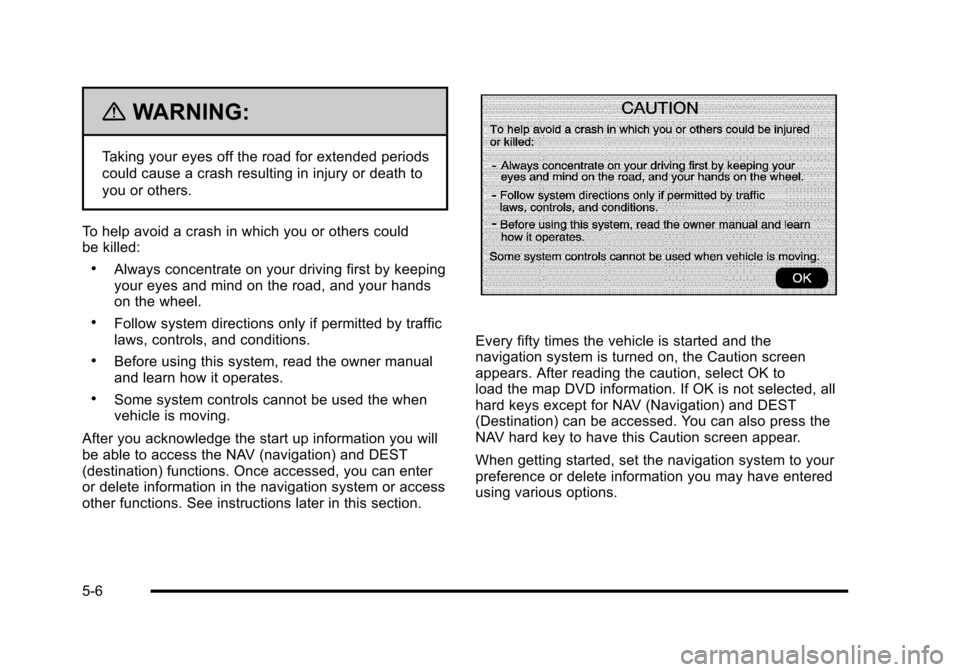
When the navigation system is turned on, a screen mayappear with the information below, and you must readand acknowledge the information it contains.
5-5
Page 306 of 616
{WARNING:
Taking your eyes off the road for extended periods
could cause a crash resulting in injury or death to
you or others.
To help avoid a crash in which you or others couldbe killed:
.Always concentrate on your driving first by keepingyour eyes and mind on the road, and your handson the wheel.
.Follow system directions only if permitted by trafficlaws, controls, and conditions.
.Before using this system, read the owner manualand learn how it operates.
.Some system controls cannot be used the whenvehicle is moving.
After you acknowledge the start up information you willbe able to access the NAV (navigation) and DEST(destination) functions. Once accessed, you can enteror delete information in the navigation system or accessother functions. See instructions later in this section.
Every fifty times the vehicle is started and thenavigation system is turned on, the Caution screenappears. After reading the caution, select OK toload the map DVD information. If OK is not selected, allhard keys except for NAV (Navigation) and DEST(Destination) can be accessed. You can also press theNAV hard key to have this Caution screen appear.
When getting started, set the navigation system to yourpreference or delete information you may have enteredusing various options.
5-6
Page 353 of 616
After selecting the INFO (information) screen button,the type of traffic condition, the street name, and adescription of the traffic condition displays. See“Scrolling the Map”underMapson page 5!14formore information.
To display traffic events in another state or a greatdistance away, scroll to the desired area, and then stopscrolling. Wait for the traffic to update. It may take up totwo minutes before traffic in this new area can bereceived and displayed.
Traffic Event Display Categories
The following are traffic condition categories andsymbols that can appear on the display:
Category 1, Road Closure:
q(Road Closed):Road and/or ramps closed.
Category 2, Traffic Delayed:
o(Stopped Traffic):Traffic stopped, stop and gotraffic, delayed and congested traffic.
Category 3, Incidents:
p(Alert):Object in the roadway, disabled vehicle,or dangerous road conditions.
t(Accident):Roadway obstructed due to accident.
s(Road Works):Delayed traffic due to construction.
Category 4, Advisories:
j/r(Road Condition):Delayed or stopped traffic,lane blocked or closed due to a road condition.
k(Weather):Heavy rain, snow, or fog weathercondition.
m(Parking):Available parking area.
l(Information):Special event, general information,or warning.
5-53
Page 383 of 616
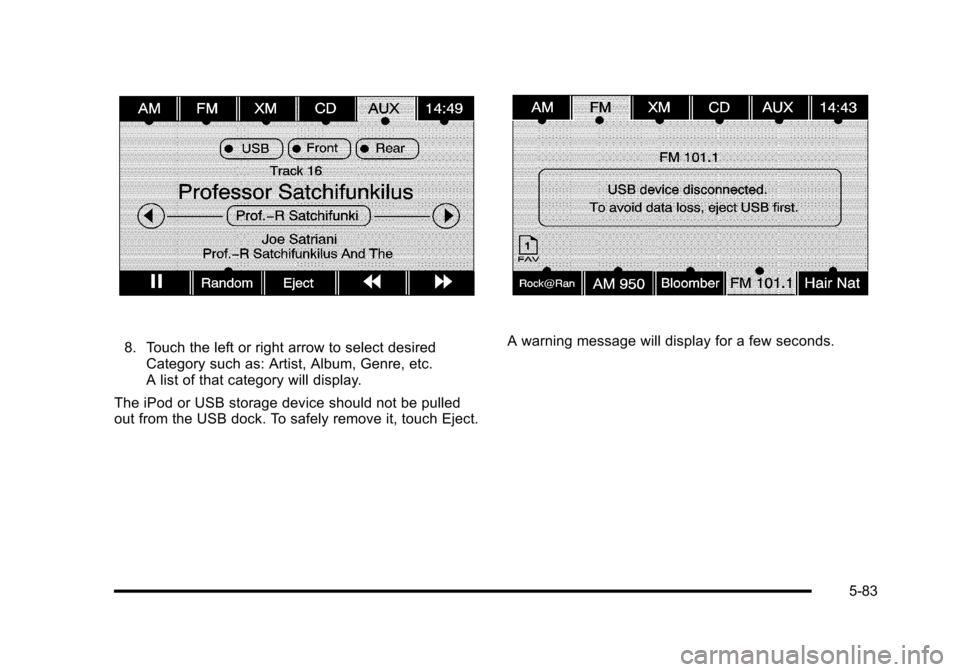
8. Touch the left or right arrow to select desiredCategory such as: Artist, Album, Genre, etc.A list of that category will display.
The iPod or USB storage device should not be pulledout from the USB dock. To safely remove it, touch Eject.
A warning message will display for a few seconds.
5-83
Page 392 of 616
Your Driving, the Road, and
the Vehicle
Defensive Driving
Defensive driving means“always expect theunexpected.”The first step in driving defensively is towear your safety belt—SeeSafety Belts: They Are forEveryone on page 2!26.
{WARNING:
Assume that other road users (pedestrians,
bicyclists, and other drivers) are going to be
careless and make mistakes. Anticipate what they
might do and be ready. In addition:
.Allow enough following distance between you
and the driver in front of you.
.Focus on the task of driving.
Driver distraction can cause collisions resulting in
injury or possible death. These simple defensive
driving techniques could save your life.
Drunk Driving
{WARNING:
Drinking and then driving is very dangerous.
Your reflexes, perceptions, attentiveness, and
judgment can be affected by even a small amount
of alcohol. You can have a serious—or even
fatal—collision if you drive after drinking. Do not
drink and drive or ride with a driver who has been
drinking. Ride home in a cab; or if you are with a
group, designate a driver who will not drink.
Death and injury associated with drinking and drivingis a global tragedy.
Alcohol affects four things that anyone needs to drive avehicle: judgment, muscular coordination, vision, andattentiveness.
Police records show that almost 40 percent of allmotor vehicle-related deaths involve alcohol. In mostcases, these deaths are the result of someone whowas drinking and driving. In recent years, more than17,000 annual motor vehicle-related deaths have beenassociated with the use of alcohol, with about250,000 people injured.
6-2
Page 394 of 616
Braking
SeeBrake System Warning Light on page 4!33.
Braking action involves perception time and reactiontime. Deciding to push the brake pedal is perceptiontime. Actually doing it is reaction time.
Average reaction time is about three!fourths of asecond. But that is only an average. It might be lesswith one driver and as long as two or three seconds ormore with another. Age, physical condition, alertness,coordination, and eyesight all play a part. So do alcohol,drugs, and frustration. But even in three!fourths of asecond, a vehicle moving at 100 km/h (60 mph) travels20 m (66 feet). That could be a lot of distance in anemergency, so keeping enough space between thevehicle and others is important.
And, of course, actual stopping distances vary greatlywith the surface of the road, whether it is pavement orgravel; the condition of the road, whether it is wet, dry,or icy; tire tread; the condition of the brakes; the weightof the vehicle; and the amount of brake force applied.
Avoid needless heavy braking. Some people drive inspurts, heavy acceleration followed by heavy braking,rather than keeping pace with traffic. This is a mistake.The brakes might not have time to cool between hardstops. The brakes will wear out much faster with a lotof heavy braking. Keeping pace with the traffic andallowing realistic following distances eliminates a lotof unnecessary braking. That means better brakingand longer brake life.
If the engine ever stops while the vehicle is beingdriven, brake normally but do not pump the brakes.If the brakes are pumped, the pedal could get harder topush down. If the engine stops, there will still be somepower brake assist but it will be used when the brake isapplied. Once the power assist is used up, it can takelonger to stop and the brake pedal will be harderto push.
Adding non!dealer/non!retailer accessories can affectvehicle performance. SeeAccessories andModifications on page 7!4.
6-4
Page 395 of 616

Antilock Brake System (ABS)
This vehicle has the Antilock Brake System (ABS), anadvanced electronic braking system that helps preventa braking skid.
When the engine is started and the vehicle begins todrive away, ABS checks itself. A momentary motor orclicking noise might be heard while this test is going on.This is normal.
If there is a problem withABS, this warning lightstays on. SeeAntilockBrake System (ABS)Warning Lightonpage 4!34.
Along with ABS, the vehicle has a Dynamic RearProportioning (DRP) system. If there is a DRP problem,both the brake and ABS warning lights come onaccompanied by a 10!second chime. The lights andchime will come on each time the ignition is turned onuntil the problem is repaired. See your dealer/retailerfor service.
Let us say the road is wet and you are driving safely.Suddenly, an animal jumps out in front of you. You slamon the brakes and continue braking. Here is whathappens with ABS:
A computer senses that the wheels are slowing down.If one of the wheels is about to stop rolling, thecomputer will separately work the brakes at each frontwheel and at both rear wheels.
ABS can change the brake pressure to each wheel, asrequired, faster than any driver could. This can help thedriver steer around the obstacle while braking hard.
As the brakes are applied, the computer keepsreceiving updates on wheel speed and controls brakingpressure accordingly.
Remember: ABS does not change the time needed toget a foot up to the brake pedal or always decreasestopping distance. If you get too close to the vehicle infront of you, there will not be enough time to apply thebrakes if that vehicle suddenly slows or stops. Alwaysleave enough room up ahead to stop, even with ABS.
6-5