brake light CADILLAC ESCALADE 2010 3.G Owners Manual
[x] Cancel search | Manufacturer: CADILLAC, Model Year: 2010, Model line: ESCALADE, Model: CADILLAC ESCALADE 2010 3.GPages: 616, PDF Size: 39.41 MB
Page 5 of 616
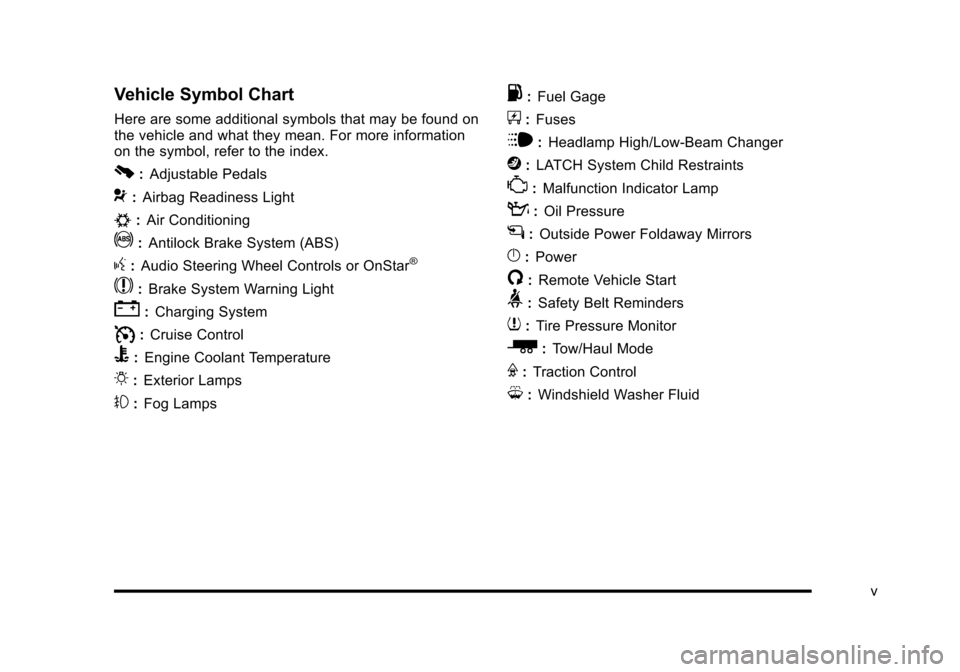
Vehicle Symbol Chart
Here are some additional symbols that may be found onthe vehicle and what they mean. For more informationon the symbol, refer to the index.
0:Adjustable Pedals
9:Airbag Readiness Light
#:Air Conditioning
!:Antilock Brake System (ABS)
g:Audio Steering Wheel Controls or OnStar®
$:Brake System Warning Light
":Charging System
I:Cruise Control
B:Engine Coolant Temperature
O:Exterior Lamps
#:Fog Lamps
.:Fuel Gage
+:Fuses
i:Headlamp High/Low-Beam Changer
j:LATCH System Child Restraints
*:Malfunction Indicator Lamp
::Oil Pressure
g:Outside Power Foldaway Mirrors
}:Power
/:Remote Vehicle Start
>:Safety Belt Reminders
7:Tire Pressure Monitor
_:Tow/Haul Mode
F:Traction Control
M:Windshield Washer Fluid
v
Page 162 of 616
Parking Brake
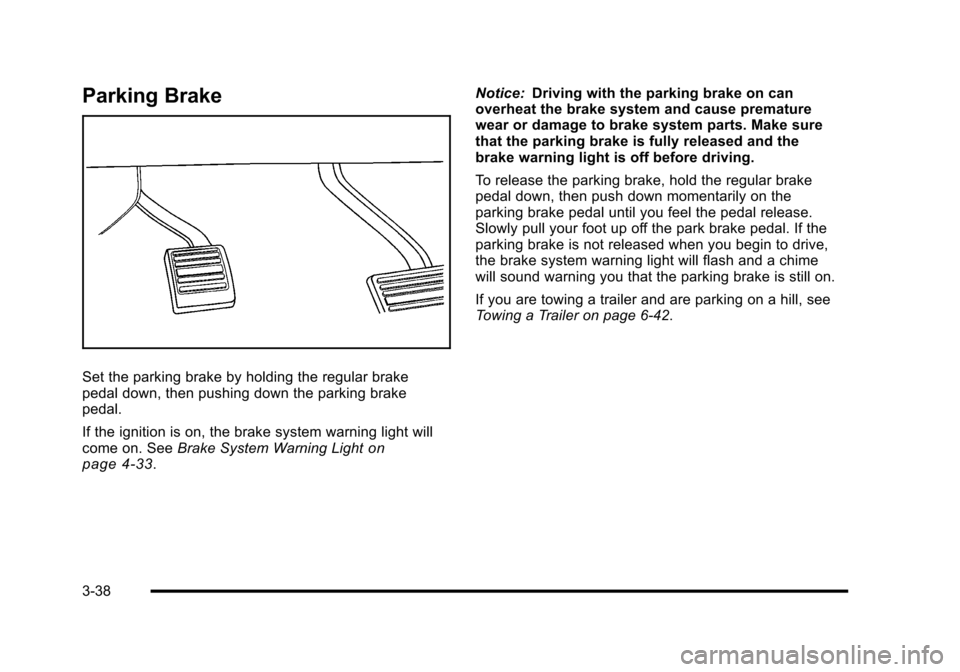
Set the parking brake by holding the regular brakepedal down, then pushing down the parking brakepedal.
If the ignition is on, the brake system warning light willcome on. SeeBrake System Warning Lightonpage 4!33.
Notice:Driving with the parking brake on canoverheat the brake system and cause prematurewear or damage to brake system parts. Make surethat the parking brake is fully released and thebrake warning light is off before driving.
To release the parking brake, hold the regular brakepedal down, then push down momentarily on theparking brake pedal until you feel the pedal release.Slowly pull your foot up off the park brake pedal. If theparking brake is not released when you begin to drive,the brake system warning light will flash and a chimewill sound warning you that the parking brake is still on.
If you are towing a trailer and are parking on a hill, seeTowing a Trailer on page 6!42.
3-38
Page 171 of 616

The system can bedisabled by pressing therear park aid disablebutton located next tothe radio.
The indicator light will come on and PARK ASSIST OFFdisplays on the Driver Information Center (DIC) toindicate that URPA is off, seeDIC Warnings andMessages on page 4!48.
When the System Does Not Seem to
Work Properly
If the URPA system will not activate due to a temporarycondition, the messages PARK ASSIST OFF or PARKASSIST BLOCKED SEE OWNERS MANUAL will bedisplayed on the DIC.
SERVICE PARK ASSIST :If this message occurs, takethe vehicle to your dealer/retailer to repair the system.
PARK ASSIST OFF :This message occurs if the driverdisables the system.
PARKING ASSIST BLOCKED SEE OWNERSMANUAL :This message can occur under thefollowing conditions:
.The ultrasonic sensors are not clean. Keep thevehicle's rear bumper free of mud, dirt, snow, iceand slush. For cleaning instructions, seeWashingYour Vehicle on page 7!102.
.The park assist sensors are covered by frost orice. Frost or ice can form around and behind thesensors and may not always be seen; this canoccur after washing the vehicle in cold weather.The message may not clear until the frost or icehas melted.
.A trailer was attached to the vehicle, or a bicycle oran object was hanging out of the liftgate during thelast drive cycle. Once the attached object isremoved, URPA will return to normal operation.
.A tow bar is attached to the vehicle.
.The vehicle's bumper is damaged. Take the vehicleto your dealer/retailer to repair the system.
.Other conditions may affect system performance,such as vibrations from a jackhammer or thecompression of air brakes on a very large truck.
If the system is still disabled, after driving forward atleast 40 km/h (25 mph), take the vehicle to yourdealer/retailer.
3-47
Page 193 of 616

Section 4 Instrument Panel
Instrument Panel Overview. . . . . . . . . . . . . . . . . . . . . . . . 4-3Hazard Warning Flashers . . . . . . . . . . . . . . . . . . . . . . . 4-3Horn . . . . . . . . . . . . . . . . . . . . . . . . . . . . . . . . . . . . . . . . . . . . 4-3Tilt Wheel . . . . . . . . . . . . . . . . . . . . . . . . . . . . . . . . . . . . . . . 4-3Heated Steering Wheel . . . . . . . . . . . . . . . . . . . . . . . . . 4-4Turn Signal/Multifunction Lever . . . . . . . . . . . . . . . . . . 4-4Turn and Lane-Change Signals . . . . . . . . . . . . . . . . . 4-5Headlamp High/Low-Beam Changer . . . . . . . . . . . . 4-5Flash-to-Pass . . . . . . . . . . . . . . . . . . . . . . . . . . . . . . . . . . . 4-6Windshield Wipers . . . . . . . . . . . . . . . . . . . . . . . . . . . . . . 4-6Windshield Washer . . . . . . . . . . . . . . . . . . . . . . . . . . . . . 4-7Rear Window Wiper/Washer . . . . . . . . . . . . . . . . . . . . 4-7Cruise Control . . . . . . . . . . . . . . . . . . . . . . . . . . . . . . . . . . 4-8Exterior Lamps . . . . . . . . . . . . . . . . . . . . . . . . . . . . . . . . . 4-11Headlamps on Reminder . . . . . . . . . . . . . . . . . . . . . . 4-15Daytime Running Lamps (DRL) . . . . . . . . . . . . . . . . 4-15Automatic Headlamp System . . . . . . . . . . . . . . . . . . 4-15Fog Lamps . . . . . . . . . . . . . . . . . . . . . . . . . . . . . . . . . . . . 4-16Instrument Panel Brightness . . . . . . . . . . . . . . . . . . . 4-16Dome Lamps . . . . . . . . . . . . . . . . . . . . . . . . . . . . . . . . . . 4-17Dome Lamp Override . . . . . . . . . . . . . . . . . . . . . . . . . . 4-17Entry Lighting . . . . . . . . . . . . . . . . . . . . . . . . . . . . . . . . . . 4-17Exit Lighting . . . . . . . . . . . . . . . . . . . . . . . . . . . . . . . . . . . 4-17
Reading Lamps . . . . . . . . . . . . . . . . . . . . . . . . . . . . . . . . 4-17Electric Power Management . . . . . . . . . . . . . . . . . . . 4-18Battery Run-Down Protection . . . . . . . . . . . . . . . . . . 4-18Accessory Power Outlet(s) . . . . . . . . . . . . . . . . . . . . . 4-19Ashtray(s) and Cigarette Lighter . . . . . . . . . . . . . . . 4-20Analog Clock . . . . . . . . . . . . . . . . . . . . . . . . . . . . . . . . . . 4-20
Climate Controls. . . . . . . . . . . . . . . . . . . . . . . . . . . . . . . . . . 4-20Dual Automatic Climate Control System . . . . . . . 4-20Outlet Adjustment . . . . . . . . . . . . . . . . . . . . . . . . . . . . . . 4-25Rear Air Conditioning and Heating System andElectronic Climate Controls . . . . . . . . . . . . . . . . . . 4-26
Warning Lights, Gages, and Indicators. . . . . . . . . . 4-27Instrument Panel Cluster . . . . . . . . . . . . . . . . . . . . . . . 4-28Speedometer and Odometer . . . . . . . . . . . . . . . . . . . 4-29Trip Odometer . . . . . . . . . . . . . . . . . . . . . . . . . . . . . . . . . 4-29Tachometer . . . . . . . . . . . . . . . . . . . . . . . . . . . . . . . . . . . . 4-29Safety Belt Reminders . . . . . . . . . . . . . . . . . . . . . . . . . 4-29Airbag Readiness Light . . . . . . . . . . . . . . . . . . . . . . . . 4-30Passenger Airbag Status Indicator . . . . . . . . . . . . . 4-31Charging System Light . . . . . . . . . . . . . . . . . . . . . . . . 4-32Brake System Warning Light . . . . . . . . . . . . . . . . . . . 4-33Antilock Brake System (ABS) Warning Light . . . 4-34
4-1
Page 201 of 616
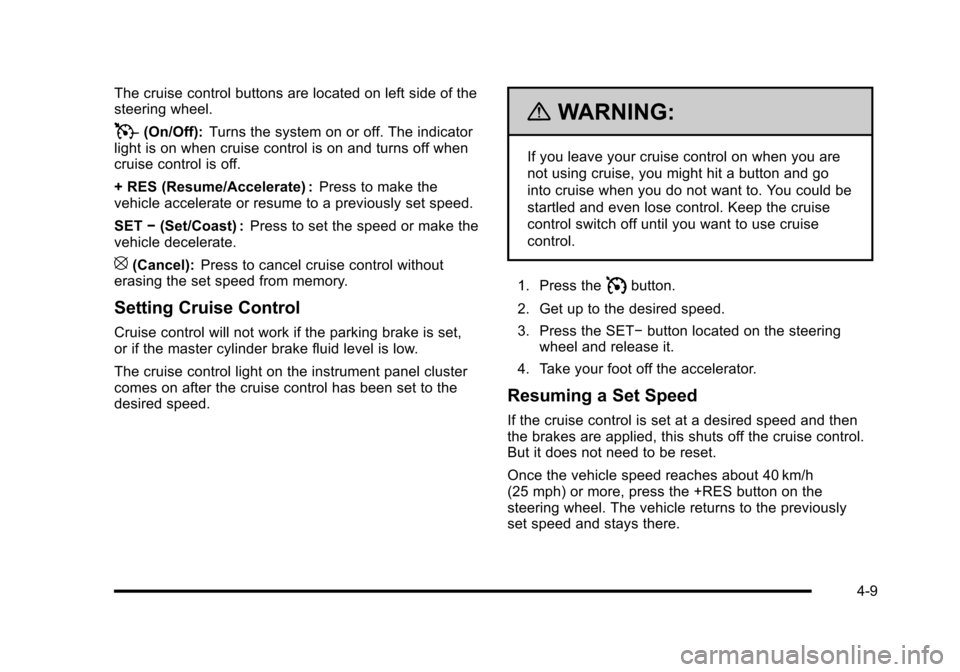
The cruise control buttons are located on left side of thesteering wheel.
T(On/Off):Turns the system on or off. The indicatorlight is on when cruise control is on and turns off whencruise control is off.
+ RES (Resume/Accelerate) :Press to make thevehicle accelerate or resume to a previously set speed.
SET!(Set/Coast) :Press to set the speed or make thevehicle decelerate.
[(Cancel):Press to cancel cruise control withouterasing the set speed from memory.
Setting Cruise Control
Cruise control will not work if the parking brake is set,or if the master cylinder brake fluid level is low.
The cruise control light on the instrument panel clustercomes on after the cruise control has been set to thedesired speed.
{WARNING:
If you leave your cruise control on when you are
not using cruise, you might hit a button and go
into cruise when you do not want to. You could be
startled and even lose control. Keep the cruise
control switch off until you want to use cruise
control.
1. Press theIbutton.
2. Get up to the desired speed.
3. Press the SET!button located on the steeringwheel and release it.
4. Take your foot off the accelerator.
Resuming a Set Speed
If the cruise control is set at a desired speed and thenthe brakes are applied, this shuts off the cruise control.But it does not need to be reset.
Once the vehicle speed reaches about 40 km/h(25 mph) or more, press the +RES button on thesteering wheel. The vehicle returns to the previouslyset speed and stays there.
4-9
Page 202 of 616
Increasing Speed While Using Cruise
Control
To increase the cruise speed while using cruise control:
.Press and hold the +RES button on the steeringwheel until the desired speed is reached, thenrelease it.
.To increase vehicle speed in small increments,press the +RES button. Each time this is done,the vehicle goes about 1.6 km/h (1 mph) faster.
Reducing Speed While Using Cruise
Control
To reduce the vehicle speed while using cruise control:
.Press and hold the SET–button on the steeringwheel until the desired lower speed is reached,then release it.
.To slow down in very small amounts, press theSET–button on the steering wheel briefly. Eachtime this is done, the vehicle goes about 1.6 km/h(1 mph) slower.
Passing Another Vehicle While Using
Cruise Control
Use the accelerator pedal to increase the vehiclespeed. When you take your foot off the pedal, thevehicle will slow down to the previous set cruise speed.
Using Cruise Control on Hills
How well the cruise control will work on hills dependsupon the vehicle speed, load, and the steepness of thehills. When going up steep hills, you might have to stepon the accelerator pedal to maintain the vehicle'sspeed. When going downhill, you might have to brakeor shift to a lower gear to keep the vehicle's speeddown. When the brakes are applied the cruise controlturns off.
Ending Cruise Control
There are three ways to end cruise control:
.Step lightly on the brake pedal.
.Press the[button on the steering wheel.
.Press theIbutton on the steering wheel.
Erasing Speed Memory
The cruise control set speed memory is erased whenthe cruise control or the ignition is turned off.
4-10
Page 225 of 616
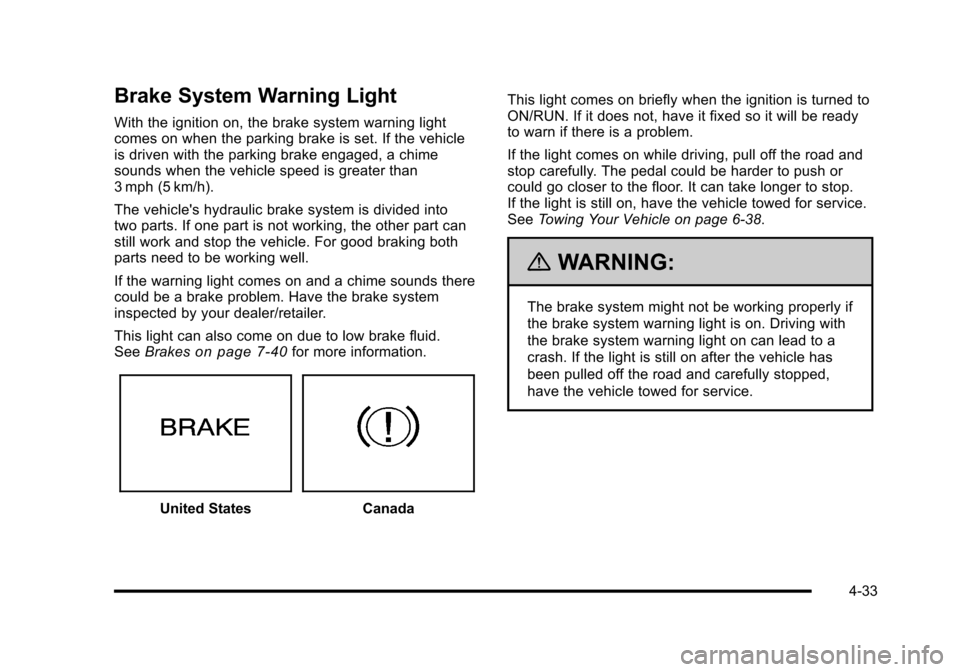
Brake System Warning Light
With the ignition on, the brake system warning lightcomes on when the parking brake is set. If the vehicleis driven with the parking brake engaged, a chimesounds when the vehicle speed is greater than3 mph (5 km/h).
The vehicle's hydraulic brake system is divided intotwo parts. If one part is not working, the other part canstill work and stop the vehicle. For good braking bothparts need to be working well.
If the warning light comes on and a chime sounds therecould be a brake problem. Have the brake systeminspected by your dealer/retailer.
This light can also come on due to low brake fluid.SeeBrakeson page 7!40for more information.
United StatesCanada
This light comes on briefly when the ignition is turned toON/RUN. If it does not, have it fixed so it will be readyto warn if there is a problem.
If the light comes on while driving, pull off the road andstop carefully. The pedal could be harder to push orcould go closer to the floor. It can take longer to stop.If the light is still on, have the vehicle towed for service.SeeTowing Your Vehicle on page 6!38.
{WARNING:
The brake system might not be working properly if
the brake system warning light is on. Driving with
the brake system warning light on can lead to a
crash. If the light is still on after the vehicle has
been pulled off the road and carefully stopped,
have the vehicle towed for service.
4-33
Page 226 of 616
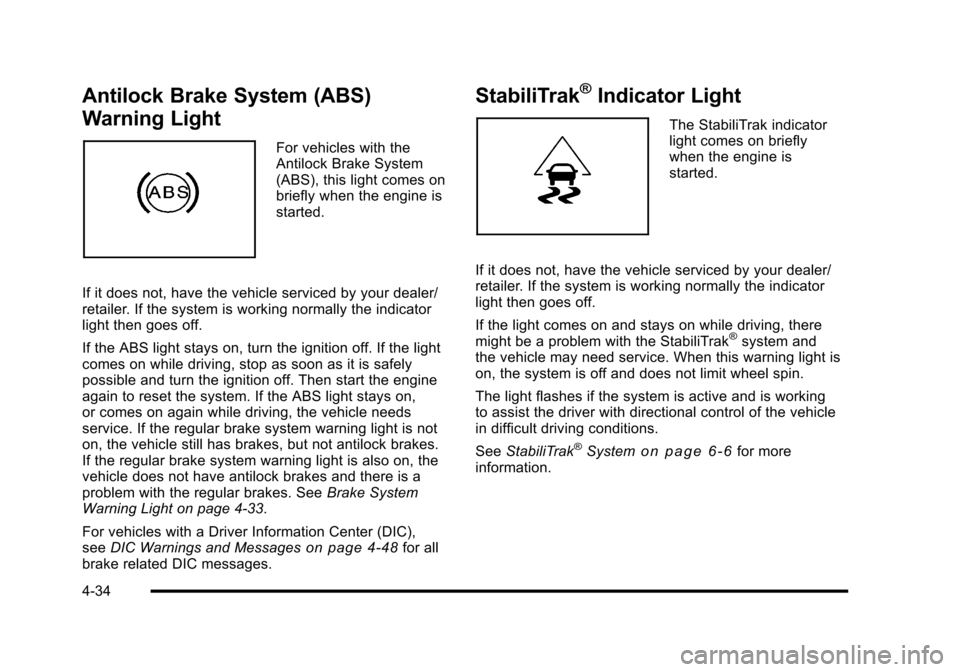
Antilock Brake System (ABS)
Warning Light
For vehicles with theAntilock Brake System(ABS), this light comes onbriefly when the engine isstarted.
If it does not, have the vehicle serviced by your dealer/retailer. If the system is working normally the indicatorlight then goes off.
If the ABS light stays on, turn the ignition off. If the lightcomes on while driving, stop as soon as it is safelypossible and turn the ignition off. Then start the engineagain to reset the system. If the ABS light stays on,or comes on again while driving, the vehicle needsservice. If the regular brake system warning light is noton, the vehicle still has brakes, but not antilock brakes.If the regular brake system warning light is also on, thevehicle does not have antilock brakes and there is aproblem with the regular brakes. SeeBrake SystemWarning Light on page 4!33.
For vehicles with a Driver Information Center (DIC),seeDIC Warnings and Messageson page 4!48for allbrake related DIC messages.
StabiliTrak®Indicator Light
The StabiliTrak indicatorlight comes on brieflywhen the engine isstarted.
If it does not, have the vehicle serviced by your dealer/retailer. If the system is working normally the indicatorlight then goes off.
If the light comes on and stays on while driving, theremight be a problem with the StabiliTrak®system andthe vehicle may need service. When this warning light ison, the system is off and does not limit wheel spin.
The light flashes if the system is active and is workingto assist the driver with directional control of the vehiclein difficult driving conditions.
SeeStabiliTrak®Systemo n p a g e 6!6for moreinformation.
4-34
Page 245 of 616
SERVICE BRAKE SYSTEM
This message displays along with the brake systemwarning light if there is a problem with the brakesystem. SeeBrake System Warning Lightonpage 4!33. If this message appears, stop as soon aspossible and turn off the vehicle. Restart the vehicleand check for the message on the DIC display. If themessage is still displayed or appears again when youbegin driving, the brake system needs service as soonas possible. See your dealer/retailer.
SERVICE BRAKES SOON
This message displays if there is a problem with thebrake system. If this message appears, stop as soon aspossible and turn off the vehicle. Restart the vehicleand check for the message on the DIC display. If themessage is still displayed or appears again when youbegin driving, the brake system needs service.See your dealer/retailer.
SERVICE LEFT HEADLAMP ASSEMBLY
On some models, this message will be displayed whenthe left headlamp is out and needs to be serviced. SeeLED Lightingon page 7!55for more information.
SERVICE PARKING ASSIST
This message displays if there is a problem with theUltrasonic Rear Parking Assist (URPA) system. Do notuse this system to help you park. SeeUltrasonic RearParking Assist (URPA)on page 3!46for moreinformation. See your dealer/retailer for service.
SERVICE RIGHT HEADLAMP
ASSEMBLY
On some models, this message will be displayed whenthe right headlamp is out and needs to be serviced.SeeLED Lightingon page 7!55for more information.
SERVICE SIDE BLIND ZONE ALERT
SYSTEM
If your vehicle has the Side Blind Zone Alert (SBZA)system and this message displays, both SBZA displayswill remain on indicating there is a problem with theSBZA system. If these displays remain on aftercontinued driving, the system needs service. See yourdealer/retailer. SeeSide Blind Zone Alert (SBZA)onpage 3!48for more information.
4-53
Page 247 of 616

SIDE BLIND ZONE SYSTEM
UNAVAILABLE
If your vehicle has the Side Blind Zone Alert (SBZA)system, this message displays when the SBZA systemis disabled because the sensor is blocked and cannotdetect vehicles in your blind zone. The sensor may beblocked by mud, dirt, snow, ice, or slush. This messagemay also display during heavy rain or due to road spray.It may also come on when driving in isolated areas withno guardrails, trees, or road signs and light traffic.Your vehicle does not need service. For cleaninginstructions, seeWashing Your Vehicleon page 7!102.SeeSide Blind Zone Alert (SBZA)on page 3!48formore information.
STABILITRAK OFF
If your vehicle has StabiliTrak, this message displayswhen you turn off StabiliTrak, or when the stabilitycontrol has been automatically disabled. To limit wheelspin and realize the full benefits of the stabilityenhancement system, you should normally leaveStabiliTrak on. However, you should turn StabiliTrak offif your vehicle gets stuck in sand, mud, ice, or snow andyou want to rock your vehicle to attempt to free it, or if
you are driving in extreme off-road conditions andrequire more wheel spin. SeeIf Your Vehicle is Stuck inSand, Mud, Ice, or Snowon page 6!30. To turn theStabiliTrak system on or off, seeStabiliTrak®Systemo n p a g e 6!6.
There are several conditions that can cause thismessage to appear.
.One condition is overheating, which could occur ifStabiliTrak activates continuously for an extendedperiod of time.
.The message also displays if the brake systemwarning light is on. SeeBrake System WarningLight on page 4!33.
.The message could display if the stability systemtakes longer than usual to complete its diagnosticchecks due to driving conditions.
.The message displays if an engine or vehiclerelated problem has been detected and the vehicleneeds service. See your dealer/retailer.
The message turns off as soon as the conditions thatcaused the message to be displayed are no longerpresent.
4-55