mirror CADILLAC ESCALADE 2011 3.G User Guide
[x] Cancel search | Manufacturer: CADILLAC, Model Year: 2011, Model line: ESCALADE, Model: CADILLAC ESCALADE 2011 3.GPages: 558, PDF Size: 7.59 MB
Page 51 of 558
Black plate (19,1)Cadillac Escalade/Escalade ESV Owner Manual - 2011
Keys, Doors and Windows 2-19
Vehicles with OnStar®have three
additional control buttons located at
the bottom of the mirror. See your
dealer for more information about
OnStar and how to subscribe to it.
See the OnStar Owner's Guide for
more information about the services
OnStar provides.
Cleaning the Mirror
Do not spray glass cleaner directly
on the mirror. Use a soft towel
dampened with water.
Windows
{WARNING
Leaving children, helpless adults,
or pets in a vehicle with the
windows closed is dangerous.
They can be overcome by
the extreme heat and suffer
permanent injuries or even death
from heat stroke. Never leave a
child, a helpless adult, or a pet
alone in a vehicle, especially with
the windows closed in warm or
hot weather.
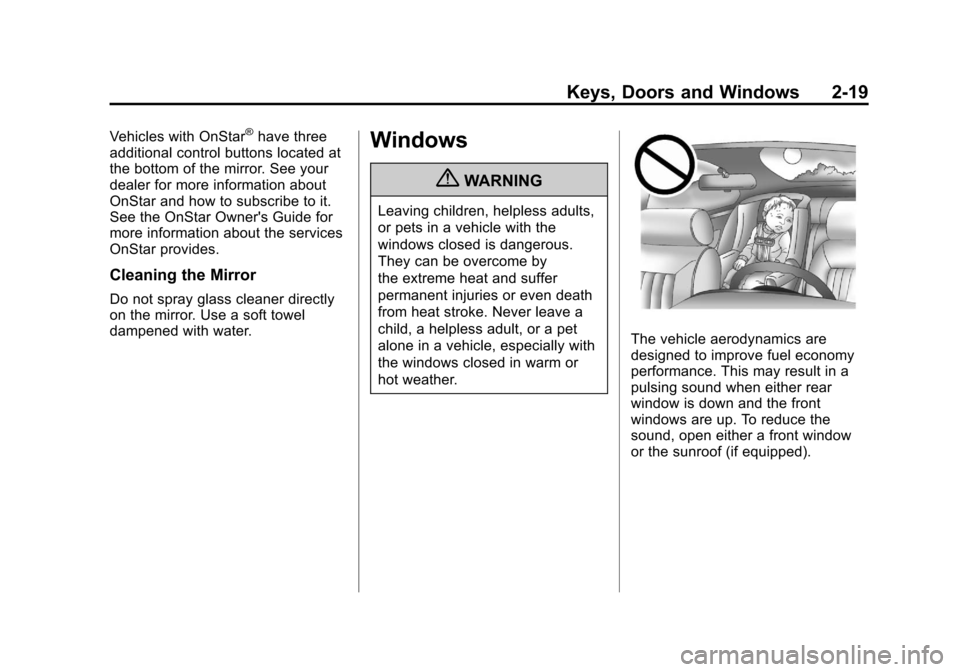
The vehicle aerodynamics are
designed to improve fuel economy
performance. This may result in a
pulsing sound when either rear
window is down and the front
windows are up. To reduce the
sound, open either a front window
or the sunroof (if equipped).
Page 54 of 558
Black plate (22,1)Cadillac Escalade/Escalade ESV Owner Manual - 2011
2-22 Keys, Doors and Windows
Window Lockout
o(Window Lockout):This button
is on the driver door near the
window switches.
Press the right side of the
button to disable the rear window
controls. The light on the button will
illuminate, indicating the feature is in
use. The rear windows still can be
raised or lowered using the driver
window switches when the lockout
feature is active.
To restore power to the rear
windows, press the button again.
The light on the button will go out.
Sun Visors
Pull the sun visor down to block
glare. Detach the sun visor from the
center mount to pivot to the side
window, or to extend along the rod if
available.
Roof
Sunroof
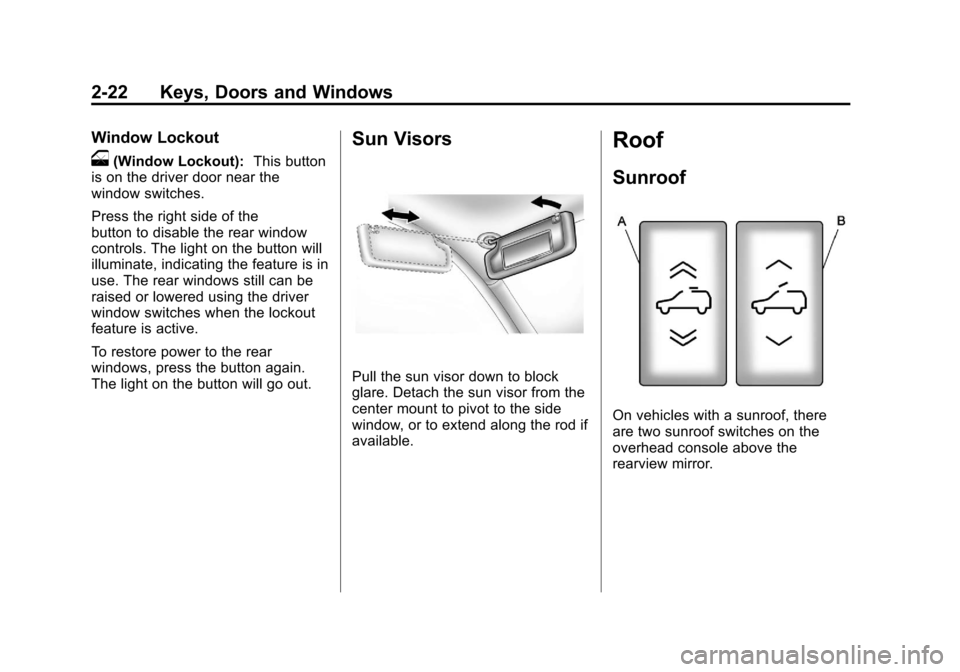
On vehicles with a sunroof, there
are two sunroof switches on the
overhead console above the
rearview mirror.
Page 60 of 558

Black plate (4,1)Cadillac Escalade/Escalade ESV Owner Manual - 2011
3-4 Seats and Restraints
Memory Features
The controls on the driver door are
used to program and recall memory
settings for the driver seat, outside
mirrors, power steering column, and
the adjustable throttle and brake
pedals.Storing Memory Positions
To save into memory:
1. Adjust the driver seat, including
the seatback recliner and
lumbar, both outside mirrors,
power steering column, and
the throttle and brake pedals.
See Power Mirrors on page 2‑16
and Adjustable Throttle and
Brake Pedal on page 9‑31 for
more information.
Not all mirrors and adjustable
throttles and brake pedals will
have the ability to save and
recall their positions. 2. Press and hold
“1”until
two beeps sound.
3. Repeat for a second driver position using “2.”
To recall, press and release “1”or
“2.” The vehicle must be in P (Park).
A single beep will sound. The seat,
outside mirrors, power steering
column, and adjustable throttle
and brake pedals will move to the
positions previously stored for the
identified driver.
Page 61 of 558

Black plate (5,1)Cadillac Escalade/Escalade ESV Owner Manual - 2011
Seats and Restraints 3-5
Memory Remote Recall
The memory feature can recall the
driver seat, outside mirrors, power
steering column, and pedals to
stored positions when entering the
vehicle.
To activate, unlock the driver
door with the Remote Keyless
Entry (RKE) transmitter. The driver
seat, outside mirrors, power steering
column, and adjustable pedals will
move to the memory positions
associated with the transmitter
used to unlock the vehicle.
This feature can be turned on or off
using the vehicle personalization
menu. See“Memory Seat Recall”
under Vehicle Personalization on
page 5‑40 for more information. To stop recall movement, press one
of the power seat controls, memory
or power mirror buttons, power
steering column control, or the
adjustable pedal switch.
If something has blocked the driver
seat, power steering column, or the
adjustable pedals while recalling a
memory position, the recall may
stop. Remove the obstruction; then
press and hold the appropriate
manual control for the memory item
that is not recalling for two seconds.
Try recalling the memory position
again by pressing the appropriate
memory button. If the memory
position is still not recalling, see
your dealer for service.
Easy Exit Positions
This feature can move the driver
seat rearward and the power
steering column up and forward to
allow extra room to exit the vehicle.
B(Easy Exit Positions):
Press
to recall the easy exit positions.
The vehicle must be in P (Park).
If the easy exit feature is
programmed on in the vehicle
personalization menu, automatic
driver seat and power steering
column movement occur when
the ignition key is removed.
Page 184 of 558
Black plate (46,1)Cadillac Escalade/Escalade ESV Owner Manual - 2011
5-46 Instruments and Controls
CHIME VOLUME
This feature allows you to select the
volume level of the chime.
Press the customization button until
CHIME VOLUME appears on the
DIC display. Press the set/reset
button once to access the settings
for this feature. Then press the
customization button to scroll
through the following settings:
NORMAL:The chime volume will
be set to a normal level.
LOUD: The chime volume will be
set to a loud level.
NO CHANGE: No change will be
made to this feature. The current
setting will remain.
There is no default for chime
volume. The volume will stay at the
last known setting. To select a setting, press the
set/reset button while the desired
setting is displayed on the DIC.
PARK TILT MIRRORS
This feature allows you to select
whether or not the outside mirror(s)
will automatically tilt down when the
vehicle is shifted into R (Reverse).
See
Park Tilt Mirrors on page 2‑18
for more information.
Press the customization button until
PARK TILT MIRRORS appears on
the DIC display. Press the set/reset
button once to access the settings
for this feature. Then press the
customization button to scroll
through the following settings:
OFF (default): Neither outside
mirror will be tilted down when the
vehicle is shifted into R (Reverse). DRIVER MIRROR:
The driver
outside mirror will be tilted down
when the vehicle is shifted into
R (Reverse).
PASSENGER MIRROR: The
passenger outside mirror will be
tilted down when the vehicle is
shifted into R (Reverse).
BOTH MIRRORS: The driver and
passenger outside mirrors will be
tilted down when the vehicle is
shifted into R (Reverse).
NO CHANGE: No change will be
made to this feature. The current
setting will remain.
To select a setting, press the
set/reset button while the desired
setting is displayed on the DIC.
Page 186 of 558
Black plate (48,1)Cadillac Escalade/Escalade ESV Owner Manual - 2011
5-48 Instruments and Controls
SEAT & TILT (default):The driver
seat and the steering wheel tilt
feature will recall.
NO CHANGE: No change will be
made to this feature. The current
setting will remain.
To select a setting, press the
set/reset button while the desired
setting is displayed on the DIC.
MEMORY SEAT RECALL
This feature allows you to select
your preference for the remote
memory seat recall feature. See
“Memory Features” inPower Seat
Adjustment on page 3‑3 for more
information.
Press the customization button
until MEMORY SEAT RECALL
appears on the DIC display.
Press the set/reset button once to
access the settings for this feature. Then press the customization button
to scroll through the following
settings:
OFF (default):
No remote memory
seat recall will occur.
ON: The driver seat, and on
some vehicles, the outside mirrors
will automatically move to the
stored driving position when the
unlock button on the Remote
Keyless Entry (RKE) transmitter
is pressed. On some vehicles with
the adjustable throttle and brake
pedal feature, the pedals will also
automatically move.
NO CHANGE: No change will be
made to this feature. The current
setting will remain.
To select a setting, press the
set/reset button while the desired
setting is displayed on the DIC. REMOTE START
If your vehicle has this feature, it
allows you to turn the remote start
off or on. The remote start feature
allows you to start the engine from
outside of the vehicle using the
Remote Keyless Entry (RKE)
transmitter. See
Remote Vehicle
Start on page 2‑5 for more
information.
Press the customization button until
REMOTE START appears on the
DIC display. Press the set/reset
button once to access the settings
for this feature. Then press the
customization button to scroll
through the following settings:
OFF: The remote start feature will
be disabled.
ON (default): The remote start
feature will be enabled.
NO CHANGE: No change will be
made to this feature. The current
setting will remain.
Page 197 of 558
Black plate (3,1)Cadillac Escalade/Escalade ESV Owner Manual - 2011
Lighting 6-3
IntelliBeam®Intelligent
High-Beam Headlamp Control
System
For vehicles with this feature, be
sure to read this entire section
before using it.
IntelliBeam is an enhancement to
the vehicle's headlamp system.
Using a digital light sensor on the
rearview mirror, this system will turn
the vehicle's high-beam headlamps
on and off according to surrounding
traffic conditions.
The IntelliBeam system turns the
high-beam headlamps on when it is
dark enough, there is no other traffic
present, and the IntelliBeam system
is enabled. Turning On and Enabling
IntelliBeam
Press and release the IntelliBeam
button on the inside rear view
mirror. The IntelliBeam indicator
on the mirror will turn on to let
you know the system has been
turned on. Once the system has
been turned on, it will remain on
each time the vehicle is started.
Additionally, the IntelliBeam system
must be enabled.
To enable the IntelliBeam system,
turn the exterior lamp control
to AUTO, with the turn signal/
multifunction lever in its neutral
position. The High-Beam On Light
will appear on the instrument panel
cluster when the high-beams are on.Driving with IntelliBeam
IntelliBeam will only activate your
high-beams when driving over
32 km/h (20 mph).
The high-beam headlamps will
remain on, under the automatic
control of IntelliBeam, until any of
the following situations occur:
.The system detects an
approaching vehicle's
headlamps.
.The system detects a preceding
vehicle's taillamps.
.The outside light is bright
enough that high-beam
headlamps are not required.
.The vehicle's speed drops below
24 km/h (15 mph).
Page 198 of 558
Black plate (4,1)Cadillac Escalade/Escalade ESV Owner Manual - 2011
6-4 Lighting
.The headlamp stalk is moved
forward to the high-beam
position.
When either of these conditions
occur, the IntelliBeam feature
will be disabled and the
IntelliBeam light in the mirror
will turn off until the high-beam
stalk is returned to the neutral
position.
.If IntelliBeam was using
low-beams prior to this action,
the IntelliBeam feature will be
temporarily disabled until the
stalk is returned to the neutral
position.
.The exterior lamp control
is turned to any setting
except AUTO.
When this occurs, IntelliBeam
will be disabled until the control
is turned back to the AUTO
position.
.The IntelliBeam system is turned
off at the inside rearview mirror.
IntelliBeam may not turn off the
high-beams if the system cannot
detect other vehicle's lamps
because of any of the following:
.The others vehicle's lamp(s) are
missing, damaged, obstructed
from view or otherwise
undetected.
.The other vehicle's lamp(s) are
covered with dirt, snow and/or
road spray.
.The other vehicle's lamp(s)
cannot be detected due to dense
exhaust, smoke, fog, snow, road
spray, mist or other airborne
obstructions.
.Your vehicle's windshield is
dirty, cracked or obstructed by
something that blocks the view
of the IntelliBeam light sensor.
.Your vehicle's windshield is
covered with ice, dirt, haze or
other obstructions.
.Your vehicle is loaded such
that the front end of the vehicle
points upward, causing the
IntelliBeam sensor to aim high
and not detect headlamps and
taillamps.
.You are driving on winding or
hilly roads.
You may need to manually disable
or cancel the high-beam headlamps
by turning the low-beam headlamps
on, if any of the above conditions
exist.
Page 199 of 558
Black plate (5,1)Cadillac Escalade/Escalade ESV Owner Manual - 2011
Lighting 6-5
Disabling and Resetting
IntelliBeam at the Rearview Mirror
IntelliBeam can be disabled by
using the controls on the inside
rearview mirror.
AUTO
3(On/Off):To disable
the system, press this button
on the inside rearview mirror.
The IntelliBeam indicator will turn off
and will not come back on until the
IntelliBeam button is pressed again.
(Stalk Disable): When IntelliBeam
has turned on the high-beams,
pull or push the high-beam stalk.
This will disable IntelliBeam.
The IntelliBeam indicator on the
mirror will turn off. To re-enable
IntelliBeam, press the IntelliBeam
button on the mirror.
A different sensitivity setting is
available for dealer diagnostics.
This is done by pushing and holding this button for 20 seconds until the
IntelliBeam indicator light flashes
three times. If you accidentally
activate this, the vehicle's setting
will automatically be reset each time
the ignition is turned off and then
on again.
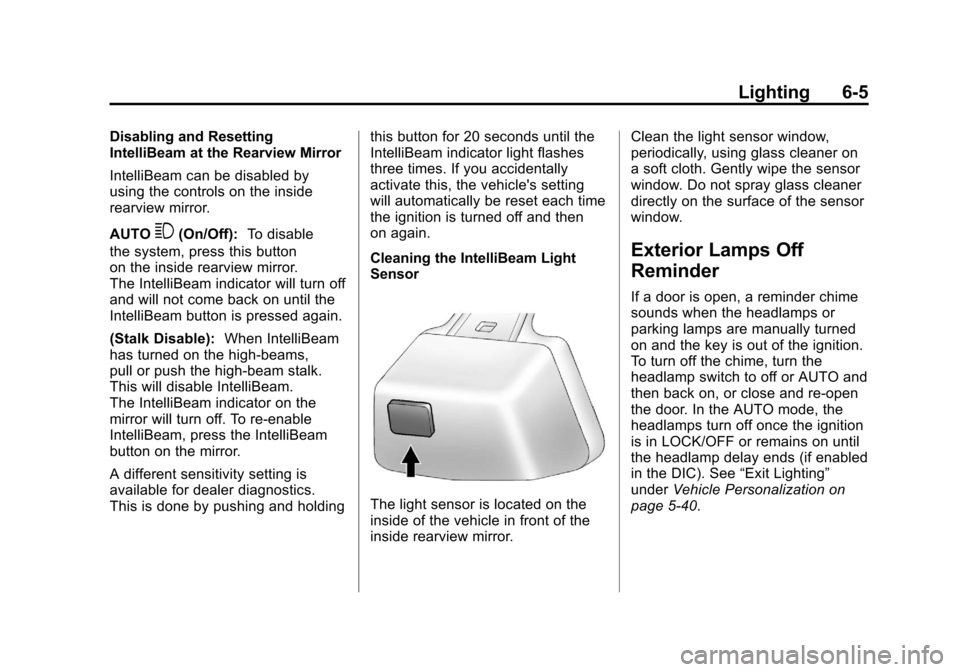
Cleaning the IntelliBeam Light
Sensor
The light sensor is located on the
inside of the vehicle in front of the
inside rearview mirror.Clean the light sensor window,
periodically, using glass cleaner on
a soft cloth. Gently wipe the sensor
window. Do not spray glass cleaner
directly on the surface of the sensor
window.
Exterior Lamps Off
Reminder
If a door is open, a reminder chime
sounds when the headlamps or
parking lamps are manually turned
on and the key is out of the ignition.
To turn off the chime, turn the
headlamp switch to off or AUTO and
then back on, or close and re-open
the door. In the AUTO mode, the
headlamps turn off once the ignition
is in LOCK/OFF or remains on until
the headlamp delay ends (if enabled
in the DIC). See
“Exit Lighting”
under Vehicle Personalization on
page 5‑40.
Page 320 of 558
Black plate (6,1)Cadillac Escalade/Escalade ESV Owner Manual - 2011
8-6 Climate Controls
<(Rear Window Defogger):
Press to turn the rear window
defogger on or off. It automatically
turns off after it has been activated.
The defogger can also be turned off
by turning off the engine. Do not
drive the vehicle until all the
windows are clear.
Notice: Do not use a razor blade
or sharp object to clear the inside
rear window. Do not adhere
anything to the defogger grid
lines in the rear glass. These
actions may damage the rear
defogger. Repairs would not be
covered by your warranty.
Heated Mirrors: Press
of the outside mirror. See “Outside
Heated Mirrors” inHeated Mirrors
on page 2‑17.
Heated or Cooled Seats: For
vehicles with heated and cooled
seats, see Heated and Ventilated
Front Seats on page 3‑8.
Rear Climate Control System (Rear Climate with Rear
Seat Audio)
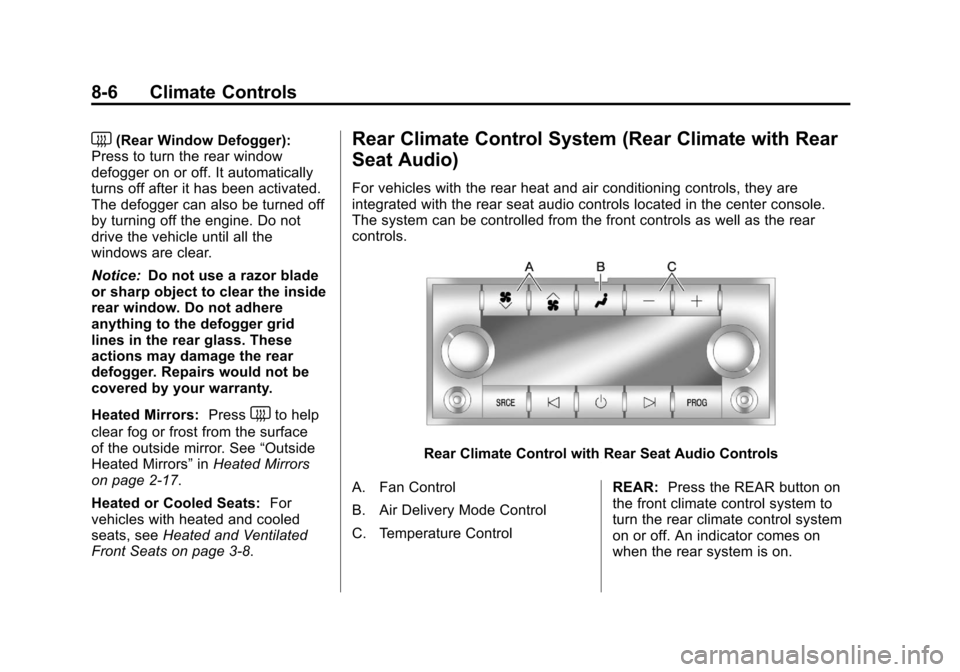
For vehicles with the rear heat and air conditioning controls, they are
integrated with the rear seat audio controls located in the center console.
The system can be controlled from the front controls as well as the rear
controls.
Rear Climate Control with Rear Seat Audio Controls
A. Fan Control
B. Air Delivery Mode Control
C. Temperature Control REAR:
Press the REAR button on
the front climate control system to
turn the rear climate control system
on or off. An indicator comes on
when the rear system is on.