phone CADILLAC ESCALADE 2011 3.G User Guide
[x] Cancel search | Manufacturer: CADILLAC, Model Year: 2011, Model line: ESCALADE, Model: CADILLAC ESCALADE 2011 3.GPages: 558, PDF Size: 7.59 MB
Page 207 of 558
Black plate (1,1)Cadillac Escalade/Escalade ESV Owner Manual - 2011
Infotainment System 7-1
Infotainment
System
Introduction
Introduction . . . . . . . . . . . . . . . . . . . 7-2
Theft-Deterrent Feature . . . . . . . 7-3
Overview . . . . . . . . . . . . . . . . . . . . . . 7-3
Radio
AM-FM Radio . . . . . . . . . . . . . . . . 7-10
Satellite Radio . . . . . . . . . . . . . . . 7-16
Radio Reception . . . . . . . . . . . . . 7-17
Rear Side WindowAntenna . . . . . . . . . . . . . . . . . . . . 7-18
Satellite Radio Antenna . . . . . . 7-18
Audio Players
CD/DVD Player . . . . . . . . . . . . . . 7-19
MP3 . . . . . . . . . . . . . . . . . . . . . . . . . 7-28
Auxiliary Devices . . . . . . . . . . . . 7-31
Rear Seat Infotainment
Rear Seat Entertainment (RSE) System
(Overhead) . . . . . . . . . . . . . . . . . 7-33
Rear Seat Entertainment (RSE) System
(Headrest DVD) . . . . . . . . . . . . 7-43
Rear Seat Audio (RSA) System . . . . . . . . . . . . . . . . . . . . . 7-58
Navigation
Using the NavigationSystem . . . . . . . . . . . . . . . . . . . . . 7-60
Maps . . . . . . . . . . . . . . . . . . . . . . . . 7-62
Navigation Symbols . . . . . . . . . 7-64
Destination . . . . . . . . . . . . . . . . . . 7-69
Configure Menu . . . . . . . . . . . . . 7-83
Global Positioning System (GPS) . . . . . . . . . . . . . . 7-96
Vehicle Positioning . . . . . . . . . . 7-97
Problems with Route Guidance . . . . . . . . . . . . . . . . . . . 7-97 If the System Needs
Service . . . . . . . . . . . . . . . . . . . . . 7-98
Map Data Updates . . . . . . . . . . . 7-98
Database Coverage Explanations . . . . . . . . . . . . . . . 7-98
Voice Recognition
Voice Recognition . . . . . . . . . . . 7-99
Phone
Bluetooth . . . . . . . . . . . . . . . . . . . 7-102
Page 208 of 558
Black plate (2,1)Cadillac Escalade/Escalade ESV Owner Manual - 2011
7-2 Infotainment System
Introduction
Read this manual thoroughly to
become familiar with how the
navigation system operates.
The navigation system includes
navigation and audio functions.
Keeping your eyes on the road
and your mind on the drive is
important for safe driving. The
navigation system has built-in
features intended to help keep
your eyes on the road and mind on
the drive. A few features may be
disabled while driving. Note that
these functions will be grayed-out.
A grayed-out function indicates it is
not available when the vehicle is
moving.All functions are available when the
vehicle is parked. Do the following
before driving:
.Become familiar with the
navigation system operation,
control buttons on the faceplate,
and touch-sensitive screen
buttons of the navigation
system.
.Set up the audio by presetting
favorite stations, setting the
tone, and adjusting the
speakers.
.Set up the navigation features
before beginning driving, such
as entering an address or a
preset destination.
.Set up your phone numbers
in advance so they can be
called easily with the press
of a single button or a single
voice command (for navigation
systems equipped with phone
capability).
{WARNING
Taking your eyes off the road too
long or too often while using the
navigation system could cause a
crash resulting in injury or death
to you or others. Focus your
attention on driving.
{WARNING
Avoid looking too long or too
often at the moving map on the
navigation screen. This could
cause a crash and you or others
can be injured or killed. Use the
turn-by-turn voice guidance
directions whenever possible.
Page 210 of 558
Black plate (4,1)Cadillac Escalade/Escalade ESV Owner Manual - 2011
7-4 Infotainment System
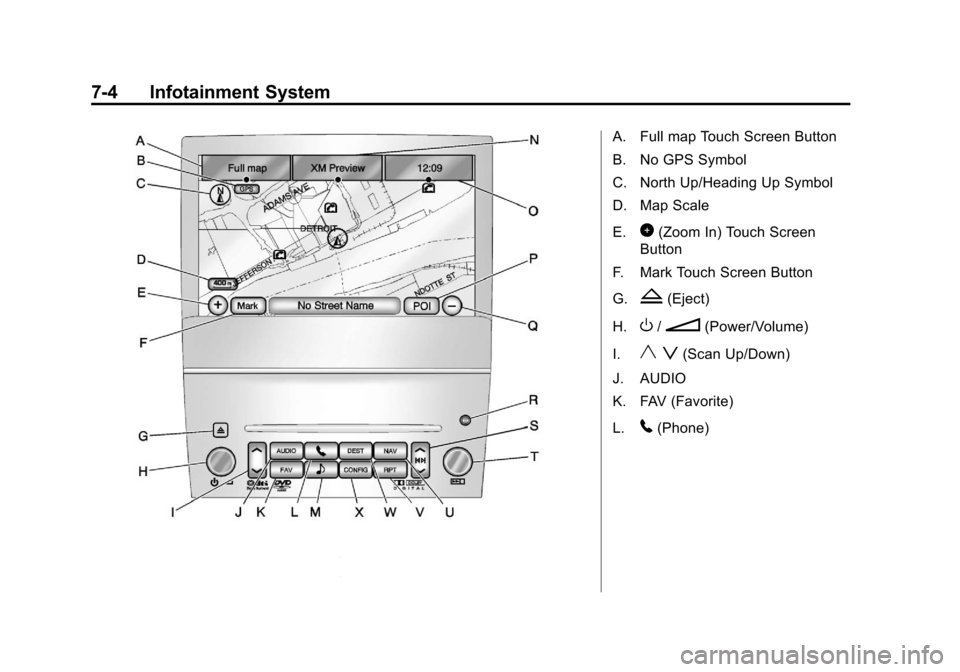
A. Full map Touch Screen Button
B. No GPS Symbol
C. North Up/Heading Up Symbol
D. Map Scale
E.
0(Zoom In) Touch Screen
Button
F. Mark Touch Screen Button
G.
Z(Eject)
H.
O/n(Power/Volume)
I.
y z(Scan Up/Down)
J. AUDIO
K. FAV (Favorite)
L.
5(Phone)
Page 216 of 558
Black plate (10,1)Cadillac Escalade/Escalade ESV Owner Manual - 2011
7-10 Infotainment System
Radio
AM-FM Radio
Notice:Before adding any
sound equipment to the vehicle,
such as an audio system,
CD player, CB radio, mobile
telephone, or two-way radio,
make sure that it can be added
by checking with your dealer.
Also, check federal rules
covering mobile radio and
telephone units. If sound
equipment can be added, it is
very important to do it properly.
Added sound equipment can
interfere with the operation of
the vehicle's engine, radio,
or other systems, and even
damage them. The vehicle's
systems can interfere with the
operation of sound equipment
that has been added. Notice:
The chime signals
related to safety belts, parking
brake, and other functions
of the vehicle operate through
the navigation system. If that
equipment is replaced or
additional equipment is added
to the vehicle, the chimes
may not work. Make sure that
replacement or additional
equipment is compatible with the
vehicle before installing it. See
“Accessories and Modifications”
in the vehicle's owner manual.
Playing the Radio
O/n(Power/Volume):
1. Press to turn the audio system on and off.
2. Turn to increase or to decrease the volume. 3. Press and hold for more than
two seconds to turn off the
navigation system, the Rear
Seat Entertainment (RSE) video
screen, and Rear Seat Audio
(RSA). If the vehicle has not
been turned off, press this knob
to turn RSE and RSA back on
and to continue playback of the
last active source.
w(Tuning Knob): Turn to go to
the next or previous frequency or
disc track or chapter. See CD/DVD
Player on page 7‑19 orMP3 on
page 7‑28 for more information.
AUDIO: Press to display the audio
screen. Press to switch between
AM, FM, or XM, if equipped, Disc,
or AUX (Auxiliary), or touch the
screen button. See CD/DVD Player
on page 7‑19, MP3 on page 7‑28,
and Auxiliary Devices on page 7‑31
for more information.
Page 223 of 558
Black plate (17,1)Cadillac Escalade/Escalade ESV Owner Manual - 2011
Infotainment System 7-17
XM Theftlocked:The XM™
receiver may have previously been
in another vehicle. For security
purposes, XM™ receivers cannot be
swapped between vehicles. If this
message is received after having
your vehicle serviced, check with
your dealer.
XM Radio ID: If tuned to channel 0,
this message will alternate with the
XM™ Radio eight digit radio ID
label. This label is needed to
activate the service.
Unknown: If this message is
received when tuned to channel 0,
there may be a receiver fault.
Consult with your dealer.
Check XM Receiver: If this
message does not clear within a
short period of time, the receiver
may have a fault. Consult with your
dealer.
No Subscription Please Renew:
The XM subscription needs to
be reactivated. Contact XM at
www.xmradio.com or call
1-800-929-2100.Radio Reception
Frequency interference and static
can occur during normal radio
reception if items such as cell phone
chargers, vehicle convenience
accessories, and external electronic
devices are plugged into the
accessory power outlet. If there is
interference or static, unplug the
item from the accessory power
outlet.
AM
The range for most AM stations is
greater than for FM, especially at
night. The longer range can cause
station frequencies to interfere
with each other. For better radio
reception, most AM radio stations
boost the power levels during the
day, and then reduce these levels
during the night. Static can also
occur when things like storms and
power lines interfere with radio
reception. When this happens, try
reducing the treble on the radio.
FM Stereo
FM signals only reach about
16 to 65 km (10 to 40 miles).
Although the radio has a built-in
electronic circuit that automatically
works to reduce interference, some
static can occur, especially around
tall buildings or hills, causing the
sound to fade in and out.
XM™ Satellite Radio Service
XM Satellite Radio Service gives
digital radio reception from coast
to coast in the 48 contiguous
United States, and in Canada.
Just as with FM, tall buildings or
hills can interfere with satellite radio
signals, causing the sound to fade
in and out. In addition, traveling
or standing under heavy foliage,
bridges, garages, or tunnels may
cause loss of the XM signal for a
period of time.
Page 224 of 558
Black plate (18,1)Cadillac Escalade/Escalade ESV Owner Manual - 2011
7-18 Infotainment System
Cellular Phone Usage
Cellular phone usage may cause
interference with the vehicle's radio.
This interference may occur when
making or receiving phone calls,
charging the phone's battery,
or simply having the phone on.
This interference causes an
increased level of static while
listening to the radio. If static is
received while listening to the
radio, unplug the cellular phone
and turn it off.
Rear Side Window
Antenna
The AM-FM antenna is located in
the passenger rear side windows.
Make sure the inside surfaces of the
rear side windows are not scratched
and that the lines on the glass are
not damaged. If the inside surfaces
are damaged, they could interfere
with radio reception.If a cellular telephone antenna
needs to be attached to the glass,
make sure that the grid lines for the
AM-FM antenna are not damaged.
There is enough space between
the grid lines to attach a cellular
telephone antenna without
interfering with radio reception.
Notice:
Using a razor blade or
sharp object to clear the inside
of the rear side windows may
affect radio reception or damage
the rear side window antenna.
Repairs would not be covered by
the warranty. Do not clear the
inside of the rear side windows
with sharp objects. Notice:
Do not apply aftermarket
glass tinting with metallic film.
The metallic film in some tinting
materials will interfere with
or distort the incoming radio
reception. Any damage caused to
the antenna due to metallic tinting
materials will not be covered by
the warranty.
Satellite Radio Antenna
The XM Satellite Radio antenna is
located on the roof of the vehicle.
Keep the antenna clear of
obstructions for clear radio
reception.
If the vehicle has a sunroof, the
performance of the XM system
(if equipped) may be affected if
the sunroof is open.
Page 237 of 558
Black plate (31,1)Cadillac Escalade/Escalade ESV Owner Manual - 2011
Infotainment System 7-31
q r(Folder/Artist/Album):
1. Select the left or right arrow to go to the previous or next folder,
artist, or album on the disc.
2. Press the middle screen button, with the folder, artist, or album
name, to sort the MP3 by folder,
artist, or album. It may take a
few minutes for the system to
sort the MP3.
y © ¨ z(Seek):
1. To seek tracks, press the up arrow to go to the next track.
2. Press the down arrow to go to the start of the current track,
if more than eight seconds have
played. 3. If either arrow is pressed more
than once, the player continues
moving backward or forward
through the CD. The sound
mutes while seeking.
w(Tuning Knob):
1. Turn counterclockwise one notch to go to the start of the current
track, turn it again to go to the
previous track.
2. Turn this knob clockwise to go to the next track.
When playing an MP3 the rear seat
operator can power on the RSE
video screen and use the remote
control to navigate through the MP3.
Auxiliary Devices
Using the Auxiliary Input Jack
The navigation system has an
auxiliary input jack located on
the right side of the faceplate.
This is not an audio output; do not
plug the headphone set into the
front auxiliary input jack. An external
audio device such as an iPod,
laptop computer, MP3 player, CD
player, or cassette tape player, etc.
can be connected to the auxiliary
input jack for use as another audio
source.
Drivers are encouraged to set
up any auxiliary device while the
vehicle is in P (Park). See Defensive
Driving on page 9‑2 for more
information on driver distraction.
Page 238 of 558
Black plate (32,1)Cadillac Escalade/Escalade ESV Owner Manual - 2011
7-32 Infotainment System
To use a portable audio player,
connect a 1/8 in (3.5 mm) cable to
the radio's front auxiliary input jack.
When a device is connected, press
the AUDIO control button, then
press it again until AUX is selected
or press the AUX screen button to
begin playing audio from the device
over the vehicle speakers.
For optimal sound quality, increase
the portable audio device's volume
to the loudest level.
It is always best to power the
portable audio device through its
own battery while playing.
The vehicle may have a rear
entertainment system (RSE) with
a second and third row screen.
The RSE has audio adapters to
allow you to connect auxiliary
devices. The audio can be heard
through the speakers or through
the wireless or wired headphones.
See the Rear Seat Infotainment
user guide for more information.Drivers are encouraged to
set up any auxiliary device
while the vehicle is in P (Park).
See
Defensive Driving on page 9‑2
for more information on driver
distraction.
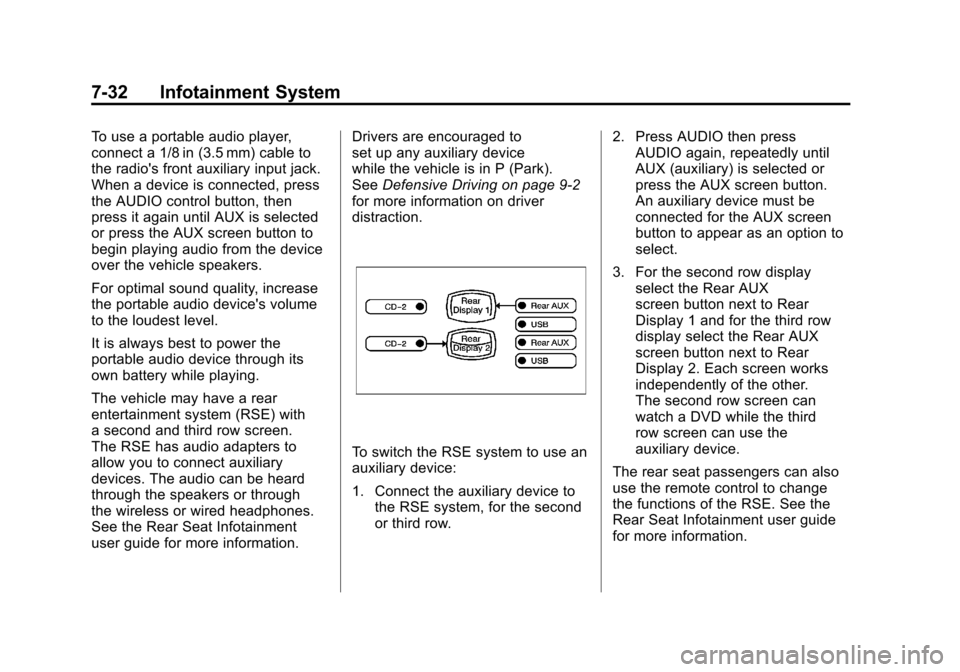
To switch the RSE system to use an
auxiliary device:
1. Connect the auxiliary device to the RSE system, for the second
or third row. 2. Press AUDIO then press
AUDIO again, repeatedly until
AUX (auxiliary) is selected or
press the AUX screen button.
An auxiliary device must be
connected for the AUX screen
button to appear as an option to
select.
3. For the second row display select the Rear AUX
screen button next to Rear
Display 1 and for the third row
display select the Rear AUX
screen button next to Rear
Display 2. Each screen works
independently of the other.
The second row screen can
watch a DVD while the third
row screen can use the
auxiliary device.
The rear seat passengers can also
use the remote control to change
the functions of the RSE. See the
Rear Seat Infotainment user guide
for more information.
Page 239 of 558
Black plate (33,1)Cadillac Escalade/Escalade ESV Owner Manual - 2011
Infotainment System 7-33
Rear Seat
Infotainment
Rear Seat Entertainment
(RSE) System (Overhead)
The vehicle may have
an Overhead DVD Rear Seat
Entertainment (RSE) system.
The RSE system works with the
vehicle's audio system. The DVD
player is part of the front radio.
The RSE system includes a radio
with a DVD player, a video display
screen, and if the vehicle has a third
row seat, it could have a second
video display screen, audio/video
jacks, two wireless headphones,
and a remote control. SeeCD/DVD
Player on page 7‑19 for more
information on the vehicle's DVD
system.
Before Driving
The RSE is designed for rear seat
passengers only. The driver cannot
safely view the video screen while
driving and should not try to do so.
In severe or extreme weather
conditions, the RSE system might
not work until the temperature
is within the operating range.
The operating range for the RSE
system is above −20°C (−4°F)
or below 60°C (140°F). If the
temperature of the vehicle is
outside this range, heat or cool
the vehicle until the temperature
is within the operating range of
the RSE system.
Parental Control
The RSE system may have a
Parental Control feature, depending
on which radio the vehicle has.
To start Parental Control, press and hold the radio power button for more
than two seconds to stop all system
features such as: radio, video
screen, Rear Seat Audio (RSA),
DVD, and/or CD. While Parental
Control is on, a padlock icon
displays.
The radio can be turned back on
with a single press of the power
button, but the RSE system will
remain under Parental Control.
To turn Parental Control off, press
and hold the radio power button for
more than two seconds. The RSE
returns from where it was previously
left and the padlock icon disappears
from the radio display.
Parental Control can also be turned
off by inserting or ejecting any disc,
pressing the play icon on the radio
DVD display menu, or changing an
ignition position.
Page 240 of 558
Black plate (34,1)Cadillac Escalade/Escalade ESV Owner Manual - 2011
7-34 Infotainment System
Headphones
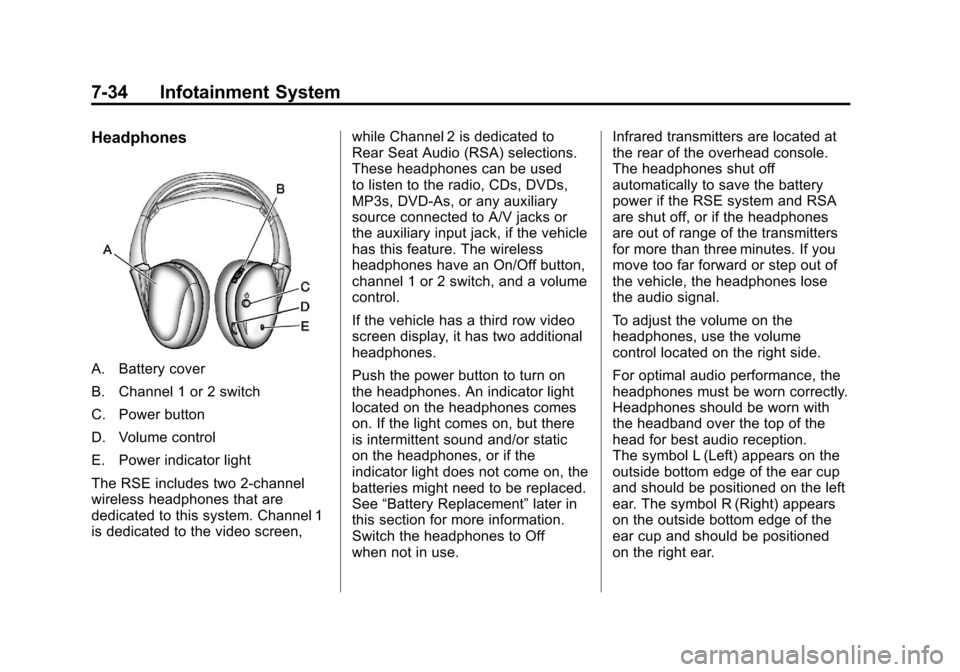
A. Battery cover
B. Channel 1 or 2 switch
C. Power button
D. Volume control
E. Power indicator light
The RSE includes two 2-channel
wireless headphones that are
dedicated to this system. Channel 1
is dedicated to the video screen,while Channel 2 is dedicated to
Rear Seat Audio (RSA) selections.
These headphones can be used
to listen to the radio, CDs, DVDs,
MP3s, DVD‐As, or any auxiliary
source connected to A/V jacks or
the auxiliary input jack, if the vehicle
has this feature. The wireless
headphones have an On/Off button,
channel 1 or 2 switch, and a volume
control.
If the vehicle has a third row video
screen display, it has two additional
headphones.
Push the power button to turn on
the headphones. An indicator light
located on the headphones comes
on. If the light comes on, but there
is intermittent sound and/or static
on the headphones, or if the
indicator light does not come on, the
batteries might need to be replaced.
See
“Battery Replacement” later in
this section for more information.
Switch the headphones to Off
when not in use. Infrared transmitters are located at
the rear of the overhead console.
The headphones shut off
automatically to save the battery
power if the RSE system and RSA
are shut off, or if the headphones
are out of range of the transmitters
for more than three minutes. If you
move too far forward or step out of
the vehicle, the headphones lose
the audio signal.
To adjust the volume on the
headphones, use the volume
control located on the right side.
For optimal audio performance, the
headphones must be worn correctly.
Headphones should be worn with
the headband over the top of the
head for best audio reception.
The symbol L (Left) appears on the
outside bottom edge of the ear cup
and should be positioned on the left
ear. The symbol R (Right) appears
on the outside bottom edge of the
ear cup and should be positioned
on the right ear.