ECU CADILLAC ESCALADE 2011 3.G Service Manual
[x] Cancel search | Manufacturer: CADILLAC, Model Year: 2011, Model line: ESCALADE, Model: CADILLAC ESCALADE 2011 3.GPages: 558, PDF Size: 7.59 MB
Page 188 of 558
Black plate (50,1)Cadillac Escalade/Escalade ESV Owner Manual - 2011
5-50 Instruments and Controls
Exiting the Feature
Settings Menu
The feature settings menu will be
exited when any of the following
occurs:
.The vehicle is no longer in
ON/RUN.
.The trip/fuel or vehicle
information DIC buttons are
pressed.
.The end of the feature settings
menu is reached and exited.
.A 40 second time period has
elapsed with no selection made.
Universal Remote
System
SeeRadio Frequency Statement on
page 13‑19 for information
regarding Part 15 of the Federal
Communications Commission
(FCC) rules and Industry Canada
Standards RSS-210/220/310.
Universal Remote System
Programming
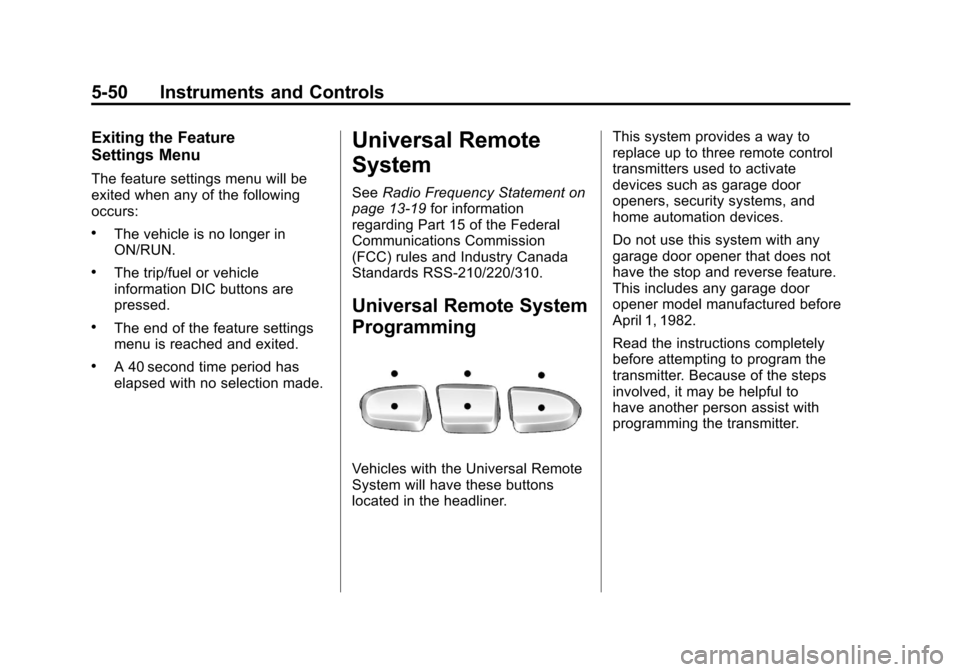
Vehicles with the Universal Remote
System will have these buttons
located in the headliner. This system provides a way to
replace up to three remote control
transmitters used to activate
devices such as garage door
openers, security systems, and
home automation devices.
Do not use this system with any
garage door opener that does not
have the stop and reverse feature.
This includes any garage door
opener model manufactured before
April 1, 1982.
Read the instructions completely
before attempting to program the
transmitter. Because of the steps
involved, it may be helpful to
have another person assist with
programming the transmitter.
Page 190 of 558
Black plate (52,1)Cadillac Escalade/Escalade ESV Owner Manual - 2011
5-52 Instruments and Controls
3. Immediately return to thevehicle. Press and hold the
Universal Home Remote button
that will be used to control the
garage door until the garage
door moves. The indicator light,
above the selected button,
should slowly blink. This button
may need to be held for up to
20 seconds.
4. Immediately, within one second, release the button when
the garage door moves.
The indicator light will blink
rapidly until programming is
complete.
5. Press and release the same button again. The garage door
should move, confirming that
programming is successful and
complete.
To program another Rolling Code
device such as an additional garage
door opener, a security device,
or home automation device, repeat
Steps 1 through 5, choosing a different function button in Step 3
than what was used for the garage
door opener.
If these instructions do not work,
the garage door opener is probably
a Fixed Code unit. Follow the
programming instructions that follow
for a Fixed Code garage door
opener.
Programming Universal Home
Remote
—Fixed Code
For questions or help programming
the Universal Home Remote
System, call 1-866-572-2728
or go to www.learcar2u.com.
Most garage door openers sold
before 1996 are Fixed Code units.
Programming a garage door opener
involves time-sensitive actions, so
read the entire procedure before
starting. Otherwise, the device will
time out and the procedure will have
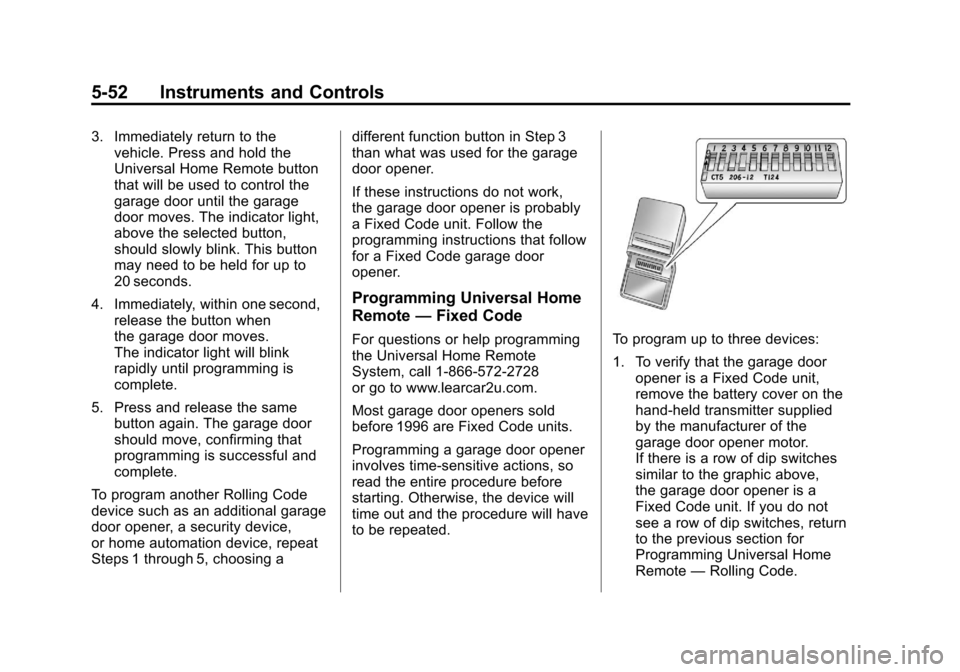
to be repeated.To program up to three devices:
1. To verify that the garage door
opener is a Fixed Code unit,
remove the battery cover on the
hand-held transmitter supplied
by the manufacturer of the
garage door opener motor.
If there is a row of dip switches
similar to the graphic above,
the garage door opener is a
Fixed Code unit. If you do not
see a row of dip switches, return
to the previous section for
Programming Universal Home
Remote —Rolling Code.
Page 193 of 558
Black plate (55,1)Cadillac Escalade/Escalade ESV Owner Manual - 2011
Instruments and Controls 5-55
6. Press and hold the button thatwill be used to control the
garage door until the garage
door moves. The indicator light
above the selected button
should slowly blink. This button
may need to be held for up to
55 seconds.
7. Immediately release the button when the garage door moves.
The indicator light will blink
rapidly until programming is
complete.
8. Press and release the same button again. The garage door
should move, confirming that
programming is successful and
complete.
To program another Fixed Code
device such as an additional garage
door opener, a security device,
or home automation device, repeat
Steps 1-8, choosing a different
button in Step 6 than what was
used for the garage door opener.Universal Remote System
Operation
Press and hold the appropriate
button for at least half of a second.
The indicator light will come on
while the signal is being transmitted.
Reprogramming Universal
Home Remote Buttons
Any of the three buttons can be
reprogrammed by repeating the
instructions.
Erasing Universal Home
Remote Buttons
The programmed buttons should be
erased when the vehicle is sold or
the lease ends. To erase either Rolling Code
or Fixed Code settings on the
Universal Home Remote device:
1. Press and hold the two outside
buttons at the same time for
approximately 20 seconds, until
the indicator lights, located
directly above the buttons,
begin to blink rapidly.
2. Once the indicator lights begin to blink, release both buttons.
The codes from all buttons will
be erased.
For help or information on the
Universal Home Remote System,
call the customer assistance phone
number under Customer Assistance
Offices (U.S. and Canada) on
page 13‑5 orCustomer Assistance
Offices (Mexico) on page 13‑5.
Page 223 of 558
Black plate (17,1)Cadillac Escalade/Escalade ESV Owner Manual - 2011
Infotainment System 7-17
XM Theftlocked:The XM™
receiver may have previously been
in another vehicle. For security
purposes, XM™ receivers cannot be
swapped between vehicles. If this
message is received after having
your vehicle serviced, check with
your dealer.
XM Radio ID: If tuned to channel 0,
this message will alternate with the
XM™ Radio eight digit radio ID
label. This label is needed to
activate the service.
Unknown: If this message is
received when tuned to channel 0,
there may be a receiver fault.
Consult with your dealer.
Check XM Receiver: If this
message does not clear within a
short period of time, the receiver
may have a fault. Consult with your
dealer.
No Subscription Please Renew:
The XM subscription needs to
be reactivated. Contact XM at
www.xmradio.com or call
1-800-929-2100.Radio Reception
Frequency interference and static
can occur during normal radio
reception if items such as cell phone
chargers, vehicle convenience
accessories, and external electronic
devices are plugged into the
accessory power outlet. If there is
interference or static, unplug the
item from the accessory power
outlet.
AM
The range for most AM stations is
greater than for FM, especially at
night. The longer range can cause
station frequencies to interfere
with each other. For better radio
reception, most AM radio stations
boost the power levels during the
day, and then reduce these levels
during the night. Static can also
occur when things like storms and
power lines interfere with radio
reception. When this happens, try
reducing the treble on the radio.
FM Stereo
FM signals only reach about
16 to 65 km (10 to 40 miles).
Although the radio has a built-in
electronic circuit that automatically
works to reduce interference, some
static can occur, especially around
tall buildings or hills, causing the
sound to fade in and out.
XM™ Satellite Radio Service
XM Satellite Radio Service gives
digital radio reception from coast
to coast in the 48 contiguous
United States, and in Canada.
Just as with FM, tall buildings or
hills can interfere with satellite radio
signals, causing the sound to fade
in and out. In addition, traveling
or standing under heavy foliage,
bridges, garages, or tunnels may
cause loss of the XM signal for a
period of time.
Page 252 of 558
Black plate (46,1)Cadillac Escalade/Escalade ESV Owner Manual - 2011
7-46 Infotainment System
AV INPUT: (Audio/Video Input
Jack):The audio/video input jack
is located below the video display
screen and allows viewing of
auxiliary sources such as portable
DVD players, game stations,
or video cameras, on each screen.
.Video Input —The yellow
connector is used for video
input.
.L Audio —The white connector
is used for the left side audio.
.R Audio —The red connector is
used for the right side audio.
Level Lock and Release Latch:
The viewing angle of the video
screen can be adjusted by releasing
the latch and gently moving the
screen. Then lock it into a secure
position.
Vehicle Speakers
Audio from the DVD player or an
auxiliary device can be heard
through the vehicle speakers or
the wireless/wired headphones,
while the radio is tuned to one
of the six frequencies selected
on the Sound Around portion of
the system’ s remote control.
See “Remote Control” later in
this section.
Only one audio source can be heard
through the vehicle’ s speakers at a
time. The audio source being used
is specified by the A/V (audio/video)
source selected on the driver side
head restraint video display screen.
To turn the RSE system audio
output to the vehicle’s speakers,
press Sound Around ON, on the
system’ s remote control. The audio
from the RSE system can be
heard through the wireless/wired
headphones and the vehicle’s
speakers at the same time. The volume on the radio can vary
when switching between the radio,
CD, DVD, MP3, or an auxiliary
device.
Wireless Headphones
The two wireless headphones
included with the Headrest DVD
RSE system will only work with
the Headrest DVD RSE system
and are marked for channel 3 and 4.
The wireless headphones must be
used within a line of sight of the
transmitter that is located above
the video display screen.
3‐4 Channel Selector:
This is
located on the right earpiece. Either
Channel 3 or 4 can be selected with
the channel selector. The driver side
monitor is designated as Channel 3,
and the passenger side as
Channel 4. Set the channel selector
switch according to the video
display screen being viewed.
Page 263 of 558
Black plate (57,1)Cadillac Escalade/Escalade ESV Owner Manual - 2011
Infotainment System 7-57
Tips and Troubleshooting Chart
ProblemRecommended Action
IR Sensor Inoperative
.Check that the batteries are good in the
remote control.
.Check that the remote Control IR Sensor is
not blocked.
.Aim the remote control toward the IR Sensor
being controlled.
.Select the correct screen, 3 or 4.
No picture
.Check that the correct video input mode is
selected.
.Check that the video cable is plugged into
the jack securely.
No Sound
.Check that the correct audio input mode is
selected.
.Check that the audio cable is securely
plugged into the jack.
Cleaning the Video Screens
The video display screens are
made of a specially coated glass
and can be scratched or damaged
by abrasive products, solvents,
or ammonia-based window
cleaners. Clean with a soft,
lint-free, cotton cloth that has
been slightly dampened with warm
water. Dry the screens by wiping
with a clean dry cotton cloth.
Cleaning the Components
Use care when touching or cleaning
the components such as the DVD
player or the discs.
Do not use DVD lens cleaners for
DVD players because the lens
of the DVD optics can become
contaminated by lubricants.
Page 331 of 558
Black plate (9,1)Cadillac Escalade/Escalade ESV Owner Manual - 2011
Driving and Operating 9-9
Loading Your Vehicle for
Off-Road Driving
{WARNING
.Cargo on the load floor piled
higher than the seatbacks
can be thrown forward during
a sudden stop. You or your
passengers could be injured.
Keep cargo below the top of
the seatbacks.
.Unsecured cargo on the
load floor can be tossed
about when driving over
rough terrain. You or your
passengers can be struck
by flying objects. Secure
the cargo properly.(Continued)
WARNING (Continued)
.Heavy loads on the roof raise
the vehicle's center of gravity,
making it more likely to roll
over. You can be seriously or
fatally injured if the vehicle
rolls over. Put heavy loads
inside the cargo area, not on
the roof. Keep cargo in the
cargo area as far forward
and low as possible. There are some important things to
remember about how to load your
vehicle..The heaviest things should be
on the floor, forward of the rear
axle. Put heavier items as far
forward as you can.
.Be sure the load is properly
secured, so things are not
tossed around.
You will find other important
information under Vehicle Load
Limits on page 9‑24 andTires on
page 10‑50.
Page 351 of 558
Black plate (29,1)Cadillac Escalade/Escalade ESV Owner Manual - 2011
Driving and Operating 9-29
If you put things inside your
vehicle—like suitcases,
tools, packages, or anything
else —they will go as fast as the
vehicle goes. If you have to stop
or turn quickly, or if there is a
crash, they will keep going.
{WARNING
Things you put inside your
vehicle can strike and injure
people in a sudden stop or
turn, or in a crash.
.Put things in the cargo
area of your vehicle. Try to
spread the weight evenly.
.Never stack heavier
things, like suitcases,
inside the vehicle so that
some of them are above
the tops of the seats.
(Continued)
WARNING (Continued)
.Do not leave an
unsecured child restraint
in your vehicle.
.When you carry something
inside the vehicle, secure
it whenever you can.
.Do not leave a seat folded
down unless you need to.
There is also important loading
information for off-road driving in
this manual. See “Loading Your
Vehicle for Off-Road Driving”
under Off-Road Driving on
page 9‑7. Add-On Equipment
When you carry removable
items, you may need to put a
limit on how many people you
can carry inside your vehicle.
Be sure to weigh your vehicle
before you buy and install the
new equipment.
Notice :
Overloading the
vehicle may cause damage.
Repairs would not be covered
by the vehicle warranty.
Do not overload the vehicle.
Remember not to exceed
the Gross Axle Weight
Rating (GAWR) of the front
or rear axle.
Page 357 of 558
Black plate (35,1)Cadillac Escalade/Escalade ESV Owner Manual - 2011
Driving and Operating 9-35
Engine Heater
The engine coolant heater can
provide easier starting and better
fuel economy during engine
warm-up in cold weather conditions
at or below−18°C (0°F). Vehicles
with an engine heater should be
plugged in at least four hours before
starting. An internal thermostat in
the plug-end of the cord may exist
which will prevent engine coolant
heater operation at temperatures
above −18°C (0°F).
To Use the Engine Coolant
Heater
1. Turn off the engine.
2. Open the hood and
unwrap the electrical cord.
The cord is secured to the
Engine Compartment Fuse
Block with a clip. Carefully
remove the wire tie which
secures the electrical cord.
Do not cut the electrical cord.
3. Plug the cord into a normal, grounded 110-volt AC outlet.
{WARNING
Plugging the cord into an
ungrounded outlet could cause
an electrical shock. Also, the
wrong kind of extension cord
could overheat and cause a fire.
You could be seriously injured.
Plug the cord into a properly
grounded three-prong 110-volt AC
outlet. If the cord will not reach,
use a heavy-duty three-prong
extension cord rated for at least
15 amps.
4. Before starting the engine, be sure to unplug and store the
cord as it was before to keep
it away from moving engine
parts. If you do not, it could
be damaged.
The length of time the heater should
remain plugged in depends on
several factors. Ask a dealer in the
area where you will be parking the
vehicle for the best advice on this.
Retained Accessory
Power (RAP)
The following vehicle accessories
can be used for up to 10 minutes
after the engine is turned off:
.Audio System
.Power Windows
.OnStar System (if equipped)
.Sunroof (if equipped)
These features work when
the key is in ON/RUN or ACC/
ACCESSORY. Once the key is
turned from ON/RUN to LOCK/OFF,
the windows and sunroof continue
to work up to 10 minutes until any
door is opened. The radio continues
to work for up to 10 minutes or until
the driver door is opened.
Page 394 of 558
Black plate (72,1)Cadillac Escalade/Escalade ESV Owner Manual - 2011
9-72 Driving and Operating
Driving with a Trailer
{WARNING
When towing a trailer, exhaust
gases may collect at the rear
of the vehicle and enter if the
liftgate, trunk/hatch, or rear-most
window is open.
Engine exhaust contains Carbon
Monoxide (CO) which cannot be
seen or smelled. It can cause
unconsciousness and even death.
To maximize safety when towing
a trailer:
.Have the exhaust system
inspected for leaks and make
necessary repairs before
starting a trip.
.Never drive with the liftgate,
trunk/hatch, or rear-most
window open.(Continued)
WARNING (Continued)
.Fully open the air outlets
on or under the instrument
panel.
.Adjust the Climate Control
system to a setting that
brings in only outside air
and set the fan speed to the
highest setting. See Climate
Control System in the Index.
For more information about
Carbon Monoxide, see Engine
Exhaust on page 9‑38.
Towing a trailer requires a
certain amount of experience.
The combination you are driving is
longer and not as responsive as the
vehicle itself. Get acquainted with
the handling and braking of the rig
before setting out for the open road.
Before starting, check all trailer
hitch parts and attachments, safety
chains, electrical connectors, lamps, tires and mirrors. If the trailer
has electric brakes, start the
combination moving and then
apply the trailer brake controller by
hand to be sure the brakes work.
During the trip, check occasionally
to be sure that the load is secure
and the lamps and any trailer
brakes still work.
Following Distance
Stay at least twice as far behind the
vehicle ahead as you would when
driving the vehicle without a trailer.
This can help to avoid heavy
braking and sudden turns.
Passing
More passing distance is
needed when towing a trailer.
The combination will not accelerate
as quickly and is longer so it is
necessary to go much farther
beyond the passed vehicle before
returning to the lane.