reset CADILLAC ESCALADE 2011 3.G Service Manual
[x] Cancel search | Manufacturer: CADILLAC, Model Year: 2011, Model line: ESCALADE, Model: CADILLAC ESCALADE 2011 3.GPages: 558, PDF Size: 7.59 MB
Page 288 of 558
Black plate (82,1)Cadillac Escalade/Escalade ESV Owner Manual - 2011
7-82 Infotainment System
7. Select the route preference(Fastest, Shortest, or Other).
The system calculates and
highlights the route.
8. Select Start Guidance. The route is now ready to be started.
To delete a stopover from the
current route:
1. Press the DEST control button.
2. Select Delete for the desired stopover to delete.
3. The system displays a pop-up confirmation message. Press
Yes to delete the stopover; press
No to cancel this operation.
4. Select the route preference (Fastest, Shortest, or Other).
The system calculates and
highlights the route.
5. Select Start Guidance. The route is now ready to be started.
Suspend Guidance
Press this screen button, from the
Route screen, to put the current
route on hold. Resume Guidance
Press this screen button, from the
Route screen, to resume guidance
on the current route.
Cancel Guidance
Press this screen button, from the
Route screen, to cancel the current
route.
Adding Destinations to the
Address Book
There are two ways to add a
destination to the address book:
.To add the current vehicle
position to the address
book, press the Mark screen
button from the map screen.
The system automatically saves
the current vehicle information
in the address book. When
scrolling on the map the Mark
screen button automatically adds
the current scrolled position
information in the address book.
.Press the Add to Address
Book screen button when
available on POI information
screens, Destination Entry
screens, or POI screens.
The system automatically
saves this information in the
address book.
See “Nav” under Configure Menu on
page 7‑83 for information on editing
address book entries.
Adding or Changing Preset
Destinations
This feature allows additions
or changes one of five preset
destinations. When a destination
has been added as a preset
destination, it is available to select
from the Destination Entry screen.
See “Preset Destination” previously
for information on how to select
a preset destination as a final
destination.
Page 289 of 558
Black plate (83,1)Cadillac Escalade/Escalade ESV Owner Manual - 2011
Infotainment System 7-83
To store the current vehicle position
as a preset destination:
1. Select Mark from the mapscreen to add the current vehicle
position to the address book.
The Address Book screen
appears.
2. Select Name. An alpha-keyboard displays.
Enter the name. Press OK then
Back to return to the address
book information screen.
3. Press and hold one of the buttons at the bottom of the
screen until the name appears
in that preset destination screen
button. It is now available to
select from the Destination Entry
screen. To store an address book entry as a
preset destination:
1. Select the CONFIG control
button.
2. Select the Nav screen button or press the CONFIG control button
until Nav is selected or press the
Nav screen button.
3. Select Edit/View.
4. Select the address book entry to be stored as the preset
destination. Select Name to add
a name, if needed.
5. Press and hold one of the buttons at the bottom of the
screen until the name appears
in that preset destination screen
button. It is now available to
select from the Destination Entry
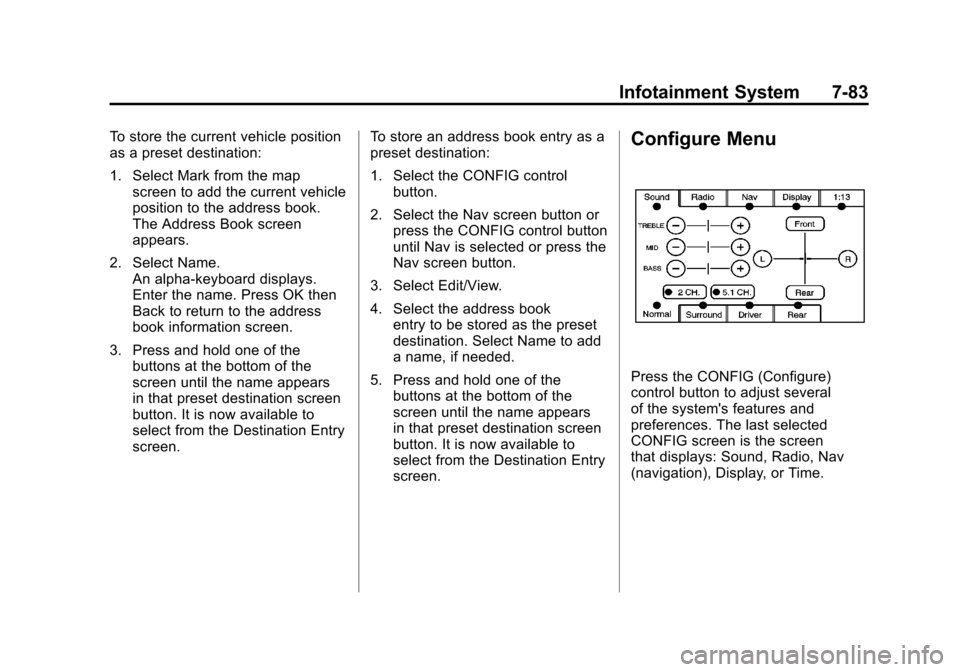
screen.Configure Menu
Press the CONFIG (Configure)
control button to adjust several
of the system's features and
preferences. The last selected
CONFIG screen is the screen
that displays: Sound, Radio, Nav
(navigation), Display, or Time.
Page 290 of 558
Black plate (84,1)Cadillac Escalade/Escalade ESV Owner Manual - 2011
7-84 Infotainment System
Sound
Press the CONFIG control button
to enter the configure menu
options, then press CONFIG again,
repeatedly until Sound is selected
or press the Sound screen button
to make speaker and DSP (Digital
Signal Processing) adjustments.
See“Sound Menu” under,Using the
Navigation System on page 7‑60
for more information.
Radio
Press the CONFIG control button
to enter the configure menu
options, then press CONFIG again,
repeatedly until Radio is selected
or press the Radio screen button to
make changes for radio information
displayed, preset pages, XM™
(if equipped) categories, and Bose
®
AudioPilot®. See “Radio Menu”
under, Using the Navigation System
on page 7‑60 for more information.
Nav (Navigation)
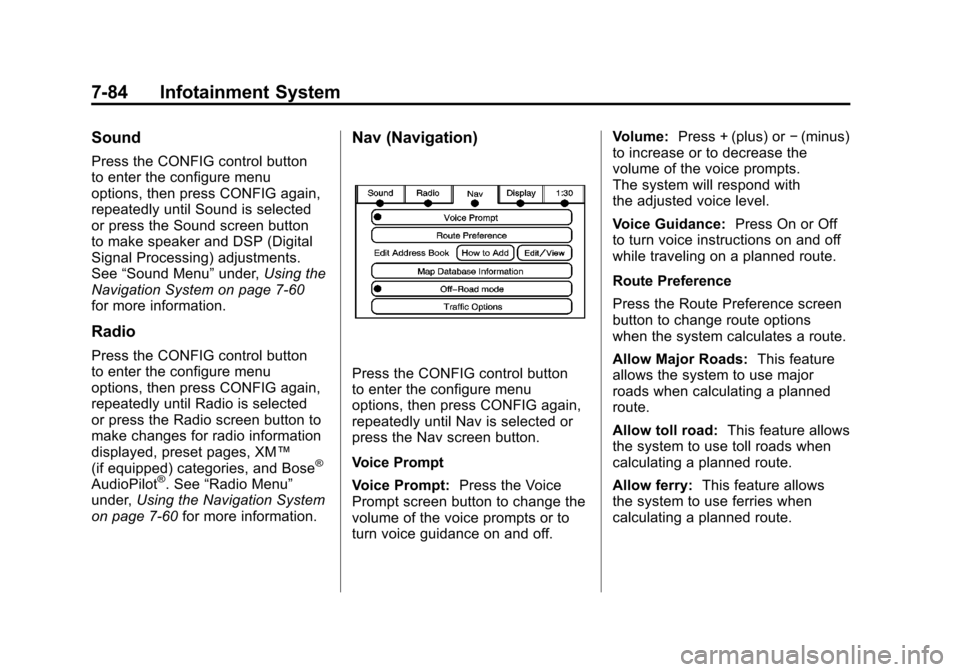
Press the CONFIG control button
to enter the configure menu
options, then press CONFIG again,
repeatedly until Nav is selected or
press the Nav screen button.
Voice Prompt
Voice Prompt: Press the Voice
Prompt screen button to change the
volume of the voice prompts or to
turn voice guidance on and off. Volume:
Press + (plus) or −(minus)
to increase or to decrease the
volume of the voice prompts.
The system will respond with
the adjusted voice level.
Voice Guidance: Press On or Off
to turn voice instructions on and off
while traveling on a planned route.
Route Preference
Press the Route Preference screen
button to change route options
when the system calculates a route.
Allow Major Roads: This feature
allows the system to use major
roads when calculating a planned
route.
Allow toll road: This feature allows
the system to use toll roads when
calculating a planned route.
Allow ferry: This feature allows
the system to use ferries when
calculating a planned route.
Page 369 of 558
Black plate (47,1)Cadillac Escalade/Escalade ESV Owner Manual - 2011
Driving and Operating 9-47
Brake Assist
This vehicle has a brake assist
feature designed to assist the
driver in stopping or decreasing
vehicle speed in emergency driving
conditions. This feature uses the
stability system hydraulic brake
control module to supplement
the power brake system under
conditions where the driver has
quickly and forcefully applied the
brake pedal in an attempt to quickly
stop or slow down the vehicle.
The stability system hydraulic brake
control module increases brake
pressure at each corner of the
vehicle until the ABS activates.
Minor brake pedal pulsation or
pedal movement during this time
is normal and the driver should
continue to apply the brake pedal
as the driving situation dictates.
The brake assist feature will
automatically disengage when
the brake pedal is released or
brake pedal pressure is quickly
decreased.
Ride Control Systems
StabiliTrak®System
The vehicle has a vehicle stability
enhancement system called
StabiliTrak. It is an advanced
computer-controlled system that
assists the driver with directional
control of the vehicle in difficult
driving conditions.
StabiliTrak activates when the
computer senses a discrepancy
between the intended path and
the direction the vehicle is actually
traveling. StabiliTrak selectively
applies braking pressure at any
one of the vehicle's brakes to assist
the driver with keeping the vehicle
on the intended path.
When the vehicle is started
and begins to move, the system
performs several diagnostic checks
to insure there are no problems.
The system may be heard or felt
while it is working. This is normal
and does not mean there is a
problem with the vehicle. Thesystem should initialize before the
vehicle reaches 32 km/h (20 mph).
In some cases, it may take
approximately 3.2 km (2 miles) of
driving before the system initializes.
If cruise control is being used
when StabiliTrak activates, the
cruise control automatically
disengages. The cruise control
can be re-engaged when road
conditions allow. See
Cruise
Control on page 9‑51.
If the system fails to turn on or
activate, the StabiliTrak light along
with one of the following messages
will be displayed on the Driver
Information Center (DIC):
TRACTION CONTROL OFF,
SERVICE TRACTION CONTROL,
STABILITRAK OFF, SERVICE
STABILITRAK. If these DIC
messages appear, make sure the
StabiliTrak system has not been
turned off using the StabiliTrak on/
off button. Then turn the vehicle off,
wait 15 seconds, and then turn it
back on again to reset the system.
If any of these messages still
Page 415 of 558
Black plate (11,1)Cadillac Escalade/Escalade ESV Owner Manual - 2011
Vehicle Care 10-11
Engine Oil Additives/Engine
Oil Flushes
Do not add anything to the oil.
The recommended oils with the
dexos™specification and displaying
the dexos™ certification mark
are all that is needed for good
performance and engine protection.
Engine oil system flushes are not
recommended and could cause
engine damage not covered by
the vehicle warranty.
What to Do with Used Oil
Used engine oil contains certain
elements that can be unhealthy for
your skin and could even cause
cancer. Do not let used oil stay on
your skin for very long. Clean your
skin and nails with soap and water,
or a good hand cleaner. Wash or
properly dispose of clothing or rags
containing used engine oil. See the
manufacturer's warnings about the
use and disposal of oil products.
Used oil can be a threat to the
environment. If you change your
own oil, be sure to drain all the
oil from the filter before disposal.
Never dispose of oil by putting it
in the trash or pouring it on the
ground, into sewers, or into streams
or bodies of water. Recycle it by
taking it to a place that collects
used oil.
Engine Oil Life System
When to Change Engine Oil
This vehicle has a computer system
that indicates when to change the
engine oil and filter. This is based
on engine revolutions and engine
temperature, and not on mileage.
Based on driving conditions, the
mileage at which an oil change is
indicated can vary considerably.
For the oil life system to work
properly, the system must be reset
every time the oil is changed.
When the system has calculated
that oil life has been diminished,
it indicates that an oil change is
necessary. A CHANGE ENGINE
OIL SOON message comes on. See
Engine Oil Messages on page 5‑34.
Change the oil as soon as possible
within the next 1 000 km (600 miles).
Page 416 of 558
Black plate (12,1)Cadillac Escalade/Escalade ESV Owner Manual - 2011
10-12 Vehicle Care
It is possible that, if driving under
the best conditions, the oil life
system might indicate that an oil
change is not necessary for up to a
year. The engine oil and filter must
be changed at least once a year
and, at this time, the system must
be reset. Your dealer has trained
service people who will perform
this work and reset the system.
It is also important to check the
oil regularly over the course of an
oil drain interval and keep it at the
proper level.
If the system is ever reset
accidentally, the oil must be
changed at 5 000 km (3,000 miles)
since the last oil change.
Remember to reset the oil life
system whenever the oil is changed.How to Reset the Engine Oil
Life System
Reset the system whenever the
engine oil is changed so that the
system can calculate the next
engine oil change. Always reset
the engine oil life to 100% after
every oil change. It will not reset
itself. To reset the system:
1. Display OIL LIFE REMAININGon the DIC.
2. Press and hold the SET/RESET button on the DIC for more than
five seconds. The oil life will
change to 100%.
If the CHANGE ENGINE OIL SOON
message comes back on when the
vehicle is started, the engine oil life
system has not reset. Repeat the
procedure.
Automatic Transmission
Fluid
When to Check and Change
Automatic Transmission Fluid
It is usually not necessary to
check the transmission fluid level.
The only reason for fluid loss is a
transmission leak or overheating
the transmission. If a small leak is
suspected, then use the following
checking procedures to check the
fluid level. However, if there is a
large leak, then it may be necessary
to have the vehicle towed to a
dealer service department and have
it repaired before driving the vehicle
further.
Notice: Use of the incorrect
automatic transmission fluid
may damage the vehicle, and the
damages may not be covered by
the vehicle's warranty. Always
use the automatic transmission
fluid listed in Recommended
Fluids and Lubricants on
page 11‑7.
Page 417 of 558
Black plate (13,1)Cadillac Escalade/Escalade ESV Owner Manual - 2011
Vehicle Care 10-13
Change the fluid and filter at the
scheduled maintenance intervals
listed inScheduled Maintenance on
page 11‑2. Be sure to use the
transmission fluid listed in
Recommended Fluids and
Lubricants on page 11‑7.
How to Check Automatic
Transmission Fluid
Notice: Too much or too
little fluid can damage the
transmission. Too much can
mean that some of the fluid could
come out and fall on hot engine
parts or exhaust system parts,
starting a fire. Too little fluid
could cause the transmission
to overheat. Be sure to get an
accurate reading if checking
the transmission fluid. Before checking the fluid level,
prepare the vehicle as follows:
1. Start the engine and park the
vehicle on a level surface.
Keep the engine running.
2. Apply the parking brake and place the shift lever in P (Park).
3. With your foot on the brake pedal, move the shift lever
through each gear range,
pausing for about three seconds
in each range. Then, move the
shift lever back to P (Park).
4. Allow the engine to idle (500 –800 rpm) for at least
one minute. Slowly release
the brake pedal. 5. Keep the engine running and
press the Trip/Fuel button or
trip odometer reset stem until
TRANS TEMP (Transmission
Temperature) displays on the
Driver Information Center (DIC).
6. Using the TRANS TEMP reading, determine and
perform the appropriate check
procedure. If the TRANS TEMP
reading is not within the required
temperature ranges, allow the
vehicle to cool, or operate the
vehicle until the appropriate
transmission fluid temperature
is reached.
Page 429 of 558
Black plate (25,1)Cadillac Escalade/Escalade ESV Owner Manual - 2011
Vehicle Care 10-25
Overheated Engine
Protection
Operating Mode
If an overheated engine condition
exists and the ENGINE POWER IS
REDUCED message is displayed,
an overheat protection mode which
alternates firing groups of cylinders
helps prevent engine damage.
In this mode, a loss in power and
engine performance will be noticed.
This operating mode allows the
vehicle to be driven to a safe place
in an emergency. Driving extended
distances and/or towing a trailer
in the overheat protection mode
should be avoided.
Notice:After driving in the
overheated engine protection
operating mode, to avoid engine
damage, allow the engine to cool
before attempting any repair.
The engine oil will be severely degraded. Repair the cause
of coolant loss, change the oil
and reset the oil life system.
See
Engine Oil on page 10‑7.Engine Fan
The vehicle has electric cooling
fans. The fans spinning at low
speed during most everyday driving
might be heard. The fans can turn
off if no cooling is required. Under
heavy vehicle loading, trailer towing,
and/or high outside temperatures,
or if operating the air conditioning
system, the fans can change to high
speed and an increase in fan noise
might be heard. This is normal and
indicates that the cooling system
is functioning properly. The fans
change to low speed when
additional cooling is no longer
required.
Power Steering Fluid
SeeEngine Compartment Overview
on page 10‑6 for reservoir location.
When to Check Power Steering
Fluid
It is not necessary to regularly
check power steering fluid unless
there is a leak suspected in the
system or an unusual noise is
heard. A fluid loss in this system
could indicate a problem. Have the
system inspected and repaired.
Page 441 of 558
Black plate (37,1)Cadillac Escalade/Escalade ESV Owner Manual - 2011
Vehicle Care 10-37
Headlamp Aiming
The vehicle has a visual optical
headlamp aiming system. The aim
of the headlamps have been preset
at the factory and should need no
further adjustment.
However, if the vehicle is damaged
in a crash, the aim of the headlamps
may be affected and adjustment
may be necessary.
If oncoming vehicles flash their high
beams at you, this may mean the
vertical aim of the headlamps needs
to be adjusted.
It is recommended that the vehicle
is taken to your dealer for service if
the headlamps need to be adjusted.
It is possible however, to re-aim the
headlamps as described.The vehicle should:.Be placed so the headlamps are
7.6 m (25 ft.) from a light colored
wall or other flat surface.
.Have all four tires on a level
surface which is level all the way
to the wall or other flat surface.
.Be placed so it is perpendicular
to the wall or other flat surface.
.Not have any snow, ice, or mud
on it.
.Be fully assembled and all other
work stopped while headlamp
aiming is being performed.
.Be normally loaded with a full
tank of fuel and one person or
75 kg (160 lbs) sitting on the
driver seat.
.Have the tires properly inflated.
.Have the spare tire is in its
proper location in the vehicle.Headlamp aiming is done with the
vehicle's low-beam headlamps.
The high-beam headlamps will be
correctly aimed if the low-beam
headlamps are aimed properly.
To adjust the vertical aim:
1. Open the hood. See
Hood on
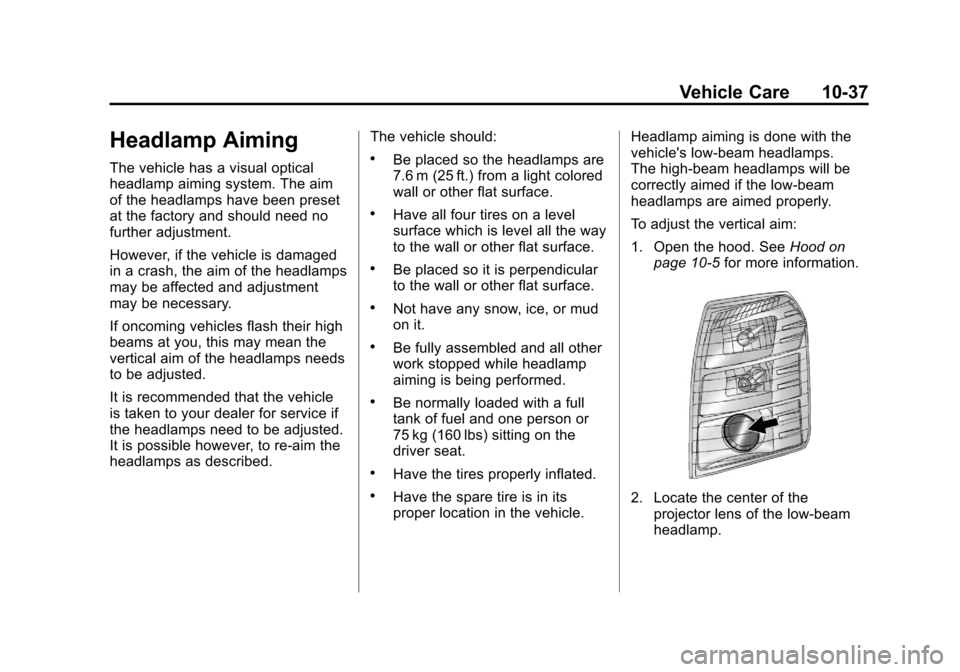
page 10‑5 for more information.2. Locate the center of the
projector lens of the low‐beam
headlamp.
Page 469 of 558
Black plate (65,1)Cadillac Escalade/Escalade ESV Owner Manual - 2011
Vehicle Care 10-65
After the tires have been
rotated, adjust the front and
rear inflation pressures as
shown on the Tire and Loading
Information label. SeeTire
Pressure on page 10‑57
and Vehicle Load Limits on
page 9‑24.
Reset the Tire Pressure Monitor
System. See Tire Pressure
Monitor Operation on
page 10‑60.
Make certain that all wheel
nuts are properly tightened.
See “Wheel Nut Torque” under
Capacities and Specifications on
page 12‑2.
{WARNING
Rust or dirt on a wheel, or on the
parts to which it is fastened, can
make wheel nuts become loose
after time. The wheel could come
(Continued)
WARNING (Continued)
off and cause an accident. When
changing a wheel, remove any
rust or dirt from places where
the wheel attaches to the vehicle.
In an emergency, use a cloth or a
paper towel to do this; but be sure
to use a scraper or wire brush
later, if needed, to get all the rust
or dirt off. SeeIf a Tire Goes Flat
on page 10‑73.
Lightly coat the center of the
wheel hub with wheel bearing
grease after a wheel change or
tire rotation to prevent corrosion
or rust build-up. Do not get
grease on the flat wheel
mounting surface or on the
wheel nuts or bolts.
When It Is Time for New
Tires
Various factors, such as
maintenance, temperatures, driving
speeds, vehicle loading, and road
conditions influence when you need
new tires.
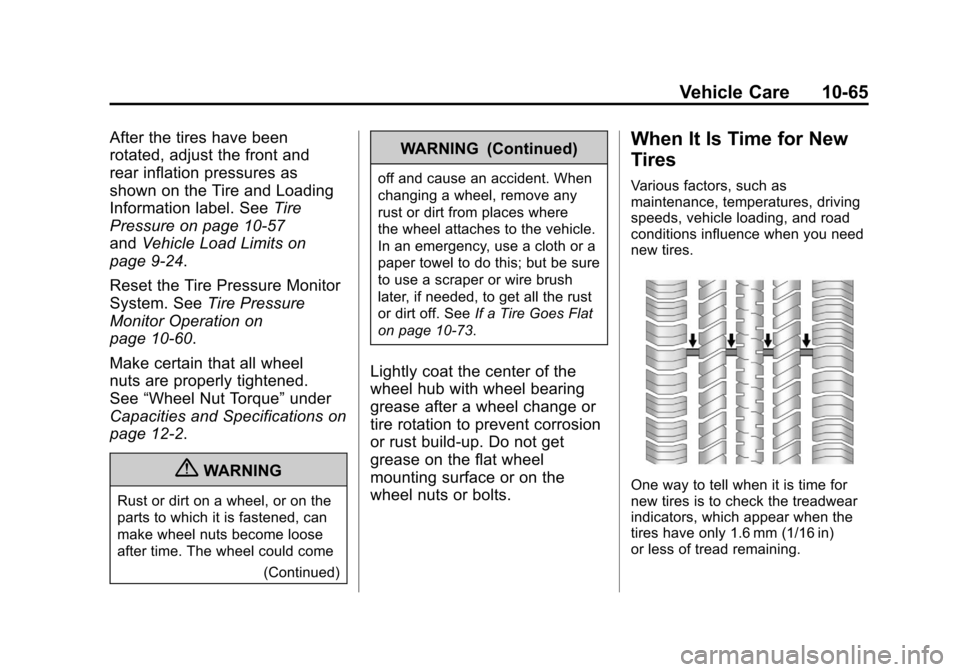
One way to tell when it is time for
new tires is to check the treadwear
indicators, which appear when the
tires have only 1.6 mm (1/16 in)
or less of tread remaining.