reset CADILLAC ESCALADE 2011 3.G Owner's Manual
[x] Cancel search | Manufacturer: CADILLAC, Model Year: 2011, Model line: ESCALADE, Model: CADILLAC ESCALADE 2011 3.GPages: 558, PDF Size: 7.59 MB
Page 180 of 558
Black plate (42,1)Cadillac Escalade/Escalade ESV Owner Manual - 2011
5-42 Instruments and Controls
AUTO DOOR LOCK
This feature allows you to select
when the vehicle's doors will
automatically lock. SeeAutomatic
Door Locks on page 2‑8 for more
information.
Press the customization button until
AUTO DOOR LOCK appears on
the DIC display. Press the set/reset
button once to access the settings
for this feature. Then press the
customization button to scroll
through the following settings:
SHIFT OUT OF PARK (default):
The doors will automatically lock
when the vehicle is shifted out of
P (Park).
AT VEHICLE SPEED: The doors
will automatically lock when the
vehicle speed is above 13 km/h
(8 mph) for three seconds. NO CHANGE:
No change will be
made to this feature. The current
setting will remain.
To select a setting, press the
set/reset button while the desired
setting is displayed on the DIC.
AUTO DOOR UNLOCK
This feature allows you to select
whether or not to turn off the
automatic door unlocking feature.
It also allows you to select which
doors and when the doors will
automatically unlock. See Automatic
Door Locks on page 2‑8 for more
information.
Press the customization button until
AUTO DOOR UNLOCK appears on
the DIC display. Press the set/reset
button once to access the settings
for this feature. Then press the
customization button to scroll
through the following settings:
OFF: None of the doors will
automatically unlock. DRIVER AT KEY OUT:
Only the
driver door will unlock when the key
is taken out of the ignition.
DRIVER IN PARK: Only the driver
door will unlock when the vehicle is
shifted into P (Park).
ALL AT KEY OUT: All of the doors
will unlock when the key is taken
out of the ignition.
ALL IN PARK (default): All of the
doors will unlock when the vehicle is
shifted into P (Park).
NO CHANGE: No change will be
made to this feature. The current
setting will remain.
To select a setting, press the
set/reset button while the desired
setting is displayed on the DIC.
Page 181 of 558

Black plate (43,1)Cadillac Escalade/Escalade ESV Owner Manual - 2011
Instruments and Controls 5-43
REMOTE DOOR LOCK
This feature allows you to select
the type of feedback you will receive
when locking the vehicle with
the Remote Keyless Entry (RKE)
transmitter. You will not receive
feedback when locking the vehicle
with the RKE transmitter if the doors
are open. SeeRemote Keyless
Entry (RKE) System Operation on
page 2‑3 for more information.
Press the customization button until
REMOTE DOOR LOCK appears on
the DIC display. Press the set/reset
button once to access the settings
for this feature. Then press the
customization button to scroll
through the following settings:
OFF: There will be no feedback
when you press the lock button on
the RKE transmitter. LIGHTS ONLY:
The exterior lamps
will flash when you press the lock
button on the RKE transmitter.
HORN ONLY: The horn will sound
on the second press of the lock
button on the RKE transmitter.
HORN & LIGHTS (default): The
exterior lamps will flash when you
press the lock button on the RKE
transmitter, and the horn will sound
when the lock button is pressed
again within five seconds of the
previous command.
NO CHANGE: No change will be
made to this feature. The current
setting will remain.
To select a setting, press the
set/reset button while the desired
setting is displayed on the DIC. REMOTE DOOR UNLOCK
This feature allows you to select the
type of feedback you will receive
when unlocking the vehicle with
the Remote Keyless Entry (RKE)
transmitter. You will not receive
feedback when unlocking the
vehicle with the RKE transmitter if
the doors are open. See
Remote
Keyless Entry (RKE) System
Operation on page 2‑3 for more
information.
Press the customization button
until REMOTE DOOR UNLOCK
appears on the DIC display. Press
the set/reset button once to access
the settings for this feature. Then
press the customization button to
scroll through the following settings:
LIGHTS OFF: The exterior lamps
will not flash when you press
the unlock button on the RKE
transmitter.
Page 182 of 558
Black plate (44,1)Cadillac Escalade/Escalade ESV Owner Manual - 2011
5-44 Instruments and Controls
LIGHTS ON (default):The exterior
lamps will flash when you press
the unlock button on the RKE
transmitter.
NO CHANGE: No change will be
made to this feature. The current
setting will remain.
To select a setting, press the
set/reset button while the desired
setting is displayed on the DIC.
DELAY DOOR LOCK
This feature allows you to select
whether or not the locking of the
vehicle's doors and liftgate will be
delayed. When locking the doors
and liftgate with the power door
lock switch and a door or the liftgate
is open, this feature will delay
locking the doors and liftgate until
five seconds after the last door is
closed. You will hear three chimes
to signal that the delayed locking
feature is in use. The key must be
out of the ignition for this feature to work. You can temporarily override
delayed locking by pressing the
power door lock switch twice.
See
Delayed Locking on page 2‑8
for more information.
Press the customization button until
DELAY DOOR LOCK appears on
the DIC display. Press the set/reset
button once to access the settings
for this feature. Then press the
customization button to scroll
through the following settings:
OFF: There will be no delayed
locking of the vehicle's doors.
ON (default): The doors will not
lock until five seconds after the last
door or the liftgate is closed.
NO CHANGE: No change will be
made to this feature. The current
setting will remain.
To select a setting, press the
set/reset button while the desired
setting is displayed on the DIC. EXIT LIGHTING
This feature allows you to select
the amount of time you want the
exterior lamps to remain on when
it is dark enough outside. This
happens after the key is turned
from ON/RUN to LOCK/OFF.
Press the customization button until
EXIT LIGHTING appears on the
DIC display. Press the set/reset
button once to access the settings
for this feature. Then press the
customization button to scroll
through the following settings:
OFF:
The exterior lamps will not
turn on.
30 SECONDS (default): The
exterior lamps will stay on for
30 seconds.
1 MINUTE: The exterior lamps will
stay on for 1 minute.
2 MINUTES: The exterior lamps will
stay on for 2 minutes.
Page 183 of 558
Black plate (45,1)Cadillac Escalade/Escalade ESV Owner Manual - 2011
Instruments and Controls 5-45
NO CHANGE:No change will be
made to this feature. The current
setting will remain.
To select a setting, press the
set/reset button while the desired
setting is displayed on the DIC.
APPROACH LIGHTING
This feature allows you to select
whether or not to have the exterior
lamps turn on briefly during low
light periods after unlocking the
vehicle using the Remote Keyless
Entry (RKE) transmitter.
Press the customization button until
APPROACH LIGHTING appears on
the DIC display. Press the set/reset
button once to access the settings
for this feature. Then press the
customization button to scroll
through the following settings:
OFF: The exterior lamps will not
turn on when you unlock the vehicle
with the RKE transmitter. ON (default):
If it is dark enough
outside, the exterior lamps will turn
on briefly when you unlock the
vehicle with the RKE transmitter.
The lamps will remain on for
20 seconds or until the lock button
on the RKE transmitter is pressed,
or the vehicle is no longer off.
See Remote Keyless Entry (RKE)
System Operation on page 2‑3 for
more information.
NO CHANGE : No change will be
made to this feature. The current
setting will remain.
To select a setting, press the
set/reset button while the desired
setting is displayed on the DIC.
AUTO HIGH BEAMS
If your vehicle has this feature, it
allows you to select to have the
IntelliBeam system turned off or on.
See Exterior Lamp Controls on
page 6‑1 for more information. Press the customization button until
AUTO HIGH BEAMS appears on
the DIC display. Press the set/reset
button once to access the settings
for this feature. Then press the
customization button to scroll
through the following settings:
OFF (default):
The IntelliBeam
system will be turned off.
ON: The IntelliBeam system will be
turned on.
NO CHANGE: No change will be
made to this feature. The current
setting will remain.
To select a setting, press the
set/reset button while the desired
setting is displayed on the DIC.
Page 184 of 558
Black plate (46,1)Cadillac Escalade/Escalade ESV Owner Manual - 2011
5-46 Instruments and Controls
CHIME VOLUME
This feature allows you to select the
volume level of the chime.
Press the customization button until
CHIME VOLUME appears on the
DIC display. Press the set/reset
button once to access the settings
for this feature. Then press the
customization button to scroll
through the following settings:
NORMAL:The chime volume will
be set to a normal level.
LOUD: The chime volume will be
set to a loud level.
NO CHANGE: No change will be
made to this feature. The current
setting will remain.
There is no default for chime
volume. The volume will stay at the
last known setting. To select a setting, press the
set/reset button while the desired
setting is displayed on the DIC.
PARK TILT MIRRORS
This feature allows you to select
whether or not the outside mirror(s)
will automatically tilt down when the
vehicle is shifted into R (Reverse).
See
Park Tilt Mirrors on page 2‑18
for more information.
Press the customization button until
PARK TILT MIRRORS appears on
the DIC display. Press the set/reset
button once to access the settings
for this feature. Then press the
customization button to scroll
through the following settings:
OFF (default): Neither outside
mirror will be tilted down when the
vehicle is shifted into R (Reverse). DRIVER MIRROR:
The driver
outside mirror will be tilted down
when the vehicle is shifted into
R (Reverse).
PASSENGER MIRROR: The
passenger outside mirror will be
tilted down when the vehicle is
shifted into R (Reverse).
BOTH MIRRORS: The driver and
passenger outside mirrors will be
tilted down when the vehicle is
shifted into R (Reverse).
NO CHANGE: No change will be
made to this feature. The current
setting will remain.
To select a setting, press the
set/reset button while the desired
setting is displayed on the DIC.
Page 185 of 558
Black plate (47,1)Cadillac Escalade/Escalade ESV Owner Manual - 2011
Instruments and Controls 5-47
EASY EXIT RECALL
If your vehicle has this feature, it
allows you to select your preference
for the automatic easy exit seat
feature. See“Memory Features” in
Power Seat Adjustment on page 3‑3
for more information.
Press the customization button until
EASY EXIT RECALL appears on
the DIC display. Press the set/reset
button once to access the settings
for this feature. Then press the
customization button to scroll
through the following settings:
DOOR BUTTON ONLY: No
automatic seat exit recall will occur.
The recall will only occur after
pressing the easy exit seat button.
BUTTON AND KEY OUT
(default): If the features are
enabled through the EASY EXIT
SETUP menu, the driver seat will
move back, and if the vehicle has the power tilt wheel feature, the
power steering column will move up
when the key is removed from the
ignition or after pressing the easy
exit seat button.
The automatic easy exit seat
movement will only occur one time
after the key is removed from the
ignition. If the automatic movement
has already occurred, and you put
the key back in the ignition and
remove it again, the seat and
steering column will stay in the
original exit position, unless a
memory recall took place prior
to removing the key again.
NO CHANGE:
No change will be
made to this feature. The current
setting will remain.
To select a setting, press the
set/reset button while the desired
setting is displayed on the DIC. EASY EXIT SETUP
If your vehicle has this feature, it
allows you to select which areas will
recall with the automatic easy exit
seat feature. It also allows you to
turn off the automatic easy exit
feature. See
“Memory Features” in
Power Seat Adjustment on page 3‑3
and “EASY EXIT RECALL” earlier
for more information.
Press the customization button until
EASY EXIT SETUP appears on the
DIC display. Press the set/reset
button once to access the settings
for this feature. Then press the
menu up/down button to scroll
through the following settings:
OFF: No automatic seat exit will
recall.
SEAT ONLY: The driver seat will
recall.
TILT ONLY: The steering wheel tilt
feature will recall.
Page 186 of 558
Black plate (48,1)Cadillac Escalade/Escalade ESV Owner Manual - 2011
5-48 Instruments and Controls
SEAT & TILT (default):The driver
seat and the steering wheel tilt
feature will recall.
NO CHANGE: No change will be
made to this feature. The current
setting will remain.
To select a setting, press the
set/reset button while the desired
setting is displayed on the DIC.
MEMORY SEAT RECALL
This feature allows you to select
your preference for the remote
memory seat recall feature. See
“Memory Features” inPower Seat
Adjustment on page 3‑3 for more
information.
Press the customization button
until MEMORY SEAT RECALL
appears on the DIC display.
Press the set/reset button once to
access the settings for this feature. Then press the customization button
to scroll through the following
settings:
OFF (default):
No remote memory
seat recall will occur.
ON: The driver seat, and on
some vehicles, the outside mirrors
will automatically move to the
stored driving position when the
unlock button on the Remote
Keyless Entry (RKE) transmitter
is pressed. On some vehicles with
the adjustable throttle and brake
pedal feature, the pedals will also
automatically move.
NO CHANGE: No change will be
made to this feature. The current
setting will remain.
To select a setting, press the
set/reset button while the desired
setting is displayed on the DIC. REMOTE START
If your vehicle has this feature, it
allows you to turn the remote start
off or on. The remote start feature
allows you to start the engine from
outside of the vehicle using the
Remote Keyless Entry (RKE)
transmitter. See
Remote Vehicle
Start on page 2‑5 for more
information.
Press the customization button until
REMOTE START appears on the
DIC display. Press the set/reset
button once to access the settings
for this feature. Then press the
customization button to scroll
through the following settings:
OFF: The remote start feature will
be disabled.
ON (default): The remote start
feature will be enabled.
NO CHANGE: No change will be
made to this feature. The current
setting will remain.
Page 187 of 558
Black plate (49,1)Cadillac Escalade/Escalade ESV Owner Manual - 2011
Instruments and Controls 5-49
To select a setting, press the
set/reset button while the desired
setting is displayed on the DIC.
DISPLAY DIGITAL SPEED
This feature allows you to enable or
disable the digital speedometer on
the DIC.
Press the customization button
until DISPLAY DIGITAL SPEED
appears on the DIC display. Press
the set/reset button once to access
the settings for this feature. Then
press the customization button to
scroll through the following settings:
OFF:The digital speedometer will
be disabled.
ON (default): The digital
speedometer will be enabled. NO CHANGE:
No change will be
made to this feature. The current
setting will remain.
To select a setting, press the
set/reset button while the desired
setting is displayed on the DIC.
FACTORY SETTINGS
This feature allows you to set all of
the customization features back to
their factory default settings.
Press the customization button until
FACTORY SETTINGS appears on
the DIC display. Press the set/reset
button once to access the settings
for this feature. Then press the
customization button to scroll
through the following settings:
RESTORE ALL (default): The
customization features will be set
to their factory default settings. DO NOT RESTORE:
The
customization features will not be
set to their factory default settings.
To select a setting, press the
set/reset button while the desired
setting is displayed on the DIC.
EXIT FEATURE SETTINGS
This feature allows you to exit the
feature settings menu.
Press the customization button
until PRESS
VTO EXIT FEATURE
SETTINGS appears in the DIC
display. Press the set/reset button
once to exit the menu.
If you do not exit, pressing the
customization button again will
return you to the beginning of the
feature settings menu.
Page 199 of 558
Black plate (5,1)Cadillac Escalade/Escalade ESV Owner Manual - 2011
Lighting 6-5
Disabling and Resetting
IntelliBeam at the Rearview Mirror
IntelliBeam can be disabled by
using the controls on the inside
rearview mirror.
AUTO
3(On/Off):To disable
the system, press this button
on the inside rearview mirror.
The IntelliBeam indicator will turn off
and will not come back on until the
IntelliBeam button is pressed again.
(Stalk Disable): When IntelliBeam
has turned on the high-beams,
pull or push the high-beam stalk.
This will disable IntelliBeam.
The IntelliBeam indicator on the
mirror will turn off. To re-enable
IntelliBeam, press the IntelliBeam
button on the mirror.
A different sensitivity setting is
available for dealer diagnostics.
This is done by pushing and holding this button for 20 seconds until the
IntelliBeam indicator light flashes
three times. If you accidentally
activate this, the vehicle's setting
will automatically be reset each time
the ignition is turned off and then
on again.
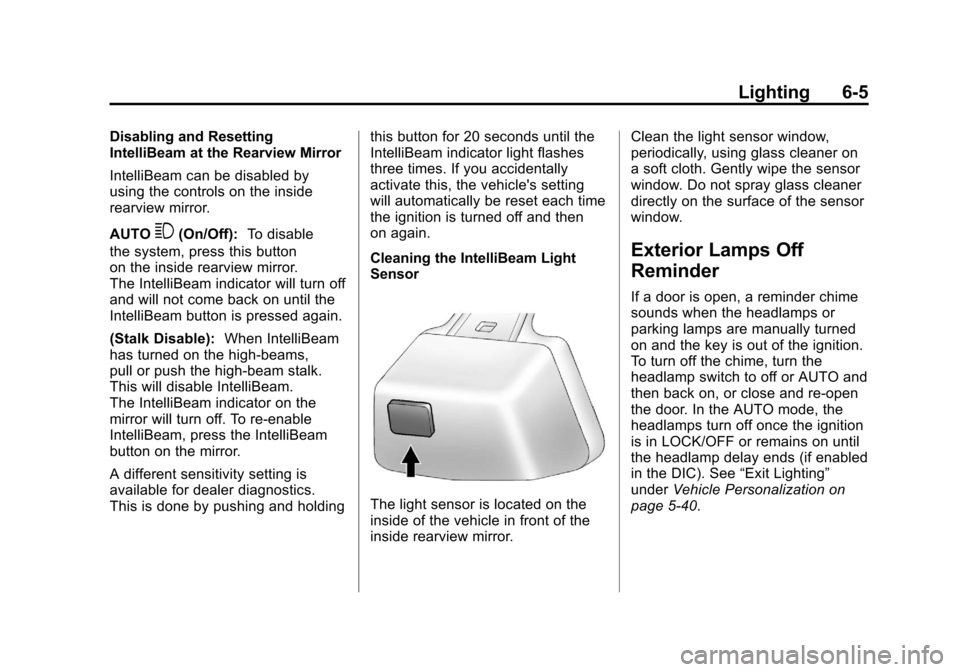
Cleaning the IntelliBeam Light
Sensor
The light sensor is located on the
inside of the vehicle in front of the
inside rearview mirror.Clean the light sensor window,
periodically, using glass cleaner on
a soft cloth. Gently wipe the sensor
window. Do not spray glass cleaner
directly on the surface of the sensor
window.
Exterior Lamps Off
Reminder
If a door is open, a reminder chime
sounds when the headlamps or
parking lamps are manually turned
on and the key is out of the ignition.
To turn off the chime, turn the
headlamp switch to off or AUTO and
then back on, or close and re-open
the door. In the AUTO mode, the
headlamps turn off once the ignition
is in LOCK/OFF or remains on until
the headlamp delay ends (if enabled
in the DIC). See
“Exit Lighting”
under Vehicle Personalization on
page 5‑40.
Page 208 of 558
Black plate (2,1)Cadillac Escalade/Escalade ESV Owner Manual - 2011
7-2 Infotainment System
Introduction
Read this manual thoroughly to
become familiar with how the
navigation system operates.
The navigation system includes
navigation and audio functions.
Keeping your eyes on the road
and your mind on the drive is
important for safe driving. The
navigation system has built-in
features intended to help keep
your eyes on the road and mind on
the drive. A few features may be
disabled while driving. Note that
these functions will be grayed-out.
A grayed-out function indicates it is
not available when the vehicle is
moving.All functions are available when the
vehicle is parked. Do the following
before driving:
.Become familiar with the
navigation system operation,
control buttons on the faceplate,
and touch-sensitive screen
buttons of the navigation
system.
.Set up the audio by presetting
favorite stations, setting the
tone, and adjusting the
speakers.
.Set up the navigation features
before beginning driving, such
as entering an address or a
preset destination.
.Set up your phone numbers
in advance so they can be
called easily with the press
of a single button or a single
voice command (for navigation
systems equipped with phone
capability).
{WARNING
Taking your eyes off the road too
long or too often while using the
navigation system could cause a
crash resulting in injury or death
to you or others. Focus your
attention on driving.
{WARNING
Avoid looking too long or too
often at the moving map on the
navigation screen. This could
cause a crash and you or others
can be injured or killed. Use the
turn-by-turn voice guidance
directions whenever possible.