lock CADILLAC ESCALADE 2012 3.G Manual Online
[x] Cancel search | Manufacturer: CADILLAC, Model Year: 2012, Model line: ESCALADE, Model: CADILLAC ESCALADE 2012 3.GPages: 538, PDF Size: 7.59 MB
Page 228 of 538

Black plate (44,1)Cadillac Escalade/Escalade ESV Owner Manual - 2012
7-44 Infotainment System
STOPc:Press once to stop
playing a DVD.
There is a pre-stop feature for DVD
and video CD only. This feature
resumes playback of the disc where
it was stopped. Press the stop
button once during disc playback
and
cdisplays on the DVD startup
screen. This icon disappears after a
few seconds. Press the stop button
a second time, or eject the disc, to
cancel the pre-stop feature and to
clear the disc position memory.
SOURCE: Press to select between
Monitor 3, Monitor 4, or the
AV INPUT.
Each video display screen can be
adjusted independently, as well as
display information from both DVD
players and both A/V inputs. Infrared Remote Sensor:
Located
in the top center of the video display
screen. Do not block the signal from
the remote to the sensor.
Infrared Transmitters: Located in
the top center of the video display
screen. Do not block the signal from
the headphones to the transmitter.
Video Display Screen: Located on
the back of each headrest.
AV OUTPUT (Audio/Video Output
Jack): Located on the lower left
side of the screen and is identified
on the video screen panel as the AV
OUTPUT.
Headphone Jack: Wired
headphones can be plugged
into the headphone jack with
one-eighth inch stereo plugs. AV INPUT: (Audio/Video Input
Jack):
The audio/video input jack
is located below the video display
screen and allows viewing of
auxiliary sources such as portable
DVD players, game stations,
or video cameras, on each screen..Video Input —The yellow
connector is used for video
input.
.L Audio —The white connector
is used for the left side audio.
.R Audio —The red connector is
used for the right side audio.
Level Lock and Release Latch:
The viewing angle of the video
screen can be adjusted by releasing
the latch and gently moving the
screen. Then lock it into a secure
position.
Page 230 of 538

Black plate (46,1)Cadillac Escalade/Escalade ESV Owner Manual - 2012
7-46 Infotainment System
VOL0(Volume):Use to adjust
the volume on the headphones.
Notice: Do not store the
headphones in heat or direct
sunlight. This could damage the
headphones and repairs will
not be covered by the warranty.
Storage in extreme cold can
weaken the batteries. Keep the
headphones stored in a cool, dry
place.
Remote Control
To use the remote control, aim at
the remote sensor located on top
center of the video display screen
and press the desired button. Objects blocking the line-of-sight
can affect the function of the
remote control. Direct or very bright
light can affect the ability of the
transmitter to receive signals from
the remote control. If the remote
control does not seem to be
working, the batteries might need
to be replaced. See
“Battery
Replacement” following this section.
The remote control provided with
the Headrest DVD RSE system, is
not a universal remote control and
will not control other equipment.
Notice: Storing the remote
control in a hot area or in direct
sunlight can damage it, and the
repairs will not be covered by the
warranty. Storage in extreme cold
can weaken the batteries. Keep
the remote control stored in a
cool, dry place. Remote Control ButtonsPOWER:
Press to turn the
Headrest DVD RSE system on
and off.
SOURCE: Press to select between
Monitor 3, Monitor 4, or AV INPUT.
Any video equipment connected
to the AV inputs automatically
overrides the source selection.
Page 239 of 538
Black plate (55,1)Cadillac Escalade/Escalade ESV Owner Manual - 2012
Infotainment System 7-55
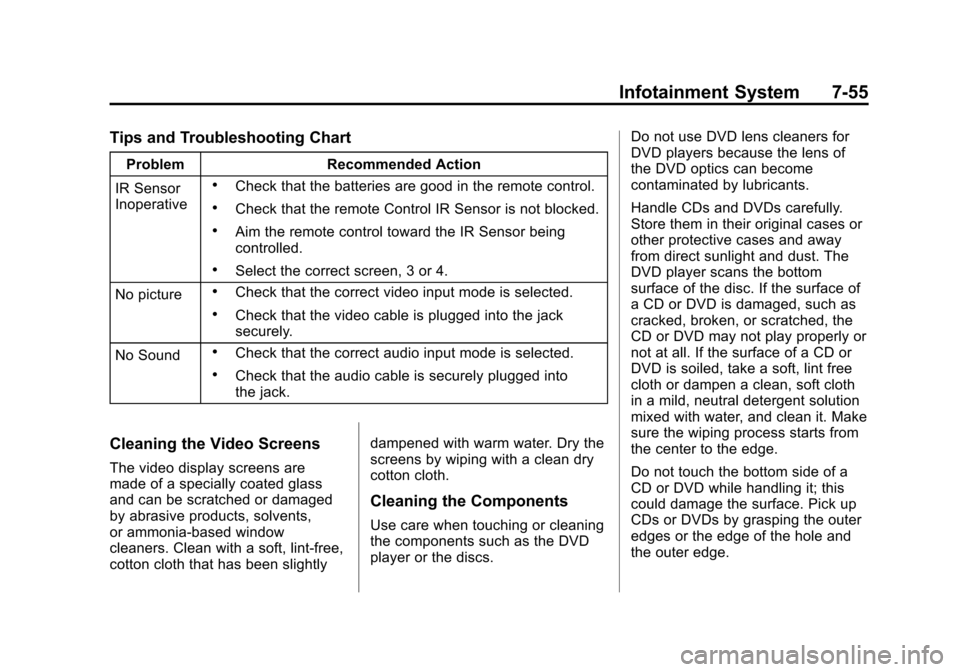
Tips and Troubleshooting Chart
ProblemRecommended Action
IR Sensor
Inoperative
.Check that the batteries are good in the remote control.
.Check that the remote Control IR Sensor is not blocked.
.Aim the remote control toward the IR Sensor being
controlled.
.Select the correct screen, 3 or 4.
No picture
.Check that the correct video input mode is selected.
.Check that the video cable is plugged into the jack
securely.
No Sound
.Check that the correct audio input mode is selected.
.Check that the audio cable is securely plugged into
the jack.
Cleaning the Video Screens
The video display screens are
made of a specially coated glass
and can be scratched or damaged
by abrasive products, solvents,
or ammonia-based window
cleaners. Clean with a soft, lint-free,
cotton cloth that has been slightly dampened with warm water. Dry the
screens by wiping with a clean dry
cotton cloth.
Cleaning the Components
Use care when touching or cleaning
the components such as the DVD
player or the discs.Do not use DVD lens cleaners for
DVD players because the lens of
the DVD optics can become
contaminated by lubricants.
Handle CDs and DVDs carefully.
Store them in their original cases or
other protective cases and away
from direct sunlight and dust. The
DVD player scans the bottom
surface of the disc. If the surface of
a CD or DVD is damaged, such as
cracked, broken, or scratched, the
CD or DVD may not play properly or
not at all. If the surface of a CD or
DVD is soiled, take a soft, lint free
cloth or dampen a clean, soft cloth
in a mild, neutral detergent solution
mixed with water, and clean it. Make
sure the wiping process starts from
the center to the edge.
Do not touch the bottom side of a
CD or DVD while handling it; this
could damage the surface. Pick up
CDs or DVDs by grasping the outer
edges or the edge of the hole and
the outer edge.
Page 274 of 538
Black plate (90,1)Cadillac Escalade/Escalade ESV Owner Manual - 2012
7-90 Infotainment System
After pressing the INFO
(information) screen button,
the type of traffic condition, the
street name, and a description of
the traffic condition displays. See
“Scrolling the Map”underMaps on
page 7‑60 for more information.
To display traffic events in another
state or a great distance away,
scroll to the desired area, and
then stop scrolling. Wait for the
traffic to update. It may take up to
two minutes before traffic in this new
area can be received and displayed.
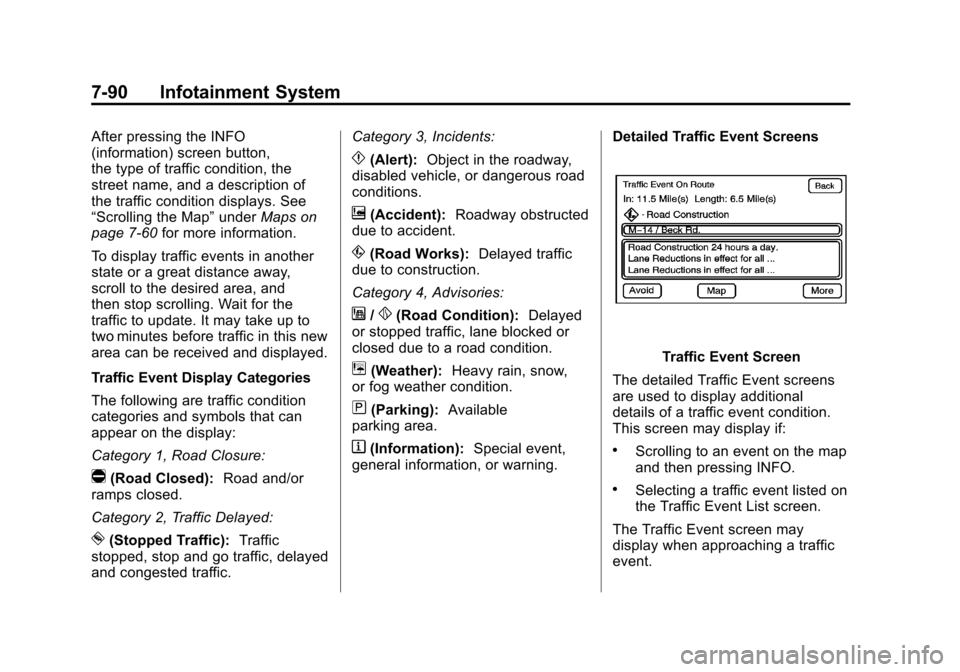
Traffic Event Display Categories
The following are traffic condition
categories and symbols that can
appear on the display:
Category 1, Road Closure:
q(Road Closed): Road and/or
ramps closed.
Category 2, Traffic Delayed:
o(Stopped Traffic): Traffic
stopped, stop and go traffic, delayed
and congested traffic. Category 3, Incidents:
p(Alert):
Object in the roadway,
disabled vehicle, or dangerous road
conditions.
t(Accident): Roadway obstructed
due to accident.
s(Road Works): Delayed traffic
due to construction.
Category 4, Advisories:
j/r(Road Condition): Delayed
or stopped traffic, lane blocked or
closed due to a road condition.
k(Weather): Heavy rain, snow,
or fog weather condition.
m(Parking): Available
parking area.
l(Information): Special event,
general information, or warning. Detailed Traffic Event Screens
Traffic Event Screen
The detailed Traffic Event screens
are used to display additional
details of a traffic event condition.
This screen may display if:
.Scrolling to an event on the map
and then pressing INFO.
.Selecting a traffic event listed on
the Traffic Event List screen.
The Traffic Event screen may
display when approaching a traffic
event.
Page 278 of 538

Black plate (94,1)Cadillac Escalade/Escalade ESV Owner Manual - 2012
7-94 Infotainment System
Setting the Clock
The navigation system time and the
analog clock operate independently.
Changing the time through the
navigation system does not change
the time on the analog clock. See
Clock on page 5‑7to change the
analog clock time.
Press CONFIG to enter the
configure menu options, then
press CONFIG repeatedly until the
time is selected or press the time
screen button.
Hours: Press−or + to decrease or
increase the hours.
Minutes: Press−or + to decrease
or increase the minutes.
12/24 Format: Select the
12 screen button for standard
time; select the 24 screen button for
military time.
Global Positioning
System (GPS)
The navigation system determines
the position of the vehicle by using
satellite signals, various vehicle
signals, and map data.
At times, other interferences such
as the satellite condition, road
configuration, the condition of the
vehicle and/or other circumstances
can interfere with the navigation
system's ability to determine the
accurate position of the vehicle.
The GPS shows the current position
of the vehicle using signals sent by
the GPS Satellites of the United
States Department of Defense.
When the vehicle is not receiving
signals from the satellites, a symbol
appears on the map screen. Refer
to Global Positioning System (GPS)
on page 7‑94. This system may not be available or
interferences may occur if any of the
following are true:.Signals are obstructed by tall
buildings, trees, large trucks,
or a tunnel.
.Objects are located on the front
dash of the vehicle.
.Satellites are being repaired or
improved.
.After-market glass tinting has
been applied to the vehicle's
windshield.
Notice: Do not apply after-market
glass tinting to the vehicle's
windows. Glass tinting interferes
with the system's ability to
receive GPS signals and causes
the system to malfunction.
The window might have to be
replaced to correct the problem.
This would not be covered by the
warranty.
Page 294 of 538

Black plate (2,1)Cadillac Escalade/Escalade ESV Owner Manual - 2012
8-2 Climate Controls
Off:Press the driver side
temperature knob to turn the climate
control system off. Outside air still
enters the vehicle, and is directed
to the floor. This direction can be
changed by pressing the mode
button. The temperature can also be
adjusted using either temperature
knob. Press the up or down arrows
on the fan switch, the defrost button,
the AUTO button, driver side
temperature knob, or the air
conditioning button to turn the
system on when it is off.
Driver and Passenger Side
Temperature Knob
The driver and passenger side
temperature knobs are used to
adjust the temperature of the air
coming through the system on the
driver or passenger side of the
vehicle. The temperature can be
adjusted even if the system is
turned off. This is possible since
outside air always flows through the
system as the vehicle is moving forward unless it is set to
recirculation mode. See
“Recirculation”
later in this section.
Turn the knob clockwise or
counterclockwise to increase or
decrease the cabin temperature.
The display will show the
temperature setting increasing
or decreasing.
Set the passenger temperature
setting to match the driver
temperature setting by pressing the
passenger temperature knob.
When in defrost mode the
passenger temperature setting
cannot be changed.
Automatic Operation
AUTO (Automatic): When
automatic operation is active the
system will control the inside
temperature, the air delivery, and
the fan speed. Use the steps below to place the
entire system in automatic mode:
1. Press the AUTO button.
When AUTO is selected, the
display will change to show the
current temperature(s) and
AUTO come on the display. The
current delivery mode and fan
speed will also be displayed for
approximately 5 seconds.
When AUTO is selected, the
air conditioning operation and
air inlet will be automatically
controlled. The air conditioning
compressor will run when the
outside temperature is over
about 4°C (40°F). The air inlet
will normally be set to outside
air. If it is hot outside, the air
inlet may automatically switch to
recirculate inside air to help
quickly cool down the vehicle.
The light on the button comes on
in recirculation.
Page 301 of 538
Black plate (1,1)Cadillac Escalade/Escalade ESV Owner Manual - 2012
Driving and Operating 9-1
Driving and
Operating
Driving Information
Distracted Driving . . . . . . . . . . . . . 9-2
Defensive Driving . . . . . . . . . . . . . 9-3
Drunk Driving . . . . . . . . . . . . . . . . . 9-3
Control of a Vehicle . . . . . . . . . . . 9-3
Braking . . . . . . . . . . . . . . . . . . . . . . . 9-3
Steering . . . . . . . . . . . . . . . . . . . . . . . 9-4
Off-Road Recovery . . . . . . . . . . . . 9-5
Loss of Control . . . . . . . . . . . . . . . . 9-5
Off-Road Driving . . . . . . . . . . . . . . 9-6
Driving on Wet Roads . . . . . . . 9-10
Highway Hypnosis . . . . . . . . . . . 9-11
Hill and Mountain Roads . . . . . 9-12
Winter Driving . . . . . . . . . . . . . . . 9-12
If the Vehicle Is Stuck . . . . . . . . 9-14
Vehicle Load Limits . . . . . . . . . . 9-15
Starting and Operating
New Vehicle Break-In . . . . . . . . 9-21
Adjustable Throttle and BrakePedal . . . . . . . . . . . . . . . . . . . . . . . 9-21
Ignition Positions . . . . . . . . . . . . 9-22
Starting the Engine . . . . . . . . . . 9-23
Engine Heater . . . . . . . . . . . . . . . 9-24 Retained Accessory
Power (RAP) . . . . . . . . . . . . . . . 9-25
Shifting Into Park . . . . . . . . . . . . 9-26
Shifting out of Park . . . . . . . . . . 9-27
Parking over Things That Burn . . . . . . . . . . . . . . . . . . 9-27
Active Fuel Management
®. . . 9-27
Engine Exhaust
Engine Exhaust . . . . . . . . . . . . . . 9-28
Running the Vehicle While Parked . . . . . . . . . . . . . . . . . . . . . 9-29
Automatic Transmission
Automatic Transmission . . . . . 9-29
Manual Mode . . . . . . . . . . . . . . . . 9-32
Tow/Haul Mode . . . . . . . . . . . . . . 9-33
Drive Systems
All-Wheel Drive . . . . . . . . . . . . . . 9-34
Brakes
Antilock BrakeSystem (ABS) . . . . . . . . . . . . . . 9-34
Parking Brake . . . . . . . . . . . . . . . 9-35
Brake Assist . . . . . . . . . . . . . . . . . 9-36
Hill Start Assist (HSA) . . . . . . . 9-36
Ride Control Systems
StabiliTrak®System . . . . . . . . . 9-37
Locking Rear Axle . . . . . . . . . . . 9-39
Road Sensing Suspension . . . 9-39
Continuous Damping Control (CDC) . . . . . . . . . . . . . . 9-40
Automatic Level Control . . . . . 9-40
Cruise Control
Cruise Control . . . . . . . . . . . . . . . 9-41
Object Detection Systems
Ultrasonic Parking Assist . . . . 9-43
Side Blind Zone Alert (SBZA) . . . . . . . . . . . . . . . 9-45
Rear Vision Camera (RVC) . . . . . . . . . . . . . 9-47
Fuel
Fuel . . . . . . . . . . . . . . . . . . . . . . . . . 9-51
Recommended Fuel . . . . . . . . . 9-51
Gasoline Specifications (U.S.and Canada Only) . . . . . . . . . . 9-52
California Fuel Requirements . . . . . . . . . . . . . . 9-52
Fuels in Foreign Countries . . . 9-52
Fuel Additives . . . . . . . . . . . . . . . 9-52
Page 304 of 538
Black plate (4,1)Cadillac Escalade/Escalade ESV Owner Manual - 2012
9-4 Driving and Operating
Helpful braking tips to keep in mind
include:
.Keep enough distance between
you and the vehicle in front
of you.
.Avoid needless heavy braking.
.Keep pace with traffic.
If the engine ever stops while the
vehicle is being driven, brake
normally but do not pump the
brakes. Doing so could make the
pedal harder to push down. If the
engine stops, there will be some
power brake assist but it will be
used when the brake is applied.
Once the power assist is used up,
it can take longer to stop and the
brake pedal will be harder to push.
Steering
Hydraulic Power Steering
Your vehicle has hydraulic
power steering. It may require
maintenance. See Power Steering
Fluid Power Steering Fluid on
page 10‑22.
If power steering assist is lost
because the engine stops or the
power steering system is not
functioning, the vehicle can be
steered but may required increased
effort. See your dealer if there is a
problem.
If the vehicle is a hybrid, see the
hybrid supplement for more
information.
Curve Tips
.Take curves at a reasonable
speed.
.Reduce speed before entering a
curve.
.Maintain a reasonable steady
speed through the curve
.Wait until the vehicle is out of
the curve before accelerating
gently into the straightaway.
Steering in Emergencies
.There are some situations when
steering around a problem may
be more effective than braking.
.Holding both sides of the
steering wheel allows you to turn
180 degrees without removing
a hand.
.Antilock Brake System (ABS)
allows steering while braking.
Page 306 of 538
Black plate (6,1)Cadillac Escalade/Escalade ESV Owner Manual - 2012
9-6 Driving and Operating
.Try to avoid sudden steering,
acceleration, or braking,
including reducing vehicle
speed by shifting to a lower
gear. Any sudden changes
could cause the tires to slide.
Remember: Antilock brakes help
avoid only the braking skid.
Off-Road Driving
All-wheel-drive vehicles can be
used for off-road driving. Vehicles
without all-wheel drive and vehicles
not equipped with All Terrain (AT) or
On-Off Road (OOR) tires must not
be driven off-road except on a level,
solid surface. To contact the tire
manufacturer for more information
about the original equipment tires,
see the Limited Warranty and
Owner Assistance Information
manual.
Controlling the vehicle is the key to
successful off-road driving. One of
the best ways to control the vehicle
is to control the speed.
{WARNING
When driving off-road, bouncing
and quick changes in direction
can easily throw you out of
position. This could cause you to
lose control and crash. You and
your passengers should always
wear safety belts.
Before Driving Off-Road
.Have all necessary maintenance
and service work completed.
.Fuel the vehicle, fill fluid levels,
and check inflation pressure in
all tires, including the spare,
if equipped.
.Read all the information about
all-wheel-drive vehicles in this
manual.
.Make sure all underbody
shields, if equipped, are properly
attached.
.Know the local laws that apply to
off-road driving. To gain more ground clearance if
needed, it may be necessary to
remove the front fascia lower
air dam.
Notice:
Operating the vehicle for
extended periods without the
front fascia lower air dam
installed can cause improper air
flow to the engine. Re‐attach the
front fascia air dam after off-road
driving.
Loading the Vehicle for
Off-Road Driving
{WARNING
.Unsecured cargo on the
load floor can be tossed
about when driving over
rough terrain. You or your
passengers can be struck by
flying objects. Secure the
cargo properly.
(Continued)
Page 313 of 538
Black plate (13,1)Cadillac Escalade/Escalade ESV Owner Manual - 2012
Driving and Operating 9-13
TheAntilock Brake System (ABS)
on page 9‑34 improves vehicle
stability during hard stops on
slippery roads, but apply the brakes
sooner than when on dry pavement.
Allow greater following distance on
any slippery road and watch for
slippery spots. Icy patches can
occur on otherwise clear roads in
shaded areas. The surface of a
curve or an overpass can remain icy
when the surrounding roads are
clear. Avoid sudden steering
maneuvers and braking while
on ice.
Turn off cruise control, if equipped,
on slippery surfaces.
Blizzard Conditions
Being stuck in snow can be a
serious situation. Stay with the
vehicle unless there is help
nearby. If possible, use the
Roadside Service (U.S. and Canada) on page 13‑8
or
Roadside Service (Mexico) on
page 13‑10. To get help and keep
everyone in the vehicle safe:
.Turn on the hazard warning
flashers.
.Tie a red cloth to an outside
mirror.
{WARNING
Snow can trap engine exhaust
under the vehicle. This may
cause exhaust gases to get
inside. Engine exhaust contains
carbon monoxide (CO) which
cannot be seen or smelled. It can
cause unconsciousness and even
death.
If the vehicle is stuck in the snow:
.Clear away snow from around
the base of your vehicle,
especially any that is blocking
the exhaust pipe.
(Continued)
WARNING (Continued)
.Check again from time to
time to be sure snow does
not collect there.
.Open a window about 5 cm
(2 in) on the side of the
vehicle that is away from the
wind to bring in fresh air.
.Fully open the air outlets on
or under the instrument
panel.
.Adjust the climate control
system to a setting that
circulates the air inside the
vehicle and set the fan speed
to the highest setting. See
“Climate Control Systems” in
the Index.
For more information about
carbon monoxide, see Engine
Exhaust on page 9‑28.
Run the engine for short periods
only as needed to keep warm, but
be careful.