ignition CADILLAC ESCALADE 2013 3.G Workshop Manual
[x] Cancel search | Manufacturer: CADILLAC, Model Year: 2013, Model line: ESCALADE, Model: CADILLAC ESCALADE 2013 3.GPages: 532, PDF Size: 7.69 MB
Page 233 of 532
Black plate (51,1)Cadillac Escalade/Escalade ESV Owner Manual - 2013 - CRC 2nd Edition - 10/
9/12
Infotainment System 7-51
Before Driving
The RSE is designed for rear seat
passengers only. The driver cannot
safely view the video screen while
driving and should not try to do so.
In severe or extreme weather
conditions, the RSE system might
not work until the temperature is
within the operating range. The
operating range for the RSE system
is above−20°C (−4°F) or below 60°
C (140°F). If the temperature of the
vehicle is outside this range, heat or
cool the vehicle until the
temperature is within the operating
range of the RSE system.
Parental Control
The RSE system may have a
Parental Control feature, depending
on which radio the vehicle has. To
start Parental Control, press and
hold the radio power button for more
than two seconds to stop all system
features such as: radio, video
screen, Rear Seat Audio (RSA), DVD, and/or CD. While Parental
Control is on, a padlock icon
displays.
The radio can be turned back on
with a single press of the power
button, but the RSE system will
remain under Parental Control.
To turn Parental Control off, press
and hold the radio power button for
more than two seconds. The RSE
returns from where it was previously
left and the padlock icon disappears
from the radio display.
Parental Control can also be turned
off by inserting or ejecting any disc,
pressing the play icon on the radio
DVD display menu, or changing an
ignition position.
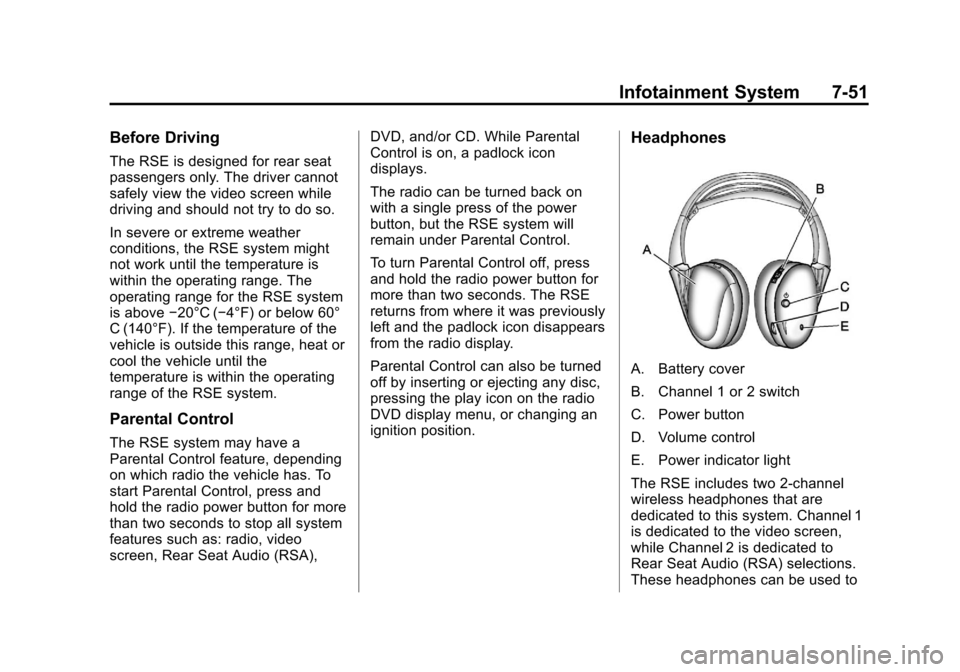
Headphones
A. Battery cover
B. Channel 1 or 2 switch
C. Power button
D. Volume control
E. Power indicator light
The RSE includes two 2-channel
wireless headphones that are
dedicated to this system. Channel 1
is dedicated to the video screen,
while Channel 2 is dedicated to
Rear Seat Audio (RSA) selections.
These headphones can be used to
Page 240 of 532
Black plate (58,1)Cadillac Escalade/Escalade ESV Owner Manual - 2013 - CRC 2nd Edition - 10/
9/12
7-58 Infotainment System
Tips and Troubleshooting Chart
ProblemRecommended Action
There is no power. The ignition might not be turned to ON/RUN or ACC/
ACCESSORY.
The picture does not fill the screen. There are black
borders on the top and bottom or on both sides, or the
picture looks stretched out. Check the display mode settings in the setup menu by
pressing the display menu button on the remote control.
In auxiliary mode, the picture moves or scrolls. Check the auxiliary input connections at both devices.
The remote control does not work. Check to make sure there is no obstruction between the
remote control and the transmitter window.
Check the batteries to make sure they are not dead or
installed incorrectly.
After stopping the player, and pushing Play, sometimes
the DVD starts where it left off and sometimes at the
beginning. If the stop button was pressed one time, the DVD player
resumes playing where the DVD was stopped. If the
stop button was pressed two times, the DVD player
begins to play from the beginning of the DVD.
The auxiliary source is running, but there is no picture or
sound. Check that the RSE video screen is in the auxiliary
source mode.
Check the auxiliary input connections at both devices.
Page 269 of 532
Black plate (87,1)Cadillac Escalade/Escalade ESV Owner Manual - 2013 - CRC 2nd Edition - 10/
9/12
Infotainment System 7-87
4. A list of all the address bookentries will display. Press and
hold Clear All.
5. A confirmation pop-up will display. Press OK to delete;
press Cancel to cancel the
operation.
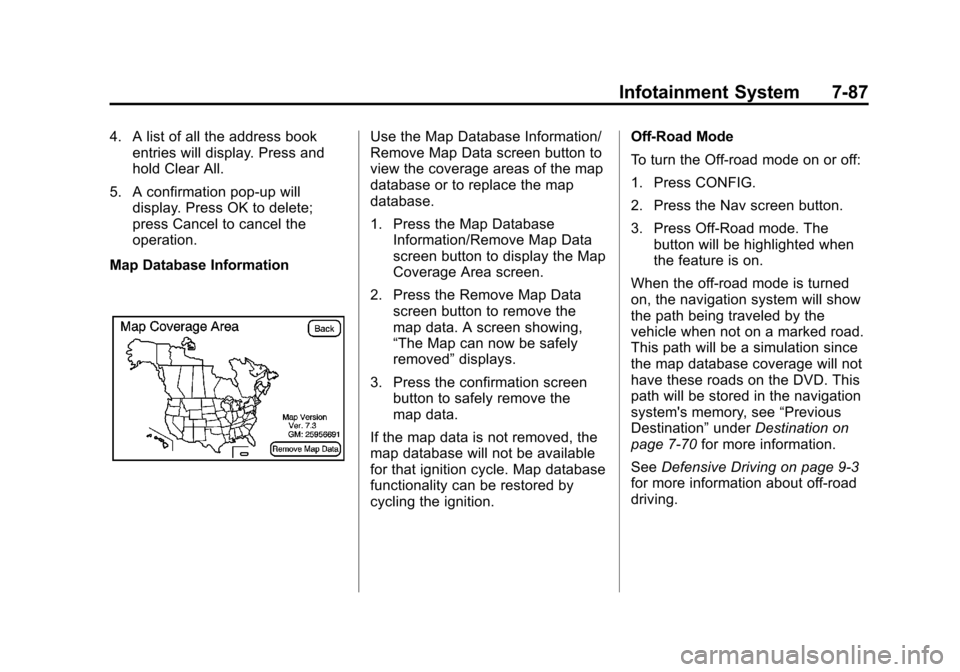
Map Database InformationUse the Map Database Information/
Remove Map Data screen button to
view the coverage areas of the map
database or to replace the map
database.
1. Press the Map Database Information/Remove Map Data
screen button to display the Map
Coverage Area screen.
2. Press the Remove Map Data screen button to remove the
map data. A screen showing,
“The Map can now be safely
removed” displays.
3. Press the confirmation screen button to safely remove the
map data.
If the map data is not removed, the
map database will not be available
for that ignition cycle. Map database
functionality can be restored by
cycling the ignition. Off-Road Mode
To turn the Off-road mode on or off:
1. Press CONFIG.
2. Press the Nav screen button.
3. Press Off-Road mode. The
button will be highlighted when
the feature is on.
When the off-road mode is turned
on, the navigation system will show
the path being traveled by the
vehicle when not on a marked road.
This path will be a simulation since
the map database coverage will not
have these roads on the DVD. This
path will be stored in the navigation
system's memory, see “Previous
Destination” underDestination on
page 7‑70 for more information.
See Defensive Driving on page 9‑3
for more information about off-road
driving.
Page 282 of 532
Black plate (100,1)Cadillac Escalade/Escalade ESV Owner Manual - 2013 - CRC 2nd Edition - 10/
9/12
7-100 Infotainment System
Database Coverage
Explanations
Coverage area depends upon the
map detail available. Some areas
have greater map detail than others.
The navigation system works only
as well as the information provided
on the stored map data. SeeMap
Data Updates on page 7‑99 on how
to obtain updated map information.
Voice Recognition
The navigation system's voice
recognition allows for hands-free
operation of the navigation system,
audio system, and OnStar (if
equipped) features.
Voice recognition can be used when
the ignition is on or when Retained
Accessory Power (RAP) is active.
See Retained Accessory Power
(RAP) on page 9‑26 for more
information. To use voice recognition:
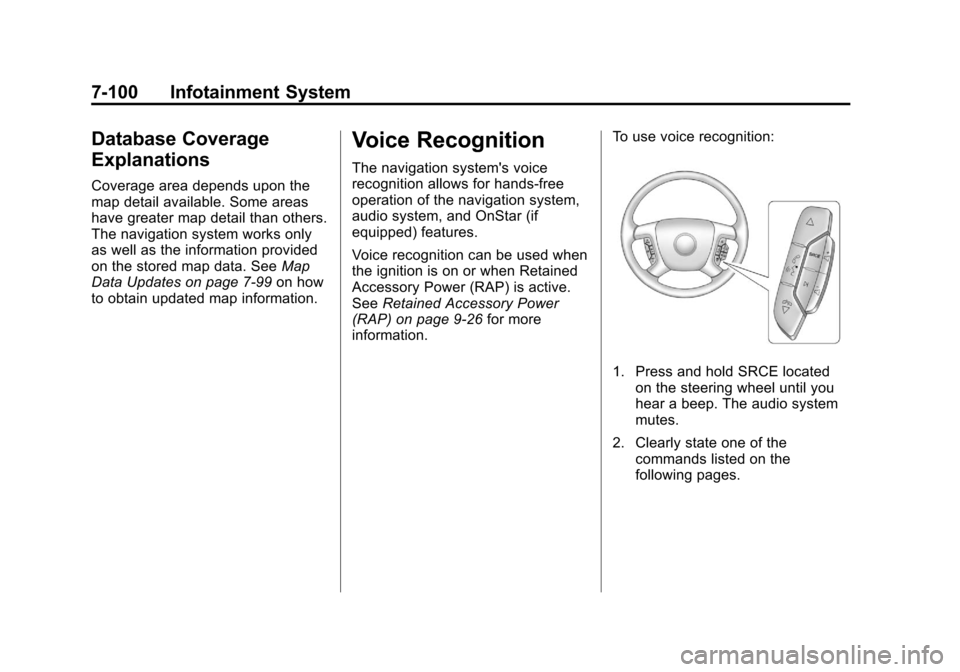
1. Press and hold SRCE located
on the steering wheel until you
hear a beep. The audio system
mutes.
2. Clearly state one of the commands listed on the
following pages.
Page 291 of 532
Black plate (109,1)Cadillac Escalade/Escalade ESV Owner Manual - 2013 - CRC 2nd Edition - 10/
9/12
Infotainment System 7-109
3. Use the dial or call command todial the number of the third party
to be called.
4. Once the call is connected, press
b/gto link all callers
together.
Ending a Call
Pressc/xto end a call.
Muting a Call
During a call, all sounds from inside
the vehicle can be muted so that the
person on the other end of the call
cannot hear them.
.To mute a call, pressb/g, and
then say “Mute call.”
.To cancel mute, pressb/g,
and then say “Un-mute call.”
Transferring a Call
Audio can be transferred between
the Bluetooth system and the cell
phone. The cell phone must be paired and
connected with the Bluetooth
system before a call can be
transferred. The connection process
can take up to two minutes after the
ignition is turned to ON/RUN.
Transferring Audio from the
Bluetooth System to a Cell Phone
During a call with the audio in the
vehicle:
1. Press
b/g.
2. Say “Transfer Call.”
Transferring Audio to the
Bluetooth System from a Cell
Phone
During a call with the audio on the
cell phone, press
b/g. The audio
transfers to the vehicle. If the audio
does not transfer to the vehicle, use
the audio transfer feature on the cell
phone. See your cell phone
manufacturer's user guide for more
information.
Voice Pass-Thru
Voice pass-thru allows access to the
voice recognition commands on the
cell phone. See your cell phone
manufacturer's user guide to see if
the cell phone supports this feature.
To access contacts stored in the cell
phone:
1. Press and hold
b/gfor
two seconds.
2. Say “Bluetooth.” This command
can be skipped.
3. Say “Voice.” The system
responds “OK, accessing
The cell phone's normal prompt
messages will go through their cycle
according to the phone's operating
instructions.
Page 297 of 532
Black plate (5,1)Cadillac Escalade/Escalade ESV Owner Manual - 2013 - CRC 2nd Edition - 10/
9/12
Climate Controls 8-5
The recirculation mode cannot be
used with floor, defog, or defrost
modes. If recirculation is selected
with one of those modes, the
indicator light flashes three times
and then turns off. The air
conditioning compressor also comes
on when this mode is activated.
While in recirculation mode the
windows may fog when the weather
is cold and damp. To clear the fog,
select either the defog or defrost
mode and increase the fan speed.
The recirculation mode can also be
turned off by turning off the ignition.
REAR (Rear Climate Control):For
vehicles with the rear heating and
air conditioning controls. Press the
REAR button to turn the rear climate
control system on or off. See Rear
Climate Control System (Rear
Climate with Rear Seat Audio) on
page 8‑6.Rear Window Defogger
The rear window defogger uses a
warming grid to remove fog from the
rear window.
1(Rear Window Defogger):
Press to turn the rear window
defogger on or off. It automatically
turns off after it has been activated.
The defogger can also be turned off
by turning off the engine. Do not
drive the vehicle until all the
windows are clear.
Notice: Do not use a razor blade
or sharp object to clear the inside
rear window. Do not adhere
anything to the defogger grid
lines in the rear glass. These
actions may damage the rear
defogger. Repairs would not be
covered by your warranty. Heated Mirrors:
Press
1to help
clear fog or frost from the surface of
the outside mirror. See “Outside
Heated Mirrors” inHeated Mirrors
on page 2‑16.
Heated or Cooled Seats: For
vehicles with heated and cooled
seats, see Heated and Ventilated
Front Seats on page 3‑7.
Page 301 of 532
Black plate (1,1)Cadillac Escalade/Escalade ESV Owner Manual - 2013 - CRC 2nd Edition - 10/
9/12
Driving and Operating 9-1
Driving and
Operating
Driving Information
Distracted Driving . . . . . . . . . . . . . 9-2
Defensive Driving . . . . . . . . . . . . . 9-3
Drunk Driving . . . . . . . . . . . . . . . . . 9-3
Control of a Vehicle . . . . . . . . . . . 9-3
Braking . . . . . . . . . . . . . . . . . . . . . . . 9-4
Steering . . . . . . . . . . . . . . . . . . . . . . . 9-4
Off-Road Recovery . . . . . . . . . . . . 9-5
Loss of Control . . . . . . . . . . . . . . . . 9-5
Off-Road Driving . . . . . . . . . . . . . . 9-6
Driving on Wet Roads . . . . . . . 9-10
Highway Hypnosis . . . . . . . . . . . 9-11
Hill and Mountain Roads . . . . . 9-12
Winter Driving . . . . . . . . . . . . . . . 9-12
If the Vehicle Is Stuck . . . . . . . . 9-14
Vehicle Load Limits . . . . . . . . . . 9-15
Starting and Operating
New Vehicle Break-In . . . . . . . . 9-21
Adjustable Throttle and BrakePedal . . . . . . . . . . . . . . . . . . . . . . . 9-22
Ignition Positions . . . . . . . . . . . . 9-22
Starting the Engine . . . . . . . . . . 9-24
Engine Heater . . . . . . . . . . . . . . . 9-25 Retained Accessory
Power (RAP) . . . . . . . . . . . . . . . 9-26
Shifting Into Park . . . . . . . . . . . . 9-26
Shifting out of Park . . . . . . . . . . 9-27
Parking over Things That Burn . . . . . . . . . . . . . . . . . . 9-28
Active Fuel Management
®. . . 9-28
Engine Exhaust
Engine Exhaust . . . . . . . . . . . . . . 9-28
Running the Vehicle While Parked . . . . . . . . . . . . . . . . . . . . . 9-29
Automatic Transmission
Automatic Transmission . . . . . 9-29
Manual Mode . . . . . . . . . . . . . . . . 9-32
Tow/Haul Mode . . . . . . . . . . . . . . 9-33
Drive Systems
All-Wheel Drive . . . . . . . . . . . . . . 9-34
Brakes
Antilock BrakeSystem (ABS) . . . . . . . . . . . . . . 9-34
Parking Brake . . . . . . . . . . . . . . . 9-35
Brake Assist . . . . . . . . . . . . . . . . . 9-36
Hill Start Assist (HSA) . . . . . . . 9-36
Ride Control Systems
StabiliTrak®System . . . . . . . . . 9-37
Locking Rear Axle . . . . . . . . . . . 9-39
Road Sensing Suspension . . . 9-40
Continuous Damping Control (CDC) . . . . . . . . . . . . . . 9-40
Automatic Level Control . . . . . 9-40
Cruise Control
Cruise Control . . . . . . . . . . . . . . . 9-41
Object Detection Systems
Ultrasonic Parking Assist . . . . 9-44
Side Blind Zone Alert (SBZA) . . . . . . . . . . . . . . . 9-45
Rear Vision Camera (RVC) . . . . . . . . . . . . . 9-47
Fuel
Fuel . . . . . . . . . . . . . . . . . . . . . . . . . 9-51
Recommended Fuel . . . . . . . . . 9-51
Gasoline Specifications . . . . . . 9-51
California FuelRequirements . . . . . . . . . . . . . . 9-52
Fuels in Foreign Countries . . . 9-52
Fuel Additives . . . . . . . . . . . . . . . 9-52
Fuel E85 (85% Ethanol) . . . . . 9-53
Filling the Tank . . . . . . . . . . . . . . 9-54
Filling a Portable Fuel Container . . . . . . . . . . . . . . . . . . . 9-56
Page 310 of 532
Black plate (10,1)Cadillac Escalade/Escalade ESV Owner Manual - 2013 - CRC 2nd Edition - 10/
9/12
9-10 Driving and Operating
{WARNING
Driving on frozen lakes, ponds,
or rivers can be dangerous. Ice
conditions vary greatly and the
vehicle could fall through the ice;
you and your passengers could
drown. Drive your vehicle on safe
surfaces only.
Driving in Water
{WARNING
Driving through rushing water can
be dangerous. Deep water can
sweep your vehicle downstream
and you and your passengers
could drown. If it is only shallow
water, it can still wash away the
ground from under your tires.
Traction could be lost, and the
vehicle could roll over. Do not
drive through rushing water.Notice:
Do not drive through
standing water if it is deep
enough to cover the wheel hubs,
axles or exhaust pipe. Deep water
can damage the axle and other
vehicle parts.
If the standing water is not too deep,
drive slowly through it. At faster
speeds, water splashes on the
ignition system and the vehicle can
stall. Stalling can also occur if you
get the tailpipe under water. While
the tailpipe is under water, you will
not be able to start the engine.
When going through water, the
brakes get wet, and it might take
longer to stop. See Driving on Wet
Roads.
After Off-Road Driving
Remove any brush or debris that
has collected on the underbody,
or chassis, or under the hood.
These accumulations can be a fire
hazard. After operation in mud or sand,
have the brake linings cleaned and
checked. These substances can
cause glazing and uneven braking.
Check the body structure, steering,
suspension, wheels, tires, and
exhaust system for damage and
check the fuel lines and cooling
system for any leakage.
More frequent maintenance service
is required. Refer to the
Maintenance Schedule on
page 11‑3.
Driving on Wet Roads
Rain and wet roads can reduce
vehicle traction and affect your
ability to stop and accelerate.
Always drive slower in these types
of driving conditions and avoid
driving through large puddles and
deep‐standing or flowing water.
Page 312 of 532
Black plate (12,1)Cadillac Escalade/Escalade ESV Owner Manual - 2013 - CRC 2nd Edition - 10/
9/12
9-12 Driving and Operating
Hill and Mountain Roads
Driving on steep hills or through
mountains is different than driving
on flat or rolling terrain. Tips for
driving in these conditions include:
.Keep the vehicle serviced and in
good shape.
.Check all fluid levels and brakes,
tires, cooling system, and
transmission.
.Shift to a lower gear when going
down steep or long hills.
{WARNING
If you do not shift down, the
brakes could get so hot that they
would not work well. You would
then have poor braking or even
none going down a hill. You could
crash. Shift down to let the engine
assist the brakes on a steep
downhill slope.
{WARNING
Coasting downhill in N (Neutral)
or with the ignition off is
dangerous. The brakes will have
to do all the work of slowing down
and they could get so hot that
they would not work well. You
would then have poor braking or
even none going down a hill.
Steering may also be affected
when ignition is off. You could
crash. Always have the engine
running and the vehicle in gear
when going downhill.
.Stay in your own lane. Do not
swing wide or cut across the
center of the road. Drive at
speeds that let you stay in your
own lane.
.Be alert on top of hills;
something could be in your lane
(stalled car, accident).
.Pay attention to special road
signs (falling rocks area, winding
roads, long grades, passing or
no-passing zones) and take
appropriate action.
Winter Driving
Driving on Snow or Ice
Drive carefully when there is snow
or ice between the tires and the
road, creating less traction or grip.
Wet ice can occur at about 0°C
(32°F) when freezing rain begins to
fall, resulting in even less traction.
Avoid driving on wet ice or in
freezing rain until roads can be
treated with salt or sand.
Drive with caution, whatever the
condition. Accelerate gently so
traction is not lost. Accelerating too
quickly causes the wheels to spin
and makes the surface under the
tires slick, so there is even less
traction.
Page 320 of 532
Black plate (20,1)Cadillac Escalade/Escalade ESV Owner Manual - 2013 - CRC 2nd Edition - 10/
9/12
9-20 Driving and Operating
{WARNING
Things you put inside the
vehicle can strike and injure
people in a sudden stop or
turn, or in a crash.
.Put things in the cargo
area of the vehicle. Try to
spread the weight evenly.
.Never stack heavier
things, like suitcases,
inside the vehicle so that
some of them are above
the tops of the seats.
.Do not leave an
unsecured child restraint
in the vehicle.
.When you carry something
inside the vehicle, secure
it whenever you can.
.Do not leave a seat folded
down unless you need to. There is also important loading
information for off-road driving in
this manual. See
“Loading Your
Vehicle for Off-Road Driving”
under Off-Road Driving on
page 9‑6.
Add-On Equipment
When you carry removable
items, you may need to put a
limit on how many people you
can carry inside your vehicle. Be
sure to weigh your vehicle
before you buy and install the
new equipment.
Notice: Overloading the
vehicle may cause damage.
Repairs would not be covered
by the vehicle warranty. Do
not overload the vehicle.
Remember not to exceed the
Gross Axle Weight
Rating (GAWR) of the front or
rear axle. Automatic Level Control
The automatic level control rear
suspension comes as a part of
the Road Sensing Suspension.
See
Road Sensing Suspension
on page 9‑40.
This type of level control is fully
automatic and will provide a
better leveled riding position as
well as better handling under a
variety of passenger and loading
conditions. An air compressor
connected to the rear shocks
will raise or lower the rear of the
vehicle to maintain proper
vehicle height. The system is
activated when the ignition key
is turned to RUN and will
automatically adjust vehicle
height thereafter. The system
may exhaust (lower vehicle
height) for up to 10 minutes after
the ignition key has been turned