phone CADILLAC ESCALADE 2014 User Guide
[x] Cancel search | Manufacturer: CADILLAC, Model Year: 2014, Model line: ESCALADE, Model: CADILLAC ESCALADE 2014Pages: 508, PDF Size: 7.64 MB
Page 181 of 508
Black plate (9,1)Cadillac Escalade/Escalade ESV Owner Manual (GMNA-Localizing-U.S./
Canada/Mexico-6081529) - 2014 - CRC 1st Edition - 4/23/13
Infotainment System 7-9
Radio
AM-FM Radio
Notice:Before adding any sound
equipment to the vehicle, such as
an audio system, CD player, CB
radio, mobile telephone,
or two-way radio, make sure that
it can be added by checking with
your dealer. Also, check federal
rules covering mobile radio and
telephone units. If sound
equipment can be added, it is
very important to do it properly.
Added sound equipment can
interfere with the operation of the
vehicle's engine, radio, or other
systems, and even damage them.
The vehicle's systems can
interfere with the operation of
sound equipment that has been
added.
Notice: The chime signals related
to safety belts, parking brake, and
other functions of the vehicle
operate through the navigation
system. If that equipment is replaced or additional equipment
is added to the vehicle, the
chimes may not work. Make sure
that replacement or additional
equipment is compatible with the
vehicle before installing it. See
“Accessories and Modifications”
in the vehicle's owner manual.
Playing the Radio
O/n(Power/Volume):
1. Press to turn the audio system on and off.
2. Turn to increase or to decrease the volume.
3. Press and hold for more than two seconds to turn off the
navigation system, the Rear
Seat Entertainment (RSE) video
screen, and Rear Seat Audio
(RSA). If the vehicle has not
been turned off, press this knob
to turn RSE and RSA back on
and to continue playback of the
last active source.
w(Tuning Knob): Turn to go to
the next or previous frequency or
disc track or chapter. See CD/DVD
Player on page 7-18 orMP3 on
page 7-26 for more information.
AUDIO: Press to display the audio
screen. Press to switch between
AM, FM, or XM, if equipped, Disc,
or AUX (Auxiliary), or press the
screen button. See CD/DVD Player
on page 7-18, MP3 on page 7-26,
and Auxiliary Devices on page 7-29
for more information.
Page 188 of 508
Black plate (16,1)Cadillac Escalade/Escalade ESV Owner Manual (GMNA-Localizing-U.S./
Canada/Mexico-6081529) - 2014 - CRC 1st Edition - 4/23/13
7-16 Infotainment System
Channel Unavail:This previously
assigned channel is no longer
assigned.
No Artist Info: No artist
information is available. The system
is working properly.
No Title Info: No song title
information is available. The system
is working properly.
No CAT Info: No category
information is available. The system
is working properly.
CAT Not Found: There are no
channels available for the selected
category. The system is working
properly.
No Information: No text or
informational messages are
available. The system is working
properly.
XM Theftlocked: The SiriusXM
receiver may have previously been
in another vehicle. For security
purposes, SiriusXM receivers
cannot be swapped between vehicles. If this message is received
after having your vehicle serviced,
check with your dealer.
XM Radio ID:
If tuned to channel 0,
this message will alternate with the
SiriusXM Radio eight digit radio ID
label. This label is needed to
activate the service.
Unknown: If this message is
received when tuned to channel 0,
there may be a receiver fault.
Consult with your dealer.
Check XM Receiver: If this
message does not clear within a
short period of time, the receiver
may have a fault. Consult with your
dealer.
No Subscription Please Renew:
The SiriusXM subscription needs to
be reactivated. Contact SiriusXM at
www.siriusxm.com or call
1-866-635-2349 (U.S) and
www.xmradio.ca or call
1-877-209-0079 (Canada).Radio Reception
Frequency interference and static
can occur during normal radio
reception if items such as cell phone
chargers, vehicle convenience
accessories, and external electronic
devices are plugged into the
accessory power outlet. If there is
interference or static, unplug the
item from the accessory power
outlet.
AM
The range for most AM stations is
greater than for FM, especially at
night. The longer range can cause
station frequencies to interfere with
each other. For better radio
reception, most AM radio stations
boost the power levels during the
day, and then reduce these levels
during the night. Static can also
occur when things like storms and
power lines interfere with radio
reception. When this happens, try
reducing the treble on the radio.
Page 189 of 508
Black plate (17,1)Cadillac Escalade/Escalade ESV Owner Manual (GMNA-Localizing-U.S./
Canada/Mexico-6081529) - 2014 - CRC 1st Edition - 4/23/13
Infotainment System 7-17
FM Stereo
FM signals only reach about
16 to 65 km (10 to 40 mi). Although
the radio has a built-in electronic
circuit that automatically works to
reduce interference, some static can
occur, especially around tall
buildings or hills, causing the sound
to fade in and out.
SiriusXM®Satellite Radio
Service
SiriusXM Satellite Radio Service
gives digital radio reception from
coast to coast in the 48 contiguous
United States, and in Canada. Just
as with FM, tall buildings or hills can
interfere with satellite radio signals,
causing the sound to fade in and
out. In addition, traveling or standing
under heavy foliage, bridges,
garages, or tunnels may cause loss
of the SiriusXM signal for a period
of time.
Cellular Phone Usage
Cellular phone usage may cause
interference with the vehicle's radio.
This interference may occur when
making or receiving phone calls,
charging the phone's battery,
or simply having the phone on. This
interference causes an increased
level of static while listening to the
radio. If static is received while
listening to the radio, unplug the
cellular phone and turn it off.
Rear Side Window
Antenna
The AM-FM antenna is located in
the passenger rear side windows.
Make sure the inside surfaces of the
rear side windows are not scratched
and that the lines on the glass are
not damaged. If the inside surfaces
are damaged, they could interfere
with radio reception.
If a cellular telephone antenna
needs to be attached to the glass,
make sure that the grid lines for the
AM-FM antenna are not damaged. There is enough space between the
grid lines to attach a cellular
telephone antenna without
interfering with radio reception.
Notice:
Using a razor blade or
sharp object to clear the inside of
the rear side windows may affect
radio reception or damage the
rear side window antenna.
Repairs would not be covered by
the warranty. Do not clear the
inside of the rear side windows
with sharp objects.
Notice: Do not apply aftermarket
glass tinting with metallic film.
The metallic film in some tinting
materials will interfere with or
distort the incoming radio
reception. Any damage caused to
the antenna due to metallic tinting
materials will not be covered by
the warranty.
Page 201 of 508
Black plate (29,1)Cadillac Escalade/Escalade ESV Owner Manual (GMNA-Localizing-U.S./
Canada/Mexico-6081529) - 2014 - CRC 1st Edition - 4/23/13
Infotainment System 7-29
2. Release to stop fast forwarding.The display shows the elapsed
time of the track.
q r(Folder/Artist/Album):
1. Select the left or right arrow to go to the previous or next folder,
artist, or album on the disc.
2. Press the middle screen button, with the folder, artist, or album
name, to sort the MP3 by folder,
artist, or album. It may take a
few minutes for the system to
sort the MP3.
y/©or¨/z(Seek/Scan):
1. To seek tracks, press the up arrow to go to the next track.
2. Press the down arrow to go to the start of the current track,
if more than eight seconds have
played.
3. If either arrow is pressed more than once, the player continues
moving backward or forward
through the CD. The sound
mutes while seeking.
w(Tuning Knob):
1. Turn counterclockwise one notch to go to the start of the current
track, turn it again to go to the
previous track.
2. Turn clockwise to go to the next track.
When playing an MP3 the rear seat
operator can power on the RSE
video screen and use the remote
control to navigate through the MP3.
Auxiliary Devices
Using the Auxiliary Input Jack
The navigation system has an
auxiliary input jack located on the
faceplate and in the center console.
This is not an audio output; do not
plug the headphone set into the
front auxiliary input jack. An external
audio device such as an iPod,
laptop computer, MP3 player, CD
player, or cassette tape player, etc.
can be connected to the auxiliary
input jack for use as another audio
source. Drivers are encouraged to set up
any auxiliary device while the
vehicle is in P (Park). See
Defensive
Driving on page 9-3 for more
information on driver distraction.
To use a portable audio player,
connect a 3.5 mm (1/8 in) cable to
the radio's front auxiliary input jack.
When a device is connected, press
AUDIO, then press AUDIO again
until AUX is selected or press the
AUX screen button to begin playing
audio from the device over the
vehicle speakers.
For optimal sound quality, increase
the portable audio device's volume
to the loudest level.
It is always best to power the
portable audio device through its
own battery while playing.
The vehicle may have a rear
entertainment system (RSE) with a
second and third row screen. The
RSE has audio adapters to allow
you to connect auxiliary devices.
The audio can be heard through the
speakers or through the wireless or
Page 202 of 508
Black plate (30,1)Cadillac Escalade/Escalade ESV Owner Manual (GMNA-Localizing-U.S./
Canada/Mexico-6081529) - 2014 - CRC 1st Edition - 4/23/13
7-30 Infotainment System
wired headphones. See the Rear
Seat Infotainment user guide for
more information.
Drivers are encouraged to set up
any auxiliary device while the
vehicle is in P (Park). See
Defensive Driving on page 9-3for
more information on driver
distraction.
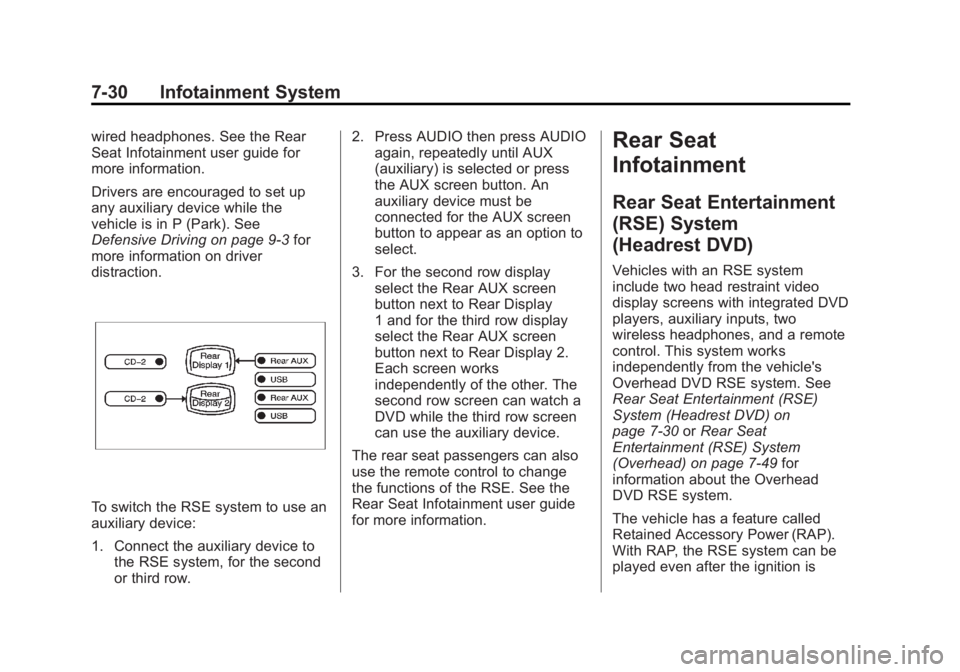
To switch the RSE system to use an
auxiliary device:
1. Connect the auxiliary device to the RSE system, for the second
or third row. 2. Press AUDIO then press AUDIO
again, repeatedly until AUX
(auxiliary) is selected or press
the AUX screen button. An
auxiliary device must be
connected for the AUX screen
button to appear as an option to
select.
3. For the second row display select the Rear AUX screen
button next to Rear Display
1 and for the third row display
select the Rear AUX screen
button next to Rear Display 2.
Each screen works
independently of the other. The
second row screen can watch a
DVD while the third row screen
can use the auxiliary device.
The rear seat passengers can also
use the remote control to change
the functions of the RSE. See the
Rear Seat Infotainment user guide
for more information.
Rear Seat
Infotainment
Rear Seat Entertainment
(RSE) System
(Headrest DVD)
Vehicles with an RSE system
include two head restraint video
display screens with integrated DVD
players, auxiliary inputs, two
wireless headphones, and a remote
control. This system works
independently from the vehicle's
Overhead DVD RSE system. See
Rear Seat Entertainment (RSE)
System (Headrest DVD) on
page 7-30 orRear Seat
Entertainment (RSE) System
(Overhead) on page 7-49 for
information about the Overhead
DVD RSE system.
The vehicle has a feature called
Retained Accessory Power (RAP).
With RAP, the RSE system can be
played even after the ignition is
Page 204 of 508
Black plate (32,1)Cadillac Escalade/Escalade ESV Owner Manual (GMNA-Localizing-U.S./
Canada/Mexico-6081529) - 2014 - CRC 1st Edition - 4/23/13
7-32 Infotainment System
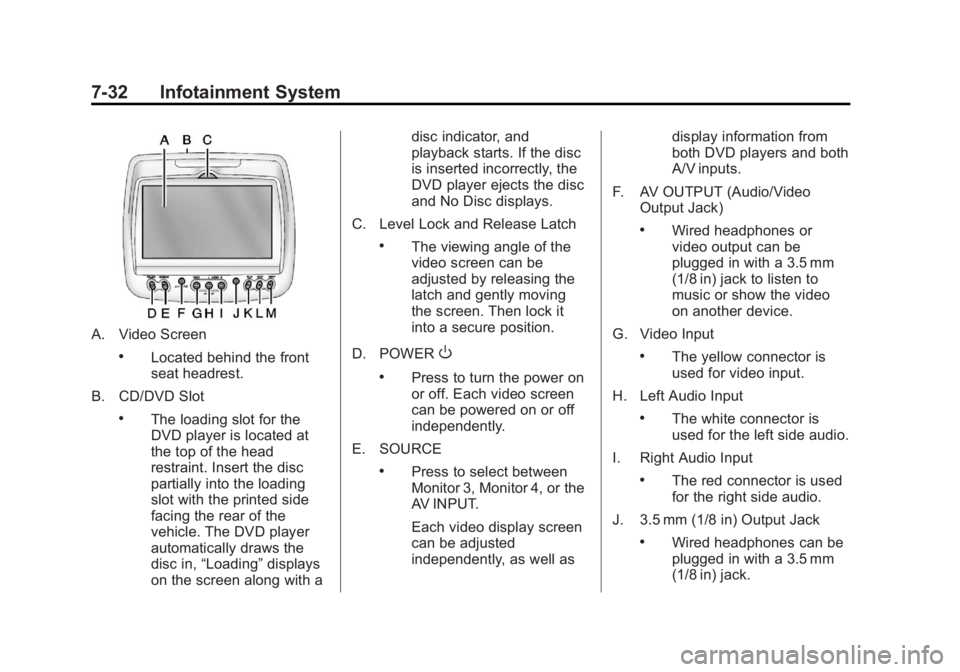
A. Video Screen
.Located behind the front
seat headrest.
B. CD/DVD Slot
.The loading slot for the
DVD player is located at
the top of the head
restraint. Insert the disc
partially into the loading
slot with the printed side
facing the rear of the
vehicle. The DVD player
automatically draws the
disc in, “Loading” displays
on the screen along with a disc indicator, and
playback starts. If the disc
is inserted incorrectly, the
DVD player ejects the disc
and No Disc displays.
C. Level Lock and Release Latch
.The viewing angle of the
video screen can be
adjusted by releasing the
latch and gently moving
the screen. Then lock it
into a secure position.
D. POWER
O
.Press to turn the power on
or off. Each video screen
can be powered on or off
independently.
E. SOURCE
.Press to select between
Monitor 3, Monitor 4, or the
AV INPUT.
Each video display screen
can be adjusted
independently, as well as display information from
both DVD players and both
A/V inputs.
F. AV OUTPUT (Audio/Video Output Jack)
.Wired headphones or
video output can be
plugged in with a 3.5 mm
(1/8 in) jack to listen to
music or show the video
on another device.
G. Video Input
.The yellow connector is
used for video input.
H. Left Audio Input
.The white connector is
used for the left side audio.
I. Right Audio Input
.The red connector is used
for the right side audio.
J. 3.5 mm (1/8 in) Output Jack
.Wired headphones can be
plugged in with a 3.5 mm
(1/8 in) jack.
Page 205 of 508
Black plate (33,1)Cadillac Escalade/Escalade ESV Owner Manual (GMNA-Localizing-U.S./
Canada/Mexico-6081529) - 2014 - CRC 1st Edition - 4/23/13
Infotainment System 7-33
K. PLAYr
.Press this button located
below the video display
screen to start playback of
a disc. On DVDs and video
CDs with playback
control (PBC), menu
screens can display
automatically. It might be
necessary to press the
play button again to
begin play.
There is a play position
memory feature for DVD
and video CD only. If the
DVD player is turned off
and then turned back on,
the DVD player resumes
playback where the disc
stopped. The play position
memory is erased if the
disc is removed.L. STOP
c
.Press once to stop playing
a DVD.
There is a pre-stop feature
for DVD and video CD
only. This feature resumes
playback of the disc where
it was stopped. Press the
stop button once during
disc playback and
c
displays on the DVD
startup screen. This icon
disappears after a few
seconds. Press the stop
button a second time,
or eject the disc, to cancel
the pre-stop feature and to
clear the disc position
memory.
M. EJECT
X
.Press to eject a disc from
the DVD slot.
If a disc is ejected from the
player, but not removed, it
will automatically reload
into the player. Another way to reload a disc that
has been ejected, but not
removed from the DVD
player, is to press the eject
button or the play button.
Infrared Remote Sensor: Located
in the top center of the video display
screen. Do not block the signal from
the remote to the sensor.
Infrared Transmitters: Located in
the top center of the video display
screen. Do not block the signal from
the headphones to the transmitter.
Using the Base RSE
On-Screen Display (OSD)
Menus
Use the OSD setup display
menus for:
.Initial setup
.Display setup
.Parental control setup
.Adjusting the picture quality
.Setting the various outputs
.On-screen display language
Page 210 of 508
Black plate (38,1)Cadillac Escalade/Escalade ESV Owner Manual (GMNA-Localizing-U.S./
Canada/Mexico-6081529) - 2014 - CRC 1st Edition - 4/23/13
7-38 Infotainment System
vehicle. The DVD player
automatically draws the
disc in,“Loading” displays
on the screen along with a
disc indicator, and
playback starts. If the disc
is inserted incorrectly, the
DVD player ejects the disc
and No Disc displays.
C. Level Lock and Release Latch
.The viewing angle of the
video screen can be
adjusted by releasing the
latch and gently moving
the screen. Then lock it
into a secure position.
D. POWER
O
.Press to turn the power on
or off. Each video screen
can be powered on or off
independently.
E. SOURCE
.Press to select between
Monitor 3, Monitor 4, or the
AV INPUT. Each video
display screen can be adjusted independently, as
well as display information
from both DVD players and
both A/V inputs.
F. USB Port
.Connect USB drive to
listen to music or view
pictures. To charge
devices, connect it to the
USB port. Not all devices
are able to be charged. For
playback, the formats
available are:
‐ JPEG
‐ JPG
‐ M2V
‐ MP3
‐ MPE
‐ MPEG-1
‐ MPEG-2
‐ MPEG-4
‐ MPG
‐ OGG ‐
WMA
‐ MWA
G. Video Input
.The yellow connector is
used for video input.
H. Left Audio Input
.The white connector is
used for the left side audio.
I. Right Audio Input
.The red connector is used
for the right side audio.
J. 3.5 mm (1/8 in) Output Jack
.Wired headphones can be
plugged in with a 3.5 mm
(1/8 in) jack.
K. PLAY
r
.Press this button located
below the video display
screen to start playback of
a disc. On DVDs and video
CDs with playback
control (PBC), menu
screens can display
automatically. It might be
Page 211 of 508
Black plate (39,1)Cadillac Escalade/Escalade ESV Owner Manual (GMNA-Localizing-U.S./
Canada/Mexico-6081529) - 2014 - CRC 1st Edition - 4/23/13
Infotainment System 7-39
necessary to press the
play button again to begin
play. There is a play
position memory feature
for DVD and video CD
only. If the DVD player is
turned off and then turned
back on, the DVD player
resumes playback where
the disc stopped. The play
position memory is erased
if the disc is removed.
L. STOP
c
.Press once to stop playing
a DVD.
There is a pre-stop feature
for DVD and video CD
only. This feature resumes
playback of the disc where
it was stopped. Press the
stop button once during
disc playback and
c
displays on the DVD
startup screen. This icon
disappears after a few
seconds. Press the stop
button a second time, or eject the disc, to cancel
the pre-stop feature and to
clear the disc position
memory.
M. EJECT
X
.Press to eject a disc from
the DVD slot.
If a disc is ejected from the
player, but not removed, it
will automatically reload
into the player. Another
way to reload a disc that
has been ejected, but not
removed from the DVD
player, is to press the eject
button or the play button.
Infrared Remote Sensor: Located
in the top center of the video display
screen. Do not block the signal from
the remote to the sensor.
Infrared Transmitters: Located in
the top center of the video display
screen. Do not block the signal from
the headphones to the transmitter.
Using the Uplevel RSE
On-Screen Display (OSD)
Menus
Use the OSD setup display
menus for:
.General Setup
.Audio Setup
.Quality Setup
.Preference Setup
To use the OSD menus while using
the DVD player or an auxiliary
device:
1. Press the SETUP button on the remote control to display the
icons and pages on the display
screen.
2. Select the desired page by using the left/right navigation arrows to
move the cursor.
3. Press the SETUP button again on the remote control to cancel
use of the setup display.
Page 214 of 508
Black plate (42,1)Cadillac Escalade/Escalade ESV Owner Manual (GMNA-Localizing-U.S./
Canada/Mexico-6081529) - 2014 - CRC 1st Edition - 4/23/13
7-42 Infotainment System
.PG
.PG 13
.PG R
.R
.NC 17
.ADULT
4. Press the left navigation arrow to confirm the selection.
If a disc is inserted into the DVD
compartment slot and it exceeds the
Parental Setting, the following
message appears on display:
The Parental Setting of this player
prohibits play. Would you like to
allow this disc to play?
If yes if selected, the six digit
password must be entered for the
disc to play. If the wrong password
is entered, the following message
appears:
This movie will not play due to the
Parental Setting of the player. To create a six digit password, use
the numeric keypad on the remote
control. Press the ENTER button to
confirm.
The default password is
136900.
To change the Parental Control
Password:
1. Press the SETUP button on the remote control
2. Navigate to the Password sub-menu under the Preference
Menu and press enter.
3. At the Old Password option, enter the old password or the
default password (136900).
4. At the New Password option, enter the new password (six
digits) using numeric buttons.
5. At the Confirm PWD option, confirm the new password by
entering the new password
again.
6. Scroll to the OK button and press ENTER. The message
“Your password has been
changed” displays. To reset the system back to the
factory default settings:
1. Press the SETUP button on the
remote control.
2. Use the left/right and down navigation arrows on the remote
control to select the Default
sub-menu under the Preference
Page and press the ENTER
button to reset the settings. The
parental settings will not be
affected.
Vehicle Speakers
Audio from the DVD player or an
auxiliary device can be heard
through the vehicle speakers or the
wireless/wired headphones, while
the radio is tuned to one of the six
frequencies selected on the Sound
Around portion of the system’s
remote control. See “Remote
Control” later in this section.
Only one audio source can be heard
through the vehicle’ s speakers at a
time. The audio source being used