lane assist CADILLAC ESCALADE 2016 4.G User Guide
[x] Cancel search | Manufacturer: CADILLAC, Model Year: 2016, Model line: ESCALADE, Model: CADILLAC ESCALADE 2016 4.GPages: 357, PDF Size: 3.49 MB
Page 233 of 357
Cadillac Escalade Owner Manual (GMNA-Localizing-MidEast-9369153) -
2016 - crc - 6/19/15
232 Driving and Operating
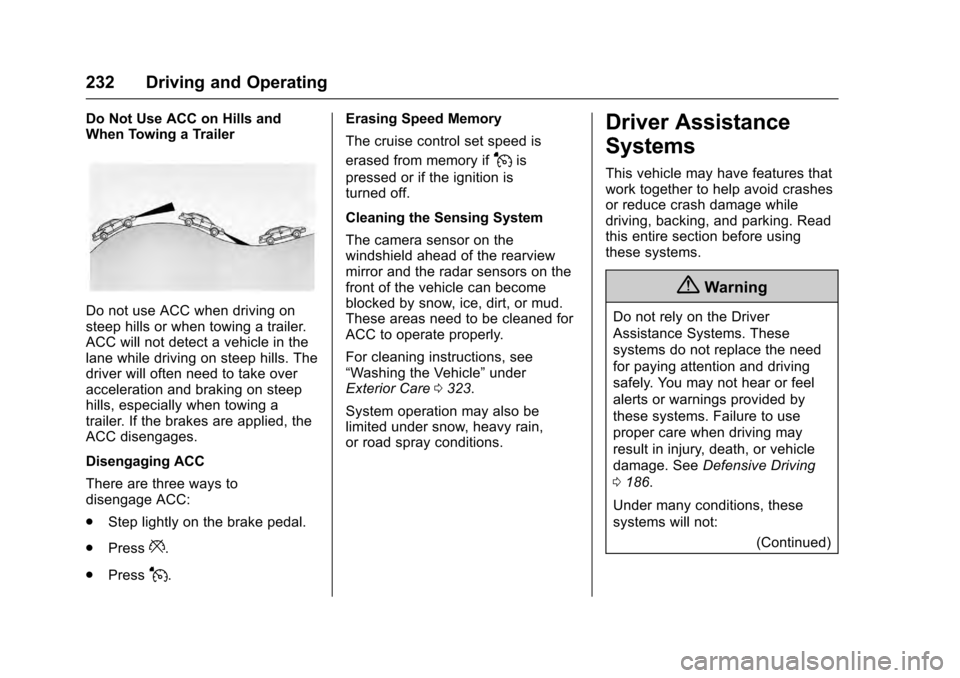
Do Not Use ACC on Hills and
When Towing a Trailer
Do not use ACC when driving on
steep hills or when towing a trailer.
ACC will not detect a vehicle in the
lane while driving on steep hills. The
driver will often need to take over
acceleration and braking on steep
hills, especially when towing a
trailer. If the brakes are applied, the
ACC disengages.
Disengaging ACC
There are three ways to
disengage ACC:
.Step lightly on the brake pedal.
. Press
*.
. Press
J. Erasing Speed Memory
The cruise control set speed is
erased from memory if
Jis
pressed or if the ignition is
turned off.
Cleaning the Sensing System
The camera sensor on the
windshield ahead of the rearview
mirror and the radar sensors on the
front of the vehicle can become
blocked by snow, ice, dirt, or mud.
These areas need to be cleaned for
ACC to operate properly.
For cleaning instructions, see
“Washing the Vehicle” under
Exterior Care 0323.
System operation may also be
limited under snow, heavy rain,
or road spray conditions.
Driver Assistance
Systems
This vehicle may have features that
work together to help avoid crashes
or reduce crash damage while
driving, backing, and parking. Read
this entire section before using
these systems.
{Warning
Do not rely on the Driver
Assistance Systems. These
systems do not replace the need
for paying attention and driving
safely. You may not hear or feel
alerts or warnings provided by
these systems. Failure to use
proper care when driving may
result in injury, death, or vehicle
damage. See Defensive Driving
0 186.
Under many conditions, these
systems will not: (Continued)
Page 239 of 357
Cadillac Escalade Owner Manual (GMNA-Localizing-MidEast-9369153) -
2016 - crc - 6/19/15
238 Driving and Operating
On some vehicles RCTA setting can
be turned off through“Collision/
Detection Systems” underVehicle
Personalization 0156
Assistance Systems for
Driving
If equipped, when driving the
vehicle in a forward gear, Forward
Collision Alert (FCA), Lane
Departure Warning (LDW), Lane
Keep Assist (LKA), Side Blind Zone
Alert (SBZA), Lane Change Alert
(LCA), and/or the Front Automatic
Braking (FAB) System can help to
avoid a crash or reduce crash
damage.
Forward Collision Alert
(FCA) System
If equipped, the FCA system may
help to avoid or reduce the harm
caused by front-end crashes. When
approaching a vehicle ahead too
quickly, FCA provides a red flashing
alert on the windshield and rapidly
beeps or pulses the driver seat. FCA also lights an amber visual
alert if following another vehicle
much too closely.
FCA detects vehicles within a
distance of approximately 60 m
(197 ft) and operates at speeds
above 40 km/h (25 mph). If the
vehicle has Adaptive Cruise Control
(ACC), it can detect vehicles to
distances of approximately 110 m
(360 ft) and operates at all speeds.
See
Adaptive Cruise Control 0225.
{Warning
FCA is a warning system and
does not apply the brakes. When
approaching a slower-moving or
stopped vehicle ahead too rapidly,
or when following a vehicle too
closely, FCA may not provide a
warning with enough time to help
avoid a crash. FCA does not warn
of pedestrians, animals, signs,
guardrails, bridges, construction
barrels, or other objects. Be ready
to take action and apply the
brakes. For more information, see
Defensive Driving 0186. FCA can be disabled with the FCA
steering wheel control, or if your
vehicle is equipped with Adaptive
Cruise Control (ACC), through
vehicle personalization. See the
“Auto Collision Preparation”
portion
of “Collision/Detection Systems”
under Vehicle Personalization
0 156.
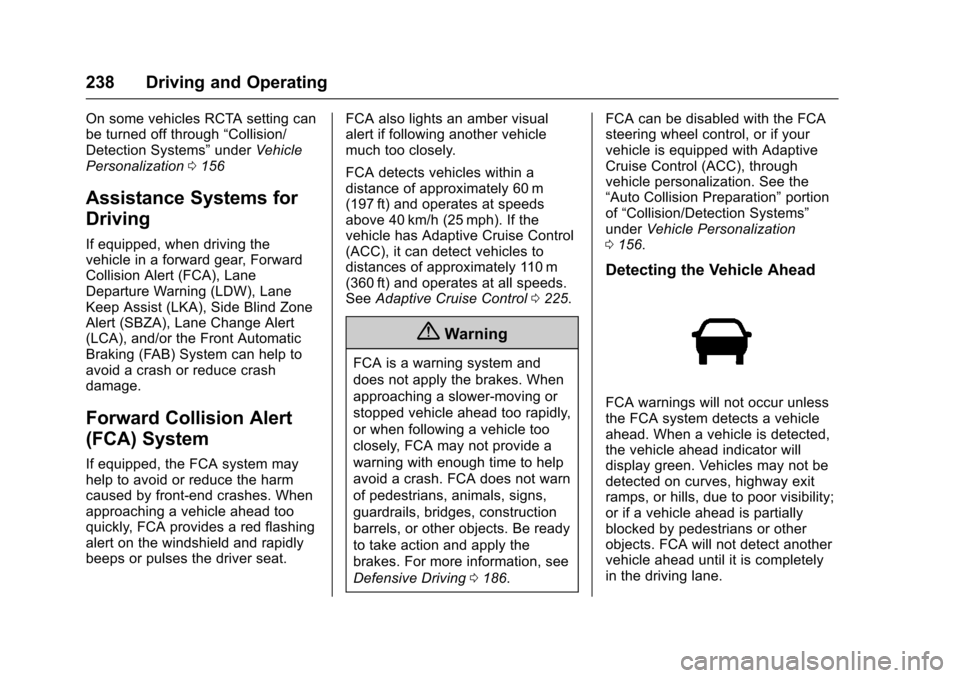
Detecting the Vehicle Ahead
FCA warnings will not occur unless
the FCA system detects a vehicle
ahead. When a vehicle is detected,
the vehicle ahead indicator will
display green. Vehicles may not be
detected on curves, highway exit
ramps, or hills, due to poor visibility;
or if a vehicle ahead is partially
blocked by pedestrians or other
objects. FCA will not detect another
vehicle ahead until it is completely
in the driving lane.
Page 241 of 357
Cadillac Escalade Owner Manual (GMNA-Localizing-MidEast-9369153) -
2016 - crc - 6/19/15
240 Driving and Operating
weather conditions when selecting
the alert timing. The range of
selectable alert timing may not be
appropriate for all drivers and
driving conditions.
If your vehicle is equipped with
Adaptive Cruise Control (ACC),
changing the FCA timing setting
automatically changes the ACC
following gap setting (Far, Medium,
or Near).
Unnecessary Alerts
FCA may provide unnecessary
alerts for turning vehicles, vehicles
in other lanes, objects that are not
vehicles, or shadows. These alerts
are normal operation and the
vehicle does not need service.
Cleaning the System
If the FCA system does not seem to
operate properly, cleaning the
outside of the windshield in front of
the camera sensor on the
windshield behind the rearview
mirror, and cleaning the front of the
vehicle where radar sensors and
headlamps are located, may correct
the issue.For cleaning instructions, see
“Washing the Vehicle”
under
Exterior Care 0323.
System operation may also be
limited under snow, heavy rain,
or road spray conditions.
Front Automatic Braking
(FAB) System
If the vehicle has Adaptive Cruise
Control (ACC), it also has FAB,
which includes Intelligent Brake
Assist (IBA). When the system
detects a vehicle ahead in your path
that is traveling in the same
direction that you may be about to
crash into, it can provide a boost to
braking or automatically brake the
vehicle. This can help avoid or
lessen the severity of crashes when
driving in a forward gear. Depending
on the situation, the vehicle may
automatically brake moderately or
hard. This front automatic braking
can only occur if a vehicle is
detected. This is shown by the FCA
vehicle ahead indicator being lit.
See Forward Collision Alert (FCA)
System 0238. The system works when driving in a
forward gear above 4 km/h (2 mph).
It can detect vehicles up to
approximately 60 m (197 ft).
{Warning
FAB is an emergency crash
preparation feature and is not
designed to avoid crashes. Do
not rely on FAB to brake the
vehicle. FAB will not brake
outside of its operating speed
range and only responds to
detected vehicles.
FAB may not:
. Detect a vehicle ahead on
winding or hilly roads.
. Detect all vehicles,
especially vehicles with a
trailer, tractors, muddy
vehicles, etc.
. Detect a vehicle when
weather limits visibility, such
as in fog, rain, or snow.
(Continued)
Page 242 of 357
Cadillac Escalade Owner Manual (GMNA-Localizing-MidEast-9369153) -
2016 - crc - 6/19/15
Driving and Operating 241
Warning (Continued)
.Detect a vehicle ahead if it
is partially blocked by
pedestrians or other objects.
Complete attention is always
required while driving, and you
should be ready to take action
and apply the brakes and/or steer
the vehicle to avoid crashes.
FAB may slow the vehicle to a
complete stop to try to avoid a
potential crash. If this happens, FAB
may engage the Electric Parking
Brake (EPB) to hold the vehicle at a
stop. Release the EPB or firmly
press the accelerator pedal.
{Warning
FAB may automatically brake the
vehicle suddenly in situations
where it is unexpected and
undesired. It could respond to a
turning vehicle ahead, guardrails,
signs, and other non-moving (Continued)
Warning (Continued)
objects. To override FAB, firmly
press the accelerator pedal, if it is
safe to do so.
Intelligent Brake Assist (IBA)
IBA may activate when the brake
pedal is applied quickly by providing
a boost to braking based on the
speed of approach and distance to
a vehicle ahead.
Minor brake pedal pulsations or
pedal movement during this time is
normal and the brake pedal should
continue to be applied as needed.
IBA will automatically disengage
only when the brake pedal is
released.
{Warning
IBA may increase vehicle braking
in situations when it may not be
necessary. You could block the(Continued)
Warning (Continued)
flow of traffic. If this occurs, take
your foot off the brake pedal and
then apply the brakes as needed.
FAB and IBA can be disabled
through vehicle personalization. See
“Auto Collision Preparation” in
“Collision/Detection Systems” under
Vehicle Personalization 0156.
{Warning
Using FAB or IBA while towing a
trailer could cause you to lose
control of the vehicle and crash.
Turn the system to Off when
towing a trailer.
Side Blind Zone
Alert (SBZA)
If equipped, the SBZA system is a
lane-changing aid that assists
drivers with avoiding crashes that
occur with moving vehicles in the
side blind zone (or spot) areas.
Page 243 of 357
Cadillac Escalade Owner Manual (GMNA-Localizing-MidEast-9369153) -
2016 - crc - 6/19/15
242 Driving and Operating
When the vehicle is in a forward
gear, the left or right side mirror
display will light up if a moving
vehicle is detected in that blind
zone. If the turn signal is activated
and a vehicle is also detected on
the same side, the display will flash
as an extra warning not to change
lanes. Since this system is part of
the Lane Change Alert system, read
the entire Lane Change Alert
section before using this feature.
Lane Change Alert (LCA)
If equipped, the LCA system is a
lane-changing aid that assists
drivers with avoiding lane change
crashes that occur with moving
vehicles in the side blind zone (or
spot) areas or with vehicles rapidly
approaching these areas from
behind. The LCA warning display
will light up in the corresponding
outside side mirror and will flash if
the turn signal is on.
{Warning
LCA does not alert the driver to
vehicles outside of the system
detection zones, pedestrians,
bicyclists, or animals. It may not
provide alerts when changing
lanes under all driving conditions.
Failure to use proper care when
changing lanes may result in
injury, death, or vehicle damage.
Before making a lane change,
always check mirrors, glance over
your shoulder, and use the turn
signals.
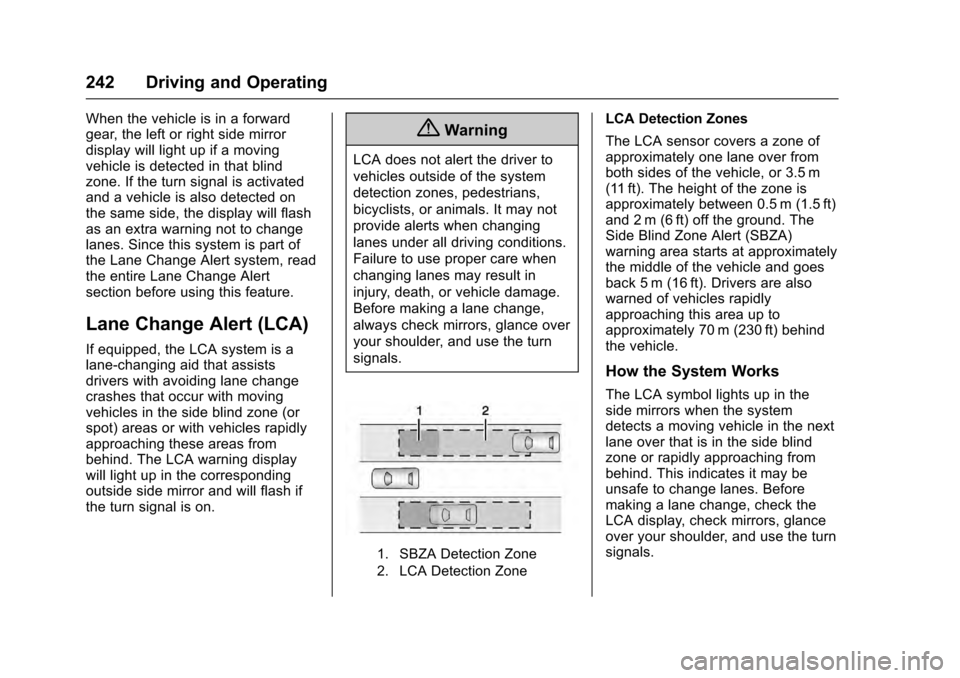
1. SBZA Detection Zone
2. LCA Detection Zone
LCA Detection Zones
The LCA sensor covers a zone of
approximately one lane over from
both sides of the vehicle, or 3.5 m
(11 ft). The height of the zone is
approximately between 0.5 m (1.5 ft)
and 2 m (6 ft) off the ground. The
Side Blind Zone Alert (SBZA)
warning area starts at approximately
the middle of the vehicle and goes
back 5 m (16 ft). Drivers are also
warned of vehicles rapidly
approaching this area up to
approximately 70 m (230 ft) behind
the vehicle.
How the System Works
The LCA symbol lights up in the
side mirrors when the system
detects a moving vehicle in the next
lane over that is in the side blind
zone or rapidly approaching from
behind. This indicates it may be
unsafe to change lanes. Before
making a lane change, check the
LCA display, check mirrors, glance
over your shoulder, and use the turn
signals.
Page 245 of 357
Cadillac Escalade Owner Manual (GMNA-Localizing-MidEast-9369153) -
2016 - crc - 6/19/15
244 Driving and Operating
When LCA is disabled for any
reason other than the driver turning
it off, the Side Blind Zone Alert On
option will not be available on the
personalization menu.
Lane Departure
Warning (LDW)
If equipped, LDW may help avoid
crashes due to unintentional lane
departures. It may provide a
warning if the vehicle is crossing a
detected lane marking without using
a turn signal in the lane departure
direction. Since this system is part
of the Lane Keep Assist (LKA)
system, read the entire LKA section
before using this feature.
Lane Keep Assist (LKA)
If equipped, LKA may help avoid
crashes due to unintentional lane
departures. It may assist by gently
turning the steering wheel if the
vehicle approaches a detected lane
marking without using a turn signal
in that direction. It may also provide
a Lane Departure Warning (LDW)
system alert as the lane marking iscrossed. The LKA system will not
assist or provide an LDW alert if it
detects that you are actively
steering. Override LKA by turning
the steering wheel. LKA uses a
camera to detect lane markings
between 60 km/h (37 mph) and
180 km/h (112 mph).
{Warning
The LKA system does not
continuously steer the vehicle.
It may not keep the vehicle in the
lane or give a Lane Departure
Warning (LDW) alert, even if a
lane marking is detected.
The LKA and LDW systems
may not:
. Provide an alert or enough
steering assist to avoid a
lane departure or crash.
. Detect lane markings under
poor weather or visibility
conditions. This can occur if
the windshield or
headlamps are blocked by
(Continued)
Warning (Continued)
dirt, snow, or ice, if they are
not in proper condition, or if
the sun shines directly into
the camera.
. Detect road edges.
. Detect lanes on winding or
hilly roads.
If LKA only detects lane markings
on one side of the road, it will
only assist or provide an LDW
alert when approaching the lane
on the side where it has detected
a lane marking. Even with LKA
and LDW, you must steer the
vehicle. Always keep your
attention on the road and
maintain proper vehicle position
within the lane, or vehicle
damage, injury, or death could
occur. Always keep the
windshield, headlamps, and
camera sensors clean and in
good repair. Do not use LKA in
bad weather conditions.
Page 246 of 357
Cadillac Escalade Owner Manual (GMNA-Localizing-MidEast-9369153) -
2016 - crc - 6/19/15
Driving and Operating 245
{Warning
Using LKA while towing a trailer
or on slippery roads could cause
loss of control of the vehicle and
a crash. Turn the system off.
How the System Works
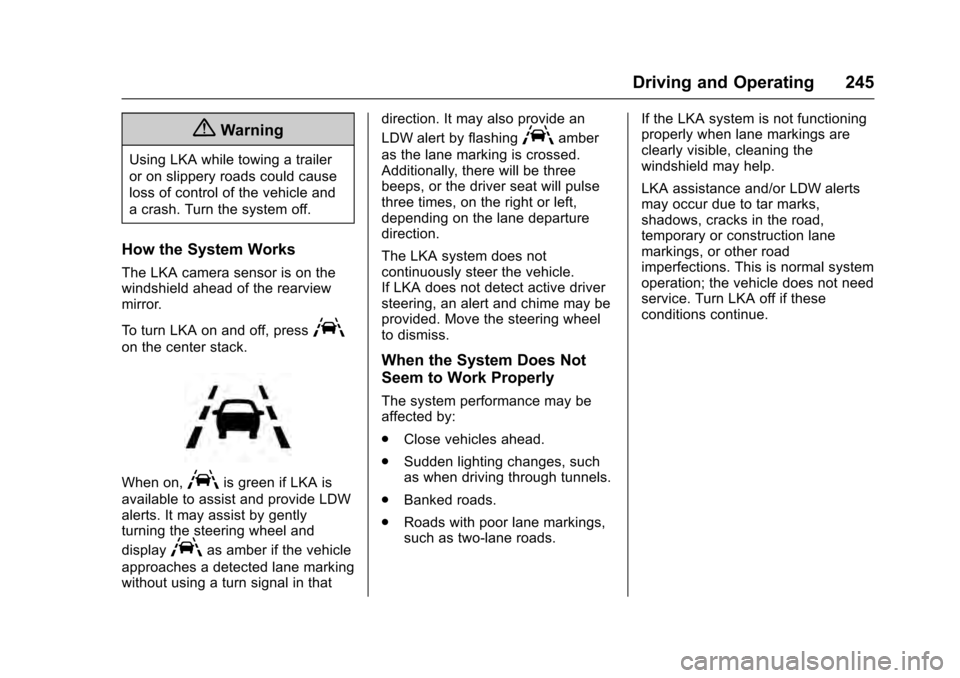
The LKA camera sensor is on the
windshield ahead of the rearview
mirror.
To turn LKA on and off, press
A
on the center stack.
When on,Ais green if LKA is
available to assist and provide LDW
alerts. It may assist by gently
turning the steering wheel and
display
Aas amber if the vehicle
approaches a detected lane marking
without using a turn signal in that direction. It may also provide an
LDW alert by flashing
Aamber
as the lane marking is crossed.
Additionally, there will be three
beeps, or the driver seat will pulse
three times, on the right or left,
depending on the lane departure
direction.
The LKA system does not
continuously steer the vehicle.
If LKA does not detect active driver
steering, an alert and chime may be
provided. Move the steering wheel
to dismiss.
When the System Does Not
Seem to Work Properly
The system performance may be
affected by:
. Close vehicles ahead.
. Sudden lighting changes, such
as when driving through tunnels.
. Banked roads.
. Roads with poor lane markings,
such as two-lane roads. If the LKA system is not functioning
properly when lane markings are
clearly visible, cleaning the
windshield may help.
LKA assistance and/or LDW alerts
may occur due to tar marks,
shadows, cracks in the road,
temporary or construction lane
markings, or other road
imperfections. This is normal system
operation; the vehicle does not need
service. Turn LKA off if these
conditions continue.
Page 348 of 357

Cadillac Escalade Owner Manual (GMNA-Localizing-MidEast-9369153) -
2016 - crc - 6/19/15
Index 347
IndexA
Accessories andModifications . . . . . . . . . . . . . . . . . . 259
Accessory Power . . . . . . . . . . . . . . . 204
Active Fuel Management
®. . . . . . 206
Adaptive Cruise Control . . . . . . . . 225
Add-On Electrical Equipment . . . 257
Adjustable Throttle and Brake Pedal . . . . . . . . . . . . . . . . . . . 200
Adjustments
Lumbar, Front Seats . . . . . . . . . . . . 56
Air Cleaner/Filter, Engine . . . . . . . 266
Air Filter, Passenger Compartment . . . . . . . . . . . . . . . . . 183
Air Vents . . . . . . . . . . . . . . . . . . . . . . . 182
Airbag System Check . . . . . . . . . . . . . . . . . . . . . . . . . . 88
How Does an AirbagRestrain? . . . . . . . . . . . . . . . . . . . . . 81
Passenger Sensing System . . . . 83
What Makes an Airbag Inflate? . . . . . . . . . . . . . . . . . . . . . . . . 81
What Will You See after an Airbag Inflates? . . . . . . . . . . . . . . . 82
When Should an Airbag Inflate? . . . . . . . . . . . . . . . . . . . . . . . . 80
Where Are the Airbags? . . . . . . . . 79 Airbags
Adding Equipment to the
Vehicle . . . . . . . . . . . . . . . . . . . . . . . . 88
Passenger Status Indicator . . . 129
Readiness Light . . . . . . . . . . . . . . 129
Servicing Airbag-Equipped Vehicles . . . . . . . . . . . . . . . . . . . . . . . 87
System Check . . . . . . . . . . . . . . . . . . 77
Alarm Vehicle Security . . . . . . . . . . . . . . . . 43
Alert
Lane Change . . . . . . . . . . . . . . . . . 242
Side Blind Zone (SBZA) . . . . . . 241
All-Season Tires . . . . . . . . . . . . . . . . 292
All-Terrain Tires . . . . . . . . . . . . . . . . . 293
Antilock Brake System (ABS) . . . 216 Warning Light . . . . . . . . . . . . . . . . . 133
Appearance Care Exterior . . . . . . . . . . . . . . . . . . . . . . . 323
Interior . . . . . . . . . . . . . . . . . . . . . . . . 327
Armrest Storage . . . . . . . . . . . . . . . . 110
Ashtrays . . . . . . . . . . . . . . . . . . . . . . . . 123
Assistance Systems for
Driving . . . . . . . . . . . . . . . . . . . . . . . . 238
Assistance Systems for
Parking and Backing . . . . . . . . . . 233
Automatic Door Locks . . . . . . . . . . . . . . . . . . . . . 37
Page 352 of 357

Cadillac Escalade Owner Manual (GMNA-Localizing-MidEast-9369153) -
2016 - crc - 6/19/15
Index 351
Headlamps (cont'd)Daytime Running
Lamps (DRL) . . . . . . . . . . . . . . . . 168
Flash-to-Pass . . . . . . . . . . . . . . . . . 168
High-Beam On Light . . . . . . . . . . 137
High/Low Beam Changer . . . . . 168
Lamps On Reminder . . . . . . . . . 138
Heated Rear Seats . . . . . . . . . . . . . . . . . . . . . 62
Steering Wheel . . . . . . . . . . . . . . . .115
Heated and Cooled Front Seats . . . . . . . . . . . . . . . . . . . . . . . . . . 60
Heated Mirrors . . . . . . . . . . . . . . . . . . . 47
High-Beam On Light . . . . . . . . . . . . 137
High-Speed Operation . . . . . . . . . . 294
Hill and Mountain Roads . . . . . . . . 193
Hill Start Assist (HSA) . . . . . . . . . . 219
Hood . . . . . . . . . . . . . . . . . . . . . . . . . . . 260
Horn . . . . . . . . . . . . . . . . . . . . . . . . . . . . 116
How to Wear Safety Belts Properly . . . . . . . . . . . . . . . . . . . . . . . . 70
I
Ignition Positions . . . . . . . . . . . . . . . 201
IndicatorVehicle Ahead . . . . . . . . . . . . . . . . 134
Infants and Young Children, Restraints . . . . . . . . . . . . . . . . . . . . . . 91
Infotainment . . . . . . . . . . . . . . . . . . . . 175 Infotainment System . . . . . . . . . . . . 346
Instrument Cluster . . . . . . . . . . . . . . 124
Instrument Panel
Storage Area . . . . . . . . . . . . . . . . . 109
Interior Rearview Mirrors . . . . . . . . . 48
Introduction . . . . . . . . . . . . . . . . . . . . . . . 2
J
Jump Starting . . . . . . . . . . . . . . . . . . . 315
K
Key and Lock Messages . . . . . . . . 148
Keyless Entry Remote (RKE) System . . . . . . . . . 29
Keys . . . . . . . . . . . . . . . . . . . . . . . . . . . . . 28
L
Lamps Cornering . . . . . . . . . . . . . . . . . . . . . 171
Daytime Running (DRL) . . . . . . 168
Dome . . . . . . . . . . . . . . . . . . . . . . . . . 172
Exterior Controls . . . . . . . . . . . . . . 166
Exterior Lamps OffReminder . . . . . . . . . . . . . . . . . . . 168
License Plate . . . . . . . . . . . . . . . . . 280
Malfunction Indicator . . . . . . . . . 130
Messages . . . . . . . . . . . . . . . . . . . . 149
On Reminder . . . . . . . . . . . . . . . . . 138 Lamps (cont'd)
Reading . . . . . . . . . . . . . . . . . . . . . . 172
Lane Change Alert (LCA) . . . . . . . 242
Lane Departure Warning (LDW) . . . . . . . . . . . . . . . . 244
Lane Keep Assist (LKA) . . . . . . . . 244
Lane Keep Assist Light . . . . . . . . . 134
Lap-Shoulder Belt . . . . . . . . . . . . . . . 71
LATCH System Replacing Parts after aCrash . . . . . . . . . . . . . . . . . . . . . . . 103
LATCH, Lower Anchors and Tethers for Children . . . . . . . . . . . . 96
LED Lighting . . . . . . . . . . . . . . . . . . . . 280
Level Control
Automatic . . . . . . . . . . . . . . . . . . . . . 222
Liftgate . . . . . . . . . . . . . . . . . . . . . . . . . . 38
Lighter, Cigarette . . . . . . . . . . . . . . . 122
Lighting Entry . . . . . . . . . . . . . . . . . . . . . . . . . 173
Exit . . . . . . . . . . . . . . . . . . . . . . . . . . . 173
Illumination Control . . . . . . . . . . . 171
LED . . . . . . . . . . . . . . . . . . . . . . . . . . 280
Lights . . . . . . . . . . . . . . . . . . . . . . . . . . . 134 Airbag Readiness . . . . . . . . . . . . . 129
Antilock Brake System(ABS) Warning . . . . . . . . . . . . . . 133
Brake System Warning . . . . . . . 132