power steering CADILLAC ESCALADE 2016 4.G User Guide
[x] Cancel search | Manufacturer: CADILLAC, Model Year: 2016, Model line: ESCALADE, Model: CADILLAC ESCALADE 2016 4.GPages: 357, PDF Size: 3.49 MB
Page 154 of 357
Cadillac Escalade Owner Manual (GMNA-Localizing-MidEast-9369153) -
2016 - crc - 6/19/15
Instruments and Controls 153
Safety Belt Messages
AUTOMATIC SEATBELT
TIGHTENING UNAVAILABLE
This message displays when the
Automatic Safety Belt Tightening
System, if equipped, becomes
unavailable. This could be caused
by a temporary condition. If the
message continues to display, see
your dealer.
SERVICE AUTOMATIC
SEATBELT TIGHTENING
SYSTEM
If this message displays, take the
vehicle to your dealer to repair the
Automatic Safety Belt Tightening
System, if equipped.
Security Messages
THEFT ATTEMPTED
This message displays if the vehicle
detects a tamper condition.
Service Vehicle Messages
SERVICE VEHICLE SOON
This message is displayed if there is
a problem with the vehicle. Take the
vehicle to your dealer for service.
Steering System
Messages
STEERING ASSIST IS
REDUCED DRIVE WITH CARE
This message may display if a
problem occurs with the electric
power steering system. If this
message appears, steering effort
may be slightly higher than normal.
The vehicle is still safe to drive. Use
caution while in reduced assist
mode. If this message is persistent
or appears repeatedly, take the
vehicle to your dealer for service.
SeeSteering 0186.
SERVICE POWER STEERING
This message displays when there
is a problem with electric power
steering. If this message displays
and a reduction in steering performance or loss of power
steering assistance is noticed, see
your dealer. See
Steering0186.
Starting the Vehicle
Messages
PRESS BRAKE TO START
This message is displayed when
attempting to start the vehicle
without first pressing the brake
pedal.
SERVICE KEYLESS START
SYSTEM
This message is displayed if there is
a problem with the pushbutton start
system. Take the vehicle to your
dealer for service.
Tire Messages
SERVICE TIRE MONITOR
SYSTEM
This message displays if there is a
problem with the Tire Pressure
Monitor System (TPMS). See Tire
Pressure Monitor Operation 0296.
Page 167 of 357

Cadillac Escalade Owner Manual (GMNA-Localizing-MidEast-9369153) -
2016 - crc - 6/19/15
166 Lighting
Lighting
Exterior Lighting
Exterior Lamp Controls . . . . . . . 166
Exterior Lamps OffReminder . . . . . . . . . . . . . . . . . . . 168
Headlamp High/Low-Beam Changer . . . . . . . . . . . . . . . . . . . . 168
Flash-to-Pass . . . . . . . . . . . . . . . . 168
Daytime Running Lamps (DRL) . . . . . . . . . . . . . . . 168
Automatic Headlamp System . . . . . . . . . . . . . . . . . . . . . . 169
Hazard Warning Flashers . . . . . 170
Turn and Lane-Change Signals . . . . . . . . . . . . . . . . . . . . . . 170
Cornering Lamps . . . . . . . . . . . . . 171
Interior Lighting
Instrument Panel Illumination Control . . . . . . . . . . . . . . . . . . . . . . 171
Dome Lamps . . . . . . . . . . . . . . . . . 172
Reading Lamps . . . . . . . . . . . . . . 172
Lighting Features
Entry Lighting . . . . . . . . . . . . . . . . 173
Exit Lighting . . . . . . . . . . . . . . . . . . 173
Battery Load Management . . . 173
Battery Power Protection . . . . . 174
Exterior Lighting
Exterior Lamp Controls
The exterior lamp control is on the
instrument panel to the left of the
steering wheel.
Turn the control to the following
positions:
P(Off) : Turns off the automatic
headlamps and Daytime Running
Lamps (DRL). Turning the headlamp
control to the off position again will
turn the automatic headlamps or
DRL back on.
AUTO (Automatic) : Automatically
turns the exterior lamps on and off,
depending on outside lighting.
;(Parking Lamps) : Turns on the
parking lamps including all lamps,
except the headlamps.
2(Headlamps) : Turns on the
headlamps together with the parking
lamps and instrument panel lights.
When the headlamps are turned on
while the vehicle is on, the
headlamps will turn off automatically
10 minutes after the ignition is
turned off. When the headlamps are
turned on while the vehicle is off,
the headlamps will stay on for
10 minutes before automatically
turning off to prevent the battery
from being drained. Turn the
headlamp control to off and then
back to the headlamp on position to
make the headlamps stay on for an
additional 10 minutes.
IntelliBeam®System
If equipped, this system turns the
vehicle's high-beam headlamps on
and off according to surrounding
traffic conditions.
Page 185 of 357
Cadillac Escalade Owner Manual (GMNA-Localizing-MidEast-9369153) -
2016 - crc - 6/19/15
184 Driving and Operating
Driving and
Operating
Driving Information
Distracted Driving . . . . . . . . . . . . 185
Defensive Driving . . . . . . . . . . . . . 186
Control of a Vehicle . . . . . . . . . . . 186
Braking . . . . . . . . . . . . . . . . . . . . . . . 186
Steering . . . . . . . . . . . . . . . . . . . . . . 186
Off-Road Recovery . . . . . . . . . . . 187
Loss of Control . . . . . . . . . . . . . . . 187
Off-Road Driving . . . . . . . . . . . . . 188
Driving on Wet Roads . . . . . . . . 192
Hill and Mountain Roads . . . . . 193
Winter Driving . . . . . . . . . . . . . . . . 194
If the Vehicle Is Stuck . . . . . . . . 195
Vehicle Load Limits . . . . . . . . . . . 196
Starting and Operating
New Vehicle Break-In . . . . . . . . . 200
Adjustable Throttle and BrakePedal . . . . . . . . . . . . . . . . . . . . . . . 200
Ignition Positions . . . . . . . . . . . . . 201
Starting the Engine . . . . . . . . . . . 203
Retained Accessory Power (RAP) . . . . . . . . . . . . . . . . 204
Shifting Into Park . . . . . . . . . . . . . 204
Shifting out of Park . . . . . . . . . . . 205 Parking over Things
That Burn . . . . . . . . . . . . . . . . . . . 206
Active Fuel Management
®. . . . 206
Engine Exhaust
Engine Exhaust . . . . . . . . . . . . . . 206
Running the Vehicle While Parked . . . . . . . . . . . . . . . . . . . . . . 207
Automatic Transmission
Automatic Transmission . . . . . . 207
Manual Mode . . . . . . . . . . . . . . . . . 210
Tow/Haul Mode . . . . . . . . . . . . . . . 212
Drive Systems
Four-Wheel Drive . . . . . . . . . . . . . 213
Brakes
Antilock BrakeSystem (ABS) . . . . . . . . . . . . . . . 216
Parking Brake . . . . . . . . . . . . . . . . 217
Electric Parking Brake . . . . . . . . 218
Brake Assist . . . . . . . . . . . . . . . . . . 219
Hill Start Assist (HSA) . . . . . . . . 219
Ride Control Systems
Traction Control/Electronic Stability Control . . . . . . . . . . . . . 220
Magnetic Ride Control . . . . . . . . 222
Locking Rear Axle . . . . . . . . . . . . 222
Automatic Level Control . . . . . . 222
Cruise Control
Cruise Control . . . . . . . . . . . . . . . . 223
Adaptive Cruise Control . . . . . . 225
Driver Assistance Systems
Driver Assistance Systems . . . 232
Assistance Systems for Parking or Backing . . . . . . . . . . 233
Assistance Systems for Driving . . . . . . . . . . . . . . . . . . . . . . 238
Forward Collision Alert (FCA) System . . . . . . . . . . . . . . . . . . . . . . 238
Front Automatic Braking (FAB) System . . . . . . . . . . . . . . . . . . . . . . 240
Side Blind Zone Alert (SBZA) . . . . . . . . . . . . . . . . 241
Lane Change Alert (LCA) . . . . . 242
Lane Departure Warning (LDW) . . . . . . . . . . . . . 244
Lane Keep Assist (LKA) . . . . . . 244
Fuel
Fuel . . . . . . . . . . . . . . . . . . . . . . . . . . 246
Fuel Additives . . . . . . . . . . . . . . . . 246
Filling the Tank . . . . . . . . . . . . . . . 247
Filling a Portable Fuel Container . . . . . . . . . . . . . . . . . . . 248
Trailer Towing
General TowingInformation . . . . . . . . . . . . . . . . . . 249
Page 187 of 357
Cadillac Escalade Owner Manual (GMNA-Localizing-MidEast-9369153) -
2016 - crc - 6/19/15
186 Driving and Operating
See the infotainment manual for
information on that system or the
navigation system, if equipped,
including pairing and using a cell
phone.
Defensive Driving
Defensive driving means“always
expect the unexpected.” The first
step in driving defensively is to wear
the safety belt. See Safety Belts
0 69.
. Assume that other road users
(pedestrians, bicyclists, and
other drivers) are going to be
careless and make mistakes.
Anticipate what they might do
and be ready.
. Allow enough following distance
between you and the driver in
front of you.
. Focus on the task of driving.
Control of a Vehicle
Braking, steering, and accelerating
are important factors in helping to
control a vehicle while driving.
Braking
Braking action involves perception
time and reaction time. Deciding to
push the brake pedal is perception
time. Actually doing it is
reaction time.
Average driver reaction time is
about three-quarters of a second. In
that time, a vehicle moving at
100 km/h (60 mph) travels 20 m
(66 ft), which could be a lot of
distance in an emergency.
Helpful braking tips to keep in mind
include:
.Keep enough distance between
you and the vehicle in front
of you.
. Avoid needless heavy braking.
. Keep pace with traffic.
If the engine ever stops while the
vehicle is being driven, brake
normally but do not pump the
brakes. Doing so could make the
pedal harder to push down. If the
engine stops, there will be some
power brake assist but it will be
used when the brake is applied. Once the power assist is used up, it
can take longer to stop and the
brake pedal will be harder to push.
Steering
Electric Power Steering
This vehicle has electric power
steering. It does not have power
steering fluid. Regular maintenance
is not required.
If power steering assist is lost due
to a system malfunction, the vehicle
can be steered, but may require
increased effort.
See your dealer if there is a
problem.
If the steering assist is used for an
extended period of time, power
assist may be reduced.
If the steering wheel is turned until it
reaches the end of its travel, and is
held in that position for an extended
period of time, power steering assist
may be reduced.
Normal use of the power steering
assist should return when the
system cools down.
Page 202 of 357
Cadillac Escalade Owner Manual (GMNA-Localizing-MidEast-9369153) -
2016 - crc - 6/19/15
Driving and Operating 201
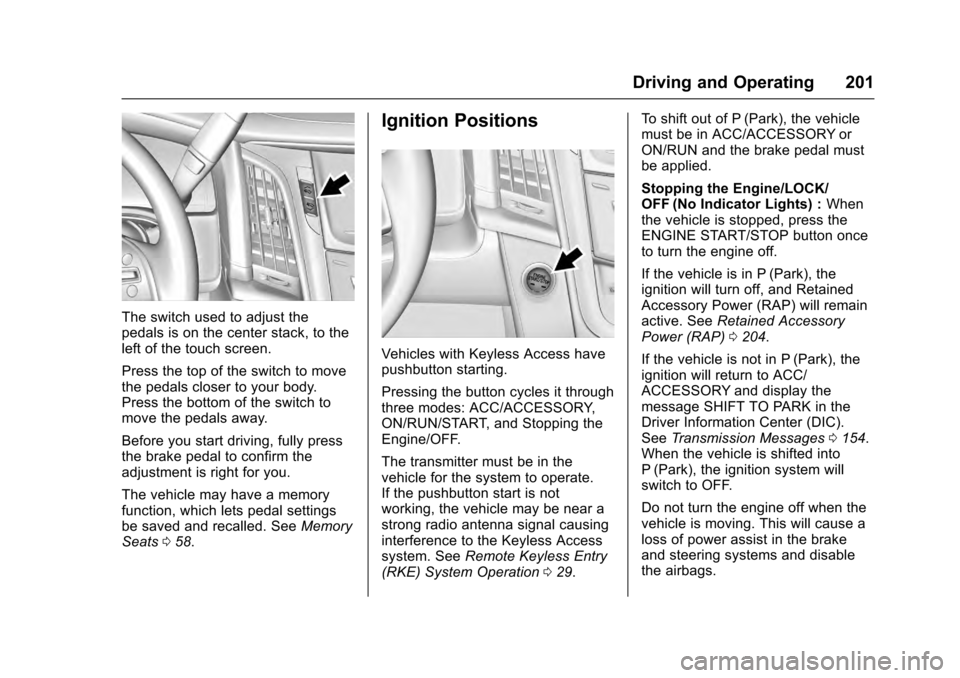
The switch used to adjust the
pedals is on the center stack, to the
left of the touch screen.
Press the top of the switch to move
the pedals closer to your body.
Press the bottom of the switch to
move the pedals away.
Before you start driving, fully press
the brake pedal to confirm the
adjustment is right for you.
The vehicle may have a memory
function, which lets pedal settings
be saved and recalled. SeeMemory
Seats 058.
Ignition Positions
Vehicles with Keyless Access have
pushbutton starting.
Pressing the button cycles it through
three modes: ACC/ACCESSORY,
ON/RUN/START, and Stopping the
Engine/OFF.
The transmitter must be in the
vehicle for the system to operate.
If the pushbutton start is not
working, the vehicle may be near a
strong radio antenna signal causing
interference to the Keyless Access
system. See Remote Keyless Entry
(RKE) System Operation 029. To shift out of P (Park), the vehicle
must be in ACC/ACCESSORY or
ON/RUN and the brake pedal must
be applied.
Stopping the Engine/LOCK/
OFF (No Indicator Lights) :
When
the vehicle is stopped, press the
ENGINE START/STOP button once
to turn the engine off.
If the vehicle is in P (Park), the
ignition will turn off, and Retained
Accessory Power (RAP) will remain
active. See Retained Accessory
Power (RAP) 0204.
If the vehicle is not in P (Park), the
ignition will return to ACC/
ACCESSORY and display the
message SHIFT TO PARK in the
Driver Information Center (DIC).
See Transmission Messages 0154.
When the vehicle is shifted into
P (Park), the ignition system will
switch to OFF.
Do not turn the engine off when the
vehicle is moving. This will cause a
loss of power assist in the brake
and steering systems and disable
the airbags.
Page 203 of 357
Cadillac Escalade Owner Manual (GMNA-Localizing-MidEast-9369153) -
2016 - crc - 6/19/15
202 Driving and Operating
The vehicle may have an electric
steering column lock. The lock is
activated when the vehicle is
switched to OFF and either front
door is opened. A sound may be
heard as the lock actuates or
releases. The steering column lock
may not release with the wheels
turned off center. If this happens,
the vehicle may not start. Move the
steering wheel from left to right
while attempting to start the vehicle.
If this does not work, the vehicle
needs service.
If the vehicle must be shut off in an
emergency:1. Brake using a firm and steady pressure. Do not pump the
brakes repeatedly. This may
deplete power assist, requiring
increased brake pedal force.
2. Shift the vehicle to N (Neutral). This can be done while the
vehicle is moving. After shifting
to N (Neutral), firmly apply the
brakes and steer the vehicle to
a safe location. 3. Come to a complete stop, shift
to P (Park), and turn the
ignition to OFF. On vehicles
with an automatic transmission,
the shift lever must be in
P (Park) to turn the ignition
switch to the OFF position.
4. Set the parking brake. See Parking Brake 0217.
{Warning
Turning off the vehicle while
moving may cause loss of power
assist in the brake and steering
systems and disable the airbags.
While driving, only shut the
vehicle off in an emergency.
If the vehicle cannot be pulled over,
and must be shut off while driving,
press and hold the ENGINE START/
STOP button for longer than
two seconds, or press twice in
five seconds.
ACC/ACCESSORY (Amber
Indicator Light) : This mode allows
some electrical accessories to be
used when the engine is off. With the ignition off, pressing the
button one time without the brake
pedal applied will place the ignition
system in ACC/ACCESSORY.
The ignition will switch from ACC/
ACCESSORY to OFF after
five minutes to prevent battery
rundown.
ON/RUN/START (Green Indicator
Light) :
This mode is for driving and
starting. With the ignition off, and
the brake pedal applied, pressing
the button once will place the
ignition system in ON/RUN/START.
Once engine cranking begins,
release the button. Engine cranking
will continue until the engine starts.
See Starting the Engine 0203. The
ignition will then remain in ON/RUN.
Service Only Mode
This power mode is available for
service and diagnostics, and to
verify the proper operation of the
malfunction indicator lamp as may
be required for emission inspection
purposes. With the vehicle off, and
the brake pedal not applied,
pressing and holding the button for
more than five seconds will place
Page 214 of 357
Cadillac Escalade Owner Manual (GMNA-Localizing-MidEast-9369153) -
2016 - crc - 6/19/15
Driving and Operating 213
For other forms of grade braking,
seeAutomatic Transmission 0207
and Cruise Control 0223.Drive Systems
Four-Wheel Drive
If equipped, four-wheel drive
engages the front axle for extra
traction. Read the appropriate
section for transfer case operation
before using.
Caution
Do not drive on clean, dry
pavement in 4
mand 4n(if
equipped) for an extended period
of time. These conditions may
cause premature wear on the
vehicle’s powertrain.
Driving on clean, dry pavement in
four-wheel drive may:
. Cause a vibration to be felt in
the steering system.
. Cause tires to wear faster.
. Make the transfer case harder to
shift, and cause it to run noisier.
{Warning
Shifting the transfer case to
N (Neutral) can cause the vehicle
to roll even if the transmission is
in P (Park). You or someone else
could be seriously injured. Be
sure to set the parking brake
before placing the transfer case in
N (Neutral). See Parking Brake
0 217.
Caution
Extended high-speed operation in
4
nmay damage or shorten the
life of the drivetrain.
Engagement noise and bump when
shifting between 4
nand 4mor from
N (Neutral), with the engine running,
is normal.
Shifting into 4
nwill turn Traction
Control and StabiliTrak®off. See
Traction Control/Electronic Stability
Control 0220.
Page 215 of 357
Cadillac Escalade Owner Manual (GMNA-Localizing-MidEast-9369153) -
2016 - crc - 6/19/15
214 Driving and Operating
Two Speed Automatic
Transfer Case
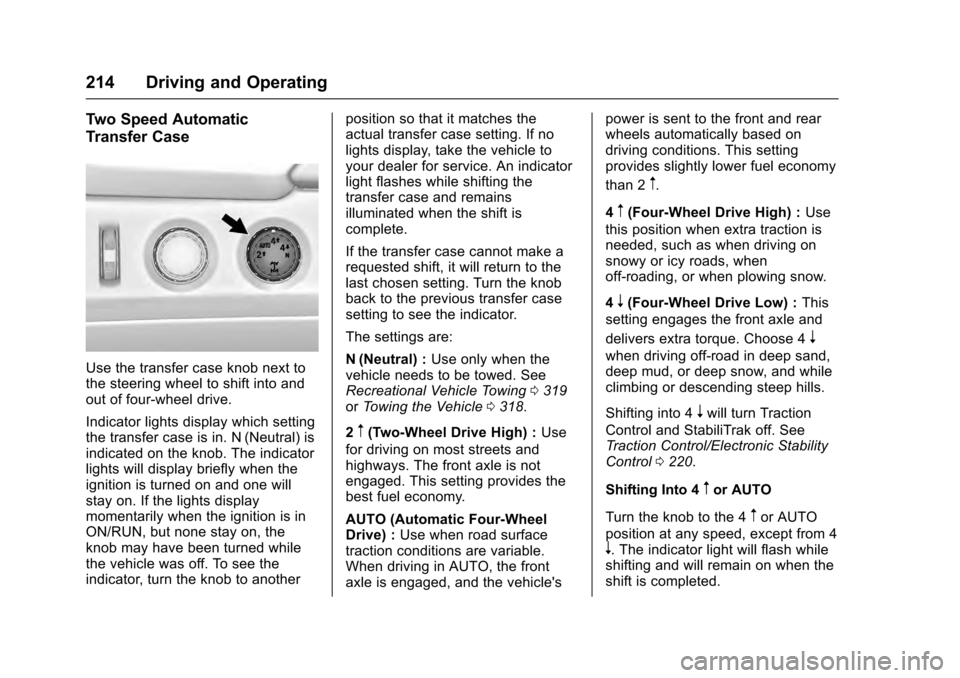
Use the transfer case knob next to
the steering wheel to shift into and
out of four-wheel drive.
Indicator lights display which setting
the transfer case is in. N (Neutral) is
indicated on the knob. The indicator
lights will display briefly when the
ignition is turned on and one will
stay on. If the lights display
momentarily when the ignition is in
ON/RUN, but none stay on, the
knob may have been turned while
the vehicle was off. To see the
indicator, turn the knob to anotherposition so that it matches the
actual transfer case setting. If no
lights display, take the vehicle to
your dealer for service. An indicator
light flashes while shifting the
transfer case and remains
illuminated when the shift is
complete.
If the transfer case cannot make a
requested shift, it will return to the
last chosen setting. Turn the knob
back to the previous transfer case
setting to see the indicator.
The settings are:
N (Neutral) :
Use only when the
vehicle needs to be towed. See
Recreational Vehicle Towing 0319
or Towing the Vehicle 0318.
2
m(Two-Wheel Drive High) : Use
for driving on most streets and
highways. The front axle is not
engaged. This setting provides the
best fuel economy.
AUTO (Automatic Four-Wheel
Drive) : Use when road surface
traction conditions are variable.
When driving in AUTO, the front
axle is engaged, and the vehicle's power is sent to the front and rear
wheels automatically based on
driving conditions. This setting
provides slightly lower fuel economy
than 2
m.
4
m(Four-Wheel Drive High) : Use
this position when extra traction is
needed, such as when driving on
snowy or icy roads, when
off-roading, or when plowing snow.
4
n(Four-Wheel Drive Low) : This
setting engages the front axle and
delivers extra torque. Choose 4
n
when driving off-road in deep sand,
deep mud, or deep snow, and while
climbing or descending steep hills.
Shifting into 4
nwill turn Traction
Control and StabiliTrak off. See
Traction Control/Electronic Stability
Control 0220.
Shifting Into 4
mor AUTO
Turn the knob to the 4
mor AUTO
position at any speed, except from 4
n. The indicator light will flash while
shifting and will remain on when the
shift is completed.
Page 219 of 357

Cadillac Escalade Owner Manual (GMNA-Localizing-MidEast-9369153) -
2016 - crc - 6/19/15
218 Driving and Operating
message will appear and a chime
will sound warning you that the
parking brake is still on.
If you are towing a trailer and are
parking on a hill, seeDriving
Characteristics and Towing Tips
0 249.
Electric Parking Brake
If equipped with an Electric Parking
Brake (EPB), the switch is to the left
of the steering wheel on the
instrument panel, below the exterior
lamp controls. The EPB can always
be activated, even if the ignition is off. To prevent draining the battery,
avoid repeated cycles of the EPB
when the engine is not running.
The system has a red parking brake
status light and an amber parking
brake warning light. See
Electric
Parking Brake Light 0133 and
Service Electric Parking Brake Light
0 133. There are also parking
brake-related Driver Information
Center (DIC) messages. See Brake
System Messages 0145. In case of
insufficient electrical power, the EPB
cannot be applied or released.
Before leaving the vehicle, check
the red parking brake status light to
ensure that the parking brake is
applied.
EPB Apply
To apply the EPB:
1. Be sure the vehicle is at a complete stop.
2. Lift up the EPB switch momentarily.
The red parking brake status light
will flash and then stay on once the
EPB is fully applied. If the red parking brake status light flashes
continuously, then the EPB is only
partially applied or there is a
problem with the EPB. A DIC
message will display. Release the
EPB and try to apply it again. If the
light does not come on, or keeps
flashing, have the vehicle serviced.
Do not drive the vehicle if the red
parking brake status light is flashing.
See your dealer. See
Electric
Parking Brake Light 0133.
If the amber parking brake warning
light is on, lift up on the EPB switch
and hold it up. Continue to hold the
switch until the red parking brake
status light remains on. If the amber
parking brake warning light is on,
see your dealer.
If the EPB is applied while the
vehicle is moving, the vehicle will
decelerate as long as the switch is
held up. If the switch is held up until
the vehicle comes to a stop, the
EPB will remain applied.
The vehicle may automatically apply
the EPB in some situations when
the vehicle is not moving. This is
Page 287 of 357
Cadillac Escalade Owner Manual (GMNA-Localizing-MidEast-9369153) -
2016 - crc - 6/19/15
286 Vehicle Care
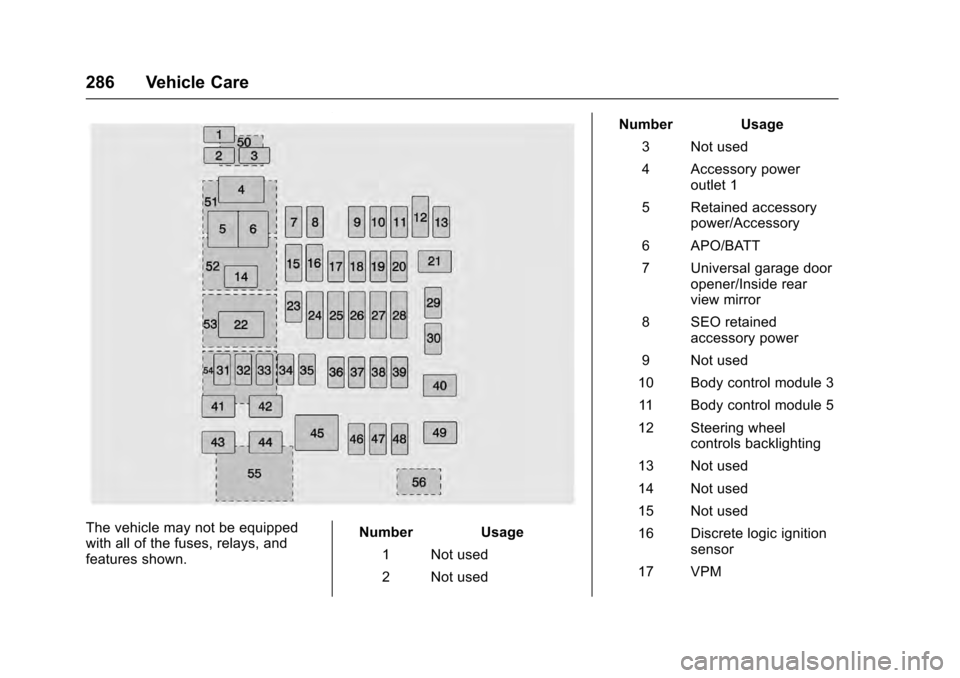
The vehicle may not be equipped
with all of the fuses, relays, and
features shown.Number Usage
1 Not used
2 Not used Number Usage
3 Not used
4 Accessory power outlet 1
5 Retained accessory power/Accessory
6 APO/BATT
7 Universal garage door opener/Inside rear
view mirror
8 SEO retained accessory power
9 Not used
10 Body control module 3
11 Body control module 5
12 Steering wheel controls backlighting
13 Not used
14 Not used
15 Not used
16 Discrete logic ignition sensor
17 VPM