charging CADILLAC ESCALADE 2016 4.G Owners Manual
[x] Cancel search | Manufacturer: CADILLAC, Model Year: 2016, Model line: ESCALADE, Model: CADILLAC ESCALADE 2016 4.GPages: 357, PDF Size: 3.49 MB
Page 4 of 357
Cadillac Escalade Owner Manual (GMNA-Localizing-MidEast-9369153) -
2016 - crc - 6/19/15
Introduction 3
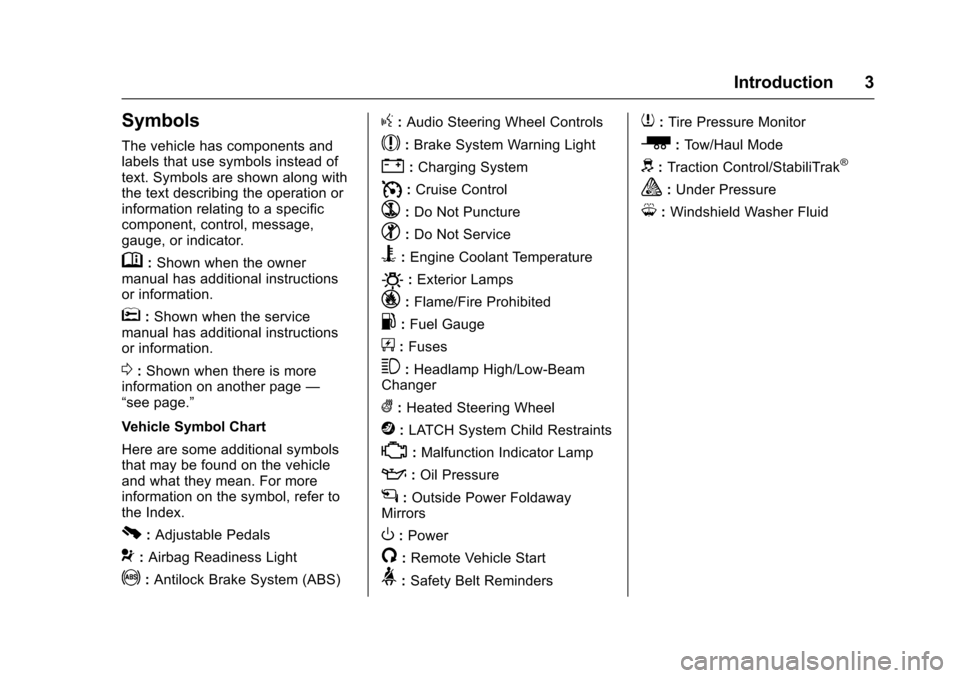
Symbols
The vehicle has components and
labels that use symbols instead of
text. Symbols are shown along with
the text describing the operation or
information relating to a specific
component, control, message,
gauge, or indicator.
M:Shown when the owner
manual has additional instructions
or information.
*: Shown when the service
manual has additional instructions
or information.
0: Shown when there is more
information on another page —
“see page.”
Vehicle Symbol Chart
Here are some additional symbols
that may be found on the vehicle
and what they mean. For more
information on the symbol, refer to
the Index.
0: Adjustable Pedals
9: Airbag Readiness Light
!:Antilock Brake System (ABS)
g: Audio Steering Wheel Controls
$:Brake System Warning Light
":Charging System
I: Cruise Control
`:Do Not Puncture
^:Do Not Service
B:Engine Coolant Temperature
O:Exterior Lamps
_: Flame/Fire Prohibited
.:Fuel Gauge
+: Fuses
3:Headlamp High/Low-Beam
Changer
(: Heated Steering Wheel
j:LATCH System Child Restraints
*:Malfunction Indicator Lamp
::Oil Pressure
g:Outside Power Foldaway
Mirrors
O: Power
/:Remote Vehicle Start
>: Safety Belt Reminders
7:Tire Pressure Monitor
_:Tow/Haul Mode
d:Traction Control/StabiliTrak®
a:Under Pressure
M: Windshield Washer Fluid
Page 115 of 357

Cadillac Escalade Owner Manual (GMNA-Localizing-MidEast-9369153) -
2016 - crc - 6/19/15
114 Instruments and Controls
Instruments and
Controls
Controls
Steering Wheel Adjustment . . . 115
Steering Wheel Controls . . . . . . 115
Heated Steering Wheel . . . . . . . 115
Horn . . . . . . . . . . . . . . . . . . . . . . . . . . 116
Windshield Wiper/Washer . . . . 116
Rear Window Wiper/Washer . . . . . . . . . . . . . . . . . . . . . . 118
Compass . . . . . . . . . . . . . . . . . . . . . 118
Clock . . . . . . . . . . . . . . . . . . . . . . . . . 119
Power Outlets . . . . . . . . . . . . . . . . 120
Wireless Charging . . . . . . . . . . . . 121
Cigarette Lighter . . . . . . . . . . . . . . 122
Ashtrays . . . . . . . . . . . . . . . . . . . . . . 123
Warning Lights, Gauges, and
Indicators
Warning Lights, Gauges, and Indicators . . . . . . . . . . . . . . . . . . . 123
Instrument Cluster . . . . . . . . . . . . 124
Speedometer . . . . . . . . . . . . . . . . . 126
Odometer . . . . . . . . . . . . . . . . . . . . . 126
Trip Odometer . . . . . . . . . . . . . . . . 126
Tachometer . . . . . . . . . . . . . . . . . . . 127
Fuel Gauge . . . . . . . . . . . . . . . . . . . 127 Engine Coolant Temperature
Gauge . . . . . . . . . . . . . . . . . . . . . . 127
Safety Belt Reminders . . . . . . . . 128
Airbag Readiness Light . . . . . . . 129
Passenger Airbag Status Indicator . . . . . . . . . . . . . . . . . . . . 129
Charging System Light . . . . . . . 130
Malfunction Indicator Lamp (Check Engine Light) . . . . . . . . 130
Brake System Warning Light . . . . . . . . . . . . . . . . . . . . . . . . 132
Electric Parking Brake Light . . . . . . . . . . . . . . . . . . . . . . . . 133
Service Electric Parking Brake Light . . . . . . . . . . . . . . . . . . . . . . . . 133
Antilock Brake System (ABS) Warning Light . . . . . . . . . . . . . . . 133
Tow/Haul Mode Light . . . . . . . . . 134
Lane Keep Assist (LKA) Light . . . . . . . . . . . . . . . . . . . . . . . . 134
Vehicle Ahead Indicator . . . . . . 134
Traction Off Light . . . . . . . . . . . . . 134
StabiliTrak®OFF Light . . . . . . . . 135
Traction Control System (TCS)/ StabiliTrak
®Light . . . . . . . . . . . 135
Engine Coolant Temperature Warning Light . . . . . . . . . . . . . . . 135
Tire Pressure Light . . . . . . . . . . . 136
Engine Oil Pressure Light . . . . 136
Low Fuel Warning Light . . . . . . 137
Security Light . . . . . . . . . . . . . . . . . 137 High-Beam On Light . . . . . . . . . . 137
Lamps On Reminder . . . . . . . . . 138
Cruise Control Light . . . . . . . . . . 138
Door Ajar Light . . . . . . . . . . . . . . . 138
Information Displays
Driver Information
Center (DIC) . . . . . . . . . . . . . . . . 139
Head-Up Display (HUD) . . . . . . 141
Vehicle Messages
Vehicle Messages . . . . . . . . . . . . 145
Battery Voltage and Charging Messages . . . . . . . . . . . . . . . . . . . 145
Brake System Messages . . . . . 145
Compass Messages . . . . . . . . . . 146
Cruise Control Messages . . . . . 146
Door Ajar Messages . . . . . . . . . . 147
Engine Cooling System Messages . . . . . . . . . . . . . . . . . . . 147
Engine Oil Messages . . . . . . . . . 148
Engine Power Messages . . . . . 148
Fuel System Messages . . . . . . . 148
Key and Lock Messages . . . . . 148
Lamp Messages . . . . . . . . . . . . . . 149
Object Detection System Messages . . . . . . . . . . . . . . . . . . . 149
Ride Control System Messages . . . . . . . . . . . . . . . . . . . 152
Airbag System Messages . . . . 152
Safety Belt Messages . . . . . . . . 153
Page 122 of 357
Cadillac Escalade Owner Manual (GMNA-Localizing-MidEast-9369153) -
2016 - crc - 6/19/15
Instruments and Controls 121
When adding electrical equipment,
be sure to follow the proper
installation instructions included with
the equipment. SeeAdd-On
Electrical Equipment 0257.
Caution
Hanging heavy equipment from
the power outlet can cause
damage not covered by the
vehicle warranty. The power
outlets are designed for
accessory power plugs only, such
as cell phone charge cords.
Power Outlet 220V/230V Volt
Alternating Current
For vehicles with 220V/230V outlet,
use only accessories rated for
220V/230V.
This power outlet can be used to
plug in electrical equipment that
uses a maximum limit of 150 watts.
The 220V/230V power outlet is on
the rear of the center console. An indicator light on the outlet turns
on to show it is in use. The light
comes on when the ignition is in
ON/RUN/START, equipment
requiring less than 150 watts is
plugged into the outlet, and no
system fault is detected.
The indicator light does not come on
when the ignition is in LOCK/OFF or
if the equipment is not fully seated
into the outlet.
If equipment is connected using
more than 150 watts or a system
fault is detected, a protection circuit
shuts off the power supply and the
indicator light turns off. To reset the
circuit, unplug the item and plug it
back in or turn the ignition off and
then back to ON/RUN. The power
restarts when equipment using 150
watts or less is plugged into the
outlet and a system fault is not
detected.
The power outlet is not designed for
the following, and may not work
properly if they are plugged in:
.
Equipment with high initial peak
wattage, such as
compressor-driven refrigerators
and electric power tools.
. Other equipment requiring an
extremely stable power supply,
such as
microcomputer-controlled
electric blankets and touch
sensor lamps.
. Medical equipment.
Wireless Charging
The vehicle may have wireless
charging on top of the center
console. See Center Console
Storage 0110. The system
wirelessly charges one PMA or Qi
compatible mobile device. To check
for phone or other device
compatibility, see
www.gmtotalconnect.com.
Page 123 of 357
Cadillac Escalade Owner Manual (GMNA-Localizing-MidEast-9369153) -
2016 - crc - 6/19/15
122 Instruments and Controls
{Warning
Wireless charging can affect the
operation of an implanted
pacemaker or other medical
devices. If you have one, it is
recommended to consult with
your doctor before using the
wireless charging system.
The vehicle must be in ON/RUN,
ACC/ACCESSORY, or Retained
Accessory Power (RAP). The
wireless charging feature may not
correctly indicate charging when the
vehicle is in RAP. See Retained
Accessory Power (RAP) 0204.
The operating temperature is -20 °C
(-4 °F) to 60 °C (140 °F) for the
charging system and 0 °C (32 °F) to
35 °C (95 °F) for the phone.
{Warning
Remove all metal objects from the
charging pad before charging
your mobile device. Metal objects, (Continued)
Warning (Continued)
such as coins, keys, rings,
or paper clips, between the phone
and charging pad will become
very hot. On the rare occasion
that the charging system does not
detect a metal object, and the
object gets wedged between the
phone and charger, remove the
phone and allow the metallic
object to cool before removing it
from the charging pad, to prevent
burns.
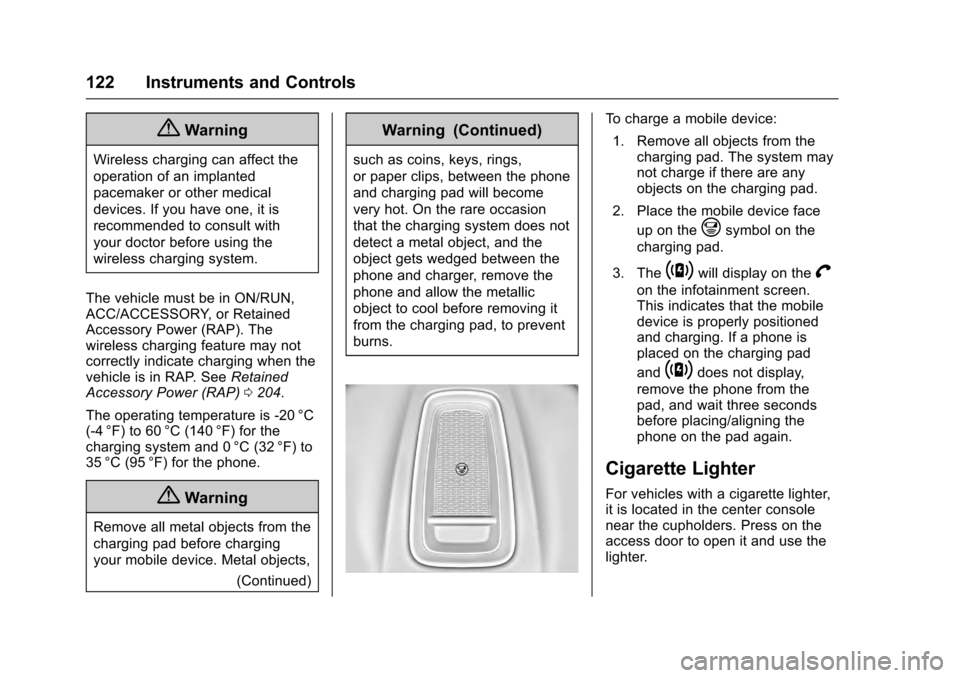
To charge a mobile device:
1. Remove all objects from the charging pad. The system may
not charge if there are any
objects on the charging pad.
2. Place the mobile device face up on the
@symbol on the
charging pad.
3. The
~will display on theV
on the infotainment screen.
This indicates that the mobile
device is properly positioned
and charging. If a phone is
placed on the charging pad
and
~does not display,
remove the phone from the
pad, and wait three seconds
before placing/aligning the
phone on the pad again.
Cigarette Lighter
For vehicles with a cigarette lighter,
it is located in the center console
near the cupholders. Press on the
access door to open it and use the
lighter.
Page 131 of 357

Cadillac Escalade Owner Manual (GMNA-Localizing-MidEast-9369153) -
2016 - crc - 6/19/15
130 Instruments and Controls
problem with the lights or the
passenger sensing system. See
your dealer for service.
{Warning
If the airbag readiness light ever
comes on and stays on, it means
that something may be wrong
with the airbag system. To help
avoid injury to yourself or others,
have the vehicle serviced right
away. SeeAirbag Readiness
Light 0129 for more information,
including important safety
information.
Charging System Light
The charging system light comes on
briefly when the ignition is turned
on, but the engine is not running, as a check to show the light is working.
It should go out when the engine is
started.
If the light stays on, or comes on
while driving, there may be a
problem with the electrical charging
system. Have it checked by your
dealer. Driving while this light is on
could drain the battery.
When this light comes on, or is
flashing, the Driver Information
Center (DIC) also displays a
message.
See
Battery Voltage and Charging
Messages 0145.
If a short distance must be driven
with the light on, be sure to turn off
all accessories, such as the radio
and air conditioner.
Malfunction Indicator
Lamp (Check Engine
Light)
This light is part of the vehicle’s
emission control on-board
diagnostic system. If this light is on
while the engine is running, a
malfunction has been detected and the vehicle may require service. The
light should come on to show that it
is working when the ignition is in
Service Only Mode. See
Ignition
Positions 0201.
Malfunctions are often indicated by
the system before any problem is
noticeable. Being aware of the light
and seeking service promptly when
it comes on may prevent damage.
Caution
If the vehicle is driven continually
with this light on, the emission
control system may not work as
well, the fuel economy may be
lower, and the vehicle may not
run smoothly. This could lead to
costly repairs that might not be
covered by the vehicle warranty.
Page 146 of 357
Cadillac Escalade Owner Manual (GMNA-Localizing-MidEast-9369153) -
2016 - crc - 6/19/15
Instruments and Controls 145
Vehicle Messages
Messages displayed on the DIC
indicate the status of the vehicle or
some action that may be needed to
correct a condition. Multiple
messages may display one after the
other.
The messages that do not require
immediate action can be
acknowledged and cleared by
pressing SEL. The messages that
require immediate action cannot be
cleared until that action is
performed. All messages should be
taken seriously and clearing the
messages does not correct the
problem.
The following are some of the
vehicle messages that may be
displayed depending on the vehicle
content.
Battery Voltage and
Charging Messages
BATTERY SAVER ACTIVE
This message displays when the
vehicle has detected that the battery
voltage is dropping beyond a
reasonable point. The battery saver
system starts reducing features of
the vehicle that may be noticed. At
the point that features are disabled,
this message displays. Turn off
unnecessary accessories to allow
the battery to recharge.
LOW BATTERY
This message is displayed when the
battery voltage is low. SeeBattery
0 275.
SERVICE BATTERY
CHARGING SYSTEM
This message is displayed when
there is a fault in the battery
charging system. Take the vehicle to
your dealer for service.
TRANSPORT MODE ON
This message is displayed when the
vehicle is in transport mode. Some
features can be disabled while in
this mode, including Remote
Keyless Entry (RKE), remote start,
and the vehicle alarm system. Take
the vehicle to your dealer for service
to turn transport mode off.
Brake System Messages
BRAKE FLUID LOW
This message is displayed when the
brake fluid level is low. See Brake
Fluid 0274.
BRAKES OVERHEATED
This message is displayed when the
brakes are becoming overheated.
This may be seen when driving on
hills. Shift to a lower gear.
Page 174 of 357
Cadillac Escalade Owner Manual (GMNA-Localizing-MidEast-9369153) -
2016 - crc - 6/19/15
Lighting 173
Lighting Features
Entry Lighting
Some exterior lamps and the interior
lamps turn on briefly at night, or in
areas with limited lighting, when
K
is pressed on the Remote Keyless
Entry (RKE) transmitter. When a
door is opened, the interior lamps
come on if the dome lamp control is
in the DOOR position. After about
30 seconds the exterior lamps turn
off. Entry lighting can be disabled
manually by changing the ignition
out of the OFF position, or by
pressing the RKE transmitter
Q
button.
This feature can be changed. See
“Vehicle Locator Lights”under
Vehicle Personalization 0156.
Exit Lighting
Some exterior lamps and interior
lamps come on at night, or in areas
with limited lighting, when the driver
door is opened after the ignition is
turned off. The exterior lamps and interior lamps remain on for a set
amount of time, then automatically
turn off.
The exterior lamps turn off
immediately by turning the exterior
lamp control off.
This feature can be changed. See
Vehicle Personalization
0156.
Battery Load
Management
The vehicle has Electric Power
Management (EPM), which
estimates the battery's temperature
and state of charge. It then adjusts
the voltage for best performance
and extended life of the battery.
When the battery's state of charge
is low, the voltage is raised slightly
to quickly bring the charge back up.
When the state of charge is high,
the voltage is lowered slightly to
prevent overcharging. The voltmeter
gauge or the voltage display on the
Driver Information Center (DIC),
if equipped, may show the voltage moving up or down. This is normal.
If there is a problem, an alert will be
displayed.
The battery can be discharged at
idle if the electrical loads are very
high. This is true for all vehicles.
This is because the generator
(alternator) may not be spinning fast
enough at idle to produce all the
power that is needed for very high
electrical loads.
A high electrical load occurs when
several of the following are on, such
as: headlamps, high beams, fog
lamps, rear window defogger,
climate control fan at high speed,
heated seats, engine cooling fans,
trailer loads, and loads plugged into
accessory power outlets.
EPM works to prevent excessive
discharge of the battery. It does this
by balancing the generator's output
and the vehicle's electrical needs.
It can increase engine idle speed to
generate more power, whenever
needed. It can temporarily reduce
the power demands of some
accessories.
Page 175 of 357
Cadillac Escalade Owner Manual (GMNA-Localizing-MidEast-9369153) -
2016 - crc - 6/19/15
174 Lighting
Normally, these actions occur in
steps or levels, without being
noticeable. In rare cases at the
highest levels of corrective action,
this action may be noticeable to the
driver. If so, a DIC message might
be displayed and it is recommended
that the driver reduce the electrical
loads as much as possible. See
Battery Voltage and Charging
Messages0145.
Battery Power Protection
This feature shuts off the dome and
reading lamps if they are left on for
more than 10 minutes when the
ignition is off. This will keep the
battery from running down.
Page 206 of 357
Cadillac Escalade Owner Manual (GMNA-Localizing-MidEast-9369153) -
2016 - crc - 6/19/15
Driving and Operating 205
Leaving the Vehicle with the
Engine Running
{Warning
It can be dangerous to leave the
vehicle with the engine running.
The vehicle could move suddenly
if the shift lever is not fully in
P (Park) with the parking brake
firmly set.
And, if you leave the vehicle with
the engine running, it could
overheat and even catch fire. You
or others could be injured. Do not
leave the vehicle with the engine
running unless you have to.
If you have to leave the vehicle with
the engine running, be sure the
vehicle is in P (Park) and the
parking brake is firmly set before
you leave it. After you move the shift
lever into P (Park), hold the regular
brake pedal down. Then, see if you
can move the shift lever away from
P (Park) without first pulling it toward you. If you can, it means that the
shift lever was not fully locked into
P (Park).
Torque Lock
If you are parking on a hill and you
do not shift the transmission into
P (Park) properly, the weight of the
vehicle may put too much force on
the parking pawl in the
transmission. You may find it difficult
to pull the shift lever out of P (Park).
This is called torque lock. To
prevent torque lock, set the parking
brake and then shift into P (Park)
properly before you leave the driver
seat. To find out how, see
Shifting
Into Park 0204.
When you are ready to drive, move
the shift lever out of P (Park) before
you release the parking brake.
If torque lock does occur, you may
need to have another vehicle push
yours a little uphill to take some of
the pressure from the parking pawl
in the transmission. You will then be
able to pull the shift lever out of
P (Park).
Shifting out of Park
This vehicle is equipped with an
electronic shift lock release system.
The shift lock release is designed to
prevent movement of the shift lever
out of P (Park), unless the ignition is
in ON/RUN and the regular brake
pedal is applied.
The shift lock release is always
functional except in the case of an
uncharged or low voltage (less than
9 volt) battery.
If the vehicle has an uncharged
battery or a battery with low voltage,
try charging or jump starting the
battery. See Jump Starting 0315.
To shift out of P (Park): 1. Apply the brake pedal.
2. Move the shift lever to the desired position.
If you still are unable to shift out of
P (Park): 1. Ease the pressure on the shift lever.
Page 256 of 357
Cadillac Escalade Owner Manual (GMNA-Localizing-MidEast-9369153) -
2016 - crc - 6/19/15
Driving and Operating 255
Trailer Brakes
A loaded trailer that weighs more
than 900 kg (2,000 lb) needs to have
its own brake system that is
adequate for the weight of the
trailer. Be sure to read and follow
the instructions for the trailer brakes
so they are installed, adjusted, and
maintained properly.
Since the vehicle is equipped with
StabiliTrak, the trailer brakes cannot
tap into the vehicle's hydraulic
system.
Trailer Wiring Harness
The seven-pin trailer connector is
mounted in the bumper. This
connector can be plugged into a
seven-pin universal heavy-duty
trailer connector available through
your dealer.
The seven-wire harness contains
the following trailer circuits:
.Yellow: Left Stop/Turn Signal
. Green/Violet: Right Stop/Turn
Signal
. Brown: Taillamps .
White: Ground
. Light Green: Back-up Lamps
. Red/Green: Battery Feed
. Dark Blue: Trailer Brake
If charging a remote (non-vehicle)
battery, press the Tow/Haul mode
button at the end of the shift lever.
This will boost the vehicle system
voltage and properly charge the
battery. If the trailer is too light for
Tow/Haul mode, turn on the
headlamps as a second way to
boost the vehicle system and
charge the battery.Electric Brake Control Wiring
Provisions
These wiring provisions are
included with the vehicle as part of
the trailer wiring package. These
provisions are for an electric brake
controller.
The harness should be installed by
your dealer or a qualified service
center.
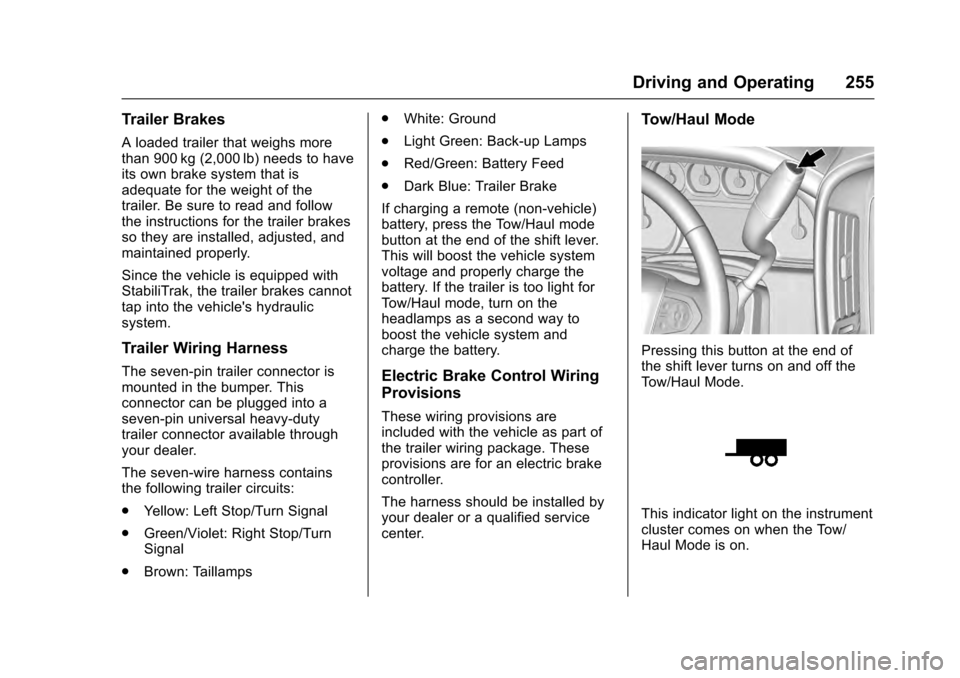
Tow/Haul Mode
Pressing this button at the end of
the shift lever turns on and off the
Tow/Haul Mode.
This indicator light on the instrument
cluster comes on when the Tow/
Haul Mode is on.