four wheel drive CADILLAC ESCALADE 2016 4.G Owners Manual
[x] Cancel search | Manufacturer: CADILLAC, Model Year: 2016, Model line: ESCALADE, Model: CADILLAC ESCALADE 2016 4.GPages: 357, PDF Size: 3.49 MB
Page 6 of 357
Cadillac Escalade Owner Manual (GMNA-Localizing-MidEast-9369153) -
2016 - crc - 6/19/15
In Brief 5
In Brief
Instrument Panel
Instrument Panel . . . . . . . . . . . . . . . . 6
Initial Drive Information
Initial Drive Information . . . . . . . . . . 8
Remote Keyless Entry (RKE)System . . . . . . . . . . . . . . . . . . . . . . . . 8
Remote Vehicle Start . . . . . . . . . . . 9
Door Locks . . . . . . . . . . . . . . . . . . . . . 9
Liftgate . . . . . . . . . . . . . . . . . . . . . . . . 10
Windows . . . . . . . . . . . . . . . . . . . . . . . 10
Seat Adjustment . . . . . . . . . . . . . . . 11
Memory Features . . . . . . . . . . . . . . 13
Second Row Seats . . . . . . . . . . . . 14
Third Row Seats . . . . . . . . . . . . . . . 14
Heated and Cooled Front Seats . . . . . . . . . . . . . . . . . . . . . . . . . 14
Head Restraint Adjustment . . . . 14
Safety Belts . . . . . . . . . . . . . . . . . . . . 15
Passenger Sensing System . . . 15
Mirror Adjustment . . . . . . . . . . . . . . 15
Steering Wheel Adjustment . . . . 16
Throttle and Brake Pedal Adjustment . . . . . . . . . . . . . . . . . . . 16
Interior Lighting . . . . . . . . . . . . . . . . 17
Exterior Lighting . . . . . . . . . . . . . . . 17
Windshield Wiper/Washer . . . . . . 18
Climate Controls . . . . . . . . . . . . . . . 19 Transmission . . . . . . . . . . . . . . . . . . 19
Four-Wheel Drive . . . . . . . . . . . . . . 20
Vehicle Features
Infotainment System . . . . . . . . . . . 21
Steering Wheel Controls . . . . . . . 21
Cruise Control . . . . . . . . . . . . . . . . . 21
Driver Information
Center (DIC) . . . . . . . . . . . . . . . . . 21
Forward Collision Alert (FCA) System . . . . . . . . . . . . . . . . . . . . . . . 22
Front Automatic Braking (FAB) System . . . . . . . . . . . . . . . . . . . . . . . 22
Lane Keep Assist (LKA) . . . . . . . 22
Lane Change Alert (LCA) . . . . . . 23
Surround Vision . . . . . . . . . . . . . . . 23
Rear Vision Camera (RVC) . . . . 23
Rear Cross Traffic Alert (RCTA) System . . . . . . . . . . . . . . . . . . . . . . . 23
Parking Assist . . . . . . . . . . . . . . . . . 23
Rear Automatic Braking (RAB) System . . . . . . . . . . . . . . . . . . . . . . . 24
Power Outlets . . . . . . . . . . . . . . . . . 24
Universal Remote System . . . . . 24
Sunroof . . . . . . . . . . . . . . . . . . . . . . . . 24
Performance and Maintenance
Traction Control/Electronic Stability Control . . . . . . . . . . . . . . 25
Tire Pressure Monitor . . . . . . . . . . 26
Engine Oil Life System . . . . . . . . 26 Driving for Better Fuel
Economy . . . . . . . . . . . . . . . . . . . . . 27
Page 8 of 357

Cadillac Escalade Owner Manual (GMNA-Localizing-MidEast-9369153) -
2016 - crc - 6/19/15
In Brief 7
1.Air Vents 0182.
2. Head-Up Display (HUD) 0141
(If Equipped).
3. Turn Signal Lever. See Turn
and Lane-Change Signals
0 170.
Windshield Wiper/Washer
0 116.
Rear Window Wiper/Washer
0 118.
4. Hazard Warning Flashers
0170.
5. Instrument Cluster 0124.
6. Shift Lever. See Automatic
Transmission 0207.
Tow/Haul Mode Selector
Button. See Tow/Haul Mode
0 212.
Range Selection Mode Buttons
(If Equipped). See Manual
Mode 0210.
7. Power Assist Steps 042 (If
Equipped). Pedal Adjust Switch (If
Equipped). See
Adjustable
Throttle and Brake Pedal
0 200.
Magnetic Ride Control Button.
See Magnetic Ride Control
0 222.
8. Light Sensor. See Automatic
Headlamp System 0169.
9. Infotainment 0175.
10. Glove Box Button. See Glove
Box 0109.
Parking Assist Button. See
Assistance Systems for
Parking or Backing 0233.
Lane Keep Assist (LKA) 0244
(If Equipped).
Traction Control/Electronic
Stability Control 0220.
11. Dual Automatic Climate Control
System 0176.
Instrument Panel Storage
0 109.
12. CD Player. See the infotainment manual. 13. ENGINE START/STOP Button.
SeeIgnition Positions 0201.
14. Steering Wheel Controls 0115.
Driver Information Center (DIC)
Controls. See Driver
Information Center (DIC) 0139.
15. Horn 0116.
16. Steering Wheel Adjustment
0115.
17. Hood Release. See Hood
0 260.
18. Cruise Control 0223 (If
Equipped).
Adaptive Cruise Control 0225
(If Equipped).
Forward Collision Alert (FCA)
System 0238 (If Equipped).
Heated Steering Wheel 0115
(If Equipped).
Phone Button. See the
infotainment manual.
19. Automatic Transfer Case Knob (If Equipped). See Four-Wheel
Drive 0213.
Page 21 of 357
Cadillac Escalade Owner Manual (GMNA-Localizing-MidEast-9369153) -
2016 - crc - 6/19/15
20 In Brief
2. Tap the plus/minus buttons onthe shift lever to select the
desired range of gears for
current driving conditions. See
Manual Mode 0210.
While using Range Selection Mode,
cruise control and the Tow/Haul
Mode can be used.
Grade Braking is not available when
Range Selection Mode is active.
See Tow/Haul Mode 0212.
Four-Wheel Drive
If equipped, four-wheel drive
engages the front axle for extra
traction.
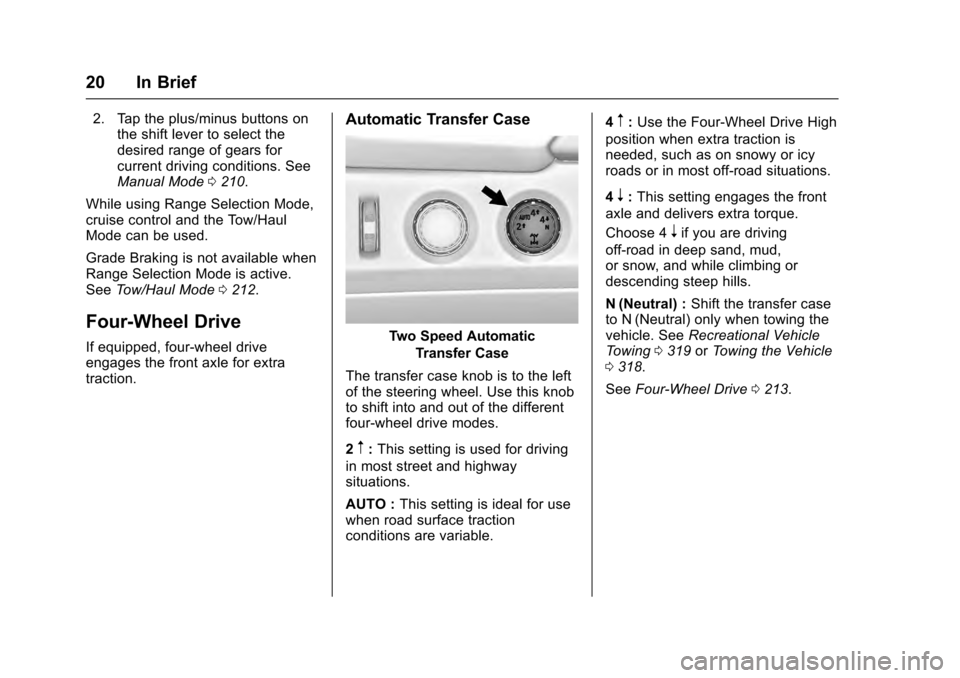
Automatic Transfer Case
Two Speed Automatic
Transfer Case
The transfer case knob is to the left
of the steering wheel. Use this knob
to shift into and out of the different
four-wheel drive modes.
2
m: This setting is used for driving
in most street and highway
situations.
AUTO : This setting is ideal for use
when road surface traction
conditions are variable. 4
m:
Use the Four-Wheel Drive High
position when extra traction is
needed, such as on snowy or icy
roads or in most off-road situations.
4
n: This setting engages the front
axle and delivers extra torque.
Choose 4
nif you are driving
off-road in deep sand, mud,
or snow, and while climbing or
descending steep hills.
N (Neutral) : Shift the transfer case
to N (Neutral) only when towing the
vehicle. See Recreational Vehicle
Towing 0319 orTowing the Vehicle
0 318.
See Four-Wheel Drive 0213.
Page 144 of 357
Cadillac Escalade Owner Manual (GMNA-Localizing-MidEast-9369153) -
2016 - crc - 6/19/15
Instruments and Controls 143
$(Image Adjustment) :Press
down or lift up to center the HUD
image. The HUD image can only be
adjusted up and down, not side
to side.
!(Display View) : Press to
select the display view. Each press
will change the display view.
D(Image Brightness) : Lift up
and hold to brighten the display.
Press down and hold to dim the
display. Hold down to turn the
display off.
The HUD image will automatically
dim and brighten to compensate for
outside lighting. The HUD
brightness control can also be
adjusted as needed.
The HUD image can temporarily
light up depending on the angle and
position of the sunlight on the HUD
display. This is normal.
Polarized sunglasses could make
the HUD image harder to see. HUD Views
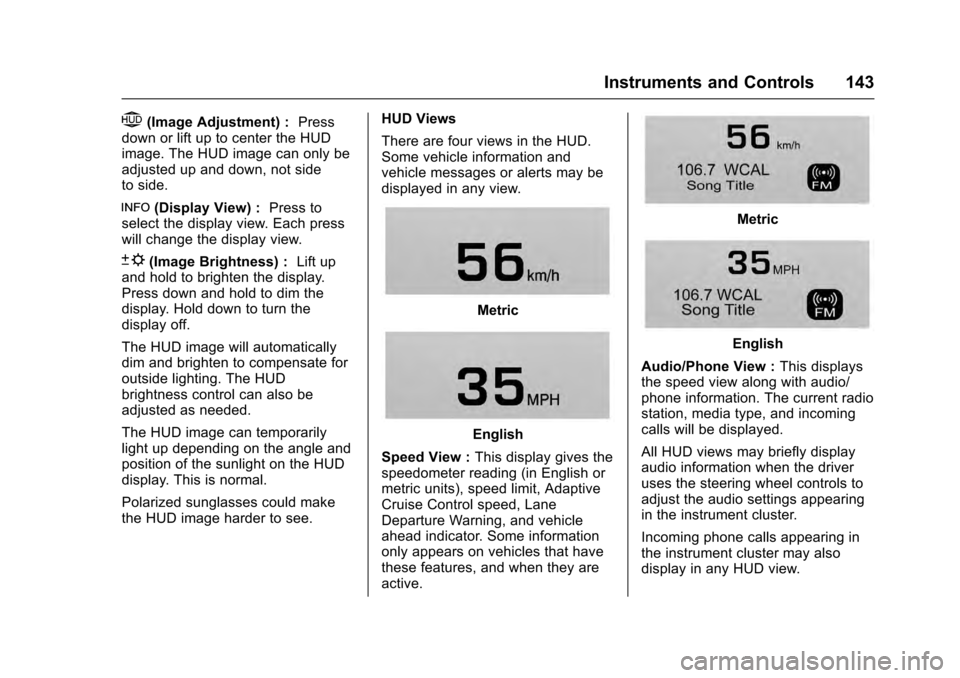
There are four views in the HUD.
Some vehicle information and
vehicle messages or alerts may be
displayed in any view.
Metric
English
Speed View : This display gives the
speedometer reading (in English or
metric units), speed limit, Adaptive
Cruise Control speed, Lane
Departure Warning, and vehicle
ahead indicator. Some information
only appears on vehicles that have
these features, and when they are
active.
Metric
English
Audio/Phone View : This displays
the speed view along with audio/
phone information. The current radio
station, media type, and incoming
calls will be displayed.
All HUD views may briefly display
audio information when the driver
uses the steering wheel controls to
adjust the audio settings appearing
in the instrument cluster.
Incoming phone calls appearing in
the instrument cluster may also
display in any HUD view.
Page 155 of 357
Cadillac Escalade Owner Manual (GMNA-Localizing-MidEast-9369153) -
2016 - crc - 6/19/15
154 Instruments and Controls
TIRE LEARNING ACTIVE
This message displays when the
system is learning new tires. See
Tire Pressure Monitor Operation
0296.
TIRE LOW ADD AIR TO TIRE
This message displays when the
pressure in one or more of the tires
is low.
This message also displays LEFT
FRONT, RIGHT FRONT, LEFT
REAR, or RIGHT REAR to indicate
the location of the low tire.
The low tire pressure warning light
will also come on. See Tire
Pressure Light 0136.
If a tire pressure message appears
on the DIC, stop as soon as you
can. Inflate the tires by adding air
until the tire pressure is equal to the
values shown on the Tire and
Loading Information label. See Tires
0 291, Vehicle Load Limits 0196,
and Tire Pressure 0293. You can receive more than one tire
pressure message at a time. The
DIC also shows the tire pressure
values. See
Driver Information
Center (DIC) 0139.
Transmission Messages
4WD OFF
If equipped with four-wheel drive,
this message displays when the
four-wheel-drive system is
temporarily disabled due to an
overheated condition. The vehicle
will run in two-wheel drive when this
message is present. Once the
four-wheel-drive system cools down,
the message turns off and the
four-wheel-drive system returns to
normal operation.
4WD SHIFT IN PROGRESS
This message will display while the
four-wheel-drive system is shifting.
GRADE BRAKING OFF
This message displays when grade
braking has been disabled with the
Tow/Haul Mode button on the end of the shift lever. See
Tow/Haul Mode
0 212, Automatic Transmission
0 207, and Cruise Control 0223.
GRADE BRAKING ON
This message displays when grade
braking has been enabled with the
Tow/Haul Mode button on the end of
the shift lever. See Tow/Haul Mode
0 212, Automatic Transmission
0 207, and Cruise Control 0223.
GRADE BRAKING ACTIVE
This message displays when grade
braking has been activated while
driving on downhill grades. This
message will only appear the first
time the feature is activated in an
ignition cycle. See Tow/Haul Mode
0 212, Automatic Transmission
0 207, and Cruise Control 0223.
SERVICE 4WD
If the vehicle has four-wheel drive,
this message may display if a
problem occurs with the
four-wheel-drive system. If this
message appears, stop as soon as
possible and turn off the vehicle.
Turn the vehicle off for at least
Page 156 of 357
Cadillac Escalade Owner Manual (GMNA-Localizing-MidEast-9369153) -
2016 - crc - 6/19/15
Instruments and Controls 155
one minute, then restart the vehicle
and check for the message on the
DIC display. If the message is still
displayed or appears again when
you begin driving, the
four-wheel-drive system needs
service. See your dealer.
SHIFT DENIED
This message displays when the
shift lever is in the M (Manual Mode)
position and a transmission range
has been selected that is
unavailable at the current vehicle
speed.
TRANSMISSION HOT IDLE
ENGINE
This message displays and a chime
may sound if the transmission fluid
in the vehicle gets hot. Driving with
the transmission fluid temperature
high can cause damage to the
vehicle. Stop the vehicle and let it
idle to allow the transmission to
cool. This message clears and the
chime stops when the fluid
temperature reaches a safe level.When towing, use Tow/Haul Mode
to prevent damage to the engine or
transmission. See
Tow/Haul Mode
0 212.
Vehicle Reminder
Messages
ICE POSSIBLE DRIVE
WITH CARE
This message displays when ice
conditions are possible.
Vehicle Speed Messages
VEHICLE OVERSPEED
This message displays when the
vehicle speed exceeds 120 km/h
(75 mph).
Washer Fluid Messages
WASHER FLUID LOW ADD
FLUID
This message may display when the
washer fluid level is low. Fill the
windshield washer reservoir as soon
as possible. See Engine
Compartment Overview 0261 for the location of the windshield
washer reservoir. Also, see
Washer
Fluid 0272.
Window Messages
OPEN, THEN CLOSE DRIVER/
PASSENGER WINDOW
This message is displayed when the
window needs to be reprogrammed.
If the vehicle's battery has been
recharged or disconnected, you will
need to program each front window
for the express-up feature to work.
See Power Windows 049.
Page 185 of 357
Cadillac Escalade Owner Manual (GMNA-Localizing-MidEast-9369153) -
2016 - crc - 6/19/15
184 Driving and Operating
Driving and
Operating
Driving Information
Distracted Driving . . . . . . . . . . . . 185
Defensive Driving . . . . . . . . . . . . . 186
Control of a Vehicle . . . . . . . . . . . 186
Braking . . . . . . . . . . . . . . . . . . . . . . . 186
Steering . . . . . . . . . . . . . . . . . . . . . . 186
Off-Road Recovery . . . . . . . . . . . 187
Loss of Control . . . . . . . . . . . . . . . 187
Off-Road Driving . . . . . . . . . . . . . 188
Driving on Wet Roads . . . . . . . . 192
Hill and Mountain Roads . . . . . 193
Winter Driving . . . . . . . . . . . . . . . . 194
If the Vehicle Is Stuck . . . . . . . . 195
Vehicle Load Limits . . . . . . . . . . . 196
Starting and Operating
New Vehicle Break-In . . . . . . . . . 200
Adjustable Throttle and BrakePedal . . . . . . . . . . . . . . . . . . . . . . . 200
Ignition Positions . . . . . . . . . . . . . 201
Starting the Engine . . . . . . . . . . . 203
Retained Accessory Power (RAP) . . . . . . . . . . . . . . . . 204
Shifting Into Park . . . . . . . . . . . . . 204
Shifting out of Park . . . . . . . . . . . 205 Parking over Things
That Burn . . . . . . . . . . . . . . . . . . . 206
Active Fuel Management
®. . . . 206
Engine Exhaust
Engine Exhaust . . . . . . . . . . . . . . 206
Running the Vehicle While Parked . . . . . . . . . . . . . . . . . . . . . . 207
Automatic Transmission
Automatic Transmission . . . . . . 207
Manual Mode . . . . . . . . . . . . . . . . . 210
Tow/Haul Mode . . . . . . . . . . . . . . . 212
Drive Systems
Four-Wheel Drive . . . . . . . . . . . . . 213
Brakes
Antilock BrakeSystem (ABS) . . . . . . . . . . . . . . . 216
Parking Brake . . . . . . . . . . . . . . . . 217
Electric Parking Brake . . . . . . . . 218
Brake Assist . . . . . . . . . . . . . . . . . . 219
Hill Start Assist (HSA) . . . . . . . . 219
Ride Control Systems
Traction Control/Electronic Stability Control . . . . . . . . . . . . . 220
Magnetic Ride Control . . . . . . . . 222
Locking Rear Axle . . . . . . . . . . . . 222
Automatic Level Control . . . . . . 222
Cruise Control
Cruise Control . . . . . . . . . . . . . . . . 223
Adaptive Cruise Control . . . . . . 225
Driver Assistance Systems
Driver Assistance Systems . . . 232
Assistance Systems for Parking or Backing . . . . . . . . . . 233
Assistance Systems for Driving . . . . . . . . . . . . . . . . . . . . . . 238
Forward Collision Alert (FCA) System . . . . . . . . . . . . . . . . . . . . . . 238
Front Automatic Braking (FAB) System . . . . . . . . . . . . . . . . . . . . . . 240
Side Blind Zone Alert (SBZA) . . . . . . . . . . . . . . . . 241
Lane Change Alert (LCA) . . . . . 242
Lane Departure Warning (LDW) . . . . . . . . . . . . . 244
Lane Keep Assist (LKA) . . . . . . 244
Fuel
Fuel . . . . . . . . . . . . . . . . . . . . . . . . . . 246
Fuel Additives . . . . . . . . . . . . . . . . 246
Filling the Tank . . . . . . . . . . . . . . . 247
Filling a Portable Fuel Container . . . . . . . . . . . . . . . . . . . 248
Trailer Towing
General TowingInformation . . . . . . . . . . . . . . . . . . 249
Page 189 of 357
Cadillac Escalade Owner Manual (GMNA-Localizing-MidEast-9369153) -
2016 - crc - 6/19/15
188 Driving and Operating
The vehicle may straighten out.
Be ready for a second skid if it
occurs.
. Slow down and adjust your
driving according to weather
conditions. Stopping distance
can be longer and vehicle
control can be affected when
traction is reduced by water,
snow, ice, gravel, or other
material on the road. Learn to
recognize warning clues —such
as enough water, ice, or packed
snow on the road to make a
mirrored surface —and slow
down when you have any doubt.
. Try to avoid sudden steering,
acceleration, or braking,
including reducing vehicle speed
by shifting to a lower gear. Any
sudden changes could cause
the tires to slide.
Remember: Antilock brakes help
avoid only the braking skid.
Off-Road Driving
Four-wheel-drive vehicles can be
used for off-road driving. Vehicles
without four-wheel drive and vehicles not equipped with All
Terrain (AT) or On-Off Road (OOR)
tires must not be driven off-road
except on a level, solid surface. For
more contact information about the
original equipment tires, see the
Limited Warranty and Owner
Assistance Information manual.
One of the best ways for successful
off-road driving is to control the
speed.
{Warning
When driving off-road, bouncing
and quick changes in direction
can easily throw you out of
position. This could cause you to
lose control and crash. You and
your passengers should always
wear safety belts.
Before Driving Off-Road
.
Have all necessary maintenance
and service work completed. .
Fuel the vehicle, fill fluid levels,
and check inflation pressure in
all tires, including the spare,
if equipped.
. Read all the information about
four-wheel-drive vehicles in this
manual.
. Know the local laws that apply to
off-road driving.
To gain more ground clearance if
needed, it may be necessary to
remove the front fascia lower
air dam.
Caution
Operating the vehicle for
extended periods without the front
fascia lower air dam installed can
cause improper air flow to the
engine. Re-attach the front fascia
air dam after off-road driving.
Page 196 of 357
Cadillac Escalade Owner Manual (GMNA-Localizing-MidEast-9369153) -
2016 - crc - 6/19/15
Driving and Operating 195
Warning (Continued)
cannot be seen or smelled. It can
cause unconsciousness and even
death.
If the vehicle is stuck in snow:. Clear snow from the base of
the vehicle, especially any
blocking the exhaust pipe.
. Open a window about 5 cm
(2 in) on the vehicle side
that is away from the wind,
to bring in fresh air.
. Fully open the air outlets on
or under the instrument
panel.
. Adjust the climate control
system to circulate the air
inside the vehicle and set
the fan speed to the highest
setting. See “Climate
Control Systems.”
For more information about CO,
see Engine Exhaust 0206 in the
index. To save fuel, run the engine for
short periods to warm the vehicle
and then shut the engine off and
partially close the window. Moving
about to keep warm also helps.
If it takes time for help to arrive,
when running the engine, push the
accelerator pedal slightly so the
engine runs faster than the idle
speed. This keeps the battery
charged to restart the vehicle and to
signal for help with the headlamps.
Do this as little as possible, to
save fuel.
If the Vehicle Is Stuck
Slowly and cautiously spin the
wheels to free the vehicle when
stuck in sand, mud, ice, or snow.
See
“Rocking the Vehicle to Get It
Out” later in this section.
The Traction Control System (TCS)
can often help to free a stuck
vehicle. See Traction Control/
Electronic Stability Control 0220.
If TCS cannot free the vehicle, see
“Rocking the Vehicle to Get it Out”
following.
{Warning
If the vehicle's tires spin at high
speed, they can explode, and you
or others could be injured. The
vehicle can overheat, causing an
engine compartment fire or other
damage. Spin the wheels as little
as possible and avoid going
above 56 km/h (35 mph).
For information about using tire
chains on the vehicle, see Tire
Chains 0304.
Rocking the Vehicle to Get
It Out
Turn the steering wheel left and
right to clear the area around the
front wheels. For four-wheel-drive
vehicles, shift into Four-Wheel Drive
High. Turn the TCS off. Shift back
and forth between R (Reverse) and
a forward gear, spinning the wheels
as little as possible. To prevent
transmission wear, wait until the
wheels stop spinning before shifting
gears. Slowly spinning the wheels in
the forward and reverse directions
Page 205 of 357
Cadillac Escalade Owner Manual (GMNA-Localizing-MidEast-9369153) -
2016 - crc - 6/19/15
204 Driving and Operating
engine starts, let go of the
button, and the accelerator.
If the vehicle starts briefly but
then stops again, do the same
thing. This clears the extra
gasoline from the engine. Do
not race the engine
immediately after starting it.
Operate the engine and
transmission gently until the oil
warms up and lubricates all
moving parts.
Retained Accessory
Power (RAP)
The following vehicle accessories
can be used for up to 10 minutes
after the engine is turned off:
.Audio System
. Power Windows
. OnStar System (if equipped)
. Sunroof (if equipped)
. Accessory Power Outlets. The
console and center seat outlets
are RAP powered. These features work when the
ignition is in ON/RUN or ACC/
ACCESSORY. Once the ignition is
turned from ON/RUN to LOCK/OFF,
the windows and sunroof continue
to work up to 10 minutes until any
door is opened. The radio continues
to work for up to 10 minutes or until
the driver door is opened.
Shifting Into Park
{Warning
It can be dangerous to get out of
the vehicle if the shift lever is not
fully in P (Park) with the parking
brake firmly set. The vehicle can
roll. If you have left the engine
running, the vehicle can move
suddenly. You or others could be
injured. To be sure the vehicle will
not move, even when you are on
fairly level ground, use the steps
that follow. If the vehicle has a
four-wheel drive transfer case
with a N (Neutral) position, and
the transfer case is in N (Neutral),
(Continued)
Warning (Continued)
the vehicle will be free to roll,
even if the shift lever is in
P (Park). Be sure the transfer
case is in a drive gear. If towing a
trailer, seeDriving Characteristics
and Towing Tips 0249.
1. Hold the brake pedal down, then set the parking brake.
See Parking Brake 0217.
2. Move the shift lever into the P (Park) position by pulling the
shift lever toward you and
moving it up as far as it will go.
3. Be sure the transfer case is in a drive gear —not in
N (Neutral).
4. Turn the ignition to LOCK/OFF.