steering CADILLAC ESCALADE 2016 4.G Owners Manual
[x] Cancel search | Manufacturer: CADILLAC, Model Year: 2016, Model line: ESCALADE, Model: CADILLAC ESCALADE 2016 4.GPages: 357, PDF Size: 3.49 MB
Page 4 of 357
Cadillac Escalade Owner Manual (GMNA-Localizing-MidEast-9369153) -
2016 - crc - 6/19/15
Introduction 3
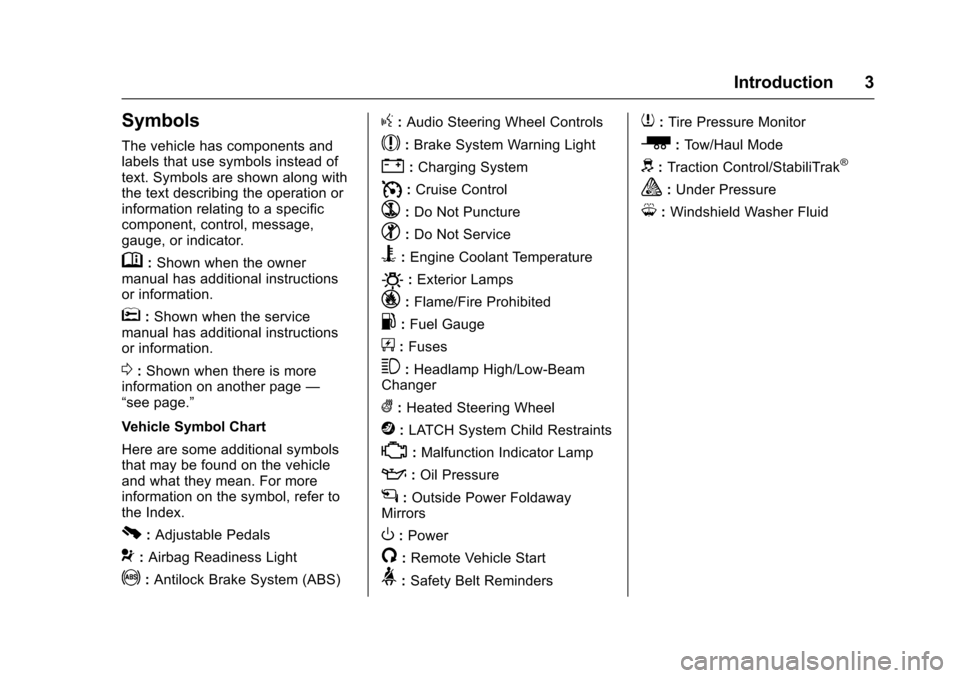
Symbols
The vehicle has components and
labels that use symbols instead of
text. Symbols are shown along with
the text describing the operation or
information relating to a specific
component, control, message,
gauge, or indicator.
M:Shown when the owner
manual has additional instructions
or information.
*: Shown when the service
manual has additional instructions
or information.
0: Shown when there is more
information on another page —
“see page.”
Vehicle Symbol Chart
Here are some additional symbols
that may be found on the vehicle
and what they mean. For more
information on the symbol, refer to
the Index.
0: Adjustable Pedals
9: Airbag Readiness Light
!:Antilock Brake System (ABS)
g: Audio Steering Wheel Controls
$:Brake System Warning Light
":Charging System
I: Cruise Control
`:Do Not Puncture
^:Do Not Service
B:Engine Coolant Temperature
O:Exterior Lamps
_: Flame/Fire Prohibited
.:Fuel Gauge
+: Fuses
3:Headlamp High/Low-Beam
Changer
(: Heated Steering Wheel
j:LATCH System Child Restraints
*:Malfunction Indicator Lamp
::Oil Pressure
g:Outside Power Foldaway
Mirrors
O: Power
/:Remote Vehicle Start
>: Safety Belt Reminders
7:Tire Pressure Monitor
_:Tow/Haul Mode
d:Traction Control/StabiliTrak®
a:Under Pressure
M: Windshield Washer Fluid
Page 6 of 357
Cadillac Escalade Owner Manual (GMNA-Localizing-MidEast-9369153) -
2016 - crc - 6/19/15
In Brief 5
In Brief
Instrument Panel
Instrument Panel . . . . . . . . . . . . . . . . 6
Initial Drive Information
Initial Drive Information . . . . . . . . . . 8
Remote Keyless Entry (RKE)System . . . . . . . . . . . . . . . . . . . . . . . . 8
Remote Vehicle Start . . . . . . . . . . . 9
Door Locks . . . . . . . . . . . . . . . . . . . . . 9
Liftgate . . . . . . . . . . . . . . . . . . . . . . . . 10
Windows . . . . . . . . . . . . . . . . . . . . . . . 10
Seat Adjustment . . . . . . . . . . . . . . . 11
Memory Features . . . . . . . . . . . . . . 13
Second Row Seats . . . . . . . . . . . . 14
Third Row Seats . . . . . . . . . . . . . . . 14
Heated and Cooled Front Seats . . . . . . . . . . . . . . . . . . . . . . . . . 14
Head Restraint Adjustment . . . . 14
Safety Belts . . . . . . . . . . . . . . . . . . . . 15
Passenger Sensing System . . . 15
Mirror Adjustment . . . . . . . . . . . . . . 15
Steering Wheel Adjustment . . . . 16
Throttle and Brake Pedal Adjustment . . . . . . . . . . . . . . . . . . . 16
Interior Lighting . . . . . . . . . . . . . . . . 17
Exterior Lighting . . . . . . . . . . . . . . . 17
Windshield Wiper/Washer . . . . . . 18
Climate Controls . . . . . . . . . . . . . . . 19 Transmission . . . . . . . . . . . . . . . . . . 19
Four-Wheel Drive . . . . . . . . . . . . . . 20
Vehicle Features
Infotainment System . . . . . . . . . . . 21
Steering Wheel Controls . . . . . . . 21
Cruise Control . . . . . . . . . . . . . . . . . 21
Driver Information
Center (DIC) . . . . . . . . . . . . . . . . . 21
Forward Collision Alert (FCA) System . . . . . . . . . . . . . . . . . . . . . . . 22
Front Automatic Braking (FAB) System . . . . . . . . . . . . . . . . . . . . . . . 22
Lane Keep Assist (LKA) . . . . . . . 22
Lane Change Alert (LCA) . . . . . . 23
Surround Vision . . . . . . . . . . . . . . . 23
Rear Vision Camera (RVC) . . . . 23
Rear Cross Traffic Alert (RCTA) System . . . . . . . . . . . . . . . . . . . . . . . 23
Parking Assist . . . . . . . . . . . . . . . . . 23
Rear Automatic Braking (RAB) System . . . . . . . . . . . . . . . . . . . . . . . 24
Power Outlets . . . . . . . . . . . . . . . . . 24
Universal Remote System . . . . . 24
Sunroof . . . . . . . . . . . . . . . . . . . . . . . . 24
Performance and Maintenance
Traction Control/Electronic Stability Control . . . . . . . . . . . . . . 25
Tire Pressure Monitor . . . . . . . . . . 26
Engine Oil Life System . . . . . . . . 26 Driving for Better Fuel
Economy . . . . . . . . . . . . . . . . . . . . . 27
Page 8 of 357

Cadillac Escalade Owner Manual (GMNA-Localizing-MidEast-9369153) -
2016 - crc - 6/19/15
In Brief 7
1.Air Vents 0182.
2. Head-Up Display (HUD) 0141
(If Equipped).
3. Turn Signal Lever. See Turn
and Lane-Change Signals
0 170.
Windshield Wiper/Washer
0 116.
Rear Window Wiper/Washer
0 118.
4. Hazard Warning Flashers
0170.
5. Instrument Cluster 0124.
6. Shift Lever. See Automatic
Transmission 0207.
Tow/Haul Mode Selector
Button. See Tow/Haul Mode
0 212.
Range Selection Mode Buttons
(If Equipped). See Manual
Mode 0210.
7. Power Assist Steps 042 (If
Equipped). Pedal Adjust Switch (If
Equipped). See
Adjustable
Throttle and Brake Pedal
0 200.
Magnetic Ride Control Button.
See Magnetic Ride Control
0 222.
8. Light Sensor. See Automatic
Headlamp System 0169.
9. Infotainment 0175.
10. Glove Box Button. See Glove
Box 0109.
Parking Assist Button. See
Assistance Systems for
Parking or Backing 0233.
Lane Keep Assist (LKA) 0244
(If Equipped).
Traction Control/Electronic
Stability Control 0220.
11. Dual Automatic Climate Control
System 0176.
Instrument Panel Storage
0 109.
12. CD Player. See the infotainment manual. 13. ENGINE START/STOP Button.
SeeIgnition Positions 0201.
14. Steering Wheel Controls 0115.
Driver Information Center (DIC)
Controls. See Driver
Information Center (DIC) 0139.
15. Horn 0116.
16. Steering Wheel Adjustment
0115.
17. Hood Release. See Hood
0 260.
18. Cruise Control 0223 (If
Equipped).
Adaptive Cruise Control 0225
(If Equipped).
Forward Collision Alert (FCA)
System 0238 (If Equipped).
Heated Steering Wheel 0115
(If Equipped).
Phone Button. See the
infotainment manual.
19. Automatic Transfer Case Knob (If Equipped). See Four-Wheel
Drive 0213.
Page 14 of 357
Cadillac Escalade Owner Manual (GMNA-Localizing-MidEast-9369153) -
2016 - crc - 6/19/15
In Brief 13
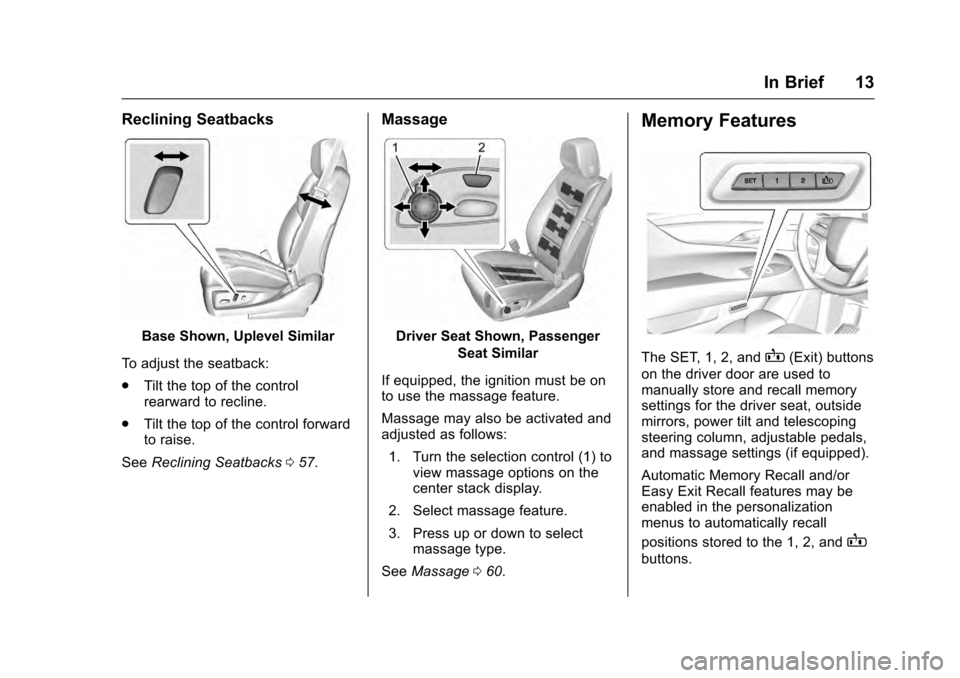
Reclining Seatbacks
Base Shown, Uplevel Similar
To adjust the seatback:
. Tilt the top of the control
rearward to recline.
. Tilt the top of the control forward
to raise.
See Reclining Seatbacks 057.
Massage
Driver Seat Shown, Passenger
Seat Similar
If equipped, the ignition must be on
to use the massage feature.
Massage may also be activated and
adjusted as follows: 1. Turn the selection control (1) to view massage options on the
center stack display.
2. Select massage feature.
3. Press up or down to select massage type.
See Massage 060.
Memory Features
The SET, 1, 2, andB(Exit) buttons
on the driver door are used to
manually store and recall memory
settings for the driver seat, outside
mirrors, power tilt and telescoping
steering column, adjustable pedals,
and massage settings (if equipped).
Automatic Memory Recall and/or
Easy Exit Recall features may be
enabled in the personalization
menus to automatically recall
positions stored to the 1, 2, and
B
buttons.
Page 17 of 357
Cadillac Escalade Owner Manual (GMNA-Localizing-MidEast-9369153) -
2016 - crc - 6/19/15
16 In Brief
3. Press either (1) or (2) again todeselect the mirror.
See Power Mirrors 045.
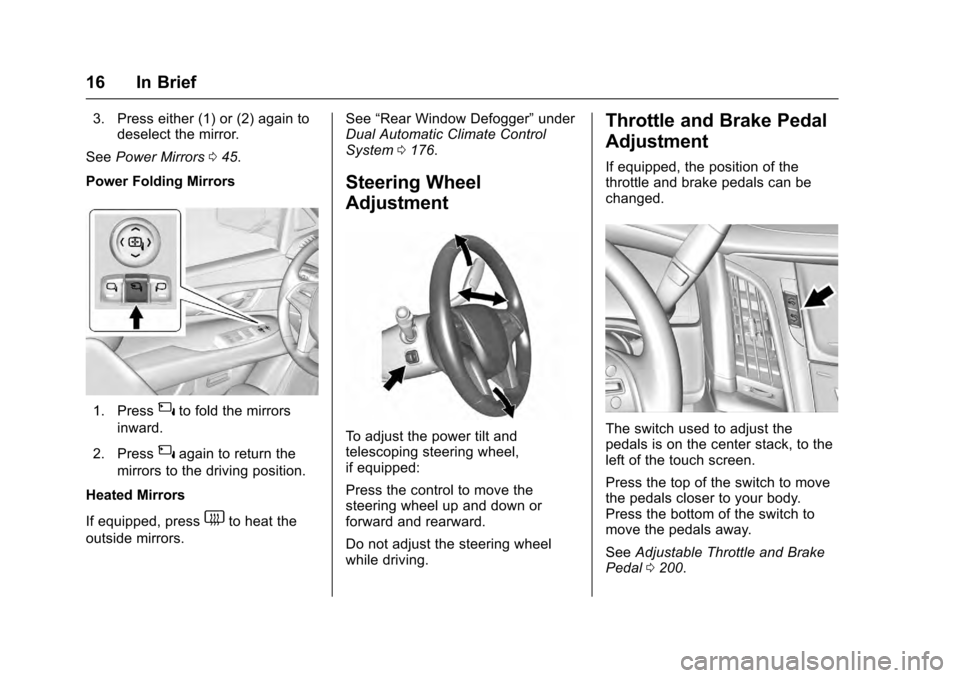
Power Folding Mirrors
1. Press{to fold the mirrors
inward.
2. Press
{again to return the
mirrors to the driving position.
Heated Mirrors
If equipped, press
1to heat the
outside mirrors. See
“Rear Window Defogger” under
Dual Automatic Climate Control
System 0176.
Steering Wheel
Adjustment
To adjust the power tilt and
telescoping steering wheel,
if equipped:
Press the control to move the
steering wheel up and down or
forward and rearward.
Do not adjust the steering wheel
while driving.
Throttle and Brake Pedal
Adjustment
If equipped, the position of the
throttle and brake pedals can be
changed.
The switch used to adjust the
pedals is on the center stack, to the
left of the touch screen.
Press the top of the switch to move
the pedals closer to your body.
Press the bottom of the switch to
move the pedals away.
See Adjustable Throttle and Brake
Pedal 0200.
Page 18 of 357
Cadillac Escalade Owner Manual (GMNA-Localizing-MidEast-9369153) -
2016 - crc - 6/19/15
In Brief 17
The vehicle may have a memory
function, which lets pedal settings
be saved and recalled. SeeMemory
Seats 058.
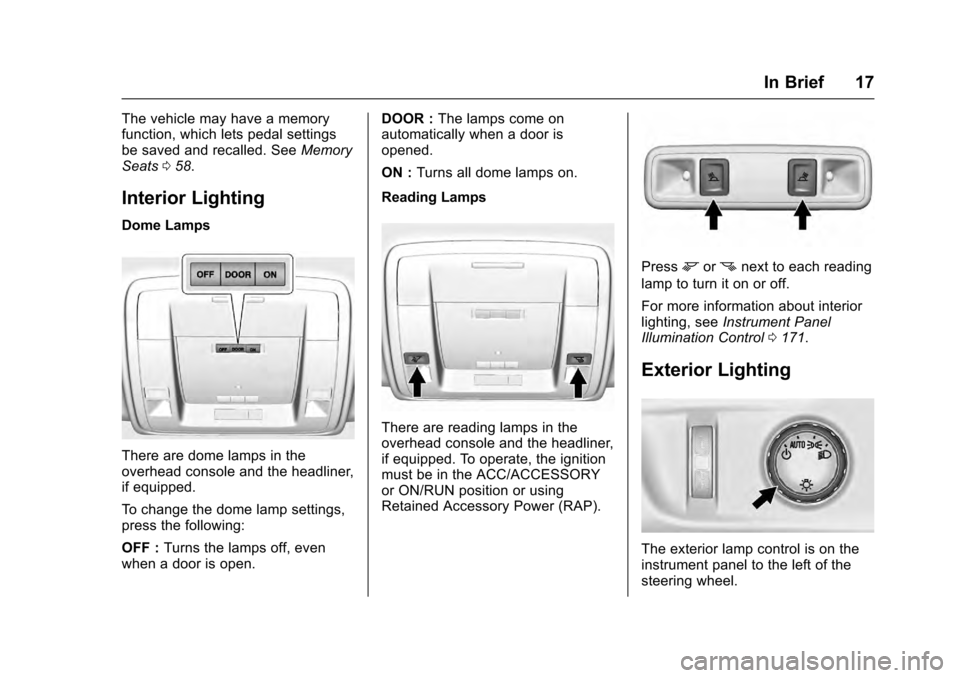
Interior Lighting
Dome Lamps
There are dome lamps in the
overhead console and the headliner,
if equipped.
To change the dome lamp settings,
press the following:
OFF : Turns the lamps off, even
when a door is open. DOOR :
The lamps come on
automatically when a door is
opened.
ON : Turns all dome lamps on.
Reading Lamps
There are reading lamps in the
overhead console and the headliner,
if equipped. To operate, the ignition
must be in the ACC/ACCESSORY
or ON/RUN position or using
Retained Accessory Power (RAP).
Pressmornnext to each reading
lamp to turn it on or off.
For more information about interior
lighting, see Instrument Panel
Illumination Control 0171.
Exterior Lighting
The exterior lamp control is on the
instrument panel to the left of the
steering wheel.
Page 21 of 357
Cadillac Escalade Owner Manual (GMNA-Localizing-MidEast-9369153) -
2016 - crc - 6/19/15
20 In Brief
2. Tap the plus/minus buttons onthe shift lever to select the
desired range of gears for
current driving conditions. See
Manual Mode 0210.
While using Range Selection Mode,
cruise control and the Tow/Haul
Mode can be used.
Grade Braking is not available when
Range Selection Mode is active.
See Tow/Haul Mode 0212.
Four-Wheel Drive
If equipped, four-wheel drive
engages the front axle for extra
traction.
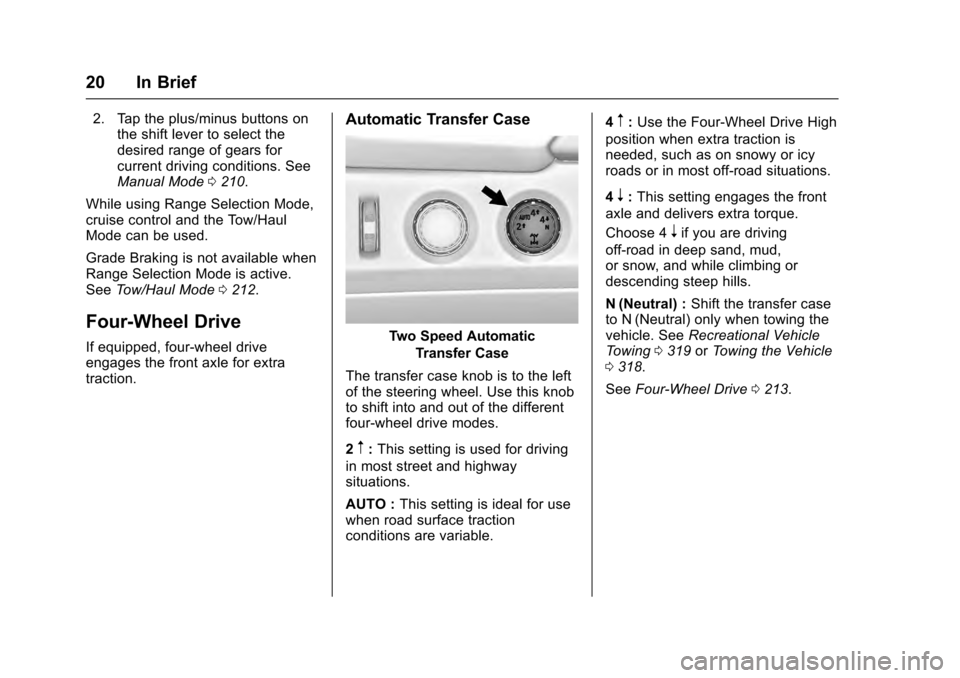
Automatic Transfer Case
Two Speed Automatic
Transfer Case
The transfer case knob is to the left
of the steering wheel. Use this knob
to shift into and out of the different
four-wheel drive modes.
2
m: This setting is used for driving
in most street and highway
situations.
AUTO : This setting is ideal for use
when road surface traction
conditions are variable. 4
m:
Use the Four-Wheel Drive High
position when extra traction is
needed, such as on snowy or icy
roads or in most off-road situations.
4
n: This setting engages the front
axle and delivers extra torque.
Choose 4
nif you are driving
off-road in deep sand, mud,
or snow, and while climbing or
descending steep hills.
N (Neutral) : Shift the transfer case
to N (Neutral) only when towing the
vehicle. See Recreational Vehicle
Towing 0319 orTowing the Vehicle
0 318.
See Four-Wheel Drive 0213.
Page 22 of 357
Cadillac Escalade Owner Manual (GMNA-Localizing-MidEast-9369153) -
2016 - crc - 6/19/15
In Brief 21
Vehicle Features
Infotainment System
See the infotainment manual for
information on the radio, audio
players, phone, and navigation
system. It also includes information
on settings.
Steering Wheel Controls
The infotainment system can be
operated by using the steering
wheel controls. See "Steering
Wheel Controls" in the infotainment
manual.
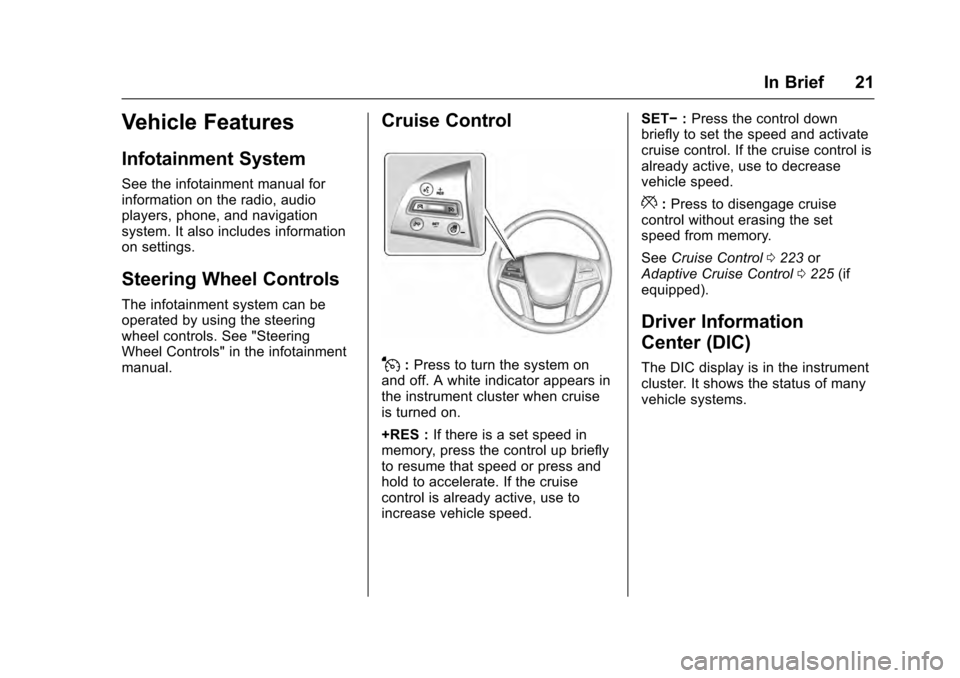
Cruise Control
J:Press to turn the system on
and off. A white indicator appears in
the instrument cluster when cruise
is turned on.
+RES : If there is a set speed in
memory, press the control up briefly
to resume that speed or press and
hold to accelerate. If the cruise
control is already active, use to
increase vehicle speed. SET−
:Press the control down
briefly to set the speed and activate
cruise control. If the cruise control is
already active, use to decrease
vehicle speed.
*: Press to disengage cruise
control without erasing the set
speed from memory.
See Cruise Control 0223 or
Adaptive Cruise Control 0225 (if
equipped).
Driver Information
Center (DIC)
The DIC display is in the instrument
cluster. It shows the status of many
vehicle systems.
Page 23 of 357
Cadillac Escalade Owner Manual (GMNA-Localizing-MidEast-9369153) -
2016 - crc - 6/19/15
22 In Brief
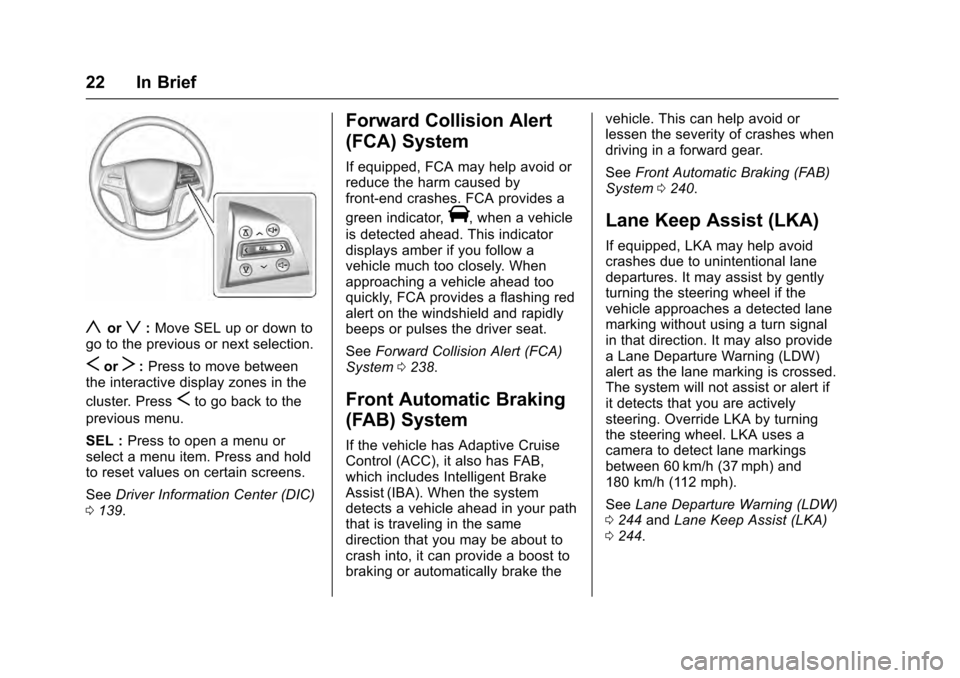
yorz:Move SEL up or down to
go to the previous or next selection.
SorT: Press to move between
the interactive display zones in the
cluster. Press
Sto go back to the
previous menu.
SEL : Press to open a menu or
select a menu item. Press and hold
to reset values on certain screens.
See Driver Information Center (DIC)
0 139.
Forward Collision Alert
(FCA) System
If equipped, FCA may help avoid or
reduce the harm caused by
front-end crashes. FCA provides a
green indicator,
V, when a vehicle
is detected ahead. This indicator
displays amber if you follow a
vehicle much too closely. When
approaching a vehicle ahead too
quickly, FCA provides a flashing red
alert on the windshield and rapidly
beeps or pulses the driver seat.
See Forward Collision Alert (FCA)
System 0238.
Front Automatic Braking
(FAB) System
If the vehicle has Adaptive Cruise
Control (ACC), it also has FAB,
which includes Intelligent Brake
Assist (IBA). When the system
detects a vehicle ahead in your path
that is traveling in the same
direction that you may be about to
crash into, it can provide a boost to
braking or automatically brake the vehicle. This can help avoid or
lessen the severity of crashes when
driving in a forward gear.
See
Front Automatic Braking (FAB)
System 0240.
Lane Keep Assist (LKA)
If equipped, LKA may help avoid
crashes due to unintentional lane
departures. It may assist by gently
turning the steering wheel if the
vehicle approaches a detected lane
marking without using a turn signal
in that direction. It may also provide
a Lane Departure Warning (LDW)
alert as the lane marking is crossed.
The system will not assist or alert if
it detects that you are actively
steering. Override LKA by turning
the steering wheel. LKA uses a
camera to detect lane markings
between 60 km/h (37 mph) and
180 km/h (112 mph).
See Lane Departure Warning (LDW)
0 244 andLane Keep Assist (LKA)
0 244.
Page 27 of 357

Cadillac Escalade Owner Manual (GMNA-Localizing-MidEast-9369153) -
2016 - crc - 6/19/15
26 In Brief
in the instrument cluster and the
appropriate DIC message
displays. SeeRide Control
System Messages 0152.
. Press and release
gagain to
turn on both systems.
StabiliTrak will automatically turn on
if the vehicle exceeds 56 km/h
(35 mph). Traction control will
remain off.
See Traction Control/Electronic
Stability Control 0220.
Tire Pressure Monitor
This vehicle may have a Tire
Pressure Monitor System (TPMS).
The low tire pressure warning light
alerts to a significant loss in
pressure of one of the vehicle's
tires. If the warning light comes on,
stop as soon as possible and inflate the tires to the recommended
pressure shown on the Tire and
Loading Information label. See
Vehicle Load Limits
0196. The
warning light will remain on until the
tire pressure is corrected.
The low tire pressure warning light
may come on in cool weather when
the vehicle is first started, and then
turn off as the vehicle is driven. This
may be an early indicator that the
tire pressures are getting low and
the tires need to be inflated to the
proper pressure.
The TPMS does not replace normal
monthly tire maintenance. Maintain
the correct tire pressures.
See Tire Pressure Monitor System
0 295.
Engine Oil Life System
The engine oil life system calculates
engine oil life based on vehicle use
and displays the CHANGE ENGINE
OIL SOON message when it is time
to change the engine oil and filter.
The oil life system should be reset
to 100% only following an oil
change. Resetting the Oil Life System
1. Using the DIC controls on the right side of the steering wheel,
display OIL LIFE on the DIC.
See Driver Information Center
(DIC) 0139. When remaining
oil life is low, the CHANGE
ENGINE OIL SOON message
will appear on the display. See
Engine Oil Messages 0148.
2. Press SEL on the DIC controls and hold SEL down for a few
seconds to clear the CHANGE
ENGINE OIL SOON message
and reset the oil life at 100%.
Be careful not to reset the oil
life display accidentally at any
time other than after the oil is
changed. It cannot be reset
accurately until the next oil
change.
The oil life system can also be reset
as follows: 1. Turn the ignition on with the engine off.
2. Fully press and release the accelerator pedal three times
within five seconds.