light CADILLAC ESCALADE 2017 4.G Owners Manual
[x] Cancel search | Manufacturer: CADILLAC, Model Year: 2017, Model line: ESCALADE, Model: CADILLAC ESCALADE 2017 4.GPages: 354, PDF Size: 3.9 MB
Page 239 of 354
Cadillac Escalade Owner Manual (GMNA-Localizing-MidEast-10293077) -
2017 - crc - 8/24/16
238 DRIVING AND OPERATING
to be applied as needed. IBA will
automatically disengage only when
the brake pedal is released.
{Warning
IBA may increase vehicle braking in
situations when it may not be
necessary. You could block the flow
of traffic. If this occurs, take your
foot off the brake pedal and then
apply the brakes as needed.
FAB and IBA can be disabled through
vehicle personalization. See “Collision/
Detection Systems” underVehicle
Personalization 0154.
{Warning
Using FAB or IBA while towing a
trailer could cause you to lose
control of the vehicle and crash.
Turn the system to Alert, or if the
vehicle has ACC to Off, when
towing a trailer.
Side Blind Zone
Alert (SBZA)
If equipped, the SBZA system is a
lane-changing aid that assists drivers
with avoiding crashes that occur with
moving vehicles in the side blind zone
(or spot) areas. When the vehicle is in
a forward gear, the left or right side
mirror display will light up if a moving
vehicle is detected in that blind zone.
If the turn signal is activated and a
vehicle is also detected on the same
side, the display will flash as an extra
warning not to change lanes. Since
this system is part of the Lane Change
Alert (LCA) system, read the entire
LCA section before using this feature.
Lane Change Alert (LCA)
If equipped, the LCA system is a
lane-changing aid that assists drivers
with avoiding lane change crashes
that occur with moving vehicles in the
side blind zone (or spot) areas or with
vehicles rapidly approaching these
areas from behind. The LCA warning
display will light up in the
corresponding outside side mirror and
will flash if the turn signal is on.
{Warning
LCA does not alert the driver to
vehicles outside of the system
detection zones, pedestrians,
bicyclists, or animals. It may not
provide alerts when changing lanes
under all driving conditions. Failure
to use proper care when changing
lanes may result in injury, death,
or vehicle damage. Before making a
lane change, always check mirrors,
glance over your shoulder, and use
the turn signals.
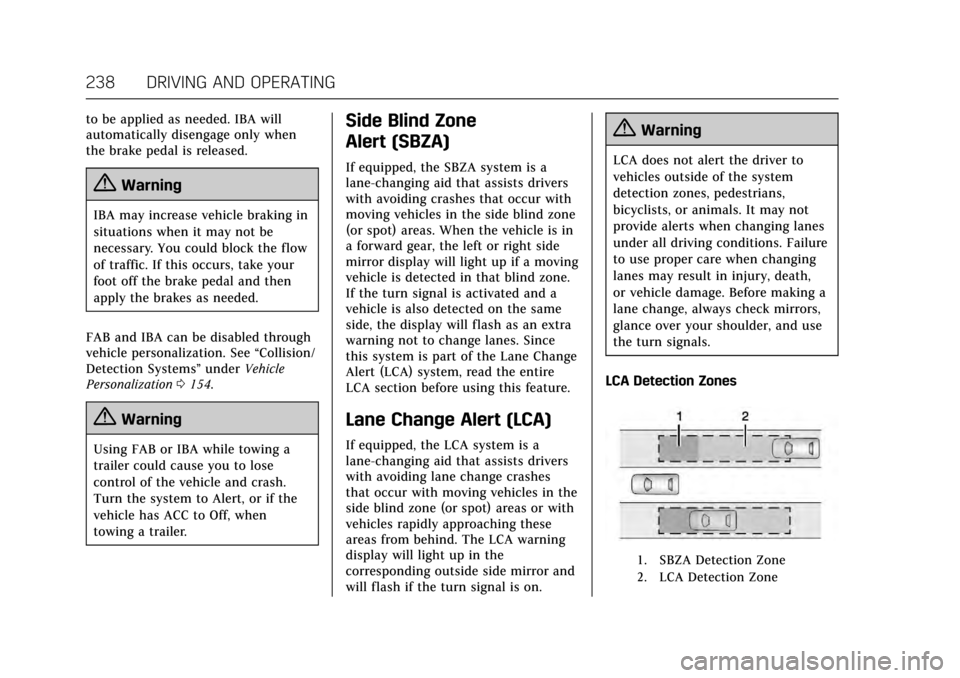
LCA Detection Zones
1. SBZA Detection Zone
2. LCA Detection Zone
Page 240 of 354
Cadillac Escalade Owner Manual (GMNA-Localizing-MidEast-10293077) -
2017 - crc - 8/24/16
DRIVING AND OPERATING 239
The LCA sensor covers a zone of
approximately one lane over from
both sides of the vehicle, or 3.5 m
(11 ft). The height of the zone is
approximately between 0.5 m (1.5 ft)
and 2 m (6 ft) off the ground. The Side
Blind Zone Alert (SBZA) warning area
starts at approximately the middle of
the vehicle and goes back 5 m (16 ft).
Drivers are also warned of vehicles
rapidly approaching this area up to
approximately 70 m (230 ft) behind
the vehicle.
How the System Works
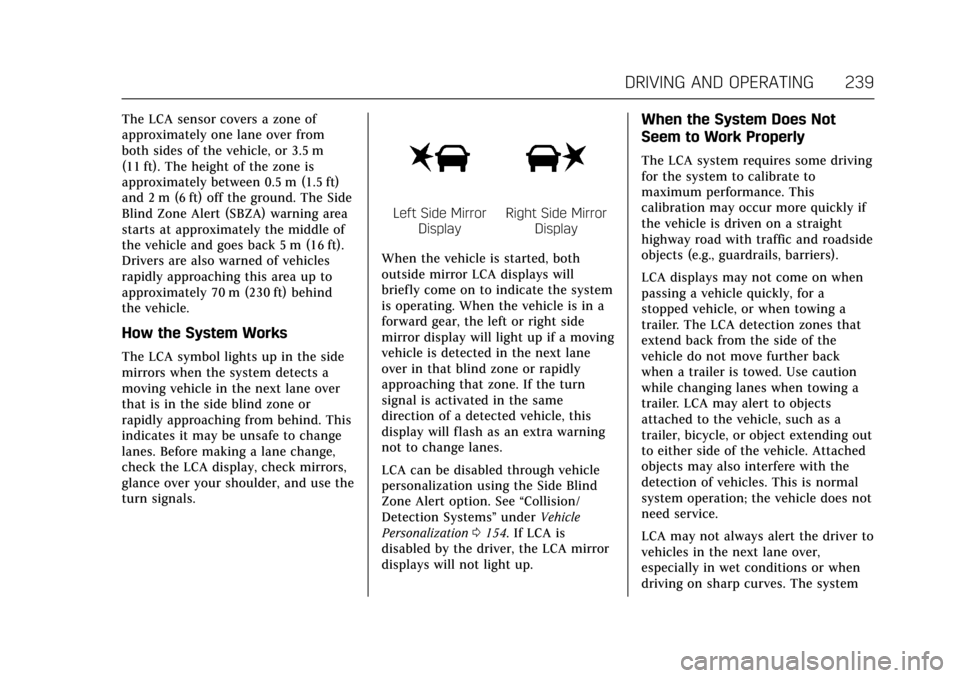
The LCA symbol lights up in the side
mirrors when the system detects a
moving vehicle in the next lane over
that is in the side blind zone or
rapidly approaching from behind. This
indicates it may be unsafe to change
lanes. Before making a lane change,
check the LCA display, check mirrors,
glance over your shoulder, and use the
turn signals.
Left Side MirrorDisplayRight Side Mirror Display
When the vehicle is started, both
outside mirror LCA displays will
briefly come on to indicate the system
is operating. When the vehicle is in a
forward gear, the left or right side
mirror display will light up if a moving
vehicle is detected in the next lane
over in that blind zone or rapidly
approaching that zone. If the turn
signal is activated in the same
direction of a detected vehicle, this
display will flash as an extra warning
not to change lanes.
LCA can be disabled through vehicle
personalization using the Side Blind
Zone Alert option. See “Collision/
Detection Systems” underVehicle
Personalization 0154. If LCA is
disabled by the driver, the LCA mirror
displays will not light up.
When the System Does Not
Seem to Work Properly
The LCA system requires some driving
for the system to calibrate to
maximum performance. This
calibration may occur more quickly if
the vehicle is driven on a straight
highway road with traffic and roadside
objects (e.g., guardrails, barriers).
LCA displays may not come on when
passing a vehicle quickly, for a
stopped vehicle, or when towing a
trailer. The LCA detection zones that
extend back from the side of the
vehicle do not move further back
when a trailer is towed. Use caution
while changing lanes when towing a
trailer. LCA may alert to objects
attached to the vehicle, such as a
trailer, bicycle, or object extending out
to either side of the vehicle. Attached
objects may also interfere with the
detection of vehicles. This is normal
system operation; the vehicle does not
need service.
LCA may not always alert the driver to
vehicles in the next lane over,
especially in wet conditions or when
driving on sharp curves. The system
Page 241 of 354

Cadillac Escalade Owner Manual (GMNA-Localizing-MidEast-10293077) -
2017 - crc - 8/24/16
240 DRIVING AND OPERATING
does not need to be serviced. The
system may light up due to guardrails,
signs, trees, shrubs, and other
non-moving objects. This is normal
system operation; the vehicle does not
need service.
LCA may not operate when the LCA
sensors in the left or right corners of
the rear bumper are covered with
mud, dirt, snow, ice, or slush, or in
heavy rainstorms. For cleaning
instructions, see "Washing the
Vehicle" underExterior Care0320.
If the DIC still displays the system
unavailable message after cleaning
both sides of the vehicle toward the
rear corners of the vehicle, see your
dealer.
If the LCA displays do not light up
when moving vehicles are in the blind
zone or are rapidly approaching that
zone and the system is clean, the
system may need service. Take the
vehicle to your dealer.Lane Departure
Warning (LDW)
If equipped, LDW may help avoid
crashes due to unintentional lane
departures. It may provide a warning
if the vehicle is crossing a detected
lane marking without using a turn
signal in the lane departure direction.
Since this system is part of the Lane
Keep Assist (LKA) system, read the
entire LKA section before using this
feature.
Lane Keep Assist (LKA)
If equipped, LKA may help avoid
crashes due to unintentional lane
departures. It may assist by gently
turning the steering wheel if the
vehicle approaches a detected lane
marking without using a turn signal in
that direction. It may also provide a
Lane Departure Warning (LDW)
system alert as the lane marking is
crossed. The LKA system will not
assist or provide an LDW alert if it
detects that you are actively steering.
Override LKA by turning the steering wheel. LKA uses a camera to detect
lane markings between 60 km/h (37
mph) and 180 km/h (112 mph).
{Warning
The LKA system does not
continuously steer the vehicle.
It may not keep the vehicle in the
lane or give a Lane Departure
Warning (LDW) alert, even if a lane
marking is detected.
The LKA and LDW systems
may not:
. Provide an alert or enough
steering assist to avoid a lane
departure or crash.
. Detect lane markings under
poor weather or visibility
conditions. This can occur if
the windshield or headlamps
are blocked by dirt, snow,
or ice, if they are not in
proper condition, or if the sun
shines directly into the
camera.
. Detect road edges.
(Continued)
Page 242 of 354

Cadillac Escalade Owner Manual (GMNA-Localizing-MidEast-10293077) -
2017 - crc - 8/24/16
DRIVING AND OPERATING 241
Warning (Continued)
.Detect lanes on winding or
hilly roads.
If LKA only detects lane markings
on one side of the road, it will only
assist or provide an LDW alert
when approaching the lane on the
side where it has detected a lane
marking. Even with LKA and LDW,
you must steer the vehicle. Always
keep your attention on the road and
maintain proper vehicle position
within the lane, or vehicle damage,
injury, or death could occur. Always
keep the windshield, headlamps,
and camera sensors clean and in
good repair. Do not use LKA in bad
weather conditions.
{Warning
Using LKA while towing a trailer or
on slippery roads could cause loss
of control of the vehicle and a
crash. Turn the system off.
How the System Works
The LKA camera sensor is on the
windshield ahead of the rearview
mirror.
To turn LKA on and off, press
A
on the center stack.
When on,
Ais green if LKA is
available to assist and provide LDW
alerts. It may assist by gently turning
the steering wheel and display
A
as amber if the vehicle approaches a
detected lane marking without using a
turn signal in that direction. It may
also provide an LDW alert by
flashing
Aamber as the lane
marking is crossed. Additionally, there
will be three beeps, or the driver seat
will pulse three times, on the right or
left, depending on the lane departure
direction.
The LKA system does not
continuously steer the vehicle. If LKA
does not detect active driver steering,
an alert and chime may be provided.
Move the steering wheel to dismiss.
When the System Does Not
Seem to Work Properly
The system performance may be
affected by:
. Close vehicles ahead.
. Sudden lighting changes, such as
when driving through tunnels.
. Banked roads.
. Roads with poor lane markings,
such as two-lane roads.
If the LKA system is not functioning
properly when lane markings are
clearly visible, cleaning the windshield
may help.
LKA assistance and/or LDW alerts
may occur due to tar marks, shadows,
cracks in the road, temporary or
construction lane markings, or other
road imperfections. This is normal
system operation; the vehicle does not
need service. Turn LKA off if these
conditions continue.
Page 245 of 354
Cadillac Escalade Owner Manual (GMNA-Localizing-MidEast-10293077) -
2017 - crc - 8/24/16
244 DRIVING AND OPERATING
Filling the Tank With a Portable
Gas Can
If the vehicle runs out of fuel and
must be filled from a portable gas can:
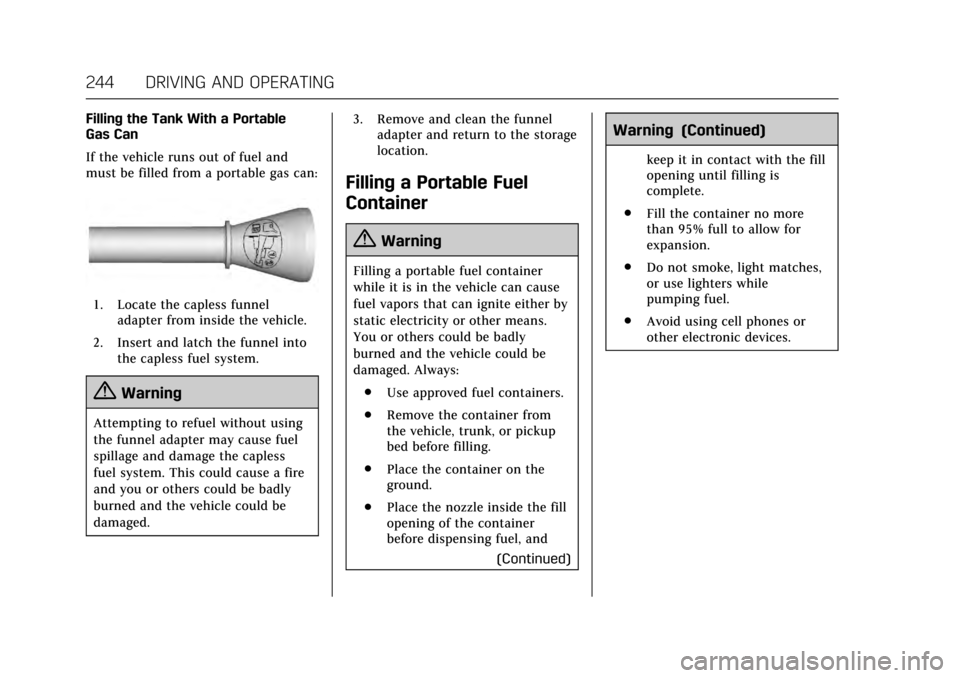
1. Locate the capless funneladapter from inside the vehicle.
2. Insert and latch the funnel into the capless fuel system.
{Warning
Attempting to refuel without using
the funnel adapter may cause fuel
spillage and damage the capless
fuel system. This could cause a fire
and you or others could be badly
burned and the vehicle could be
damaged. 3. Remove and clean the funnel
adapter and return to the storage
location.
Filling a Portable Fuel
Container
{Warning
Filling a portable fuel container
while it is in the vehicle can cause
fuel vapors that can ignite either by
static electricity or other means.
You or others could be badly
burned and the vehicle could be
damaged. Always:
. Use approved fuel containers.
. Remove the container from
the vehicle, trunk, or pickup
bed before filling.
. Place the container on the
ground.
. Place the nozzle inside the fill
opening of the container
before dispensing fuel, and
(Continued)
Warning (Continued)
keep it in contact with the fill
opening until filling is
complete.
. Fill the container no more
than 95% full to allow for
expansion.
. Do not smoke, light matches,
or use lighters while
pumping fuel.
. Avoid using cell phones or
other electronic devices.
Page 251 of 354
Cadillac Escalade Owner Manual (GMNA-Localizing-MidEast-10293077) -
2017 - crc - 8/24/16
250 DRIVING AND OPERATING
Weight-Distributing Hitch
Adjustment
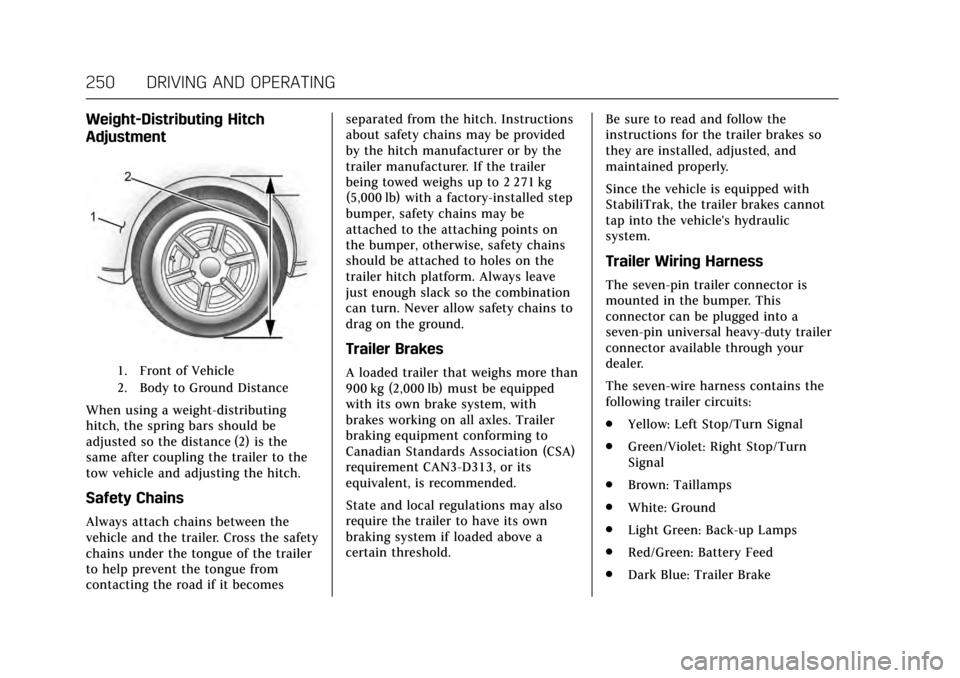
1. Front of Vehicle
2. Body to Ground Distance
When using a weight-distributing
hitch, the spring bars should be
adjusted so the distance (2) is the
same after coupling the trailer to the
tow vehicle and adjusting the hitch.
Safety Chains
Always attach chains between the
vehicle and the trailer. Cross the safety
chains under the tongue of the trailer
to help prevent the tongue from
contacting the road if it becomesseparated from the hitch. Instructions
about safety chains may be provided
by the hitch manufacturer or by the
trailer manufacturer. If the trailer
being towed weighs up to 2 271 kg
(5,000 lb) with a factory-installed step
bumper, safety chains may be
attached to the attaching points on
the bumper, otherwise, safety chains
should be attached to holes on the
trailer hitch platform. Always leave
just enough slack so the combination
can turn. Never allow safety chains to
drag on the ground.
Trailer Brakes
A loaded trailer that weighs more than
900 kg (2,000 lb) must be equipped
with its own brake system, with
brakes working on all axles. Trailer
braking equipment conforming to
Canadian Standards Association (CSA)
requirement CAN3-D313, or its
equivalent, is recommended.
State and local regulations may also
require the trailer to have its own
braking system if loaded above a
certain threshold.
Be sure to read and follow the
instructions for the trailer brakes so
they are installed, adjusted, and
maintained properly.
Since the vehicle is equipped with
StabiliTrak, the trailer brakes cannot
tap into the vehicle's hydraulic
system.
Trailer Wiring Harness
The seven-pin trailer connector is
mounted in the bumper. This
connector can be plugged into a
seven-pin universal heavy-duty trailer
connector available through your
dealer.
The seven-wire harness contains the
following trailer circuits:
.
Yellow: Left Stop/Turn Signal
. Green/Violet: Right Stop/Turn
Signal
. Brown: Taillamps
. White: Ground
. Light Green: Back-up Lamps
. Red/Green: Battery Feed
. Dark Blue: Trailer Brake
Page 252 of 354

Cadillac Escalade Owner Manual (GMNA-Localizing-MidEast-10293077) -
2017 - crc - 8/24/16
DRIVING AND OPERATING 251
To help charge a remote (non-vehicle)
battery, press the Tow/Haul Mode
button at the end of the shift lever.
If the trailer is too light for Tow/Haul
Mode, turn on the headlamps to help
charge the battery.
Electric Brake Control Wiring
Provisions
These wiring provisions are included
with the vehicle as part of the trailer
wiring package. These provisions are
for an electric brake controller.
The harness should be installed by
your dealer or a qualified service
center.
Tow/Haul Mode
Pressing this button at the end of the
shift lever turns on and off the Tow/
Haul Mode.
This indicator light on the instrument
cluster comes on when the Tow/Haul
Mode is on.Tow/Haul is a feature that assists
when pulling a heavy trailer or a large
or heavy load. See
Tow/Haul
Mode 0208.
Tow/Haul is designed to be most
effective when the vehicle and trailer
combined weight is at least 75% of
the vehicle's Gross Combined Weight
Rating (GCWR). See “Weight of the
Trailer” underTrailer Towing 0247.
Tow/Haul is most useful under the
following driving conditions:
. When pulling a heavy trailer or a
large or heavy load through rolling
terrain.
. When pulling a heavy trailer or a
large or heavy load in stop-and-go
traffic.
. When pulling a heavy trailer or a
large or heavy load in busy
parking lots where improved low
speed control of the vehicle is
desired.
Operating the vehicle in Tow/Haul
when lightly loaded or with no trailer
at all will not cause damage. However,
there is no benefit to the selection of
Tow/Haul when the vehicle is
Page 253 of 354
Cadillac Escalade Owner Manual (GMNA-Localizing-MidEast-10293077) -
2017 - crc - 8/24/16
252 DRIVING AND OPERATING
unloaded. Such a selection when
unloaded may result in unpleasant
engine and transmission driving
characteristics and reduced fuel
economy. Tow/Haul is recommended
only when pulling a heavy trailer or a
large or heavy load.
Trailer Sway Control (TSC)
Vehicles with StabiliTrak have a
Trailer Sway Control (TSC) feature.
Trailer sway is unintended side-to-side
motion of a trailer while being towed.
If the vehicle is towing a trailer and
the TSC detects that sway is
increasing, the vehicle brakes are
selectively applied at each wheel, to
help reduce excessive trailer sway.
If TSC is enabled, the Traction Control
System (TCS)/StabiliTrak warning
light will flash on the instrument
cluster. Vehicle speed must be
reduced. If trailer sway continues,
StabiliTrak can reduce engine torque
to help slow the vehicle. SeeTraction
Control/Electronic Stability
Control 0216.
{Warning
Even if the vehicle is equipped with
TSC, trailer sway could result in
loss of control and the vehicle could
crash. If excessive trailer sway is
detected, slow down to a safe speed.
Check the trailer and vehicle to help
correct possible causes. These could
include an improperly or overloaded
trailer, unrestrained cargo, improper
trailer hitch configuration, excessive
vehicle-trailer speed, or improperly
inflated or incorrect vehicle or
trailer tires. See Towing Equipment
0 249 for trailer ratings and hitch
setup recommendations.
Adding non-dealer accessories can
affect the vehicle performance. See
Accessories and Modifications 0255.
Conversions and
Add-Ons
Add-On Electrical
Equipment
{Warning
The Data Link Connector (DLC) is
used for vehicle service and
Emission Inspection/Maintenance
testing. See Malfunction Indicator
Lamp (Check Engine Light) 0130.
A device connected to the DLC —
such as an aftermarket fleet or
driver-behavior tracking device —
may interfere with vehicle systems.
This could affect vehicle operation
and cause a crash. Such devices
may also access information stored
in the vehicle’s systems.
Page 255 of 354
Cadillac Escalade Owner Manual (GMNA-Localizing-MidEast-10293077) -
2017 - crc - 8/24/16
254 VEHICLE CARE
Vehicle Care
General Information
General Information . . . . . . . . . . . . . 255
Accessories andModifications . . . . . . . . . . . . . . . . . . . 255
Vehicle Checks
Doing Your OwnService Work . . . . . . . . . . . . . . . . . . . . 256
Hood . . . . . . . . . . . . . . . . . . . . . . . . . . . . . . 256
Engine Compartment Overview . . . . . . . . . . . . . . . . . . . . . . . . . 257
Engine Oil . . . . . . . . . . . . . . . . . . . . . . . . . 258
Engine Oil Life System . . . . . . . . . . . 260
Automatic Transmission Fluid . . . . . . . . . . . . . . . . . . . . . . . . . . . . . 261
Engine Air Cleaner/Filter . . . . . . . . . 262
Cooling System . . . . . . . . . . . . . . . . . . . 263
Engine Coolant . . . . . . . . . . . . . . . . . . . 264
Engine Overheating . . . . . . . . . . . . . . 266
Engine Fan . . . . . . . . . . . . . . . . . . . . . . . . 267
Washer Fluid . . . . . . . . . . . . . . . . . . . . . 268
Brakes . . . . . . . . . . . . . . . . . . . . . . . . . . . . . 269
Brake Fluid . . . . . . . . . . . . . . . . . . . . . . . 269
Battery . . . . . . . . . . . . . . . . . . . . . . . . . . . . 271
Four-Wheel Drive . . . . . . . . . . . . . . . . 272
Front Axle . . . . . . . . . . . . . . . . . . . . . . . . 272
Rear Axle . . . . . . . . . . . . . . . . . . . . . . . . . 273
Starter Switch Check . . . . . . . . . . . . . 273 Automatic Transmission Shift
Lock Control Function
Check . . . . . . . . . . . . . . . . . . . . . . . . . . . . 274
Park Brake and P (Park) Mechanism Check . . . . . . . . . . . . . . 274
Wiper Blade Replacement . . . . . . . 274
Glass Replacement . . . . . . . . . . . . . . . 275
Windshield Replacement . . . . . . . . 275Headlamp Aiming
Headlamp Aiming . . . . . . . . . . . . . . . . 276
Bulb Replacement
Bulb Replacement . . . . . . . . . . . . . . . . 276
LED Lighting . . . . . . . . . . . . . . . . . . . . . 276
License Plate Lamp . . . . . . . . . . . . . . 277
Replacement Bulbs . . . . . . . . . . . . . . . 277
Electrical System
Electrical System Overload . . . . . . 278
Fuses . . . . . . . . . . . . . . . . . . . . . . . . . . . . . . 278
Engine Compartment Fuse Block . . . . . . . . . . . . . . . . . . . . . . . . . . . . 278
Instrument Panel Fuse Block (Left) . . . . . . . . . . . . . . . . . . . . . . 283
Instrument Panel Fuse Block (Right) . . . . . . . . . . . . . . . . . . . . . . . . . . . 286
Rear Compartment Fuse Block . . . . . . . . . . . . . . . . . . . . . . . . . . . . 288
Wheels and Tires
Tires . . . . . . . . . . . . . . . . . . . . . . . . . . . . . . . 289 All-Season Tires . . . . . . . . . . . . . . . . . . 290
Winter Tires . . . . . . . . . . . . . . . . . . . . . . 290
Low-Profile Tires . . . . . . . . . . . . . . . . . 291
All-Terrain Tires . . . . . . . . . . . . . . . . . . 291
Tire Pressure . . . . . . . . . . . . . . . . . . . . . . 291
Tire Pressure for High-Speed
Operation . . . . . . . . . . . . . . . . . . . . . . . . 292
Tire Pressure Monitor System . . . 293
Tire Pressure Monitor Operation . . . . . . . . . . . . . . . . . . . . . . . . 294
Tire Inspection . . . . . . . . . . . . . . . . . . . 296
Tire Rotation . . . . . . . . . . . . . . . . . . . . . 297
When It Is Time for New Tires . . . . . . . . . . . . . . . . . . . . . . . . . . . . . 298
Buying New Tires . . . . . . . . . . . . . . . . 298
Different Size Tires and Wheels . . . . . . . . . . . . . . . . . . . . . . . . . . 300
Wheel Alignment and Tire Balance . . . . . . . . . . . . . . . . . . . . . . . . . . 300
Wheel Replacement . . . . . . . . . . . . . . 301
Tire Chains . . . . . . . . . . . . . . . . . . . . . . . 301
If a Tire Goes Flat . . . . . . . . . . . . . . . . 302
Tire Changing . . . . . . . . . . . . . . . . . . . . . 303
Full-Size Spare Tire . . . . . . . . . . . . . . 311
Jump Starting
Jump Starting . . . . . . . . . . . . . . . . . . . . . 312
Towing the Vehicle
Towing the Vehicle . . . . . . . . . . . . . . . 315
Recreational Vehicle Towing . . . . 316
Page 263 of 354
Cadillac Escalade Owner Manual (GMNA-Localizing-MidEast-10293077) -
2017 - crc - 8/24/16
262 VEHICLE CARE
Change the fluid and filter at the
scheduled maintenance intervals
listed inMaintenance Schedule 0329.
Be sure to use the transmission fluid
listed in Recommended Fluids and
Lubricants 0336.
Engine Air Cleaner/Filter
See Engine Compartment Overview
0 257 for the location of the engine
air cleaner/filter.
When to Inspect the Engine Air
Cleaner/Filter
For intervals on changing and
inspecting the engine air cleaner/filter
see Maintenance Schedule 0329.
How to Inspect the Engine Air
Cleaner/Filter
Do not start the engine or have the
engine running with the engine air
cleaner/filter housing open. Before
removing the engine air cleaner/filter,
make sure that the engine air cleaner/
filter housing and nearby components
are free of dirt and debris. Remove the
engine air cleaner/filter. Lightly tap
and shake the engine air cleaner/filter
(away from the vehicle), to release loose dust and dirt. Inspect the engine
air cleaner/filter for damage, and
replace if damaged. Do not clean the
engine air cleaner/filter or
components with water or
compressed air.
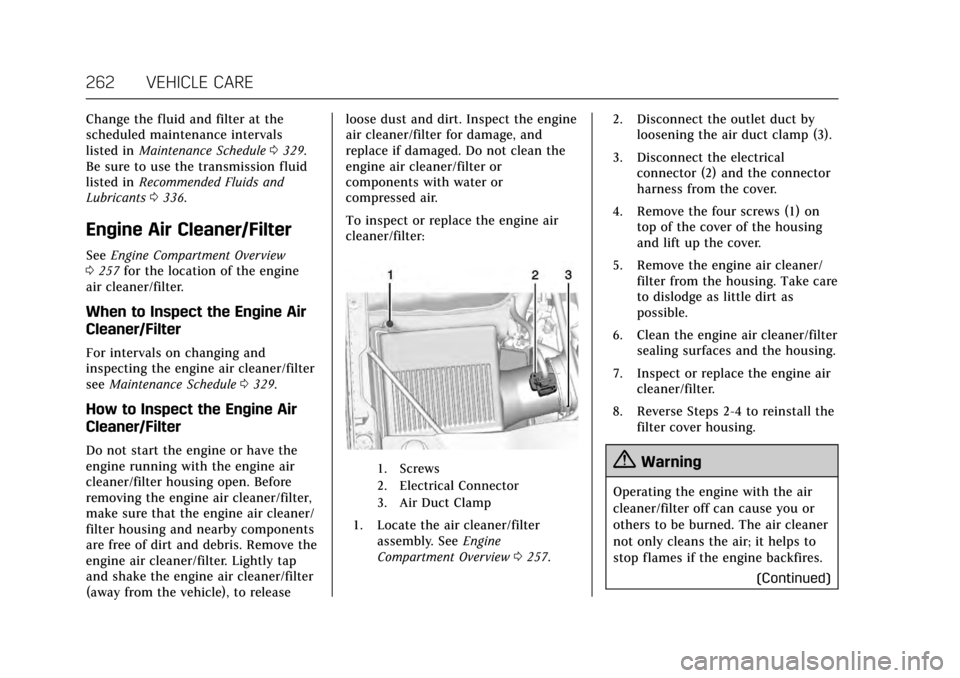
To inspect or replace the engine air
cleaner/filter:
1. Screws
2. Electrical Connector
3. Air Duct Clamp
1. Locate the air cleaner/filter
assembly. See Engine
Compartment Overview 0257. 2. Disconnect the outlet duct by
loosening the air duct clamp (3).
3. Disconnect the electrical connector (2) and the connector
harness from the cover.
4. Remove the four screws (1) on top of the cover of the housing
and lift up the cover.
5. Remove the engine air cleaner/ filter from the housing. Take care
to dislodge as little dirt as
possible.
6. Clean the engine air cleaner/filter sealing surfaces and the housing.
7. Inspect or replace the engine air cleaner/filter.
8. Reverse Steps 2-4 to reinstall the filter cover housing.
{Warning
Operating the engine with the air
cleaner/filter off can cause you or
others to be burned. The air cleaner
not only cleans the air; it helps to
stop flames if the engine backfires.
(Continued)