ESP CADILLAC ESCALADE 2017 4.G Owners Manual
[x] Cancel search | Manufacturer: CADILLAC, Model Year: 2017, Model line: ESCALADE, Model: CADILLAC ESCALADE 2017 4.GPages: 354, PDF Size: 3.9 MB
Page 23 of 354
Cadillac Escalade Owner Manual (GMNA-Localizing-MidEast-10293077) -
2017 - crc - 8/24/16
22 IN BRIEF
Override LKA by turning the steering
wheel. LKA uses a camera to detect
lane markings between 60 km/h (37
mph) and 180 km/h (112 mph).
SeeLane Departure Warning (LDW)
0 240 and Lane Keep Assist
(LKA) 0240.
Lane Change Alert (LCA)
If equipped, the LCA system is a
lane-changing aid that assists drivers
with avoiding lane change crashes
that occur with moving vehicles in the
side blind zone (or spot) areas or with
vehicles rapidly approaching these
areas from behind. The LCA warning
display will light up in the
corresponding outside mirror and will
flash if the turn signal is on. The Side
Blind Zone Alert (SBZA) system is
included as part of the LCA system.
See Side Blind Zone Alert (SBZA) 0238
and Lane Change Alert (LCA) 0238.
Surround Vision
If equipped, views around the vehicle
display in the infotainment display to
aid with parking and low-speed
maneuvers.
See “Surround Vision ”under
Assistance Systems for Parking or
Backing 0230.
Front Vision Camera
If equipped, a view of the area in front
of the vehicle displays on the
infotainment display to aid with
parking and low-speed maneuvers.
See “Front Vision Camera ”under
Assistance Systems for Parking or
Backing 0230.
Rear Vision Camera (RVC)
If equipped, RVC shows a view of the
area behind the vehicle on the
infotainment display when the vehicle
is shifted into R (Reverse) to aid with
parking and low-speed backing
maneuvers.
See Assistance Systems for Parking or
Backing 0230.
Rear Cross Traffic Alert
(RCTA) System
If equipped, the RCTA system uses a
triangle with an arrow displayed on
the infotainment display to warn of
traffic behind your vehicle that may
cross your vehicle's path while in
R (Reverse). In addition, beeps will
sound, or the driver seat will pulse.
See Assistance Systems for Parking or
Backing 0230.
Parking Assist
If equipped, Front and Rear Parking
Assist (FRPA) uses sensors on the
front and rear bumpers to assist with
parking and avoiding objects during
low speed parking maneuvers.
It operates at speeds less than 8 km/h
(5 mph). FRPA may display a warning
triangle on the Rear Vision Camera
screen and a graphic on the
instrument cluster to provide the
object distance. In addition, multiple
beeps or seat pulses may occur if very
close to an object.
Page 35 of 354
Cadillac Escalade Owner Manual (GMNA-Localizing-MidEast-10293077) -
2017 - crc - 8/24/16
34 KEYS, DOORS, AND WINDOWS
while the engine is still running. An
extension can be requested
30 seconds after starting.
A maximum of two remote starts, or a
single start with an extension, is
allowed between ignition cycles.
The vehicle's ignition must be turned
on and then back off to use remote
start again.
Canceling a Remote Start
To cancel a remote start, do one of
the following:
.Press and hold
/until the
parking lamps turn off.
. Turn on the hazard warning
flashers.
. Turn the ignition on and then off.
Door Locks
{Warning
Unlocked doors can be dangerous.
. Passengers, especially
children, can easily open the
doors and fall out of a moving
vehicle. When a door is
locked, the handle will not
open it. The chance of being
thrown out of the vehicle in a
crash is increased if the doors
are not locked. So, all
passengers should wear safety
belts properly and the doors
should be locked whenever
the vehicle is driven.
. Young children who get into
unlocked vehicles may be
unable to get out. A child can
be overcome by extreme heat
and can suffer permanent
injuries or even death from
heat stroke. Always lock the
vehicle whenever leaving it.
(Continued)
Warning (Continued)
.Outsiders can easily enter
through an unlocked door
when you slow down or stop
the vehicle. Locking the doors
can help prevent this from
happening.
To lock the doors from inside the
vehicle:
. Press
Qon a power door lock
switch.
. Push down the manual lock knob
on the driver door to lock all
doors. Push down the manual lock
knob on a passenger door to lock
only that door.
To unlock the doors from inside the
vehicle:
. Press
Kon a power door lock
switch.
. Pull the door handle once to
unlock it. Pull the door handle
again to unlatch it.
Page 42 of 354
Cadillac Escalade Owner Manual (GMNA-Localizing-MidEast-10293077) -
2017 - crc - 8/24/16
KEYS, DOORS, AND WINDOWS 41
Use the pull cup to lower and close
the liftgate. Do not press the touch
pad while closing the liftgate. This will
cause the liftgate to be unlatched.
The RKE transmitter must be within
1 m (3 ft) of the liftgate to
automatically unlock it. SeeRemote
Keyless Entry (RKE) System
Operation 028.
The liftgate has an electric latch.
If the battery is disconnected or has
low voltage, the liftgate will not open.
The liftgate will resume operation
when the battery is reconnected and
charged.
Hands-Free Operation
The liftgate may be operated with a
kicking motion under the rear bumper.
The liftgate will not operate if the RKE
transmitter is not within 1 m (3 ft).
The hands-free feature will not work
while the liftgate is moving. To stop
the liftgate while in motion use one of
the liftgate switches.
Length of Kick Zone
To operate, move your foot in a
forward kicking motion under the
center of the rear bumper, then pull
it back.
Caution
Splashing water may cause the
liftgate to open. Keep the RKE
transmitter away from the rear
bumper detection area or turn the
liftgate mode to OFF when cleaning
or working near the rear bumper to
avoid accidental opening.
. Do not sweep your foot side
to side.
. Do not keep your foot under the
bumper; the liftgate will not
activate.
. Do not touch the liftgate until it
has stopped moving.
. This feature may be temporarily
disabled under some conditions.
If the liftgate does not respond to
the kick, open or close the liftgate
by another method or start the
vehicle. The feature will be
re-enabled.
Page 51 of 354
Cadillac Escalade Owner Manual (GMNA-Localizing-MidEast-10293077) -
2017 - crc - 8/24/16
50 KEYS, DOORS, AND WINDOWS
Push the mirror back up when not
in use.Windows
{Warning
Never leave a child, a helpless adult,
or a pet alone in a vehicle,
especially with the windows closed
in warm or hot weather. They can
be overcome by the extreme heat
and suffer permanent injuries or
even death from heat stroke.
The vehicle aerodynamics are
designed to improve fuel economy
performance. This may result in a
pulsing sound when either rearwindow is down and the front
windows are up. To reduce the sound,
open either a front window or the
sunroof, if equipped.
Power Windows
{Warning
Children could be seriously injured
or killed if caught in the path of a
closing window. Never leave keys in
a vehicle with children. When there
are children in the rear seat, use the
window lockout button to prevent
operation of the windows. See
Keys
027.
Page 63 of 354
Cadillac Escalade Owner Manual (GMNA-Localizing-MidEast-10293077) -
2017 - crc - 8/24/16
62 SEATS AND RESTRAINTS
5. To activate massage at lastmassage type and intensity
settings or to turn massage off,
press the massage On/Off
control (2).
Heated and Cooled Front
Seats
{Warning
If temperature change or pain to
the skin cannot be felt, the seat
heater may cause burns. To reduce
the risk of burns, use care when
using the seat heater, especially for
long periods of time. Do not place
anything on the seat that insulates
against heat, such as a blanket,
cushion, cover, or similar item. This
may cause the seat heater to
overheat. An overheated seat heater
may cause a burn or may damage
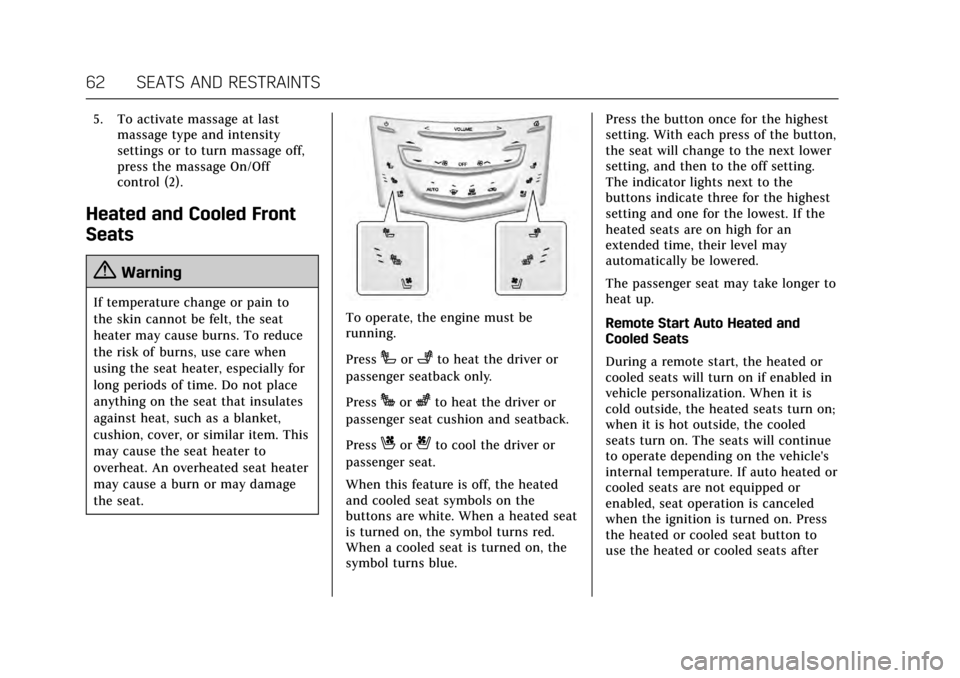
the seat.To operate, the engine must be
running.
Press
Ior+to heat the driver or
passenger seatback only.
Press
Jorzto heat the driver or
passenger seat cushion and seatback.
Press
Cor{to cool the driver or
passenger seat.
When this feature is off, the heated
and cooled seat symbols on the
buttons are white. When a heated seat
is turned on, the symbol turns red.
When a cooled seat is turned on, the
symbol turns blue. Press the button once for the highest
setting. With each press of the button,
the seat will change to the next lower
setting, and then to the off setting.
The indicator lights next to the
buttons indicate three for the highest
setting and one for the lowest. If the
heated seats are on high for an
extended time, their level may
automatically be lowered.
The passenger seat may take longer to
heat up.
Remote Start Auto Heated and
Cooled Seats
During a remote start, the heated or
cooled seats will turn on if enabled in
vehicle personalization. When it is
cold outside, the heated seats turn on;
when it is hot outside, the cooled
seats turn on. The seats will continue
to operate depending on the vehicle's
internal temperature. If auto heated or
cooled seats are not equipped or
enabled, seat operation is canceled
when the ignition is turned on. Press
the heated or cooled seat button to
use the heated or cooled seats after
Page 185 of 354
Cadillac Escalade Owner Manual (GMNA-Localizing-MidEast-10293077) -
2017 - crc - 8/24/16
184 DRIVING AND OPERATING
See specific vehicle steering messages
underSteering System Messages 0151.
See your dealer if there is a problem.
Curve Tips
. Take curves at a reasonable speed.
. Reduce speed before entering a
curve.
. Maintain a reasonable steady
speed through the curve.
. Wait until the vehicle is out of the
curve before accelerating gently
into the straightaway.
Steering in Emergencies
.There are some situations when
steering around a problem may be
more effective than braking.
. Holding both sides of the steering
wheel allows you to turn
180 degrees without removing
a hand.
. Antilock Brake System (ABS)
allows steering while braking.
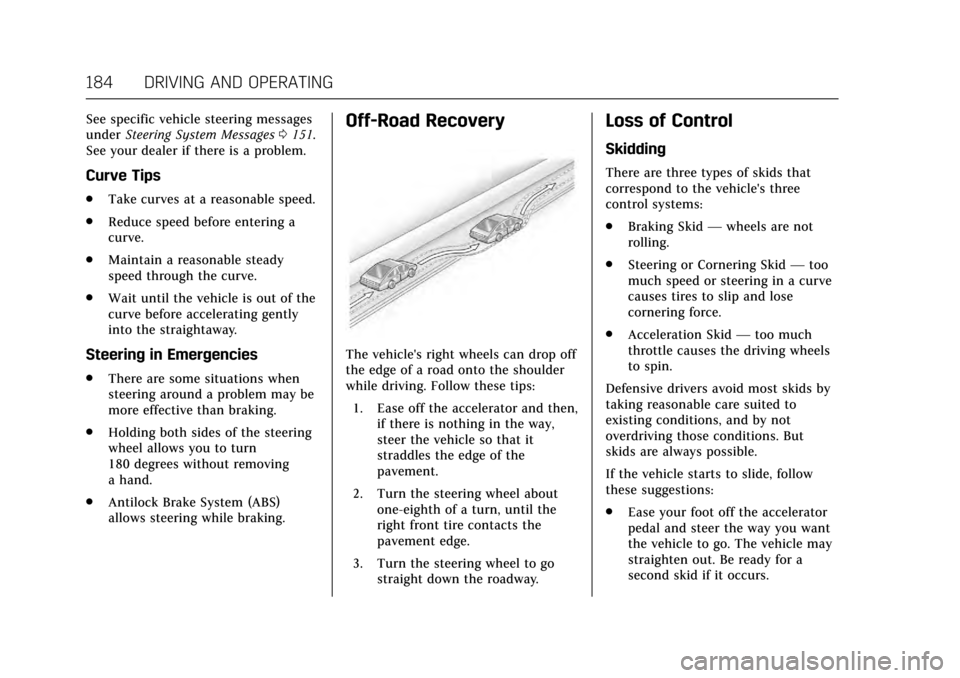
Off-Road Recovery
The vehicle's right wheels can drop off
the edge of a road onto the shoulder
while driving. Follow these tips:
1. Ease off the accelerator and then, if there is nothing in the way,
steer the vehicle so that it
straddles the edge of the
pavement.
2. Turn the steering wheel about one-eighth of a turn, until the
right front tire contacts the
pavement edge.
3. Turn the steering wheel to go straight down the roadway.
Loss of Control
Skidding
There are three types of skids that
correspond to the vehicle's three
control systems:
.Braking Skid —wheels are not
rolling.
. Steering or Cornering Skid —too
much speed or steering in a curve
causes tires to slip and lose
cornering force.
. Acceleration Skid —too much
throttle causes the driving wheels
to spin.
Defensive drivers avoid most skids by
taking reasonable care suited to
existing conditions, and by not
overdriving those conditions. But
skids are always possible.
If the vehicle starts to slide, follow
these suggestions:
. Ease your foot off the accelerator
pedal and steer the way you want
the vehicle to go. The vehicle may
straighten out. Be ready for a
second skid if it occurs.
Page 192 of 354

Cadillac Escalade Owner Manual (GMNA-Localizing-MidEast-10293077) -
2017 - crc - 8/24/16
DRIVING AND OPERATING 191
surface of a curve or an overpass
can remain icy when the
surrounding roads are clear. Avoid
sudden steering maneuvers and
braking while on ice.
. Turn off cruise control.
Blizzard Conditions
Stop the vehicle in a safe place and
signal for help. Stay with the vehicle
unless there is help nearby. To get
help and keep everyone in the
vehicle safe:
.Turn on the hazard warning
flashers.
. Tie a red cloth to an outside
mirror.
{Warning
Snow can trap engine exhaust
under the vehicle. This may cause
exhaust gases to get inside. Engine
exhaust contains carbon monoxide
(CO), which cannot be seen or
smelled. It can cause
unconsciousness and even death.
(Continued)
Warning (Continued)
If the vehicle is stuck in snow:
. Clear snow from the base of
the vehicle, especially any
blocking the exhaust pipe.
. Open a window about 5 cm
(2 in) on the vehicle side that
is away from the wind, to
bring in fresh air.
. Fully open the air outlets on
or under the instrument
panel.
. Adjust the climate control
system to circulate the air
inside the vehicle and set the
fan speed to the highest
setting. See “Climate Control
Systems.”
For more information about CO, see
Engine Exhaust 0203.
To save fuel, run the engine for short
periods to warm the vehicle and then
shut the engine off and partially close
the window. Moving about to keep
warm also helps. If it takes time for help to arrive,
when running the engine, push the
accelerator pedal slightly so the
engine runs faster than the idle speed.
This keeps the battery charged to
restart the vehicle and to signal for
help with the headlamps. Do this as
little as possible, to save fuel.
If the Vehicle Is Stuck
Slowly and cautiously spin the wheels
to free the vehicle when stuck in sand,
mud, ice, or snow. See
“Rocking the
Vehicle to Get It Out ”later in this
section.
The Traction Control System (TCS)
can often help to free a stuck vehicle.
See Traction Control/Electronic Stability
Control 0216. If TCS cannot free the
vehicle, see “Rocking the Vehicle to
Get it Out ”following.
{Warning
If the vehicle's tires spin at high
speed, they can explode, and you or
others could be injured. The vehicle
can overheat, causing an engine
(Continued)
Page 201 of 354
Cadillac Escalade Owner Manual (GMNA-Localizing-MidEast-10293077) -
2017 - crc - 8/24/16
200 DRIVING AND OPERATING
Caution
Cranking the engine for long
periods of time, by returning the
ignition to the START position
immediately after cranking has
ended, can overheat and damage
the cranking motor, and drain the
battery. Wait at least 15 seconds
between each try, to let the
cranking motor cool down.
2. If the engine does not start after five to 10 seconds, especially in
very cold weather (below −18 °C
or 0 °F), it could be flooded with
too much gasoline. Try pushing
the accelerator pedal all the way
to the floor and holding it there
as you press ENGINE START/
STOP, for up to a maximum of
15 seconds. Wait at least
15 seconds between each try, to
allow the cranking motor to cool
down. When the engine starts,
let go of the button, and the
accelerator. If the vehicle starts
briefly but then stops again, do
the same thing. This clears the extra gasoline from the engine.
Do not race the engine
immediately after starting it.
Operate the engine and
transmission gently until the oil
warms up and lubricates all
moving parts.
Retained Accessory
Power (RAP)
The following vehicle accessories can
be used for up to 10 minutes after the
engine is turned off:
.
Audio System
. Power Windows
. OnStar System (if equipped)
. Sunroof (if equipped)
. Accessory Power Outlets. The
console and center seat outlets are
Retained Accessory Power (RAP)
powered.
These features work when the ignition
is in ON/RUN or ACC/ACCESSORY.
Once the ignition is turned from ON/
RUN to LOCK/OFF, the windows and
sunroof continue to work up to
10 minutes until any door is opened. The radio continues to work for up to
10 minutes or until the driver door is
opened.
Shifting Into Park
{Warning
It can be dangerous to get out of
the vehicle if the shift lever is not
fully in P (Park) with the parking
brake firmly set. The vehicle can
roll. If you have left the engine
running, the vehicle can move
suddenly. You or others could be
injured. To be sure the vehicle will
not move, even when you are on
fairly level ground, use the steps
that follow. If the vehicle has a
four-wheel-drive transfer case with
a N (Neutral) position, and the
transfer case is in N (Neutral), the
vehicle will be free to roll, even if
the shift lever is in P (Park). Be sure
the transfer case is in a drive gear.
If towing a trailer, see
Driving
Characteristics and Towing
Tips 0245.
Page 205 of 354
Cadillac Escalade Owner Manual (GMNA-Localizing-MidEast-10293077) -
2017 - crc - 8/24/16
204 DRIVING AND OPERATING
Automatic Transmission
If equipped, there is an electronic shift
lever position indicator within the
instrument cluster. This display comes
on when the ignition is turned to the
ON/RUN position.
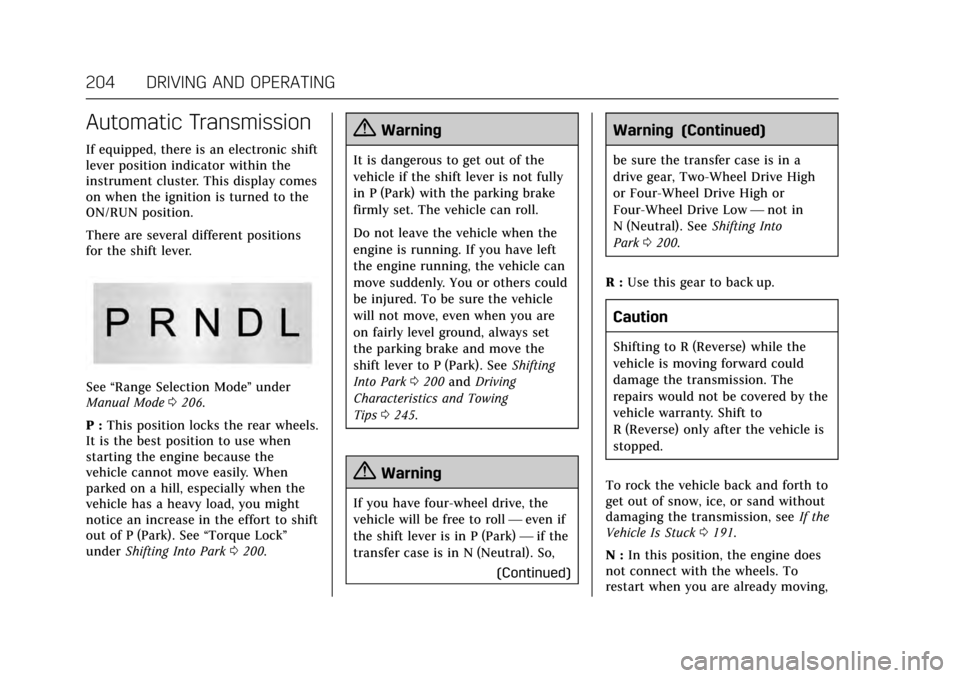
There are several different positions
for the shift lever.
See“Range Selection Mode ”under
Manual Mode 0206.
P : This position locks the rear wheels.
It is the best position to use when
starting the engine because the
vehicle cannot move easily. When
parked on a hill, especially when the
vehicle has a heavy load, you might
notice an increase in the effort to shift
out of P (Park). See “Torque Lock”
under Shifting Into Park 0200.
{Warning
It is dangerous to get out of the
vehicle if the shift lever is not fully
in P (Park) with the parking brake
firmly set. The vehicle can roll.
Do not leave the vehicle when the
engine is running. If you have left
the engine running, the vehicle can
move suddenly. You or others could
be injured. To be sure the vehicle
will not move, even when you are
on fairly level ground, always set
the parking brake and move the
shift lever to P (Park). See Shifting
Into Park 0200 and Driving
Characteristics and Towing
Tips 0245.
{Warning
If you have four-wheel drive, the
vehicle will be free to roll —even if
the shift lever is in P (Park) —if the
transfer case is in N (Neutral). So,
(Continued)
Warning (Continued)
be sure the transfer case is in a
drive gear, Two-Wheel Drive High
or Four-Wheel Drive High or
Four-Wheel Drive Low—not in
N (Neutral). See Shifting Into
Park 0200.
R : Use this gear to back up.
Caution
Shifting to R (Reverse) while the
vehicle is moving forward could
damage the transmission. The
repairs would not be covered by the
vehicle warranty. Shift to
R (Reverse) only after the vehicle is
stopped.
To rock the vehicle back and forth to
get out of snow, ice, or sand without
damaging the transmission, see If the
Vehicle Is Stuck 0191.
N : In this position, the engine does
not connect with the wheels. To
restart when you are already moving,
Page 217 of 354
Cadillac Escalade Owner Manual (GMNA-Localizing-MidEast-10293077) -
2017 - crc - 8/24/16
216 DRIVING AND OPERATING
Ride Control Systems
Traction Control/Electronic
Stability Control
System Operation
The vehicle has a Traction Control
System (TCS) and StabiliTrak®, an
electronic stability control system.
These systems help limit wheel spin
and assist the driver in maintaining
control, especially on slippery road
conditions.
TCS activates if it senses any of the
drive wheels are spinning or beginning
to lose traction. When this happens,
TCS applies the brakes to the spinning
wheels and reduces engine power to
limit wheel spin.
StabiliTrak activates when the vehicle
senses a difference between the
intended path and the direction the
vehicle is actually traveling.
StabiliTrak selectively applies braking
pressure to any one of the vehicle
wheel brakes to assist the driver in
keeping the vehicle on the intended
path. Trailer Sway Control (TSC) is also on automatically when the
vehicle is started. See
Trailer Sway
Control (TSC) 0252.
If cruise control is being used and
traction control or StabiliTrak begins
to limit wheel spin, cruise control will
disengage. Cruise control may be
turned back on when road conditions
allow.
Both systems come on automatically
when the vehicle is started and begins
to move. The systems may be heard or
felt while they are operating or while
performing diagnostic checks. This is
normal and does not mean there is a
problem with the vehicle.
It is recommended to leave both
systems on for normal driving
conditions, but it may be necessary to
turn TCS off if the vehicle gets stuck
in sand, mud, ice, or snow. See If the
Vehicle Is Stuck 0191 and “Turning
the Systems Off and On ”later in this
section.
When the transfer case (if equipped)
is in Four-Wheel Drive Low, the
stability system is automatically
disabled,
gcomes on, and the
appropriate message will appear on the DIC. Both traction control and
StabiliTrak are automatically disabled
in this condition.
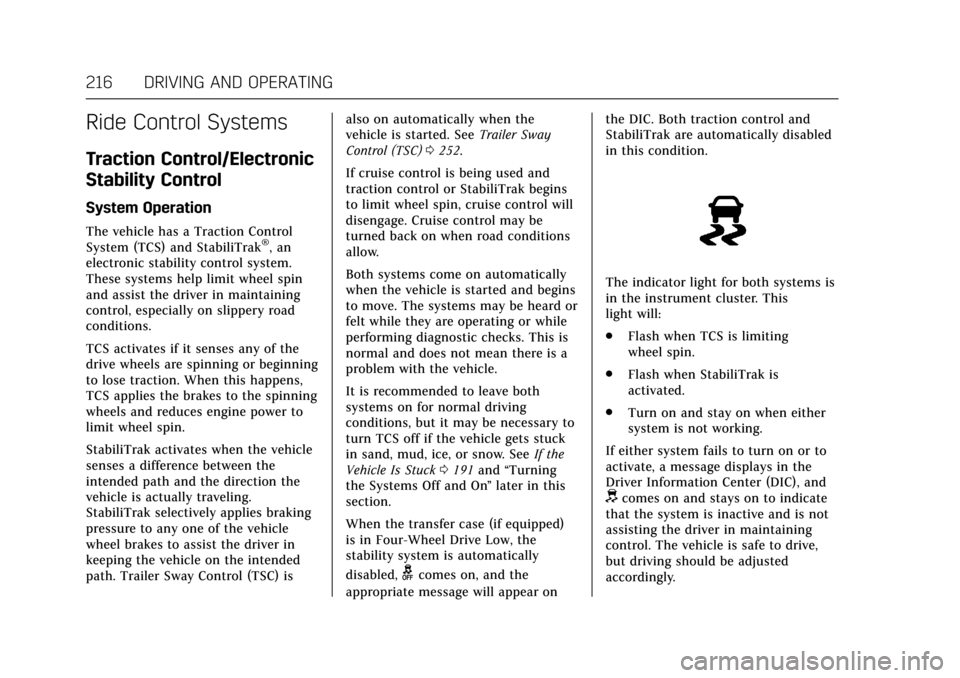
The indicator light for both systems is
in the instrument cluster. This
light will:
.
Flash when TCS is limiting
wheel spin.
. Flash when StabiliTrak is
activated.
. Turn on and stay on when either
system is not working.
If either system fails to turn on or to
activate, a message displays in the
Driver Information Center (DIC), and
dcomes on and stays on to indicate
that the system is inactive and is not
assisting the driver in maintaining
control. The vehicle is safe to drive,
but driving should be adjusted
accordingly.