remote start CADILLAC ESCALADE 2017 4.G User Guide
[x] Cancel search | Manufacturer: CADILLAC, Model Year: 2017, Model line: ESCALADE, Model: CADILLAC ESCALADE 2017 4.GPages: 354, PDF Size: 3.9 MB
Page 45 of 354
Cadillac Escalade Owner Manual (GMNA-Localizing-MidEast-10293077) -
2017 - crc - 8/24/16
44 KEYS, DOORS, AND WINDOWS
To avoid setting off the alarm by
accident:
.Lock the vehicle after all
occupants have exited.
. Always unlock a door with the
RKE transmitter, or use the
Keyless Access system.
Unlocking the driver door with the
key will not disarm the system or
turn off the alarm.
How to Detect a Tamper
Condition
IfKis pressed on the RKE
transmitter and the horn chirps and
the lights flash three times, an alarm
occurred previously while the alarm
system was armed.
If the alarm has been activated, a
message will appear on the DIC. See
Security Messages 0151.
Immobilizer Operation
This vehicle has a passive
theft-deterrent system.
The system does not have to be
manually armed or disarmed. The vehicle is automatically
immobilized when the vehicle is
turned off.
The immobilization system is
disarmed when the ignition button is
pressed in and a valid transmitter is
found in the vehicle.
The security light in the instrument
cluster comes on if there is a problem
with arming or disarming the
theft-deterrent system.
The system has one or more
transmitters matched to an
immobilizer control unit in the
vehicle. Only a correctly matched
transmitter will start the vehicle.
If the transmitter is ever damaged,
you may not be able to start the
vehicle.
If the engine does not start and the
security light stays on, there is a
problem with the system. Turn the
vehicle off and try again.
If the RKE transmitter appears to be
undamaged, try another transmitter or
place the transmitter in the
transmitter pocket/insert next to the
center console storage area between
the driver and front passenger seats.
See
“Starting the Vehicle with a Low
Transmitter Battery” underRemote
Keyless Entry (RKE) System
Operation 028.
If the engine does not start with the
other transmitter or when the
transmitter is in the pocket/insert, the
vehicle needs service. See your dealer
who can service the theft-deterrent
system and have a new transmitter
programmed to the vehicle.
Do not leave the transmitter or device
that disarms or deactivates the
theft-deterrent system in the vehicle.
Page 63 of 354
Cadillac Escalade Owner Manual (GMNA-Localizing-MidEast-10293077) -
2017 - crc - 8/24/16
62 SEATS AND RESTRAINTS
5. To activate massage at lastmassage type and intensity
settings or to turn massage off,
press the massage On/Off
control (2).
Heated and Cooled Front
Seats
{Warning
If temperature change or pain to
the skin cannot be felt, the seat
heater may cause burns. To reduce
the risk of burns, use care when
using the seat heater, especially for
long periods of time. Do not place
anything on the seat that insulates
against heat, such as a blanket,
cushion, cover, or similar item. This
may cause the seat heater to
overheat. An overheated seat heater
may cause a burn or may damage
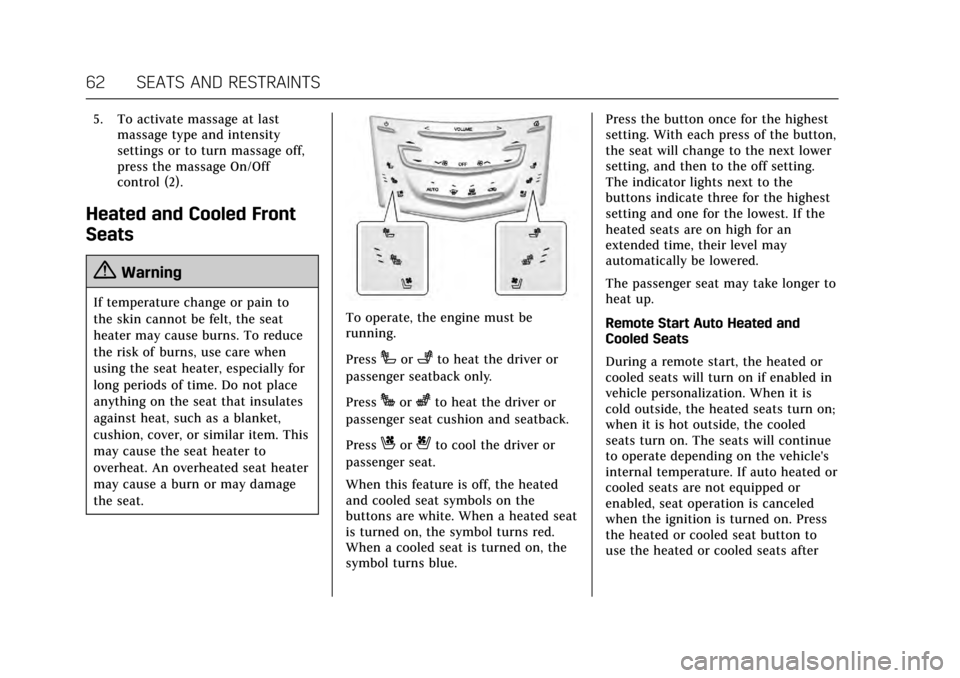
the seat.To operate, the engine must be
running.
Press
Ior+to heat the driver or
passenger seatback only.
Press
Jorzto heat the driver or
passenger seat cushion and seatback.
Press
Cor{to cool the driver or
passenger seat.
When this feature is off, the heated
and cooled seat symbols on the
buttons are white. When a heated seat
is turned on, the symbol turns red.
When a cooled seat is turned on, the
symbol turns blue. Press the button once for the highest
setting. With each press of the button,
the seat will change to the next lower
setting, and then to the off setting.
The indicator lights next to the
buttons indicate three for the highest
setting and one for the lowest. If the
heated seats are on high for an
extended time, their level may
automatically be lowered.
The passenger seat may take longer to
heat up.
Remote Start Auto Heated and
Cooled Seats
During a remote start, the heated or
cooled seats will turn on if enabled in
vehicle personalization. When it is
cold outside, the heated seats turn on;
when it is hot outside, the cooled
seats turn on. The seats will continue
to operate depending on the vehicle's
internal temperature. If auto heated or
cooled seats are not equipped or
enabled, seat operation is canceled
when the ignition is turned on. Press
the heated or cooled seat button to
use the heated or cooled seats after
Page 64 of 354
Cadillac Escalade Owner Manual (GMNA-Localizing-MidEast-10293077) -
2017 - crc - 8/24/16
SEATS AND RESTRAINTS 63
the vehicle is started. SeeRemote
Vehicle Start 033 and Vehicle
Personalization 0154.
The heated or cooled seat indicator
lights do not turn on during a remote
start.
The temperature performance of an
unoccupied seat may be reduced. This
is normal.
Auto Heated and Cooled Seats
When the ignition is on, the auto
heated or cooled seats will
automatically activate at the level
determined by the vehicle's interior
temperature, if enabled in vehicle
personalization. See Vehicle
Personalization 0154. The indicator
lights next to the buttons indicate the
level of operation. Use the heated or
cooled seat buttons to turn off auto
heated or cooled seats. If the
passenger seat is unoccupied, this
feature will not activate that seat.
Rear Seats
Heated Rear Seats
{Warning
If you cannot feel temperature
change or pain to the skin, the seat
heater may cause burns. See the
Warning under Heated and Cooled
Front Seats 062.
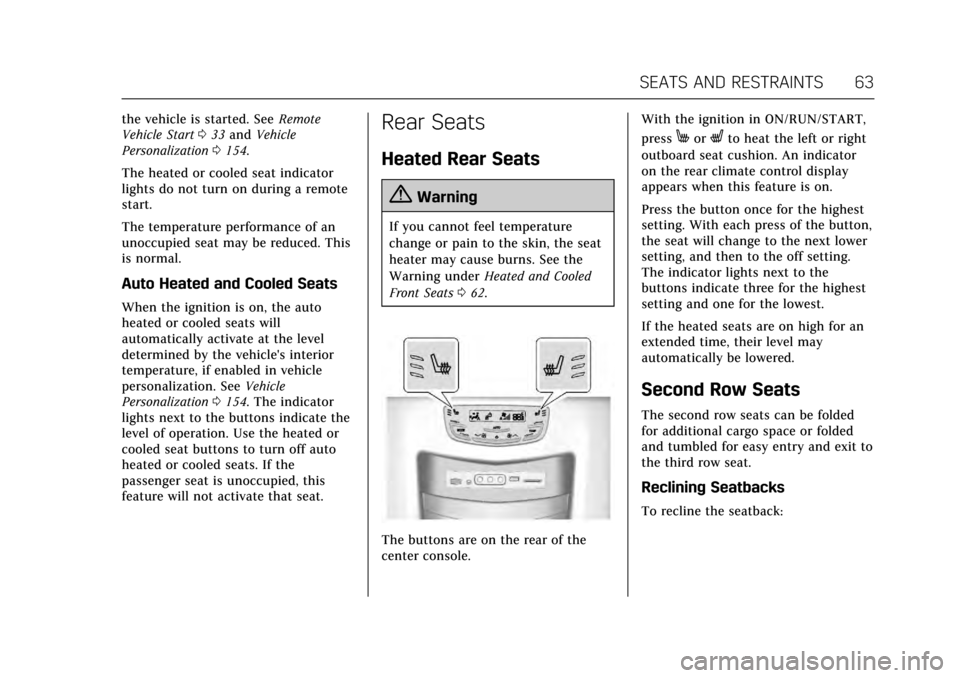
The buttons are on the rear of the
center console. With the ignition in ON/RUN/START,
press
MorLto heat the left or right
outboard seat cushion. An indicator
on the rear climate control display
appears when this feature is on.
Press the button once for the highest
setting. With each press of the button,
the seat will change to the next lower
setting, and then to the off setting.
The indicator lights next to the
buttons indicate three for the highest
setting and one for the lowest.
If the heated seats are on high for an
extended time, their level may
automatically be lowered.
Second Row Seats
The second row seats can be folded
for additional cargo space or folded
and tumbled for easy entry and exit to
the third row seat.
Reclining Seatbacks
To recline the seatback:
Page 116 of 354
Cadillac Escalade Owner Manual (GMNA-Localizing-MidEast-10293077) -
2017 - crc - 8/24/16
INSTRUMENTS AND CONTROLS 115
Starting the Vehicle Messages . . . 151
Tire Messages . . . . . . . . . . . . . . . . . . . . 152
Transmission Messages . . . . . . . . . . 152
Vehicle Reminder Messages . . . . . 153
Vehicle Speed Messages . . . . . . . . . 153
Washer Fluid Messages . . . . . . . . . . 153
Window Messages . . . . . . . . . . . . . . . . 153
Vehicle Personalization
Vehicle Personalization . . . . . . . . . . 154
Universal Remote System
Universal Remote SystemProgramming . . . . . . . . . . . . . . . . . . . 161
Universal Remote System Operation . . . . . . . . . . . . . . . . . . . . . . . . 163
Controls
Steering Wheel Adjustment
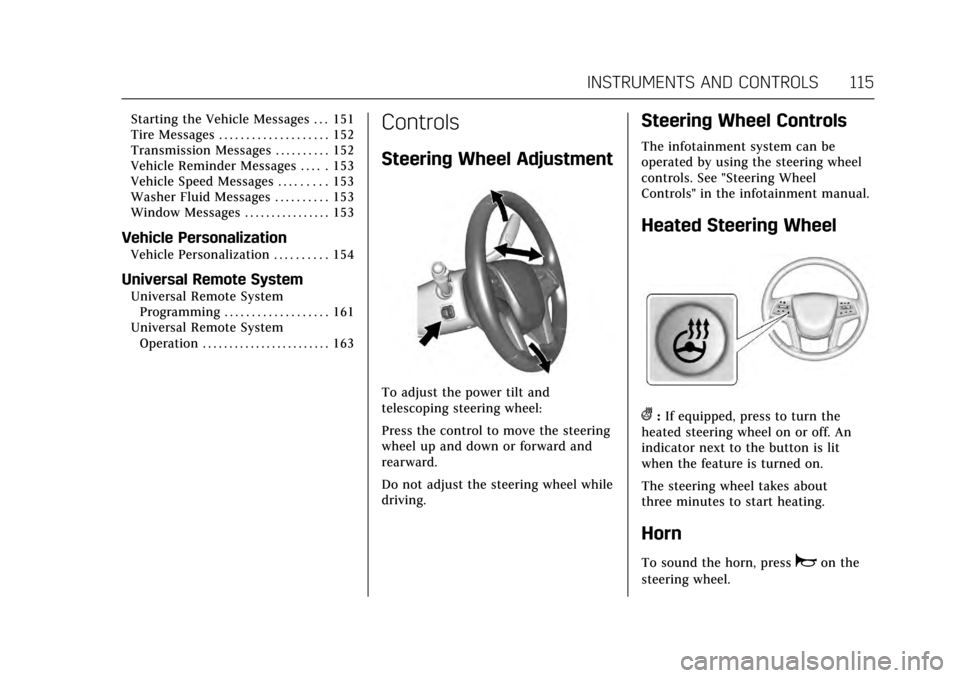
To adjust the power tilt and
telescoping steering wheel:
Press the control to move the steering
wheel up and down or forward and
rearward.
Do not adjust the steering wheel while
driving.
Steering Wheel Controls
The infotainment system can be
operated by using the steering wheel
controls. See "Steering Wheel
Controls" in the infotainment manual.
Heated Steering Wheel
(:If equipped, press to turn the
heated steering wheel on or off. An
indicator next to the button is lit
when the feature is turned on.
The steering wheel takes about
three minutes to start heating.
Horn
To sound the horn, pressaon the
steering wheel.
Page 145 of 354
Cadillac Escalade Owner Manual (GMNA-Localizing-MidEast-10293077) -
2017 - crc - 8/24/16
144 INSTRUMENTS AND CONTROLS
Vehicle Messages
Messages displayed on the DIC
indicate the status of the vehicle or
some action that may be needed to
correct a condition. Multiple messages
may display one after the other.
The messages that do not require
immediate action can be
acknowledged and cleared by pressing
SEL. The messages that require
immediate action cannot be cleared
until that action is performed. All
messages should be taken seriously
and clearing the messages does not
correct the problem.
The following are some of the vehicle
messages that may be displayed
depending on the vehicle content.
Battery Voltage and
Charging Messages
BATTERY SAVER ACTIVE
This message displays when the
vehicle has detected that the battery
voltage is dropping beyond a
reasonable point. The battery saver
system starts reducing features of thevehicle that may be noticed. At the
point that features are disabled, this
message displays. Turn off
unnecessary accessories to allow the
battery to recharge.
LOW BATTERY
This message is displayed when the
battery voltage is low. See
Battery
0271.
SERVICE BATTERY CHARGING
SYSTEM
This message is displayed when there
is a fault in the battery charging
system. Take the vehicle to your
dealer for service.
TRANSPORT MODE ON
This message is displayed when the
vehicle is in transport mode. Some
features can be disabled while in this
mode, including Remote Keyless
Entry (RKE), remote start, and the
vehicle alarm system. Take the vehicle
to your dealer for service to turn
transport mode off.
Brake System Messages
BRAKE FLUID LOW
This message is displayed when the
brake fluid level is low. See Brake
Fluid 0269.
BRAKES OVERHEATED
This message is displayed when the
brakes are becoming overheated. This
may be seen when driving on hills.
Shift to a lower gear.
STEP ON BRAKE TO RELEASE
PARK BRAKE
This message is displayed if you
attempt to release the Electric Parking
Brake without the brake pedal applied.
See Electric Parking Brake 0213.
RELEASE PARKING BRAKE
This message is displayed if the
Electric Parking Brake is on while the
vehicle is in motion. See Electric
Parking Brake 0213.
SERVICE BRAKE ASSIST
This message may be displayed when
there is a problem with the brake
boost assist system. The brake boost
Page 148 of 354
Cadillac Escalade Owner Manual (GMNA-Localizing-MidEast-10293077) -
2017 - crc - 8/24/16
INSTRUMENTS AND CONTROLS 147
OIL PRESSURE LOW—STOP
ENGINE
This message displays if low oil
pressure levels occur. Stop the vehicle
as soon as safely possible and do not
operate it until the cause of the low
oil pressure has been corrected. Check
the oil as soon as possible and have
the vehicle serviced by your dealer.
Engine Power Messages
ENGINE POWER IS REDUCED
This message displays when the
vehicle's engine power is reduced.
Reduced engine power can affect the
vehicle's ability to accelerate. If this
message is on, but there is no
reduction in performance, proceed to
your destination. The performance
may be reduced the next time the
vehicle is driven. The vehicle may be
driven at a reduced speed while this
message is on, but maximum
acceleration and speed may be
reduced. Anytime this message stays
on, or displays repeatedly, the vehicle
should be taken to your dealer for
service as soon as possible.
Fuel System Messages
FUEL LEVEL LOW
This message displays when the
vehicle is low on fuel. Refuel as soon
as possible.
Key and Lock Messages
NO REMOTE KEY WAS DETECTED
PLACE KEY IN TRANSMITTER
POCKET THEN START YOUR
VEHICLE
This message displays when trying to
start the vehicle if an RKE transmitter
is not detected. The transmitter
battery may be weak. See “Starting the
Vehicle with a Low Transmitter
Battery” underRemote Keyless Entry
(RKE) System Operation 028.
NO REMOTE DETECTED
This message displays when the
transmitter battery may be weak. See
“Starting the Vehicle with a Low
Transmitter Battery” underRemote
Keyless Entry (RKE) System
Operation 028.
NO REMOTE DETECTED PRESS
BRAKE TO RESTART
This message displays when
attempting to turn off the vehicle and
the RKE transmitter is no longer
detected. Restarting is allowed
without the RKE transmitter for
five minutes. Press the brake pedal
and ENGINE START/STOP to restart
the vehicle.
NUMBER OF KEYS PROGRAMMED
This message displays when
programming new keys to the vehicle.
REMOTE LEFT IN VEHICLE
This message displays when leaving
the vehicle with the RKE transmitter
still inside.
REPLACE BATTERY IN
REMOTE KEY
This message displays when the
battery in the RKE transmitter needs
to be replaced.
Page 156 of 354

Cadillac Escalade Owner Manual (GMNA-Localizing-MidEast-10293077) -
2017 - crc - 8/24/16
INSTRUMENTS AND CONTROLS 155
Manage Favorites
This allows favorites to be edited. See
“Manage Favorites”in “Settings” under
“Radio ”in the infotainment manual.
Number of Favorites Pages
Press to set the number of favorites to
display.
Select the desired number or select
Auto and the infotainment system will
automatically adjust the number of
favorites shown.
Audible Touch Feedback
This allows Audible Touch Feedback
to be turned on or off.
Select Off or On.
Auto Volume
This feature adjusts the volume based
on vehicle speed and ambient noise.
Select Off, Low, Medium-Low,
Medium, Medium-High, or High.
Maximum Startup Volume
This feature sets the maximum
startup volume. If the vehicle is
started and the volume is greater than
this level, the volume is adjusted to this level. To set the maximum
startup volume, press + or
−to
increase or decrease.
Audio Cue Volume
This feature sets the volume of audio
files played at system startup and
shutdown.
Select On, then press + or −to
increase or decrease the volume.
Vehicle
Select and the following may display:
. Climate and Air Quality
. Collision/Detection Systems
. Comfort and Convenience
. Lighting
. Power Door Locks
. Remote Lock, Unlock, Start
Climate and Air Quality
Select and the following may display:
. Auto Fan Max Speed
. Auto Cooled Seats
. Auto Heated Seats
. Auto Defog Auto Fan Max Speed
This feature will set the maximum
auto fan speed.
Select Low, Medium, or High.
Auto Cooled Seats
When enabled, this feature will
automatically activate ventilated seats
at the level required by the interior
temperature. See
Heated and Cooled
Front Seats 062.
Select Off or On.
Auto Heated Seats
When the vehicle is on, this feature
will automatically activate the heated
seats at the level required by the
vehicle's interior temperature. See
“Auto Heated Seats” under inHeated
and Cooled Front Seats 062.
Select Off or On.
Auto Defog
When set to On, the auto defog comes
on when the climate control detects a
humidity risk based on outside temp,
windshield temp, and interior
humidity. Air will be directed on to
the windshield.
Page 159 of 354

Cadillac Escalade Owner Manual (GMNA-Localizing-MidEast-10293077) -
2017 - crc - 8/24/16
158 INSTRUMENTS AND CONTROLS
Delayed Door Lock
When on, this feature will delay the
locking of the doors. To override the
delay, press the power door lock
switch on the door.
Select Off or On.
Remote Lock, Unlock, Start
Select and the following may display:
.Remote Unlock Light Feedback
. Remote Lock Feedback
. Remote Door Unlock
. Relock Remotely Unlocked Doors
. Remote Start Auto Cool Seats
. Remote Start Auto Heat Seats
. Remote Window Operation
. Passive Door Unlock
. Passive Door Lock
. Remote Left in Vehicle Alert
Remote Unlock Light Feedback
When on, the exterior lamps will flash
when unlocking the vehicle with the
RKE transmitter.
Select Off or Flash Lights. Remote Lock Feedback
This allows selection of what type of
feedback is given when locking the
vehicle with the RKE transmitter.
Select Off, Lights and Horn, Lights
Only, or Horn Only.
Remote Door Unlock
This allows selection of which doors
will unlock when pressing
Kon the
RKE transmitter.
Select All Doors or Driver Door.
Relock Remotely Unlocked Doors
This feature will re-lock all doors and
re-arm the vehicle alarm if a door is
not opened or the vehicle is not
started within a set time of unlocking
the vehicle and disarming the alarm
system with the RKE transmitter. See
“Auto Door Relock” inRemote Keyless
Entry (RKE) System Operation 028.
Select Off or On.
Remote Start Auto Cool Seats
If equipped and turned on, this
feature will turn the cooled seats on
when using remote start on
warm days. Select Off or On.
Remote Start Auto Heat Seats
If equipped and turned on, this
feature will turn the heated seats on
when using remote start on cold days.
Select Off or On.
Remote Window Operation
This allows the window to be opened
when pressingKon the RKE
transmitter. See Remote Keyless Entry
(RKE) System Operation 028.
Select Off or On.
Passive Door Unlock
This allows the selection of what
doors will unlock when using the
button on the driver door to unlock
the vehicle.
Select All Doors or Driver Door Only.
Passive Door Lock
This feature can be turned on or off,
or can be used to select feedback
when using the button on the driver
door to lock the vehicle. See Remote
Keyless Entry (RKE) System
Operation 028.
Page 178 of 354
Cadillac Escalade Owner Manual (GMNA-Localizing-MidEast-10293077) -
2017 - crc - 8/24/16
CLIMATE CONTROLS 177
There are also auto heated and cooled
seats, for more information seeHeated
and Cooled Front Seats 062.
Remote Start Climate Control
Operation : The climate control
system may run when the vehicle is
started remotely. The system uses the
driver’s previous settings to heat or
cool the inside of the vehicle. The rear
defog may come on during remote
start based on cold ambient
conditions. The rear defog indicator
light does not come on during a
remote start. If equipped with heated
or cooled seats, they may come on
during a remote start. See Remote
Vehicle Start 033 and Heated and
Cooled Front Seats 062.Sensor
The solar sensor, on top of the
instrument panel near the windshield,
monitors the solar heat.
The climate control system uses the
sensor information to adjust the
temperature, fan speed, recirculation,
and air delivery mode for best
comfort.
If the sensor is covered, the automatic
climate control system may not work
properly.
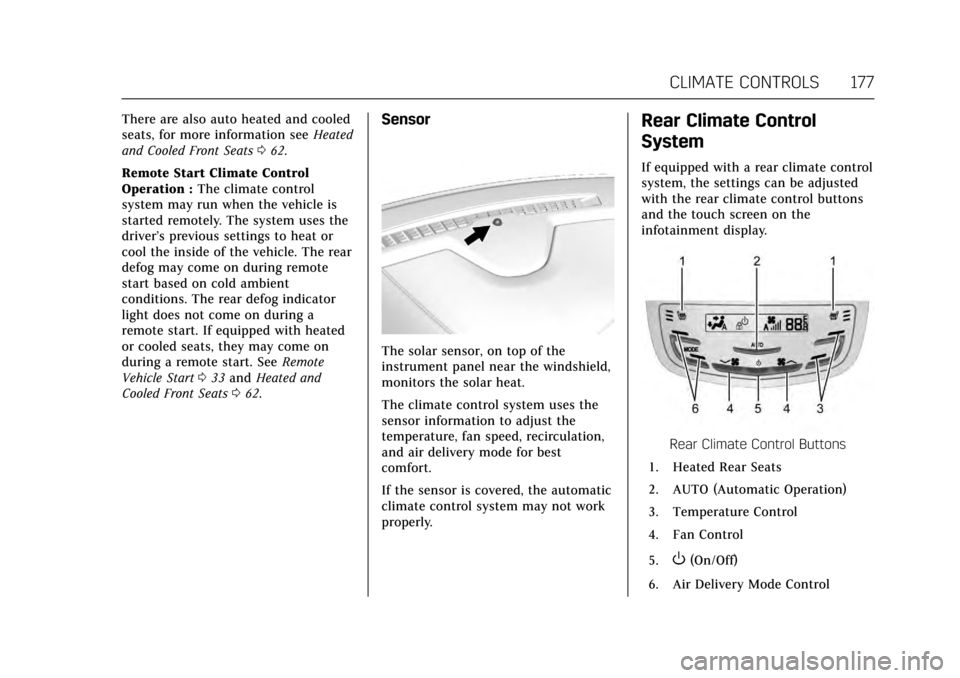
Rear Climate Control
System
If equipped with a rear climate control
system, the settings can be adjusted
with the rear climate control buttons
and the touch screen on the
infotainment display.
Rear Climate Control Buttons
1. Heated Rear Seats
2. AUTO (Automatic Operation)
3. Temperature Control
4. Fan Control
5.
O(On/Off)
6. Air Delivery Mode Control
Page 198 of 354
Cadillac Escalade Owner Manual (GMNA-Localizing-MidEast-10293077) -
2017 - crc - 8/24/16
DRIVING AND OPERATING 197
Caution (Continued)
breaking-in guideline every
time you get new brake
linings.
. Do not tow a trailer during
break-in. See Trailer Towing
0 247 for the trailer towing
capabilities of the vehicle and
more information.
Following break-in, engine speed
and load can be gradually
increased.
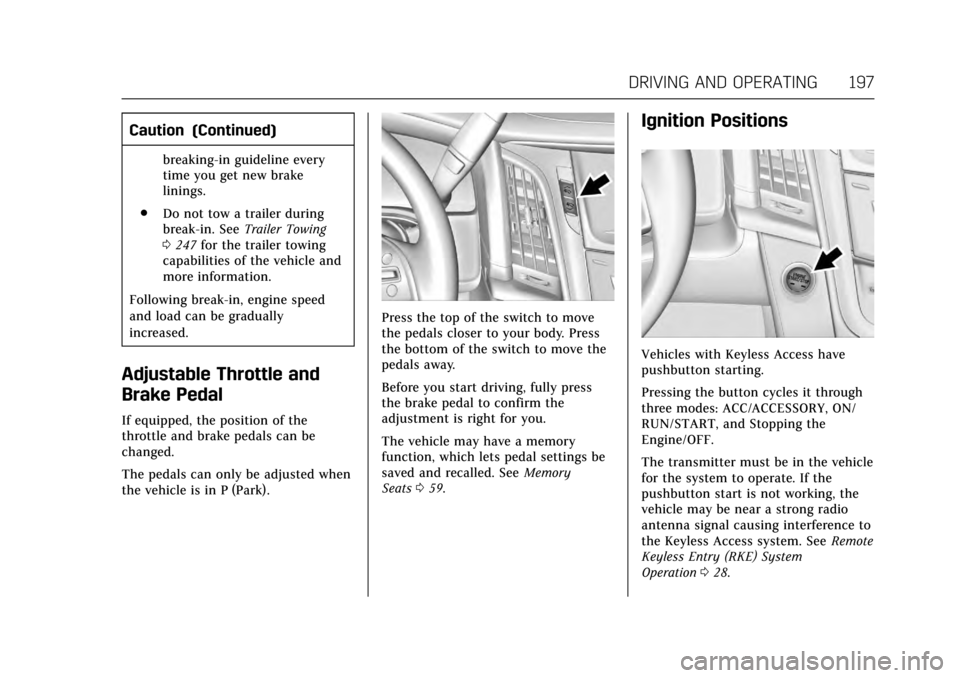
Adjustable Throttle and
Brake Pedal
If equipped, the position of the
throttle and brake pedals can be
changed.
The pedals can only be adjusted when
the vehicle is in P (Park).
Press the top of the switch to move
the pedals closer to your body. Press
the bottom of the switch to move the
pedals away.
Before you start driving, fully press
the brake pedal to confirm the
adjustment is right for you.
The vehicle may have a memory
function, which lets pedal settings be
saved and recalled. See Memory
Seats 059.
Ignition Positions
Vehicles with Keyless Access have
pushbutton starting.
Pressing the button cycles it through
three modes: ACC/ACCESSORY, ON/
RUN/START, and Stopping the
Engine/OFF.
The transmitter must be in the vehicle
for the system to operate. If the
pushbutton start is not working, the
vehicle may be near a strong radio
antenna signal causing interference to
the Keyless Access system. See Remote
Keyless Entry (RKE) System
Operation 028.