tow CADILLAC ESCALADE 2017 4.G Owner's Manual
[x] Cancel search | Manufacturer: CADILLAC, Model Year: 2017, Model line: ESCALADE, Model: CADILLAC ESCALADE 2017 4.GPages: 354, PDF Size: 3.9 MB
Page 135 of 354
Cadillac Escalade Owner Manual (GMNA-Localizing-MidEast-10293077) -
2017 - crc - 8/24/16
134 INSTRUMENTS AND CONTROLS
SeeTow/Haul Mode 0208.
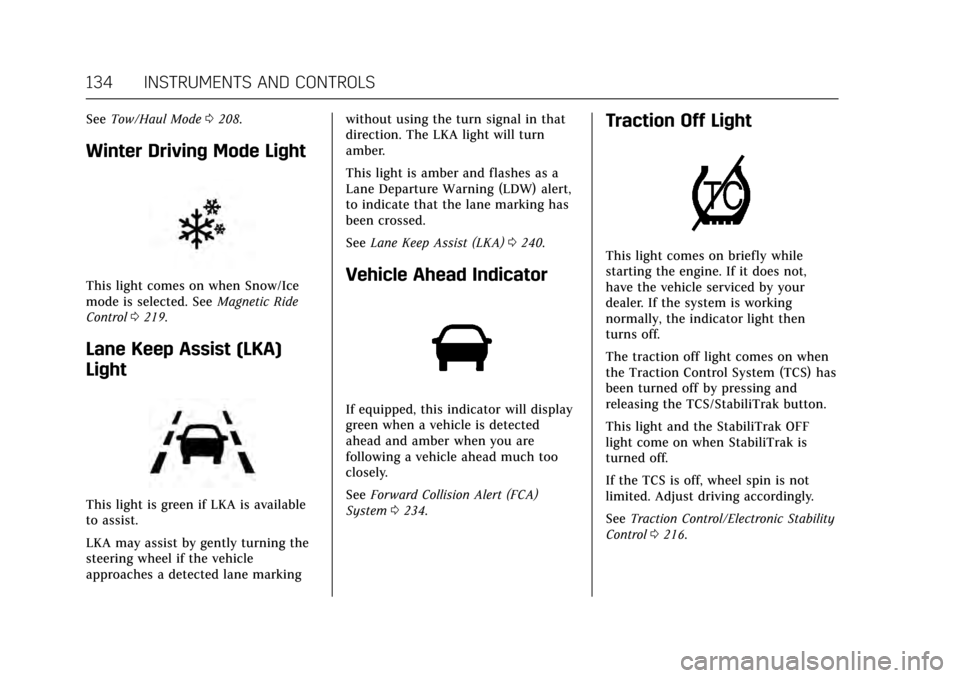
Winter Driving Mode Light
This light comes on when Snow/Ice
mode is selected. See Magnetic Ride
Control 0219.
Lane Keep Assist (LKA)
Light
This light is green if LKA is available
to assist.
LKA may assist by gently turning the
steering wheel if the vehicle
approaches a detected lane marking without using the turn signal in that
direction. The LKA light will turn
amber.
This light is amber and flashes as a
Lane Departure Warning (LDW) alert,
to indicate that the lane marking has
been crossed.
See
Lane Keep Assist (LKA) 0240.
Vehicle Ahead Indicator
If equipped, this indicator will display
green when a vehicle is detected
ahead and amber when you are
following a vehicle ahead much too
closely.
See Forward Collision Alert (FCA)
System 0234.
Traction Off Light
This light comes on briefly while
starting the engine. If it does not,
have the vehicle serviced by your
dealer. If the system is working
normally, the indicator light then
turns off.
The traction off light comes on when
the Traction Control System (TCS) has
been turned off by pressing and
releasing the TCS/StabiliTrak button.
This light and the StabiliTrak OFF
light come on when StabiliTrak is
turned off.
If the TCS is off, wheel spin is not
limited. Adjust driving accordingly.
See Traction Control/Electronic Stability
Control 0216.
Page 142 of 354
Cadillac Escalade Owner Manual (GMNA-Localizing-MidEast-10293077) -
2017 - crc - 8/24/16
INSTRUMENTS AND CONTROLS 141
kilopascal (kPa) or in pounds per
square inch (psi). If the pressure is
low, the value for that tire is shown in
amber. SeeTire Pressure Monitor
System 0293 and Tire Pressure
Monitor Operation 0294.
Blank Page : Allows for no
information to be displayed in the
cluster info display areas.
Head-Up Display (HUD)
{Warning
If the HUD image is too bright or
too high in your field of view, it
may take you more time to see
things you need to see when it is
dark outside. Be sure to keep the
HUD image dim and placed low in
your field of view.
If equipped with HUD, some
information concerning the operation
of the vehicle is projected onto the
windshield. The image is projected
through the HUD lens on top of the instrument panel. The information
appears as an image focused out
toward the front of the vehicle.
Caution
If you try to use the HUD image as
a parking aid, you may misjudge
the distance and damage your
vehicle. Do not use the HUD image
as a parking aid.
The HUD information can be
displayed in various languages. The
speedometer reading and other
numerical values can be displayed in
either English or metric units.
The language selection is changed
through the radio and the units of
measurement is changed through the
instrument cluster. See Vehicle
Personalization 0154 and “Cluster
Settings Menu ”under Instrument
Cluster 0124.
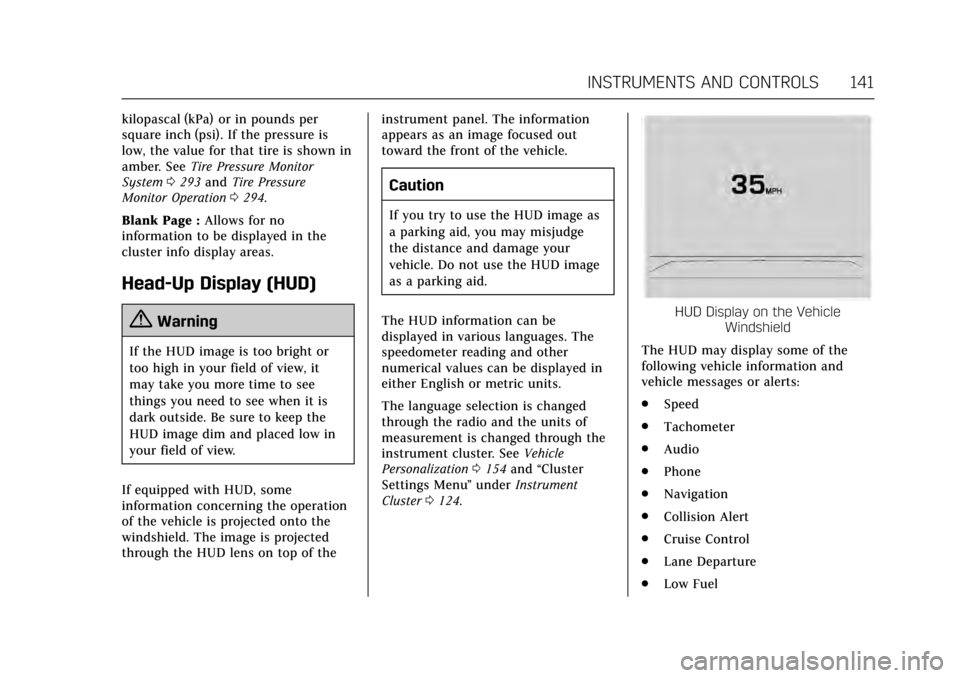
HUD Display on the Vehicle
Windshield
The HUD may display some of the
following vehicle information and
vehicle messages or alerts:
. Speed
. Tachometer
. Audio
. Phone
. Navigation
. Collision Alert
. Cruise Control
. Lane Departure
. Low Fuel
Page 147 of 354
Cadillac Escalade Owner Manual (GMNA-Localizing-MidEast-10293077) -
2017 - crc - 8/24/16
146 INSTRUMENTS AND CONTROLS
message will also be displayed. The
DOOR OPEN message may also be
displayed if the vehicle starts to move.
Close the door completely.
HOOD OPEN
This message will display along with a
hood open symbol when the hood is
open. A chime may also sound. Close
the hood completely.
TRUNK OPEN
This message will display along with a
symbol when the trunk is open. Close
the trunk completely.
Engine Cooling System
Messages
A/C OFF DUE TO HIGH
ENGINE TEMP
This message displays when the
engine coolant becomes hotter than
the normal operating temperature. See
Engine Coolant Temperature Gauge
0127. To avoid added strain on a hot
engine, the air conditioning
compressor automatically turns off.
When the coolant temperature returns to normal, the air conditioning
compressor turns back on. You can
continue to drive your vehicle.
If this message continues to appear,
have the system repaired by your
dealer as soon as possible to avoid
damage to the engine.
ENGINE OVERHEATED IDLE
ENGINE
This message displays when the
engine coolant temperature is too hot.
Stop and allow the vehicle to idle until
it cools down. See
Engine Coolant
Temperature Gauge 0127.
When towing, use Tow/Haul Mode to
prevent damage to the engine or
transmission. See Tow/Haul
Mode 0208.
ENGINE OVERHEATED STOP
ENGINE
This message displays and a chime
may sound if the engine cooling
system reaches unsafe temperatures
for operation. Stop and turn off the
vehicle as soon as it is safe to do so to avoid severe damage. This message
clears when the engine has cooled to a
safe operating temperature.
Engine Oil Messages
CHANGE ENGINE OIL SOON
This message displays when the
engine oil needs to be changed. When
you change the engine oil, be sure to
reset the oil life system. See
Engine Oil
Life System 0260, Driver Information
Center (DIC) 0138, Engine Oil 0258,
and Maintenance Schedule 0329.
ENGINE OIL HOT, IDLE ENGINE
This message displays when the
engine oil temperature is too hot. Stop
and allow the vehicle to idle until it
cools down.
ENGINE OIL LOW —ADD OIL
On some vehicles, this message
displays when the engine oil level may
be too low. Check the oil level before
filling to the recommended level.
If the oil is not low and this message
remains on, take the vehicle to your
dealer for service. See Engine
Oil 0258.
Page 153 of 354
Cadillac Escalade Owner Manual (GMNA-Localizing-MidEast-10293077) -
2017 - crc - 8/24/16
152 INSTRUMENTS AND CONTROLS
Tire Messages
SERVICE TIRE MONITOR SYSTEM
This message displays if there is a
problem with the Tire Pressure
Monitor System (TPMS). SeeTire
Pressure Monitor Operation 0294.
TIRE LEARNING ACTIVE
This message displays when the
system is learning new tires. See Tire
Pressure Monitor Operation 0294.
TIRE PRESSURE LOW ADD AIR
TO TIRE
This message displays when the
pressure in one or more of the tires
is low.
This message also displays LEFT
FRONT, RIGHT FRONT, LEFT REAR,
or RIGHT REAR to indicate the
location of the low tire.
The low tire pressure warning light
will also come on. See Tire Pressure
Light 0136.
If a tire pressure message appears on
the DIC, stop as soon as possible.
Inflate the tires by adding air until the
tire pressure is equal to the values shown on the Tire and Loading
Information label. See
Tires0289,
Vehicle Load Limits 0192, and Tire
Pressure 0291.
More than one tire pressure message
can appear at a time. The DIC also
shows the tire pressure values. See
Driver Information Center (DIC) 0138.
Transmission Messages
4WD OFF
If equipped with four-wheel drive, this
message displays when the
four-wheel-drive system is temporarily
disabled due to an overheated
condition. The vehicle will run in
two-wheel drive when this message is
present. Once the four-wheel-drive
system cools down, the message turns
off and the four-wheel-drive system
returns to normal operation.
4WD SHIFT IN PROGRESS
This message will display while the
four-wheel-drive system is shifting.
GRADE BRAKING OFF
This message displays when grade
braking has been disabled with the
Tow/Haul Mode button on the end of
the shift lever. See Tow/Haul Mode
0 208, Automatic Transmission 0204,
and Cruise Control 0220.
GRADE BRAKING ON
This message displays when grade
braking has been enabled with the
Tow/Haul Mode button on the end of
the shift lever. See Tow/Haul Mode
0 208, Automatic Transmission 0204,
and Cruise Control 0220.
GRADE BRAKING ACTIVE
This message displays when grade
braking has been activated while
driving on downhill grades. This
message will only appear the first
time the feature is activated in an
ignition cycle. See Tow/Haul Mode
0 208, Automatic Transmission 0204,
and Cruise Control 0220.
SERVICE 4WD
If the vehicle has four-wheel drive,
this message may display if a problem
occurs with the four-wheel-drive
Page 154 of 354
Cadillac Escalade Owner Manual (GMNA-Localizing-MidEast-10293077) -
2017 - crc - 8/24/16
INSTRUMENTS AND CONTROLS 153
system. If this message appears, stop
as soon as possible and turn off the
vehicle. Turn the vehicle off for at
least one minute, then restart the
vehicle and check for the message on
the DIC display. If the message is still
displayed or appears again when you
begin driving, the four-wheel-drive
system needs service. See your dealer.
SHIFT DENIED
This message displays when the shift
lever is in the L (Manual Mode)
position and a transmission range has
been selected that is unavailable at
the current vehicle speed.
TRANSMISSION HOT IDLE ENGINE
This message displays and a chime
may sound if the transmission fluid in
the vehicle gets hot. Driving with the
transmission fluid temperature high
can cause damage to the vehicle. Stop
the vehicle and let it idle to allow the
transmission to cool. This message
clears and the chime stops when the
fluid temperature reaches a safe level.When towing, use Tow/Haul Mode to
prevent damage to the engine or
transmission. See
Tow/Haul
Mode 0208.
Vehicle Reminder
Messages
ICE POSSIBLE DRIVE WITH CARE
This message displays when ice
conditions are possible.
Vehicle Speed Messages
VEHICLE OVERSPEED
This message displays when the
vehicle speed exceeds 120 km/h
(75 mph).
Washer Fluid Messages
WASHER FLUID LOW ADD FLUID
This message may display when the
washer fluid level is low. Fill the
windshield washer reservoir as soon
as possible. See Engine Compartment
Overview 0257 for the location of the
windshield washer reservoir. Also, see
Washer Fluid 0268.
Window Messages
OPEN, THEN CLOSE DRIVER/
PASSENGER WINDOW
This message is displayed when the
window needs to be reprogrammed.
If the vehicle's battery has been
discharged or disconnected, you may
need to program each front window
for the express-up feature to work. See
Power Windows 050.
Page 157 of 354
Cadillac Escalade Owner Manual (GMNA-Localizing-MidEast-10293077) -
2017 - crc - 8/24/16
156 INSTRUMENTS AND CONTROLS
Select Off or On.
Collision/Detection Systems
Select the Collision/Detection Systems
menu and the following may display:
.Alert Type
. Forward Collision System
. Go Notifier
. Park Assist
. Lane Change Assist
. Rear Cross Traffic Alert
Alert Type
This feature will set crash alerts to
beeps or seat vibrations. This setting
affects all crash alerts including
Forward Collision Alert, Lane
Departure Warning, and Park Assist
alerts. See Driver Assistance
Systems 0229.
Select Beeps or Safety Alert Seat.
Forward Collision System
This feature will turn on or off
Forward Collision Alert (FCA) and
Forward Automatic Braking (FAB).
The Off setting disables all FCA and FAB functions. With the Alert and
Brake setting, both FCA and FAB are
available. The Alert setting disables
FAB. See
Forward Automatic Braking
(FAB) 0237.
Select Off, Alert and Brake, or Alert.
Go Notifier
This feature will give a reminder that
Adaptive Cruise Control provides
when it has brought the vehicle to a
complete stop behind another
stopping vehicle, and then that vehicle
drives on.
Select Off or On.
Park Assist
If equipped, this allows the feature to
be turned on or off. See Assistance
Systems for Parking or Backing 0230.
Select Off, On, or On with Towbar
Attached.
Lane Change Assist
This allows the feature to be turned
on or off. See Side Blind Zone Alert
(SBZA) 0238.
Select Off or On. Rear Cross Traffic Alert
This allows the feature to be turned
on or off. See
Assistance Systems for
Parking or Backing 0230.
Select Off or On.
Comfort and Convenience
Select the Comfort and Convenience
menu and the following may display:
. Auto Memory Recall
. Easy Exit Options
. Chime Volume
. Reverse Tilt Mirror
. Auto Mirror Folding
. Auto Wipe in Reverse Gear
Auto Memory Recall
This allows the feature to be turned
on or off.
Select On or Off.
Easy Exit Options
This allows the feature to be turned
on or off.
Select On or Off.
Page 167 of 354

Cadillac Escalade Owner Manual (GMNA-Localizing-MidEast-10293077) -
2017 - crc - 8/24/16
166 LIGHTING
Exterior Lamps Off
Reminder
If a door is open, a reminder chime
sounds when the headlamps or
parking lamps are manually turned on
and the ignition is off. To turn off the
chime, turn the exterior lamp control
to off or AUTO and then back on,
or close and re-open the door. In the
AUTO mode, the headlamps turn off
once the ignition is off or remain on
until the headlamp delay ends (if
enabled in the DIC). See“Exit
Lighting” underVehicle
Personalization 0154.
Headlamp High/Low-Beam
Changer
Push the turn signal lever toward the
instrument panel to change the
headlamps from low to high beam.
Pull the turn signal lever toward you
and release it to return to low-beam
headlamps.
When the high-beam headlamps are
on, this indicator light on the
instrument cluster will also be on.
Flash-to-Pass
This feature lets you use the
high-beam headlamps to signal a
driver in front of you that you want to
pass. It works even if the headlamps
are in the automatic position.
To use it, pull the turn signal lever
toward you, then release it.
If the headlamps are in the automatic
position or on low beam, the
high-beam headlamps will turn on.
They will stay on as long as you hold
the lever toward you. The high-beam
indicator on the instrument cluster
will come on. Release the lever to
return to normal operation.
Daytime Running
Lamps (DRL)
DRL can make it easier for others to
see the front of the vehicle during
the day.
The DRL system comes on when the
following conditions are met:
.
The ignition is on.
. The exterior lamp control is
in AUTO.
. The transmission is not in
P (Park).
. The light sensor determines it is
daytime.
When the DRL system is on, only the
DRL are on. The taillamps, sidemarker
lamps, instrument panel lights, and
other lamps will not be on.
When it begins to get dark, the
automatic headlamp system switches
from DRL to the headlamps.
To turn off the DRL, turn the exterior
lamp control to the off position and
then release.
Page 169 of 354
Cadillac Escalade Owner Manual (GMNA-Localizing-MidEast-10293077) -
2017 - crc - 8/24/16
168 LIGHTING
Hazard Warning Flashers
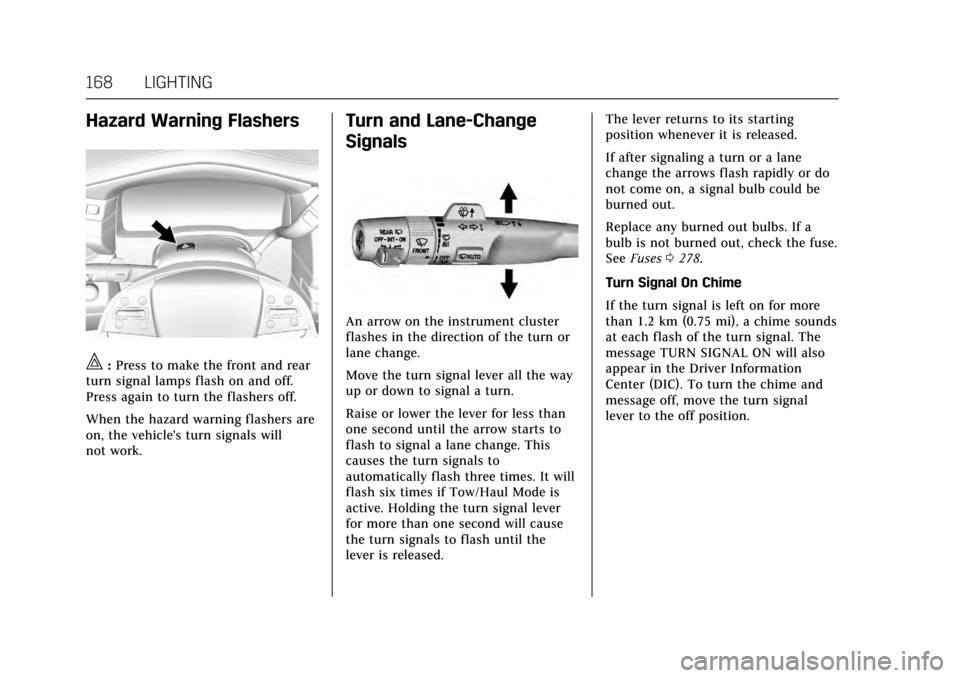
|:Press to make the front and rear
turn signal lamps flash on and off.
Press again to turn the flashers off.
When the hazard warning flashers are
on, the vehicle's turn signals will
not work.
Turn and Lane-Change
Signals
An arrow on the instrument cluster
flashes in the direction of the turn or
lane change.
Move the turn signal lever all the way
up or down to signal a turn.
Raise or lower the lever for less than
one second until the arrow starts to
flash to signal a lane change. This
causes the turn signals to
automatically flash three times. It will
flash six times if Tow/Haul Mode is
active. Holding the turn signal lever
for more than one second will cause
the turn signals to flash until the
lever is released. The lever returns to its starting
position whenever it is released.
If after signaling a turn or a lane
change the arrows flash rapidly or do
not come on, a signal bulb could be
burned out.
Replace any burned out bulbs. If a
bulb is not burned out, check the fuse.
See
Fuses 0278.
Turn Signal On Chime
If the turn signal is left on for more
than 1.2 km (0.75 mi), a chime sounds
at each flash of the turn signal. The
message TURN SIGNAL ON will also
appear in the Driver Information
Center (DIC). To turn the chime and
message off, move the turn signal
lever to the off position.
Page 182 of 354
Cadillac Escalade Owner Manual (GMNA-Localizing-MidEast-10293077) -
2017 - crc - 8/24/16
DRIVING AND OPERATING 181
Driving and
Operating
Driving Information
Distracted Driving . . . . . . . . . . . . . . . . 182
Defensive Driving . . . . . . . . . . . . . . . . 183
Control of a Vehicle . . . . . . . . . . . . . . 183
Braking . . . . . . . . . . . . . . . . . . . . . . . . . . . . 183
Steering . . . . . . . . . . . . . . . . . . . . . . . . . . . 183
Off-Road Recovery . . . . . . . . . . . . . . . . 184
Loss of Control . . . . . . . . . . . . . . . . . . . 184
Off-Road Driving . . . . . . . . . . . . . . . . . 185
Driving on Wet Roads . . . . . . . . . . . 189
Hill and Mountain Roads . . . . . . . . 190
Winter Driving . . . . . . . . . . . . . . . . . . . . 190
If the Vehicle Is Stuck . . . . . . . . . . . 191
Vehicle Load Limits . . . . . . . . . . . . . . 192
Starting and Operating
New Vehicle Break-In . . . . . . . . . . . . 196
Adjustable Throttle and BrakePedal . . . . . . . . . . . . . . . . . . . . . . . . . . . . 197
Ignition Positions . . . . . . . . . . . . . . . . 197
Starting the Engine . . . . . . . . . . . . . . 199
Retained Accessory Power (RAP) . . . . . . . . . . . . . . . . . . . . 200
Shifting Into Park . . . . . . . . . . . . . . . . 200
Shifting out of Park . . . . . . . . . . . . . . 201 Parking over Things
That Burn . . . . . . . . . . . . . . . . . . . . . . . 202
Active Fuel Management
®. . . . . . . 202
Extended Parking . . . . . . . . . . . . . . . . . 202
Engine Exhaust
Engine Exhaust . . . . . . . . . . . . . . . . . . . 203
Running the Vehicle While Parked . . . . . . . . . . . . . . . . . . . . . . . . . . . 203
Automatic Transmission
Automatic Transmission . . . . . . . . . 204
Manual Mode . . . . . . . . . . . . . . . . . . . . . 206
Tow/Haul Mode . . . . . . . . . . . . . . . . . . 208
Drive Systems
Four-Wheel Drive . . . . . . . . . . . . . . . . 209
Brakes
Antilock Brake System (ABS) . . . . 212
Parking Brake . . . . . . . . . . . . . . . . . . . . . 213
Electric Parking Brake . . . . . . . . . . . . 213
Brake Assist . . . . . . . . . . . . . . . . . . . . . . . 215
Hill Start Assist (HSA) . . . . . . . . . . . 215
Ride Control Systems
Traction Control/ElectronicStability Control . . . . . . . . . . . . . . . . 216
Driver Mode Control . . . . . . . . . . . . . 217
Magnetic Ride Control . . . . . . . . . . . 219
Locking Rear Axle . . . . . . . . . . . . . . . . 219
Automatic Level Control . . . . . . . . . 219
Cruise Control
Cruise Control . . . . . . . . . . . . . . . . . . . . 220
Adaptive Cruise Control . . . . . . . . . 222
Driver Assistance Systems
Driver Assistance Systems . . . . . . . 229
Assistance Systems for Parking or Backing . . . . . . . . . . . . . . . . . . . . . . . 230
Assistance Systems for Driving . . . . . . . . . . . . . . . . . . . . . . . . . . 234
Forward Collision Alert (FCA) System . . . . . . . . . . . . . . . . . . . . . . . . . . 234
Forward Automatic Braking (FAB) . . . . . . . . . . . . . . . . . . . 237
Side Blind Zone Alert (SBZA) . . . . 238
Lane Change Alert (LCA) . . . . . . . . 238
Lane Departure Warning (LDW) . . . . . . . . . . . . . . . . . 240
Lane Keep Assist (LKA) . . . . . . . . . . 240
Fuel
Fuel . . . . . . . . . . . . . . . . . . . . . . . . . . . . . . . 242
Fuel Additives . . . . . . . . . . . . . . . . . . . . 242
Filling the Tank . . . . . . . . . . . . . . . . . . 242
Filling a Portable Fuel Container . . . . . . . . . . . . . . . . . . . . . . . . 244
Trailer Towing
General Towing Information . . . . 245
Driving Characteristics andTowing Tips . . . . . . . . . . . . . . . . . . . . . 245
Trailer Towing . . . . . . . . . . . . . . . . . . . . 247
Page 183 of 354
Cadillac Escalade Owner Manual (GMNA-Localizing-MidEast-10293077) -
2017 - crc - 8/24/16
182 DRIVING AND OPERATING
Towing Equipment . . . . . . . . . . . . . . . 249
Trailer Sway Control (TSC) . . . . . . 252
Conversions and Add-Ons
Add-On Electrical Equipment . . . 252
Driving Information
Distracted Driving
Distraction comes in many forms and
can take your focus from the task of
driving. Exercise good judgment and
do not let other activities divert your
attention away from the road. Many
local governments have enacted laws
regarding driver distraction. Become
familiar with the local laws in
your area.
To avoid distracted driving, keep your
eyes on the road, keep your hands on
the steering wheel, and focus your
attention on driving.
.Do not use a phone in demanding
driving situations. Use a
hands-free method to place or
receive necessary phone calls.
. Watch the road. Do not read, take
notes, or look up information on
phones or other electronic devices.
. Designate a front seat passenger
to handle potential distractions. .
Become familiar with vehicle
features before driving, such as
programming favorite radio
stations and adjusting climate
control and seat settings. Program
all trip information into any
navigation device prior to driving.
. Wait until the vehicle is parked to
retrieve items that have fallen to
the floor.
. Stop or park the vehicle to tend to
children.
. Keep pets in an appropriate carrier
or restraint.
. Avoid stressful conversations
while driving, whether with a
passenger or on a cell phone.
{Warning
Taking your eyes off the road too
long or too often could cause a
crash resulting in injury or death.
Focus your attention on driving.