instrument panel CADILLAC ESCALADE 2018 Owner's Guide
[x] Cancel search | Manufacturer: CADILLAC, Model Year: 2018, Model line: ESCALADE, Model: CADILLAC ESCALADE 2018Pages: 399, PDF Size: 6.23 MB
Page 178 of 399
Cadillac Escalade Owner Manual (GMNA-Localizing-U.S./Canada/Mexico-
11349344) - 2018 - crc - 11/7/17
CLIMATE CONTROLS 177
Caution
Do not try to clear frost or other
material from the inside of the
front windshield and rear window
with a razor blade or anything else
that is sharp. This may damage the
rear window defogger grid and
affect the radio's ability to pick up
stations clearly. The repairs would
not be covered by the vehicle
warranty.
Driver and Passenger Heated and
Cooled Seats : If equipped, press
I
or+to heat the driver or passenger
seatback only.
If equipped, press
Jorzto heat the
driver or passenger seat cushion and
seatback.
If equipped, press
Cor{to cool the
driver or passenger seat. See Heated
and Cooled Front Seats 067. The vehicle also has auto heated and
cooled seats that turn on when the
vehicle is on. The seats will activate at
the level required by the vehicle’s
interior temperature. The auto heated
and cooled seats can be turned on or
off.
See
Vehicle Personalization 0152 and
Heated and Cooled Front Seats 067.
Remote Start Climate Control
Operation : If equipped with the
remote start feature, the climate
control system may run when the
vehicle is started remotely. The system
uses the driver’s previous settings to
heat or cool the inside of the vehicle.
The rear defog may come on during
remote start based on cold ambient
conditions. The rear defog indicator
light does not come on during a
remote start. If equipped with heated
or cooled seats, they may come on
during a remote start.
See Remote Vehicle Start 036 and
Heated and Cooled Front Seats 067.
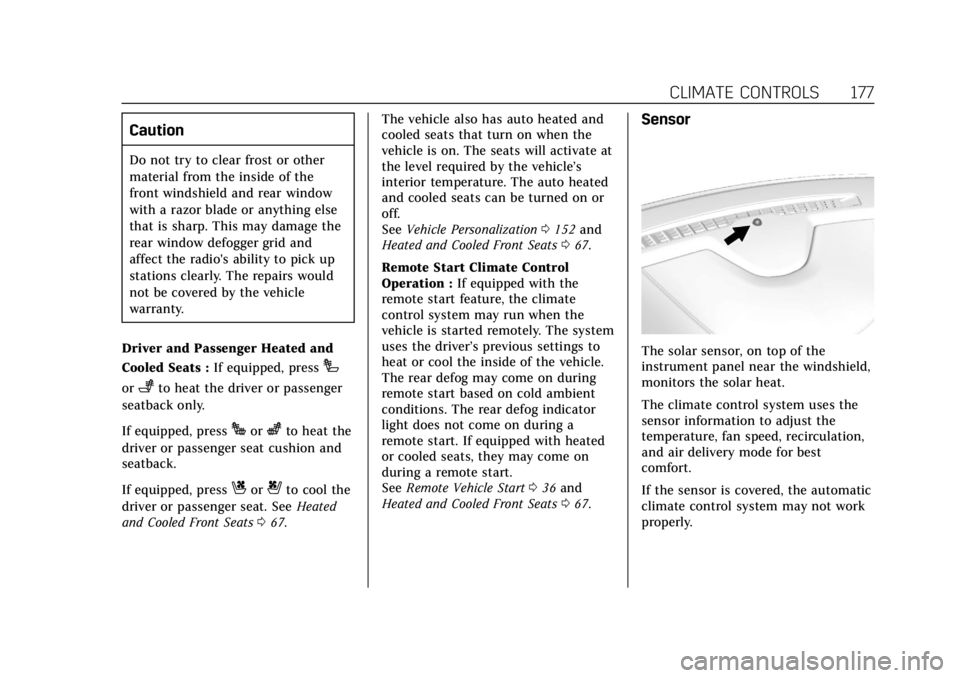
Sensor
The solar sensor, on top of the
instrument panel near the windshield,
monitors the solar heat.
The climate control system uses the
sensor information to adjust the
temperature, fan speed, recirculation,
and air delivery mode for best
comfort.
If the sensor is covered, the automatic
climate control system may not work
properly.
Page 180 of 399
Cadillac Escalade Owner Manual (GMNA-Localizing-U.S./Canada/Mexico-
11349344) - 2018 - crc - 11/7/17
CLIMATE CONTROLS 179
the rear climate control system from
the front climate control display.
When locked the rear climate control
system cannot be adjusted from the
rear climate controls on the rear of
the center console.
Automatic Operation
Rear AUTO :Touch to turn on or off.
The air delivery and fan speed are
controlled automatically. The AUTO
indicator appears on the display on
the rear of the center console. If the
Mode or fan control buttons are
manually adjusted, this cancels the
automatic operation.
Manual Operation
A«/ªAª: Touch or press the
fan controls on the rear climate
display or on the rear of the center
console to increase or decrease the
airf low. Pressing
A «when the
system is off will turn the system on.
The air delivery mode remains in its
previous setting.
w/x: Touch or press and hold the
rear temperature controls on the rear
climate display or on the rear of the
center console to adjust the rear
passenger temperature. Press
wfor
warmer air and press
xfor cooler air.
Y/\/Y: Touch the desired mode
on the rear climate display or the
MODE button on the rear of the
center console to change the direction
of the airflow in the rear seating area.
MorL: PressMorLto heat the
left or right outboard seat cushion and
seatback. See Heated Rear Seats 068.
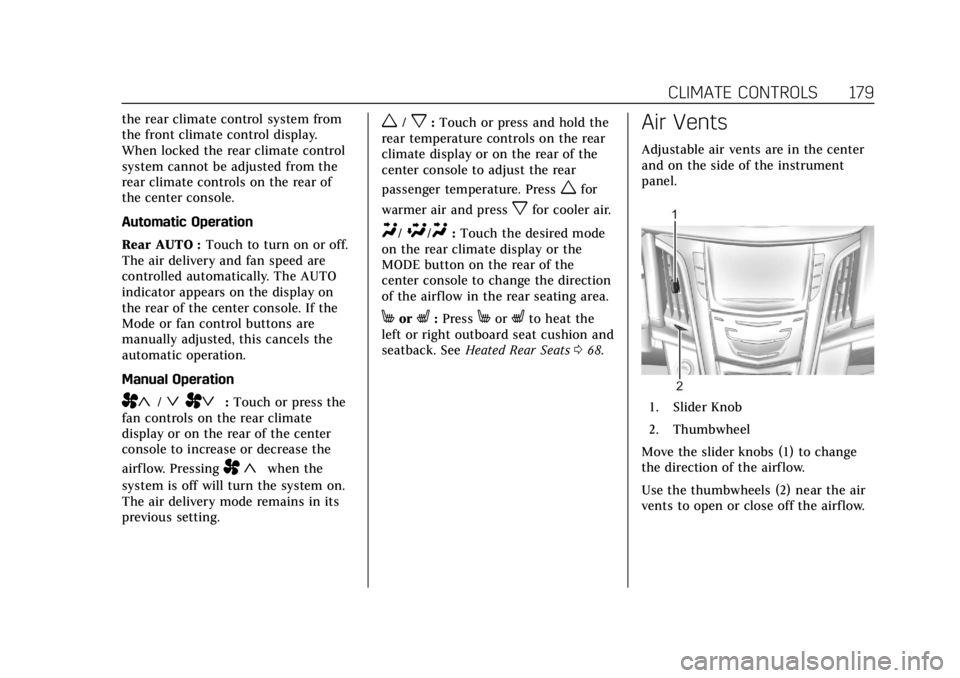
Air Vents
Adjustable air vents are in the center
and on the side of the instrument
panel.
1. Slider Knob
2. Thumbwheel
Move the slider knobs (1) to change
the direction of the airf low.
Use the thumbwheels (2) near the air
vents to open or close off the airflow.
Page 193 of 399
Cadillac Escalade Owner Manual (GMNA-Localizing-U.S./Canada/Mexico-
11349344) - 2018 - crc - 11/7/17
192 DRIVING AND OPERATING
.Drive at speeds that keep the
vehicle in its own lane. Do not
swing wide or cross the
center line.
. Be alert on top of hills; something
could be in your lane (e.g., stalled
car, accident).
. Pay attention to special road signs
(e.g., falling rocks area, winding
roads, long grades, passing or
no-passing zones) and take
appropriate action.
Winter Driving
Driving on Snow or Ice
Snow or ice between the tires and the
road creates less traction or grip, so
drive carefully. Wet ice can occur at
about 0 °C (32 °F) when freezing rain
begins to fall. Avoid driving on wet ice
or in freezing rain until roads can be
treated.
For Slippery Road Driving:
.Accelerate gently. Accelerating too
quickly causes the wheels to spin
and makes the surface under the
tires slick. .
Turn on Traction Control. See
Traction Control/Electronic Stability
Control 0218.
. Antilock Brake System (ABS)
improves vehicle stability during
hard stops, but the brakes should
be applied sooner than when on
dry pavement. See Antilock Brake
System (ABS) 0215.
. Allow greater following distance
and watch for slippery spots. Icy
patches can occur on otherwise
clear roads in shaded areas. The
surface of a curve or an overpass
can remain icy when the
surrounding roads are clear. Avoid
sudden steering maneuvers and
braking while on ice.
. Turn off cruise control.
Blizzard Conditions
Stay with the vehicle unless there is
help nearby. If possible, use Roadside
Assistance. See Roadside Service 0366.
To get help and keep everyone in the
vehicle safe:
. Turn on the hazard warning
flashers. .
Tie a red cloth to an outside
mirror.
{Warning
Snow can trap engine exhaust
under the vehicle. This may cause
exhaust gases to get inside. Engine
exhaust contains carbon monoxide
(CO), which cannot be seen or
smelled. It can cause
unconsciousness and even death.
If the vehicle is stuck in snow:
. Clear snow from the base of
the vehicle, especially any
blocking the exhaust pipe.
. Open a window about 5 cm
(2 in) on the vehicle side that
is away from the wind, to
bring in fresh air.
. Fully open the air outlets on
or under the instrument
panel.
. Adjust the climate control
system to circulate the air
inside the vehicle and set the
(Continued)
Page 253 of 399
Cadillac Escalade Owner Manual (GMNA-Localizing-U.S./Canada/Mexico-
11349344) - 2018 - crc - 11/7/17
252 DRIVING AND OPERATING
Trailer Towing
General Towing
Information
Only use towing equipment that has
been designed for the vehicle. Contact
your dealer or trailering dealer for
assistance with preparing the vehicle
for towing a trailer. Read the entire
section before towing a trailer.
For towing a disabled vehicle, see
Towing the Vehicle0332. For towing
the vehicle behind another vehicle
such as a motor home, see
Recreational Vehicle Towing 0333.
Driving Characteristics and
Towing Tips
Driving with a Trailer
When towing a trailer:
.
Become familiar with the state
and local laws that apply to trailer
towing. These requirements vary
from state to state. .
The trailer must be equipped with
brakes adequate for the intended
use. A loaded trailer weighing
more than 900 kg (2,000 lb) must
be equipped with its own brake
system, with brakes working on all
axles. Trailer braking equipment
conforming to Canadian Standards
Association (CSA) requirement
CAN3-D313, or its equivalent, is
recommended.
. Do not tow a trailer during the
first 800 km (500 mi) to prevent
damage to the engine, axle,
or other parts.
. Then during the first 800 km
(500 mi) of trailer towing, do not
drive over 80 km/h (50 mph) and
do not make starts at full throttle.
. Vehicles can tow in D (Drive). Shift
the transmission to a lower gear if
the transmission shifts too often
under heavy loads and/or hilly
conditions.
. Do not use Adaptive Cruise
Control when towing. .
Turn off Parking Assist and Rear
Cross Traffic Alert (RTCA) when
towing.
. The Forward Automatic Braking
System should be set to Off when
towing. See Forward Automatic
Braking (FAB) 022.
. Turn off Lane Keep Assist (LKA)
when towing. See Lane Keep Assist
(LKA) 0246.
{Warning
When towing a trailer, exhaust
gases may collect at the rear of the
vehicle and enter if the liftgate,
trunk/hatch, or rear-most window
is open.
When towing a trailer:
. Do not drive with the liftgate,
trunk/hatch, or rear-most
window open.
. Fully open the air outlets on
or under the instrument
panel.
(Continued)
Page 264 of 399
Cadillac Escalade Owner Manual (GMNA-Localizing-U.S./Canada/Mexico-
11349344) - 2018 - crc - 11/7/17
VEHICLE CARE 263
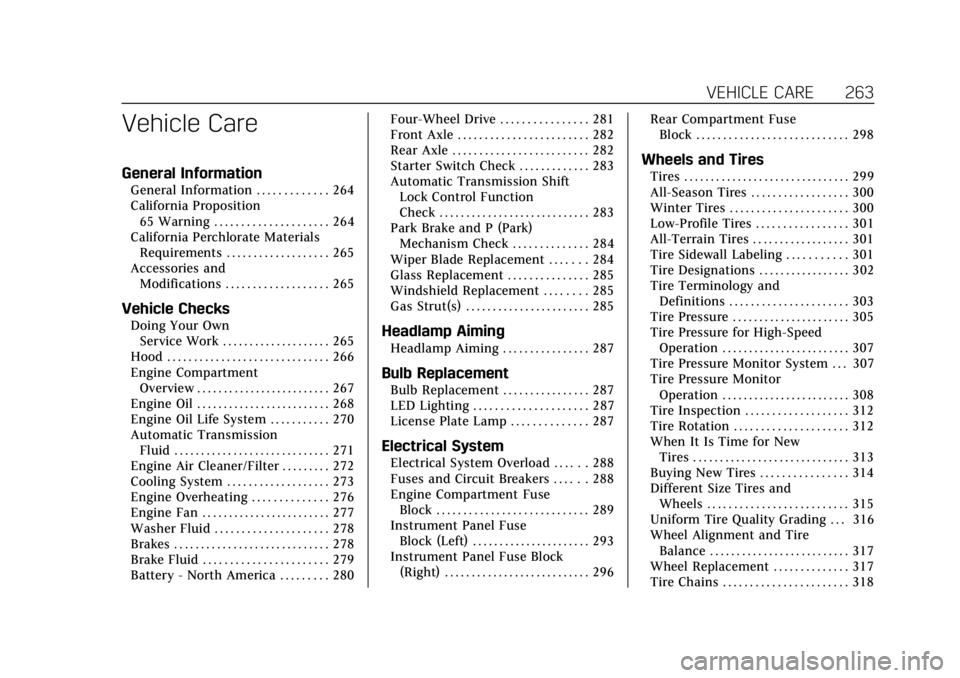
Vehicle Care
General Information
General Information . . . . . . . . . . . . . 264
California Proposition65 Warning . . . . . . . . . . . . . . . . . . . . . 264
California Perchlorate Materials Requirements . . . . . . . . . . . . . . . . . . . 265
Accessories and Modifications . . . . . . . . . . . . . . . . . . . 265
Vehicle Checks
Doing Your OwnService Work . . . . . . . . . . . . . . . . . . . . 265
Hood . . . . . . . . . . . . . . . . . . . . . . . . . . . . . . 266
Engine Compartment Overview . . . . . . . . . . . . . . . . . . . . . . . . . 267
Engine Oil . . . . . . . . . . . . . . . . . . . . . . . . . 268
Engine Oil Life System . . . . . . . . . . . 270
Automatic Transmission Fluid . . . . . . . . . . . . . . . . . . . . . . . . . . . . . 271
Engine Air Cleaner/Filter . . . . . . . . . 272
Cooling System . . . . . . . . . . . . . . . . . . . 273
Engine Overheating . . . . . . . . . . . . . . 276
Engine Fan . . . . . . . . . . . . . . . . . . . . . . . . 277
Washer Fluid . . . . . . . . . . . . . . . . . . . . . 278
Brakes . . . . . . . . . . . . . . . . . . . . . . . . . . . . . 278
Brake Fluid . . . . . . . . . . . . . . . . . . . . . . . 279
Battery - North America . . . . . . . . . 280 Four-Wheel Drive . . . . . . . . . . . . . . . . 281
Front Axle . . . . . . . . . . . . . . . . . . . . . . . . 282
Rear Axle . . . . . . . . . . . . . . . . . . . . . . . . . 282
Starter Switch Check . . . . . . . . . . . . . 283
Automatic Transmission Shift
Lock Control Function
Check . . . . . . . . . . . . . . . . . . . . . . . . . . . . 283
Park Brake and P (Park) Mechanism Check . . . . . . . . . . . . . . 284
Wiper Blade Replacement . . . . . . . 284
Glass Replacement . . . . . . . . . . . . . . . 285
Windshield Replacement . . . . . . . . 285
Gas Strut(s) . . . . . . . . . . . . . . . . . . . . . . . 285Headlamp Aiming
Headlamp Aiming . . . . . . . . . . . . . . . . 287
Bulb Replacement
Bulb Replacement . . . . . . . . . . . . . . . . 287
LED Lighting . . . . . . . . . . . . . . . . . . . . . 287
License Plate Lamp . . . . . . . . . . . . . . 287
Electrical System
Electrical System Overload . . . . . . 288
Fuses and Circuit Breakers . . . . . . 288
Engine Compartment Fuse Block . . . . . . . . . . . . . . . . . . . . . . . . . . . . 289
Instrument Panel Fuse Block (Left) . . . . . . . . . . . . . . . . . . . . . . 293
Instrument Panel Fuse Block (Right) . . . . . . . . . . . . . . . . . . . . . . . . . . . 296 Rear Compartment Fuse
Block . . . . . . . . . . . . . . . . . . . . . . . . . . . . 298
Wheels and Tires
Tires . . . . . . . . . . . . . . . . . . . . . . . . . . . . . . . 299
All-Season Tires . . . . . . . . . . . . . . . . . . 300
Winter Tires . . . . . . . . . . . . . . . . . . . . . . 300
Low-Profile Tires . . . . . . . . . . . . . . . . . 301
All-Terrain Tires . . . . . . . . . . . . . . . . . . 301
Tire Sidewall Labeling . . . . . . . . . . . 301
Tire Designations . . . . . . . . . . . . . . . . . 302
Tire Terminology andDefinitions . . . . . . . . . . . . . . . . . . . . . . 303
Tire Pressure . . . . . . . . . . . . . . . . . . . . . . 305
Tire Pressure for High-Speed Operation . . . . . . . . . . . . . . . . . . . . . . . . 307
Tire Pressure Monitor System . . . 307
Tire Pressure Monitor
Operation . . . . . . . . . . . . . . . . . . . . . . . . 308
Tire Inspection . . . . . . . . . . . . . . . . . . . 312
Tire Rotation . . . . . . . . . . . . . . . . . . . . . 312
When It Is Time for New Tires . . . . . . . . . . . . . . . . . . . . . . . . . . . . . 313
Buying New Tires . . . . . . . . . . . . . . . . 314
Different Size Tires and Wheels . . . . . . . . . . . . . . . . . . . . . . . . . . 315
Uniform Tire Quality Grading . . . 316
Wheel Alignment and Tire Balance . . . . . . . . . . . . . . . . . . . . . . . . . . 317
Wheel Replacement . . . . . . . . . . . . . . 317
Tire Chains . . . . . . . . . . . . . . . . . . . . . . . 318
Page 289 of 399

Cadillac Escalade Owner Manual (GMNA-Localizing-U.S./Canada/Mexico-
11349344) - 2018 - crc - 11/7/17
288 VEHICLE CARE
1. Bulb Socket
2. Bulb
3. Lamp Assembly
To replace one of these bulbs:1. Push the lamp assembly (3) toward the center of the vehicle.
2. Pull the lamp assembly down to remove.
3. Turn the bulb socket (1) counterclockwise to remove it
from the lamp assembly (3).
4. Pull the bulb (2) straight out of the bulb socket (1).
5. Push the replacement bulb straight into the bulb socket and
turn the bulb socket clockwise to
install it into the lamp assembly.
6. Push the lamp assembly back into position until the release tab
locks into place.
Electrical System
Electrical System Overload
The vehicle has fuses to protect
against an electrical system overload.
Fuses also protect power devices in
the vehicle.
Replace a bad fuse with a new one of
the identical size and rating.
If there is a problem on the road and
a fuse needs to be replaced, there are
some spare fuses and a fuse puller in
the left instrument panel fuse block.
The same amperage fuse can also be
borrowed. Choose some feature of the
vehicle that is not needed to use and
replace it as soon as possible.
Headlamp Wiring
An electrical overload may cause the
lamps to go on and off, or in some
cases to remain off. Have the
headlamp wiring checked right away if
the lamps go on and off or remain off.
Windshield Wipers
If the wiper motor overheats due to
heavy snow or ice, the windshield
wipers will stop until the motor cools
and will then restart.
Although the circuit is protected from
electrical overload, overload due to
heavy snow or ice may cause wiper
linkage damage. Always clear ice and
heavy snow from the windshield
before using the windshield wipers.
If the overload is caused by an
electrical problem and not snow or
ice, be sure to get it fixed.
Fuses and Circuit Breakers
The wiring circuits in the vehicle are
protected from short circuits by a
combination of fuses and circuit
breakers. This greatly reduces the
chance of damage caused by electrical
problems.
Page 290 of 399
Cadillac Escalade Owner Manual (GMNA-Localizing-U.S./Canada/Mexico-
11349344) - 2018 - crc - 11/7/17
VEHICLE CARE 289
{Danger
Fuses and circuit breakers are
marked with their ampere rating.
Do not exceed the
specified amperage rating when
replacing fuses and circuit breakers.
Use of an oversized fuse or circuit
breaker can result in a vehicle fire.
You and others could be seriously
injured or killed.
To check a fuse, look at the
silver-colored band inside the fuse.
If the band is broken or melted,
replace the fuse. Be sure to replace a
bad fuse with a new one of the
identical size and rating.
Fuses of the same amperage can be
temporarily borrowed from another
fuse location, if a fuse goes out.
Replace the fuse as soon as possible.
Engine Compartment Fuse
Block
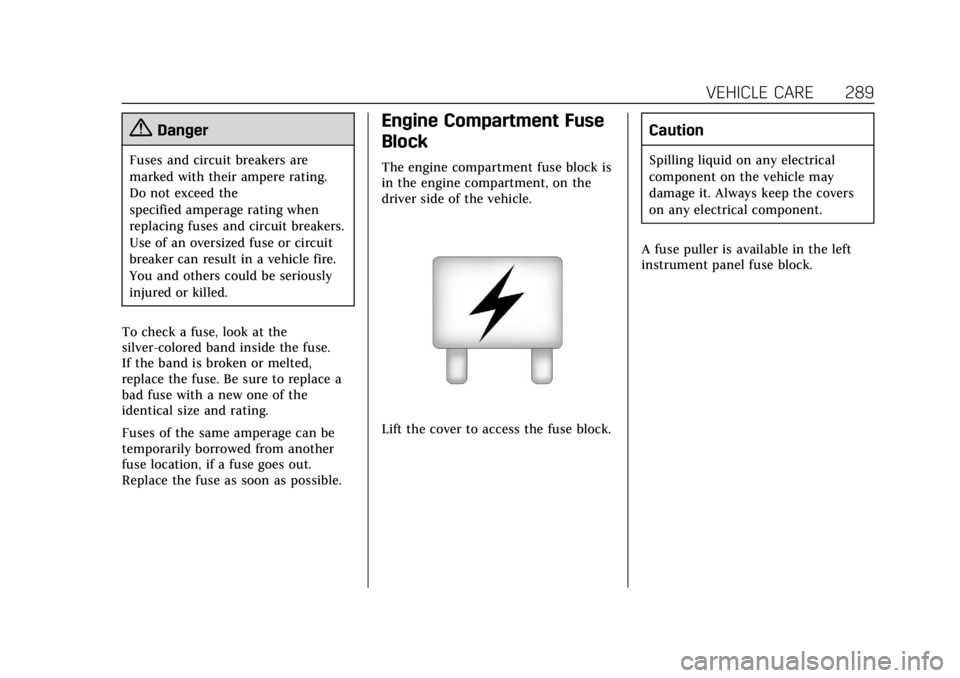
The engine compartment fuse block is
in the engine compartment, on the
driver side of the vehicle.
Lift the cover to access the fuse block.
Caution
Spilling liquid on any electrical
component on the vehicle may
damage it. Always keep the covers
on any electrical component.
A fuse puller is available in the left
instrument panel fuse block.
Page 294 of 399
Cadillac Escalade Owner Manual (GMNA-Localizing-U.S./Canada/Mexico-
11349344) - 2018 - crc - 11/7/17
VEHICLE CARE 293
FusesUsage
106 –
107 Aeroshutter
108 –
109 Police upfitter
110 –
111 –
113 –
114 Front windshield washer
115 Rear window washer
116 Left cooling fan
117 Fuel pump prime
118 –
119 –
120 –
121 Right HID headlamp
122 Left HID headlamp
123 Right cooling fan Relays
Usage
9 Fuel pump
29 Upfitter 2
37 Upfitter 3
48 Upfitter 4
51 Parking lamp
64 Secondary fuel pump
72 Upfitter 1
84 Run/Crank
92 Engine control module
112 Starter
120 Fuel pump primeInstrument Panel Fuse
Block (Left)
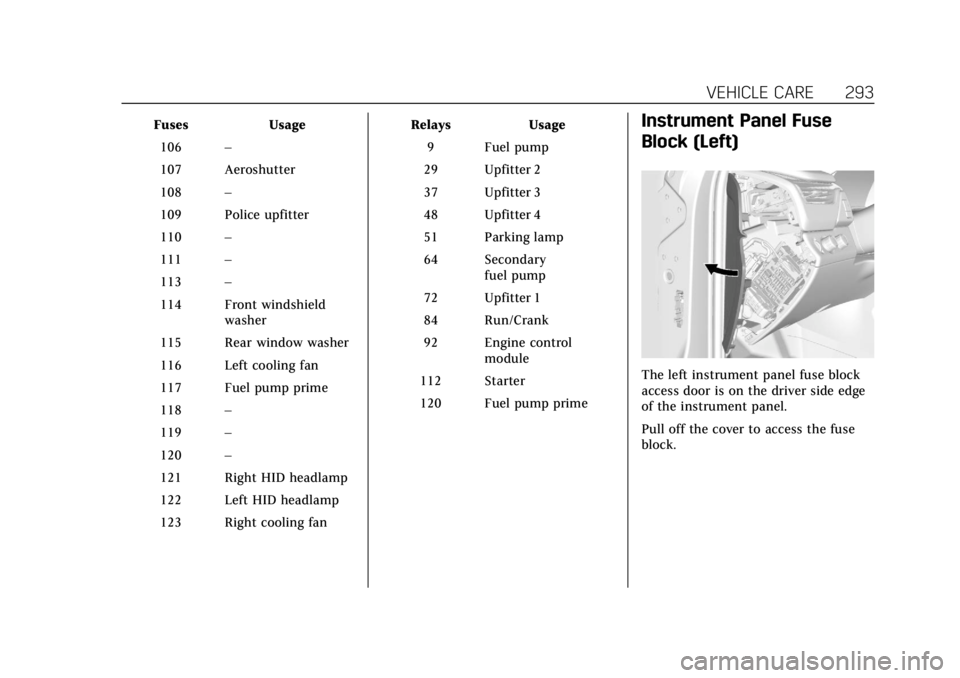
The left instrument panel fuse block
access door is on the driver side edge
of the instrument panel.
Pull off the cover to access the fuse
block.
Page 297 of 399
Cadillac Escalade Owner Manual (GMNA-Localizing-U.S./Canada/Mexico-
11349344) - 2018 - crc - 11/7/17
296 VEHICLE CARE
Instrument Panel Fuse
Block (Right)
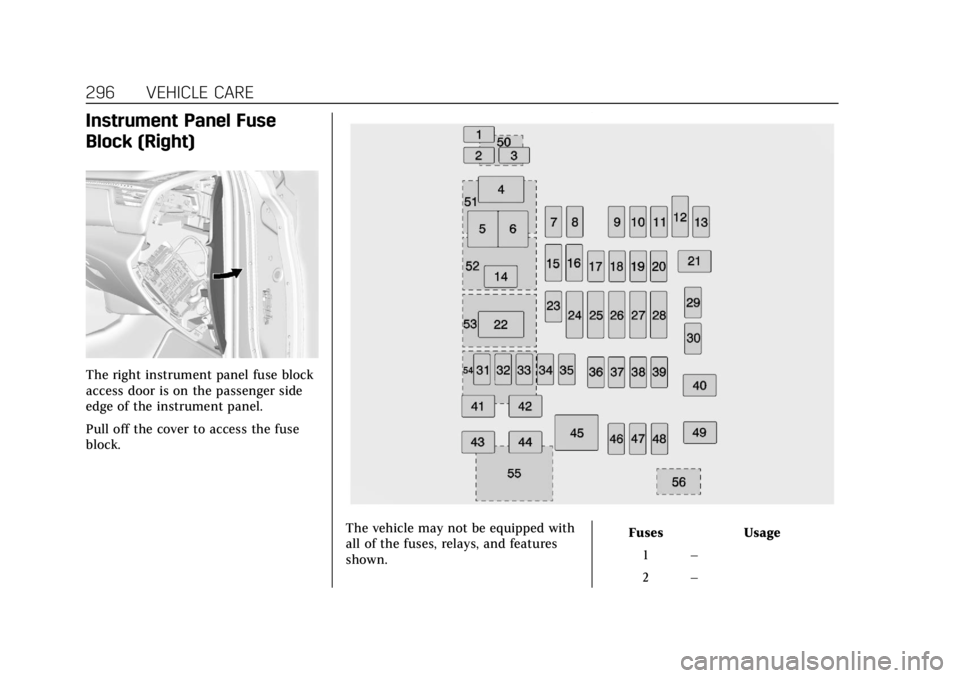
The right instrument panel fuse block
access door is on the passenger side
edge of the instrument panel.
Pull off the cover to access the fuse
block.
The vehicle may not be equipped with
all of the fuses, relays, and features
shown.Fuses Usage
1 –
2 –
Page 344 of 399
Cadillac Escalade Owner Manual (GMNA-Localizing-U.S./Canada/Mexico-
11349344) - 2018 - crc - 11/7/17
VEHICLE CARE 343
Cleaning High Gloss Surfaces
and Vehicle Information and
Radio Displays
Use a microfiber cloth on high gloss
surfaces or vehicle displays. First, use
a soft bristle brush to remove dirt that
can scratch the surface. Then gently
clean by rubbing with a microfiber
cloth. Never use window cleaners or
solvents. Periodically hand wash the
microfiber cloth separately, using mild
soap. Do not use bleach or fabric
softener. Rinse thoroughly and air dry
before next use.
Caution
Do not attach a device with a
suction cup to the display. This may
cause damage and would not be
covered by the vehicle warranty.
Instrument Panel, Leather, Vinyl,
Other Plastic Surfaces, Low
Gloss Paint Surfaces, and
Natural Open Pore Wood
Surfaces
Use a soft microfiber cloth dampened
with water to remove dust and loose
dirt. For a more thorough cleaning,
use a soft microfiber cloth dampened
with a mild soap solution.
Caution
Soaking or saturating leather,
especially perforated leather, as well
as other interior surfaces, may
cause permanent damage. Wipe
excess moisture from these surfaces
after cleaning and allow them to
dry naturally. Never use heat,
steam, or spot removers. Do not use
cleaners that contain silicone or
wax-based products. Cleaners
containing these solvents can
permanently change the appearance
and feel of leather or soft trim, and
are not recommended.Do not use cleaners that increase
gloss, especially on the instrument
panel. Reflected glare can decrease
visibility through the windshield
under certain conditions.
Caution
Use of air fresheners may cause
permanent damage to plastics and
painted surfaces. If an air freshener
comes in contact with any plastic
or painted surface in the vehicle,
blot immediately and clean with a
soft cloth dampened with a mild
soap solution. Damage caused by
air fresheners would not be covered
by the vehicle warranty.
Cargo Cover and
Convenience Net
If equipped, wash with warm water
and mild detergent. Do not use
chlorine bleach. Rinse with cold water,
and then dry completely.