lock CADILLAC ESCALADE 2018 Manual Online
[x] Cancel search | Manufacturer: CADILLAC, Model Year: 2018, Model line: ESCALADE, Model: CADILLAC ESCALADE 2018Pages: 399, PDF Size: 6.23 MB
Page 233 of 399
Cadillac Escalade Owner Manual (GMNA-Localizing-U.S./Canada/Mexico-
11349344) - 2018 - crc - 11/7/17
232 DRIVING AND OPERATING
ACC may occasionally provide an alert
and/or braking that is considered
unnecessary. It could respond to
vehicles in different lanes, signs,
guardrails, and other stationary
objects when entering or exiting a
curve. This is normal operation. The
vehicle does not need service.
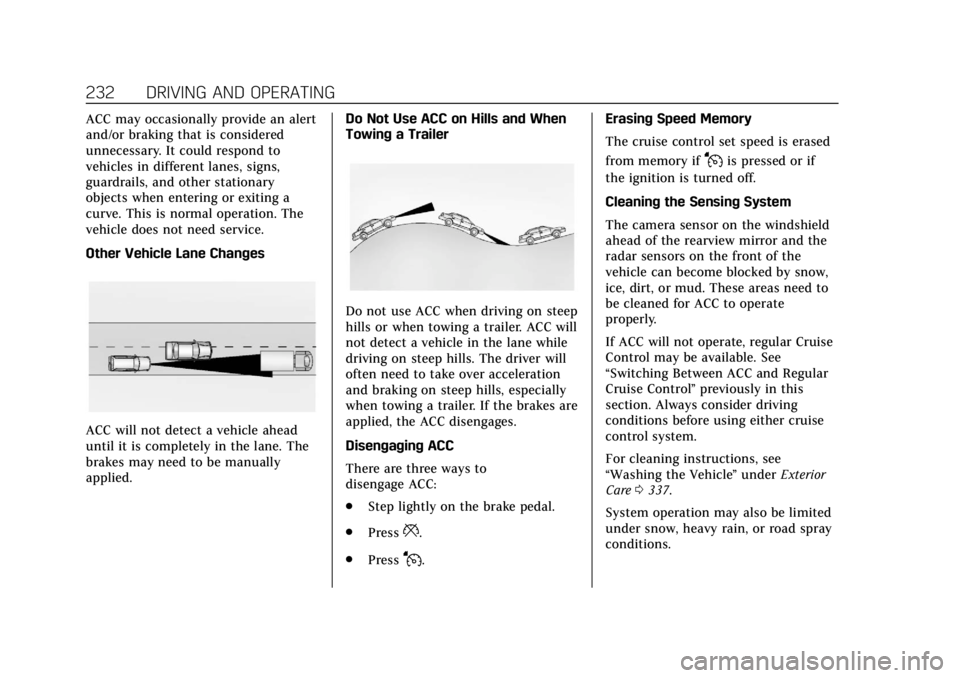
Other Vehicle Lane Changes
ACC will not detect a vehicle ahead
until it is completely in the lane. The
brakes may need to be manually
applied.Do Not Use ACC on Hills and When
Towing a Trailer
Do not use ACC when driving on steep
hills or when towing a trailer. ACC will
not detect a vehicle in the lane while
driving on steep hills. The driver will
often need to take over acceleration
and braking on steep hills, especially
when towing a trailer. If the brakes are
applied, the ACC disengages.
Disengaging ACC
There are three ways to
disengage ACC:
.
Step lightly on the brake pedal.
. Press
*.
. Press
J. Erasing Speed Memory
The cruise control set speed is erased
from memory if
Jis pressed or if
the ignition is turned off.
Cleaning the Sensing System
The camera sensor on the windshield
ahead of the rearview mirror and the
radar sensors on the front of the
vehicle can become blocked by snow,
ice, dirt, or mud. These areas need to
be cleaned for ACC to operate
properly.
If ACC will not operate, regular Cruise
Control may be available. See
“Switching Between ACC and Regular
Cruise Control ”previously in this
section. Always consider driving
conditions before using either cruise
control system.
For cleaning instructions, see
“Washing the Vehicle ”under Exterior
Care 0337.
System operation may also be limited
under snow, heavy rain, or road spray
conditions.
Page 236 of 399
Cadillac Escalade Owner Manual (GMNA-Localizing-U.S./Canada/Mexico-
11349344) - 2018 - crc - 11/7/17
DRIVING AND OPERATING 235
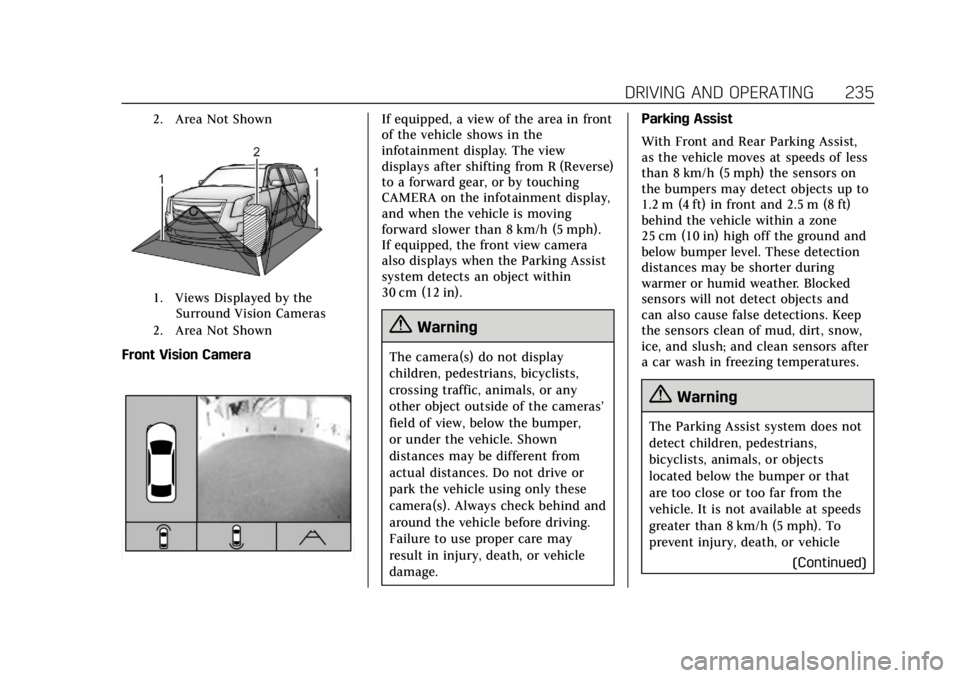
2. Area Not Shown
1. Views Displayed by theSurround Vision Cameras
2. Area Not Shown
Front Vision Camera
If equipped, a view of the area in front
of the vehicle shows in the
infotainment display. The view
displays after shifting from R (Reverse)
to a forward gear, or by touching
CAMERA on the infotainment display,
and when the vehicle is moving
forward slower than 8 km/h (5 mph).
If equipped, the front view camera
also displays when the Parking Assist
system detects an object within
30 cm (12 in).
{Warning
The camera(s) do not display
children, pedestrians, bicyclists,
crossing traffic, animals, or any
other object outside of the cameras’
field of view, below the bumper,
or under the vehicle. Shown
distances may be different from
actual distances. Do not drive or
park the vehicle using only these
camera(s). Always check behind and
around the vehicle before driving.
Failure to use proper care may
result in injury, death, or vehicle
damage. Parking Assist
With Front and Rear Parking Assist,
as the vehicle moves at speeds of less
than 8 km/h (5 mph) the sensors on
the bumpers may detect objects up to
1.2 m (4 ft) in front and 2.5 m (8 ft)
behind the vehicle within a zone
25 cm (10 in) high off the ground and
below bumper level. These detection
distances may be shorter during
warmer or humid weather. Blocked
sensors will not detect objects and
can also cause false detections. Keep
the sensors clean of mud, dirt, snow,
ice, and slush; and clean sensors after
a car wash in freezing temperatures.
{Warning
The Parking Assist system does not
detect children, pedestrians,
bicyclists, animals, or objects
located below the bumper or that
are too close or too far from the
vehicle. It is not available at speeds
greater than 8 km/h (5 mph). To
prevent injury, death, or vehicle
(Continued)
Page 240 of 399
Cadillac Escalade Owner Manual (GMNA-Localizing-U.S./Canada/Mexico-
11349344) - 2018 - crc - 11/7/17
DRIVING AND OPERATING 239
space to the left, turn on the left turn
signal or, if available, change the side
selection in the infotainment display.
To switch the parking mode between
parallel and perpendicular, press and
hold
Oduring the search process or,
if available, change the parking mode
in the infotainment display.
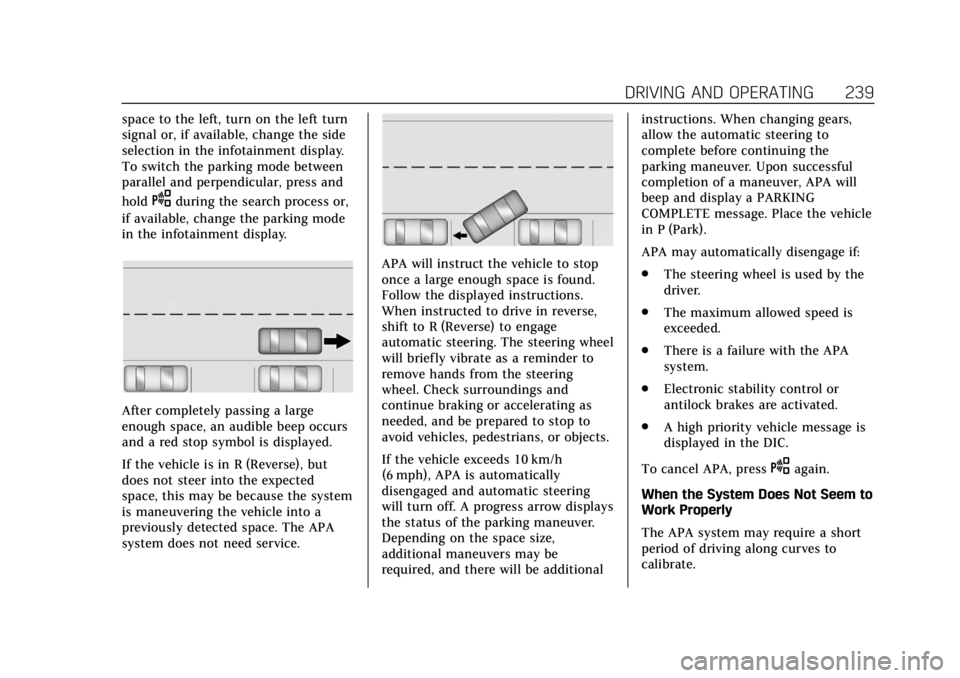
After completely passing a large
enough space, an audible beep occurs
and a red stop symbol is displayed.
If the vehicle is in R (Reverse), but
does not steer into the expected
space, this may be because the system
is maneuvering the vehicle into a
previously detected space. The APA
system does not need service.
APA will instruct the vehicle to stop
once a large enough space is found.
Follow the displayed instructions.
When instructed to drive in reverse,
shift to R (Reverse) to engage
automatic steering. The steering wheel
will briefly vibrate as a reminder to
remove hands from the steering
wheel. Check surroundings and
continue braking or accelerating as
needed, and be prepared to stop to
avoid vehicles, pedestrians, or objects.
If the vehicle exceeds 10 km/h
(6 mph), APA is automatically
disengaged and automatic steering
will turn off. A progress arrow displays
the status of the parking maneuver.
Depending on the space size,
additional maneuvers may be
required, and there will be additional instructions. When changing gears,
allow the automatic steering to
complete before continuing the
parking maneuver. Upon successful
completion of a maneuver, APA will
beep and display a PARKING
COMPLETE message. Place the vehicle
in P (Park).
APA may automatically disengage if:
.
The steering wheel is used by the
driver.
. The maximum allowed speed is
exceeded.
. There is a failure with the APA
system.
. Electronic stability control or
antilock brakes are activated.
. A high priority vehicle message is
displayed in the DIC.
To cancel APA, press
Oagain.
When the System Does Not Seem to
Work Properly
The APA system may require a short
period of driving along curves to
calibrate.
Page 241 of 399
Cadillac Escalade Owner Manual (GMNA-Localizing-U.S./Canada/Mexico-
11349344) - 2018 - crc - 11/7/17
240 DRIVING AND OPERATING
Assistance Systems for
Driving
If equipped, when driving the vehicle
in a forward gear, Forward Collision
Alert (FCA), Lane Departure Warning
(LDW), Lane Keep Assist (LKA), Side
Blind Zone Alert (SBZA), Lane Change
Alert (LCA), and/or Forward
Automatic Braking (FAB) can help to
avoid a crash or reduce crash damage.
Forward Collision Alert
(FCA) System
If equipped, the FCA system may help
to avoid or reduce the harm caused by
front-end crashes. When approaching
a vehicle ahead too quickly, FCA
provides a red flashing alert on the
windshield and rapidly beeps or pulses
the driver seat. FCA also lights an
amber visual alert if following another
vehicle much too closely.
FCA detects vehicles within a distance
of approximately 60 m (197 ft) and
operates at speeds above 8 km/h
(5 mph). If the vehicle has Adaptive
Cruise Control (ACC), it can detect
vehicles to distances of approximately110 m (360 ft) and operates at all
speeds. See
Adaptive Cruise Control
0 225.
{Warning
FCA is a warning system and does
not apply the brakes. When
approaching a slower-moving or
stopped vehicle ahead too rapidly,
or when following a vehicle too
closely, FCA may not provide a
warning with enough time to help
avoid a crash. It also may not
provide any warning at all. FCA
does not warn of pedestrians,
animals, signs, guardrails, bridges,
construction barrels, or other
objects. Be ready to take action and
apply the brakes. See Defensive
Driving 0184.
FCA can be disabled with either the
FCA steering wheel control or,
if equipped, through vehicle
personalization. See “Collision/
Detection Systems” underVehicle
Personalization 0152.
Detecting the Vehicle Ahead
FCA warnings will not occur unless
the FCA system detects a vehicle
ahead. When a vehicle is detected, the
vehicle ahead indicator will display
green. Vehicles may not be detected
on curves, highway exit ramps,
or hills, due to poor visibility; or if a
vehicle ahead is partially blocked by
pedestrians or other objects. FCA will
not detect another vehicle ahead until
it is completely in the driving lane.
{Warning
FCA does not provide a warning to
help avoid a crash, unless it detects
a vehicle. FCA may not detect a
vehicle ahead if the FCA sensor is
blocked by dirt, snow, or ice, or if
(Continued)
Page 244 of 399
Cadillac Escalade Owner Manual (GMNA-Localizing-U.S./Canada/Mexico-
11349344) - 2018 - crc - 11/7/17
DRIVING AND OPERATING 243
Warning (Continued)
.Detect a vehicle ahead if it is
partially blocked by
pedestrians or other objects.
Complete attention is always
required while driving, and you
should be ready to take action and
apply the brakes and/or steer the
vehicle to avoid crashes.
FAB may slow the vehicle to a
complete stop to try to avoid a
potential crash. If this happens, FAB
may engage the Electric Parking Brake
(EPB) to hold the vehicle at a stop.
Release the EPB or firmly press the
accelerator pedal.
{Warning
FAB may automatically brake the
vehicle suddenly in situations
where it is unexpected and
undesired. It could respond to a
turning vehicle ahead, guardrails, (Continued)
Warning (Continued)
signs, and other non-moving
objects. To override FAB, firmly
press the accelerator pedal, if it is
safe to do so.
Intelligent Brake Assist (IBA)
IBA may activate when the brake
pedal is applied quickly by providing a
boost to braking based on the speed
of approach and distance to a vehicle
ahead.
Minor brake pedal pulsations or pedal
movement during this time is normal
and the brake pedal should continue
to be applied as needed. IBA will
automatically disengage only when
the brake pedal is released.
{Warning
IBA may increase vehicle braking in
situations when it may not be
necessary. You could block the flow(Continued)
Warning (Continued)
of traffic. If this occurs, take your
foot off the brake pedal and then
apply the brakes as needed.
FAB and IBA can be disabled through
vehicle personalization. See “Collision/
Detection Systems” underVehicle
Personalization 0152.
{Warning
Using FAB or IBA while towing a
trailer could cause you to lose
control of the vehicle and crash.
Turn the system to Alert, or if the
vehicle has ACC to Off, when
towing a trailer.
A system unavailable message may
display if:
. The front of the vehicle or
windshield is not clean.
. Heavy rain or snow is interfering
with object detection.
Page 247 of 399
Cadillac Escalade Owner Manual (GMNA-Localizing-U.S./Canada/Mexico-
11349344) - 2018 - crc - 11/7/17
246 DRIVING AND OPERATING
If the LCA displays do not light up
when moving vehicles are in the side
blind zone or are rapidly approaching
this zone and the system is clean, the
system may need service. Take the
vehicle to your dealer.
Radio Frequency Information
SeeRadio Frequency Statement 0372.
Lane Departure
Warning (LDW)
If equipped, LDW may help avoid
crashes due to unintentional lane
departures. It may provide a warning
if the vehicle is crossing a detected
lane marking without using a turn
signal in the lane departure direction.
Since this system is part of the Lane
Keep Assist (LKA) system, read the
entire LKA section before using this
feature.
Lane Keep Assist (LKA)
If equipped, LKA may help avoid
crashes due to unintentional lane
departures. It may assist by gently
turning the steering wheel if the vehicle approaches a detected lane
marking without using a turn signal in
that direction. It may also provide a
Lane Departure Warning (LDW)
system alert as the lane marking is
crossed. The LKA system will not
assist or provide an LDW alert if it
detects that you are actively steering.
Override LKA by turning the steering
wheel. LKA uses a camera to detect
lane markings between 60 km/h (37
mph) and 180 km/h (112 mph).
{Warning
The LKA system does not
continuously steer the vehicle.
It may not keep the vehicle in the
lane or give a Lane Departure
Warning (LDW) alert, even if a lane
marking is detected.
The LKA and LDW systems
may not:
. Provide an alert or enough
steering assist to avoid a lane
departure or crash.
(Continued)
Warning (Continued)
.Detect lane markings under
poor weather or visibility
conditions. This can occur if
the windshield or headlamps
are blocked by dirt, snow,
or ice, if they are not in
proper condition, or if the sun
shines directly into the
camera.
. Detect road edges.
. Detect lanes on winding or
hilly roads.
If LKA only detects lane markings
on one side of the road, it will only
assist or provide an LDW alert
when approaching the lane on the
side where it has detected a lane
marking. Even with LKA and LDW,
you must steer the vehicle. Always
keep your attention on the road and
maintain proper vehicle position
within the lane, or vehicle damage,
injury, or death could occur. Always
keep the windshield, headlamps, (Continued)
Page 248 of 399
Cadillac Escalade Owner Manual (GMNA-Localizing-U.S./Canada/Mexico-
11349344) - 2018 - crc - 11/7/17
DRIVING AND OPERATING 247
Warning (Continued)
and camera sensors clean and in
good repair. Do not use LKA in bad
weather conditions.
{Warning
Using LKA while towing a trailer or
on slippery roads could cause loss
of control of the vehicle and a
crash. Turn the system off.
How the System Works
The LKA camera sensor is on the
windshield ahead of the rearview
mirror.
To turn LKA on and off, press
A
on the center stack.
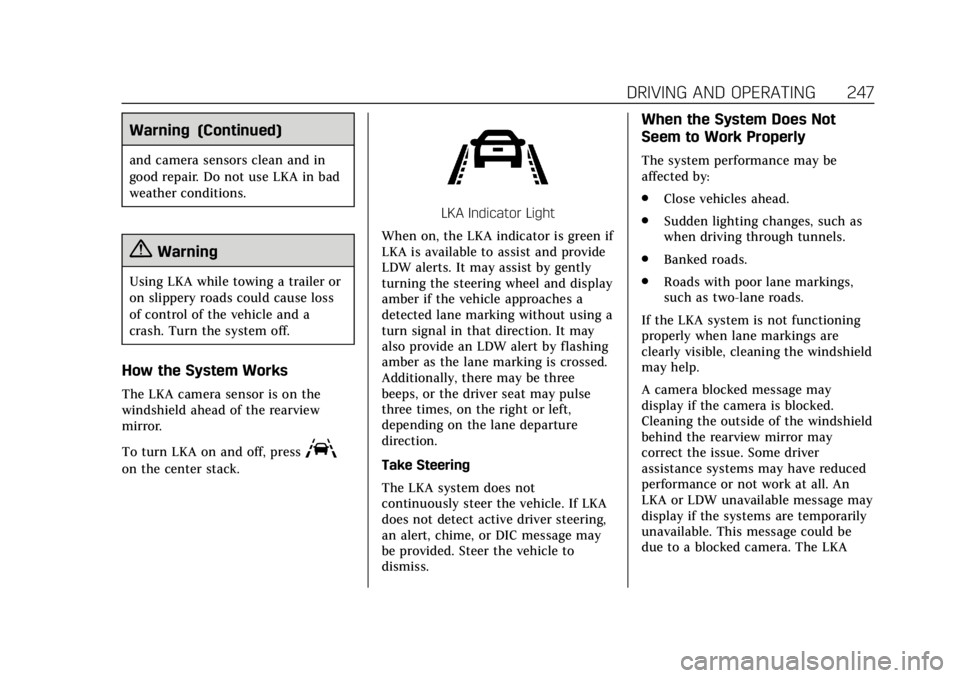
LKA Indicator Light
When on, the LKA indicator is green if
LKA is available to assist and provide
LDW alerts. It may assist by gently
turning the steering wheel and display
amber if the vehicle approaches a
detected lane marking without using a
turn signal in that direction. It may
also provide an LDW alert by flashing
amber as the lane marking is crossed.
Additionally, there may be three
beeps, or the driver seat may pulse
three times, on the right or left,
depending on the lane departure
direction.
Take Steering
The LKA system does not
continuously steer the vehicle. If LKA
does not detect active driver steering,
an alert, chime, or DIC message may
be provided. Steer the vehicle to
dismiss.
When the System Does Not
Seem to Work Properly
The system performance may be
affected by:
. Close vehicles ahead.
. Sudden lighting changes, such as
when driving through tunnels.
. Banked roads.
. Roads with poor lane markings,
such as two-lane roads.
If the LKA system is not functioning
properly when lane markings are
clearly visible, cleaning the windshield
may help.
A camera blocked message may
display if the camera is blocked.
Cleaning the outside of the windshield
behind the rearview mirror may
correct the issue. Some driver
assistance systems may have reduced
performance or not work at all. An
LKA or LDW unavailable message may
display if the systems are temporarily
unavailable. This message could be
due to a blocked camera. The LKA
Page 264 of 399
Cadillac Escalade Owner Manual (GMNA-Localizing-U.S./Canada/Mexico-
11349344) - 2018 - crc - 11/7/17
VEHICLE CARE 263
Vehicle Care
General Information
General Information . . . . . . . . . . . . . 264
California Proposition65 Warning . . . . . . . . . . . . . . . . . . . . . 264
California Perchlorate Materials Requirements . . . . . . . . . . . . . . . . . . . 265
Accessories and Modifications . . . . . . . . . . . . . . . . . . . 265
Vehicle Checks
Doing Your OwnService Work . . . . . . . . . . . . . . . . . . . . 265
Hood . . . . . . . . . . . . . . . . . . . . . . . . . . . . . . 266
Engine Compartment Overview . . . . . . . . . . . . . . . . . . . . . . . . . 267
Engine Oil . . . . . . . . . . . . . . . . . . . . . . . . . 268
Engine Oil Life System . . . . . . . . . . . 270
Automatic Transmission Fluid . . . . . . . . . . . . . . . . . . . . . . . . . . . . . 271
Engine Air Cleaner/Filter . . . . . . . . . 272
Cooling System . . . . . . . . . . . . . . . . . . . 273
Engine Overheating . . . . . . . . . . . . . . 276
Engine Fan . . . . . . . . . . . . . . . . . . . . . . . . 277
Washer Fluid . . . . . . . . . . . . . . . . . . . . . 278
Brakes . . . . . . . . . . . . . . . . . . . . . . . . . . . . . 278
Brake Fluid . . . . . . . . . . . . . . . . . . . . . . . 279
Battery - North America . . . . . . . . . 280 Four-Wheel Drive . . . . . . . . . . . . . . . . 281
Front Axle . . . . . . . . . . . . . . . . . . . . . . . . 282
Rear Axle . . . . . . . . . . . . . . . . . . . . . . . . . 282
Starter Switch Check . . . . . . . . . . . . . 283
Automatic Transmission Shift
Lock Control Function
Check . . . . . . . . . . . . . . . . . . . . . . . . . . . . 283
Park Brake and P (Park) Mechanism Check . . . . . . . . . . . . . . 284
Wiper Blade Replacement . . . . . . . 284
Glass Replacement . . . . . . . . . . . . . . . 285
Windshield Replacement . . . . . . . . 285
Gas Strut(s) . . . . . . . . . . . . . . . . . . . . . . . 285Headlamp Aiming
Headlamp Aiming . . . . . . . . . . . . . . . . 287
Bulb Replacement
Bulb Replacement . . . . . . . . . . . . . . . . 287
LED Lighting . . . . . . . . . . . . . . . . . . . . . 287
License Plate Lamp . . . . . . . . . . . . . . 287
Electrical System
Electrical System Overload . . . . . . 288
Fuses and Circuit Breakers . . . . . . 288
Engine Compartment Fuse Block . . . . . . . . . . . . . . . . . . . . . . . . . . . . 289
Instrument Panel Fuse Block (Left) . . . . . . . . . . . . . . . . . . . . . . 293
Instrument Panel Fuse Block (Right) . . . . . . . . . . . . . . . . . . . . . . . . . . . 296 Rear Compartment Fuse
Block . . . . . . . . . . . . . . . . . . . . . . . . . . . . 298
Wheels and Tires
Tires . . . . . . . . . . . . . . . . . . . . . . . . . . . . . . . 299
All-Season Tires . . . . . . . . . . . . . . . . . . 300
Winter Tires . . . . . . . . . . . . . . . . . . . . . . 300
Low-Profile Tires . . . . . . . . . . . . . . . . . 301
All-Terrain Tires . . . . . . . . . . . . . . . . . . 301
Tire Sidewall Labeling . . . . . . . . . . . 301
Tire Designations . . . . . . . . . . . . . . . . . 302
Tire Terminology andDefinitions . . . . . . . . . . . . . . . . . . . . . . 303
Tire Pressure . . . . . . . . . . . . . . . . . . . . . . 305
Tire Pressure for High-Speed Operation . . . . . . . . . . . . . . . . . . . . . . . . 307
Tire Pressure Monitor System . . . 307
Tire Pressure Monitor
Operation . . . . . . . . . . . . . . . . . . . . . . . . 308
Tire Inspection . . . . . . . . . . . . . . . . . . . 312
Tire Rotation . . . . . . . . . . . . . . . . . . . . . 312
When It Is Time for New Tires . . . . . . . . . . . . . . . . . . . . . . . . . . . . . 313
Buying New Tires . . . . . . . . . . . . . . . . 314
Different Size Tires and Wheels . . . . . . . . . . . . . . . . . . . . . . . . . . 315
Uniform Tire Quality Grading . . . 316
Wheel Alignment and Tire Balance . . . . . . . . . . . . . . . . . . . . . . . . . . 317
Wheel Replacement . . . . . . . . . . . . . . 317
Tire Chains . . . . . . . . . . . . . . . . . . . . . . . 318
Page 266 of 399
Cadillac Escalade Owner Manual (GMNA-Localizing-U.S./Canada/Mexico-
11349344) - 2018 - crc - 11/7/17
VEHICLE CARE 265
California Perchlorate
Materials Requirements
Certain types of automotive
applications, such as airbag initiators,
seat belt pretensioners, and lithium
batteries contained in Remote Keyless
Entry transmitters, may contain
perchlorate materials. Special
handling may be necessary. For
additional information, see
www.dtsc.ca.gov/hazardouswaste/
perchlorate.
Accessories and
Modifications
Adding non-dealer accessories or
making modifications to the vehicle
can affect vehicle performance and
safety, including such things as
airbags, braking, stability, ride and
handling, emissions systems,
aerodynamics, durability, and
electronic systems like antilock
brakes, traction control, and stability
control. These accessories or
modifications could even cause
malfunction or damage not covered by
the vehicle warranty.Damage to suspension components
caused by modifying vehicle height
outside of factory settings will not be
covered by the vehicle warranty.
Damage to vehicle components
resulting from modifications or the
installation or use of non-GM certified
parts, including control module or
software modifications, is not covered
under the terms of the vehicle
warranty and may affect remaining
warranty coverage for affected parts.
GM Accessories are designed to
complement and function with other
systems on the vehicle. See your
dealer to accessorize the vehicle using
genuine GM Accessories installed by a
dealer technician.
Also, see
Adding Equipment to the
Airbag-Equipped Vehicle 094.
Vehicle Checks
Doing Your Own
Service Work
{Warning
It can be dangerous to work on
your vehicle if you do not have the
proper knowledge, service manual,
tools, or parts. Always follow
owner’s manual procedures and
consult the service manual for your
vehicle before doing any
service work.
If doing some of your own service
work, use the proper service manual.
It tells you much more about how to
service the vehicle than this manual
can. To order the proper service
manual, see Service Publications
Ordering Information 0371.
This vehicle has an airbag system.
Before attempting to do your own
service work, see Servicing the
Airbag-Equipped Vehicle 094.
Page 269 of 399
Cadillac Escalade Owner Manual (GMNA-Localizing-U.S./Canada/Mexico-
11349344) - 2018 - crc - 11/7/17
268 VEHICLE CARE
1. Positive (+) Terminal. SeeJump
Starting - North America 0329.
2. Battery - North America 0280.
3. Coolant Surge Tank and Pressure Cap. See Cooling System 0273.
4. Engine Air Cleaner/Filter 0272.
5. Remote Negative (–) Location (Out of View). See Jump Starting -
North America 0329.
6. Engine Cooling Fans (Out of View). See Cooling System 0273.
7. Engine Oil Fill Cap. See “When to
Add Engine Oil” underEngine Oil
0 268.
8. Engine Oil Dipstick. See “Checking Engine Oil” under
Engine Oil 0268.
9. Windshield Washer Fluid Reservoir. See “Adding Washer
Fluid ”under Washer Fluid 0278.
10. Brake Fluid Reservoir. See Brake
Fluid 0279.
11. Engine Compartment Fuse Block
0289.Engine Oil
To ensure proper engine performance
and long life, careful attention must
be paid to engine oil. Following these
simple, but important steps will help
protect your investment:
.
Use engine oil approved to the
proper specification and of the
proper viscosity grade. See
“Selecting the Right Engine Oil” in
this section.
. Check the engine oil level regularly
and maintain the proper oil level.
See “Checking Engine Oil” and
“When to Add Engine Oil” in this
section.
. Change the engine oil at the
appropriate time. See Engine Oil
Life System 0270.
. Always dispose of engine oil
properly. See “What to Do with
Used Oil” in this section.
Checking Engine Oil
Check the engine oil level regularly,
every 650 km (400 mi), especially prior
to a long trip. The engine oil dipstick handle is a loop. See
Engine
Compartment Overview 0267 for the
location.
{Warning
The engine oil dipstick handle may
be hot; it could burn you. Use a
towel or glove to touch the dipstick
handle.
If a low oil Driver Information Center
(DIC) message displays, check the oil
level.
Follow these guidelines:
. To get an accurate reading, park
the vehicle on level ground. Check
the engine oil level after the
engine has been off for at least
two hours. Checking the engine oil
level on steep grades or too soon
after engine shutoff can result in
incorrect readings. Accuracy
improves when checking a cold
engine prior to starting. Remove
the dipstick and check the level.