power steering CADILLAC ESCALADE 2018 Owner's Manual
[x] Cancel search | Manufacturer: CADILLAC, Model Year: 2018, Model line: ESCALADE, Model: CADILLAC ESCALADE 2018Pages: 399, PDF Size: 6.23 MB
Page 6 of 399
Cadillac Escalade Owner Manual (GMNA-Localizing-U.S./Canada/Mexico-
11349344) - 2018 - crc - 11/7/17
IN BRIEF 5
In Brief
Instrument Panel
Instrument Panel . . . . . . . . . . . . . . . . . . . 6
Initial Drive Information
Initial Drive Information . . . . . . . . . . . 8
Remote Keyless Entry (RKE)System . . . . . . . . . . . . . . . . . . . . . . . . . . . . . 8
Remote Vehicle Start . . . . . . . . . . . . . . . 8
Door Locks . . . . . . . . . . . . . . . . . . . . . . . . . . 9
Liftgate . . . . . . . . . . . . . . . . . . . . . . . . . . . . . . 9
Windows . . . . . . . . . . . . . . . . . . . . . . . . . . . 10
Seat Adjustment . . . . . . . . . . . . . . . . . . . 10
Memory Features . . . . . . . . . . . . . . . . . . 13
Second Row Seats . . . . . . . . . . . . . . . . . 14
Third Row Seats . . . . . . . . . . . . . . . . . . . 14
Heated and Cooled Front Seats . . . 14
Head Restraint Adjustment . . . . . . . 14
Seat Belts . . . . . . . . . . . . . . . . . . . . . . . . . . . 14
Passenger Sensing System . . . . . . . . 15
Mirror Adjustment . . . . . . . . . . . . . . . . 15
Steering Wheel Adjustment . . . . . . . 16
Throttle and Brake Pedal Adjustment . . . . . . . . . . . . . . . . . . . . . . . 16
Interior Lighting . . . . . . . . . . . . . . . . . . . 17
Exterior Lighting . . . . . . . . . . . . . . . . . . . 17
Windshield Wiper/Washer . . . . . . . . 18
Climate Controls . . . . . . . . . . . . . . . . . . . 18 Transmission . . . . . . . . . . . . . . . . . . . . . . . 19
Four-Wheel Drive . . . . . . . . . . . . . . . . . . 20
Vehicle Features
Infotainment System . . . . . . . . . . . . . . 21
Steering Wheel Controls . . . . . . . . . . 21
Cruise Control . . . . . . . . . . . . . . . . . . . . . 21
Driver Information
Center (DIC) . . . . . . . . . . . . . . . . . . . . . . 21
Forward Collision Alert (FCA) System . . . . . . . . . . . . . . . . . . . . . . . . . . . . 22
Forward Automatic Braking (FAB) . . . . . . . . . . . . . . . . . . . . 22
Lane Keep Assist (LKA) . . . . . . . . . . . 22
Lane Change Alert (LCA) . . . . . . . . . . 22
Surround Vision . . . . . . . . . . . . . . . . . . . 23
Rear Vision Camera (RVC) . . . . . . . . 23
Rear Cross Traffic Alert (RCTA) System . . . . . . . . . . . . . . . . . . . . . . . . . . . . 23
Parking Assist . . . . . . . . . . . . . . . . . . . . . . 23
Automatic Parking Assist (APA) . . . . . . . . . . . . . . . . . . . . . . 23
Reverse Automatic Braking (RAB) . . . . . . . . . . . . . . . . . . . . 23
Power Outlets . . . . . . . . . . . . . . . . . . . . . . 24
Universal Remote System . . . . . . . . . 24
Sunroof . . . . . . . . . . . . . . . . . . . . . . . . . . . . . 24
Performance and Maintenance
Traction Control/Electronic Stability Control . . . . . . . . . . . . . . . . . . 25
Tire Pressure Monitor . . . . . . . . . . . . . 25
Fuel . . . . . . . . . . . . . . . . . . . . . . . . . . . . . . . . . 26
E85 or FlexFuel . . . . . . . . . . . . . . . . . . . . 26
Engine Oil Life System . . . . . . . . . . . . 26
Driving for Better Fuel Economy . . . . . . . . . . . . . . . . . . . . . . . . . . 27
Roadside Service . . . . . . . . . . . . . . . . . . . 27
Page 14 of 399
Cadillac Escalade Owner Manual (GMNA-Localizing-U.S./Canada/Mexico-
11349344) - 2018 - crc - 11/7/17
IN BRIEF 13
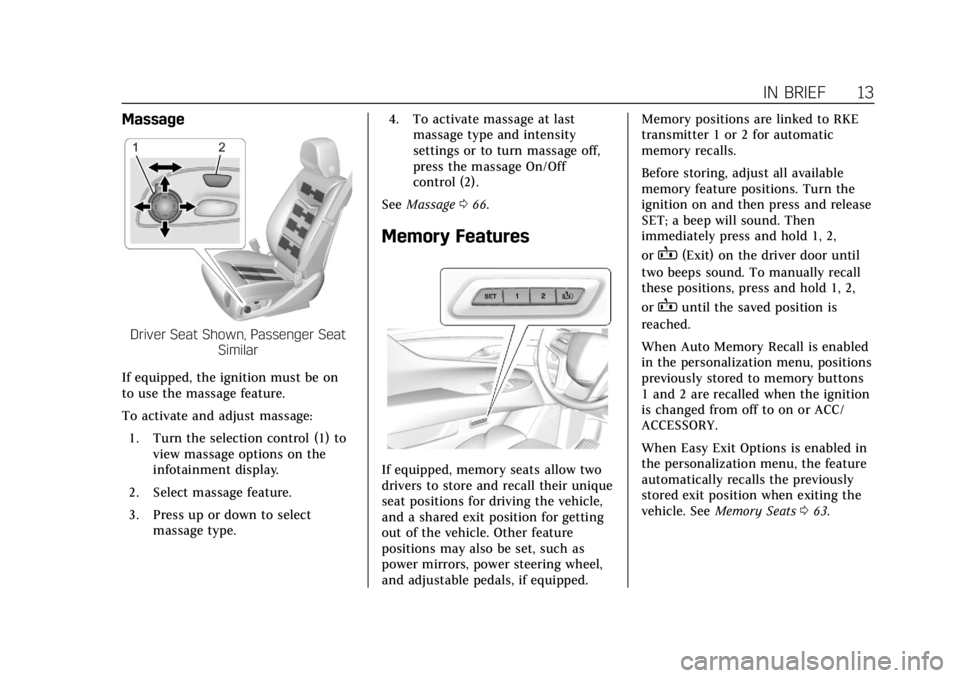
Massage
Driver Seat Shown, Passenger SeatSimilar
If equipped, the ignition must be on
to use the massage feature.
To activate and adjust massage: 1. Turn the selection control (1) to view massage options on the
infotainment display.
2. Select massage feature.
3. Press up or down to select massage type. 4. To activate massage at last
massage type and intensity
settings or to turn massage off,
press the massage On/Off
control (2).
See Massage 066.
Memory Features
If equipped, memory seats allow two
drivers to store and recall their unique
seat positions for driving the vehicle,
and a shared exit position for getting
out of the vehicle. Other feature
positions may also be set, such as
power mirrors, power steering wheel,
and adjustable pedals, if equipped. Memory positions are linked to RKE
transmitter 1 or 2 for automatic
memory recalls.
Before storing, adjust all available
memory feature positions. Turn the
ignition on and then press and release
SET; a beep will sound. Then
immediately press and hold 1, 2,
or
B(Exit) on the driver door until
two beeps sound. To manually recall
these positions, press and hold 1, 2,
or
Buntil the saved position is
reached.
When Auto Memory Recall is enabled
in the personalization menu, positions
previously stored to memory buttons
1 and 2 are recalled when the ignition
is changed from off to on or ACC/
ACCESSORY.
When Easy Exit Options is enabled in
the personalization menu, the feature
automatically recalls the previously
stored exit position when exiting the
vehicle. See Memory Seats 063.
Page 17 of 399
Cadillac Escalade Owner Manual (GMNA-Localizing-U.S./Canada/Mexico-
11349344) - 2018 - crc - 11/7/17
16 IN BRIEF
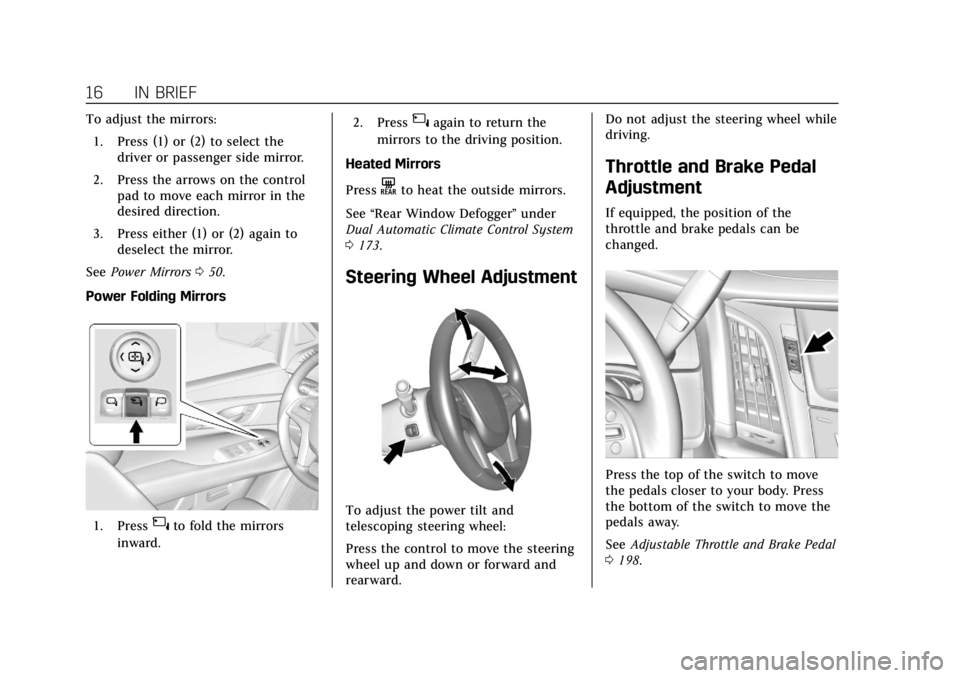
To adjust the mirrors:1. Press (1) or (2) to select the driver or passenger side mirror.
2. Press the arrows on the control pad to move each mirror in the
desired direction.
3. Press either (1) or (2) again to deselect the mirror.
See Power Mirrors 050.
Power Folding Mirrors
1. Press{to fold the mirrors
inward. 2. Press
{again to return the
mirrors to the driving position.
Heated Mirrors
Press
Kto heat the outside mirrors.
See “Rear Window Defogger” under
Dual Automatic Climate Control System
0 173.
Steering Wheel Adjustment
To adjust the power tilt and
telescoping steering wheel:
Press the control to move the steering
wheel up and down or forward and
rearward. Do not adjust the steering wheel while
driving.
Throttle and Brake Pedal
Adjustment
If equipped, the position of the
throttle and brake pedals can be
changed.
Press the top of the switch to move
the pedals closer to your body. Press
the bottom of the switch to move the
pedals away.
See
Adjustable Throttle and Brake Pedal
0 198.
Page 18 of 399
Cadillac Escalade Owner Manual (GMNA-Localizing-U.S./Canada/Mexico-
11349344) - 2018 - crc - 11/7/17
IN BRIEF 17
The vehicle may have a memory
function, which lets pedal settings be
saved and recalled. SeeMemory Seats
0 63.
Interior Lighting
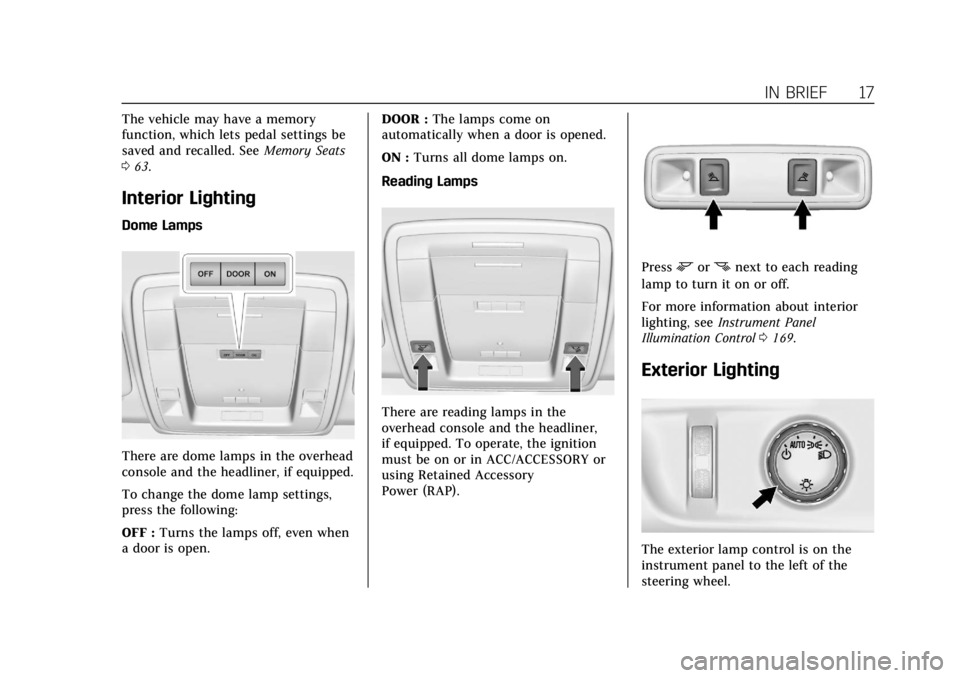
Dome Lamps
There are dome lamps in the overhead
console and the headliner, if equipped.
To change the dome lamp settings,
press the following:
OFF : Turns the lamps off, even when
a door is open. DOOR :
The lamps come on
automatically when a door is opened.
ON : Turns all dome lamps on.
Reading Lamps
There are reading lamps in the
overhead console and the headliner,
if equipped. To operate, the ignition
must be on or in ACC/ACCESSORY or
using Retained Accessory
Power (RAP).
Pressmornnext to each reading
lamp to turn it on or off.
For more information about interior
lighting, see Instrument Panel
Illumination Control 0169.
Exterior Lighting
The exterior lamp control is on the
instrument panel to the left of the
steering wheel.
Page 21 of 399
Cadillac Escalade Owner Manual (GMNA-Localizing-U.S./Canada/Mexico-
11349344) - 2018 - crc - 11/7/17
20 IN BRIEF
2. Press the plus/minus buttons onthe shift lever to select the
desired range of gears for current
driving conditions. See Manual
Mode 0209.
While using Range Selection Mode,
cruise control and the Tow/Haul Mode
can be used.
Grade Braking is not available when
Range Selection Mode is active. See
Tow/Haul Mode 0210.
Four-Wheel Drive
If equipped with four-wheel drive, the
engine's driving power can be sent to
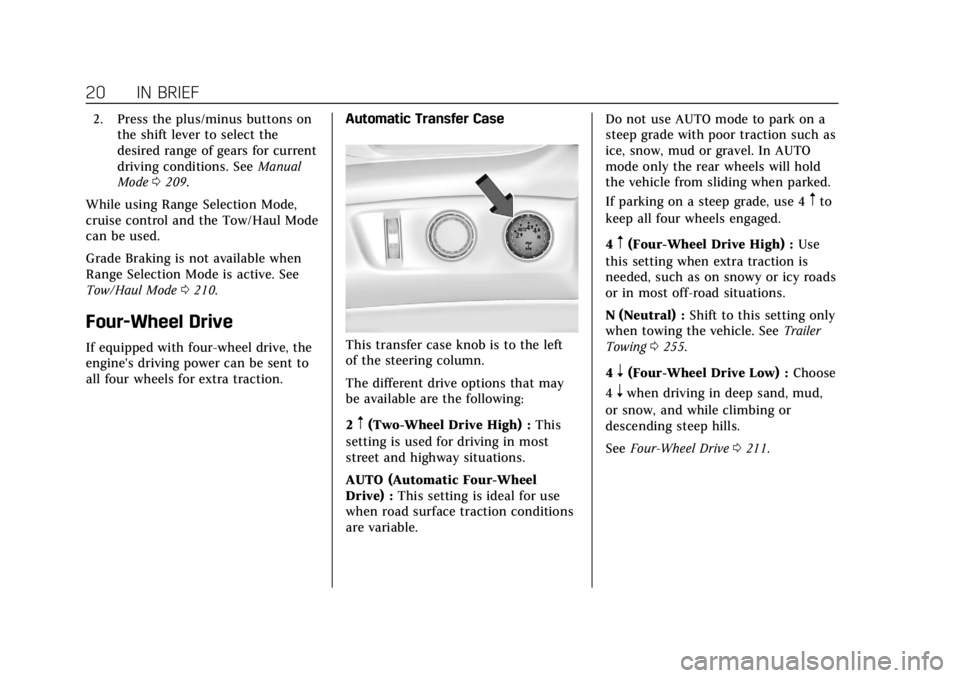
all four wheels for extra traction. Automatic Transfer CaseThis transfer case knob is to the left
of the steering column.
The different drive options that may
be available are the following:
2
m(Two-Wheel Drive High) :
This
setting is used for driving in most
street and highway situations.
AUTO (Automatic Four-Wheel
Drive) : This setting is ideal for use
when road surface traction conditions
are variable. Do not use AUTO mode to park on a
steep grade with poor traction such as
ice, snow, mud or gravel. In AUTO
mode only the rear wheels will hold
the vehicle from sliding when parked.
If parking on a steep grade, use 4
mto
keep all four wheels engaged.
4
m(Four-Wheel Drive High) : Use
this setting when extra traction is
needed, such as on snowy or icy roads
or in most off-road situations.
N (Neutral) : Shift to this setting only
when towing the vehicle. See Trailer
Towing 0255.
4
n(Four-Wheel Drive Low) : Choose
4
nwhen driving in deep sand, mud,
or snow, and while climbing or
descending steep hills.
See Four-Wheel Drive 0211.
Page 65 of 399
Cadillac Escalade Owner Manual (GMNA-Localizing-U.S./Canada/Mexico-
11349344) - 2018 - crc - 11/7/17
64 SEATS AND RESTRAINTS
If equipped, memory seats allow two
drivers to store and recall their unique
seat positions for driving the vehicle,
and a shared exit position for getting
out of the vehicle. Other feature
positions may also be set, such as
power mirrors, power steering wheel,
and adjustable pedals, if equipped.
Memory positions are linked to RKE
transmitter 1 or 2 for automatic
memory recalls.
Before storing, adjust all available
memory feature positions. Turn the
ignition on and then press and release
SET; a beep will sound. Then
immediately press and hold 1, 2,
or
B(Exit) on the driver door until
two beeps sound. To manually recall
these positions, press and hold 1, 2,
or
Buntil the saved position is
reached.
The vehicle identifies the current
driver’s RKE transmitter number
(1–8). See Remote Keyless Entry (RKE)
System Operation 029. Only RKE
transmitters 1 and 2 can be used for
automatic memory recalls. A Driver
Information Center (DIC) welcome
message indicating the transmitter number may display for the first few
ignition cycles following a transmitter
change. For Auto Memory Recall to
work properly, save the positions to
the memory button (1 or 2) matching
the RKE transmitter number displayed
in the DIC welcome message. Carry
the linked RKE transmitter when
entering the vehicle.
Vehicle Personalization Settings
.
To have the Auto Memory Recall
movement begin when the vehicle
is started, select the Settings
menu, then Vehicle, then Comfort
and Convenience, and then Auto
Memory Recall. Select On or Off.
See “Auto Memory Recall” later in
this section.
. To begin Easy Exit Recall
movement when the ignition is
turned off and the driver door is
opened, or when the ignition is
turned off with the driver door
already opened, select the Settings
menu, then Vehicle, then Comfort
and Convenience, and then Easy
Exit Options. Select On or Off. See
“Easy Exit Recall” later in this
section. .
See Vehicle Personalization 0152
for additional setting information.
Identifying Driver Number
To identify the driver number: 1. Start the vehicle with the other key or RKE transmitter. The DIC
should display the driver
number; 1 or 2. Turn the ignition
off and remove the key or RKE
transmitter from the vehicle.
2. Start the vehicle with the initial key or RKE transmitter. The DIC
should display the other driver
number not shown in step 1.
Saving Memory Positions
Read these instructions completely
before saving memory positions.
To save preferred driving positions
1 and 2: 1. Turn the ignition on or to ACC/ ACCESSORY.
A DIC welcome message may be
displayed indicating number 1 or
2 for memory recalls.
Page 66 of 399
Cadillac Escalade Owner Manual (GMNA-Localizing-U.S./Canada/Mexico-
11349344) - 2018 - crc - 11/7/17
SEATS AND RESTRAINTS 65
2. Adjust all available memoryfeatures to the desired driving
position.
3. Press and release SET; a beep will sound.
4. Immediately press and hold the 1 or 2 memory button matching
the above DIC welcome message
until two beeps sound.
If too much time passes between
releasing SET and pressing 1, the
memory position will not be
saved and two beeps will not
sound. Repeat Steps 3 and 4.
1 or 2 corresponds to the driver
number. See “Identifying Driver
Number” in this section.
5. Repeat Steps 1–4 for a second driver using 1 or 2.
To save positions for
Band easy exit
features, repeat Steps 1–4 using
B.
This stores the positions for getting
out of the vehicle.
Save preferred memory feature
positions to both 1 and 2 if you are
the only driver. Manually Recalling Memory
Positions
Press and hold 1, 2, or
Bto recall
the previously stored memory
positions.
To stop manual recall movement,
release 1, 2, or B. Recall can also be
stopped by pressing a power seat, SET,
power mirror control, power steering
wheel control, or adjustable pedal
control, if memory equipped. The
driver or passenger side mirror must
be selected.
Auto Memory Recall
The vehicle identifies the number of
the current driver’s RKE transmitter
(1–8). See Remote Keyless Entry (RKE)
System Operation 029. If the RKE
transmitter is 1 or 2, and Auto
Memory Recall is programmed on in
vehicle personalization, the positions
saved to the same memory button
number 1 or 2 are automatically
recalled when the ignition is turned
on, or turned from off to ACC/
ACCESSORY. RKE transmitters 3–8
will not provide automatic memory
recalls. To turn Auto Memory Recall on or off,
see "Vehicle Personalization Settings"
previously in this section and
Vehicle
Personalization 0152.
The transmission must be in P (Park)
to initiate Auto Memory Recall. Auto
Memory Recall will complete if the
vehicle is shifted out of P (Park) prior
to reaching the stored memory
position.
To stop Auto Memory Recall
movement, turn the ignition off or
press any of the following memory
controls:
. Power seat
. Memory SET, 1, 2, or
B
.Power mirror, with the driver or
passenger side mirror selected
. Power steering wheel, if equipped
. Adjustable pedals, if equipped
If the stored memory seat position
does not automatically recall or recalls
to the wrong positions, the driver’s
RKE transmitter number (1 or 2) may
not match the memory button
number that positions were saved to.
Page 67 of 399
Cadillac Escalade Owner Manual (GMNA-Localizing-U.S./Canada/Mexico-
11349344) - 2018 - crc - 11/7/17
66 SEATS AND RESTRAINTS
Try storing the position to the other
memory button or try the other RKE
transmitter.
Easy Exit Recall
Easy Exit Recall is not linked to an
RKE transmitter. The position stored
to
Bis used for all drivers. To turn
Easy Exit Recall on or off, see "Vehicle
Personalization Settings" previously in
this section and Vehicle Personalization
0 152.
If turned on, the positions saved to
Bare automatically recalled when
one of the following occurs:
. The vehicle is turned off and the
driver door is opened within a
short time.
. The vehicle is turned off with the
driver door open.
To stop Easy Exit Recall movement,
press any of the following memory
controls:
. Power seat
. Memory SET, 1, 2, or
B
.Power mirror, with the driver or
passenger side mirror selected
. Power steering wheel, if equipped
. Adjustable pedals, if equipped
Obstructions
If something has blocked the driver
seat and/or power steering wheel
while recalling a memory position, the
recall may stop. Remove the
obstruction and try the recall again.
If the memory position still does not
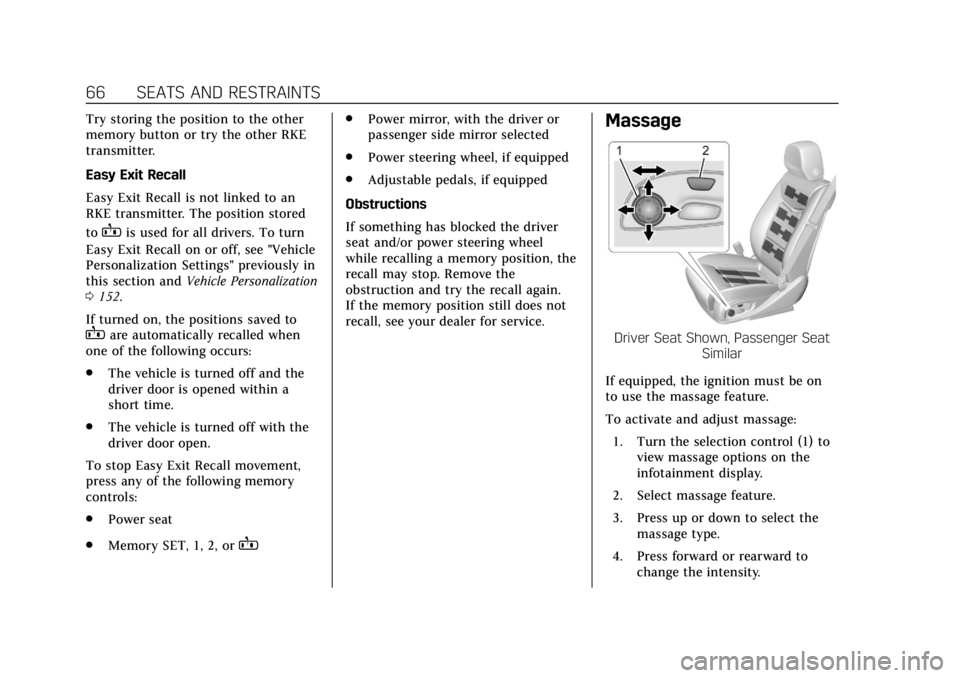
recall, see your dealer for service.Massage
Driver Seat Shown, Passenger Seat Similar
If equipped, the ignition must be on
to use the massage feature.
To activate and adjust massage: 1. Turn the selection control (1) to view massage options on the
infotainment display.
2. Select massage feature.
3. Press up or down to select the massage type.
4. Press forward or rearward to change the intensity.
Page 121 of 399
Cadillac Escalade Owner Manual (GMNA-Localizing-U.S./Canada/Mexico-
11349344) - 2018 - crc - 11/7/17
120 INSTRUMENTS AND CONTROLS
Instruments and
Controls
Controls
Steering Wheel Adjustment . . . . . 121
Steering Wheel Controls . . . . . . . . . 121
Heated Steering Wheel . . . . . . . . . . 121
Horn . . . . . . . . . . . . . . . . . . . . . . . . . . . . . . . 121
Windshield Wiper/Washer . . . . . . . 121
Rear Window Wiper/Washer . . . . 123
Compass . . . . . . . . . . . . . . . . . . . . . . . . . . 124
Clock . . . . . . . . . . . . . . . . . . . . . . . . . . . . . . 124
Power Outlets . . . . . . . . . . . . . . . . . . . . . 125
Wireless Charging . . . . . . . . . . . . . . . . 127
Cigarette Lighter . . . . . . . . . . . . . . . . . . 129
Ashtrays . . . . . . . . . . . . . . . . . . . . . . . . . . 129
Warning Lights, Gauges, and
Indicators
Warning Lights, Gauges, andIndicators . . . . . . . . . . . . . . . . . . . . . . . 129
Instrument Cluster . . . . . . . . . . . . . . . 130
Speedometer . . . . . . . . . . . . . . . . . . . . . . 132
Odometer . . . . . . . . . . . . . . . . . . . . . . . . . 132
Trip Odometer . . . . . . . . . . . . . . . . . . . . 133
Tachometer . . . . . . . . . . . . . . . . . . . . . . . 133
Fuel Gauge . . . . . . . . . . . . . . . . . . . . . . . . 133 Engine Coolant Temperature
Gauge . . . . . . . . . . . . . . . . . . . . . . . . . . . . 134
Seat Belt Reminders . . . . . . . . . . . . . . 134
Airbag Readiness Light . . . . . . . . . . 135
Passenger Airbag Status Indicator . . . . . . . . . . . . . . . . . . . . . . . . . 135
Charging System Light . . . . . . . . . . . 136
Malfunction Indicator Lamp (Check Engine Light) . . . . . . . . . . . 137
Brake System Warning Light . . . . 138
Electric Parking Brake Light . . . . . 139
Service Electric Parking Brake Light . . . . . . . . . . . . . . . . . . . . . . . . . . . . . 139
Antilock Brake System (ABS) Warning Light . . . . . . . . . . . . . . . . . . 140
Sport Mode Light . . . . . . . . . . . . . . . . . 140
Tow/Haul Mode Light . . . . . . . . . . . . 140
Winter Driving Mode Light . . . . . . 140
Lane Keep Assist (LKA) Light . . . 140
Vehicle Ahead Indicator . . . . . . . . . 141
Traction Off Light . . . . . . . . . . . . . . . . 141
StabiliTrak OFF Light . . . . . . . . . . . . 141
Traction Control System (TCS)/ StabiliTrak Light . . . . . . . . . . . . . . . . 142
Engine Coolant Temperature Warning Light . . . . . . . . . . . . . . . . . . 142
Tire Pressure Light . . . . . . . . . . . . . . . 142
Engine Oil Pressure Light . . . . . . . . 143
Low Fuel Warning Light . . . . . . . . . 143
Security Light . . . . . . . . . . . . . . . . . . . . . 143 High-Beam On Light . . . . . . . . . . . . . 144
Lamps On Reminder . . . . . . . . . . . . . 144
Cruise Control Light . . . . . . . . . . . . . . 144
Door Ajar Light . . . . . . . . . . . . . . . . . . . 145
Information Displays
Driver Information
Center (DIC) . . . . . . . . . . . . . . . . . . . . . 145
Head-Up Display (HUD) . . . . . . . . . 147
Vehicle Messages
Vehicle Messages . . . . . . . . . . . . . . . . . 151
Engine Power Messages . . . . . . . . . . 151
Vehicle Speed Messages . . . . . . . . . 152
Vehicle Personalization
Vehicle Personalization . . . . . . . . . . 152
Universal Remote System
Universal Remote System . . . . . . . . 160
Universal Remote System Programming . . . . . . . . . . . . . . . . . . . 160
Universal Remote System Operation . . . . . . . . . . . . . . . . . . . . . . . . 163
Page 122 of 399
Cadillac Escalade Owner Manual (GMNA-Localizing-U.S./Canada/Mexico-
11349344) - 2018 - crc - 11/7/17
INSTRUMENTS AND CONTROLS 121
Controls
Steering Wheel Adjustment
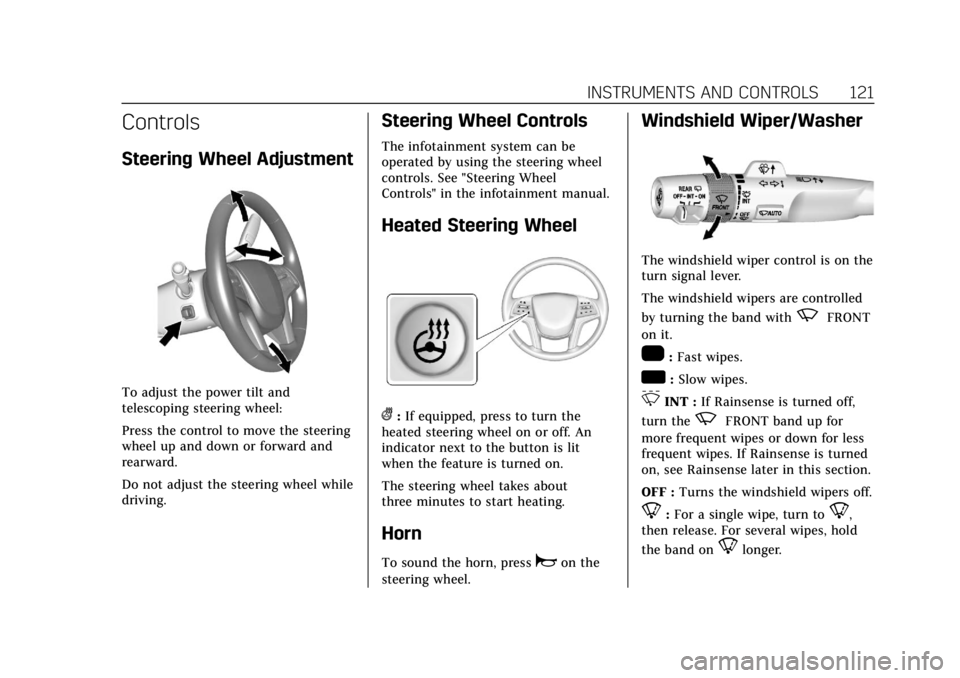
To adjust the power tilt and
telescoping steering wheel:
Press the control to move the steering
wheel up and down or forward and
rearward.
Do not adjust the steering wheel while
driving.
Steering Wheel Controls
The infotainment system can be
operated by using the steering wheel
controls. See "Steering Wheel
Controls" in the infotainment manual.
Heated Steering Wheel
(:If equipped, press to turn the
heated steering wheel on or off. An
indicator next to the button is lit
when the feature is turned on.
The steering wheel takes about
three minutes to start heating.
Horn
To sound the horn, pressaon the
steering wheel.
Windshield Wiper/Washer
The windshield wiper control is on the
turn signal lever.
The windshield wipers are controlled
by turning the band with
zFRONT
on it.
1: Fast wipes.
w: Slow wipes.
3INT : If Rainsense is turned off,
turn the
zFRONT band up for
more frequent wipes or down for less
frequent wipes. If Rainsense is turned
on, see Rainsense later in this section.
OFF : Turns the windshield wipers off.
8:For a single wipe, turn to8,
then release. For several wipes, hold
the band on
8longer.