parking CADILLAC ESCALADE 2019 User Guide
[x] Cancel search | Manufacturer: CADILLAC, Model Year: 2019, Model line: ESCALADE, Model: CADILLAC ESCALADE 2019Pages: 415, PDF Size: 6.66 MB
Page 124 of 415
Cadillac Escalade Owner Manual (GMNA-Localizing-U.S./Canada/Mexico-
12460268) - 2019 - crc - 9/14/18
INSTRUMENTS AND CONTROLS 123
Instruments and
Controls
Controls
Steering Wheel Adjustment . . . . . 124
Steering Wheel Controls . . . . . . . . . 124
Heated Steering Wheel . . . . . . . . . . 124
Horn . . . . . . . . . . . . . . . . . . . . . . . . . . . . . . . 124
Windshield Wiper/Washer . . . . . . . 124
Rear Window Wiper/Washer . . . . 126
Compass . . . . . . . . . . . . . . . . . . . . . . . . . . 127
Clock . . . . . . . . . . . . . . . . . . . . . . . . . . . . . . 127
Power Outlets . . . . . . . . . . . . . . . . . . . . . 128
Wireless Charging . . . . . . . . . . . . . . . . 130
Cigarette Lighter . . . . . . . . . . . . . . . . . . 132
Ashtrays . . . . . . . . . . . . . . . . . . . . . . . . . . 132
Warning Lights, Gauges, and
Indicators
Warning Lights, Gauges, andIndicators . . . . . . . . . . . . . . . . . . . . . . . 132
Instrument Cluster . . . . . . . . . . . . . . . 133
Speedometer . . . . . . . . . . . . . . . . . . . . . . 135
Odometer . . . . . . . . . . . . . . . . . . . . . . . . . 135
Trip Odometer . . . . . . . . . . . . . . . . . . . . 136
Tachometer . . . . . . . . . . . . . . . . . . . . . . . 136
Fuel Gauge . . . . . . . . . . . . . . . . . . . . . . . . 136 Engine Coolant Temperature
Gauge . . . . . . . . . . . . . . . . . . . . . . . . . . . . 137
Seat Belt Reminders . . . . . . . . . . . . . . 137
Airbag Readiness Light . . . . . . . . . . 138
Passenger Airbag Status Indicator . . . . . . . . . . . . . . . . . . . . . . . . . 138
Charging System Light . . . . . . . . . . . 139
Malfunction Indicator Lamp (Check Engine Light) . . . . . . . . . . . 140
Brake System Warning Light . . . . 141
Electric Parking Brake Light . . . . . 142
Service Electric Parking Brake Light . . . . . . . . . . . . . . . . . . . . . . . . . . . . . 142
Antilock Brake System (ABS) Warning Light . . . . . . . . . . . . . . . . . . 143
Sport Mode Light . . . . . . . . . . . . . . . . . 143
Tow/Haul Mode Light . . . . . . . . . . . . 143
Winter Driving Mode Light . . . . . . 143
Lane Keep Assist (LKA) Light . . . 143
Vehicle Ahead Indicator . . . . . . . . . 144
Traction Off Light . . . . . . . . . . . . . . . . 144
StabiliTrak OFF Light . . . . . . . . . . . . 144
Traction Control System (TCS)/ StabiliTrak Light . . . . . . . . . . . . . . . . 145
Engine Coolant Temperature Warning Light . . . . . . . . . . . . . . . . . . 145
Tire Pressure Light . . . . . . . . . . . . . . . 145
Engine Oil Pressure Light . . . . . . . . 146
Low Fuel Warning Light . . . . . . . . . 146
Security Light . . . . . . . . . . . . . . . . . . . . . 146 High-Beam On Light . . . . . . . . . . . . . 147
Lamps On Reminder . . . . . . . . . . . . . 147
Cruise Control Light . . . . . . . . . . . . . . 147
Door Ajar Light . . . . . . . . . . . . . . . . . . . 148
Information Displays
Driver Information
Center (DIC) . . . . . . . . . . . . . . . . . . . . . 148
Head-Up Display (HUD) . . . . . . . . . 150
Vehicle Messages
Vehicle Messages . . . . . . . . . . . . . . . . . 154
Engine Power Messages . . . . . . . . . . 154
Vehicle Speed Messages . . . . . . . . . 154
Vehicle Personalization
Vehicle Personalization . . . . . . . . . . 155
Universal Remote System
Universal Remote System . . . . . . . . 163
Universal Remote System Programming . . . . . . . . . . . . . . . . . . . 163
Universal Remote System Operation . . . . . . . . . . . . . . . . . . . . . . . . 165
Page 126 of 415

Cadillac Escalade Owner Manual (GMNA-Localizing-U.S./Canada/Mexico-
12460268) - 2019 - crc - 9/14/18
INSTRUMENTS AND CONTROLS 125
Clear ice and snow from the wiper
blades before using them. If frozen to
the windshield, carefully loosen or
thaw them. Damaged wiper blades
should be replaced. SeeWiper Blade
Replacement 0297.
Heavy snow or ice can overload the
wiper motor. An internal circuit
breaker to the motor will stop the
motor until it cools down.
Wiper Parking
If the ignition is turned off while the
wipers are on
w,1, or3INT,
they will immediately stop.
If
zFRONT is then moved to OFF
before the driver door is opened or
within 10 minutes, the wipers will
restart and move to the base of the
windshield.
If the ignition is turned off while the
wipers are performing wipes due to
windshield washing or Rainsense, the
wipers continue to run until they
reach the base of the windshield.
Rainsense
With Rainsense, a sensor near the top
center of the windshield detects the
amount of water on the windshield
and controls the frequency of the
windshield wiper.
Keep this area of the windshield clear
of debris to allow for best system
performance.
3INT : Turn thezFRONT band
on the wiper lever to adjust the
sensitivity when Rainsense is
turned on.
. Turn the band up for more
sensitivity to moisture.
. Turn the band down to lower INT
setting for less sensitivity to
moisture.
Move the band out of the
3INT
position to deactivate Rainsense.
zAUTO : Press to turn Rainsense
on or off. When turned on and
z
FRONT is in one of the Rainsense
wipe sensitivity positions the wipers
can be adjusted for more or less
sensitivity to moisture. When turned
off, the wipers operate as timed
intermittent wipers and can be
adjusted for more or less frequent
wipes.
If
zAUTO is turned on when the
ignition is turned on, or if the ignition
is on and the
zFRONT band is in
one of the sensitivity settings when
zAUTO is turned on or off, a
message may display indicating if
Rainsense was turned on or off.
If the ignition is on and
zFRONT
is not in one of the sensitivity settings
when
zAUTO is turned on, a
Page 143 of 415

Cadillac Escalade Owner Manual (GMNA-Localizing-U.S./Canada/Mexico-
12460268) - 2019 - crc - 9/14/18
142 INSTRUMENTS AND CONTROLS
This light should come on briefly
when the engine is started. If it does
not come on then, have it fixed so it
will be ready to warn you if there is a
problem.
If the light comes on and stays on,
there is a brake problem.
{Warning
The brake system might not be
working properly if the brake
system warning light is on. Driving
with the brake system warning light
on can lead to a crash. If the light is
still on after the vehicle has been
pulled off the road and carefully
stopped, have the vehicle towed for
service.
Electric Parking Brake
Light
MetricEnglish
This light comes on when the parking
brake is applied. If the light continues
flashing after the parking brake is
released, or while driving, there is a
problem with the Electric Parking
Brake system. A message may also
display in the Driver Information
Center (DIC).
If the light does not come on,
or remains flashing, see your dealer.
Service Electric Parking
Brake Light
If this light comes on and stays on,
there is a problem with a system on
the vehicle that is causing the parking
brake system to work at a reduced
level. The vehicle can still be driven,
but should be taken to a dealer as
soon as possible. See Electric Parking
Brake 0219. A message may also
display in the Driver Information
Center (DIC).
Page 152 of 415

Cadillac Escalade Owner Manual (GMNA-Localizing-U.S./Canada/Mexico-
12460268) - 2019 - crc - 9/14/18
INSTRUMENTS AND CONTROLS 151
instrument panel. The information
appears as an image focused out
toward the front of the vehicle.
Caution
If you try to use the HUD image as
a parking aid, you may misjudge
the distance and damage your
vehicle. Do not use the HUD image
as a parking aid.
The HUD information can be
displayed in various languages. The
speedometer reading and other
numerical values can be displayed in
either English or metric units.
The language selection is changed
through the radio and the units of
measurement is changed through the
instrument cluster. See Vehicle
Personalization 0155 and “Options”
under Instrument Cluster 0133.
HUD Display on the Windshield
The HUD may display some of the
following vehicle information and
vehicle messages or alerts:
. Speed
. Tachometer
. Audio
. Phone
. Navigation
. Collision Alert
. Adaptive Cruise Control and set
speed
. Lane Departure .
Low Fuel
Some vehicle messages or alerts
displayed in the HUD may be cleared
by using the steering wheel controls.
See Vehicle Messages 0154.
Some information shown may not be
available on your vehicle if it is not
equipped with these features.
The HUD control is to the left of the
steering wheel.
To adjust the HUD image: 1. Adjust the driver seat.
2. Start the engine.
3. Use the following settings to adjust the HUD.
$:Press or lift to center the HUD
image. The HUD image can only be
adjusted up and down, not side
to side.
Page 158 of 415

Cadillac Escalade Owner Manual (GMNA-Localizing-U.S./Canada/Mexico-
12460268) - 2019 - crc - 9/14/18
INSTRUMENTS AND CONTROLS 157
Auto Fan Speed
This feature will set the auto fan
speed.
Select Low, Medium, or High.
Auto Cooled Seats
When enabled, this feature will
automatically activate the cooled seats
at the level required by the interior
temperature. SeeHeated and Cooled
Front Seats 069.
Select Off or On.
Auto Heated Seats
When the vehicle is on, this feature
will automatically activate the heated
seats at the level required by the
vehicle's interior temperature. See
Heated and Cooled Front Seats 069.
Select Off or On.
Auto Defog
When set to On, the auto defog comes
on when the climate control sensor
detects high interior humidity. Air will
be directed to the windshield.
Select Off or On. Auto Rear Defog
If equipped, this feature will
automatically turn on the rear window
defogger when the vehicle is first
started in cold weather and turn off
when the vehicle is warmed.
Select Off or On.
Collision/Detection Systems
Select the Collision/Detection Systems
menu and the following may display:
.
Alert Type
. Forward Collision System
. Rear Cross Traffic Alert
. Adaptive Cruise Go Notifier
. Park Assist
. Lane Change Alert
Alert Type
This feature will set crash alerts to
beeps or seat vibrations. See Driver
Assistance Systems 0236.
Select Beeps or Safety Alert Seat. Forward Collision System
This feature will turn on or off
Forward Collision Alert (FCA) and
Forward Automatic Braking (FAB).
The Off setting disables all FCA and
FAB functions. With the Alert and
Brake setting, both FCA and FAB are
available. The Alert setting disables
FAB. See
Forward Automatic Braking
(FAB) 0246.
Select Off, Alert and Brake, or Alert.
Rear Cross Traffic Alert
This allows the Rear Cross Traffic
Alert feature to be turned on or off.
See Assistance Systems for Parking or
Backing 0237.
Select Off or On.
Adaptive Cruise Go Notifier
This feature will give a reminder that
Adaptive Cruise Control provides
when it has brought the vehicle to a
complete stop behind another
stopping vehicle, and then that vehicle
drives on.
Select Off or On.
Page 159 of 415

Cadillac Escalade Owner Manual (GMNA-Localizing-U.S./Canada/Mexico-
12460268) - 2019 - crc - 9/14/18
158 INSTRUMENTS AND CONTROLS
Park Assist
If equipped, this allows the feature to
be turned on or off. SeeAssistance
Systems for Parking or Backing 0237.
Select Off, On, or On with Towbar
Attached.
Lane Change Alert
This allows the feature to be turned
on or off. See Lane Change Alert (LCA)
0 248.
When Lane Change Alert is disabled,
Side Blind Zone Alert is also disabled.
Select Off or On.
Comfort and Convenience
Select and the following may display:
. Auto Running Boards
. Auto Memory Recall
. Easy Exit Options
. Chime Volume
. Hands Free Liftgate Control
. Reverse Tilt Mirror
. Auto Mirror Folding
. Auto Wipe in Reverse Gear Auto Running Boards
This allows the feature to be turned
on or off. See
Power Assist Steps 048.
Select Off, On, or Extended.
Auto Memory Recall
This feature automatically recalls the
current driver’s previously stored 1 or
2 button positions when the ignition
is changed from off to on or ACC/
ACCESSORY. See Memory Seats065.
Select On or Off.
Easy Exit Options
This feature automatically recalls the
previously stored exit button position
when exiting the vehicle. See Memory
Seats 065.
Select Off or On.
Chime Volume
This allows the selection of the chime
volume level.
Touch + or −to adjust the volume. Hands Free Liftgate Control
The liftgate may be operated with a
kicking motion under the rear bumper.
See
Liftgate 040.
Select Off, On-Open and Close,
or On-Open Only.
Reverse Tilt Mirror
When on, the driver and/or passenger
mirrors will tilt downward when the
vehicle is shifted to R (Reverse) to
improve visibility of the ground near
the rear wheels. See Reverse Tilt
Mirrors 053.
Select Off, On - Driver and Passenger,
On - Driver, or On - Passenger.
Auto Mirror Folding
When on, the outside mirrors will
automatically fold or unfold when the
Remote Keyless Entry (RKE)
transmitter
QorKbutton is pressed
and held. See Folding Mirrors 052.
Select Off or On.
Page 163 of 415

Cadillac Escalade Owner Manual (GMNA-Localizing-U.S./Canada/Mexico-
12460268) - 2019 - crc - 9/14/18
162 INSTRUMENTS AND CONTROLS
Select Off or On.
Display
Select and the following may display:
.Mode
. Proximity Sensing
. Calibrate Touchscreen
. Turn Display Off
Mode
Select to change the display of the
infotainment system.
Select Auto, Day, or Night.
Proximity Sensing
This allows the feature to be turned
on or off.
Select Off, On, or On-Map Only.
Calibrate Touchscreen
Select to calibrate the touchscreen,
then follow the prompts. Turn Display Off
Select to turn the display off. Touch
anywhere on the infotainment display
or press any infotainment controls on
the center stack to turn the
display on.
Rear Camera
Select and the following may display:
.
Guidance Lines
. Rear Park Assist Symbols
Guidance Lines
Select to turn Off or On. See
Assistance Systems for Parking or
Backing 0237.
Rear Park Assist Symbols
Select to turn Off or On. See
Assistance Systems for Parking or
Backing 0237.
Return to Factory Settings
Select and the following may display:
.
Restore Vehicle Settings
. Clear All Private Data
. Restore Radio Settings Restore Vehicle Settings
This allows selection of restoring
vehicle settings.
Select Restore or Cancel.
Clear All Private Data
This allows selection to clear all
private information from the vehicle.
Select Delete or Cancel.
Restore Radio Settings
This allows selection to restore radio
settings.
Select Restore or Cancel.
Software Information
Select to view or update the
infotainment system current software
information.
Wi-Fi
Select and the following may display:
.
Wi-Fi
. Manage Wi-Fi Networks
Page 168 of 415
Cadillac Escalade Owner Manual (GMNA-Localizing-U.S./Canada/Mexico-
12460268) - 2019 - crc - 9/14/18
LIGHTING 167
Lighting
Exterior Lighting
Exterior Lamp Controls . . . . . . . . . . 167
Exterior Lamps Off Reminder . . . 169
Headlamp High/Low-BeamChanger . . . . . . . . . . . . . . . . . . . . . . . . . . 169
Flash-to-Pass . . . . . . . . . . . . . . . . . . . . . 169
Daytime Running Lamps (DRL) . . . . . . . . . . . . . . . . . . . . 169
Automatic Headlamp System . . . 170
Hazard Warning Flashers . . . . . . . . 171
Turn and Lane-Change Signals . . . . . . . . . . . . . . . . . . . . . . . . . . . 171
Cornering Lamps . . . . . . . . . . . . . . . . . 172
Interior Lighting
Instrument Panel Illumination Control . . . . . . . . . . . . . . . . . . . . . . . . . . 172
Dome Lamps . . . . . . . . . . . . . . . . . . . . . 172
Reading Lamps . . . . . . . . . . . . . . . . . . . 173
Lighting Features
Entry Lighting . . . . . . . . . . . . . . . . . . . . 173
Exit Lighting . . . . . . . . . . . . . . . . . . . . . . 173
Battery Load Management . . . . . . 174
Battery Power Protection . . . . . . . . 174
Exterior Lighting Battery Saver . . . . . . . . . . . . . . . . . . . . . . . . . . . . . 174
Exterior Lighting
Exterior Lamp Controls
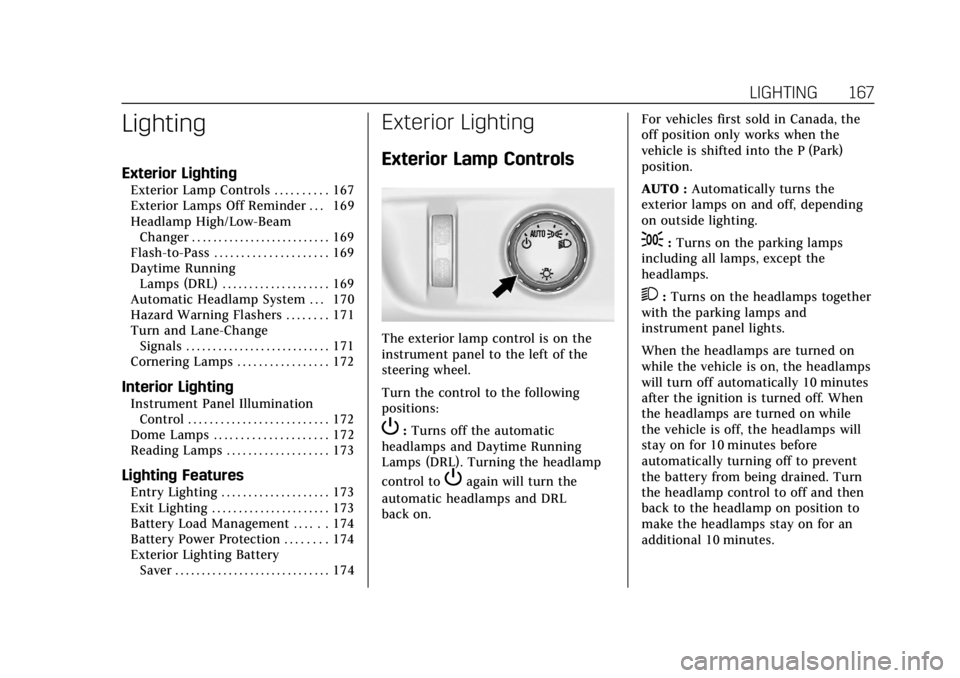
The exterior lamp control is on the
instrument panel to the left of the
steering wheel.
Turn the control to the following
positions:
P:Turns off the automatic
headlamps and Daytime Running
Lamps (DRL). Turning the headlamp
control to
Pagain will turn the
automatic headlamps and DRL
back on. For vehicles first sold in Canada, the
off position only works when the
vehicle is shifted into the P (Park)
position.
AUTO :
Automatically turns the
exterior lamps on and off, depending
on outside lighting.
;: Turns on the parking lamps
including all lamps, except the
headlamps.
2: Turns on the headlamps together
with the parking lamps and
instrument panel lights.
When the headlamps are turned on
while the vehicle is on, the headlamps
will turn off automatically 10 minutes
after the ignition is turned off. When
the headlamps are turned on while
the vehicle is off, the headlamps will
stay on for 10 minutes before
automatically turning off to prevent
the battery from being drained. Turn
the headlamp control to off and then
back to the headlamp on position to
make the headlamps stay on for an
additional 10 minutes.
Page 170 of 415
Cadillac Escalade Owner Manual (GMNA-Localizing-U.S./Canada/Mexico-
12460268) - 2019 - crc - 9/14/18
LIGHTING 169
.The vehicle is being driven on
winding or hilly roads.
The automatic high-beam headlamps
may need to be disabled if any of the
above conditions exist.
Exterior Lamps Off
Reminder
If a door is open, a reminder chime
sounds when the headlamps or
parking lamps are manually turned on
and the ignition is off. To turn off the
chime, turn the exterior lamp control
to off or AUTO and then back on,
or close and re-open the door. In the
AUTO mode, the headlamps turn off
once the ignition is off or remain on
until the headlamp delay ends (if
enabled in the DIC). See “Exit
Lighting” underVehicle Personalization
0 155.
Headlamp High/Low-Beam
Changer
Push the turn signal lever toward the
instrument panel to change the
headlamps from low to high beam. Pull the turn signal lever toward you
and release it to return to low-beam
headlamps.
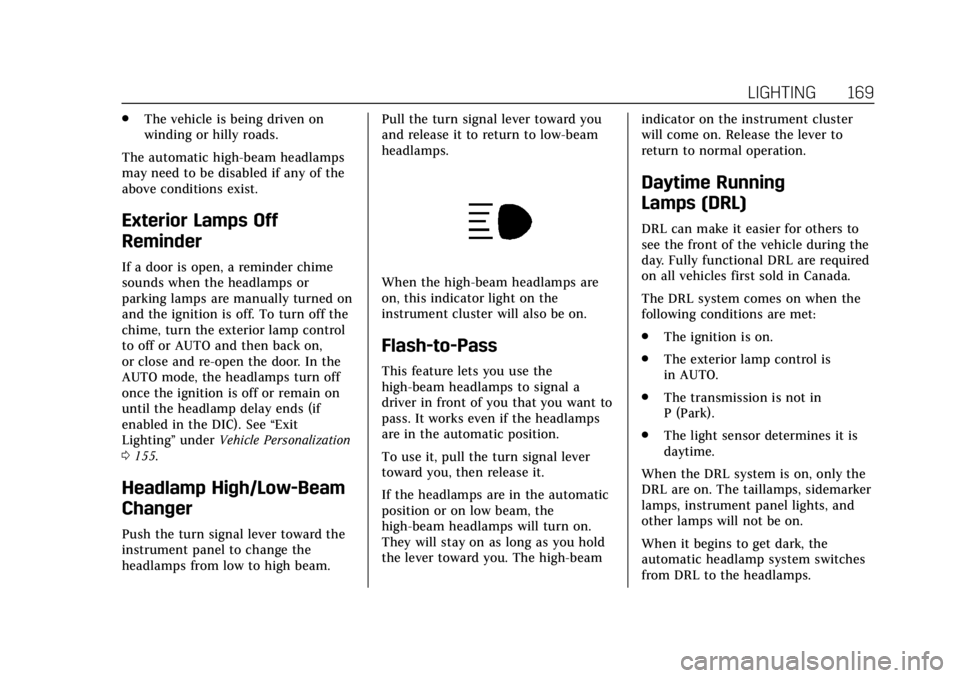
When the high-beam headlamps are
on, this indicator light on the
instrument cluster will also be on.
Flash-to-Pass
This feature lets you use the
high-beam headlamps to signal a
driver in front of you that you want to
pass. It works even if the headlamps
are in the automatic position.
To use it, pull the turn signal lever
toward you, then release it.
If the headlamps are in the automatic
position or on low beam, the
high-beam headlamps will turn on.
They will stay on as long as you hold
the lever toward you. The high-beam
indicator on the instrument cluster
will come on. Release the lever to
return to normal operation.
Daytime Running
Lamps (DRL)
DRL can make it easier for others to
see the front of the vehicle during the
day. Fully functional DRL are required
on all vehicles first sold in Canada.
The DRL system comes on when the
following conditions are met:
.
The ignition is on.
. The exterior lamp control is
in AUTO.
. The transmission is not in
P (Park).
. The light sensor determines it is
daytime.
When the DRL system is on, only the
DRL are on. The taillamps, sidemarker
lamps, instrument panel lights, and
other lamps will not be on.
When it begins to get dark, the
automatic headlamp system switches
from DRL to the headlamps.
Page 171 of 415

Cadillac Escalade Owner Manual (GMNA-Localizing-U.S./Canada/Mexico-
12460268) - 2019 - crc - 9/14/18
170 LIGHTING
To turn off the DRL, turn the exterior
lamp control to
Oand then release.
For vehicles first sold in Canada, off
will only work when the vehicle is
parked.
Automatic Headlamp
System
When it is dark enough outside, the
automatic headlamp system turns on
the headlamps at the normal
brightness, along with the taillamps,
sidemarker, parking lamps, and the
instrument panel lights. The radio
lights will also be dim.
To turn off the automatic headlamp
system, turn the exterior lamp control
to
Pand then release it.
The vehicle has a light sensor on the
top of the instrument panel that
controls the automatic headlamp
system. Do not cover the sensor,
otherwise the headlamps may come
on when they are not needed.
The system may also turn on the
headlamps when driving through a
parking garage, heavy overcast
weather, or a tunnel. This is normal.
There is a delay in the transition
between the daytime and nighttime
operation of the automatic headlamp
system so that driving under bridges
or bright overhead street lights does
not affect the system. The automatic
headlamp system is only affected when the light sensor detects a
change in lighting lasting longer than
the delay.
If the vehicle is started in a dark
garage, the automatic headlamp
system will come on immediately.
Once the vehicle leaves the garage, it
takes approximately one minute for
the automatic headlamp system to
change if it is bright enough outside.
During that delay, the instrument
cluster may not be as bright as usual.
Make sure the instrument panel
brightness control is in the full bright
position. See
Instrument Panel
Illumination Control 0172.
To idle the vehicle with the automatic
headlamp system off, turn the control
to the off position.
The headlamps will also stay on after
you exit the vehicle.
The regular headlamp system can be
turned on when needed.
Lights On with Wipers
If the windshield wipers are activated
in daylight with the engine on, and
the exterior lamp control is in AUTO,