parking CADILLAC ESCALADE 2019 Owner's Manual
[x] Cancel search | Manufacturer: CADILLAC, Model Year: 2019, Model line: ESCALADE, Model: CADILLAC ESCALADE 2019Pages: 415, PDF Size: 6.66 MB
Page 6 of 415
Cadillac Escalade Owner Manual (GMNA-Localizing-U.S./Canada/Mexico-
12460268) - 2019 - crc - 9/14/18
IN BRIEF 5
In Brief
Instrument Panel
Instrument Panel . . . . . . . . . . . . . . . . . . . 6
Initial Drive Information
Initial Drive Information . . . . . . . . . . . 8
Remote Keyless Entry (RKE)System . . . . . . . . . . . . . . . . . . . . . . . . . . . . . 8
Remote Vehicle Start . . . . . . . . . . . . . . . 8
Door Locks . . . . . . . . . . . . . . . . . . . . . . . . . . 9
Liftgate . . . . . . . . . . . . . . . . . . . . . . . . . . . . . . 9
Windows . . . . . . . . . . . . . . . . . . . . . . . . . . . 10
Seat Adjustment . . . . . . . . . . . . . . . . . . . 10
Memory Features . . . . . . . . . . . . . . . . . . 12
Second Row Seats . . . . . . . . . . . . . . . . . 12
Third Row Seats . . . . . . . . . . . . . . . . . . . 12
Heated and Cooled Front Seats . . . 12
Head Restraint Adjustment . . . . . . . 13
Seat Belts . . . . . . . . . . . . . . . . . . . . . . . . . . . 13
Passenger Sensing System . . . . . . . . 13
Mirror Adjustment . . . . . . . . . . . . . . . . 14
Steering Wheel Adjustment . . . . . . . 15
Throttle and Brake Pedal Adjustment . . . . . . . . . . . . . . . . . . . . . . . 15
Interior Lighting . . . . . . . . . . . . . . . . . . . 15
Exterior Lighting . . . . . . . . . . . . . . . . . . . 16
Windshield Wiper/Washer . . . . . . . . 17
Climate Controls . . . . . . . . . . . . . . . . . . . 17 Transmission . . . . . . . . . . . . . . . . . . . . . . . 18
Four-Wheel Drive . . . . . . . . . . . . . . . . . . 18
Vehicle Features
Infotainment System . . . . . . . . . . . . . . 19
Steering Wheel Controls . . . . . . . . . . 19
Cruise Control . . . . . . . . . . . . . . . . . . . . . 20
Driver Information
Center (DIC) . . . . . . . . . . . . . . . . . . . . . . 20
Forward Collision Alert (FCA) System . . . . . . . . . . . . . . . . . . . . . . . . . . . . 20
Forward Automatic Braking (FAB) . . . . . . . . . . . . . . . . . . . . 21
Lane Keep Assist (LKA) . . . . . . . . . . . 21
Lane Change Alert (LCA) . . . . . . . . . . 21
Surround Vision . . . . . . . . . . . . . . . . . . . 21
Rear Vision Camera (RVC) . . . . . . . . 21
Rear Cross Traffic Alert (RCTA) System . . . . . . . . . . . . . . . . . . . . . . . . . . . . 22
Park Assist . . . . . . . . . . . . . . . . . . . . . . . . . 22
Automatic Parking Assist (APA) . . . . . . . . . . . . . . . . . . . . . . 22
Reverse Automatic Braking (RAB) . . . . . . . . . . . . . . . . . . . . 22
Power Outlets . . . . . . . . . . . . . . . . . . . . . . 22
Universal Remote System . . . . . . . . . 23
Sunroof . . . . . . . . . . . . . . . . . . . . . . . . . . . . . 23
Performance and Maintenance
Traction Control/Electronic Stability Control . . . . . . . . . . . . . . . . . . 24
Tire Pressure Monitor . . . . . . . . . . . . . 24
Fuel . . . . . . . . . . . . . . . . . . . . . . . . . . . . . . . . . 25
E85 or FlexFuel . . . . . . . . . . . . . . . . . . . . 25
Engine Oil Life System . . . . . . . . . . . . 25
Driving for Better Fuel Economy . . . . . . . . . . . . . . . . . . . . . . . . . . 25
Roadside Service . . . . . . . . . . . . . . . . . . . 26
Page 8 of 415

Cadillac Escalade Owner Manual (GMNA-Localizing-U.S./Canada/Mexico-
12460268) - 2019 - crc - 9/14/18
IN BRIEF 7
1.Air Vents 0182.
2. Head-Up Display (HUD) 0150 (If
Equipped).
3. Turn Signal Lever. See Turn and
Lane-Change Signals 0171.
Windshield Wiper/Washer 0124.
Rear Window Wiper/Washer
0 126.
4. Hazard Warning Flashers 0171.
5. Instrument Cluster 0133.
6. Shift Lever. See Automatic
Transmission 0209.
Tow/Haul Mode Selector Button.
See Tow/Haul Mode 0213.
Range Selection Mode Buttons (If
Equipped). See Manual Mode
0 212.
7. Magnetic Ride Control Button. See Magnetic Ride Control 0224.
Pedal Adjust Switch (If
Equipped). See Adjustable Throttle
and Brake Pedal 0201.
Traction Control/Electronic
Stability Control 0221. 8. Light Sensor. See
Automatic
Headlamp System 0170.
9. Infotainment 0175.
10. Glove Box Button. See Glove Box
0 119.
Lane Keep Assist (LKA) 0250 (If
Equipped).
Park Assist Button. See
Assistance Systems for Parking or
Backing 0237.
11. Dual Automatic Climate Control
System 0176.
Instrument Panel Storage 0119.
12. CD Player. See the infotainment manual.
13. ENGINE START/STOP Button. SeeIgnition Positions 0202.
14. Steering Wheel Controls 0124.
Driver Information Center (DIC)
Controls. See Driver Information
Center (DIC) 0148.
15. Horn 0124.
16. Steering Wheel Adjustment 0124.
17. Hood Release. See Hood0279. 18.
Cruise Control 0225 (If
Equipped).
Adaptive Cruise Control 0228 (If
Equipped).
Forward Collision Alert (FCA)
System 0243 (If Equipped).
Heated Steering Wheel 0124 (If
Equipped).
Phone Button. See the
infotainment manual.
19. Automatic Transfer Case Knob (If Equipped). See Four-Wheel Drive
0 214.
20. Data Link Connector (DLC) (Out of View). See Malfunction
Indicator Lamp (Check Engine
Light) 0140.
21. Electric Parking Brake 0219 (If
Equipped).
22. Exterior Lamp Controls 0167.
23. Instrument Panel Illumination
Control 0172.
Page 9 of 415
Cadillac Escalade Owner Manual (GMNA-Localizing-U.S./Canada/Mexico-
12460268) - 2019 - crc - 9/14/18
8 IN BRIEF
Initial Drive Information
This section provides a brief overview
about some of the important features
that may or may not be on your
specific vehicle.
For more detailed information, refer to
each of the features which can be
found later in this owner’s manual.
Remote Keyless Entry
(RKE) System
The Remote Keyless Entry (RKE)
transmitter is used to remotely lock
and unlock the doors from up to 60 m
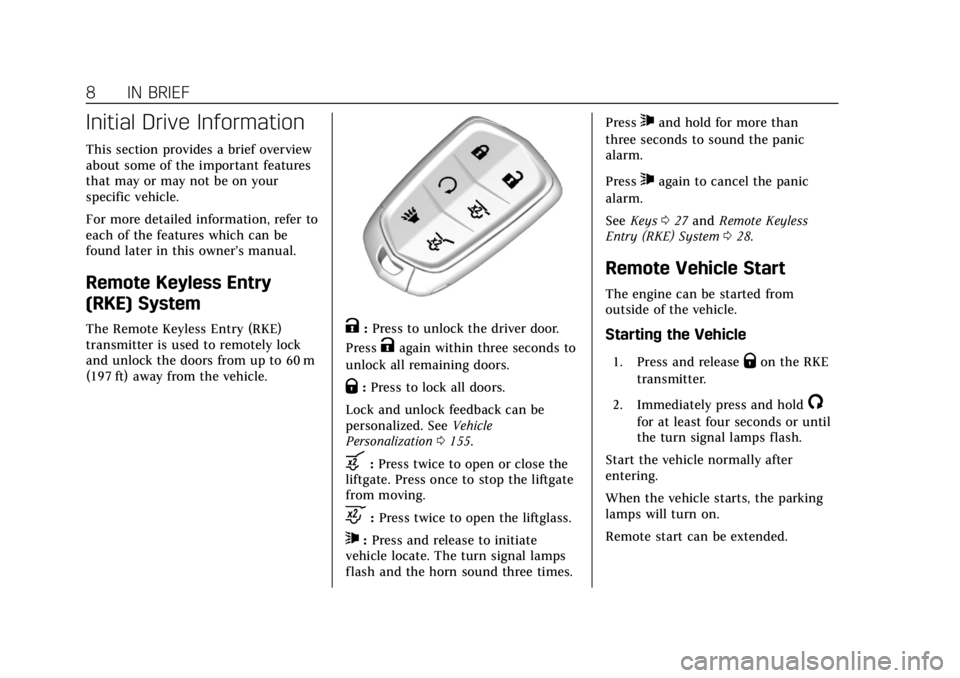
(197 ft) away from the vehicle.K:Press to unlock the driver door.
Press
Kagain within three seconds to
unlock all remaining doors.
Q: Press to lock all doors.
Lock and unlock feedback can be
personalized. See Vehicle
Personalization 0155.
b:Press twice to open or close the
liftgate. Press once to stop the liftgate
from moving.
c: Press twice to open the liftglass.
7:Press and release to initiate
vehicle locate. The turn signal lamps
flash and the horn sound three times. Press
7and hold for more than
three seconds to sound the panic
alarm.
Press
7again to cancel the panic
alarm.
See Keys 027 and Remote Keyless
Entry (RKE) System 028.
Remote Vehicle Start
The engine can be started from
outside of the vehicle.
Starting the Vehicle
1. Press and releaseQon the RKE
transmitter.
2. Immediately press and hold
/
for at least four seconds or until
the turn signal lamps flash.
Start the vehicle normally after
entering.
When the vehicle starts, the parking
lamps will turn on.
Remote start can be extended.
Page 10 of 415
Cadillac Escalade Owner Manual (GMNA-Localizing-U.S./Canada/Mexico-
12460268) - 2019 - crc - 9/14/18
IN BRIEF 9
Canceling a Remote Start
To cancel a remote start, do one of
the following:
.Press and hold
/until the
parking lamps turn off.
. Turn on the hazard warning
flashers.
. Turn the vehicle on and then off.
See Remote Vehicle Start 035.
Door Locks
To lock or unlock the doors from
inside the vehicle:
.
Press
QorKon a power door
lock switch.
. Push down the manual lock knob
on the driver door to lock all
doors. Push down the lock knob
on a passenger door to lock that
door only.
. Pull the door handle once to
unlock that door. Pull the handle
again to unlatch it. To lock or unlock the doors from
outside the vehicle press
QorKon
the RKE transmitter or use the key in
the front doors. The key cylinder is
covered by a cap. See Door Locks036.
See Remote Keyless Entry (RKE) System
Operation 028.
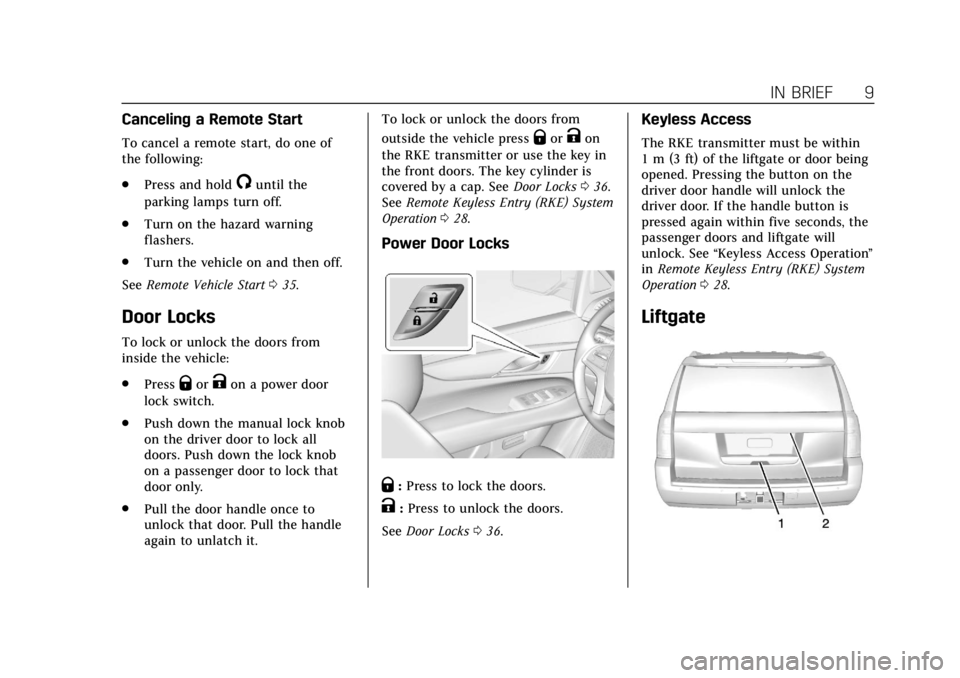
Power Door Locks
Q:Press to lock the doors.
K:Press to unlock the doors.
See Door Locks 036.
Keyless Access
The RKE transmitter must be within
1 m (3 ft) of the liftgate or door being
opened. Pressing the button on the
driver door handle will unlock the
driver door. If the handle button is
pressed again within five seconds, the
passenger doors and liftgate will
unlock. See “Keyless Access Operation ”
in Remote Keyless Entry (RKE) System
Operation 028.
Liftgate
Page 17 of 415
Cadillac Escalade Owner Manual (GMNA-Localizing-U.S./Canada/Mexico-
12460268) - 2019 - crc - 9/14/18
16 IN BRIEF
Reading Lamps
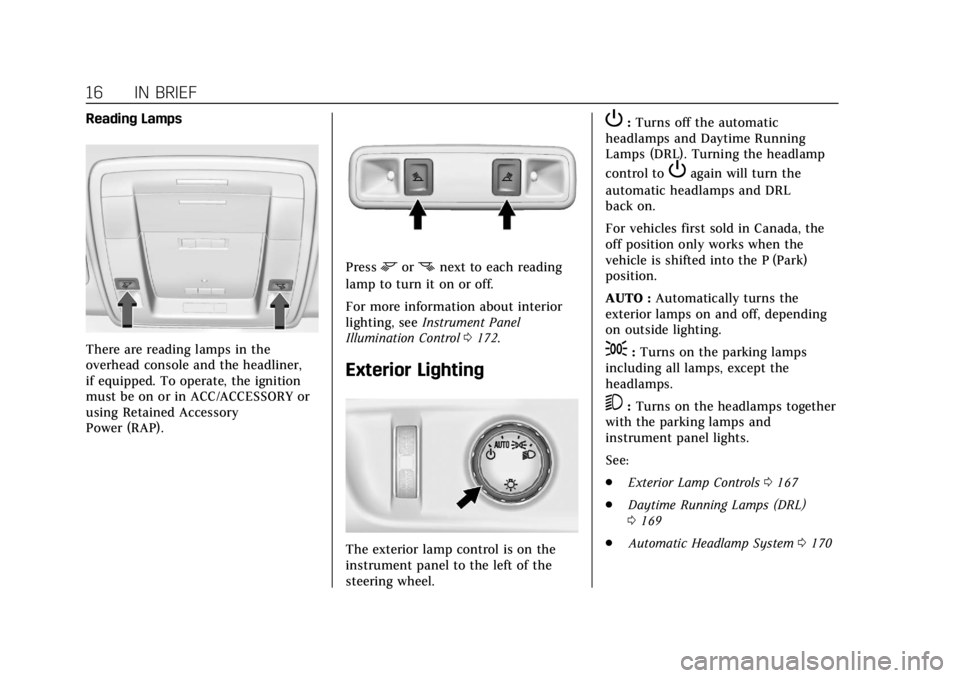
There are reading lamps in the
overhead console and the headliner,
if equipped. To operate, the ignition
must be on or in ACC/ACCESSORY or
using Retained Accessory
Power (RAP).
Pressmornnext to each reading
lamp to turn it on or off.
For more information about interior
lighting, see Instrument Panel
Illumination Control 0172.
Exterior Lighting
The exterior lamp control is on the
instrument panel to the left of the
steering wheel.
P:Turns off the automatic
headlamps and Daytime Running
Lamps (DRL). Turning the headlamp
control to
Pagain will turn the
automatic headlamps and DRL
back on.
For vehicles first sold in Canada, the
off position only works when the
vehicle is shifted into the P (Park)
position.
AUTO : Automatically turns the
exterior lamps on and off, depending
on outside lighting.
;: Turns on the parking lamps
including all lamps, except the
headlamps.
5: Turns on the headlamps together
with the parking lamps and
instrument panel lights.
See:
. Exterior Lamp Controls 0167
. Daytime Running Lamps (DRL)
0169
. Automatic Headlamp System 0170
Page 20 of 415
Cadillac Escalade Owner Manual (GMNA-Localizing-U.S./Canada/Mexico-
12460268) - 2019 - crc - 9/14/18
IN BRIEF 19
Automatic Transfer Case
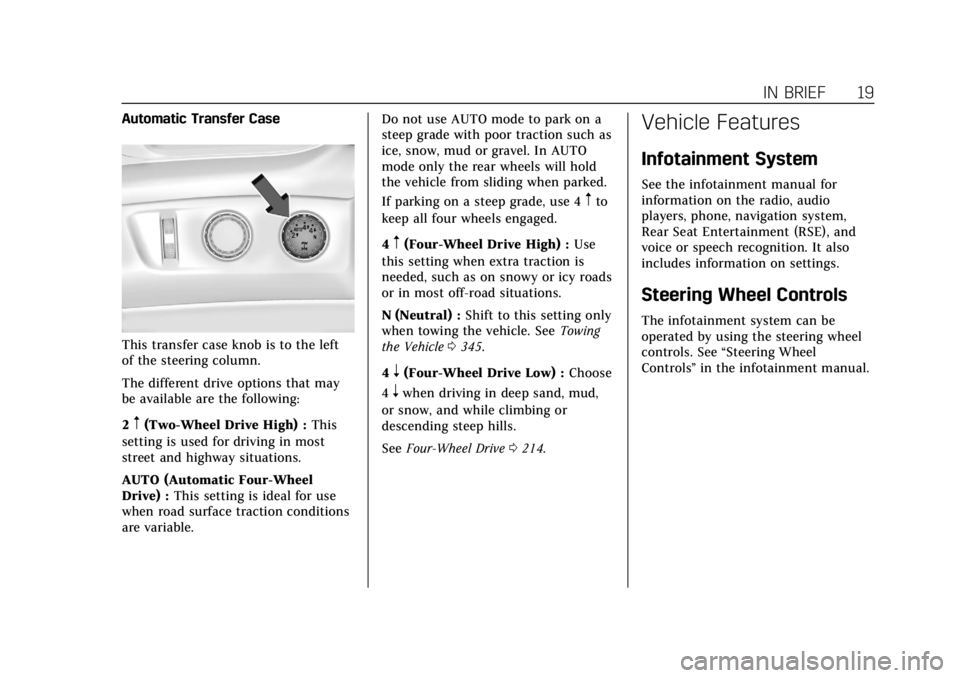
This transfer case knob is to the left
of the steering column.
The different drive options that may
be available are the following:
2
m(Two-Wheel Drive High) :This
setting is used for driving in most
street and highway situations.
AUTO (Automatic Four-Wheel
Drive) : This setting is ideal for use
when road surface traction conditions
are variable. Do not use AUTO mode to park on a
steep grade with poor traction such as
ice, snow, mud or gravel. In AUTO
mode only the rear wheels will hold
the vehicle from sliding when parked.
If parking on a steep grade, use 4
mto
keep all four wheels engaged.
4
m(Four-Wheel Drive High) : Use
this setting when extra traction is
needed, such as on snowy or icy roads
or in most off-road situations.
N (Neutral) : Shift to this setting only
when towing the vehicle. See Towing
the Vehicle 0345.
4
n(Four-Wheel Drive Low) : Choose
4
nwhen driving in deep sand, mud,
or snow, and while climbing or
descending steep hills.
See Four-Wheel Drive 0214.
Vehicle Features
Infotainment System
See the infotainment manual for
information on the radio, audio
players, phone, navigation system,
Rear Seat Entertainment (RSE), and
voice or speech recognition. It also
includes information on settings.
Steering Wheel Controls
The infotainment system can be
operated by using the steering wheel
controls. See “Steering Wheel
Controls ”in the infotainment manual.
Page 22 of 415
Cadillac Escalade Owner Manual (GMNA-Localizing-U.S./Canada/Mexico-
12460268) - 2019 - crc - 9/14/18
IN BRIEF 21
SeeForward Collision Alert (FCA)
System 0243.
Forward Automatic
Braking (FAB)
If the vehicle has Forward Collision
Alert (FCA), it also has FAB, which
includes Intelligent Brake Assist (IBA).
When the system detects a vehicle
ahead in your path that is traveling in
the same direction that you may be
about to crash into, it can provide a
boost to braking or automatically
brake the vehicle. This can help avoid
or lessen the severity of crashes when
driving in a forward gear.
See Forward Automatic Braking (FAB)
0 246.
Lane Keep Assist (LKA)
If equipped, LKA may help avoid
crashes due to unintentional lane
departures. It may assist by gently
turning the steering wheel if the
vehicle approaches a detected lane
marking without using a turn signal in
that direction. It may also provide a
Lane Departure Warning (LDW) alert as the lane marking is crossed. The
system will not assist or alert if it
detects that you are actively steering.
Override LKA by turning the steering
wheel. LKA uses a camera to detect
lane markings between 60 km/h (37
mph) and 180 km/h (112 mph).
See
Lane Departure Warning (LDW)
0 249 and Lane Keep Assist (LKA)
0 250.
Lane Change Alert (LCA)
If equipped, the LCA system is a
lane-changing aid that assists drivers
with avoiding lane change crashes
that occur with moving vehicles in the
side blind zone (or spot) areas or with
vehicles rapidly approaching these
areas from behind. The LCA warning
display will light up in the
corresponding outside mirror and will
flash if the turn signal is on. The Side
Blind Zone Alert (SBZA) system is
included as part of the LCA system.
See Side Blind Zone Alert (SBZA) 0247
and Lane Change Alert (LCA) 0248.
Surround Vision
If equipped, views around the vehicle
appear in the infotainment display to
aid with parking and low-speed
maneuvers.
See “Surround Vision ”under
Assistance Systems for Parking or
Backing 0237.
Front Vision Camera
If equipped, a view of the area in front
of the vehicle appears on the
infotainment display to aid with
parking and low-speed maneuvers.
See “Front Vision Camera ”under
Assistance Systems for Parking or
Backing 0237.
Rear Vision Camera (RVC)
If equipped, RVC shows a view of the
area behind the vehicle on the
infotainment display when the vehicle
is shifted into R (Reverse) to aid with
parking and low-speed backing
maneuvers.
See Assistance Systems for Parking or
Backing 0237.
Page 23 of 415
Cadillac Escalade Owner Manual (GMNA-Localizing-U.S./Canada/Mexico-
12460268) - 2019 - crc - 9/14/18
22 IN BRIEF
Rear Cross Traffic Alert
(RCTA) System
If equipped, the RCTA system shows a
triangle with an arrow on the
infotainment display to warn of traffic
behind your vehicle that may cross
your vehicle's path while in
R (Reverse). In addition, beeps will
sound, or the driver seat will pulse.
SeeAssistance Systems for Parking or
Backing 0237.
Park Assist
If equipped, Front and Rear Park
Assist (FRPA) uses sensors on the
front and rear bumpers to assist with
parking and avoiding objects during
low speed parking maneuvers.
It operates at speeds less than 8 km/h
(5 mph). FRPA may display a warning
triangle on the infotainment display
and a graphic on the instrument
cluster to provide the object distance.
In addition, multiple beeps or seat
pulses may occur if very close to an
object. The vehicle may also have a higher
speed Backing Warning System and
the Reverse Automatic Braking
system.
See
Driver Assistance Systems 0236.
Automatic Parking
Assist (APA)
If equipped, the APA system helps to
search for and maneuver the vehicle
into parallel or perpendicular parking
spots using automatic steering,
displays, and beeps. When the vehicle
speed is below 30 km/h (18 mph),
touch
Oto enable the system.
See “Automatic Parking Assist (APA)”
under Assistance Systems for Parking
or Backing 0237.
Reverse Automatic
Braking (RAB)
If the vehicle has Adaptive Cruise
Control (ACC) it also has the RAB
system, which is designed to help
avoid or reduce the harm caused by
backing crashes when the vehicle is
shifted into R (Reverse). If the system detects the vehicle is backing too fast
to avoid a crash with a detected object
behind your vehicle in your path, it
may automatically brake hard to
a stop.
See
Assistance Systems for Parking or
Backing 0237.
Power Outlets
Power Outlets 12 Volt Direct
Current
Accessory power outlets can be used
to plug in electrical equipment, such
as a cell phone, MP3 player, etc.
The vehicle has five accessory power
outlets:
.
One near the cupholders on the
center console
. One inside the center console
. One on the rear of the center
console
. One in the third row seat on the
driver side
. One in the rear cargo area on the
passenger side
Page 37 of 415
Cadillac Escalade Owner Manual (GMNA-Localizing-U.S./Canada/Mexico-
12460268) - 2019 - crc - 9/14/18
36 KEYS, DOORS, AND WINDOWS
The engine will turn off during a
remote vehicle start if:
.The coolant temperature gets
too high.
. The oil pressure gets low.
The RKE transmitter range may be
less while the vehicle is running.
Other conditions can affect the
performance of the transmitter.
See Remote Keyless Entry (RKE) System
0 28 orVehicle Personalization 0155.
Starting the Engine Using Remote
Start
1. Press and release
Q.
2. Immediately press and hold
/
until the turn signal lamps flash
or for at least four seconds.
When the vehicle starts, the
parking lamps will turn on. The
doors will be locked and the
climate control system may
come on. The engine will continue to run
for 15 minutes. Repeat
Steps 1 and 2 for one 15-minute
time extension.
Turn the ignition on to operate the
vehicle.
Extending Engine Run Time
The engine run time can be extended
by 15 minutes, for a total of
30 minutes, if during the first
15 minutes Steps 1 and 2 are repeated
while the engine is still running. An
extension can be requested
30 seconds after starting.
A maximum of two remote starts, or a
single start with an extension, is
allowed between ignition cycles.
The vehicle's ignition must be turned
on and then back off to use remote
start again.
Canceling a Remote Start
To cancel a remote start, do one of
the following:
. Press and hold
/until the
parking lamps turn off. .
Turn on the hazard warning
flashers.
. Turn the ignition on and then off.
Door Locks
{Warning
Unlocked doors can be dangerous.
. Passengers, especially
children, can easily open the
doors and fall out of a moving
vehicle. The doors can be
unlocked and opened while
the vehicle is moving. The
chance of being thrown out of
the vehicle in a crash is
increased if the doors are not
locked. So, all passengers
should wear seat belts
properly and the doors should
be locked whenever the
vehicle is driven.
. Young children who get into
unlocked vehicles may be
unable to get out. A child can
be overcome by extreme heat
(Continued)
Page 54 of 415
Cadillac Escalade Owner Manual (GMNA-Localizing-U.S./Canada/Mexico-
12460268) - 2019 - crc - 9/14/18
KEYS, DOORS, AND WINDOWS 53
.The mirrors will not stay in the
unfolded position.
. The mirrors vibrate at normal
driving speeds.
Fold and unfold the mirrors one time
using the mirror controls to reset
them to their normal position.
A popping noise may be heard during
the resetting of the power folding
mirrors. This sound is normal after a
manual folding operation.
Auto Mirror Folding
If equipped, press and holdQon the
RKE transmitter for approximately
one second to automatically fold the
exterior mirrors. Press and hold
Kon
the RKE transmitter for approximately
one second to unfold. See Remote
Keyless Entry (RKE) System Operation
0 28.
This feature is turned on or off
through vehicle personalization. See
Vehicle Personalization 0155.
Heated Mirrors
K
:Press to heat the outside mirrors.
See “Rear Window Defogger” under
Dual Automatic Climate Control System
0 176.
Reverse Tilt Mirrors
If equipped with memory seats, the
passenger and/or driver mirror tilts to
a preselected position when the
vehicle is in R (Reverse). This allows
the curb to be seen when parallel
parking.
The mirror(s) return to the original
position when:
.
The vehicle is shifted out of
R (Reverse), or remains in
R (Reverse) for about 30 seconds.
. The ignition is turned off.
. The vehicle is driven in
R (Reverse) above a set speed.
To turn this feature on or off, see
Vehicle Personalization 0155.
Interior Mirrors
Interior Rearview Mirrors
Adjust the rearview mirror for a clear
view of the area behind your vehicle.
If equipped with OnStar, there may be
three buttons at the bottom of the
mirror. See OnStar Overview 0391.
To avoid accidental OnStar calls, clean
the mirror with the ignition off. Do
not spray glass cleaner directly on the
mirror. Use a soft towel dampened
with water.
Automatic Dimming
Rearview Mirror
The rearview mirror automatically
dims to reduce the glare of the
headlamps from behind. This feature
comes on when the vehicle is started.