maintenance CADILLAC ESCALADE 2021 Owner's Guide
[x] Cancel search | Manufacturer: CADILLAC, Model Year: 2021, Model line: ESCALADE, Model: CADILLAC ESCALADE 2021Pages: 492, PDF Size: 7.92 MB
Page 359 of 492
Cadillac Escalade Owner Manual (GMNA-Localizing-U.S./Canada/Mexico-
13690472) - 2021 - CRC - 8/10/21
358 DRIVING AND OPERATING
touch Relearn to overwrite the current
sensors and begin the relearning
process. See“Trailer Tire Pressure
Setup ”previously in this section.
If number of sensors has not changed,
touch Next and the Learn sensors
screen will appear.
On the Learn Sensors screen. Touch
Relearn to overwrite the current
sensors and begin the relearning
process. See “Trailer Tire Pressure
Setup ”previously in this section.
On the Learn Sensors screen, touch
Next to go to the Edit Recommended
Tire Pressure screen.
On the Edit Recommended Tire
Pressure screen, touch a number on
the keypad to change the
Recommended Tire Pressure for the
trailer’s tires. This will change the
number at which the vehicle displays
alerts related to trailer tire pressure.
Touch Done to return to the Trailer
Profile view.
Trailer Maintenance
Touch to view a list of maintenance
reminders for the Trailer Profile. Touch a reminder to view, reset,
delete, or edit it.
Reset Reminder
Touch Maintenance Complete in the
reminder view to reset the reminder.
On the pop-up, touch Reset to reset
the time and mileage values for the
reminder. Touch Cancel to return to
the previous view and nothing will
change.
Edit Reminder
Touch to edit the mileage or time
settings for the reminder. Touch Save
to save the new settings to the Trailer
Profile.
Delete Reminder
Touch to delete the maintenance
reminder. On the pop-up, touch Delete
to delete the reminder or touch Cancel
to return to the previous view and
nothing will change.
New Maintenance Reminder
Touch + New Maintenance Reminder
to set up a new reminder. Suggested
reminders that were previously set will
have checkmarks next to them.
Suggested reminders that have notbeen set will have empty boxes next
to them. The maximum number of
reminders is 50.
Edit Mileage
Touch to edit the Trailer Profile’s
mileage. Touch Reset to reset trailer
mileage to zero, or enter a new value
and touch Save. Touching back will
return to the Trailer Profile view.
Effect on Maintenance Reminders
If the mileage is reset or changed, and
mileage has already accumulated, any
maintenance reminders that have
been set up will be adjusted
accordingly.
Reset Average Fuel Economy
Touch to reset the average fuel
economy for the Trailer Profile. Touch
Reset to change, or touch Cancel to go
back to the previous view.
Delete/Remove Trailer
Touch to remove the Trailer Profile
and all of its settings.
Page 360 of 492
Cadillac Escalade Owner Manual (GMNA-Localizing-U.S./Canada/Mexico-
13690472) - 2021 - CRC - 8/10/21
DRIVING AND OPERATING 359
On the pop-up, touch Remove to
remove the Trailer Profile from the
vehicle. Touch Cancel to dismiss the
pop-up and return to the
previous view.
Remove will be displayed if there is a
connected OnStar plan active with the
vehicle. Removing a trailer profile will
remove the profile from the vehicle
but the profile will still be associated
with the user account. However,
if there is not a connected OnStar
plan then the remove button will read
DELETE and the profile will be deleted
permanently
Settings View
Within the Trailering App, touch the
Settings tab to modify the following
settings:
.Trailer Detection Alert
.Maintenance Alerts
.Theft Alert
.Tow/Haul Mode Reminder
.Trailer Length Indicator
Trailer Detection Alert
The Trailer Detection Alert setting will
be on by default. Turn it off to disable
the Trailer Detection pop-up from
displaying when a trailer is connected.
The Guest Trailer Profile will become
the active Trailer Profile, unless
another Trailer Profile is selected
manually through the Trailering App.
If this setting is disabled while a
Custom Trailer Profile is active, that
Trailer Profile will remain the active
profile until the trailer is
disconnected.
Maintenance Alerts
Touch Maintenance Alerts to view the
Maintenance Alerts settings page.
These alerts are based on the Trailer
Profile, so the settings for each Trailer
Profile must be turned on or off.
Touch a profile to view more
information or adjust the setting for
that profile.
The setting will be on by default for
each profile. All Maintenance Alerts
for that active Trailer Profile will be
received.Turn a setting off to not receive any
of the Maintenance Alerts when that
Trailer Profile is active.
Theft Alert
A theft alert can be set if a trailer is
connected and the alert is enabled.
When the trailer is disconnected and
the vehicle is off, an alarm will sound.
Touch Theft Alert in Settings to view
the Theft Alert settings page. These
alerts are based on the Trailer Profile,
so the settings for each Trailer Profile
must be turned on or off. Touch a
profile to view more information or
adjust the setting for that profile.
This setting will be off by default for
each Trailer Profile, including the
Guest Trailer Profile.
A smartphone will receive a
notification that the trailer related to
the selected Trailer Profile is
disconnected from the vehicle, if the
setting is on for the active Trailer
Profile, the vehicle has an OnStar or
connected service plan and the
smartphone number has been added
to the account for this notification.
Page 361 of 492

Cadillac Escalade Owner Manual (GMNA-Localizing-U.S./Canada/Mexico-
13690472) - 2021 - CRC - 8/10/21
360 DRIVING AND OPERATING
If the setting is turned off for a given
Trailer Profile, the smartphone will
not receive this security notification
even if the Trailer Profile is active.
Tow/Haul Mode Reminder
This is a reminder to turn on the Tow/
Haul Mode when towing a trailer. See
Tow/Haul Mode0256.
Touch Tow/Haul Mode Reminder in
Settings to view the Tow/Haul Mode
Reminder settings page. These alerts
are based on the Trailer Profile, so the
settings for each Trailer Profile must
be turned on or off. Touch a profile to
view more information or to adjust
the setting for that profile.
This setting will default to OFF for
each Trailer Profile, including the
Guest Trailer Profile.
If Tow/Haul Mode is off and this
setting is on for a Trailer Profile, each
time the ignition is turned on a
reminder will appear to turn on Tow/
Haul Mode when the Trailer Profile is
active. If Tow/Haul Mode is on and this
setting is on for a Trailer Profile, the
reminder will not appear when the
Trailer Profile is active.
Trailer Length Indicator
Touch Trailer Length Indicator to view
the Trailer Length Indicator settings
page. If this setting is ON a guideline
is displayed in the side mirror camera
view to indicate the rear of the
attached trailer. If this setting is OFF
the guideline will not be displayed.
This setting will default to OFF if the
trailer length indicator feature is not
set up. See "Towing Assistance" for
details on the setup.
Conversions and
Add-Ons
Add-On Electrical
Equipment
{Warning
The Data Link Connector (DLC) is
used for vehicle service and
Emission Inspection/Maintenance
testing. See
Malfunction Indicator
Lamp (Check Engine Light) 0122.
A device connected to the DLC —
such as an aftermarket fleet or
driver-behavior tracking device —
may interfere with vehicle systems.
This could affect vehicle operation
and cause a crash. Such devices
may also access information stored
in the vehicle’s systems.
Caution
Some electrical equipment can
damage the vehicle or cause
components to not work and would (Continued)
Page 365 of 492
Cadillac Escalade Owner Manual (GMNA-Localizing-U.S./Canada/Mexico-
13690472) - 2021 - CRC - 8/10/21
364 VEHICLE CARE
may contain perchlorate materials.
Perchlorate Material–special
handling may apply. See
www.dtsc.ca.gov/hazardouswaste/
perchlorate.
Accessories and
Modifications
Adding non-dealer accessories or
making modifications to the vehicle
can affect vehicle performance and
safety, including such things as
airbags, braking, stability, ride and
handling, emissions systems,
aerodynamics, durability, and
electronic systems like antilock
brakes, traction control, and stability
control. These accessories or
modifications could even cause
malfunction or damage not covered by
the vehicle warranty.
Damage to suspension components
caused by modifying vehicle height
outside of factory settings will not be
covered by the vehicle warranty.
Damage to vehicle components
resulting from modifications or the
installation or use of non-GM certified
parts, including control module or software modifications, is not covered
under the terms of the vehicle
warranty and may affect remaining
warranty coverage for affected parts.
GM Accessories are designed to
complement and function with other
systems on the vehicle. See your
dealer to accessorize the vehicle using
genuine GM Accessories installed by a
dealer technician.
Also, see
Adding Equipment to the
Airbag-Equipped Vehicle 075.
Vehicle Checks
Doing Your Own
Service Work
{Warning
It can be dangerous to work on
your vehicle if you do not have the
proper knowledge, service manual,
tools, or parts. Always follow
owner’s manual procedures and
consult the service manual for your
vehicle before doing any
service work. If doing some of your own service
work, use the proper service manual.
It tells you much more about how to
service the vehicle than this manual
can. To order the proper service
manual, see
Publication Ordering
Information 0467.
This vehicle has an airbag system.
Before attempting to do your own
service work, see Servicing the
Airbag-Equipped Vehicle 075.
If equipped with remote vehicle start,
open the hood before performing any
service work to prevent remote
starting the vehicle accidentally. See
Remote Vehicle Start 014.
Keep a record with all parts receipts
and list the mileage and the date of
any service work performed. See
Maintenance Records 0453.
Caution
Even small amounts of
contamination can cause damage to
vehicle systems. Do not allow
contaminants to contact the fluids,
reservoir caps, or dipsticks.
Page 371 of 492
Cadillac Escalade Owner Manual (GMNA-Localizing-U.S./Canada/Mexico-
13690472) - 2021 - CRC - 8/10/21
370 VEHICLE CARE
How to Reset the Engine Oil Life
System
Reset the system whenever the engine
oil is changed so that the system can
calculate the next engine oil change.
To reset the system:1. Using the vehicle information screen controls on the right side of
the instrument cluster, display OIL
LIFE on the screen. See Vehicle
Information 0134. When remaining
oil life is low, the CHANGE
ENGINE OIL SOON message will
appear on the display.
2. Touch RESET on the screen to clear the CHANGE ENGINE OIL
SOON message and reset the oil life
at 100%.
Be careful not to reset the oil life
display accidentally at any time
other than after the oil is changed.
It cannot be reset accurately until
the next oil change.
The oil life system can also be reset as
follows: 1. Display OIL LIFE on the vehicle information screen. See Vehicle
Information 0134. 2. Fully press and release the
accelerator pedal three times
within five seconds.
If the CHANGE ENGINE OIL SOON
message is not on, the system is
reset.
The system is reset when the
CHANGE ENGINE OIL SOON message
is off.
If the CHANGE ENGINE OIL SOON
message comes back on when the
vehicle is started, the engine oil life
system has not been reset. Repeat the
procedure.
Automatic Transmission
Fluid
When to Check and Change
Automatic Transmission Fluid
If the vehicle has a diesel engine, see
the Duramax diesel supplement.
It is usually not necessary to check
the transmission fluid level. The only
reason for fluid loss is a transmission
leak or overheated transmission. This
vehicle is not equipped with a
transmission fluid level dipstick. There is a special procedure for
checking and changing the
transmission fluid in these vehicles.
Because this procedure is difficult,
this should be done at the dealer.
Contact the dealer for additional
information or the procedure can be
found in the service manual. See
Publication Ordering Information
0467.
Caution
Use of the incorrect automatic
transmission fluid may damage the
vehicle, and the damage may not be
covered by the vehicle warranty.
Always use the correct automatic
transmission fluid. See
Recommended Fluids and Lubricants
0451.
Change the fluid and filter at the
scheduled maintenance intervals
listed in Maintenance Schedule 0442.
Be sure to use the transmission fluid
listed in Recommended Fluids and
Lubricants 0451.
Page 372 of 492
Cadillac Escalade Owner Manual (GMNA-Localizing-U.S./Canada/Mexico-
13690472) - 2021 - CRC - 8/10/21
VEHICLE CARE 371
Engine Air Filter Life
System
If equipped, this feature provides the
engine air filter’s remaining life and
best timing for a change. The timing
to change an engine air filter depends
on driving and environmental
conditions.
When to Change the Engine Air
Filter
When the Driver Information Center
(DIC) displays a message to replace
the engine air filter at the next oil
change, follow this timing.
When the DIC displays a message to
replace the engine air filter soon,
replace the engine air filter at the
earliest convenience.
The system must be reset after the
engine air filter is changed.
If the DIC displays a message to check
the engine air filter system, see your
dealer.
How to Reset the Engine Air
Filter Life System
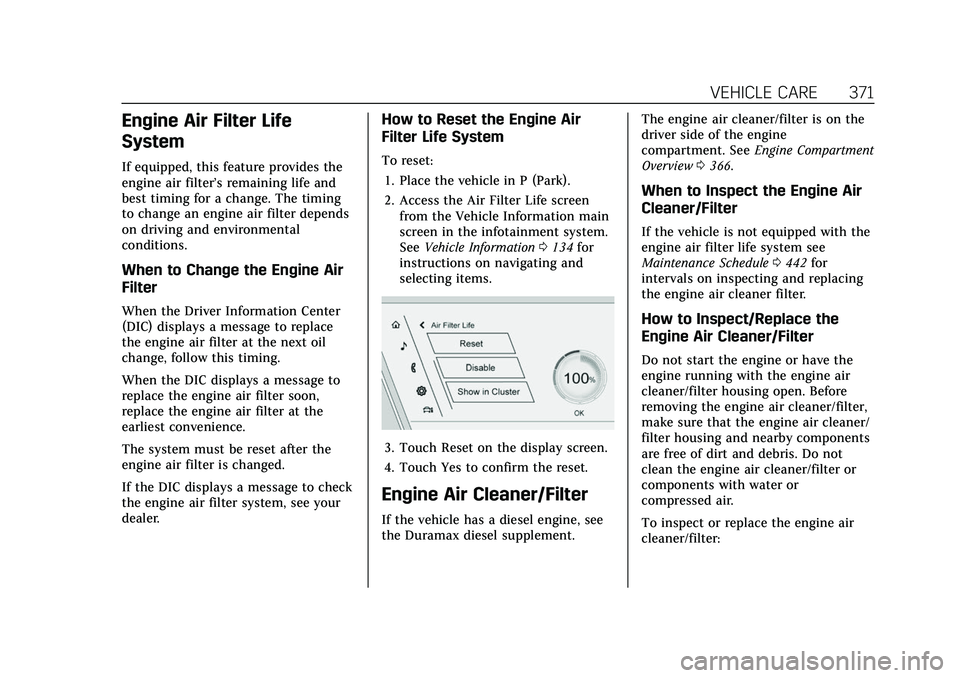
To reset:1. Place the vehicle in P (Park).
2. Access the Air Filter Life screen from the Vehicle Information main
screen in the infotainment system.
See Vehicle Information 0134 for
instructions on navigating and
selecting items.
3. Touch Reset on the display screen.
4. Touch Yes to confirm the reset.
Engine Air Cleaner/Filter
If the vehicle has a diesel engine, see
the Duramax diesel supplement. The engine air cleaner/filter is on the
driver side of the engine
compartment. See
Engine Compartment
Overview 0366.
When to Inspect the Engine Air
Cleaner/Filter
If the vehicle is not equipped with the
engine air filter life system see
Maintenance Schedule 0442 for
intervals on inspecting and replacing
the engine air cleaner filter.
How to Inspect/Replace the
Engine Air Cleaner/Filter
Do not start the engine or have the
engine running with the engine air
cleaner/filter housing open. Before
removing the engine air cleaner/filter,
make sure that the engine air cleaner/
filter housing and nearby components
are free of dirt and debris. Do not
clean the engine air cleaner/filter or
components with water or
compressed air.
To inspect or replace the engine air
cleaner/filter:
Page 381 of 492
Cadillac Escalade Owner Manual (GMNA-Localizing-U.S./Canada/Mexico-
13690472) - 2021 - CRC - 8/10/21
380 VEHICLE CARE
the specified intervals to prevent
increased stopping distance. See
Maintenance Schedule0442.
What to Add
Use only GM approved DOT 4 brake
fluid from a clean, sealed container.
See Recommended Fluids and
Lubricants 0451.
{Warning
The wrong or contaminated brake
fluid could result in damage to the
brake system. This could result in
the loss of braking leading to a
possible injury. Always use the
proper GM approved brake fluid.
Caution
If brake fluid is spilled on the
vehicle's painted surfaces, the paint
finish can be damaged. Immediately
wash off any painted surface.
Battery - North America
The original equipment battery is
maintenance free. Do not remove the
cap and do not add fluid. Refer to the replacement number
shown on the original battery label
when a new battery is needed. See
Engine Compartment Overview
0366
for battery location.
{Warning
WARNING: Battery posts,
terminals, and related accessories
contain lead and lead compounds,
chemicals known to the State of
California to cause cancer and birth
defects or other reproductive harm.
Batteries also contain other
chemicals known to the State of
California to cause cancer. WASH
HANDS AFTER HANDLING. For
more information go to
www.P65Warnings.ca.gov/
passenger-vehicle.
See California Proposition 65 Warning
0 363 and the back cover.
Vehicle Storage
{Warning
Batteries have acid that can burn
you and gas that can explode. You
can be badly hurt if you are not
careful. See Jump Starting - North
America 0425 for tips on working
around a battery without
getting hurt.
Infrequent Usage: Remove the black,
negative (−) cable from the battery to
keep the battery from running down.
Extended Storage: Remove the black,
negative (−) cable from the battery or
use a battery trickle charger.
Four-Wheel Drive
Transfer Case
If the vehicle is equipped with
Four-Wheel Drive, be sure to perform
the lubricant checks described in this
section.
Page 382 of 492

Cadillac Escalade Owner Manual (GMNA-Localizing-U.S./Canada/Mexico-
13690472) - 2021 - CRC - 8/10/21
VEHICLE CARE 381
When to Check Lubricant
Refer toMaintenance Schedule 0442
to determine how often to check the
lubricant.
How to Check Lubricant
To get an accurate reading, the vehicle
should be on a level surface.
1. Fill Plug
2. Drain Plug
If the level is below the bottom of the
fill plug (1) hole, located on the
transfer case, some lubricant will need
to be added. Add enough lubricant to raise the level to the bottom of the fill
plug (1) hole. Use care not to
overtighten the plug.
What to Use
Refer to
Recommended Fluids and
Lubricants 0451 to determine what
kind of lubricant to use.
Front Axle
When to Check Lubricant
It is not necessary to regularly check
the front axle fluid unless a leak is
suspected or an unusual noise is
heard. A fluid loss could indicate a
problem. Have it inspected and
repaired. This service can be complex.
See your dealer.
Do not directly power wash the
transfer case and/or front/rear axle
output seals. High pressure water can
overcome the seals and contaminate
the fluid. Contaminated fluid will
decrease the life of the transfer case
and/or drive axles and should be
replaced.
Rear Axle
When to Check Lubricant
It is not necessary to regularly check
the rear axle fluid unless a leak is
suspected or an unusual noise is
heard. A fluid loss could indicate a
problem. Have it inspected and
repaired. This service can be complex.
See your dealer.
Do not directly power wash the
transfer case and/or front/rear axle
output seals. High pressure water can
overcome the seals and contaminate
the fluid. Contaminated fluid will
decrease the life of the transfer case
and/or drive axles and should be
replaced.
Park Brake and P (Park)
Mechanism Check
{Warning
When you are doing this check, the
vehicle could begin to move. You or
others could be injured and
property could be damaged. Make
sure there is room in front of the
(Continued)
Page 383 of 492
Cadillac Escalade Owner Manual (GMNA-Localizing-U.S./Canada/Mexico-
13690472) - 2021 - CRC - 8/10/21
382 VEHICLE CARE
Warning (Continued)
vehicle in case it begins to roll. Be
ready to apply the regular brake at
once should the vehicle begin
to move.
Park on a fairly steep hill, with the
vehicle facing downhill. Keeping your
foot on the regular brake, set the
parking brake.
.To check the parking brake's
holding ability: With the engine
running and the transmission in
N (Neutral), slowly remove foot
pressure from the regular brake
pedal. Do this until the vehicle is
held by the parking brake only.
.To check the P (Park) mechanism's
holding ability: With the engine
running, shift to P (Park). Then
release the parking brake followed
by the regular brake.
Contact your dealer if service is
required.
Wiper Blade Replacement
Windshield wiper blades should be
inspected for wear or cracking.
For the proper type and size, see
Maintenance Replacement Parts 0452.
Caution
Allowing the wiper arm to touch
the windshield when no wiper blade
is installed could damage the
windshield. Any damage that occurs
would not be covered by the vehicle
warranty. Do not allow the wiper
arm to touch the windshield.
Front Wiper Blade Replacement
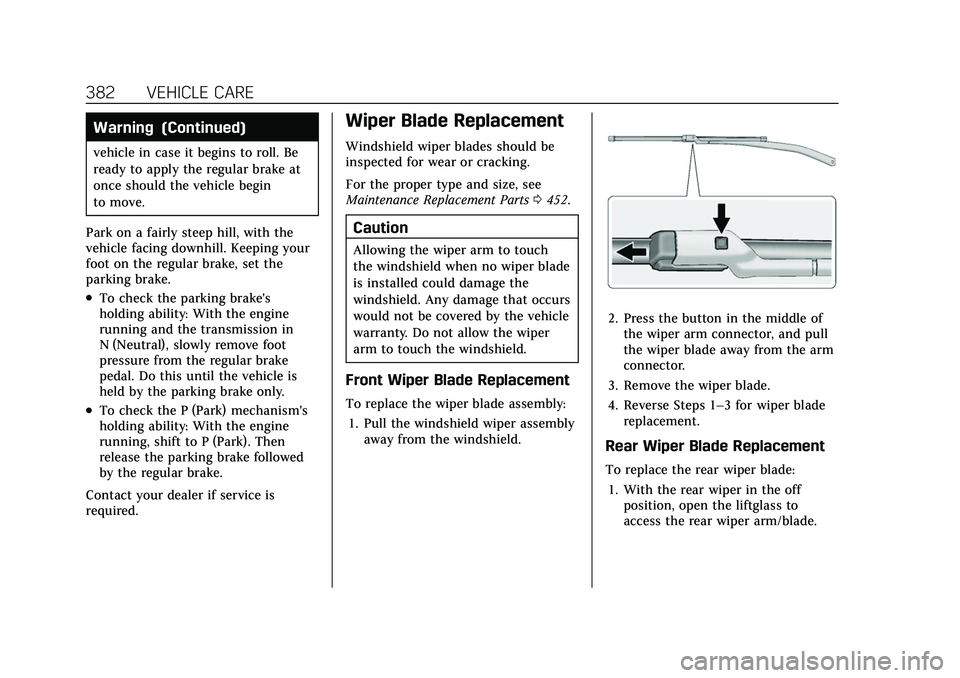
To replace the wiper blade assembly:
1. Pull the windshield wiper assembly away from the windshield.
2. Press the button in the middle ofthe wiper arm connector, and pull
the wiper blade away from the arm
connector.
3. Remove the wiper blade.
4. Reverse Steps 1–3 for wiper blade replacement.
Rear Wiper Blade Replacement
To replace the rear wiper blade:
1. With the rear wiper in the off position, open the liftglass to
access the rear wiper arm/blade.
Page 385 of 492

Cadillac Escalade Owner Manual (GMNA-Localizing-U.S./Canada/Mexico-
13690472) - 2021 - CRC - 8/10/21
384 VEHICLE CARE
Caution
Do not apply tape or hang any
objects from gas struts. Also do not
push down or pull on gas struts.
This may cause damage to the
vehicle.
See Maintenance Schedule 0442.
Hood
Trunk
Liftgate
Headlamp Aiming
Front Headlamp Aiming
Headlamp aim has been preset and
should need no further adjustment.
If the vehicle is damaged in a crash,
the headlamp aim may be affected.
If adjustment to the headlamps is
necessary, see your dealer.
Bulb Replacement
For the proper type of replacement
bulbs, or any bulb changing procedure
not listed in this section, contact your
dealer.
Caution
Do not replace incandescent bulbs
with aftermarket LED replacement
bulbs. This can cause damage to
the vehicle electrical system.
LED Lighting
This vehicle has several LED lamps.
For replacement of any LED lighting
assembly, contact your dealer.